

Page 1
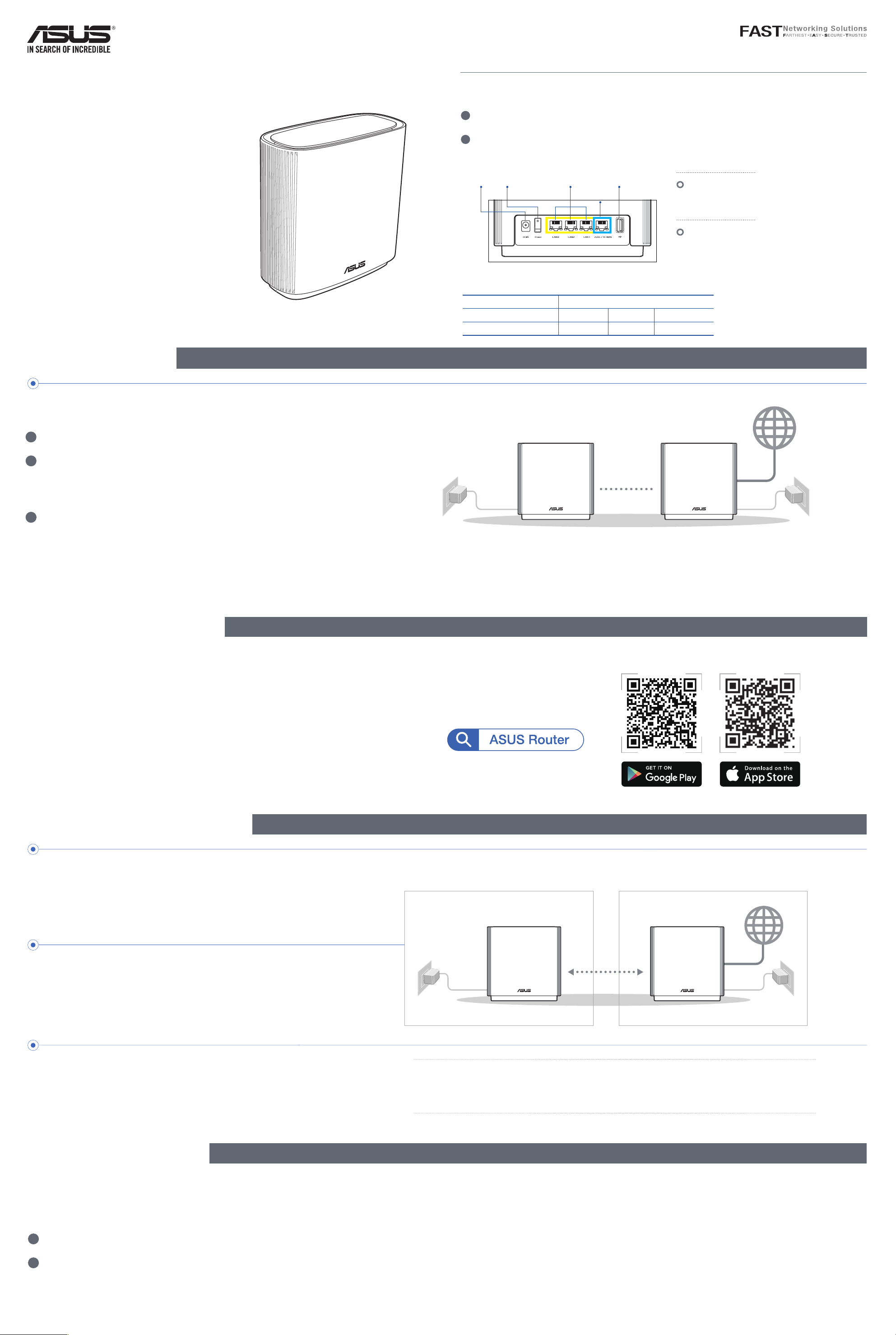
Hardware Explanations
1 Plug the adapter into the DCIN port, and press the power switch.
2
The power LED will light up when your hardware is ready.
Quick
Start Guide
ASUS ZenWiFi XT9
AX7800 Tri Band WiFi Router
Model: XT9
Before Setup
Preparing to set up an AiMesh WiFi system
ZenWiFi XT9 Overview
Power switchDCIN port
Specications:
DC Power adapter DC Output: +12V with max 3A current
Operating Temperature 0~40
Operating Humidity 50~90% Storage 20~90%
LAN ports 1-3 USB 3.2 Gen 1x1
2.5G / 1G
WAN port
o
C Storage 0~70oC
2.5G / 1G WAN port
Connect your optical modem to this
port with a network cable.
LAN ports 1-3
Connect your PC to a LAN port with
a network cable.
1 Find two ZenWiFi XT9, and power both on.
2
Use a network cable to connect your optical modem to the WAN
port of either ZenWiFi XT9. This ZenWiFi XT9 will be the AiMesh
router, and the other ZenWiFi XT9 will be the AiMesh node.
3
The LED turns solid blue to indicate that ZenWiFi XT9 is ready for
setup.
ASUS Router App
Download free ASUS Router APP to set up and
manage your router(s).
AiMesh node
AiMesh Setup Steps
AiMesh router
AiMesh Setup Steps
Prepare
01
Place your AiMesh router and node within 3 meters of each other during the setup process.
AiMesh node
02
Keep your AiMesh node powered on and standby for AiMesh system settings.
Launching ASUS Router APP
03
Launch ASUS Router APP, and then follow the
on-screen instructions to finish the AiMesh setup.
within
3 meters
AiMesh routerAiMesh node
NOTE: When you’re using a wireless backhaul to connect your router and AiMesh
node, the WAN port on your AiMesh node can be used as a LAN port
providing up to 2.5G transmission speed.
Troubleshooting
If your AiMesh router cannot find any AiMesh node nearby or synchronization fails, please check the following
and try again.
a Move your AiMesh node closer to the AiMesh router ideally. Ensure that it is within 3 meters.
b
Your AiMesh node is powered on.
Page 2
Relocation
https://qr.asus.com/wl_videotutorials
THE BEST PERFORMANCE
Locate the AiMesh router and node at the best place.
NOTES: To minimize interference, keep the routers away from devices like
cordless phones, Bluetooth devices and microwave ovens.
We recommend that you place the routers in an open or spacious
location.
FAQ
FREQUENTLY ASKED QUESTIONS
Q1:
Does the AiMesh router support Access Point mode?
A: Yes. You can choose to set the AiMesh router as router mode or
access point mode. Please go to web GUI (http://router.asus.com), and
go to the page Administration > Operation Mode.
Q2:
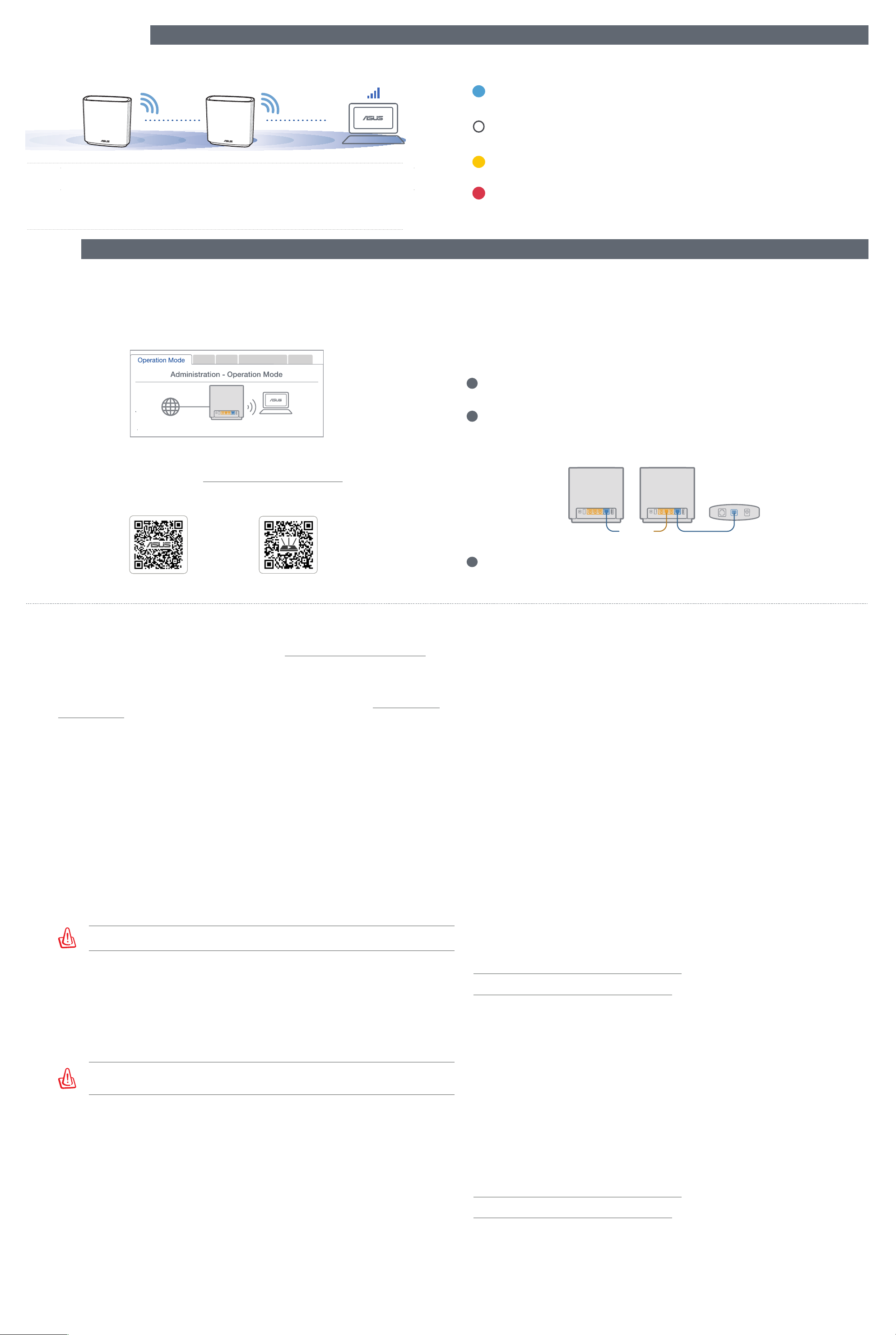
ZenWiFi XT9 LED indications
Solid blue:
Your ZenWiFi XT9 is ready for setup.
Solid white:
Your ZenWiFi XT9 is online and works well.
Solid yellow:
The signal between your ZenWiFi XT9 router and the node is weak.
Solid red:
Your ZenWiFi XT9 router has no Internet connection. / Your node is disconnected
from the router.
Could I setup wired connection between AiMesh routers (Ethernet backhaul)?
A: Yes. AiMesh system supports both wireless and wired connection between AiMesh
router and node to maximize throughput and stability. AiMesh analyzes the wireless signal
strength for each frequency band available, and then determines automatically whether a
wireless or wired connection is best to serve as the inter-router connection backbone.
Q3:
Where can I find more information about Mesh WiFi system?
A: Technical support site: https://www.asus.com/support
Service and Support
https://www.asus.com/support
Video Tutorials
ASUS Recycling/Takeback Services
ASUS recycling and takeback programs come from our commitment to the highest standards for protecting our
environment. We believe in providing solutions for you to be able to responsibly recycle our products, batteries,
other components, as well as the packaging materials. Please go to http://csr.asus.com/english/Takeback.htm for the
detailed recycling information in dierent regions.
REACH
Complying with the REACH (Registration, Evaluation, Authorisation, and Restriction of Chemicals) regulatory
framework, we published the chemical substances in our products at ASUS REACH website at http://csr.asus.com/
english/REACH.htm
Federal Communications Commission Statement
This device complies with Part 15 of the FCC Rules. Operation is subject to the following two conditions:
• This device may not cause harmful interference.
• This device must accept any interference received, including interference that may cause undesired operation.
FCC regulations restrict the operation of this device to indoor use only.
This device cannot operate as a subordinate between separate buildings or structures.
This equipment has been tested and found to comply with the limits for a class B digital device, pursuant to part 15 of
the FCC Rules. These limits are designed to provide reasonable protection against harmful interference in a residential
installation.
This equipment generates, uses and can radiate radio frequency energy and, if not installed and used in accordance
with the instructions, may cause harmful interference to radio communications. However, there is no guarantee that
interference will not occur in a particular installation. If this equipment does cause harmful interference to radio or
television reception, which can be determined by turning the equipment o and on, the user is encouraged to try to
correct the interference by one or more of the following measures:
• Reorient or relocate the receiving antenna.
• Increase the separation between the equipment and receiver.
• Connect the equipment into an outlet on a circuit dierent from that to which the receiver is connected.
• Consult the dealer or an experienced radio/TV technician for help.
WARNING! Any changes or modications not expressly approved by the party responsible for compliance
could void the user’s authority to operate the equipment.
Prohibition of Co-location
This device and its antenna(s) must not be co-located or operating in conjunction with any other antenna or
transmitter.
1
Follow the setup steps to establish a connection between the AiMesh
router and node via WiFi first.
Place the node in the ideal locations for best coverage. Run an
2
Ethernet cable from the LAN port of the AiMesh router to the WAN port
of AiMesh node.
Modem
LAN-WAN
3
AiMesh system will auto-select the best path for data transmission,
whether wired or wireless.
Avertissements de sécurité
• Utilisez ce produit dans un environnement dont la température ambiante est comprise entre 0˚C (32°F) et 40˚C
(104°F).
• Référez-vous à l'étiquette située au dessous du produit pour vérier que l'adaptateur secteur répond aux exigences
de tension.
• NE PAS placer sur une surface irrégulière ou instable. Contactez le service après-vente si le châssis a été endommagé.
• NE PAS placer, faire tomber ou insérer d'objets sur/dans le produit.
• NE PAS exposer l'appareil à la pluie ou à l'humidité, tenez-le à distance des liquides. NE PAS utiliser le modem lors
d'un orage.
• NE PAS bloquer les ouvertures destinées à la ventilation du système pour éviter que celui-ci ne surchaue.
• NE PAS utiliser de cordons d'alimentation, d'accessoires ou autres périphériques endommagés.
• Si l'adaptateur est endommagé, n'essayez pas de le réparer vous-même. Contactez un technicien électrique qualié
ou votre revendeur.
• Pour éviter tout risque de choc électrique, débranchez le câble d'alimentation de la prise électrique avant de
toucher au système.
• Ne placez pas cet appareil à une hauteur supérieure à 2 mètres.
Compliance Statement of Innovation, Science and Economic Development Canada (ISED)
This device complies with Innovation, Science and Economic Development Canada licence exempt RSS standard(s).
Operation is subject to the following two conditions: (1) this device may not cause interference, and (2) this device
must accept any interference, including interference that may cause undesired operation of the device.
Operation in the band 5150–5250 MHz is only for indoor use to reduce the potential for harmful interference to cochannel mobile satellite systems.
CAN ICES-003(B)/NMB-003(B)
Radio Frequency (RF) Exposure Information
The radiated output power of the ASUS Wireless Device is below the Innovation, Science and Economic Development
Canada radio frequency exposure limits. The ASUS Wireless Device should be used in such a manner such that the
potential for human contact during normal operation is minimized.
This equipment should be installed and operated with a minimum distance of 30 cm between the radiator any part of
your body.
This device has been certied for use in Canada. Status of the listing in the Innovation, Science and Economic
Development Canada’s REL (Radio Equipment List) can be found at the following web address:
http://www.ic.gc.ca/eic/site/ceb-bhst.nsf/eng/h_tt00020.html
Additional Canadian information on RF exposure also can be found at the following web:
https://www.ic.gc.ca/eic/site/smt-gst.nsf/eng/sf08792.html
IMPORTANT NOTE:
Radiation Exposure Statement: This equipment complies with FCC radiation exposure limits set forth for an
uncontrolled environment. End users must follow the specic operating instructions for satisfying RF exposure
compliance. To maintain compliance with FCC exposure compliance requirement, please follow operation instruction
as documented in this manual.
WARNING! This equipment must be installed and operated in accordance with provided instructions and the
antenna(s) used for this transmitter must be installed to provide a separation distance of at least 30 cm from
all persons and must not be co-located or operating in conjunction with any other antenna or transmitter.
Safety Notices
• Use this product in environments with ambient temperatures between 0°C(32°F) and 40°C(104°F).
• Refer to the rating label on the bottom of your product and ensure your power adapter complies with this rating.
• DO NOT place on uneven or unstable work surfaces. Seek servicing if the casing has been damaged.
• DO NOT place or drop objects on top and do not shove any foreign objects into the product.
• DO NOT expose to or use near liquids, rain, or moisture. DO NOT use the modem during electrical storms.
• DO NOT cover the vents on the product to prevent the system from getting overheated.
• DO NOT use damaged power cords, accessories, or other peripherals.
• If the Adapter is broken, do not try to x it by yourself. Contact a qualied service technician or your retailer.
• To prevent electrical shock hazard, disconnect the power cable from the electrical outlet before relocating the
system.
• DO NOT mount this equipment higher than 2 meters.
Déclaration de conformité de Innovation, Sciences et Développement économique Canada (ISED)
Le présent appareil est conforme aux CNR d’Innovation, Sciences et Développement économique Canada applicables
aux appareils radio exempts de licence. L’exploitation est autorisée aux deux conditions suivantes : (1) l’appareil ne
doit pas produire de brouillage, et (2) l’utilisateur de l’appareil doit accepter tout brouillage radioélectrique subi,
même si le brouillage est susceptible d’en compromettre le fonctionnement.
La bande 5150 – 5250 MHz est réservée uniquement pour une utilisation à l’intérieur an de réduire les risques de
brouillage préjudiciable aux systèmes de satellites mobiles utilisant les mêmes canaux.
CAN ICES-003(B)/NMB-003(B)
Informations concernant l’exposition aux fréquences radio (RF)
La puissance de sortie émise par cet appareil sans l est inférieure à la limite d'exposition aux fréquences radio
d'Innovation, Sciences et Développement économique du Canada (ISED). Utilisez l'appareil sans l de façon à
minimiser les contacts humains lors d'un fonctionnement normal.
Cet équipement doit être installé et utilisé avec un minimum de 30 cm de distance entre la source de rayonnement et
votre corps.
L'utilisation de cet appareil est autorisée au Canada. Pour consulter l'entrée correspondant à l'appareil dans la liste
d'équipement radio (REL - Radio Equipment List) d'Innovation, Sciences et Développement économique du Canada,
rendez-vous sur :
http://www.ic.gc.ca/eic/site/ceb-bhst.nsf/eng/h_tt00020.html
Pour des informations supplémentaires concernant l'exposition aux fréquences radio au Canada, rendez-vous sur :
https://www.ic.gc.ca/eic/site/smt-gst.nsf/eng/sf08792.html
For product available in the US/Canada market, only channel 1~11 can be operated. Selection of other channels is not
possible.
Pour les produits disponibles aux États-Unis et au Canada, seuls les canaux 1 à 11 peuvent être utilisés. La sélection
d’autres canaux n’est pas possible.
This device is restricted for indoor use only.
Cet appareil convient uniquement à un usage intérieur.
 Loading...