

Page 1
Product name /
Gaming Headset Wireless Receiver /
Model /型號: A501 / A501Dongle
Quick Start Guide
快速使用指南(繁體中文)
快速使用指南(簡體中文)
クイックスタートガイド (J P)
간단사 용 설명서
Guide de démarrage rapide (FR)
Schnellstartanleitung (DE)
Guida rapida (IT)
Guia de Início Rápido (PT:BR)
Краткое руководство (RU)
Guía de inicio rápido (ES)
Beknopte handleiding (NL)
(KO)
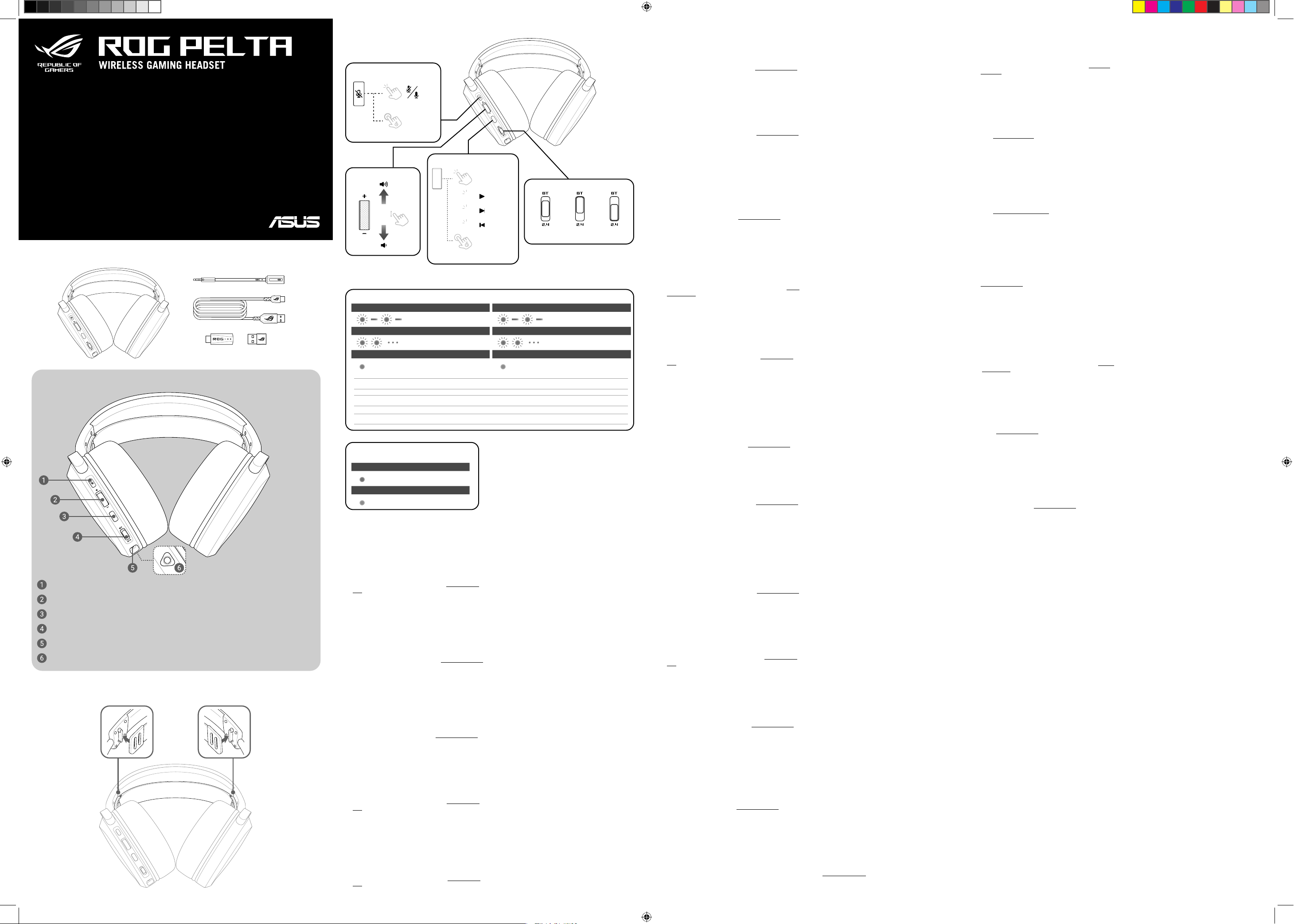
Package contents
Headset features
Q24044 / First Edition / September 2024
商品名稱
: Gaming Headset
Hızlı Başlangıç Kılavuzu (TR)
Стисле керівництво для початку експлуатації
(UA)
Przewodnik szybkiego startu (PL)
Rychlý průvodce (CS)
Ghid de pornire rapidă (RO)
Gyors üzembe helyezési útmutató (HU)
Snabbstartshandbok (SV)
Pikaopas (FI)
Hurtigstartveiledning (NO)
Stručný návod na používanie (SK)
電競耳機
/
(AR)
)HB
無線接收器
Buttons and switches
Microphone Mute button
Turn on/off
RGB lighting
5s
Function button
Audio control wheel
1
2
3
Factory default
(under 2.4GHz mode)
15s
LED indicators /
Logo LED indicator /
Flashing (red) /
Fast flashing (red) /
Solid (green) /
CAUTION! Using the headset whilst charging the power will cause the temperature of the headset to rise.
LED 指示燈 / LED 指示燈
Logo 指示燈
閃爍(紅色)/ 閃爍(紅色)
快速閃爍(紅色)/ 快速閃爍(紅色)
恆亮(綠色)/ 恆亮(綠色)
Headset charging /
耳機充電中
Low battery (below 20%) /
低 電 量(低 於 2 0 %)/低 電量(低 於 2 0% )
充電已完成
/
耳機充電中
/
Fully charged
充電已完成
/
Logo 指示燈
Flashing (blue) /
Fast flashing (blue) /
/
No light /
Power off
(USB mode)
閃爍(藍色)/ 閃爍(藍色)
快速閃爍(藍色)/ 快速閃爍(藍色)
無燈光 / 無燈光
Mode switch
未與藍牙設備配對
/
與設備配對中
/
Headset off
耳機已關閉
/
RF 2.4GHz
/
Bluetooth®
mode
No Bluetooth device paired /
未與藍牙裝置配對
Pairing to a device /
與裝置配對中
耳機已關閉
mode
Začínáme
Pokyny pro zprovoznění sluchátek ROG PELTA herní náhlavní
souprava:
1. Připojte náhlavní soupravu k vašemu zařízení přes Bluetooth®
dongle.
2. Stáhněte software Armoury Crate z webu http://rog.asus.com a
potom jej nainstalujte do počítače.
Aan de slag
Uw ROG PELTA gamingheadset instellen:
1. Sluit de headset aan op uw apparaat via Bluetooth®-dongle.
2. Download de Armoury Crate-software van http://rog.asus.com
en installeer deze op uw computer.
Iniciando
Para instalar os seus fone de ouvido para jogos ROG PELTA:
1. Conecte o seu fone de ouvido para jogos no seu dispositivo
usando Bluetooth® ou dongle.
2. Baixe o Armoury Crate a partir de http://rog.asus.com e
instale-o no seu computador.
Начало работы
Для настройки игровой гарнитуры:
1. Подключите гарнитуру к устройству с помощью Bluetooth
или приемника.
2. Скачайте программное обеспечение Armoury Crate с http://
rog.asus.com и установите его на свой компьютер.
Näin pääset alkuun
ROG PELTA - kuulokkeiden asentaminen:
1. Liitä kuulokkeet laitteeseesi Bluetooth® tai käyttöavain.
2. Lataa Armoury Crate-ohjelmisto osoitteesta http://rog.asus.
com ja asenna se tietokoneeseen.
PT:BR
CS
NL
RU
FI
Opětovné spárování Bluetooth®
Bluetooth® můžete znovu spárovat podle následujících kroků.
1. Vypněte náhlavní soupravu.
2. Stiskněte a podržte tlačítko Function button (Function (Funkce)
po dobu 5 sekund.
Bluetooth® opnieuw koppelen
U kunt Bluetooth® opnieuw koppelen met de onderstaande
stappen.
1. Zet je headset uit.
2. Houd de Function button (Functieknop) 5 seconden ingedrukt.
Emparelhando o Bluetooth® novamente
Você pode emparelhar o Bluetooth® novamente seguindo as
etapas abaixo.
1. Desligue o fone de ouvido.
2. Pressione e segure o Function button (Botão de Função) por 5
segundos.
Повторное сопряжение Bluetooth
Для повторного сопряжения Bluetooth выполнив следующие
действия.
1. Выключите гарнитуру
2. Нажмите и удерживайте функциональную кнопку в
течение 5 секунд.
Bluetooth®-pariliitoksen muodostaminen
uudelleen
Voit muodostaa Bluetooth®-pariliitoksen uudelleen noudattamalla
seuraavia ohjeita.
1. Sammuta kuulokkeet.
2. Pidä Function button (Toimintopainiketta) painettuna 5
sekunnin ajan.
Noţiuni introductive
Pentru a configura Set de căşti pentru jocuri ROG PELTA:
1. Conectaţi setul de căşti la dispozitiv folosind Bluetooth® sau
adaptor cheie hardware.
2. Descărcaţi software-ul Armoury Crate de la adresa http://rog.
asus.com şi apoi instalaţi-l pe computer.
開始設定
設定您的 ROG PELTA 電競耳機:
1. 透過藍牙或接收器將您的耳機連線至裝置。
2. 請至 http://rog.asus.com 下載 Armoury Crate 軟體然後在電
腦上進行安裝。
開始設置
設置您的 ROG PELTA 電競耳機:
1. 通過藍牙或接收器將您的耳機連接至設備。
2. 請至 https://rog.asus.com.cn 下載 Armoury Crate 軟件
然後在電腦上進行安裝。
시작하기
ROG PELTA 게이밍 헤드셋을 설치하는 방법:
1. 블루투스® 또는 동글 헤드셋을 사용자의 장치에 연결하십시오.
2. http://rog.asus.com 에서 Armoury Crate 소프트웨어를
다운로드한 후 이를 사용자의 컴퓨터에 설치합니다.
はじめ に
本製品を使用する準備をする:
1. Bluetooth® または付属のUSBレシーバーを使用し、本機とお使
いの機器を接続します。
2. コンピューターに接続している場合は、当社ウェブサイト https://
rog.asus.com から設定アプリ Armoury Crate をダウンロードし
てインストールします。
ZH:SC
RO
ZH
KO
JP
Asocierea din nou prin Bluetooth®
Puteți asocia din nou prin Bluetooth®, urmând pașii de mai jos.
1. Opriți căștile.
2. Apăsați și mențineți apăsat Function button (Butonul funcție)
timp de 5 secunde.
重新設定藍牙
您可以按照以下步驟重新進行藍牙配對。
1.
關閉耳機。
2. 按住功能鍵並保持 5 秒。
重新設置藍牙
您可以按照以下步驟重新進行藍牙配對。
1. 關閉耳機。
2. 按住功能鍵並保持 5 秒。
블루투스를® 다시 페어링하기
아래 단계에 따라 블루투스를® 다시 페어링할 수 있습니다.
1. 헤드셋을 꺼주세요.
2.
Function button(기능 버튼)
ペアリングモードに切り替える
Bluetooth® 機器を登録/再登録(ペアリング)するには、本製品を
ペアリングモードに切り替える必要があります。切り替えは、下
記の方法で行うことができます。
1. モードスイッチを電源オフ(USBモード)の位置に動かし電源
を切ります。
2. 機能ボタンを5秒間長押しします。
을 5초 동안 눌러주세요.
Microphone Mute button /
Audio control wheel /
Function button /
Mode switch /
USB Type-C® port /
Microphone jack /
音效控制滾輪(繁體中文)/ 音頻控制滾輪(簡體中文)
功能鍵(繁體中文)
模式切換(繁體中文)
USB Type-C® 連接埠(繁體中文)
麥克風插孔(繁體中文)/ 麥克風插孔(簡體中文)
麥克風靜音鍵(繁體中文)/ 麥克風關閉鍵(簡體中文)
/
功能鍵(簡體中文)
/
模式切換(簡體中文)
/
USB Type-C® 接口(簡體中文)
注意!在充電時使用耳機將可能造成耳機溫度升高。
注意!在充電時使用耳機將可能造成耳机溫度升高。
Microphone LED /
麥克風指示燈
Solid (red) /
No light /
Getting started
To set up your ROG PELTA gaming headset:
1. Connect the headset to your device through Bluetooth® or
dongle.
2. Download the Armoury Crate software from http://rog.asus.
com and then install it on your computer.
Prise en main
Pour configurer votre casque gaming ROG PELTA :
1. Connectez le casque à votre appareil via Bluetooth ou le
dongle.
2. Téléchargez le logiciel Armoury Crate sur http://rog.asus.com
et installez-le sur votre ordinateur.
麥克風指示燈
/
恆亮(紅色)/ 恆亮(紅色)
Microphone muted
麥克風已靜音
無燈光 / 無燈光
麥克風已取消靜音
麥克風已關閉
/
Microphone unmuted
/
麥克風已開啟
EN
FR
Pairing Bluetooth® again
You can pair Bluetooth® again by following the steps below.
1. Turn off your headset
2. Press and hold the Function button for 5 seconds.
Appairer à nouveau le Bluetooth
Vous pouvez à nouveau appairer le Bluetooth en suivant les étapes
ci-dessous.
1. Éteignez votre casque
2. Maintenez le bouton de fonction enfoncé pendant environ 5
secondes.
Első lépések
ROG PELTA játékosoknak szánt headset beállításához tegye a
következőket:
1. Csatlakoztassa a headsetet a készülékéhez a Bluetooth® vagy
kulcs.
2. Töltse le az Armoury Crate szoftvert a http://rog.asus.com
webhelyről, és telepítse a számítógépére.
Komme i gang
Slik setter du opp ROG PELTA spillhodesett:
1. Koble headset til enheten din gjennom Bluetooth® til dongle.
2. Last ned Armoury Crate-programvaren fra http://rog.asus.com,
og installer den på datamaskinen.
Rozpoczęcie
W celu skonfigurowania zestawu słuchawkowego dla graczy ROG
PELTA:
1. Podłącz zestaw słuchawkowy do urządzenia za pomocą
Bluetooth® lub moduł.
2. Pobierz oprogramowanie Armoury Crate z http://rog.asus.com, a
następnie zainstaluj je w komputerze.
Začíname
Nastavenie herná náhlavná súprava ROG PELTA:
1. Náhlavnú súpravu pripojte k svojmu zariadeniu pomocou
Bluetooth® alebo hardvérový kľúč.
2. Softvér Armoury Crate si prevezmite z lokality http://rog.asus.
čom a potom ho nainštalujte do počítača.
HU
PL
SK
A Bluetooth® újbóli párosítása
A Bluetooth® újbóli párosítása az alábbi lépésekkel lehetséges.
1. Kapcsolja ki a headsetet.
2. Nyomja meg és tartsa lenyomva 5 másodpercig a Function
button (Funkció gomb) gombot.
Pare med Bluetooth® igjen
Du kan pare med Bluetooth® igjen ved å følge trinnene nedenfor.
1. Slå av headsettet.
2. Hold inne Function button (Funksjon-knappen) i 5 sekunder.
Ponowne parowanie Bluetooth
Aby ponownie sparować przez Bluetooth®, należy wykonać
poniższe czynności.
1. Wyłącz słuchawki.
2. Naciśnij i przytrzymaj Function button (Przycisk funkcji) przez 5
sekund.
Opätovné párovanie Bluetooth
Bluetooth® môžete znova spárovať podľa krokov nižšie.
1. Vypnite si slúchadlá.
2. Stlačte a podržte Function button (Tlačidlo Funkcia) na 5
sekúnd.
®
®
Bluetooth® 1
http://rog.asus.comArmoury Crate 2
Başlarken
ROG PELTA mikrofonlu oyun mikrofonlu kulaklığınızı kurmak için:
1. Mikrofonlu kulaklığı Bluetooth® dongle ına aracılığıyla aygıtınıza
bağlayın.
2. Armoury Crate yazılımını http://rog.asus.com adresinden indirip
bilgisayarınıza yükleyin.
: ROG PELTA
HB
TRNO
Bluetooth®
5Function button 2
Bluetooth® tekrar eşleştiriliyor
Aşağıdaki adımları izleyerek Bluetooth®’u tekrar eşleştirebilirsiniz.
1. Kulaklığınızı kapatın.
2. Function button (Fonksiyon düğmesini) 5 saniye boyunca basılı
tutun.
Bluetooth®
1
Installing the elastic headband
Per iniziare
Per installare le vostre cuffie gaming ROG PELTA:
1. Collegate le cuffie al vostro dispositivo tramite il Bluetooth® o
da dongle.
2. Scaricate il software Armoury Crate da http://rog.asus.com
quindi installatelo sul vostro computer.
Erste Schritte
So richten Sie Ihr ROG PELTA Gaming-Headset ein:
1. Verbinden Sie das Headset per Bluetooth oder Dongle mit
Ihrem Gerät.
2. Laden Sie die Armoury Crate Software unter http://rog.asus.
com herunter und installieren Sie sie dann auf Ihrem Computer.
Procedimientos iniciales
Para configurar su Auriculares para juegos ROG PELTA:
1. Conecte los auriculares al dispositivo a través del Bluetooth®
llave.
2. Descargue el software Armoury Crate desde http://rog.asus.
com y, a continuación, instálelo en el equipo.
IT
DE
ES
Nuova associazione Bluetooth
È possibile associare nuovamente il Bluetooth® seguendo i
passaggi seguenti.
1. Spegni l’auricolare.
2. Tenere premuto il Function button (Tasto funzione) per 5
secondi.
Noch einmal über Bluetooth koppeln
Sie können noch einmal über Bluetooth koppeln, indem Sie die
folgenden Schritte ausführen.
1. Schalten Sie Ihr Headset aus.
2. Halten Sie die Funktionstaste für fünf Sekunden gedrückt.
Volver a emparejar Bluetooth®
Puede emparejar Bluetooth® de nuevo siguiendo los pasos descritos
a continuación.
1. Apaga tus auriculares.
2.
Mantenga presionado Function button (botón Función) durante
5 segundos.
®
Komma igång
För att installera ditt ROG PELTA Gaming Headset:
1. Anslut headsetet till din enhet med Bluetooth® eller dongel.
2. Hämta Armoury Crate-programmet från http://rog.asus.com
och installera det på datorn.
SV
Початок експлуатації
Для налаштування Ігрова гарнітура ROG PELTA:
1. Підключіть гарнітуру до пристрою сполучувачем
Bluetooth® або ключ.
2. Завантажте пз Armoury Crate з http://rog.asus.com, а потім
встановіть його на комп’ютер.
Bluetooth®
Function button2
Bluetooth®
1
UA
AR
Parkoppla Bluetooth® igen
Du kan parkoppla Bluetooth® igen genom att följa stegen nedan.
1. Stäng av ditt headset.
2. Håll Function button (Funktionsknapp) intryckt i 5 sekunder.
Повторне поєднання в пару по Bluetooth
Знову поєднати в пару по Bluetooth® можна, виконавши кроки
нижче.
1. Вимкніть свою гарнітуру.
2. Натисніть і утримуйте протягом 5 секунд Function button
(Кнопка функції).
ROG PELTA
Bluetooth®1
http://rog.asus.comArmoury Crate2
®
Page 2
Safety Guidelines
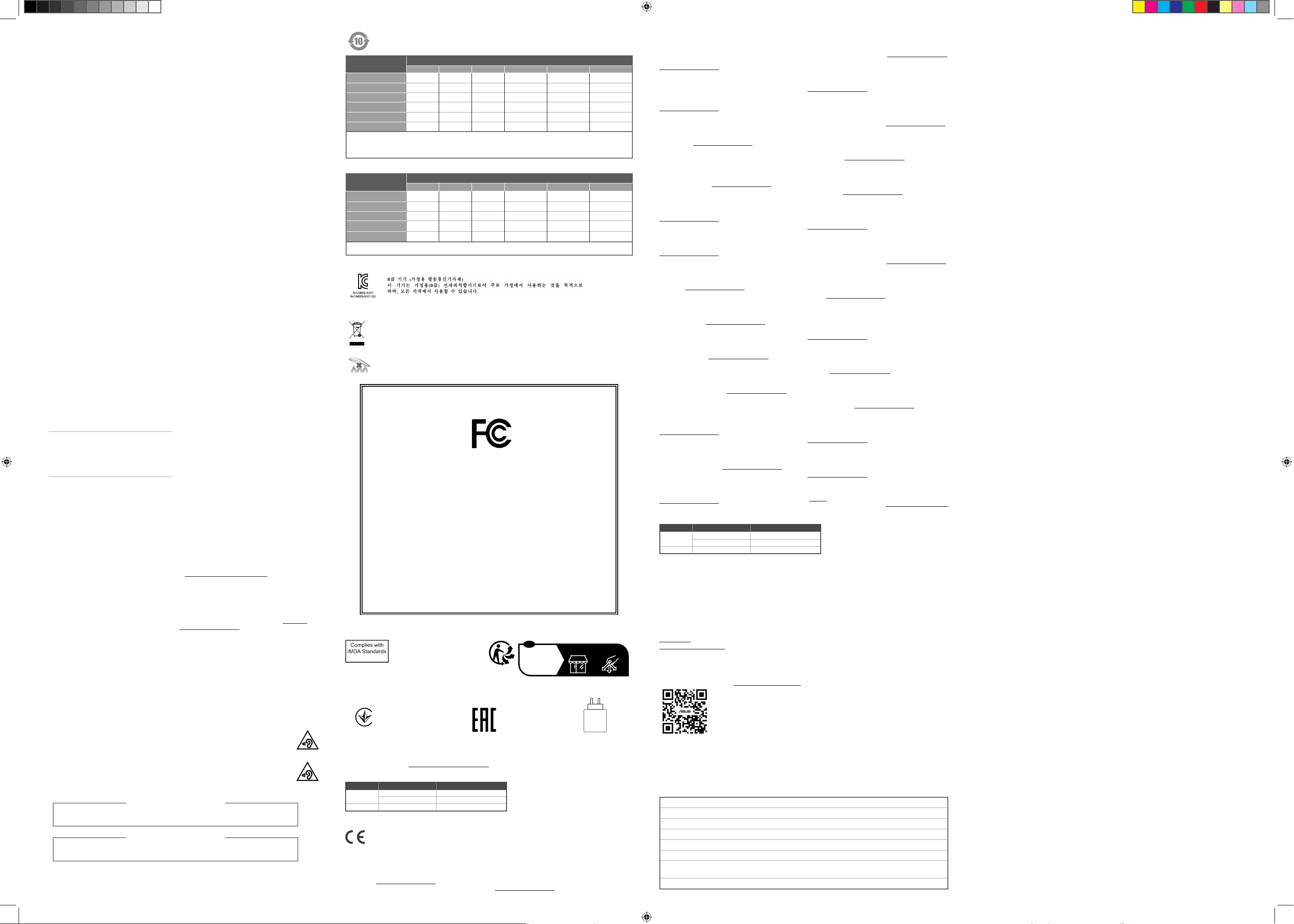
FCC COMPLIANCE INFORMATION
Responsible Party:
Asus Computer International
Product Name :
Gaming Headset
Model Number :
A501
Ver. 180620
DB103778
安全上のご注意
付属品は本製品専用です。本製品を使用の際には、必ず製品パッケージに付属のものをお使いください。また、付属品は絶対他の製品
には使用しないでください。製品破損もしくは、火災や感電の原因となる場合があります。
Operating temperature
Operating temperature for this product while in use is 0°C ~ 40°C, with an operating voltage of 3.3V ~ 4.2V.
作業溫度與電壓
注意:本產品使用時工作溫度為 0-40 度,電壓為 3.3V ~ 4.2V。
本产品为微功率设备,消费者使用时应遵守以下规范,以免造成危害或损伤。
(一)本产品2.4G微功率模式使用频率为:2402-2480MHz,发射功率限值:10mW(e.i.r.p),频率容限:75kHz
搭载2.4GHz无线技术,用来配对连结PC,提供低延迟音讯传输,符合“微功率短距离无线电发射设
备目录和技术要求”
(二)不得擅自改变使用场景或使用条件、扩大发射频率范围、加大发射功率(包括额外加装射频功率
放大器),不得擅自更改发射天线;
(三)不得对其他合法的无线电台(站)产生有害干扰,也不得提出免受有害干扰保护;
(四)应当承受辐射射频能量的工业、科学及医疗(ISM)应用设备的干扰或其他合法的无线电台(站)
干扰;
(五)如对其他合法的无线电台(站)产生有害干扰时,应立即停止使用,并采取措施消除干扰后方可继
续使用;
(六)在航空器内和依据法律法规、国家有关规定、标准划设的射电天文台、气象雷达站、卫星地球站
(含测控、测距、接收、导航站)等军民用无线电台(站)、机场等的电磁环境保护区域内使用微
功率设备,应当遵守电磁环境保护及相关行业主管部门的规定;
(七)禁止在以机场跑道中心点为圆心、半径5000米的区域内使用各类模型遥控器;
(八)本产品使用时工作温度为0~40度,工作电压3.3-4.2V。
Notices
Federal Communications Commission Statement
This device complies with Part 15 of the FCC Rules. Operation is
subject to the following two conditions:
• This device may not cause harmful interference.
• This device must accept any interference received including
interference that may cause undesired operation.
This equipment has been tested and found to comply with the
limits for a Class B digital device, pursuant to Part 15 of the FCC
Rules. These limits are designed to provide reasonable protection
against harmful interference in a residential installation. This
equipment generates, uses and can radiate radio frequency energy
and, if not installed and used in accordance with manufacturer’s
instructions, may cause harmful interference to radio
communications. However, there is no guarantee that interference
will not occur in a particular installation. If this equipment does
cause harmful interference to radio or television reception, which
can be determined by turning the equipment off and on, the user is
encouraged to try to correct the interference by one or more of the
following measures:
• Reorient or relocate the receiving antenna.
• Increase the separation between the equipment and receiver.
• Connect the equipment to an outlet on a circuit different from
that to which the receiver is connected.
• Consult the dealer or an experienced radio/TV technician for
help.
CAUTION! The use of shielded cables for connection
of the monitor to the graphics card is required to
assure compliance with FCC regulations. Changes or
modifications to this unit not expressly approved by the
party responsible for compliance could void the user’s
authority to operate this equipment.
Limitation of Liability
Circumstances may arise where because of a default on ASUS’
part or other liability, you are entitled to recover damages from
ASUS. In each such instance, regardless of the basis on which
you are entitled to claim damages from ASUS, ASUS is liable for
no more than damages for bodily injury (including death) and
damage to real property and tangible personal property; or any
other actual and direct damages resulted from omission or failure
of performing legal duties under this Warranty Statement, up to
the listed contract price of each product.
ASUS will only be responsible for or indemnify you for loss,
damages or claims based in contract, tort or infringement under
this Warranty Statement.
This limit also applies to ASUS’ suppliers and its reseller. It is the
maximum for which ASUS, its suppliers, and your reseller are
collectively responsible.
UNDER NO CIRCUMSTANCES IS ASUS LIABLE FOR ANY OF
THE FOLLOWING: (1) THIRD-PARTY CLAIMS AGAINST YOU FOR
DAMAGES; (2) LOSS OF, OR DAMAGE TO, YOUR RECORDS OR
DATA; OR (3) SPECIAL, INCIDENTAL, OR INDIRECT DAMAGES OR
FOR ANY ECONOMIC CONSEQUENTIAL DAMAGES (INCLUDING
LOST PROFITS OR SAVINGS), EVEN IF ASUS, ITS SUPPLIERS OR
YOUR RESELLER IS INFORMED OF THEIR POSSIBILITY.
Radio Frequency (RF) Exposure Information
The radiated output power of the Wireless Device is below the
Innovation, Science and Economic Development Canada (ISED)
radio frequency exposure limits. The Wireless Device should be
used in such a manner such that the potential for human contact
during normal operation is minimized.
This device has also been evaluated and shown compliant with
the ISED RF Exposure limits under portable exposure conditions.
(antennas are less than 20 cm of a person's body).
VCCI: Japan Compliance Statement
VCCI Class B Statement
VCCI 準拠クラスB機器(日本)
この装置は、クラスB情報技術装置です。この装置は、家庭 環
境で使 用することを目的としていますが、この装置がラジオ
やテレビジョン受信機に近接して使用されると、受信障害を
引き 起 こすことが ありま す。
取扱説明書に従って正しい取り扱いをして下さい。
CAUTION: Danger of explosion if battery is incorrectly replaced. Replace only with the same or equivalent type
recommended by the manufacturer. Dispose of used batteries according to the manufacturer’s instructions.
電池如果更換不正確,會有爆炸的危險,請依照製造商說明書使用相同或同款式電池,並請依照製造商指示處
Lithium-Metal Battery Warning
鋰金屬電池安全警告
Informations concernant l'exposition aux
fréquences radio (RF)
La puissance de sortie rayonnée du dispositif sans l est inférieure
aux limites d'exposition aux radiofréquences d'Innovation,
Sciences et Développement économique Canada (ISED). Le
dispositif sans l doit être utilisé de manière à minimiser le
potentiel de contact humain pendant le fonctionnement normal.
Cet appareil a également été évalué et montré conforme aux
limites d'exposition RF ISED dans des conditions d'exposition
portable. (les antennes mesurent moins de 20 cm du corps d'une
personne).
Compliance Statement of Innovation, Science
and Economic Development Canada (ISED)
This device complies with Innovation, Science and Economic
Development Canada licence exempt RSS standard(s). Operation
is subject to the following two conditions: (1) this device may
not cause interference, and (2) this device must accept any
interference, including interference that may cause undesired
operation of the device.
CAN ICES-003(B)/NMB-003(B)
Déclaration de conformité de Innovation,
Sciences et Développement économique
Canada (ISED)
Le présent appareil est conforme aux CNR d’Innovation, Sciences
et Développement économique Canada applicables aux appareils
radio exempts de licence. L’exploitation est autorisée aux
deux conditions suivantes : (1) l’appareil ne doit pas produire
de brouillage, et (2) l’utilisateur de l’appareil doit accepter
tout brouillage radioélectrique subi, même si le brouillage est
susceptible d’en compromettre le fonctionnement.
CAN ICES-003(B)/NMB-003(B)
RF exposure warning
The equipment complies with FCC RF exposure limits set forth for
an uncontrolled environment.
The equipment must not be co-located or operating in conjunction
with any other antenna or transmitter.
REACH
Complying with the REACH (Registration, Evaluation, Authorisation,
and Restriction of Chemicals) regulatory framework, we published
the chemical substances in our products at ASUS REACH website
at https://esg.asus.com/Compliance.htm.
ASUS Recycling/Takeback Services
ASUS recycling and takeback programs come from our
commitment to the highest standards for protecting our
environment. We believe in providing solutions for you to be able
to responsibly recycle our products, batteries, other components
as well as the packaging materials. Please go to https://esg.
asus.com/en/Takeback.htm for detailed recycling information in
different regions.
NCC: Taiwan Wireless Statement
低功率射頻器材技術規範
取得審驗證明之低功率射頻器材,非經核准,公司、商號或使用者
均不得擅自變更頻率、加大功率或變更原設計之特性及功能。低功
率射頻器材之使用不得影響飛航安全及干擾合法通信;經發現有干
擾現象時,應 立即停用,並改善至無干擾時方得繼續使用。前述
合法通信,指依電信管理法規定作業之無線電通信。低功率射頻器
材須忍受合法通信或工業、科學及醫療用電波輻射性電機設備之干
擾。
Prevention of Hearing Loss
To prevent possible hearing damage, do not
listen at high volume levels for long periods.
預防聽力受損
為預防聽力損害,請勿長時間聆聽高音量音源。
理用過的電池。
電子電氣產品有害物質限制使用標識:圖中之數字為產品之環保使用期限。僅指電子電氣
產品中含有的有害物質不致發生外洩或突變,從而對環境造成汙染或對人身、財產造成嚴
重損害的期限。
称
部件名
印刷電路板及電子組件
塑膠外壳
海綿耳罩
麥克風組
线
材
電池
本表格依據 SJ/T 11364 的規定編制。
○: 表示該有害物質在該部件所有均質材料中的含量均在 GB/T 26572 規定的限量要求以下。
×: 表示該有害物質至少在該部件的某一均質材料中的含量超出 GB/T 26572 規定的限量要求,然該部件仍符合歐盟指令 2011/65/EU 的規范。
備註:此產品所標示之環保使用期限,係指在一般正常使用狀況下。
质
有害物
铅
(Pb) 汞 (Hg)
X
○
○
X
X
X
镉
○ ○ ○ ○ ○
○ ○ ○ ○ ○
○ ○ ○ ○ ○
○ ○ ○ ○ ○
○ ○ ○ ○ ○
○ ○ ○ ○ ○
(Cd) 六价铬 (Cr (VI)) 多溴联苯(PBB) 多溴二苯醚(PBDE)
限用物質及其化學符號:
單元 限用物質及其化學符號
印刷電路板及電子組件
塑膠外殼 ○ ○ ○ ○ ○ ○
海綿耳罩 ○ ○ ○ ○ ○ ○
麥克風組
其他及其配件
備考1.“O”係指該項限用物質之百分比含量未超出百分比含量基準值。
備考2.“-”係指該項限用物質為排除項目。
鉛(Pb) 汞(Hg) 鎘(Cd)
-
-
-
○ ○ ○ ○ ○
○ ○ ○ ○ ○
○ ○ ○ ○ ○
六價鉻(Cr+6)
多溴聯苯(PBB) 多溴二苯醚(PBDE)
KC: Korea Warning Statement
Proper disposal
DO NOT throw the device in municipal waste. This product has been designed to enable proper reuse
of parts and recycling. The symbol of the crossed out wheeled bin indicates that the product (electrical,
electronic equipment and mercury-containing button cell battery) should not be placed in municipal
waste. Check local regulations for disposal of electronic products.
DO NOT throw the device in fire. DO NOT short circuit the contacts.
DO NOT disassemble the device.
Per FCC Part 2 Section 2.1077
Address:
48720 Kato Rd, Fremont, CA 94538.
Phone/Fax No: (510)739-3777/(510)608-4555
hereby declares that the product
compliance statement:
This device complies with part 15 of the FCC Rules. Operation is subject to the
following two conditions: (1) This device may not cause harmful interference,
and (2) this device must accept any interference received, including
interference that may cause undesired operation.
Regional notice for Singapore
This ASUS product complies
with IMDA Standards.
Ukraine Certication Logo
France sorting and recycling information
FR
Cet appareil
se recycle
Points de collecte sur www.quefairedemesdechets.fr
Privilégiez la répara�on ou le don de votre appareil !
EAC Certication Logo
À DÉPOSER
EN MAGASIN
EN DÉCHÈTERIE
OU
2.75 – 2.75
W
À DÉPOSER
Simplied UKCA Declaration of Conformity:
ASUSTek Computer Inc. hereby declares that this device is in compliance with the essential requirements and other
relevant provisions of The Radio Equipment Regulations 2017 (S.I. 2017/1206). Full text of UKCA declaration of
conformity is available at https://www.asus.com/support/.
UKCA RF Output table (The Radio Equipment Regulations 2017)
Function Frequency Maximum Output Power EIRP (mW)
2.4GHz wireless
Bluetooth (2402 - 2480MHz) - Headset < 100
(2402 - 2480MHz) - Headset < 100
(2402 - 2480MHz) - Dongle < 100
CE Mark Warning
English ASUSTeK Computer Inc. hereby declares
that this device is in compliance with the essential
requirements and other relevant provisions of related
Directives. Full text of EU declaration of conformity is
available at: www.asus.com/support
Français AsusTek Computer Inc. déclare par la
présente que cet appareil est conforme aux critères
essentiels et autres clauses pertinentes des directives
concernées. La déclaration de conformité de l’UE peut
être téléchargée à partir du site Internet suivant :
www.asus.com/support.
Deutsch ASUSTeK Computer Inc. erklärt hiermit, dass
dieses Gerät mit den wesentlichen Anforderungen und
anderen relevanten Bestimmungen der zugehörigen
Richtlinien übereinstimmt. Der gesamte Text der EUKonformitätserklärung ist verfügbar unter:
www.asus.com/support
Italiano ASUSTeK Computer Inc. con la presente
dichiara che questo dispositivo è conforme ai requisiti
essenziali e alle altre disposizioni pertinenti con le
direttive correlate. Il testo completo della dichiarazione
di conformità UE è disponibile all’indirizzo:
www.asus.com/support
Русский Компания ASUS заявляет, что это устройство
соответствует основным требованиям и другим
соответствующим условиям соответствующих
директив. Подробную информацию, пожалуйста,
смотрите на www.asus.com/support
Български С настоящото ASUSTeK Computer Inc.
декларира, че това устройство е в съответствие със
съществените изисквания и другите приложими
постановления на свързаните директиви. Пълният
текст на декларацията за съответствие на ЕС е
достъпна на адрес: www.asus.com/support
Hrvatski ASUSTeK Computer Inc. ovim izjavljuje da
je ovaj uređaj sukladan s bitnim zahtjevima i ostalim
odgovarajućim odredbama vezanih direktiva. Cijeli tekst
EU izjave o sukladnosti dostupan je na:
www.asus.com/support
Čeština Společnost ASUSTeK Computer Inc. tímto
prohlašuje, že toto zařízení splňuje základní požadavky
a další příslušná ustanovení souvisejících směrnic. Plné
znění prohlášení o shodě EU je k dispozici na adrese:
www.asus.com/support
Dansk ASUSTeK Computer Inc. erklærer hermed, at
denne enhed er i overensstemmelse med hovedkravene
og andre relevante bestemmelser i de relaterede
direktiver. Hele EU-overensstemmelseserklæringen kan
findes på: www.asus.com/support
Nederlands ASUSTeK Computer Inc. verklaart hierbij
dat dit apparaat voldoet aan de essentiële vereisten en
andere relevante bepalingen van de verwante richtlijnen.
De volledige tekst van de EU-verklaring van conformiteit
is beschikbaar op: www.asus.com/support
Eesti Käesolevaga kinnitab ASUSTeK Computer Inc,
et see seade vastab asjakohaste direktiivide oluliste
nõuetele ja teistele asjassepuutuvatele sätetele.
EL vastavusdeklaratsiooni täielik tekst on saadaval
järgmisel aadressil: www.asus.com/support
Suomi ASUSTeK Computer Inc. ilmoittaa täten, että
tämä laite on asiaankuuluvien direktiivien olennaisten
vaatimusten ja muiden tätä koskevien säädösten
mukainen. EU-yhdenmukaisuusilmoituksen koko teksti
on luettavissa osoitteessa: www.asus.com/support
Ελληνικά Με το παρόν, η AsusTek Computer Inc.
δηλώνει ότι αυτή η συσκευή συμμορφώνεται με τις
θεμελιώδεις απαιτήσεις και άλλες σχετικές διατάξεις
των Οδηγιών της ΕΕ. Το πλήρες κείμενο της δήλωσης
συμβατότητας είναι διαθέσιμο στη διεύθυνση:
www.asus.com/support
Magyar Az ASUSTeK Computer Inc. ezennel kijelenti,
hogy ez az eszköz megfelel a kapcsolódó Irányelvek
lényeges követelményeinek és egyéb vonatkozó
rendelkezéseinek. Az EU megfelelőségi nyilatkozat teljes
szövege innen letölthető: www.asus.com/support
Latviski ASUSTeK Computer Inc. ar šo paziņo, ka šī
ierīce atbilst saistīto Direktīvu būtiskajām prasībām
un citiem citiem saistošajiem nosacījumiem. Pilns ES
atbilstības paziņojuma teksts pieejams šeit:
www.asus.com/support
CE RED RF Output table (Directive 2014/53/EU)
Function Frequency Maximum Output Power EIRP (mW)
2.4GHz wireless
Bluetooth (2402 - 2480MHz) - Headset < 100
(2402 - 2480MHz) - Headset < 100
(2402 - 2480MHz) - Dongle < 100
Lietuvių „ASUSTeK Computer Inc.“ šiuo tvirtina, kad
šis įrenginys atitinka pagrindinius reikalavimus ir kitas
svarbias susijusių direktyvų nuostatas. Visą ES atitikties
deklaracijos tekstą galima rasti: www.asus.com/support
Norsk ASUSTeK Computer Inc. erklærer herved at denne
enheten er i samsvar med hovedsaklige krav og andre
relevante forskrifter i relaterte direktiver. Fullstendig tekst
for EU-samsvarserklæringen finnes på:
www.asus.com/support
Polski Firma ASUSTeK Computer Inc. niniejszym
oświadcza, że urządzenie to jest zgodne z zasadniczymi
wymogami i innymi właściwymi postanowieniami
powiązanych dyrektyw. Pełny tekst deklaracji zgodności
UE jest dostępny pod adresem: www.asus.com/support
Português A ASUSTeK Computer Inc. declara que este
dispositivo está em conformidade com os requisitos
essenciais e outras disposições relevantes das Diretivas
relacionadas. Texto integral da declaração da UE
disponível em: www.asus.com/support
Română ASUSTeK Computer Inc. declară că acest
dispozitiv se conformează cerinţelor esenţiale şi altor
prevederi relevante ale directivelor conexe. Textul
complet al declaraţiei de conformitate a Uniunii Europene
se găseşte la: www.asus.com/support
Srpski ASUSTeK Computer Inc. ovim izjavljuje da je ovaj
uređaj u saglasnosti sa osnovnim zahtevima i drugim
relevantnim odredbama povezanih Direktiva. Pun tekst
EU deklaracije o usaglašenosti je dostupan da adresi:
www.asus.com/support
Slovensky Spoločnosť ASUSTeK Computer Inc. týmto
vyhlasuje, že toto zariadenie vyhovuje základným
požiadavkám a ostatým príslušným ustanoveniam
príslušných smerníc. Celý text vyhlásenia o zhode pre
štáty EÚ je dostupný na adrese: www.asus.com/support
Slovenščina ASUSTeK Computer Inc. izjavlja, da je
ta naprava skladna z bistvenimi zahtevami in drugimi
ustreznimi določbami povezanih direktiv. Celotno
besedilo EU-izjave o skladnosti je na voljo na spletnem
mestu: www.asus.com/support
Español Por la presente, ASUSTeK Computer Inc. declara
que este dispositivo cumple los requisitos básicos
y otras disposiciones pertinentes de las directivas
relacionadas. El texto completo de la declaración de la
UE de conformidad está disponible en:
www.asus.com/support
Svenska ASUSTeK Computer Inc. förklarar härmed att
denna enhet överensstämmer med de grundläggande
kraven och andra relevanta föreskrifter i relaterade
direktiv. Fulltext av EU-försäkran om överensstämmelse
finns på: www.asus.com/support
Українська ASUSTeK Computer Inc. заявляє, що цей
пристрій відповідає основним вимогам та іншим
відповідним положенням відповідних Директив.
Повний текст декларації відповідності стандартам
ЄС доступний на: www.asus.com/support
Türkçe AsusTek Computer Inc., bu aygıtın temel
gereksinimlerle ve ilişkili Yönergelerin diğer ilgili
koşullarıyla uyumlu olduğunu beyan eder. AB uygunluk
bildiriminin tam metni şu adreste bulunabilir:
www.asus.com/support
Bosanski ASUSTeK Computer Inc. ovim izjavljuje da
je ovaj uređaj usklađen sa bitnim zahtjevima i ostalim
odgovarajućim odredbama vezanih direktiva. Cijeli tekst
EU izjave o usklađenosti dostupan je na:
www.asus.com/support
ASUSTek Computer Inc.
2014/53/EU
https://
www.asus.com/support/
Официальное представительство в России
Горячая линия Службы технической поддержки в России:
Бесплатный федеральный номер для звонков по России: 8-800-100-2787
Номер для пользователей в Москве: +7(495)231-1999
Время работы: Пн-Пт, 09:00 - 21:00 (по московскому времени)
Официальные сайты ASUS в России:
www.asus.ru
www.asus.com/ru/support
Данное устройство соответствует требованиям Технического регламента Таможенного Союза ТР ТС 020/2011
Электромагнитная совместимость технических средств утв. решением КТС от 09.12.2011г. №879
Service and Support
Visit our multi-language website at https://www.asus.com/support.
Manufacturer ASUSTek COMPUTER INC.
Address, City 1F., No. 15, Lide Rd., Beitou Dist., Taipei City 112
Authorized Representative in Europe ASUS COMPUTER GmbH
Address Harkortstrasse 21-23, 40880 Ratingen
Country Germany
Authorized Representative in United Kingdom ASUSTEK (UK) LIMITED
Address 1st Floor, Sackville House, 143-149 Fenchurch Street, London,
Country United Kingdom
EC3M 6BL, England
 Loading...