

Page 1
Eee Pad User Manual
TF101
E6422
Notes for This Manual
A few notes and warnings are used throughout this guide, allowing you to
complete certain tasks safely and eectively. These notes have dierent degrees
of importance as follows:
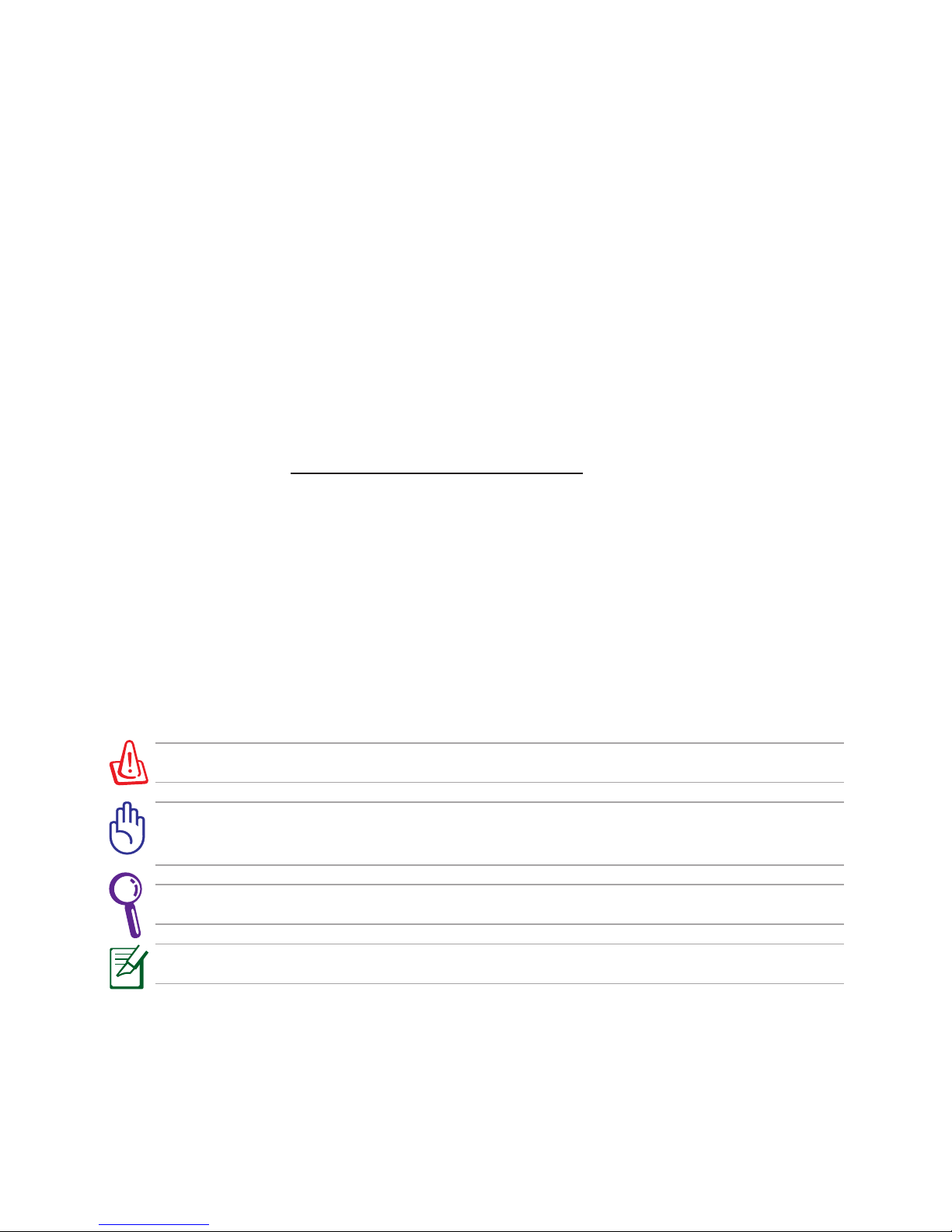
WARNING! Important information that must be followed for safe operation.
IMPORTANT! Vital information that must be followed to prevent damage
to data, components, or persons.
TIP: Tips for completing tasks.
NOTE: Information for special situations.
ASUS is devoted to creating environment-friendly products/
packagings to safeguard comsumers’ health while minimizing
the impact on the environment. The reduction of the number
of the manual pages complies with the reduction of carbon
emission.
For the detailed user manual and related information, refer
to the user manual included in the device or visit the ASUS
Support Site at http://support.asus.com/
Page 2
ASUS Eee Pad
2
There are three main types of airport security devices: X-ray machines
(used on items placed on conveyor belts), magnetic detectors (used on
people walking through security checks), and magnetic wands
(hand-held devices used on people or individual items). You can send
your Eee Pad through airport X-ray machines. But do not send your Eee
Pad through airport magnetic detectors or expose it to magnetic wands.
Airplane Precautions
Ask an airline personnel if you want to use your Eee Pad onboard an aircraft.
Most airlines have restrictions for using electronic devices. Most airlines allow
electronic use only between and not during takeos and landings.
Charging Your Batteries
If you intend to use battery power, be sure to fully charge your battery pack
before going on long trips. Remember that the power adapter charges the
battery pack as long as it is plugged into the computer and an AC power
source. Be aware that it takes much longer to charge the battery pack when
the Eee Pad is in use.
Remember to fully charge the battery (8 hours or more) before rst use
and whenever it is depleted to prolong battery life. The battery reaches its
maximum capacity after a few full charging and discharging cycles.
Page 3
ASUS Eee Pad
3
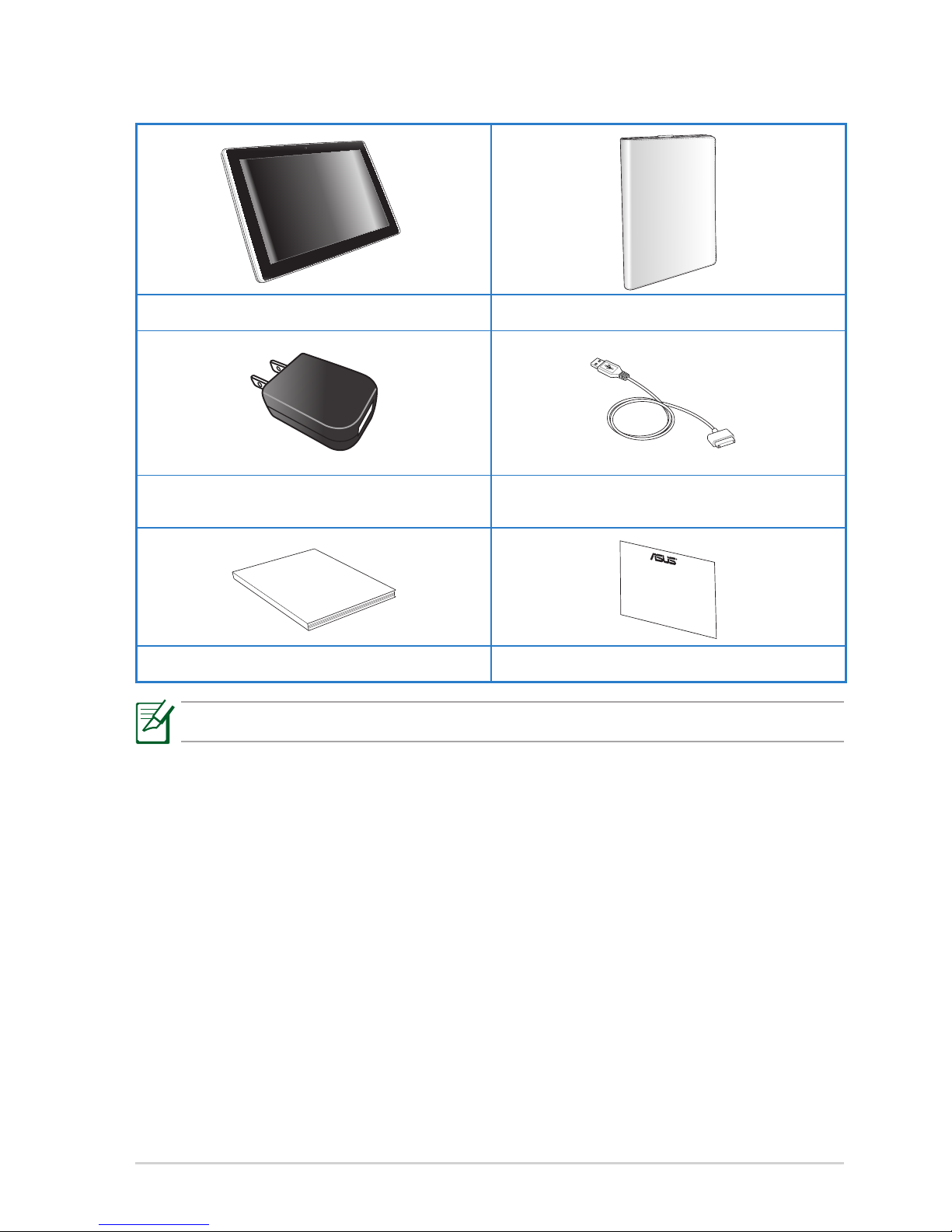
Package Contents
If any of the items is damaged or missing, contact your retailer.
Eee Pad and Digitizer Pen Case (Optional)
USB charger USB cable
User Manual
User Manual Warranty Card
Page 4
ASUS Eee Pad
4
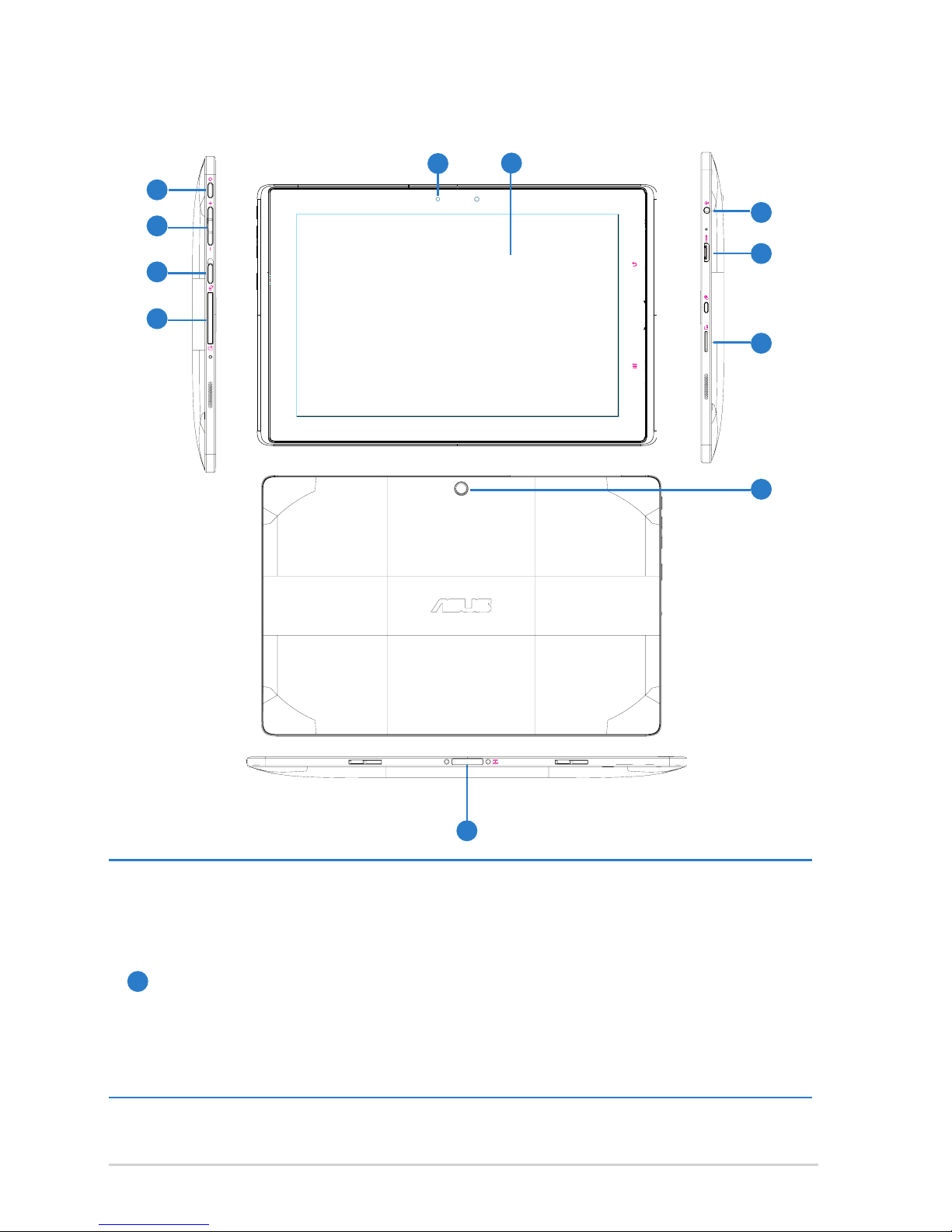
Your Eee Pad
1
Power button
The power button turns your Eee Pad on/o. Press and release
the switch to turn on or wake the Eee Pad. Press and release it
again to put the Eee Pad into sleep mode. If the system becomes
unresponsive, Press and holding the power switch will force the Eee
Pad to power o. Note that forcing the system to power o may
result in data loss. Please inspect your data to ensure there is no data
loss. It is strongly recommended that important data be backed up
regularly.
9
1
3
4
2
5
7
8
10
6
11
Page 5
ASUS Eee Pad
5
2
Volume Key
Press this button to increase or decrease the system volume.
3
Rotation Lock key
To lock the screen in the current orientation, slide this switch to the
left. To unlock, slide this switch to the right.
4
SIM Card slot (on selected model)
The SIM card compartment allows insertion of a mobile SIM card for
3G functions.
5
Built-in front Camera
Use the built-in camera for picture taking, video recording, video
conferencing, and other interactive applications.
6
Touch Screen Panel
The touch screen panel allows you to operate your Eee Pad using up
to two ngers or with the included digitizer pen.
7
Power (DC) Input
Insert the power adapter into this port to supply power to your Eee
Pad and charge the internal battery pack. To prevent damage to your
Eee Pad and battery pack, always use the bundled power adapter.
8
Built-in rear Camera
Use the built-in camera for picture taking, video recording, video
conferencing, and other interactive applications.
9
Headphone Output/Microphone Input Combo Jack
The stereo combo jack (3.5mm) connects the Eee Pad’s audio
out signal to amplied speakers or headphones. Using this jack
automatically disables the built-in speaker.
The jack is also designed to connect the microphone used for Skype,
voice narrations, or simple audio recordings.
Page 6

ASUS Eee Pad
6
10
mini HDMI port
Insert a mini HDMI cable into this port to connect to a high-denition
multimedia interface (HDMI) device.
11
Micro SD Card Slot
Insert Micro SD card into this slot
Page 7
ASUS Eee Pad
7
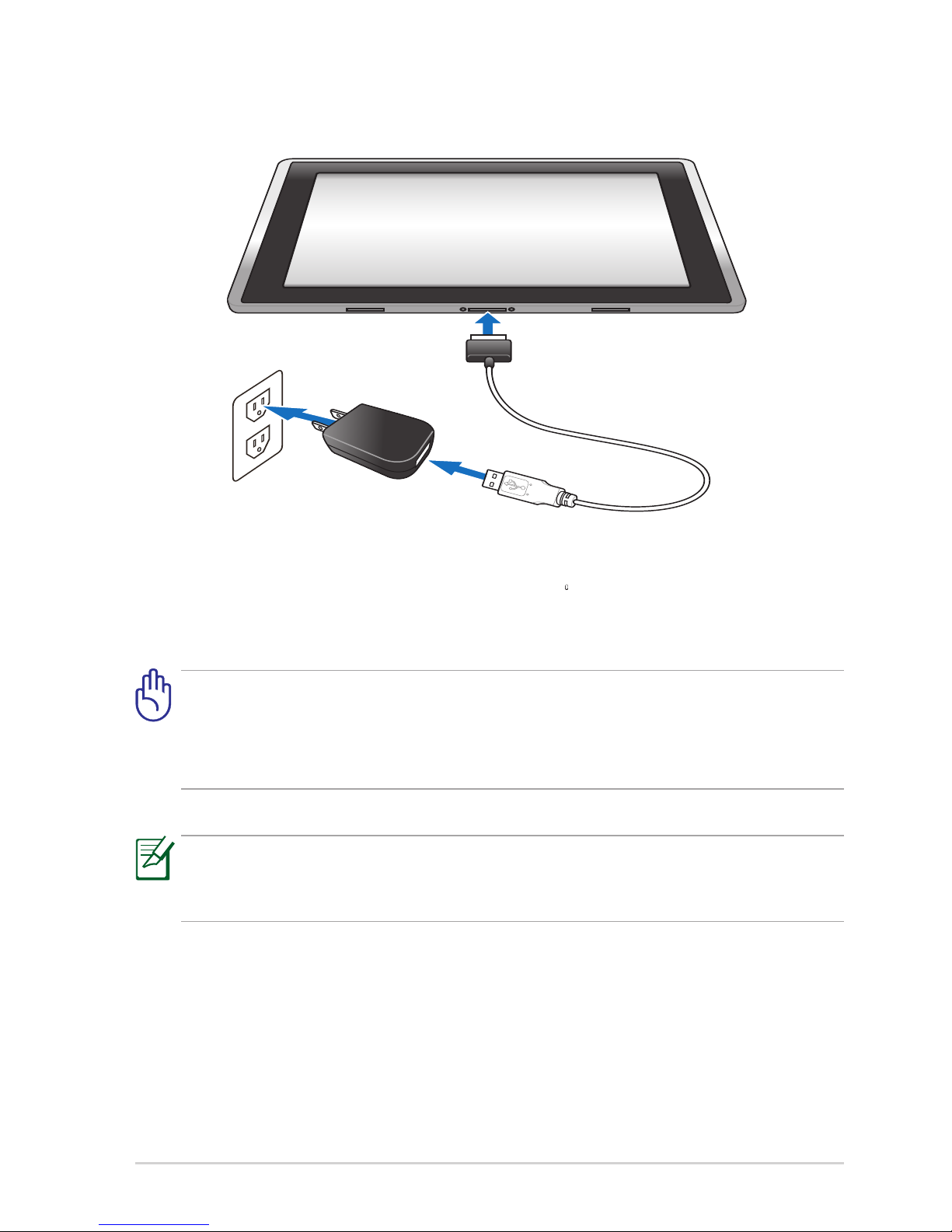
Charging the Eee Pad
• Use only the power adapter that comes with your device. Using a
dierent power adapter may damage your device.
• The input voltage range between the wall outlet and this adapter is
AC 100V–240V, and the output voltage of this adapter is 15V, 1.2A.
To prolong battery life, fully charge the battery for up to 8 hours when
using the Eee Pad for the rst time and whenever the battery power is
fully depleted.
Page 8

ASUS Eee Pad
8
Declarations and Safety Statements
Federal Communications Commission Statement
This device complies with FCC Rules Part 15. Operation is subject to the
following two conditions:
• This device may not cause harmful interference, and
• This device must accept any interference received, including interference
that may cause undesired operation.
This equipment has been tested and found to comply with the limits for a
class B digital device, pursuant to Part 15 of the Federal Communications
Commission (FCC) rules. These limits are designed to provide reasonable
protection against harmful interference in a residential installation. This
equipment generates, uses, and can radiate radio frequency energy and, if
not installed and used in accordance with the instructions, may cause harmful
interference to radio communications. However, there is no guarantee that
interference will not occur in a particular installation. If this equipment does
cause harmful interference to radio or television reception, which can be
determined by turning the equipment o and on, the user is encouraged to
try to correct the interference by one or more of the following measures:
• Reorient or relocate the receiving antenna.
• Increase the separation between the equipment and receiver.
• Connect the equipment into an outlet on a circuit dierent from that to
which the receiver is connected.
• Consult the dealer or an experienced radio/TV technician for help.
The use of a shielded-type power cord is required in order to meet FCC
emission limits and to prevent interference to the nearby radio and
television reception. It is essential that only the supplied power cord be
used. Use only shielded cables to connect I/O devices to this equipment.
You are cautioned that changes or modications not expressly approved
by the party responsible for compliance could void your authority to
operate the equipment.
(Reprinted from the Code of Federal Regulations #47, part 15.193, 1993.
Washington DC: Oce of the Federal Register, National Archives and Records
Administration, U.S. Government Printing Oce.)
Page 9

ASUS Eee Pad
9
FCC Radio Frequency (RF) Exposure Caution
Statement
Any changes or modications not expressly approved by the party
responsible for compliance could void the user’s authority to operate
this equipment. “The manufacture declares that this device is limited to
Channels 1 through 11 in the 2.4GHz frequency by specied rmware
controlled in the USA.”
This equipment complies with FCC radiation exposure limits set forth for an
uncontrolled environment. To maintain compliance with FCC RF exposure
compliance requirements, please avoid direct contact to the transmitting
antenna during transmitting. End users must follow the specic operating
instructions for satisfying RF exposure compliance.
IC Radiation Exposure Statement for Canada
This equipment complies with IC radiation exposure limits set forth for an
uncontrolled environment. To maintain compliance with IC RF exposure
compliance requirements, please avoid direct contact to the transmitting
antenna during transmitting. End users must follow the specic operating
instructions for satisfying RF exposure compliance.
Operation is subject to the following two conditions:
• This device may not cause interference and
• This device must accept any interference, including interference that may
cause undesired operation of the device.
To prevent radio interference to the licensed service (i.e. co-channel Mobile
Satellite systems) this device is intended to be operated indoors and away
from windows to provide maximum shielding. Equipment (or its transmit
antenna) that is installed outdoors is subject to licensing.
This device and its antenna(s) must not be co-located or operating in
conjunction with any other antenna or transmitter.
Country Code selection feature to be disabled for products marketed to the
US/CANADA.
This Class [B] digital apparatus complies with Canadian ICES-003.
Cet appareil numérique de la classe [B] est conforme à la norme NMB-003 du
Canada
Page 10

FCC Regulations:
This device complies with part 15 of the FCC Rules. Operation is subject to the
following two conditions: (1) This device may not cause harmful interference, and (2)
this device must accept any interference received, including interference that may
cause undesired operation.
This device has been tested and found to comply with the limits for a Class B digital
device, pursuant to Part 15 of the FCC Rules. These limits are designed to provide
reasonable protection against harmful interference in a residential installation. This
equipment generates, uses and can radiated radio frequency energy and, if not
installed and used in accordance with the instructions, may cause harmful interference
to radio communications. However, there is no guarantee that interference will not
occur in a particular installation If this equipment does cause harmful interference to
radio or television reception, which can be determined by turning the equipment off
and on, the user is encouraged to try to correct the interference by one or more of the
following measures:
-Reorient or relocate the receiving antenna.
-Increase the separation between the equipment and receiver.
-Connect the equipment into an outlet on a circuit different from that to which the
receiver is connected.
-Consult the dealer or an experienced radio/TV technician for help.
Changes or modifications not expressly approved by the party responsible for
compliance could void the user‘s authority to operate the equipment.
The antenna(s) used for this transmitter must not be co-located or operating in
conjunction with any other antenna or transmitter.
Page 11

4
44
4RF Exposure Information (SAR)
This device meets the government’s requirements for exposure to radio waves.
This device is designed and manufactured not to exceed the emission limits for
exposure to radio frequency (RF) energy set by the Federal Communications
Commission of the U.S. Government.
The exposure standard employs a unit of measurement known as the Specific
Absorption Rate, or SAR. The SAR limit set by the FCC is 1.6W/kg. Tests for
SAR are conducted using standard operating positions accepted by the FCC with the
EUT transmitting at the specified power level in different channels.
The highest SAR value for the device as reported to the FCC is 0.387 W/kg when
placed next to the body.
The FCC has granted an Equipment Authorization for this device with all reported
SAR levels evaluated as in compliance with the FCC RF exposure guidelines. SAR
information on this device is on file with the FCC and can be found under the Display
Grant section of www.fcc.gov/oet/ea/fccid after searching on FCC ID: MSQTF101.
This device is compliance with SAR for general population /uncontrolled exposure
limits in ANSI/IEEE C95.1-1999 and had been tested in accordance with the
measurement methods and procedures specified in OET Bulletin 65 Supplement C.
IC Regulations:
This device complies with Industry Canada licence-exempt RSS standard(s).
Operation is subject to the following two conditions:
(1) this device may not cause interference, and
(2) this device must accept any interference, including interference that may cause undesired
operation of the device.
This Class B digital apparatus complies with Canadian ICES-003.
Cet appareil numérique de la classe B est conforme à la norme NMB-003 du Canada.
This Category II radiocommunication device complies with Industry Canada Standard
RSS-310.
Page 12

Ce dispositif de radiocommunication de catégorie II respecte la norme CNR-310 d’Industrie
Canada.
IMPORTANT NOTE:
IC Radiation Exposure Statement
This EUT is compliance with SAR for general population/uncontrolled exposure limits in IC
RSS-102 and had been tested in accordance with the measurement methods and procedures
specified in IEEE 1528. This equipment should be installed and operated with minimum
distance 0cm between the radiator & your body.
This device and its antenna(s) must not be co-located or operating in conjunction with any
other antenna or transmitter.
The County Code Selection feature is disabled for products marketed in the US/Canada.
For product available in the USA/ Canada markets, only channel 1~11 can be operated.
Selection of other channels is not possible.
Page 13
ASUS Eee Pad
10
Power Safety Requirement
Products with electrical current ratings up to 6A and weighing more than
3Kg must use approved power cords greater than or equal to: H05VV-F, 3G,
0.75mm2 or H05VV-F, 2G, 0.75mm2.
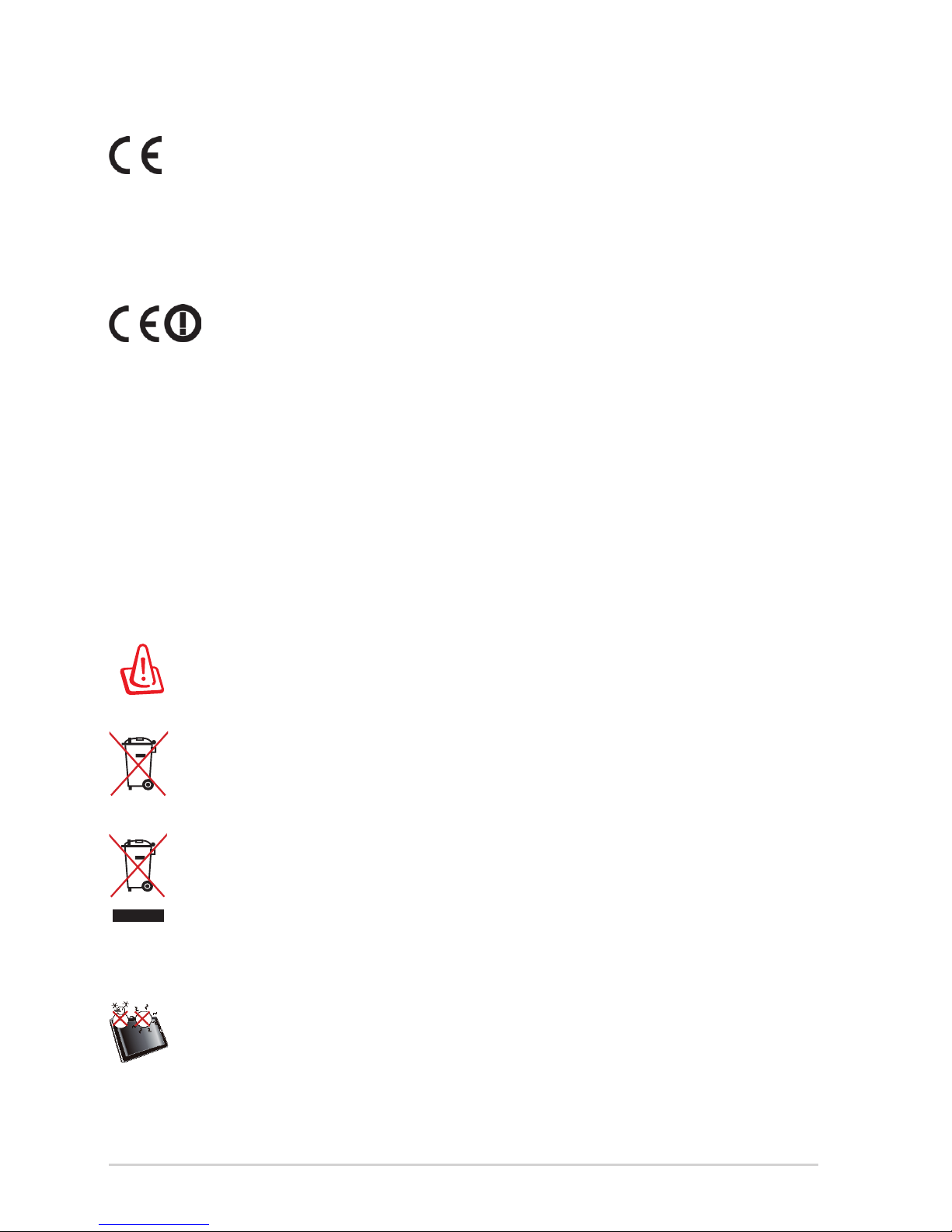
DO NOT throw the battery in municipal waste. The symbol of the
crossed out wheeled bin indicates that the battery should not be
placed in municipal waste.
DO NOT throw the Eee Pad in municipal waste. This product has been
designed to enable proper reuse of parts and recycling. The symbol
of the crossed out wheeled bin indicates that the product (electrical,
electronic equipment and mercury-containing button cell battery)
should not be placed in municipal waste. Check local regulations for
disposal of electronic products.
SAFE TEMP: This Eee Pad should only be used in environments with
ambient temperatures between 5°C (41°F) and 35°C (95°F).
Risk of Explosion if Battery is Replaced by an Incorrect Type.
Dispose of Used Batteries According to the Instructions.
CE Mark Warning
CE marking for devices without wireless LAN/Bluetooth
The shipped version of this device complies with the requirements of the EEC
directives 2004/108/EC “Electromagnetic compatibility” and 2006/95/EC “Low
voltage directive”.
CE marking for devices with wireless LAN/ Bluetooth
This equipment complies with the requirements of Directive 1999/5/EC of the
European Parliament and Commission from 9 March, 1999 governing Radio
and Telecommunications Equipment and mutual recognition of conformity.
Page 14

ASUS Eee Pad
11
Copyright Information
No part of this manual, including the products and software described
in it, may be reproduced, transmitted, transcribed, stored in a retrieval
system, or tranPadd into any language in any form or by any means, except
documentation kept by the purchaser for backup purposes, without the
express written permission of ASUSTeK COMPUTER INC. (“ASUS”).
ASUS and Eee Pad logo are trademarks of ASUSTek Computer Inc.
Information in this document is subject to change without notice.
Copyright © 2010 ASUSTeK COMPUTER INC. All Rights Reserved.
Limitation of Liability
Circumstances may arise where because of a default on ASUS’ part or other
liability, you are entitled to recover damages from ASUS. In each such
instance, regardless of the basis on which you are entitled to claim damages
from ASUS, ASUS is liable for no more than damages for bodily injury (including
death) and damage to real property and tangible personal property; or
any other actual and direct damages resulted from omission or failure of
performing legal duties under this Warranty Statement, up to the listed
contract price of each product.
ASUS will only be responsible for or indemnify you for loss, damages or claims
based in contract, tort or infringement under this Warranty Statement.
This limit also applies to ASUS’ suppliers and its reseller. It is the maximum for
which ASUS, its suppliers, and your reseller are collectively responsible.
UNDER NO CIRCUMSTANCES IS ASUS LIABLE FOR ANY OF THE FOLLOWING: (1)
THIRD-PARTY CLAIMS AGAINST YOU FOR DAMAGES; (2) LOSS OF, OR DAMAGE
TO, YOUR RECORDS OR DATA; OR (3) SPECIAL, INCIDENTAL, OR INDIRECT
DAMAGES OR FOR ANY ECONOMIC CONSEQUENTIAL DAMAGES (INCLUDING
LOST PROFITS OR SAVINGS), EVEN IF ASUS, ITS SUPPLIERS OR YOUR RESELLER
IS INFORMED OF THEIR POSSIBILITY.
Page 15

ASUS Eee Pad
12
Manufacturer ASUSTek COMPUTER INC.
Address, City No. 150, LI-TE RD., PEITOU, TAIPEI 112, TAIWAN R.O.C
Country TAIWAN
Authorized
Representative in Europe
ASUS COMPUTER GmbH
Address, City HARKORT STR. 21-23, 40880 RATINGEN
Country GERMANY
 Loading...