

Page 1
ASA Flight
Timer
Instruction Manual
Contents
Features ............................................... 2
Controls and Indicators ....................... 3
Parts and Assembly ............................. 3
Getting Started ................................... 3
Battery Replacement .......................... 5
Button Functions ................................. 5
Clock Function ..................................... 6
Fuel Timer Function ............................ 8
Chronograph Function...................... 10
Approach Timer Function ................. 11
Note/Scratchpad Function ................ 13
Backlight Operation .......................... 14
Device Reset ...................................... 14
Care .................................................... 14
Specifications ..................................... 15
ASA Products ..................................... 15
Limited Warranty .............................. 15
1
Page 2

Congratulations on your purchase of the Flight
Timer from Aviation Supplies & Academics, Inc.
(ASA). This is a quality timekeeping instrument
engineered to meet the needs of pilots. We hope you
enjoy the functionality and convenience of your new
Flight Timer.
Features
◆
Large, readable LCD display
◆
Uniform LED backlight preserves night vision
◆
Auto shut-off backlight extends battery life
◆
Multi-function clock:
• AM/PM indicator
• Military time
• Universal coordinated (“Zulu”) time
◆
Allows simultaneous timing of three events
◆
Stopwatch with 1/10th and 1/100th second
digits
◆
Fuel timer notifies you when to switch fuel tanks
◆
Approach timer stores 12 approach times
◆
Audible and visible alarms
◆
Intuitive push and rotate dial sets times quickly
◆
5-digit note can remember important flight
numbers
◆
Low battery indicator
◆
Multiple mounting options:
• Clips onto flight board
• Hook & loop attaches to panel or yoke clip
◆
Uses two AAA batteries (included)
◆
Sleek, ergonomic design
◆
Count-up or count-down timer function
2
Page 3

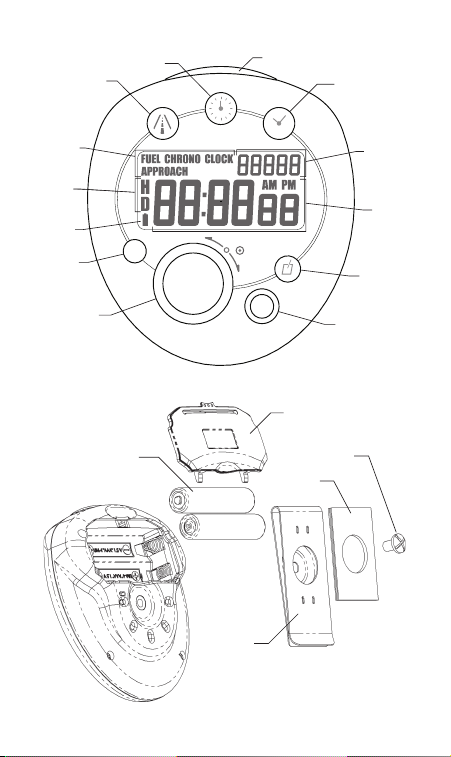
Controls and Indicators
LCD Display Icons
1 Mode indicators
2 Home/Destination approach time memory banks
3 Low battery indicator
4 5-digit note scratchpad
5 Clock and timer display
Buttons
6 CLOCK
7 START/STOP
8 FUEL/CHRONO
9 APPROACH
10 RESET
11 DIAL
12 BACKLIGHT SWITCH
13 NOTE
Parts and Assembly
14 2 AAA Alkaline batteries
15 Mounting clip
16 Battery cover
17 Hook & loop mounting pad (optional)
18 Metric clip screw (M4 x 0.8mm)
Getting Started
To begin using your Flight Timer, turn the timer over
and remove the battery tab. The timer should begin
functioning.
Note: The Timer is intended to function effectively
within an extensive span of atmospheric conditions.
However, if subjected to direct sunlight or excessive
temperatures for a prolonged period of time, the
display may go black or you may see a rainbow effect
(most visible when wearing polarized sunglasses).
3
Page 4
14
15
16
17
18
APPROACH
CLOCK
FUEL / CHRONO
TIME SET
H = HOME
D = DESTINATION
+
-
NOTE
APPROACH
RESET
LIGHT
00
UTC
1
2
3
4
5
6
7
8
9
10
11
12
13
4
Page 5

If this happens, remove the timer from the heat and
sunlight and it will display correctly within several
minutes.
Battery Replacement
Follow these steps to replace the batteries:
◆
First, remove clip screw and mounting clip.
◆
Press snap tab down and remove battery cover.
◆
Install 2 AAA Alkaline batteries according to
polarity diagram.
◆
Check to see that timer display is on.
◆
To reinstall battery cover, insert bottom lugs first
then snap into place.
◆
Install mounting clip by tightening screw into
threaded insert.
◆
Timer is ready for use.
Button Functions
CLOCK (6)—Displays time. Multiple presses toggle
between standard time (AM/PM), military 24-hour
time and universal time (UTC or “Zulu”).
FUEL/CHRONO (8)—Jumps to fuel timer from
any other mode. Subsequent presses toggle between
fuel and chrono (stopwatch) modes.
APPROACH (9)—Jumps to approach timer from
any other mode.
NOTE (13)—Press to set note data.
START/STOP (7) —Starts a stopped timer, stops
a started timer. Also stops the audible and visible
alarm for the currently displayed timer.
DIAL (11) push—Pushing the dial knob allows the
current timer, clock or note data to be set. Flashing
digits indicate the current digits being modified.
Subsequent presses step through the data being set
5
Page 6

(i.e., from hours to minutes to seconds). The knob
must be pressed and held for 2 seconds in order to
set the clock data.
DIAL rotate—Clockwise rotation increments and
counterclockwise rotation decrements the flashing
digits on the screen.
RESET (10)—Resets the fuel timer, chrono, or note
to zero. In approach mode, the first press recalls the
last preset value, the second press resets the timer to
zero. When setting clock, resets time to 12:00 PM.
LIGHT (12)—Toggles backlight on and off.
Backlight will stay on for 5 minutes then shut off.
Alternate Functionality: CLOCK, APPROACH, and
NOTE can also accept a flashing value rather than
stepping all the way through using the DIAL push
button.
Clock Function
The Flight Timer keeps track of the current time and
provides three display options:
◆
Standard 12-hour time (AM/PM)
◆
24-hour military time
◆
Universal coordinated time (UTC or “Zulu”)
The “CLOCK” icon appears in the upper portion of
the display when clock mode is active. If a different
mode is active, press the CLOCK button to display
the current time.
Display Formats
Press the CLOCK button to view the alternate
display formats, standard with “AM” or “PM” (Fig 2),
military (Fig 3) and UTC (Fig 4). UTC format
displays hour digits associated with universal time,
the minutes and seconds are identical to the other
formats.
6
Page 7
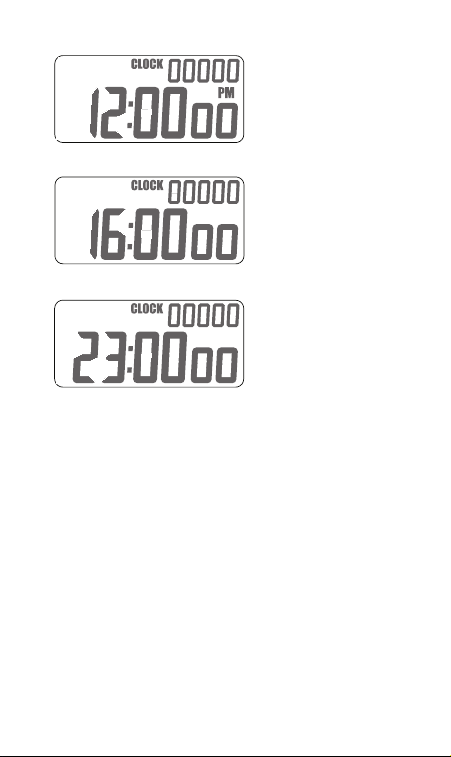
Fig 2—Standard 12-hour time format
UTC
Fig 3—Military time format
Fig 4—Universal coordinated time (UTC) format
Setting Time
◆
With standard or military time formats
displayed, push and hold DIAL until the hour
digits flash (about 2 seconds).
Trick —Press RESET at 0 seconds to reset to
12:00:00, then seconds will not need resetting later.
◆
Rotate DIAL to set the hours.
◆
Push DIAL. The minute digits will flash.
◆
Rotate DIAL to set the minutes.
◆
Push DIAL. The second digits will flash.
◆
Rotate DIAL to set the seconds.
◆
Push DIAL to finish setting time.
7
Page 8

Setting UTC Hour
◆
With UTC time format displayed, push and
hold DIAL until the hour digits flash (about 2
seconds).
◆
Rotate DIAL to set the hours.
◆
Push DIAL to finish setting UTC hour digits.
Fuel Timer Function
The Flight Timer includes a fuel timer function
to time the intervals between fuel tank selections
or other intermittent events. Fuel timer features
include:
◆
Up to 99-hour timer
◆
Count-up or countdown operation
◆
Audible and visible countdown alarm
◆
Operates independently from other timers and
clock
The “FUEL” icon appears in the upper portion of the
display when fuel mode is active. If a different mode
is active, press the FUEL/CHRONO button to display
the fuel timer.
Count-up Operation
Count-up operation can be used to track the
duration of events up to 99 hours and 59 minutes
long. No alarm will sound when counting up.
◆
If timer is running press START/STOP to stop
timer.
◆
Press RESET to zero timer as shown in Fig 5.
◆
Press START/STOP to start timer. Seconds will
begin to count up.
◆
Press START/STOP to stop timer.
8
Page 9
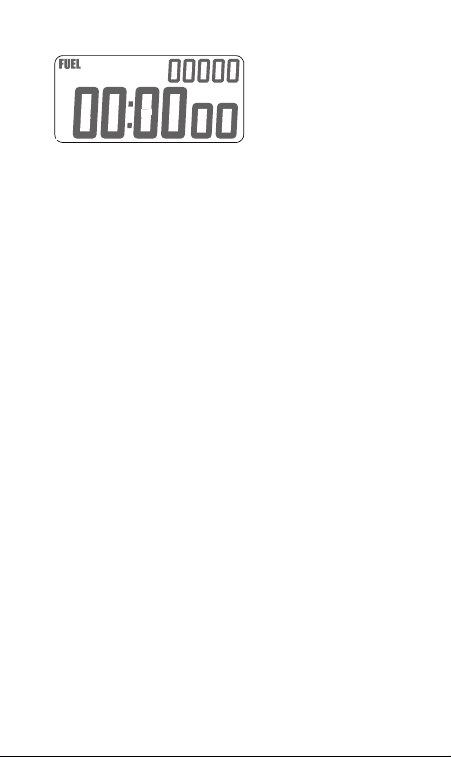
Fig 5—Fuel timer display
Countdown Operation
Countdown operation can be used to time the
interval between events. A beeping alarm, flashing
icons and backlight notify the user that time has
elapsed.
◆
If timer is running press START/STOP to stop
timer.
◆
Press RESET to zero timer as shown in Fig 5.
◆
Push DIAL. The hour digits will flash.
◆
Rotate DIAL to set hours.
◆
Push DIAL. The minute digits will flash.
◆
Rotate DIAL to set minutes.
◆
Push DIAL. The second digits will flash.
◆
Rotate DIAL to set seconds.
◆
Push DIAL to save.
Fuel Timer Alarm
When the fuel timer counts down to zero the Flight
Timer sounds an audible and visible alarm then
begins to count up, measuring the time since the
alarm. If fuel mode is active, the hour, minute and
second digits flash. If another mode is active, the
“FUEL” icon flashes to indicate a fuel timer alarm.
The audible alarm and flashing backlight cease after
10 seconds or when the alarm is canceled.
9
Page 10
Canceling the Fuel Timer Alarm
◆
If a mode other than fuel is active, press
FUEL/CHRONO.
◆
Press START/STOP to stop flashing digits.
◆
Elapsed time since alarm is maintained on
screen.
Chronograph Function
The Flight Timer includes a chronograph
(stopwatch) function for precise measurement of
time intervals. The features of this timer are:
◆
Count-up measurement only.
◆
Precise 1/10th and 1/100th second digit display.
◆
Counts up to 99 minutes.
◆
Operates independently from other timers and
clock.
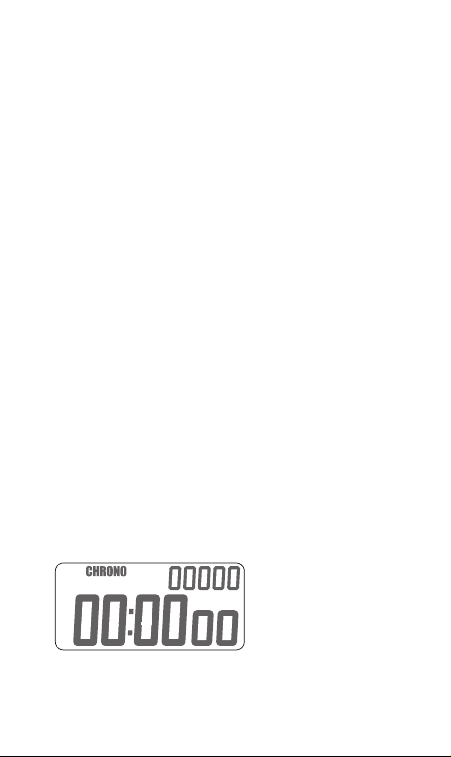
The “CHRONO” icon appears in the upper portion
of the display when chronograph mode is active. If a
different mode is active, press the FUEL/CHRONO
button to display the chronograph timer.
Chronograph Operation
◆
Press RESET to zero timer as shown in Fig 6.
◆
Press START/STOP to start chronograph.
◆
Press START/STOP to stop chronograph.
◆
Press START/STOP again to restart from same
point or RESET to zero.
Fig 6—Chronograph (stopwatch) display
10
Page 11

Approach Timer Function
The Flight Timer includes an approach timer
function to time approach intervals. For
convenience, multiple approach times can be
programmed prior to flight. Features include:
◆
Count-up or countdown operation.
◆
Up to 59-minute 59-second timer.
◆
Stores 6 home (H) airport approach times.
◆
Stores 6 destination (D) airport approach times.
◆
Preset approach times can be recalled with the
push of a button.
◆
Audible and visible countdown alarm.
◆
Operates independently of other timers and clock.
The “APPROACH” icon appears in the upper portion
of the display when approach mode is active. If
a different mode is active, press the APPROACH
button to display the approach timer.
Selecting an Approach Time
There are 12 approach times stored in memory. Six
are labeled H1, H2, H3, H4, H5, H6 and six are
labeled D1, D2, D3, D4, D5, D6. Rotate the DIAL to
view these one at a time. In a new timer, they will all
be zero.
Count-up Operation
Count-up operation can be used to track the
duration of events. No alarm will sound when
counting up.
◆
If timer is running press START/STOP to stop
timer.
◆
Press RESET to zero timer as shown in Fig 7.
◆
Press START/STOP to start timer. Seconds will
begin to count up.
◆
Press START/STOP to stop timer.
11
Page 12
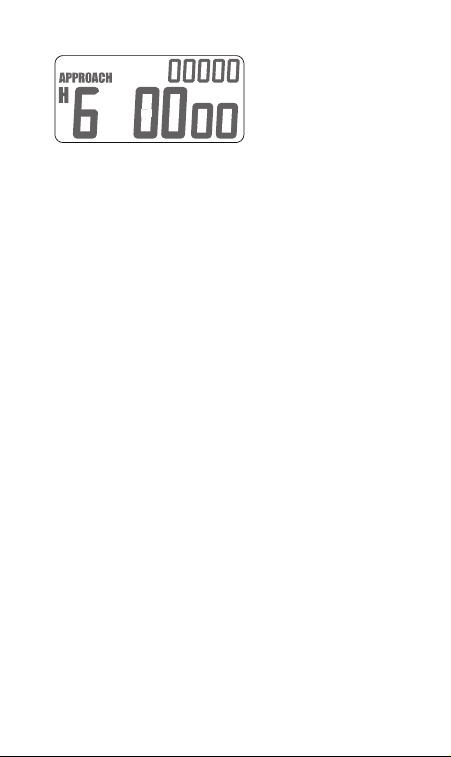
Fig 7—Approach timer display
Countdown Operation
Countdown operation can be used to time the
interval between events. A beeping alarm, flashing
icons and backlight notify the user that time has
elapsed.
◆
If timer is running press START/STOP to stop
timer.
◆
Rotate DIAL to select an approach time (H1-H6
or D1-D6).
◆
Push DIAL. The minute digits will flash.
◆
Rotate DIAL to set minutes.
◆
Push DIAL. The second digits will flash.
◆
Rotate DIAL to set seconds.
◆
Push DIAL to save or push START/STOP to start
timer directly.
◆
START/STOP starts the timer counting down.
Once started, it is not possible to reach other
approach times.
Approach Timer Alarm
When the approach timer counts down to zero the
Flight Timer sounds an audible and visible alarm
then begins to count up, measuring the time since
the alarm. If approach mode is active, the hour,
minute and second digits flash. If another mode is
active, the “APPROACH” icon flashes to indicate
an approach timer alarm. The audible alarm and
12
Page 13

flashing backlight cease after 10 seconds or when the
alarm is canceled.
Canceling the Approach Timer Alarm
◆
If a mode other than approach is active, press
the APPROACH button.
◆
Press START/STOP to stop flashing digits.
◆
Time since alarm is maintained on screen.
Recalling Stored Approach Times
With the approach timer stopped:
◆
Press RESET to recall the last saved time.
◆
Pressing RESET a second time clears the memory
location.
◆
Alternatively the DIAL can be rotated away from
then back to the current memory location to
recall the last saved time.
Note/Scratchpad Function
The Flight Timer includes a 5-digit numeric note
displayed in the upper right corner of the LCD. Use
it as a scratchpad for remembering important flight
numbers such as approach altitudes, frequencies, or
squawk codes. This note is always displayed and can
be accessed from any mode as follows:
◆
Press NOTE. The two highest digits will flash.
◆
Rotate DIAL to set first two digits.
◆
Push DIAL. The hundreds digit will flash.
◆
Rotate DIAL to set the hundreds digit.
◆
Push DIAL. The tens digit will flash.
◆
Rotate DIAL to set the tens digit.
◆
Push DIAL. The ones digit will flash.
◆
Rotate DIAL to set the ones digit.
◆
Push DIAL to accept note.
◆
Also, pressing NOTE at any time while setting
will accept the current note value.
13
Page 14

Backlight Operation
The Flight Timer includes a LED backlight system
for night visibility. Toggle on and off by pressing
the LIGHT button. If left on, the backlight will
automatically shut itself off after 5 minutes. Prior to
auto shut-off, the backlight will flash ten times to
announce that it is shutting off. Use of the backlight
greatly increases battery drain (see specifications for
details). For extended battery life, avoid excessive
use of the backlight.
Device Reset
The Flight Timer includes a user enabled reset in
case of malfunction. Press and hold NOTE and
START/STOP for several seconds to reset the device.
Under normal use, avoid holding these buttons
simultaneously since the reset clears the clock, timers
and approach memories.
Care
The ASA Flight Timer will provide years of service if
cared for properly. We suggest that you:
1. Avoid drops or shocks to the unit that could
damage the case or screen.
2. Protect your timer from dirt, dust, and water.
3. Cleaning with a damp cloth is OK but never
submerge your timer.
4. Avoid exposure to extreme temperatures. Do
not leave your timer exposed in the aircraft on
sunny days. Take it with you.
14
Page 15

Specifications
Voltage: 3V DC supplied by 2 AAA batteries
Current (backlight off): 4 µA typical
Current (backlight on): 40 mA typical
Expected battery life (no backlight use): >10 years
Expected battery life (continuous backlight use):
30 hours
Service temperature range: -4°F to 130°F (-20°C to
54°C)
ASA Products
ASA materials are used and sold by schools and retail
locations worldwide. For information about the
location nearest you and a free copy of the
ASA catalog, call Sales and Service: 800-ASA-2-FLY
Fax: (425) 235-0128 • Website: www.asa2fly.com
Aviation Supplies & Academics, Inc.
7005 132nd Place SE
Newcastle, Washington 98059-3153
Limited Warranty
Aviation Supplies & Academics, Inc. (ASA)
warrants this ASA Flight Timer to the original
purchaser for a period of five years from the initial
date of purchase, against defects in material and
workmanship. Batteries are not covered by this
warranty.
For the above five-year limited warranty period, ASA
will either amend or substitute a reconditioned
model of identical quality (at ASA’ s option),
provided the product is returned postage prepaid
to ASA. In the event of substitution with a
reconditioned model, the warranty of the original
instrument will be upheld. Other than the above
15
Page 16

requirements, repair, adjustments and/or
substitutions will be made at no charge.
ASA strives to provide the most rugged and
reliable equipment possible. So few items are
received for repair that it is not economical to
maintain parts inventory, test equipment, and
trained repair technicians to perform electronic
repair work. Therefore, a replacement unit (new
or remanufactured) is sent in exchange for units
returned for service or repair.
ASA will not be liable for lapse of use of the
instrument or other secondary or sequential costs,
expenditures, or damages brought about by the
purchaser. Implied warranties originating out of
this sale, including but not limited to the implied
warranties of merchantability and fitness for a
particular purpose, are limited in duration to the
above five-year period. ASA shall not be liable for
loss of use of the instrument or other incidental or
consequential costs, expenses, or damages incurred
by the purchaser.
Some states do not allow the exclusion or limitation
of implied warranties or consequential damages; so,
the above limitations or exclusions may not apply
to you.
Record the purchase date in the space provided
below. Refer to this when contacting ASA regarding
this product.
The ASA Flight Timer is an instruction and pilot
information aid, and is not an avionics instrument.
Purchase Date: ______________________________
US Pat. No. 7,187,303
Made in China
16
 Loading...