

Page 1

INTERNATIONAL LIMITED WARRANTY
ARX Systems (ARX) warrants to the first purchaser of any ARX equipment that it is
free from defects in materials and workmanship under normal use and service. ARX’s
sole obligation under this warranty shall be to provide, without charge, parts and
labour necessary to remedy defects, if any, which appear within twelve (12) months
from date of purchase, and for a further twelve (12) months supply parts only.
This is our only warranty. It does not cover finish or appearance items, or burned
voice coils, if the equipment has been, in ARX’s sole judgement:
• Subjected to misuse, abuse, negligence or accident;
• Repaired , worked on, or altered by persons not authorized by ARX;
• Connected, installed, adjusted or used for a purpose other than that for
which it was designed. This includes damage cause by connection to the
wrong AC voltage, and running speaker systems (a) without the appropriate
ISC processor (b) with a non ARX crossover, or (c) with the ISC
disconnected or bypassed.
This warranty gives you and us specific legal rights and there may also be other rights
and considerations which can apply.
Warranty Service Procedure
Should it become necessary to have your equipment serviced under the terms of the warranty, please
follow these steps:
1. Call your Distributor for Return Authorisation, freight details and Return address
2. Carefully repack the unit, in its original packaging where possible. If not, use plenty of packing
material - better to be safe than sorry.
3. Include a note with a description of the problem
4. Include a copy of the receipt/invoice showing date of purchase.
5. Don’t forget to write your name and address clearly, and include a phone number where you can be
contacted during normal business hours. Make it easy for the service technicians to contact you if they
have a question.
6. Attach all these to the actual unit itself.
7. We strongly recommend you insure the package. We can’t fix it if it gets lost! Send it prepaid by UPS,
Fedex, DHL or a similar parcel service that can track the package. Parcel post is not recommended!
If Warranty Registration Card is missing, please contact ARX, stating model, and where & when
purchased.
ARX Head Office, PO Box 15, Moorabbin, Victoria 3189, Australia
Phone +61 3 9555 7859 Fax +61 3 9555 6747 Email: [email protected]
ZA 5•1ZA 5•1
ZA 5•1
ZA 5•1ZA 5•1
Surround Sound
PowerAmplifier
OWNER’S MANUAL
ARXARX
ARX Systems Pty Ltd, PO Box 15,
ARXARX
Moorabbin, Victoria 3189, Australia
PhonePhone
Phone: (03) 9555 7859
PhonePhone
International FaxInternational Fax
International Fax: +61-3 -9555 6747
International FaxInternational Fax
On the WebOn the Web
On the Web: www.arx.com.au
On the WebOn the Web
EmailEmail
Email: [email protected]
EmailEmail
FaxFax
Fax: (03) 9555 6747
FaxFax
8 1
ZA5.1 Surround Amplifier Owner's Manual world v 1.6 CE ©2003 ARX® ZA5.1 Surround Amplifier Owner's Manual world v 1.6 CE ©2003 ARX®
Page 2
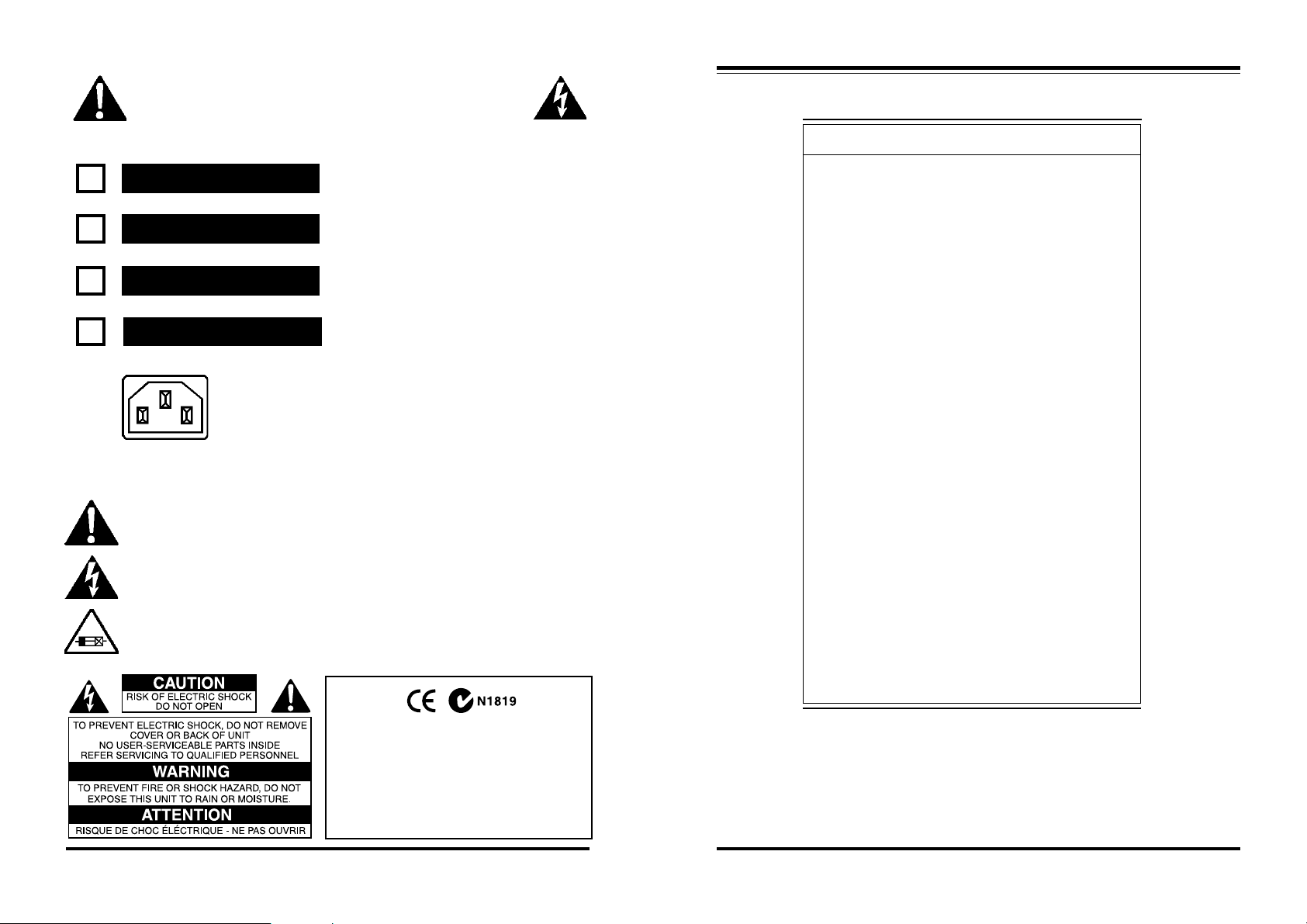
IMPORTANT - This amplifier is designed to be
connected ONLY to the AC voltage ticked below
It is essential that you check that
100 V AC, 50 - 60 Hz
this voltage is correct for your
area before connecting it to AC
120 V AC, 50 - 60 Hz
power. Do not plug power cable
into AC power until voltage has
been checked. If incorrect, contact
220-240 V AC, 50 - 60 Hz
your ARX distributor.
Your warranty does not cover
240 V AC, 50 - 60 Hz
This model has a removable AC power lead that connects to an
IEC connector (See Picture at Left)
WARNING SYMBOLS USED ON THIS EQUIPMENT
This symbol is intended to alert you to the presence of important operating instructions
contained in this owner's manual
connecting the amplifier to the
wrong voltage AC power!
!
Specifications
Power Output :
Channels 1 - 5 @ 8 ohms: 75 w RMS
Channels 1 - 5 @ 4 ohms: 100 w RMS
Sub Channel @ 8 ohms: 180 w RMS
Sub Channel @ 4 ohms: 250 w RMS
Distortion:
1 Watt @8 ohms, 1 KHz .01%
Channel Separation:
@ 1KHz -88dB
@ 10KHz -80dB
Front panel indicators:
Clip LED: yes
Protection LED: yes
Weight:
Kg 14
Lbs 30
Size 2 RU High (89 mm)
19” Wide (482 mm)
16” Deep (400 mm)*
Input sensitivity: for
rated output 8 ohms: .775V
Frequency response:
@ rated output: 20Hz - 20KHz ±4dB
This symbol is intended to alert you to the presence of uninsulated dangerous voltage within
the product's enclosure that may be of sufficient magnitude to constitute a risk of electric
shock.
This symbol indicates that a Slow Blow fuse is used in this equipment. Replace with same
type and value only
Complies with 89/336/EEC EMC Directive, amended
by 92/31/EEC and 93/68/EEC and meets the following
standards:EN 55013 : 1990, Sections 3.2 and 3.5 EN
55020 : 1988, Sections 4.3, 5.4, 6.2, 7.0, 8.0.
Complies with Australian Standard AS/N25 1053
2
ZA5.1 Surround Amplifier Owner's Manual world v 1.6 CE ©2003 ARX® ZA5.1 Surround Amplifier Owner's Manual world v 1.6 CE ©2003 ARX®
CMRR >70dB @ 1 KHz
Input Impedance: 40 Kohms Balanced
Input Connectors: Jack
Output Connectors: Neutrik Speakon
Construction All steel monocoque
* Add 30mm to depth behind front panel to allow for rear rack mount
ears and handles; add 30mm to depth before front panel to allow for
handles and volume controls (if fitted)
7
Page 3
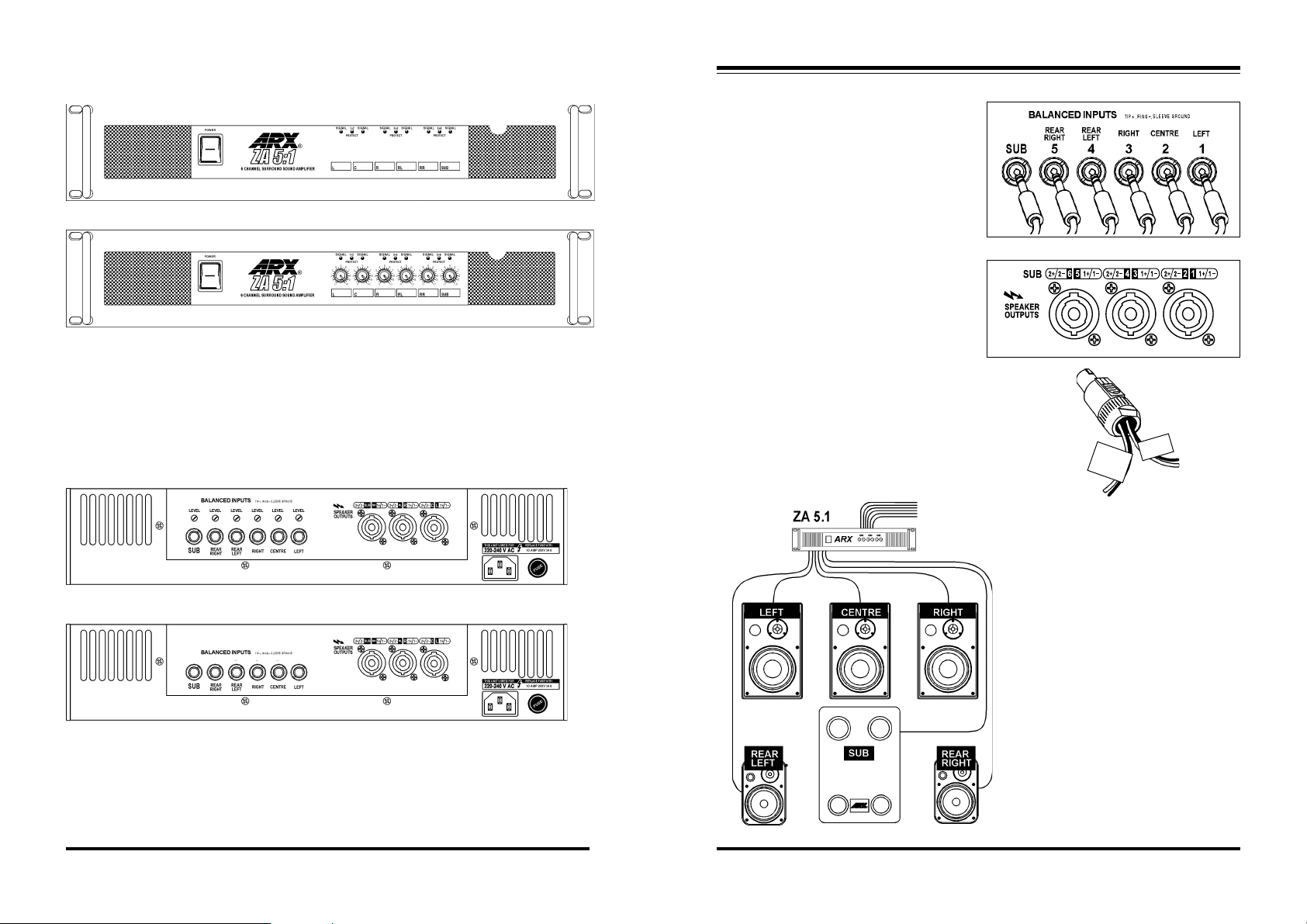
Front Panel Layout
Standard VR (Volume Rear) Model
➊
➏
➎
Optional VF (Volume Front) Model
➊
➏
➎
1. EasyGrip Handles
2. Detented Level controls(VF only)
3. Protection, Clip LEDs
4. 4 mm steel front panel
Rear Panel Layout
Standard VR (Volume Rear) Model
➊
➏
Optional VF (Volume Front) Model
➊
➏
1. Balanced Jack Inputs
2. 20 turn Level controls (VR only). Note
that amplifiers are shipped with these
controls set at maximum (no attenuation)
3. Neutrik Speakon Output Connectors
➍
➍
➋
➌
➌
➐
➐
➋
5. Non-scratch Lexan printed panel
6. Illuminated power switch
7. Fan filters. Remove, clean and replace
monthly or at first sign of clogging
➌
➍
➌
➍
4. AC power connector
5. AC Fuse. Replace with value as
marked only
6. Heavy Duty Rear rack ears for four
point racking
➎
➎
Connecting up your ZA 5.1
The ZA 5.1 accepts 6 discrete inputs from your
surround processor. These connect to the six
input jacks as shown in Fig 1.
The Speaker outputs are fully insulated Neutrik
Speakon 4 pole connectors, each handling 2
channels.
Connector 1 Left and Centre
Connector 2 Right and Rear Left
Connector 3 Rear Right and SUB
It’s a good idea to label each speaker cable pair at
each end (amplifier end and also speaker cabinet
end) to help you connect the system correctly.
(Fig. 3) Make sure the polarity of the amplifier
outputs matches the polarity of the speakers . i.e.
+ to +, – to – .
Fig. 4
From surround
processor
Fig. 1
Fig 2.
Fig.3
REAR
RIGHT
Connect all the input and output leads,
double check the wiring, and ensure that
the level controls are turned down before
powering up the system. With an incoming
signal running, turn up each volume control
a small amount to check that everything is
running correctly before increasing the
levels.
Fig. 4 shows a surround sound system
layout using ARX Ambience 5 cabinets for
Left, Centre, Right; Ambience 1 cabinets
as Left Rear and Right Rear; and an
AmbiSUB as the Sub Bass cabinet.
SUB
4
ZA5.1 Surround Amplifier Owner's Manual world v 1.6 CE ©2003 ARX® ZA5.1 Surround Amplifier Owner's Manual world v 1.6 CE ©2003 ARX®
5
Page 4

WARNING!
THERE ARE NO USER SERVICEABLE PARTS INSIDE THE AMPLIFIER, SO PLEASE
DON’T TAKE THE LID OFF AND POKE AROUND!
Amplifiers run on DC voltages provided by the amplifier’s internal power supply. The ZA series
have separate + and - DC fuses for both channels, mounted internally on the main circuit board.
The power Mosfets used in the amplifiers are extremely rugged devices, and the correct rating
fuses in the power supply ensure that the amplifier circuitry is protected from short circuit
damage.
A blown DC fuse will be indicated by a very distorted low volume output from that side of the
amplifier. A blown AC fuse will be indicated by nothing working at all - check to see if the fans
are turning.
Any blown fuse should be investigated. It doesn’t necessarily mean that something is wrong with
the amplifier, but indicates that there is something wrong in the complete signal path, from the
mixing console to the speakers.
If a fuse blows:
Get a qualified service person to inspect inside the amplifier. Please don’t do it yourself! There
are very dangerous voltages inside amplifiers, even when they have been turned off!
Things to check before you plug your amplifier in
Mains AC power - check that the voltage on your amplifier is the same as the voltage at the power
point. It is a very good idea to check this before plugging the amplifier into the power
point! Be especially careful of plugging into unchecked ‘piggyback’ plugs, power distribution
boxes or extension cables.
Your warranty does not cover damage caused by incorrect wiring.
Make sure the amplifier is connected to the same AC power supply and Earth/Ground as the
rest of the system, otherwise you may set up a Ground loop hum.
We strongly recommend that you use the rear mounting slots as well as those on the front panel.
There are 2 cooling fans on the ZA amplifiers to force air around and through the heatsinks. Do
not block the air exit path!
Air flow and cooling
It is extremely important that you ensure that there is unrestricted air access to these fans, and also
unrestricted air exit path. Clean the fan filters regularly or at the first sign of becoming clogged.
All ZA amplifiers have sufficient fan cooling capacity built in, and need no extra external fan cooling to
operate normally. Their compact ‘UltraFin’ heatsinks provide massive surface areas for rapid cooling
and stable temperatures.
BUT...If you are racking up a ZA amplifier, you MUST
WARM AIR OUT
AT REAR
COLD AIR IN
FROM FRONT
allow space in the rack for the air to exit from the rear
of the amplifier.
If you are using a rack that has a sealed rear panel, then
the normal fan cooling of the amplifiers must be
supplemented by additional fan forced air extraction
from the rack. All that air being pumped in by the fans
has to exit somewhere!
Remember that Power = Heat, and Maximum air flow =
successful heat management.
Introduction
Thank you for choosing this ARX amplifier. We hope you enjoy using it as much as we enjoyed creating
it. It is a precision engineered product designed for professional use in all pro-audio applications, and
as such, a working knowledge of basic electronic safety procedures is assumed on the part of the
operator.
Like all ARX equipment, it has undergone extensive factory calibration, testing and ‘burn in’ before
shipping. To ensure continued trouble free use, please familiarise yourself with the contents of this
manual before using.
About the ZA 5.1 amplifier
The ZA 5.1 is a multi channel surround sound amplifier designed from the ground up for the intensive
duty cycle that today’s installations demand. More power, more protection; less heat, less weight, and
most of all - better sound.
It consists of 5 full range channels, i.e. Left, Centre, Right, Rear Left and Rear Right, plus a
dedicated Sub Bass channel. It is ideally suited for all high end surround sound installations and home
theatres.
The ZA 5.1 uses the new generation Lateral Mosfet devices for the all-important amplifier output
stage, ensuring an ultra fast high frequency, high current-to-load measured in nanoseconds, up to 100
times faster than amplifiers using conventional Bipolar transistors.
Based on the core technology developed by ARX for our new range of ISC Loudspeaker
Processors, our new ‘Headroom Enhance’ circuitry provides Maximum power output levels under all
rated load conditions, eliminating Output Stage clipping.
Advanced computer modelling of the ZA 5.1 chassis design has put strength where it’s needed,
and reduced excess weight where possible. Coupling this with the use of compact toroidal transformers
has resulted in an excellent power-to-weight ratio.
A new re-settable High Current relay switched protection circuit instantly disconnect the speakers
when a potentially damaging signal or amplifier error is detected.
New Input delay muting circuitry eliminates switch on/switch off noise.
Dual variable speed cooling fans circulate cooling air through ARX’s proven ‘UltraFin
ensuring that the Mosfet output devices are kept well within their thermal tolerance levels under all
operating conditions.
As a company, ARX is dedicated to producing pro audio products that consistently deliver the
power and the quality that audio professionals expect.
The ZA 5.1multi channel surround sound amplifier is proof of our commitment - an amplifier that
work as hard as you do, day after day, night after night, because we know that audio professionals like
yourself depend on it to earn a living.
TM
’ heatsink,
6
ZA5.1 Surround Amplifier Owner's Manual world v 1.6 CE ©2003 ARX® ZA5.1 Surround Amplifier Owner's Manual world v 1.6 CE ©2003 ARX®
3
 Loading...