

Page 1
INTERNATIONAL LIMITED WARRANTY
ARX Systems (ARX) warrants to the first purchaser of any ARX equipment that
it is free from defects in materials and workmanship under normal use and
service. ARX’s sole obligation under this warranty shall be to provide, without
charge, parts and labour necessary to remedy defects, if any, which appear
within twelve (12) months from date of purchase, and for a further twelve
(12) months supply parts only.
This is our only warrantyThis is our only warranty
This is our only warranty. It does not cover finish or appearance items, burned
This is our only warrantyThis is our only warranty
voice coils, or if the equipment has been, in ARX’s sole judgement:
•Subjected to misuse, abuse, negligence or accident;
•Repaired, worked on, or altered by persons not authorized by ARX;
•Connected, installed, adjusted or used for a purpose other than that for
which it was designed. This includes running a speaker system with the ISC
leads disconnected, or with a non-ARX crossover, or with the wrong processor.
This warranty gives you and us specific legal rights and you may also have
other rights which may apply.
Warranty Service ProcedureWarranty Service Procedure
Warranty Service Procedure
Warranty Service ProcedureWarranty Service Procedure
Should it become necessary to have your equipment serviced under the terms of the
warranty, please follow these steps:
1. Call your ARX distributor for a Return Authorization (RA) number;
2. Carefully repack the unit, in its original packaging where possible, including a
note with a description of the problem, and a copy of the receipt showing
date of purchase. Attach these to the actual unit itself. Don’t forget to write
your name and address clearly, and include a phone number where you can
be contacted during normal business hours. Make it easy for our service
technicians to contact you if they have a question. Also, use plenty of
packing material - better to be safe than sorry.
3. Send the unit freight prepaid to ARX Systems, at the address given you with
your RA number. We will pay the return freight when the serviced unit is
returned to you.
4. We strongly recommend you insure the package. We can’t fix it if it gets lost!
Send it by UPS, Fedex, DHL or any similar service that can track the
package. Parcel Post is not recommended
If Warranty Registration Card is missing, please write to ARX in the country of
purchase, stating model and where purchased, or to ARX, PO Box 15, Moorabbin,
Victoria 3189, Australia.
Or you can Email us at: [email protected]
Multi Q
Parametric Equalizer
OWNER’S MANUAL
ARXARX
ARX Systems Pty Ltd, PO Box 15,
ARXARX
Moorabbin, Victoria 3189, Australia
PhonePhone
Phone: (03) 9555 7859
PhonePhone
International FaxInternational Fax
International Fax: +61-3 -9555 6747
International FaxInternational Fax
On the WebOn the Web
On the Web: www.arx.com.au
On the WebOn the Web
EmailEmail
Email: [email protected]
EmailEmail
FaxFax
Fax: (03) 9555 6747
FaxFax
8 1
Multi Q Owner's Manual v 1.8 CE ©2003 ARX®Multi Q Owner's Manual v 1.8 CE ©2003 ARX®
Page 2
IMPORTIMPORT
IMPORT
IMPORTIMPORT
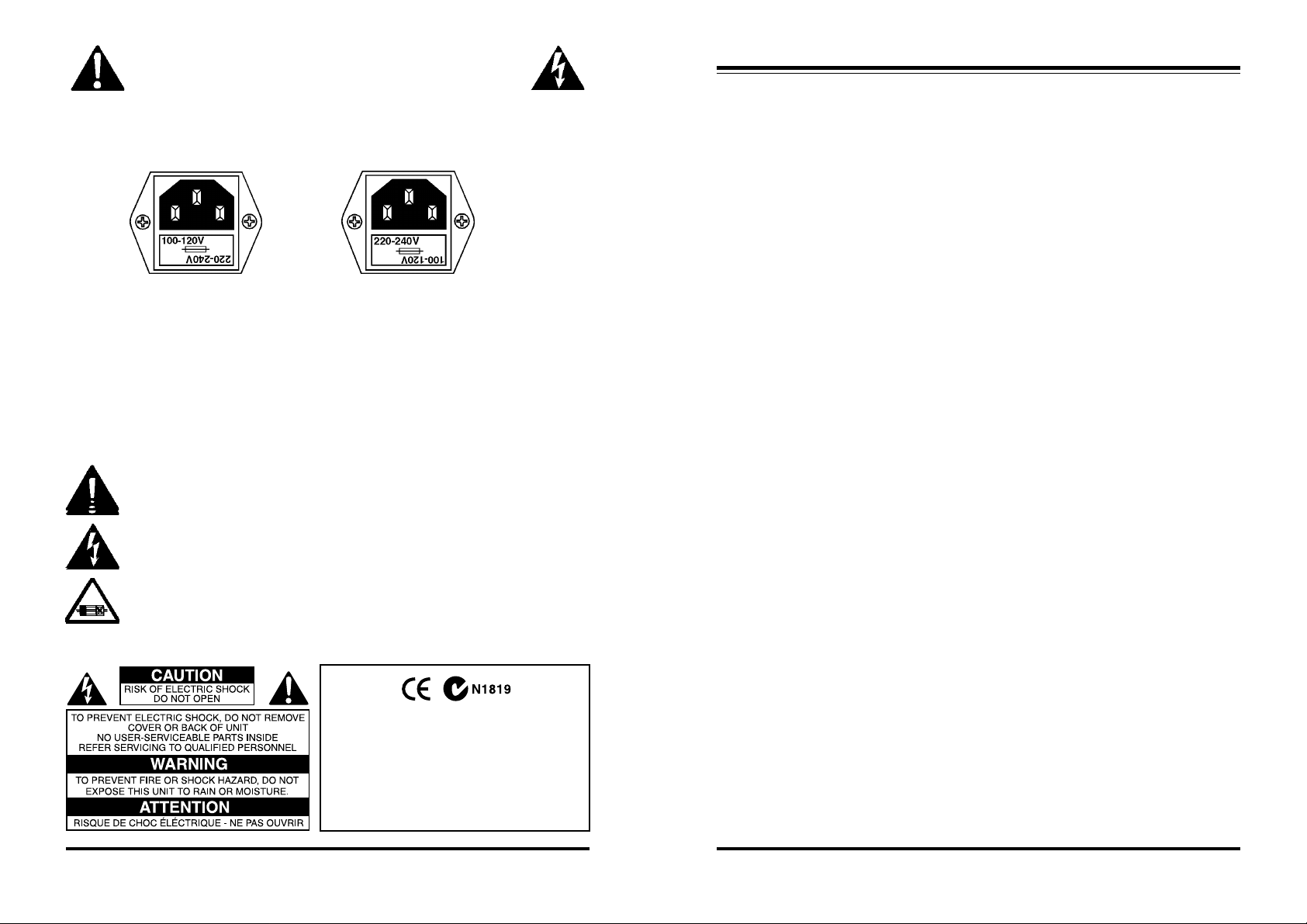
This is a dual voltage unit. It is essential that you check that the voltage on the
fuseholder cover below the AC connector on the rear of the chassis is set correctly
THIS IS SET FOR
100 V AC TO 120 V
AC OPERATION
To change, pull fuseholder out and rotate 180o, then push in again. Do not insert power
cable into unit until voltage has been correctly set. Do not plug power cable into AC
power until voltage has been correctly set
WARNING SYMBOLS USED ON THIS EQUIPMENTWARNING SYMBOLS USED ON THIS EQUIPMENT
WARNING SYMBOLS USED ON THIS EQUIPMENT
WARNING SYMBOLS USED ON THIS EQUIPMENTWARNING SYMBOLS USED ON THIS EQUIPMENT
This symbol is intended to alert you to the presence of important operating
instructions contained in this owner's manual
This symbol is intended to alert you to the presence of uninsulated
dangerous voltage within the product's enclosure that may be of sufficient
magnitude to constitute a risk of electric shock.
This symbol indicates that a Slow Blow fuse is used in this equipment.
Replace with same type and value only
ANT ANT
- PLEASE READ THIS FIRST- PLEASE READ THIS FIRST
ANT
- PLEASE READ THIS FIRST
- PLEASE READ THIS FIRST- PLEASE READ THIS FIRST
ANT ANT
before connecting it to AC power.
THIS IS SET FOR
220 V AC TO 240 V
AC OPERATION
Complies with 89/336/EEC EMC Directive,
amended by 92/31/EEC and 93/68/EEC; CE 73/
23/EEC Low Voltage directive and meets the
following standards: EN 55013 : 1990, Sections
3.2 and 3.5 EN 55020 : 1988, Sections 4.3, 5.4,
6.2, 7.0, 8.0. Complies with Australian Standard
AS/N25 1053
Multi Q Specifications
Filter Type Full Parametric State Variable
Maximum Cut/Boost ±18 dB, user variable
Bandwidth 3 octaves to 1/20th octave, user variable Input
Impedance Balanced 20 Kohms
Unbalanced 10 Kohms
Input Headroom + 21 dB
CMRR >60 dB, 20 Hz - 20 KHz
Output Impedance Balanced 300 ohms
Unbalanced 150 ohms
Output Level (Max) + 21 dB
Frequency Response 10 Hz to 20 KHz, ± 0 .5 dB
Signal to Noise ratio
One Channel: -98 dB Unweighted
-101 dB ‘A’ weighted
Six Channels: -88 dB Unweighted
-93 dB ‘A’ weighted
Distortion .004% THD @ 0 dB,1KHz
Dynamic Range 119 dB (single Channel)
Power Requirements 100-120 V AC, 220-240 V AC 50-60 Hz
8 Watts (8 VA)
Weight 5 lbs/2.2Kg
Dimensions 19"W x 1¾"H x 6"D
482 x 44 x 155mm
Input Connector type Balanced Jack (TRS)
Output Connector type Balanced Jack (TRS)
2
Multi Q Owner's Manual v 1.8 CE ©2003 ARX®Multi Q Owner's Manual v 1.8 CE ©2003 ARX®
7
Page 3
Front Panel Controls
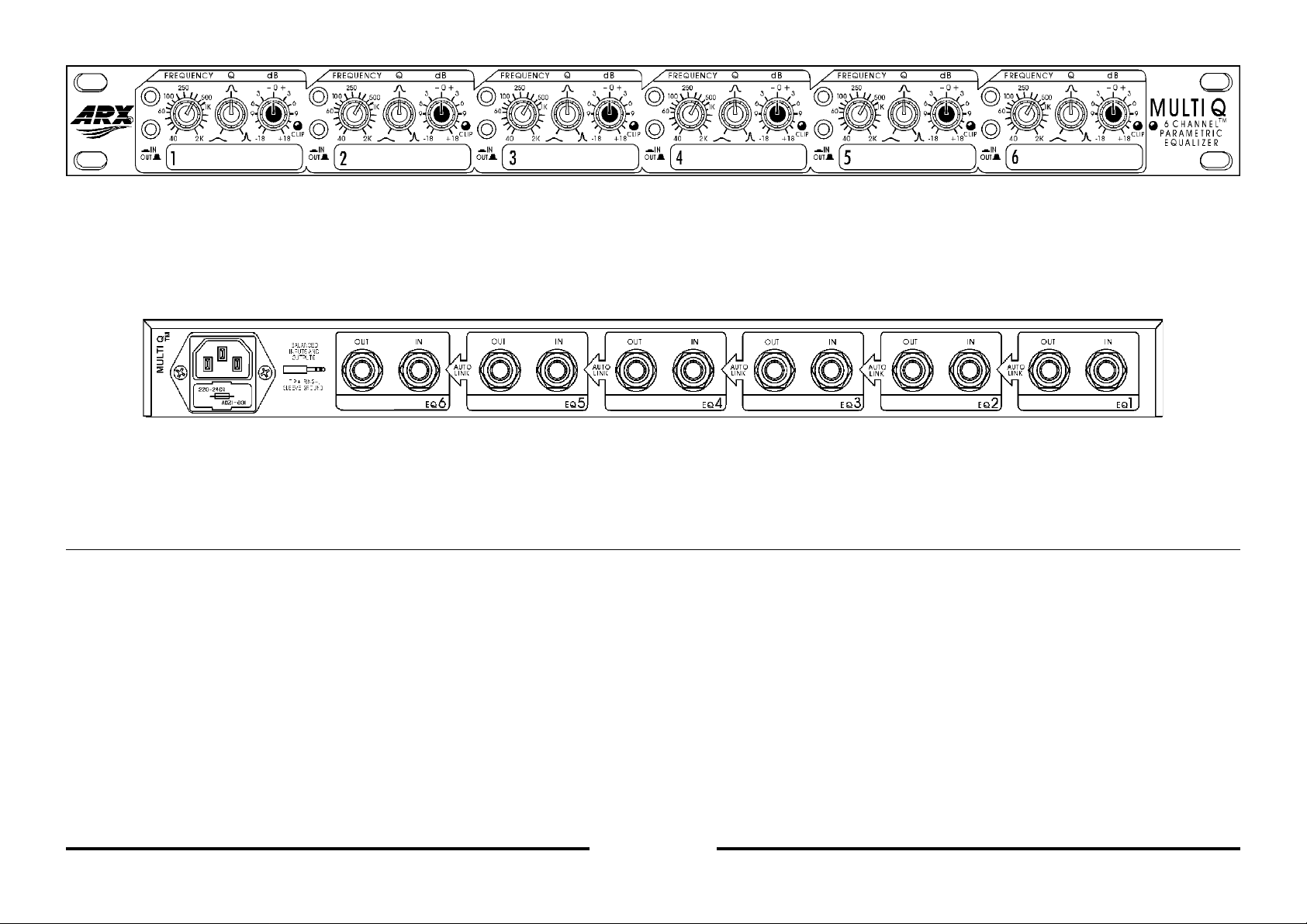
• EQ In/Out switch. A hardwire Bypass of the EQ circuitry.
• Frequency x10 switch.
• Frequency select control. When used in conjunction with the x10 switch, gives a
range of centre frequencies from 40 Hz through to 16 KHz.
Rear Panel Controls
• Tip/Ring/Sleeve Balanced Jack Input connector for Channel 1. Tip + Hot, Ring Cold, Sleeve Ground
• Tip/Ring/Sleeve Balanced Jack Output connector for Channel 2. Tip + Hot, Ring Cold, Sleeve Ground
Application Notes
The ARX Multi Q 6 Channel parametric Equalizer is a powerful and flexible tool for all
audio equalization requirements, equally at home in Studio work, Broadcast, fixed
installations or touring sound systems. Careful attention to circuit layout and shielding
has resulted in noise figures that make the Multi Q ideal for Digital applications.
Each channel of the Multi Q can be accessed individually, and has effective control
over virtually the complete audio spectrum, from 40 Hz to 16KHz.
Its exclusive and unique internal patching system lets you access up to 6 channels of
parametric EQ, either individually or in multiples.
What exactly does this mean? Here’s an example.
If you insert a lead into the Input of Channel 1, the signal will automatically be routed
through Channels 2 to 5 and come out at the Channel 6 Output, giving you a single
channel, 6 band equalizer.
• ‘Q’ (Bandwidth) control, variable from 3 octaves through to 1/20th octave.
• Cut and Boost control, variable +/- 18 dB.
• Clip LED, indicating the onset of circuit overload.
• Numbered marker panel, for labelling EQ assigns.
Note: Channels 1 to 6 connectors identical in function
• IEC 3 pin AC connector and integral fuseholder. Replace fuse with
correct value only: 100 - 120 V AC 1 amp, 220-240 V AC 0.5 amp.
Please also refer to voltage details on Page 2
If you pull the lead out of the Channel 6 Output and plug it into the Channel 3 Output,
the signal will stop there, giving you a single channel 3 band EQ. You can plug
another lead into Channel 4 Input and another into Channel 6 Output, giving you
another single channel 3 band EQ.
In this way, the Multi Q can be whatever you like: a single 6 band EQ, two 3 band
EQs, a 2 and a 4 band EQ, six one band EQs, any combination you need. All this at
the same time and without the need for extra patch leads.
All this makes the Multi Q a unique creative tool, because unlike other parametric
Equalizers you are not stuck with having to use 4 or 5 bands of EQ when you may
only need one or two. The Multi Q frees up these extra bands for use by other
applications needing EQ.
4
Multi Q Owner's Manual v 1.8 CE ©2003 ARX®Multi Q Owner's Manual v 1.8 CE ©2003 ARX®
5
Page 4
Typical configurations
Multi Q applications are as varied as your imagination, but here are a few examples to
get you started.
•Room tuning for live sound work, whether fixed installation or touring •Control room
tuning • Broadcast studio tuning • Main mix sweetening, both Live and Studio •As a
notch filter for 6 monitor sends, or as a multi band channel insert for really hot stage
monitor levels •As extra EQ on up to 6 mixing console channels, when the existing
channel EQ is not enough •Kick and Snare drum tweaking • Extra punch to Bass
guitar • Vocal sweetening •To generate a House curve for fixed installations •Digital
mastering - CD, DAT •Cassette mastering
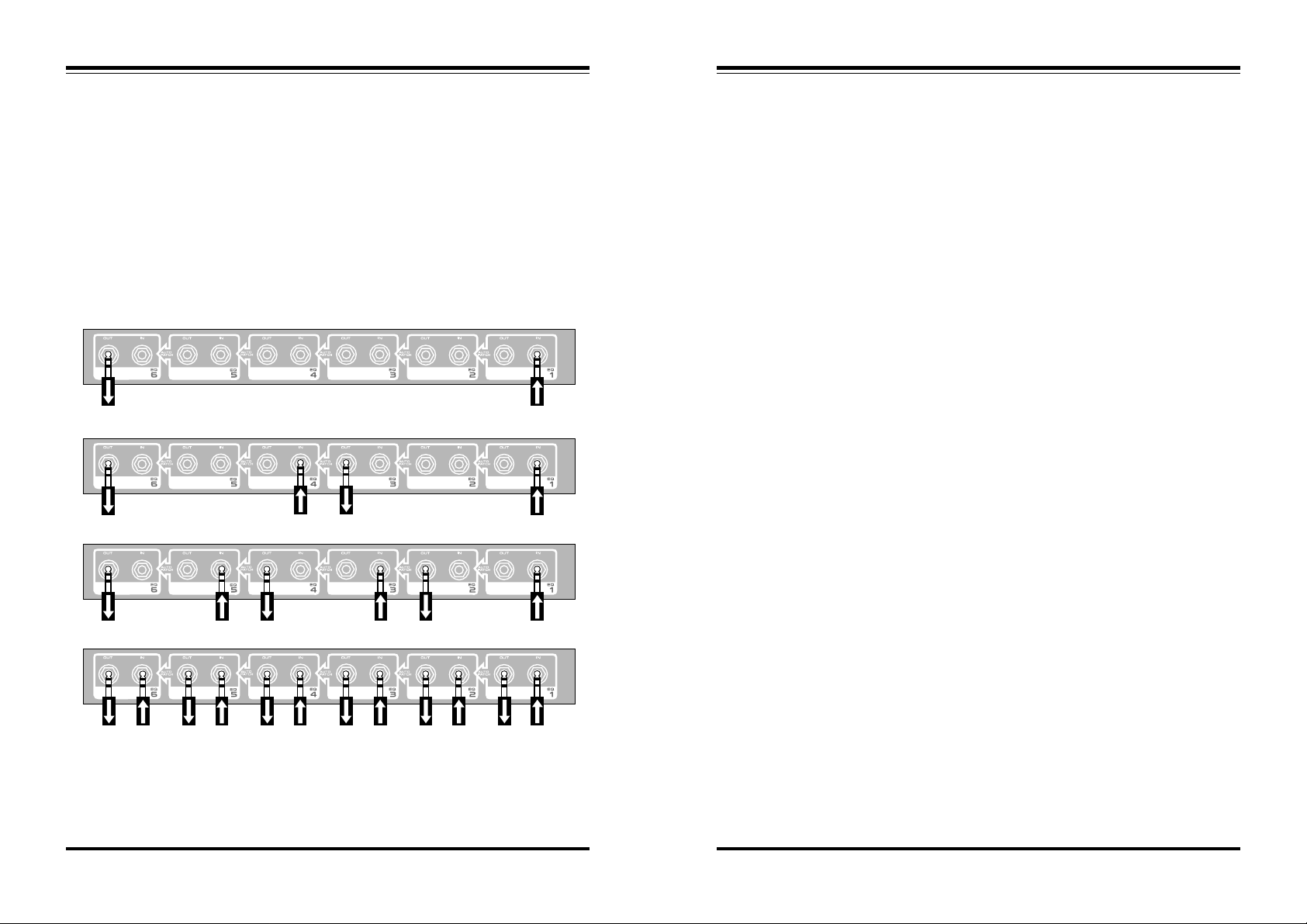
Single channel, 6 band EQ
Dual channel, 3 band EQ
Three channel, 2 band EQ
Six channel, single band EQ
Introduction
Thank you for choosing this ARX Multi Q Parametric Equalizer. We hope you enjoy
using it as much as we enjoyed creating it. As with all ARX equipment, it has
undergone extensive factory calibration and ‘burn in’ before shipping. To ensure
continued trouble free use, please familiarise yourself with the contents of this manual
before using.
About the Multi Q
The sheer amount of signal processors necessary for today’s standards of audio
production puts a great strain on the available space in equipment racks, whether in
the studio, fixed installations or on the road.
Each rack unit has to earn its space.
Recognizing this fact, ARX design engineers have developed the ‘Multi Q’, an
innovative new approach to parametric equalization. Six channels each cover the
complete audio spectrum, and each has its own Balanced Input and Output.
Each channel also has controls for Frequency Select, with x 10 switch; Bandwidth,
from 3 octaves through to 1/20th octave; Cut and Boost, up to + or -18 dB; and IN/
OUT hardwire bypass switch. A clip LED indicates overload through all circuitry, and
each channel has a numbered marker panel for easy confirmation of EQ assigns.
The Multi Q’s exclusive and unique Internal patching system allows access to 6
channels of parametric EQ, either individually or in multiples.
Inserting a lead into Channel 1 Input, for example, will automatically route that signal
through Channels 2, 3, 4, 5 and deliver it at the Output of Channel 6, forming a 6
band single channel parametric EQ. However if you insert a lead into the Output of
Channel 3, that same signal will stop and exit there, giving you a 3 band parametric
EQ. You can then start again at Channel 4 through 6.
In this way the Multi Q can be configured as a 6 band single channel EQ, or 6 single
band EQs, or two 3 band EQs, or a 2 and a 4 band EQ, in fact any combination you
need.
The Multi Q does all this without the need for handfuls of extra patch leads, making it a
unique creative tool for House or Monitor EQ, Studio EQ, compressor or gate
sidechain EQ, and the ideal desk EQ insert on up to 6 desk channels.
IMPORTANT NOTE
For lowest noise it is important that you insert the next Input jack into the channel
immediately following the Output jack. So if you’re coming out of Channel 2, insert the
next Input into Channel 3. Don’t leave any channels spare in between.
6
Multi Q Owner's Manual v 1.8 CE ©2003 ARX®Multi Q Owner's Manual v 1.8 CE ©2003 ARX®
3
 Loading...