

Page 1
QuickSpecs
Aruba 550 Series Campus Access Points
Overview
1
Aruba 550 Series Campus Access Points
802.11ax wireless for extreme-density mobile and IoT deployments
With the increasing number of mobile and IoT devices reliant on wireless access, networks must be capable of accommodating
capacity needs and a diverse mixture of device types, applications and services.
The Aruba 550 Series campus access points with 802.11ax technology are designed to deliver very high performance and
throughput in environments where mobile and IoT density is a growing concern. The 550 Series uses 802.11ax features to
simultaneously serve multiple clients and prioritize different types of traffic to increase data rates for both individual applications
and devices, and the overall network.
The 550 Series includes support for all mandatory and several optional 802.11ax features, which include up- and downlink OFDMA
with up to 37 resource u
MIMO), 8x8 MIMO with up to eight spatial streams in the
5GHz band, and 4x4 MIMO with up to four spatial streams in 2.4GHz, channel bandwidths up to 160MHz (in 5GHz; 40MHz in
2.4GHz), and 1024
The 550 Series supports maximum data rates of 4.8Gbps in the 5GHz band and 1,150Mbps in the 2.4GHz band (for an aggregate
peak data rate of 5.95Gbps). Each AP supports up to 1024 associated client devices per radio, making the high-end 802.11ax 550
Series APs
density environments, such as large public venues, higher education, hotels and enterprise offices.
In addition to 802.11ax standards, the 550 Series supports unique features such as Aruba ClientMatch radio management and
additional radios for location services and IOT applications. With 4 times the capacity of 802.11ac APs and universal IoT connectivity,
the 550 Series delivers an unsurpassed user experience for today’s all-wireless digital environments.
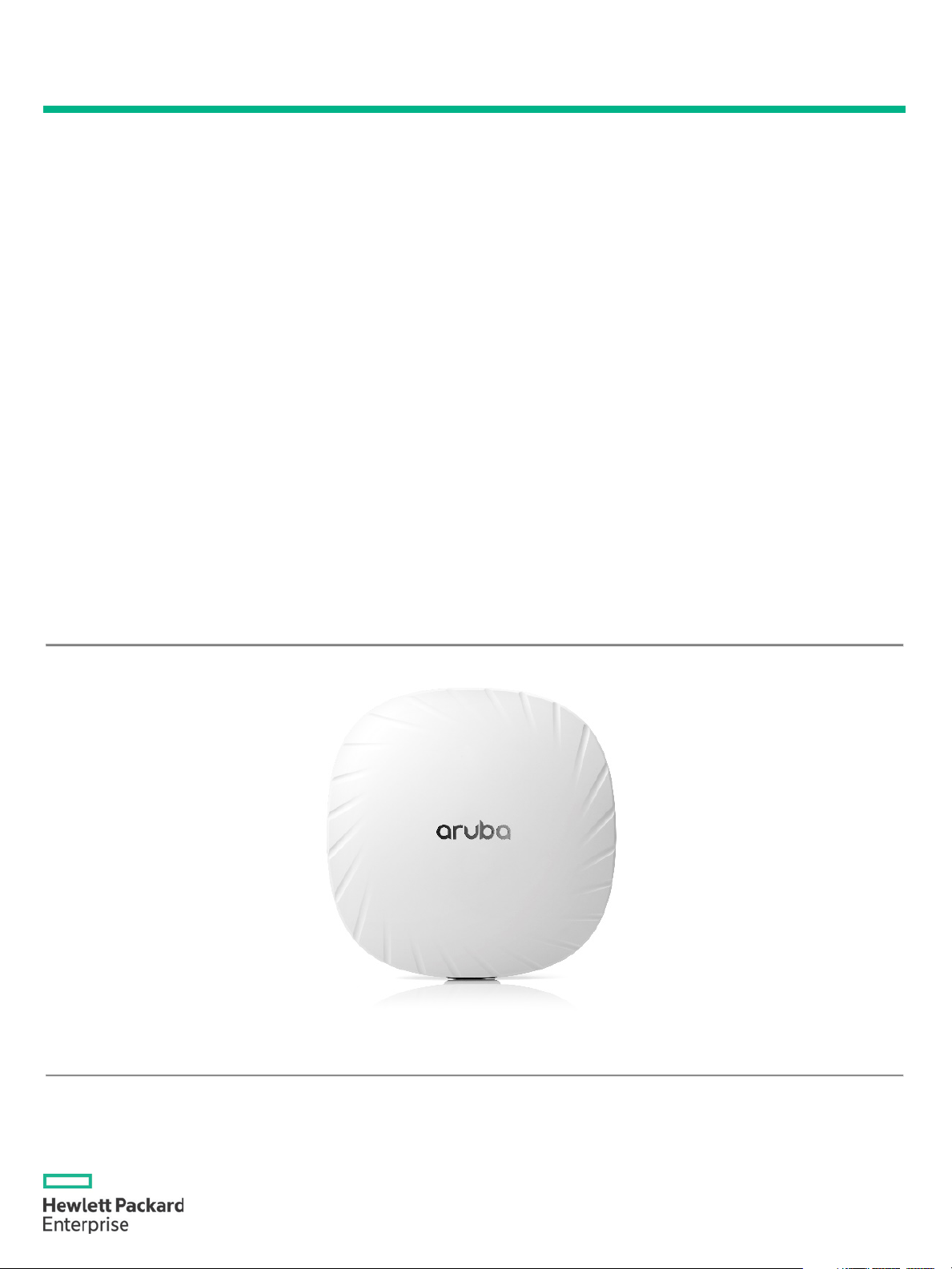
Aruba 550 Series – Front View
nits, up- and downlink multi-user MIMO (MU-
-QAM modulation.
ideal for extreme high-
Page
Page 2

QuickSpecs
Aruba 550 Series Campus Access Points
Overview
Page 2
Key Features
Maximum data rates of 4.8Gbps in the 5GHz band and 1,150Mbps in the 2.4GHz band (for an aggregate peak data rate
y and several optional 802.11ax features, and the full 37 OFDMA Resource Units (RUs) with up to
and
density performance for environments such as universities, large public venues and growing enterprise environments
•
• AI-powered wireless RF and client connectivity optimization
• Dual-radio (8x8 + 4x4 MIMO) 802.11ax AP with up-and downlink OFDMA and Multi-User MIMO (MU-MIMO)
• Optional tri-radio mode with two 5GHz and one 2.4GHz radio (all 4x4 MIMO)
• Aruba’s unique Smart PoE allows for the use of existing switching infrastructure to power up APs
•
of 5.95Gbps)
• Supports all mandator
1,024 associated client devices per radio
• Cost-effective and easy to manage universal IoT connectivity that includes Bluetooth 5 and Zigbee radios for location
IOT use-cases
• Aruba Intelligent Power Monitoring (IPM) allows the APs to operate even if there is not enough PoE power
• High-
State of the art security with WPA3 and Enhanced open.
Page 3

QuickSpecs
Aruba 550 Series Campus Access Points
Standard Features
3
Enhanced Performance
To better support growing client density, the 550 Series uses two key new features within 802.11ax that support multi-user
connectivity and enhanced efficiency. The
-
user
ly for a large number of devices with short frames or
user capabilities, a channel can be divided in
y. OFDMA is particularly effective in raising
originally introduced in 802.11ac. This improves network capacity by allowing
In addition to the standard 802.11ax capabilities, with the optional tri-radio operating mode, the 5GHz radio is split up into two
independent 4x4 MIMO radios with up to four spatial streams each. This enables even higher numbers of simultaneously connected
client devices.
To optimize endpoint connections Aruba’s ClientMatch technology will automatically detect and classify mobile devices with
common characteristics, group these devices, and match them with the best AP’s and radios to enhance the performance of the
network. For example, all 802.11ax capable devices will be grouped onto available 11ax AP and radios, so that the performance
benefits of Orthogonal Frequency Division Multiple Access (OFDMA) are maximized. This means increased network performance
and a boost in network capacity.
ArubaOS 8
on networking via features like LiveUpgrade, Controller
Clustering and seamless fail
powered technology to
automatically optimize the performance of a wireless network by tuning the radio frequencies (RF) of the access points.
Smart Power Management
As higher performance 802.11ax access points handle a greater number of devices and traffic, they will drive the need for more
power consumption. To offset these demands, Aruba NetInsight includes a feature called GreenAP which allows the 550 Series
access points to draw less power when it’s not being used, such as evenings when the buildings are empty.
Aruba Intelligent Power Monitoring (IPM) allows for the 550 Series to operate even when your existing switches do not provide
enough PoE. This enables IT to gradually upgrade their switching infrastructure by allowing the APs to operate even if 802.3bt is
not supported in the existing swi
enables the AP to continuously monitor and report its actual power
consumption and optionally make autonomous decisions to disable certain capabilities based on the amount of power needed to
boot and operate.
Another unique Aruba feature in the 550 Series AP is Aruba Smart PoE. This allows for both Ethernet ports on the AP to draw power
from existing switch infrastructure. Smart
enables to configure two PoE ports to either aggregate their power (more power
available) or use one as a redundant PoE power.
IoT and location Ready
The New 802.11ax technology also provides unique benefits for IOT devices. The features range from dedicated channels in OFDMA
to support the simultaneous transmission of low
for
battery life savings.
In addition, the 550 Series support an integrated Bluetooth 5 and Zigbee radio, as well as a USB port for maximum flexibility, which
provides secure and reliable connectivity for IOT devices to support a wide range of location services.
first is Orthogonal Frequency Division Multiple Access (OFDMA) and the other is multi
– multiple input multiple output (MU-MIMO).
• Multi-user transmission with downlink and uplink OFDMA
OFDMA increases user data rates and also reduces latency, especial
low data-rate requirements, such as voice and IOT devices. By providing multithe frequency domain, and multiple transmissions can be carried simultaneousl
network efficiency and capacity where there are many devices, short frames, or low data-rate streams.
• Multi user transmission with downlink and uplink multi-user MIMO
MU-MIMO is another multi-user capability,
multiple devices to transmit simultaneously.
runs at the core of the 550 Series APs to deliver always-
-over. Our ArubaOS 8 software also includes AirMatch, which delivers AI-
tches. This feature also
PoE
latency IOT connections, to power saving options using Target Wake Time (TWT)
Page
Page 4

QuickSpecs
Aruba 550 Series Campus Access Points
Standard Features
Page 4
Additional Features:
systems and commercial small
Supports priority handling and policy enforcement for unified communication apps, including Skype for Business
Aruba AppRF technology leverages deep packet inspection to classify and block, prioritize, or limit bandwidth for thousands
manages the 2.4GHz and 5GHz radio bands and actively optimizes the RF
ll
time or dedicated air monitoring, the spectrum analyzer remotely scans the 2.4GHz and 5GHz
Device assurance: Use of Trusted Platform Module (TPM) for secure storage of credentials and keys as well as
d eliminates the need for
IP reputation and security services identify, classify, and block malicious files, URLs and IPs, providing
- The 550 Series Access Points support a unique deep-sleep mode to deliver significant power and cost savings.
Deployment Options
The Aruba 550 Series APs offer a choice of deployment and operating modes to meet your unique management and deployment
requirements:
When deployed in conjunction with an Aruba Mobility Controller, Aruba 550 Series APs offer
on, policy enforcement and network services, as well as distributed and centralized
The controller function is virtualized in a cluster of APs while in Instant mode. As the
• Optional tri-radio mode with two 4x4 5GHz and one 4x4 2.4GHz radios
- One 5GHz radio dedicated for the lower half of the band (0L), and one for the upper half (0U)
• Two HPE SmartRate uplink Ethernet ports
- Supports up to 5Gbps with NBase-T and IEEE 802.3bz Ethernet compatibility
- Backwards compatibility with 100/1000Base-T
• Smart PoE feature that supports either combining or prioritizing PoE power from both AP ports
• Built-in Bluetooth 5 and Zigbee radio
- Enables a wide range of IOT use-cases – asset tracking, mobile engagement, and OT operations
• Advanced Cellular Coexistence (ACC)
- Minimizes interference from 3G/4G cellular networks, distributed antenna
• Quality of service for unified communications applications
-
•
of applications in a range of categories
• Best-in-class RF Management
- Built-in AirMatch technology
- Adaptive Radio Management (ARM) technology provides airtime fairness and ensures that APs stay clear of a
• Spectrum analysis
- Capable of part-
• Aruba Core Security
-
- Integrated wireless intrusion protection offers threat protection and mitigation, an
-
- SecureJack-capable for secure tunneling of wired Ethernet traffic
• Intelligent Power Monitoring (IPM)
- Enables the AP to continuously monitor and report its actual power consumption and optionally make autonomous
- Software configurable to disable capabilities in specified order of priority.
- The IPM feature applies when the unit is powered by a POE source
• Network management flexibility
- Aruba AirWave for on-prem management and Aruba Central for cloud management
• Energy efficiency with Green AP feature (requires Aruba NetInsight)
cell/femtocell equipment
with encrypted videoconferencing, voice, chat and desktop sharing
environment, which includes channel width, channel selection and transmit power
sources of RF interference to deliver reliable, high- performance Wi-Fi
radio bands to identify sources of RF interference from 20MHz through 160MHz operation
secure boot
separate RF sensors and security appliances
comprehensive protection against advanced online threats
decisions to disable certain capabilities based on the amount of power available to the unit
• Controller-based mode –
centralized configuration, data encrypti
traffic forwarding.
• Controller-less (Instant) mode –
network grows and/or requirements change, Instant deployments can easily migrate to controller-based mode.
Page 5

QuickSpecs
Aruba 550 Series Campus Access Points
Standard Features
Page 5
Deployment Options
For large installations across multiple sites, the Aruba Activate service significantly reduces deployment time by automating device
provisioning, firmware
configure themselves when powered up
Specifications
Hardware variants
AP-555: Internal antenna models
Wi-Fi radio specifications
radio operation): Eight spatial stream Single User (SU) MIMO for up to 4.8Gbps wireless data rate with
MIMO
radio operation): Four spatial stream Single User (SU) MIMO for up to 2.4Gbps wireless data rate with
MIMO
2.4GHz radio: Four spatial stream Single User (SU) MIMO for up to 1,150Mbps wireless data rate with individual 4SS HE40
clients is 200), and up to
(OFDMA) with up to 37 resource units (for an 80MHz
• 802.11ax high efficiency (HE) support: HE20/40/80/160
• Remote AP (RAP) mode for branch deployments.
• Air monitor (AM) for wireless IDS, rogue detection and containment.
• Spectrum analyzer (SA), dedicated or hybrid, for identifying sources of RF interference
• Secure enterprise mesh portal or point to point
• AP type: Indoor, dual/tri-radio, 5GHz and 2.4GHz 802.11ax 4x4 MIMO
• 5GHz radio (dual-
individual 8SS HE80 (or 4SS HE160) 802.11ax client devices, or with eight 1SS or four 2SS HE80 802.11ax MUcapable client devices simultaneously
• 5GHz radio (tri-
individual 4SS HE80 (or 2SS HE160) 802.11ax client devices, or with four 1SS or two 2SS HE80 802.11ax MUcapable client devices simultaneously
•
802.11ax client devices or with two 2SS HE40 802.11ax MU-MIMO capable client devices simultaneously
• Support for up to 1,024 associated client devices per radio (typical recommended limit for active
16 BSSIDs per radio
• Supported frequency bands (country-specific restrictions apply):
- 2.400 to 2.4835GHz (radio 1)
- 5.150 to 5.250GHz (radio 0 and 0L)
- 5.250 to 5.350GHz (radio 0 and 0L)
- 5.470 to 5.725GHz (radio 0 and 0U)
- 5.725 to 5.850GHz (radio 0 and 0U)
• Available channels: Dependent on configured regulatory domain
• Dynamic frequency selection (DFS) optimizes the use of available RF spectrum
• Supported radio technologies:
- 802.11b: Direct-sequence spread-spectrum (DSSS)
- 802.11a/g/n/ac: Orthogonal frequency-division multiplexing (OFDM)
- 802.11ax: Orthogonal frequency-division multiple access
channel)
• Supported modulation types:
- 802.11b: BPSK, QPSK, CCK
- 802.11a/g/n: BPSK, QPSK, 16-QAM, 64-QAM, 256-QAM (proprietary extension)
- 802.11ac: BPSK, QPSK, 16-QAM, 64-QAM, 256-QAM, 1024-QAM (proprietary extension)
- 802.11ax: BPSK, QPSK, 16-QAM, 64-QAM, 256-QAM, 1024-QAM
• 802.11n high-throughput (HT) support: HT20/40
• 802.11ac very high throughput (VHT) support: VHT20/40/80/160
upgrades, and inventory management. With Aruba Activate, the APs can be factory-shipped to any site and
Page 6

QuickSpecs
Aruba 550 Series Campus Access Points
Standard Features
Page 6
Wi-Fi radio specifications
• 802.11ax Target Wait Time (TWT) to support low-power client devices
Wi-Fi antennas
and 8x8 MIMO
radio mode, the peak gain of the antennas for each of the 4x4
in antennas are
g mounted orientation of the AP. The downtilt angle for maximum gain is roughly 30 degrees.
combined, average
radio mode, the peak gain of the combined, average pattern is 1.1dBi (radio 0L, lower half of 5GHz) and
3.6dBi (radio 0U, upper half of 5GHz)
Other interfaces
gain of 4.5dBi
• Supported data rates (Mbps):
- 802.11b: 1, 2, 5.5, 11
- 802.11a/g: 6, 9, 12, 18, 24, 36, 48, 54
- 802.11n: 6.5 to 600 (MCS0 to MCS31, HT20 to HT40), 800 with 256-QAM
- 802.11ac: 6.5 to 1,733 (MCS0 to MCS9, NSS = 1 to 4, VHT20 to VHT160), 2,166 with 1024-QAM
- 802.11ax (2.4GHz): 3.6 to 1,147 (MCS0 to MCS11, NSS = 1 to 4, HE20 to HE40)
- 802.11ax (5GHz): 3.6 to 4,804 (MCS0 to MCS11, NSS = 1 to 8, HE20 to HE160)
• 802.11n/ac packet aggregation: A-MPDU, A-MSDU
• Transmit power: Configurable in increments of 0.5dBm
• Maximum (aggregate, conducted total) transmit power (limited by local regulatory requirements):
- 2.4GHz band: +24dBm (18dBm per chain)
- 5GHz band: +27dBm in dual-radio mode, +24dBm in tri-radio mode (18dBm per chain)
- Note: conducted transmit power levels exclude antenna gain. For total (EIRP) transmit power, add antenna gain.
• Advanced Cellular Coexistence (ACC) minimizes the impact of interference from cellular networks
• Maximum ratio combining (MRC) for improved receiver performance
• Cyclic delay/shift diversity (CDD/CSD) for improved downlink RF performance
• Space-time block coding (STBC) for increased range and improved reception
• Low-density parity check (LDPC) for high-efficiency error correction and increased throughput
• Transmit beam-forming (TxBF) for increased signal reliability and range
• Integrated downtilt omni-directional antennas for 4x4 MIMO in 2.4GHz with peak antenna gain of 4.3dBi,
in 5GHz with peak antenna gain of 5.8dBi in 5GHz. In tri5GHz radios is 5.5dBi (radio 0L, lower half of 5GHz) and 5.6dBi (radio 0U, upper half of 5GHz). Builtoptimized for horizontal ceilin
- A mix of horizontally and vertically polarized antenna elements is used
- Combining the patterns of each of the antennas of the MIMO radios, the peak gain of the
pattern is 2.4dBi in 2.4GHz and 0.7dBi in 5GHz (dual-radio mode).
- In tri-
• E0, E1: HPE SmartRate port (RJ-45, maximum negotiated speed 5Gbps)
- Auto-sensing link speed (100/1000/2500/5000BASE-T) and MDI/MDX
- 2.5Gbps and 5Gbps speeds comply with NBase-T and 802.3bz specifications
- POE-PD: 48Vdc (nominal) 802.3af/at/bt POE (class 3 or higher)
- 802.3az Energy Efficient Ethernet (EEE)
• Link aggregation (LACP) support between both network ports for redundancy and increased capacity
• POE power can be drawn from either port (single source, or set to prioritize) or both ports simultaneously (set to combine)
• DC power interface: 48Vdc (nominal, +/- 5%), accepts 1.35mm/3.5mm center-positive circular plug with 9.5mm length
• USB 2.0 host interface (Type A connector)
- Capable of sourcing up to 1A / 5W to an attached device
• Bluetooth Low Energy (BLE5.0) and Zigbee (802.15.4) radio
- BLE: up to 8dBm transmit power (class 1) and -99dBm receive sensitivity (125kbps)
- Zigbee: up to 8dBm transmit power and -97dBm receive sensitivity
- A pair of integrated omnidirectional antennas (polarization diversity) with roughly 30 degrees downtilt and peak
Page 7

QuickSpecs
Aruba 550 Series Campus Access Points
Standard Features
Page 7
Other interfaces
• Kensington security slot
Power sources and power consumption
When powered by 1x 802.3at (class 4) POE and with the IPM feature disabled, the AP will disable the USB port, disable the
n the same configuration but with IPM enabled, the AP will start up in unrestricted mode, but may dynamically apply
connected. When sourcing the full 5W power budget to
) or 6W
radio mode,
• Maximum (worst-case) power consumption in deep-sleep mode: 3W (POE) or 3W (DC)
Mounting details
A mounting bracket has been pre
is used to secure the AP to any of the Aruba mount
kits (sold separately); see the ordering Information section below for details.
Mechanical specifications
- 2,230g / 78.7oz
Environmental specifications
- ETS 300 019 classes 1.2 and 2.3 environments
• Visual indictors (two multi-color LEDs): for System and Radio status
• Reset button: factory reset, LED mode control (normal/off)
• Serial console interface (proprietary, micro-B USB physical jack)
• The AP supports direct DC power and Power over Ethernet (POE; on port E0 and/or E1)
• When POE power is supplied to both Ethernet ports, the AP can be configured to combine or prioritize power sources
• When both DC and POE power sources are available, DC power takes priority over POE
• Power sources are sold separately; see the ordering Information section below for details
• When powered by DC, 802.3bt (class 5) POE or 2x 802.3at (class 4) POE, the AP will operate without restrictions.
•
other Ethernet port, operate the 5GHz radio in 4x4 mode, and disable tri-radio operation
I
restrictions depending on the POE budget and actual power. The feature restrictions and order can be programmed.
• Operating the AP with an 802.3af (class 3 or lower) POE source is not supported.
• Maximum (worst-case) power consumption:
- DC powered: 38.5W
- POE powered (802.3bt or dual 802.3at): 38.2W
- POE powered (802.3at, IPM enabled): 25.1W
- All numbers above are without an external USB device
such a device, the incremental (worst-case) power consumption for the AP is up to 5.7W (POE powered
(DC powered).
• Maximum (worst-case) power consumption in idle mode (dual-radio operation): 18W (POE) or 18W (DC). In tri-
this increases to 18W (POE) or 18W (DC).
-installed on the back of the AP. This bracket
• Dimensions/weight (AP-555; unit, excluding mount bracket):
- 260mm (W) x 260mm (D) x 58mm (H) / 10.2” (W) x 10.2” (D) x 2.3” (H)
- 1,570g / 55.4oz
• Dimensions/weight (AP-555; shipping):
- 320mm (W) x 303mm (D) x 108mm (H) / 12.6” (W) x 11.9” (D) x 4.3” (H)
• Operating conditions
- Temperature: 0C to +50C / +32F to +122F
- Humidity: 5% to 93% non-condensing
- AP is plenum rated for use in air-handling spaces
- ETS 300 019 class 3.2 environments
• Storage and transportation conditions
- Temperature: -40C to +70C / -40F to +158F
- Humidity: 5% to 93% non-condensing
Page 8

QuickSpecs
Aruba 550 Series Campus Access Points
Standard Features
Page 8
Reliability
Mean Time Between Failure (MTBF): 962,134hrs (110yrs) at +25C operating temperature.
Regulatory compliance
For more country-specific regulatory information and approvals, please see your Aruba representative.
Regulatory model numbers
• AP-555: APIN0555
Certifications
NOTE 1:
NOTE 2: Not available initially; will require a software upgrade
Warranty
Aruba’s hardware limited lifetime warranty
Minimum operating system software versions
ArubaOS and Aruba InstantOS 8.5.0.0
• FCC/ISED
• CE Marked
• RED Directive 2014/53/EU
• EMC Directive 2014/30/EU
• Low Voltage Directive 2014/35/EU
• UL/IEC/EN 60950
• EN 60601-1-1, EN60601-1-2
• UL2043 plenum rating
• Wi-Fi Alliance:
- Wi-Fi CERTIFIED a, b, g, n, ac
- Wi-Fi CERTIFIED ax
- WPA, WPA2 and WPA3 – Enterprise with CNSA option, Personal (SAE), Enhanced Open ( OWE)
- WMM, WMM-PS, Wi-Fi Vantage, W-Fi Agile Multiband
- Wi-Fi Location
- Passpoint (release 2)
• Bluetooth SIG
• Ethernet Alliance (POE, PD device, class 4)
Will require software update. Certification effort will be kicked off as soon as the Wi-Fi Alliance starts the program
1
2
Page 9

QuickSpecs
Aruba 550 Series Campus Access Points
Configuration
Information
Page 9
Ordering Information
Build To Order:
BTO is a standalone unit with no
Highest performance 802.11ax Enterprise Access Points for Extremely High-density Campus deployments
Step 1: Select a Model
Configuration
Rule #:
Description
SKU
Internal antenna access points
NOTE: Add Mount Kit
3
Aruba AP-555 (EG) Dual Radio 8x8:8 / 4x4:4 802.11ax Internal Antennas Unified Campus AP
JZ353A
4
Aruba AP-555 (IL) Dual Radio 8x8:8 / 4x4:4 802.11ax Internal Antennas Unified Campus AP
JZ354A
5
Aruba AP-555 (JP) Dual Radio 8x8:8 / 4x4:4 802.11ax Internal Antennas Unified Campus AP
JZ355A
1
Aruba AP-555 (RW) Dual Radio 8x8:8 / 4x4:4 802.11ax Internal Antennas Unified Campus AP
JZ356A
2
Aruba AP-555 (US) Dual Radio 8x8:8 / 4x4:4 802.11ax Internal Antennas Unified Campus AP
JZ357A
Internal antenna access points – TAA models
NOTE: Add Mount Kit
3
Aruba AP-555 (EG) TAA Dual-Radio 8x8:8 / 4x4:4 802.11ax Internal Antennas Unified Campus AP
JZ363A
4
Aruba AP-555 (IL) TAA Dual-Radio 8x8:8 / 4x4:4 802.11ax Internal Antennas Unified Campus AP
JZ364A
5
Aruba AP-555 (JP) TAA Dual-Radio 8x8:8 / 4x4:4 802.11ax Internal Antennas Unified Campus AP
JZ365A
1
Aruba AP-555 (RW) TAA Dual-Radio 8x8:8 / 4x4:4 802.11ax Internal Antennas Unified Campus AP
JZ366A
2
Aruba AP-555 (US) TAA Dual-Radio 8x8:8 / 4x4:4 802.11ax Internal Antennas Unified Campus AP
JZ367A
Configuration Rules:
NOTE:
HPE Offering > Aruba > Access Points
Aruba 550 Series Campus Access Points
integration. BTO products ship standalone are not part of a CTO or Rack-Shippable solution.
1. Available everywhere except, US, Israel, Egypt and Japan.
2. Available in US only
3. Available in Egypt only
4. Available in Israel only
5. Available in Japan only
OCA Only Model Selection Form -
- Indoor:
Page 10

QuickSpecs
Aruba 550 Series Campus Access Points
Configuration Information
Page 10
Step 2: Select AP mount kits
Mounting kits
For 555 Series Std
NOTE
Description
Part Number
AP-MNT-MP10-A Campus AP mount bracket kit (10-pack) type A: suspended ceiling rail
JZ370A
AP-MNT-MP10-B Campus AP mount bracket kit (10-pack) type B: suspended ceiling rail
Q9G69A
AP-MNT-MP10-C Campus AP mount bracket kit (10-pack) type C: suspended ceiling rail
Q9G70A
AP-MNT-MP10-D Campus AP mount bracket kit (10-pack) type D: solid surface
Q9G71A
AP-MNT-MP10-E Campus AP mount bracket kit (10-pack) type E: wall-box
R1C72A
Clic Warning: Access Points do not include a Mount. Qty 1 Mount kits should be selected for every 10 Access
Points.
Step 3: Add powering accessory (optional)
Internal antenna access points
For 555 Series Std (Min 0 // max 1) User Selection (min 0 // max 1)
NOTE: Add Mount Kit
Configuration
Rule #:
Description
SKU
1
AP-AC-48V36C 48V/36W AC/DC Desktop Style 1.35/3.5/9.5mm Circular 90 Deg Plug DoE Level
VI Adapter
JX991A
1
AP-POE-BTSR 1-Port Smart Rate 802.3bt 60W midspan injector
R1C73A
Configuration Rules:
If this Power Supply is selected, bring in (Min 1 // Max 1) Localized power cord based on the Aruba
NOTE: Most devices are PoE powered from switch so these are optional
AC power cord
PC-AC-ARG Argentina 220V AC 10A 2-meter AC Power Cord
JW113A
PC-AC-AUS Australian AC Power Cord
JW114A
PC-AC-BR Brazil AC Power Cord
JW115A
PC-AC-CHN China AC Power Cord
JW116A
PC-AC-DEN Denmark 220V AC 10A 2-meter AC Power Cord
JW117A
PC-AC-EC Continental European/Schuko AC Power Cord
JW118A
PC-AC-IN India AC Power Cord
JW119A
PC-AC-IL Israel 250V AC 10A 2-meter AC Power Cord
JW120A
PC-AC-IT Italian AC Power Cord
JW121A
PC-AC-JP Japanese AC Power Cord
JW122A
PC-AC-KOR Korea AC Power Cord
JW123A
PC-AC-NA North America AC Power Cord
JW124A
PC-AC-SWI Switzerland 220V AC 10A 2-meter AC Power Cord
JW125A
PC-AC-TW Taiwan AC Power Cord
JW126A
PC-AC-UK UK AC Power Cord
JW127A
PC-AC-ZA South Africa 250V AC 10A 2-meter AC Power Cord
JW128A
(Min 0 // max 99) User Selection (min 0 // max 99)
: Kit contains mounts for 10 access points
• 1:
Localization Menu
Page 11

QuickSpecs
Aruba 550 Series Campus Access Points
Configuration Information
Page 11
Step 4: Add cosmetic snap-on cover (AP-555 only, optional)
Cosmetic covers
For 555 Series Std (Min 0 // max 99) User Selection (min 0 // max 99)
NOTE:
NOTE:
Description
Part Number
AP-555-CVR-20 20-pack for AP-555 White Non-glossy Snap-on Covers
JZ369A
Step 5: Add other accessories (optional)
Other accessories
For 555 Series Std (Min 0 // max 99) User Selection (min 0 // max 99)
Description
Part Number
AP-CBL-SERU Micro-USB TTL3.3V to USB2.0 AP Console Adapter Cable
JY728A
Kit contains covers for 10 access points
Kit contains 20 optional snap-on covers
Page 12

QuickSpecs
Aruba 550 Series Campus Access Points
Technical Specifications
Page 12
RF Performance Table
Band, rate
Maximum transmit power (dBm) per
transmit chain6
Receiver sensitivity (dBm) per receive
chain
2.4GHz, 802.11b
1Mbps
18
-98
11Mbps
18
-89
2.4GHz, 802.11g
6Mbps
18
-92
54Mbps
-75
2.4GHz, 802.11n HT20
MCS0
18
-92
MCS7
-73
2.4GHz, 802.11ax HE20
MCS0
18
-92
MCS11
10
-64
5GHz, 802.11a
6Mbps
18
-91
54Mbps
-74
5GHz, 802.11n HT20
MCS0
18
-91
MCS7
-72
5GHz, 802.11n HT40
MCS0
18
-88
MCS7
-69
5GHz, 802.11ac VHT20
MCS0
18
-91
MCS9
12
-68
5GHz, 802.11ac VHT40
MCS0
18
-88
MCS9
-65
5GHz, 802.11ac VHT80
MCS0
-85
MCS9
12
-62
5GHz, 802.11ac VHT160
MCS0
-82
MCS9
12
-59
5GHz, 802.11ax HE20
MCS0
18
-91
MCS11
10
-62
5GHz, 802.11ax HE40
MCS0
18
-88
MCS11
10
-58
5GHz, 802.11ax HE80
MCS0
18
-85
MCS11
10
-56
5GHz, 802.11ax HE160
MCS0
18
-82
MCS11
10
-53
16
14
16
6
14
14
12
18
18
Page 13
QuickSpecs
Aruba 550 Series Campus Access Points
Technical Specifications
Page 13
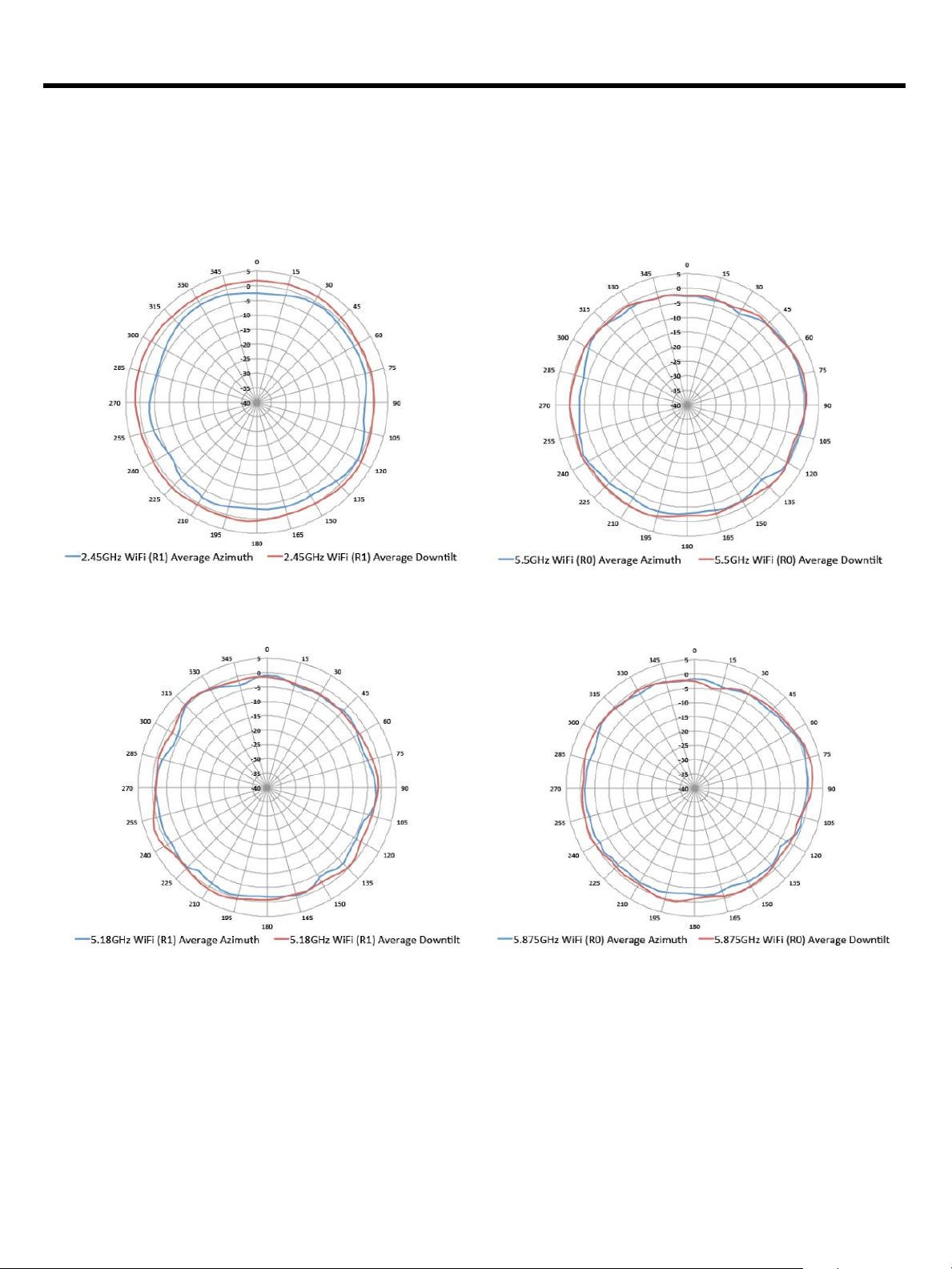
Antenna Patterns
Horizontal planes (top view)
Showing azimuth (0 degrees) and 30 degrees downtilt patterns (averaged patterns for all applicable antennas)
2.45GHz Wi-Fi (radio 1)
5.5GHz Wi-Fi (dual-radio mode, radio 0)
5.18GHz Wi-Fi (radio 0L, tri-radio mode)
5.875GHz Wi-Fi (radio 0U, tri-radio mode)
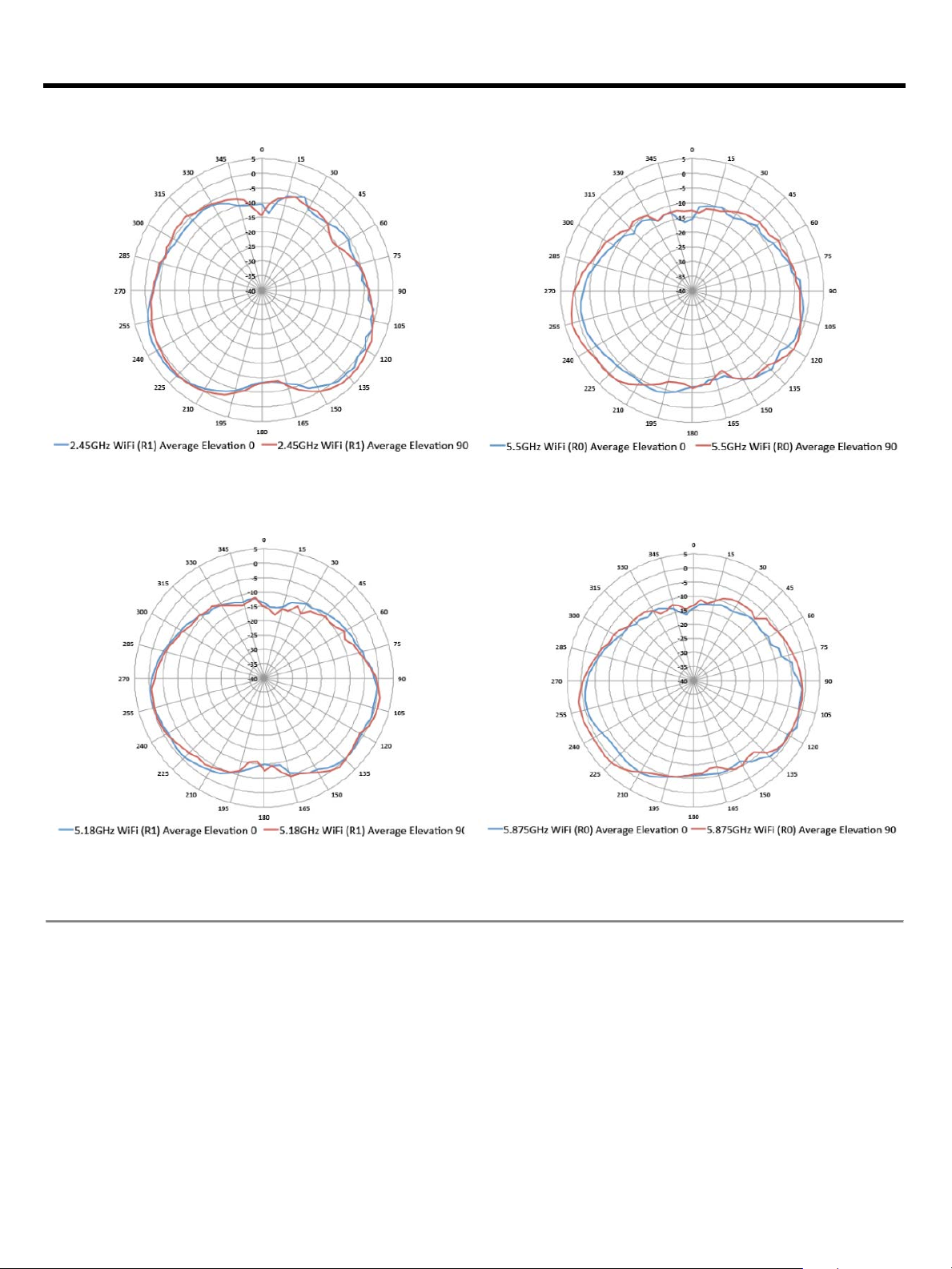
Vertical Elevation planes (side view, AP facing down)
Showing side view with AP rotated 0 and 90 degrees (averaged patterns for all applicable antennas)
Page 14
QuickSpecs
Aruba 550 Series Campus Access Points
Technical Specifications
Page 14
2.45GHz Wi-Fi (radio 1)
5.5GHz Wi-Fi (dual-radio mode, radio 0)
5.18GHz Wi-Fi (radio 0L, tri-radio mode)
5.875GHz Wi-Fi (radio 0U, tri-radio mode)
Page 15

QuickSpecs
Aruba 550 Series Campus Access Points
Summary of Changes
Page 15
Date
Version History
Action
Description of Change
02-Apr-2019
Version 1
New
New QuickSpecs
Sign up for updates
© Copyright 2019 Hewlett Packard Enterprise Development LP. The information contained herein is
subject to change without notice. The only warranties for Hewlett Packard Enterprise products and services
are set forth in the express warranty statements accompanying such pro
should be construed as constituting an additional warranty. Hewlett Packard Enterprise shall not be liable
for technical or editorial errors or omissions contained herein.
To learn more, visit
a00060236enw - 16365 - Worldwide - V1 - 02-April-2019
ducts and services. Nothing herein
: http://www.hpe.com/networking
 Loading...