

Page 1

QuickSpecs
Aruba 318 Series Access Points
Overview
1
Aruba 318 Series Access Points
802.11ac Wave 2 for harsh, weather-protected environments
Product overview
The hardened Aruba 318 series access point delivers gigabit Wi-Fi performance to 802.11ac mobile devices in harsh, weatherprotected environments such as warehouses, industrial freezers or enclosures in extreme environments such as stadiums. It
delivers 4x4:4SS MU
location services.
With a maximum concurrent data rate of 1,733 Mbps in the 5 GHz band and 300 Mbps in the 2.4 GHz band (for an aggregate
peak data rate of 2.0 Gbps), the Aruba 318 APs can quickly add required capaci
or cold, dusty and dirty, or baking in an enclosed stadium, the Aruba 318 delivers.
With high performance and high density 802.11ac, the Aruba 318 APs support 160 MHz channel bandwidth (VHT160), multi
use
Proactive and deterministic, ClientMatch dynamically optimizes Wi
If a mobile device moves away from an AP or RF interference impedes performance,
AP.
With ClientMatch, clients load web pages faster, deliver video streams with improved quality and support high densities of mo
devices. An 802.11ac network without ClientMatch performs no different tha
The Aruba 318 also has an integrated Bluetooth Aruba Beacon that simplifies the remote management of a network of large
battery
capabilities. It enables businesses to leverage mobility context to develop applications that can deliver an enhanced user
experience and increases the value of the wireless network for organizations.
Features and Benefits
Unique Benefits
enabled mobile devices receiving signals from multiple Aruba Beacons
- Supports priority handling and policy enforcement for unified communication apps, including Microsoft Skype for
-MIMO capability, Aruba’s advanced ClientMatch and an integrated Bluetooth beacon to enable Aruba
r MIMO (MU-MIMO) and 4 spatial streams (4SS).
ties to your existing or new wireless networks. Hot
-
-Fi client performance as users roam and RF conditions change.
ClientMatch automatically steers it to a better
n an 802.11n WLAN.
-powered Aruba beacons while also providing advanced location, wayfinding, and proximitybased push notification
• Dual Radio 802.11ac access point with Multi-User MIMO
- Supports up to 1,733 Mbps in the 5 GHz band (with 4SS/VHT80 or 2SS/VHT160 clients) and up to 300 Mbps
in the 2.4 GHz band (with 2SS/HT40 clients).
• Built-in Bluetooth Low-Energy (BLE) radio
- Enables location-based services with BLE-
at the same time.
• Advanced Cellular Coexistence (ACC)
- Minimizes interference from 3G/4G cellular networks, distributed antenna systems, and commercial small
cell/femtocell equipment.
• Industrial design for harsh, weather-protected environments
- Extends temperature range for indoor environments that lack heating and cooling.
- Sealed connector interfaces to lock out dust and moisture.
• Connectorized antenna ports support high gain large public venue antennas
• Designed for enhanced physical security.
• Quality of service for unified communication apps
bile
-scale
Page
Page 2

QuickSpecs
Aruba 318 Series Access Points
Overview
2
Business with encrypted videoconferencing, voice, chat, and desktop sharing.
Choose your operating mode
As a unified AP, the Aruba 318 can be deployed with or without a controller and can be readily switched to accommodate
changing network needs.
Other functional modes include:
For large installations across multiple sites, the Aruba Activate service significantly reduces deployment time by automating
provisioning, firmware upgrades, and inventory management. With Aruba Activate, Unified APs are factory
configure themselves when powered up.
Aruba 318 Series Specifications
• Best-in-class RF management
- Integrated AirMatch technology manages the 2.4-GHz and 5-GHz radio bands and actively optimizes the RF
environment including channel width, channel selection and transmit power.
• Spectrum analysis
- Capable of part-time or dedicated air monitoring, the spectrum analyzer remotely scans the 2.4-GHz and 5-GHz
radio bands to identify sources of RF interference.
• Wireless mesh
- Wireless mesh connections are convenient where Ethernet drops are not available.
• Intelligent app visibility and control
- AppRF technology leverages deep packet inspection to classify and block, prioritize, or limit bandwidth for
thousands of applications in a range of categories.
• Aruba Secure Core
- Device assurance: Use of Trusted Platform Module (TPM) for secure storage of credentials and keys as well as
secure boot.
- Integrated wireless intrusion protection offers threat protection and mitigation and eliminates the need for
separate RF sensors and security appliances.
- IP reputation and security services identify, classify, and block malicious files, URL and IPs, providing
comprehensive protection against advanced online threats.
- Encrypted IPsec VPN tunnels securely connect remote users to corporate network resources.
• Controller mode: When managed by Aruba Mobility Controllers, the Aruba 318 series APs offer centralized configuration,
data encryption, policy enforcement and network services, as well as distributed and centralized traffic forwarding or,
• Controllerless (Instant) mode: In Aruba Instant mode, a single AP automatically distributes the network configuration to
other Instant APs in the WLAN. Simply power-up one Instant AP, configure it over the air, and plug in the other APs ###
Instant Network.
• Remote AP (RAP) mode for branch deployments
• Air monitor (AM) for wireless IDS, rogue detection and containment
• Spectrum analyzer, dedicated or hybrid, for identifying sources of RF interference
• Secure enterprise mesh
• Hybrid AP serves Wi-Fi clients and provides wireless intrusion protection and spectrum analysis
-shipped to any site and
• 5 GHz 802.11ac 4x4 MU-MIMO (1,733 Mbps max rate)
- Four RP-SMA connectors for external antenna operation
• 2.4 GHz 802.11n 2x2 MIMO (300 Mbps max rate) radios
- Two RP-SMA connectors for external antenna operation at 2.4 GHz
device
Page
Page 3

QuickSpecs
Aruba 318 Series Access Points
Overview
3
WI-FI Radio Specifications
Power
• Power sources sold separately
• AP type: Indoor hardened, dual radio, 5 GHz 802.11ac 4x4 MIMO and 2.4 GHz 802.11n 2x2 MIMO
• Software-configurable dual radio supports 5 GHz (Radio 0) and 2.4 GHz (Radio 1)
• 5 GHz: Four spatial stream Multi User (MU) MIMO for up to 1,733 Mbps wireless data rate to up to three MU-MIMO
capable client devices simultaneously
• 5 GHz: Four spatial stream Single User (SU) MIMO for up to 1,733 Mbps wireless data rate to individual 4x4 VHT80 or
2x2 VHT160 client devices
• 2.4 GHz: Two spatial stream Single User (SU) MIMO for up to 300 Mbps wireless data rate to individual 2x2 HT40 client
devices
• Support for up to 256 associated client devices per radio, and up to 16 BSSIDs per radio
• Supported frequency bands (country-specific restrictions apply):
- 2.400 to 2.4835 GHz
- 5.150 to 5.250 GHz
- 5.250 to 5.350 GHz
- 5.470 to 5.725 GHz
- 5.725 to 5.850 GHz
• Available channels: Dependent on configured regulatory domain.
• Dynamic frequency selection (DFS) maximizes the use of available RF spectrum.
• Supported radio technologies:
- 802.11b: Direct-sequence spread-spectrum (DSSS)
- 802.11a/g/n/ac: Orthogonal frequency-division multiplexing (OFDM)
• Supported modulation types:
- 802.11b: BPSK, QPSK, CCK
- 802.11a/g/n/ac: BPSK, QPSK, 16-QAM, 64-QAM, 256-QAM
• Transmit power: Configurable in increments of 0.5 dBm
• Maximum (conducted) transmit power (limited by local regulatory requirements):
- 2.4 GHz band: +22 dBm per chain, +25dBm aggregate (2x2)
- 5 GHz band: +22 dBm per chain, +28dBm aggregate (4x4)
- NOTE: Conducted transmit power levels exclude antenna gain. For total (EIRP) transmit power, add antenna
gain.
• Advanced Cellular Coexistence (ACC) minimizes interference from cellular networks.
• Maximum ratio combining (MRC) for improved receiver performance.
• Cyclic delay/shift diversity (CDD/CSD) for improved downlink RF performance.
• Short guard interval for 20-MHz, 40-MHz, 80-MHz and 160-MHz channels.
• Space-time block coding (STBC) for increased range and improved reception.
• Low-density parity check (LDPC) for high-efficiency error correction and increased throughput.
• Transmit beam-forming (TxBF) for increased signal reliability and range.
• Supported data rates (Mbps):
- 802.11b: 1, 2, 5.5, 11
- 802.11a/g: 6, 9, 12, 18, 24, 36, 48, 54
- 802.11n (2.4GHz): 6.5 to 300 (MCS0 to MCS15)
- 802.11n (5GHz): 6.5 to 600 (MCS0 to MCS31)
- 802.11ac: 6.5 to 1,733 (MCS0 to MCS9, NSS = 1 to 4 for VHT20/40/80, NSS = 1 to 2 for VHT160)
• 802.11n high-throughput (HT) support: HT 20/40
• 802.11ac very high throughput (VHT) support: VHT 20/40/80/160
• 802.11n/ac packet aggregation: A-MPDU, A-MSDU
• Worst-case power consumption from the AP: 23W
Page
Page 4

QuickSpecs
Aruba 318 Series Access Points
Overview
4
•
WI-FI antenna ports
Other Interfaces
Mounting
Mechanical
Dimensions/weight (unit, excluding mount accessories):
Enviromental
Regulatory
Power over Ethernet (PoE+): 802.3at-compliant
• 5 GHz
- Four RP-SMA connectors for external antenna operation
• 2.4 GHz
- Two RP-SMA connectors for external antenna operation
• One 10/100/1000BASE-T Ethernet network interfaces (RJ-45)
- Auto-sensing link speed and MDI/MDX
- 802.3az Energy Efficient Ethernet (EEE)
• One 1000BASE-X SFP Port
• Bluetooth Low Energy (BLE) radio
- Up to 4 dBm transmit power (class 2) and -91 dBm receive sensitivity
• Visual indicator (multi-color LED): For system and radio status
• Reset button: Factory reset (during device power up)
• Micro USB console interface
• Kensington security slot
• Optional mounting kits:
o AP-220-MNT-W1 are directly compatible
o 270 Series outdoor AP mounts (AP-270-MNT-V1, AP-270-MNT-V2, AP-270-MNT-H1, AP-270-MNT-H2) are
compatible when the AP-270-MNT-ADP adapter is utilized
• 21.6 cm (L) x 15.2 cm (W) x 7.5 cm (H) 8.5” (L) x 6” (W) x 2.5” (H)
• 1.225 kg/2.7 lbs
• Operating:
- Temperature: -40° C to +60° C (-40° F to +140° F)
- Humidity: 5% to 95% non-condensing
• Storage and transportation:
- Temperature: -40° C to +70° C (-40° F to +158° F)
• Operating Altitude: 3,000 m
• Water and Dust
- IP55
Page
Page 5

QuickSpecs
Aruba 318 Series Access Points
Overview
5
•
For more country
Regulatory Model Numbers
Certifications
Warranty
Minimum Operating System Software
FCC/ISED
• CE Marked
• RED Directive 2014/53/EU
• EMC Directive 2014/30/EU
• Low Voltage Directive 2014/35/EU
• UL/IEC/EN 60950
• EN 60601-1-1, EN60601-1-2
-specific regulatory information and approvals, please see your Aruba representative.
• APIN0318
• CB Scheme Safety, cTUVus
• UL2043 plenum rating
• Wi-Fi Alliance certified 802.11a/b/g/n
• Wi-Fi CERTIFIED
TM
ac (with wave 2 features)
• Limited lifetime warranty
• ArubaOS & Aruba InstantOS 8.3.0.0
Page
Page 6

QuickSpecs
Aruba 318 Series Access Points
Configuration
6
Ordering Information
Step 1: Select AP Model
Description
Part Number
Unified Hardened Access Points
Aruba AP-318 (RW) 802.11n/ac Dual 2x2:2/4x4:4 Radio 6xRPSMA Connectors Indoor Hardened AP
JZ152A
Aruba AP-318 (US) 802.11n/ac Dual 2x2:2/4x4:4 Radio 6xRPSMA Connectors Indoor Hardened AP
JZ153A
Aruba AP-318 (EG) 802.11n/ac Dual 2x2:2/4x4:4 Radio 6xRPSMA Connectors Indoor Hardened AP
JZ149A
Aruba AP-318 (IL) 802.11n/ac Dual 2x2:2/4x4:4 Radio 6xRPSMA Connectors Indoor Hardened AP
JZ150A
Aruba AP-318 (JP) 802.11n/ac Dual 2x2:2/4x4:4 Radio 6xRPSMA Connectors Indoor Hardened AP
JZ151A
Unified Outdoor Access Points FIPS/TAA
Aruba AP-318 (RW) FIPS/TAA 802.11n/ac Dual 2x2:2/4x4:4 Radio 6xRPSMA Connectors Indoor Hardened
AP
JZ157A
Aruba AP-318 (US) FIPS/TAA 802.11n/ac Dual 2x2:2/4x4:4 Radio 6xRPSMA Connectors Indoor Hardened AP
JZ158A
Aruba AP-318 (EG) FIPS/TAA 802.11n/ac Dual 2x2:2/4x4:4 Radio 6xRPSMA Connectors Indoor Hardened AP
JZ154A
Aruba AP-318 (IL) FIPS/TAA 802.11n/ac Dual 2x2:2/4x4:4 Radio 6xRPSMA Connectors Indoor Hardened AP
JZ155A
Aruba AP-318 (JP) FIPS/TAA 802.11n/ac Dual 2x2:2/4x4:4 Radio 6xRPSMA Connectors Indoor Hardened AP
JZ156A
Step 2: Add mounting bracket
Description
Part Number
AP-220-MNT-W1 Flat Surface Wall/Ceiling Black AP Basic Flat Surface Mount Kit
JW046A
AP-220-MNT-W1W Flat Surface Wall/Ceiling White AP Basic Flat Surface Mount Kit
JW047A
AP-270-MNT-ADP AP-228 to AP-270-MNT-XX Outdoor Mount Adapter
JW056A
AP-270-MNT-V1 AP-270 Series Outdoor Pole/Wall Long Mount Kit
JW052A
AP-270-MNT-V2 AP-270 Series Outdoor Pole/Wall Short Mount Kit
JW053A
AP-270-MNT-H1 AP-270 Series Outdoor AP Hanging or Tilt Install Mount Kit
JW054A
AP-270-MNT-H2 AP-270 Series Access Flush Wall or Ceiling Mount
JW055A
NOTE: AP-270-MNT-xx require that AP-270-MNT-ADP (JW056A) be ordered
Step 3: Add SPF for fiber connection (optional)
Description
Part Number
SFP-LX Extended Temperature 1000BASE-LX SFP 1310nm LC Connector Pluggable GbE XCVR
Q8N52A
SFP-SX Extended Temperature 1000BASE-SX SFP 850nm LC Connector Pluggable GbE XCVR
Q8N53A
Outdoor SFP Weathertight Strain Relief Kit
Q8N54A
NOTE: Q8N54A is a mandatory items if an SFP is used.
Step 4: Add POE powering accessories for units to be POE powered
Description
Part Number
PD-9001GR-AC 30W 802.3at PoE+ 10/100/1000 Ethernet Indoor Rated Midspan Injector
JW629A
PD-9001GO-DC 30W 802.3at PoE+ 10/100/1000 12-24V DC in Outdoor Surge Prot Midspan Injector
JW630A
PD-9001GO-NA 30W 802.3at PoE+ 10/100/1000 Otdr Surge Prot NA Power Cord Mdspan Injector
JW700A
PD-9001GO-INTL 30W 802.3at PoE+ 10/100/1000 Outdoor Surge Prot Intl Power Cord Injector
JW701A
Step 5: Add mounting kit for outdoor POE Midspan injector (optional)
Page
Page 7

QuickSpecs
Aruba 318 Series Access Points
Configuration
7
PD-MOUNT-OD Outdoor PoE Midspan Injectors Pole/Mast Mount Kit
JW620A
Step 6: Select 3-Prong AC power cord for indoor POE injector
Description
Part Number
PC-AC-ARG Argentina 220V AC 10A 2-meter AC Power Cord
JW113A
PC-AC-AUS Australian AC Power Cord
JW114A
PC-AC-BR Brazil AC Power Cord
JW115A
PC-AC-CHN China AC Power Cord
JW116A
PC-AC-DEN Denmark 220V AC 10A 2-meter AC Power Cord
JW117A
PC-AC-EC Continental European/Schuko AC Power Cord
JW118A
PC-AC-IN India AC Power Cord
JW119A
PC-AC-IL Israel 250V AC 10A 2-meter AC Power Cord
JW120A
PC-AC-IT Italian AC Power Cord
JW121A
PC-AC-JP Japanese AC Power Cord
JW122A
PC-AC-KOR Korea AC Power Cord
JW123A
PC-AC-NA North America AC Power Cord
JW124A
PC-AC-SWI Switzerland 220V AC 10A 2-meter AC Power Cord
JW125A
PC-AC-TW Taiwan AC Power Cord
JW126A
PC-AC-UK UK AC Power Cord
JW127A
PC-AC-ZA South Africa 250V AC 10A 2-meter AC Power Cord
JW128A
Step 7: Add antenna for radio 0 (5 GHZ)
Description
Part Number
AP-ANT-1W 2.4-2.5GHz (4dBi)/4.9-5.875GHz (6dBi) High-gain Dual-band Omni-dir Indoor Antenna
JW009A
AP-ANT-13B 2.4-2.5GHz (4.4dBi)/4.9-5.9GHz (3.3dBi) downtilt Smallest Omni-dir Single Antenna
JW001A
AP-ANT-19 2.4/5G Dual-band omni-dir 3dBi/6dBi indoor/outdoor RPSMA Cnctr Ant w/36in integrated cable
JW004A
AP-ANT-20W 2.4-2.5GHz (2dBi)/4.9-5.875GHz (2dBi) Compact omni-dir DMt Indoor White Antenna
JW011A
AP-ANT-22 Dual-band 2/4dBi Omni RPSMA Low Profile 2-pk Omni Antenna
Q8N49A
AP-ANT-40 Dual-band Downtilt Omni 4dBi 4 Elmt MIMO ceiling mount 4xRPSMA Pigtail Antenna
JW017A
AP-ANT-45 Dual-band 90x90deg 5dBi 4 Element MIMO 4xRPSMA Pigtail Antenna
JW018A
AP-ANT-48 Dual-band 60x60deg 8dBi 4 Element MIMO 4xRPSMA Pigtail Antenna
JW019A
ANT-3x3-5712 4.9-5.9GHz 12.0dBi 75x25deg +/- 45deg and V Pol 3 MIMO High-gain Dir Antenna
JW033A
ANT-4x4-5314 5.15-5.9GHz 14dBi 30x30deg Dual-pol MIMO Hi Gain Dir N-Type Outdoor Antenna
JX988A
Step 8: Add antenna for radio 1 (2.4 GHZ)
Description
Part Number
AP-ANT-1W 2.4-2.5GHz (4dBi)/4.9-5.875GHz (6dBi) High-gain Dual-band Omni-dir Indoor Antenna
JW009A
AP-ANT-13B 2.4-2.5GHz (4.4dBi)/4.9-5.9GHz (3.3dBi) Downtilt smallest Omni-dir Single Antenna
JW001A
AP-ANT-16 2.4-2.5Ghz (3.9dBi)/4.9-5.9GHz (4.7dBi) 3 Elmt MIMO Ant w/downtilt Omni-dir Antenna
JW003A
AP-ANT-19 2.4/5G Dual Band Omni-Dir 3dBi/6dBi Indr/Otdr RPSMA Cnctr Ant w/36in integrated cable
JW004A
AP-ANT-20W 2.4-2.5GHz (2dBi)/4.9-5.875GHz (2dBi) Compact Omni-dir DMt Indoor White Antenna
JW011A
AP-ANT-22 Dual-band 2/4dBi Omni RPSMA Low Profile 2-pk Omni Antenna
Q8N49A
AP-ANT-25A Dual Band 90x90deg 5dBi +/- 45 Pol 2 Element MIMO 2xRPSMA Pigtail Antenna
JW012A
AP-ANT-28 Dual Band 60x60deg 8dBi +/- 45 Pol 2 Element MIMO 2xRPSMA Pigtail Antenna
JW013A
ANT-2x2-2314 2.4 GHz 14dBi 30x30deg Dual-pol MIMO High-gain Dir N-Type Outdoor Antenna
JW024A
Step 9: Add antenna mount kit for AP-ANT-25A, AP-ANT-28, AP-ANT-40, AP-ANT45, AP-ANT-48
Page
Page 8

QuickSpecs
Aruba 318 Series Access Points
Configuration
8
Description
Part Number
AP-ANT-MNT-3 AP-ANT-25A/28/35A/38 Azimuth and Elevation Adjustable Mount Kit
JW020A
AP-ANT-MNT-4 AP-ANT-48 Azimuth and Elevation Adjustable Mount Kit
JW021A
AP-ANT-MNT-5 AP-ANT-45 Azimuth and Elevation Adjustable Mount Kit
JW022A
Step 10: Add RF jumpers for ANT-2X2-2314, ANT-2X2-5314, or ANT-3X3-5712
Description
Part Number
AFC2DL60-00 Indoor AP RPSMAm to Nf 60cm Flexible Indoor Rated RF Cable
JW066A
AFCSJMTM-00 Indoor AP RPSMAm to Nm 60cm Flexible Indoor Rated RF Cable
JW067A
Step 11: Spares of items that are shipped with the Aruba 318 (optional)
Description
Part Number
Outdoor AP Covers and Glands 1-pk M25/5-pk M20 Cover/2-pk M16 Cover/5-pk M20 Gland/2-pk Ground Kit
Q8N47A
Outdoor AP Metric to Standard M20 to 1/2 inch NPT 5-pk Thread Adapter
Q8N48A
Page
Page 9
QuickSpecs
Aruba 318 Series Access Points
Technical Specifications
9
transmit chain
chain
1 Mbps
2
5.5 Mbps
11 Mbps
6 Mbps
54 Mbps
MCS0/8
MCS7/15
MCS0/8
MCS7/15
MCS0
MCS9
MCS0
MCS9
MCS0
MCS9
MCS0
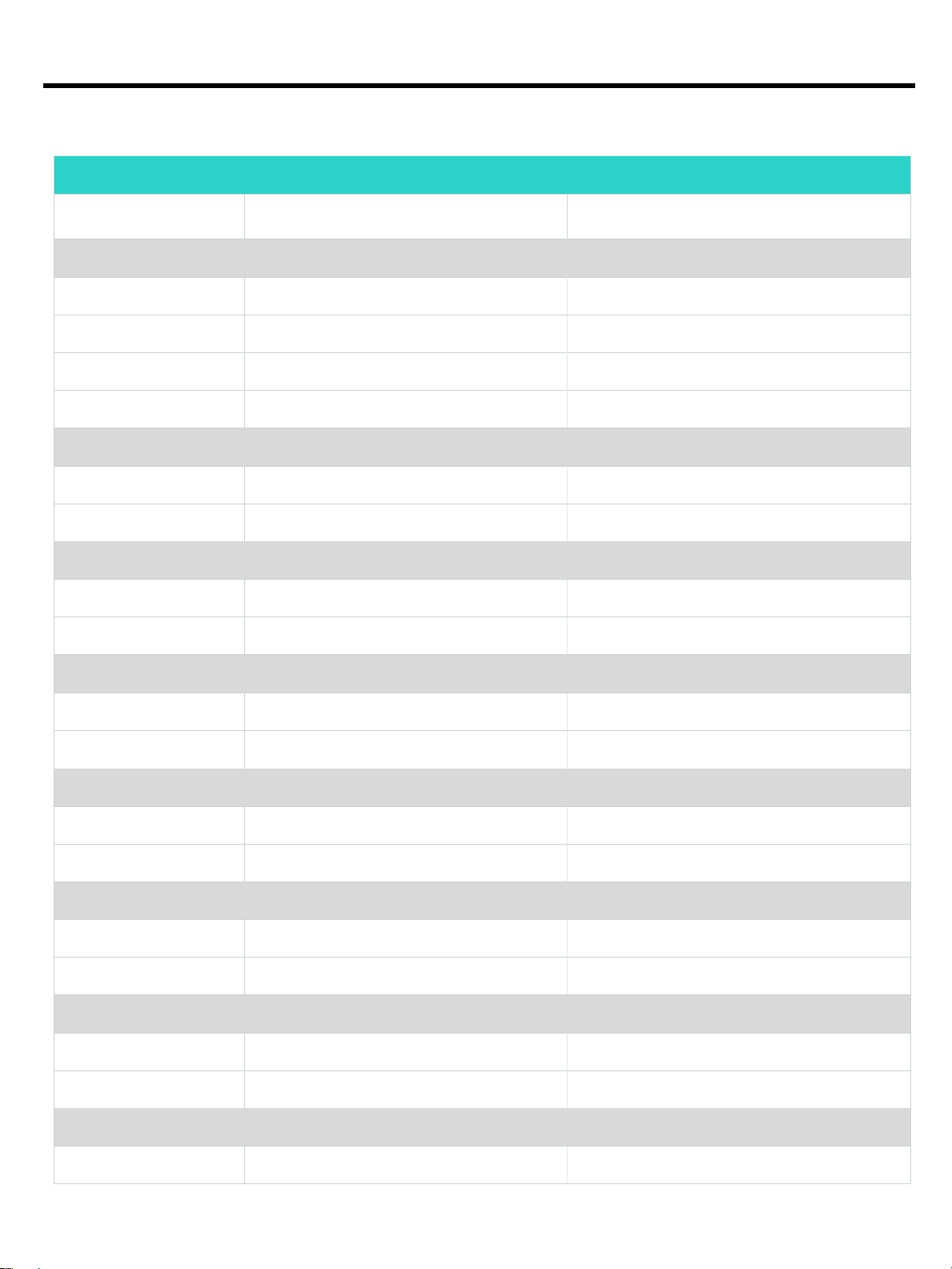
RF Performance Table
Maximum transmit power (dBm) per
802.11b 2.4 GHz
Mbps
22
22
22
22
802.11g 2.4 GHz and 802.11a 5 GHz 2.4 GHz and 802.11a 5 GHz
22 -93
19 -75
802.11n HT20 2.4 GHz and 5 GHz
22 -93
18 -71
Receiver sensitivity (dBm) per receive
-95
-93
-90
-88
802.11n HT40 2.4 GHz and 5 GHz
802.11ac VHT20 5 GHz
802.11ac VHT40 5 GHz
802.11ac VHT80 5 GHz
802.11ac VHT160 5 GHz
22 -90
18 -68
22 -93
16 -68
22 -90
15 -63
22 -87
15 -61
22 -86
Page
Page 10

QuickSpecs
Aruba 318 Series Access Points
Technical Specifications
10
MCS9
NOTE: Maximum capability of the hardware provided (excluding antenna gain). Maximum transmit power is limited by local
regulatory settings.
15 -57
Page
Page 11
QuickSpecs
Aruba 318 Series Access Points
Summary of
Changes
11
Date
Version History
Action
Description of Change
18-Dec-2017
From Version 1 to 2
Changed
Minor changes made on Features and Benefits
06-Nov-2017
Version 1
Created
Document creation.
Sign up for updates
© Copyright 2017 Hewlett Packard Enterprise Development LP. The information contained herein is
subject to change without notice. The only warranties for Hewlett Packard Enterprise products and
services are set forth in the express warranty statements accompanying such pro
Nothing herein should be construed as constituting an additional warranty. Hewlett Packard Enterprise
shall not be liable for technical or editorial errors or omissions contained herein.
To learn more, visit
a00027232enw
ducts and services.
: http://www.hpe.com/networking
- 16089 - Worldwide – V2 - 18- December-2017
Page
 Loading...