

Page 1
1
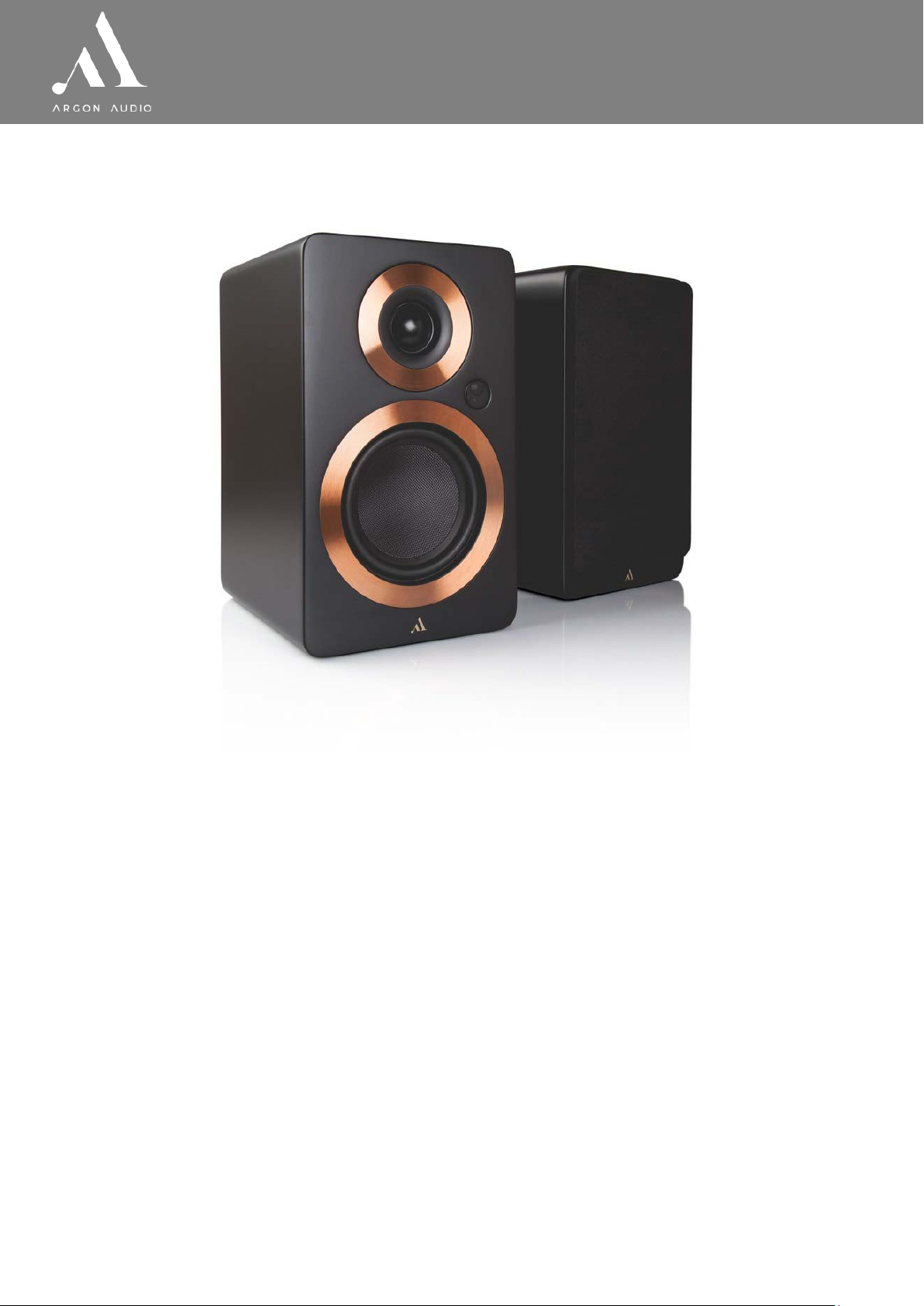
F o r t e A 4 & A 5
Dear Customer,
Quality has always been our driving force and founding Argon Audio is
a natural extension of this philosophy.
We have 20 years’ experience in creating and specifying high quality products,
manufacturing them and selling them on to end users with Value-for-Money as the
primary aim. And Argon Audio is a brand fully compliant with these values.
Design, and engineering is done in Denmark and manufacturing takes place in the Far
East, where quality vendors are highly competitive - and as a result supply outstanding
Value-for-Money products.
- To the delight of both ourselves and our customers!
Congratulations with your FORTE speakers, may they bring years of enjoyment.
www.argonaudio.com
Page 2

2
F o r t e A 4 & A 5
1
Introduction
page
1
1.1
Contents of the box
page 2 1.2
Safety Instructions
page
3 2 Usage, controls and connections
page
4
2.1 Overview of the Back pa nel
page
4
2.2 Overview of the Remote
page
5
3
Quick Start
page
6
4
Special Functions and Features
page
7 5 Connecting a Chromecast Audio device
page
8 6 Specifications
page
9
Table of Content
1.1 Contents of the box;
o ARGON AUDIO FORTE Speakers
o Front covers with magnet mount
o Quick Start Guide
o Power cable
o Speaker cable (3 meters)
o Remote control w/batteries
We recommend that you keep the original box and packi ng mat er i al for futur e. transportation.
We also recommend that you keep this User Manual for fut ur e use.
www.argonaudio.com
Page 3
3
F o r t e A 4 & A 5
1.2 Safety Instructions
• Unplug this product from the wall outlet before cleaning. Do not use this product near
water or moisture. Do not spill liquids on the product. Clean only with a dry cloth.
• Place the unit on a solid surface.
• Do not put it in a closed bookcase or a cabinet that may keep air from flowing through its
ventilation openings.
• Do not install near any heat sources, such as radiators, heat registers, stoves or other
appliances that produce heat.
• Protect the power cord from being walked on or pinched, particularly at plugs and the
point where they exit from the product.
• During Lightning storms, unplug the product from the power source or if unused for long
periods of time. This will prevent lightning and power-line surge damage to the product.
• Do not attempt to service this product yourself. Opening or removing covers may expose
you to dangerous voltages or other hazards. Please contact the manufacturer to be
referred to an authorized service center near you.
• Do not overload wall outlets, extension cords, or integral power circuits as this can result
in a risk of fire or electric shock.
• Never push any object through the product openings, as this can result in fire, electric
shock or damage.
• Use proper power sources. Plug the product into a proper power source, as described in
the operating instructions or as marked on the product.
If there is a Lightning flash with an arrow head on product, it’s intended to alert the
User of the presence of un-insulated “dangerous voltage” within the product, that
might be of
sufficient magnitude to constitute a risk of electric shock to persons.
If there is an Exclamation point on the product, it’s intended to alert the User that
there is important operating and maintenance (servicing) information in the User
manual.
If there is a double rectangular symbol on the product, it means that the product is
double insulated. Earth connection is not required.
www.argonaudio.com
Page 4
4
F o r t e A 4 & A 5
2. Usage, controls and connect ions
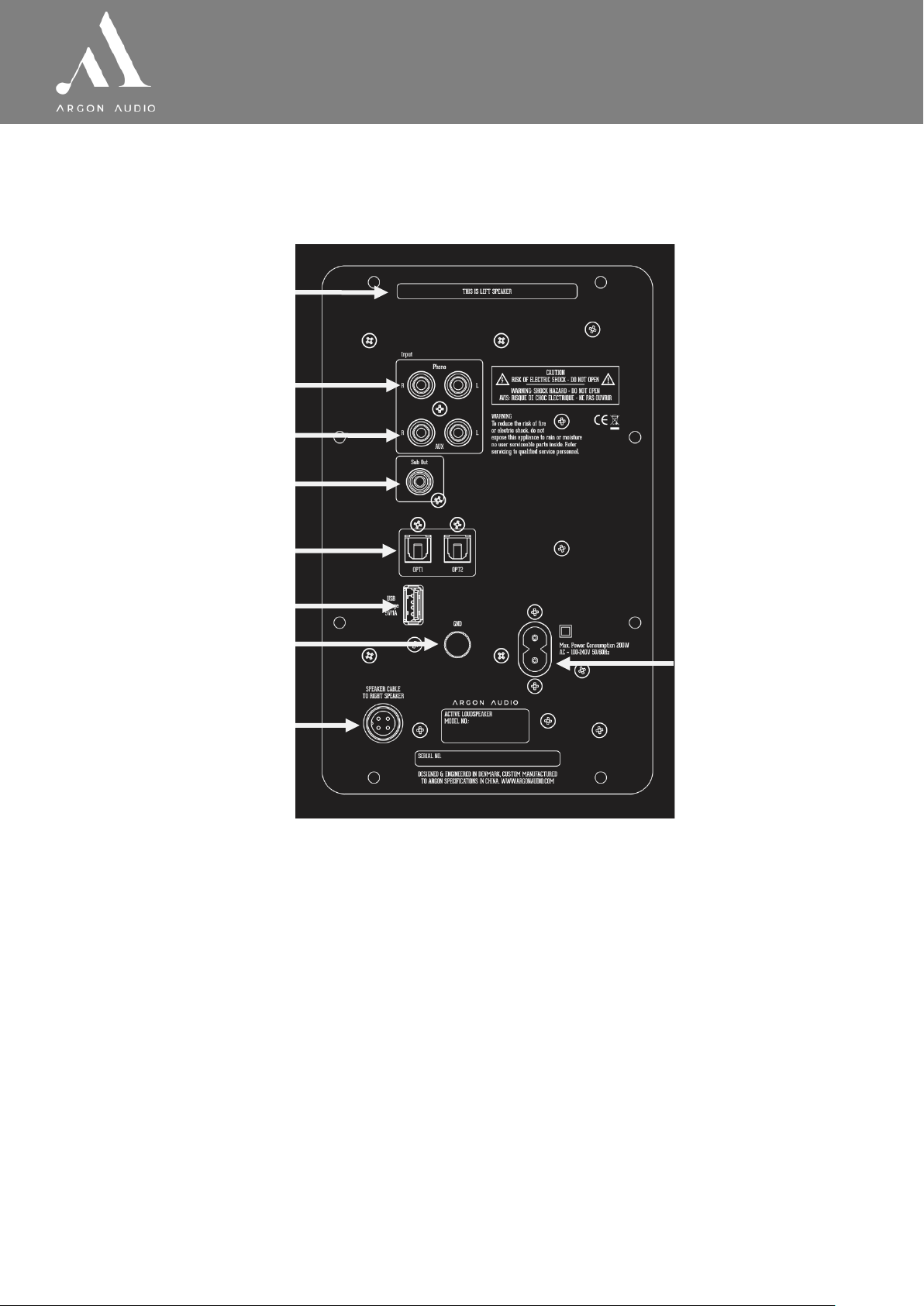
2.1 Overview of Back panel (inputs and connections)
①
②
③
④
⑤
⑥
⑦
⑧
⑨
1. Bass Reflex Port
◊ Do not cover this port and preferably keep it min. 15 cm from a wall
2. Phono (MM) for turntable only
◊ Connect a turntable, remember to connect “Ground” (⑦) as well
3. Line in for analogue sources (AUX)
◊ Connect any analogue audio source with Left Right cable
4. SUB OUT
◊ Connect a Subwoofer to this output
5. Optical/Digital 1 and 2
6. USB power
◊ Charge any 5V USB device or Connect power to a Chromecast device. (see
point 5 on page 8)
7. Ground (GND)
◊ Connection for turntable grounding
8. Speaker plug
◊ Connection cable to pass i v e speaker
9. Power Plug
◊ Insert the power cable and connec t to an electric outlet
www.argonaudio.com
Page 5
5
F o r t e A 4 & A 5
④
③
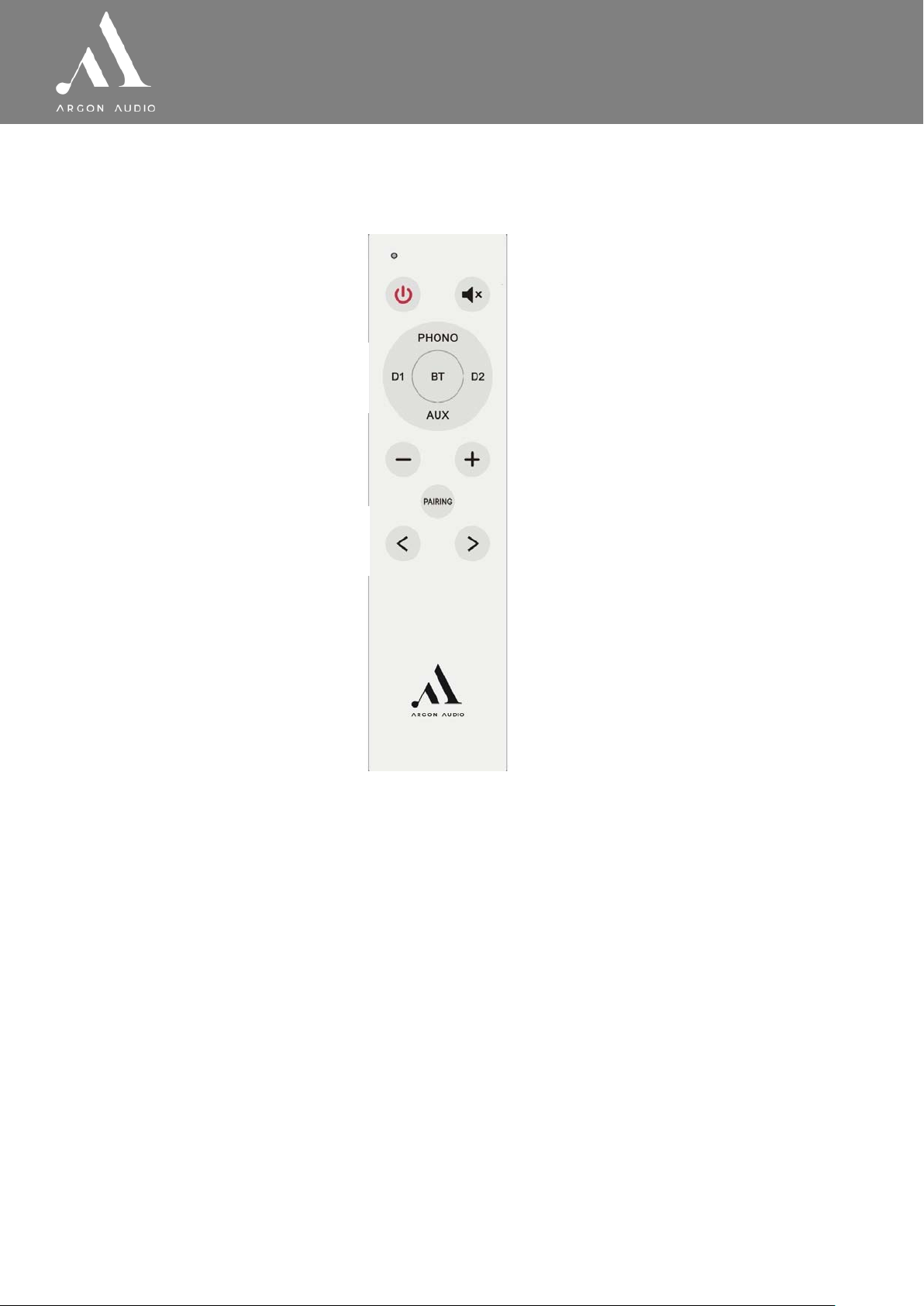
2.2 Overview of Remote control (functions)
①
②
⑤
⑥
1. Power ON/OFF
◊ Press to turn power on or off
2. Input selector
◊ Press to choose your desired input source
3. Volume up/down
◊ Press to adjust volume up or down
4. Pairing of Bluetooth device
◊ Press to pair a new Bluetooth device
5. Skip track in Bluetooth mode
◊ Press to skip track forward or backwards
6. Mute or un-mute the sound
◊ Press to Mute or un-mute the sound
www.argonaudio.com
Page 6

6
F o r t e A 4 & A 5
3. Quick s tart
1. Connect the speakers using the supplied speaker cable.
2. Connect the power cord into an electric outlet and into the back of the left speaker
(which has the amplifier). The LED light on the loudspeaker will turn on.
3. To pair your Bluetooth device, turn on the speakers and press and hold “PAIRING”
on your remote for about 3 seconds, until the LED starts blinking. Your speakers
are now in pairing mode. Activate Bluetooth on your playback device and scan for
devices. Your speaker will show up as “ARGON FORTE”. Press “pair” and you are
connected. The LED light on the speaker will change to solid blue. You’re now
ready to start listening to music!
4. Besides Bluetooth, your Forte speakers have four more inputs: Optical1, Optical2,
AUX and Phono. Use the included remote control to select your wished input.
5. When connecting a turntable to the Phono input on the Forte speaker, remember
to also connect the ground wire from the turntable, to the metal GND screw.
6. If you have an active subwoofer, connect it to the Forte speaker’s SUB OUTPUT,
using a RCA cable and then connect the cable to Your Subwoofer.
7. Your Argon Forte speakers support most Samsung, Sony and LG remote functions
for “Volume +/-“ and “Mute” using IR remotes only.
8. We recommend a running-in time of your Forte speakers of approximately 15-20
hours at normal listening level before you decide on the final positioning of the
speakers. During the running-in time the drive units will settle in and perform as
intended.
9. For optimal sound performance, the best listening position is at ear level with the
speakers placed not too far from a wall.
www.argonaudio.com
Page 7

7
F o r t e A 4 & A 5
4. Special functions and fea t ures
1. Remote control function with Samsung, Sony and Denon remotes
◊ Argon FORTE is born with IR commands fro m the most co mmon Sony
and Samsung TV. That is, you can use your Sony or Samsung IR remote
control
for completely basic commands such as:
volume up, volume down and mute. On the FORTE.
◊ If you have a remote control that does not send IR commands (eg, a Smart
remote), some newer TVs also support IR learn so you can force the television
to broadcast IR commands to your product, thus using your TV remote control
to control your FORTE. Find it in the list under setup on your TV to use this
feature. Check the manual for your TV if in doubt.
2. Auto sense (APU Auto Power Up)
◊ When in standby mode, FORTE will by default start up automatically once
you start playing music from your source. (notice, there is No Auto sense on
Phono/Turntable input)
◊ Bluetooth will Auto connect to already paired devices.
◊ You can turn the Auto sense OFF if you wish. Press and hol d the Power button
on the remote for 5 sec. and the FORTE ‘s APU is disabled.
When FORTE is powered on again it works normal again with APU function.
◊ If you do not want auto sense on the inputs at any time, you should always
power the amplifier off manually with the remote (and hold the power button
for 5 seconds when doing so)
3. Auto standby (APD Auto Power Down)
◊ The FORTE will automatically go into standby after 15 minutes if no music is
playing.
◊ Timeout for Bluetooth connection loss with Bluetooth device is also 15 minutes
4. Un-Pair Bluetooth devices
◊ Press and hold BT button for 5 sec – light will flash and unpair/reset will be
done.
www.argonaudio.com
Page 8
8
F o r t e A 4 & A 5
5. Connecting a Chromecast Audio device
Your Argon Forte speakers can easily and relatively cheap be turned into a wifi streaming
speakers, simply by adding a Google Chromecast Audio adapter. Read more about
Chromecast Audio here
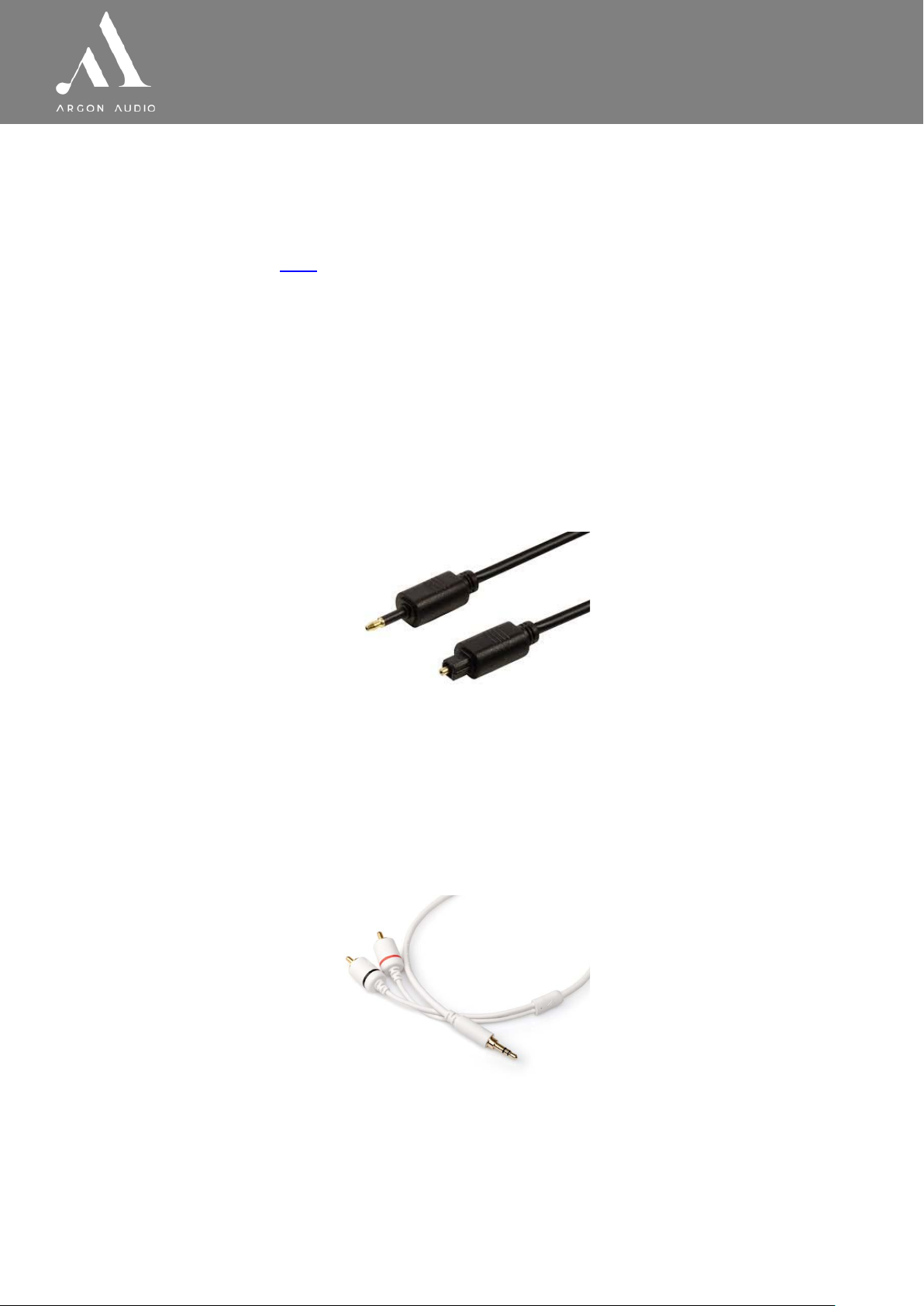
For connecting a Chromecast Audio device to Argon Forte speakers you have two
choices.
◊ Connecting the Chromecast Audio using USB power Forte (point 2.2.6 page 4)
◊ Chromecast must be connected to optical input (point 2.2.5 page 5).
A cable for this kind of connection is not included with the Chromecast. The cable
needed is called Optical mini / Toslink digital and will look like below.
Using this digital cable is the optimal sound quality solution.
◊ Connecting the Chromecast Audio using normal power outlet to pow er the
Chromecast.
◊ Chromecast must be connected to Line In (point 2.2.3 page 4). A cable for this kind
of connection is not included with the Chromecast. The cable needed is called Mini
Jack to RCA cable and will look like below
www.argonaudio.com
 Loading...