

Page 1

The User’s Manual BT01
Befor using BT01 BT earphones,
Please follow the below operation
Please confirm the earphone battery is full powered.
Please paring the BT devises with BT 01 after full charging of BT01.
Charging BT01
Please use MIC USB cable for charging, and when Red light of BT01 is light, it means that charging
begins.
Turn on BT01
Please press main button for 3 seconds for sound: DU, it means that BT01 is turned on, and the light is
twinkwling in Red / Blue
Turn off BT01
Please press main button for 3 seconds for BT01 Turn off.
If you don’t use BT01 for a littler longer time, we suggest that you can turn off BT01 to save power.
Paring Bluetooth
Please keep BT01 with BT devices in 1 meter distance
Please turn on BT01 for paring status.
Please turn on BT function for search NO: BT01 in BT device, when scan BT01 No well, press
BT01 No in BT devices for paring. When bluelight shining 2 times continuously, it means paring
is successful.
If paired last time, press main button 3 seconds of BT01, it will be paired with BT devices
automaticlly, no scan BT01 No any more.
st
If paired with 1
seconds for sound: DU, and light begins to twink in Red / But, it means BT01 can pair the 2
devies.
If paired well, you can use BT01 for phone call and music playing.
Getting phone cal/ Reject the phone call.
When phone is coming, press the main button one time for receiption of phone call.
Or press main button for 2 sonconds for rejection of phone call.
During phone call, press main button, and it can take off the phone call.
BT devices, and now begin to pair the 2nd BT device, please press main button for 2
nd
BT
Page 2
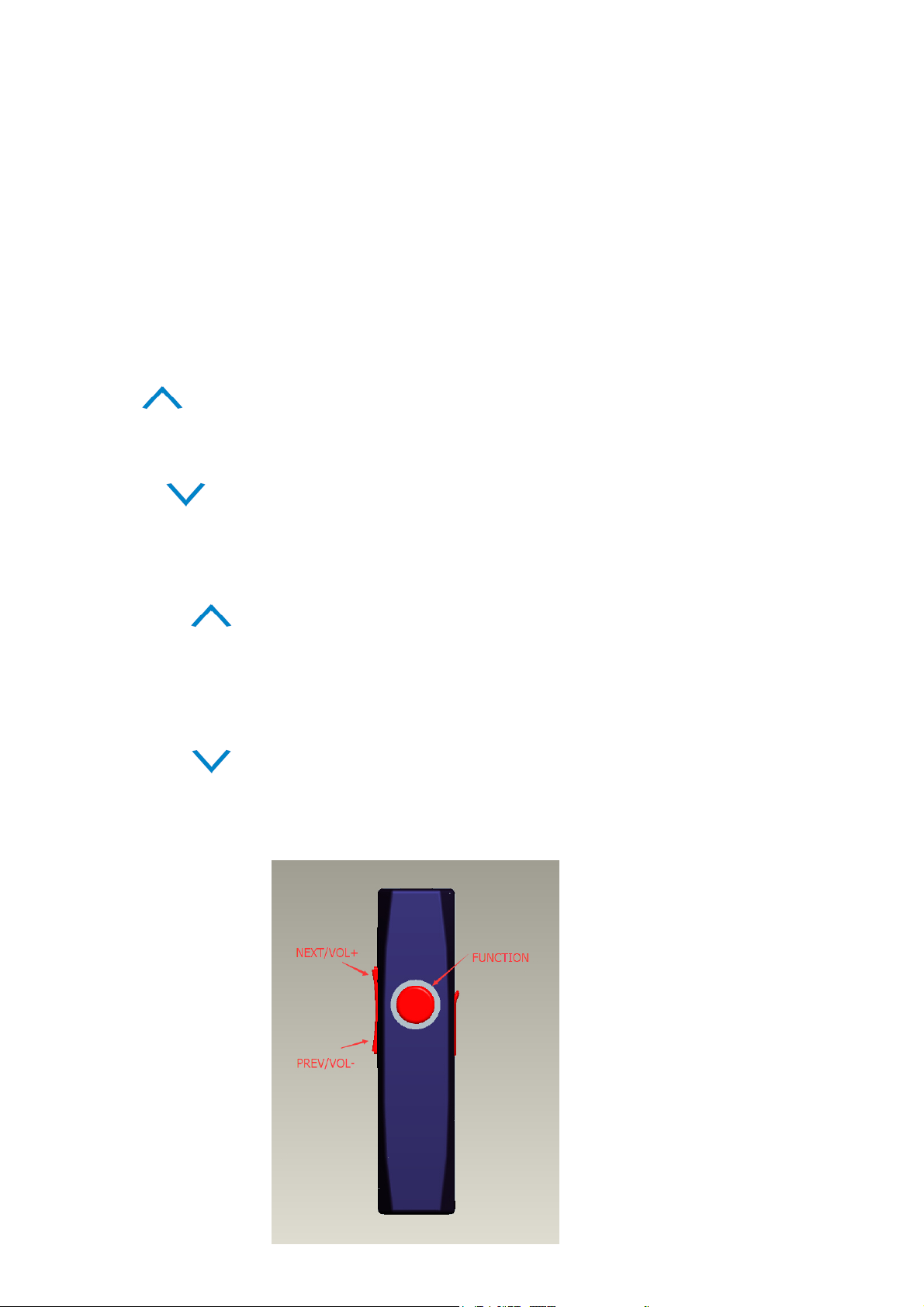
Press the latest phone No.
Press the main button 2 times for dialing the latest phone No. when BT01 is standby.
Pause/Continue
Press the main button to pause/continue music playing when BT01 connected to the BT devices
Previous
Press button for previous song
Next
在 Press button for next song
Volume Increase
Long press button to increase the volume. There will be a “Dudu” sound when reach
maximum
Volume Decrease
Long press button to decrease the volume. There will be a “Dudu” sound when reach
minimum
Page 3

FCC Statement
This equipment has been tested and found to comply with the limits for a Class B digital device,
pursuant to Part 15 of the FCC Rules. These limits are designed to provide reasonable
protection against harmful interference in a residential installation. This equipment generates
uses and can radiate radio frequency energy and, if not installed and used in accordance with
the instructions, may cause harmful interference to radio communications. However, there is
no guarantee that interference will not occur in a particular installation. If this equipment does
cause harmful interference to radio or television reception, which can be determined by turning
the equipment off and on, the user is encouraged to try to correct the interference by one or
more of the following measures:
-- Reorient or relocate the receiving antenna.
-- Increase the separation between the equipment and receiver.
-- Connect the equipment into an outlet on a circuit different from that to which the receiver is
connected.
-- Consult the dealer or an experienced radio/TV technician for help.
This device complies with part 15 of the FCC Rules. Operation is subject to the following two
conditions:(1) This device may not cause harmful interference, and (2) this device must accept
any interference received, including interference that may cause undesired operation.
Changes or modifications not expressly approved by the party responsible for compliance
could void the user's authority to operate the equipment.
 Loading...