

Page 1
User Guide
ARETE POP
Smart RFID Dongle Reader
Page 2

ARETE POP User Guide
2 / 22
Notice
Registered Trademark
ARETE mobile is launched by PHYCHIPS Inc. for mobile device and currently registered worldwide
with its ARETE mobile trade mark legally protected by law.
© 2013 PHYCHIPS Inc. All rights reserved.
This User Guide is produced by PHYCHIPS Inc. and protected by Copyright Laws.
Please note that there may be possible mistake or omission of information in this document.
Applicable Device
This document is applicable for iOS 6.0 and Android 2.3.3 above
Page 3

ARETE POP User Guide
3 / 22
Contents
1 Understanding ARETE POP ............................................................................ 4
1.1 ARETE POP at a Glance ................................................................................. 4
1.2 Accessories .................................................................................................... 4
1.3 Specifications ................................................................................................. 5
2 Basics ............................................................................................................... 6
2.1 Activating ........................................................................................................ 6
2.2 Battery Charging ............................................................................................ 6
3 How to use application .................................................................................... 7
3.1 How to install application in your iPhone ..................................................... 7
3.2 How to install application in your Android Phone ........................................ 8
3.3 Main Display ................................................................................................... 9
3.4 Status Bar ....................................................................................................... 9
3.5 Inventory ....................................................................................................... 10
3.6 Read Tag Memory ......................................................................................... 11
3.7 Write Tag Memory ......................................................................................... 12
3.8 Lock Tag Memory ......................................................................................... 13
3.9 Kill Tag Memory ............................................................................................ 14
3.10 Output Power Setting ................................................................................... 15
3.11 On/Off Time Setting ...................................................................................... 16
3.12 Stop Condition Setting ................................................................................. 17
3.13 Beep Setting ................................................................................................. 18
3.14 About ............................................................................................................. 19
4 Information ..................................................................................................... 20
4.1 Safety Information ........................................................................................ 20
4.2 RF Exposure Information ............................................................................. 20
4.3 Compliance Information ............................................................................... 20
4.4 Troubleshooting ........................................................................................... 21
4.5 Disposal and Recycling ............................................................................... 21
5 Customer Service .......................................................................................... 22
Page 4
ARETE POP User Guide
4 / 22
1 Understanding ARETE POP
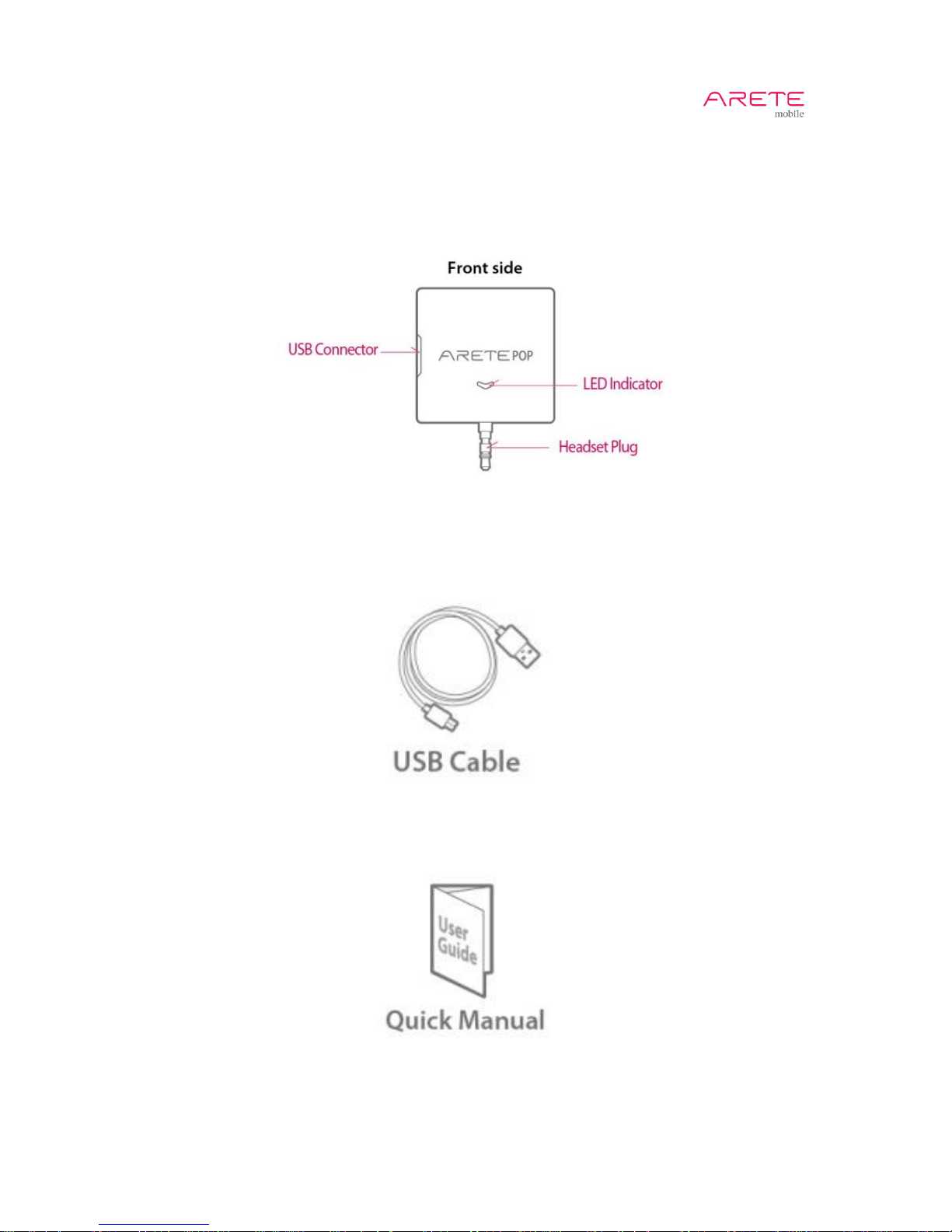
1.1 ARETE POP at a Glance
1.2 Accessories
Page 5
ARETE POP User Guide
5 / 22
1.3 Specifications
PHYSICAL
Dimension(WxLxH)
51 x 50 x 15 mm (without plug), 51 x 67.5 x 15 mm (with plug)
Weight
35g
Indication
Power on LED(Blue), Charging LED(Red), Tagging LED(Blinking Blue)
Battery
360mAh
Continuous Time
About 2.0 hours
Standby Time
About 17 hours
Charging
Micro USB 5pin
Color
White
RFID PERFORMANCE
RFID Reader Chip
PHYCHIPS PR9200
Air Protocol
EPCglobal Class 1 Gen 2 (ISO 18000-6C)
Interface
3.5mm stereo headphone jack
Part No. &
Operating Frequency
A100-K: 917.1 ~ 920.3 MHz (Korea Band)
A100-U: 917.1 ~ 926.9 MHz (US Band)
A100-E: 865.1 ~ 867.9 MHz (EU Band)
A100-J: 920.6 ~ 922.2 MHz (Japan Band)
OS
Apple iOS 6.0, Android 2.3.3 above (as of July 1st 2013)
Output Power(EIRP)
316mW(25dBm) for US, EU and Korea band
200mW(23dBm) for Japan band
RFID Read Distance
Up to 1.0m (depend on tags)
Antenna
Circularly Polarized Antenna
RFID Function
Read, Write, Lock, Kill
USER ENVIRONMENT
Operating Temp
0~40˚C
Storage Temp
-20~60˚C
REMARK
This device complies with part 15 of the FCC Rules. Operation is subject to the following two
conditions: (1) This device may not cause harmful interference, and (2) this device must accept any
interference received, including interference that may cause undesired operation.
Page 6
ARETE POP User Guide
6 / 22
2 Basics
2.1 Activating
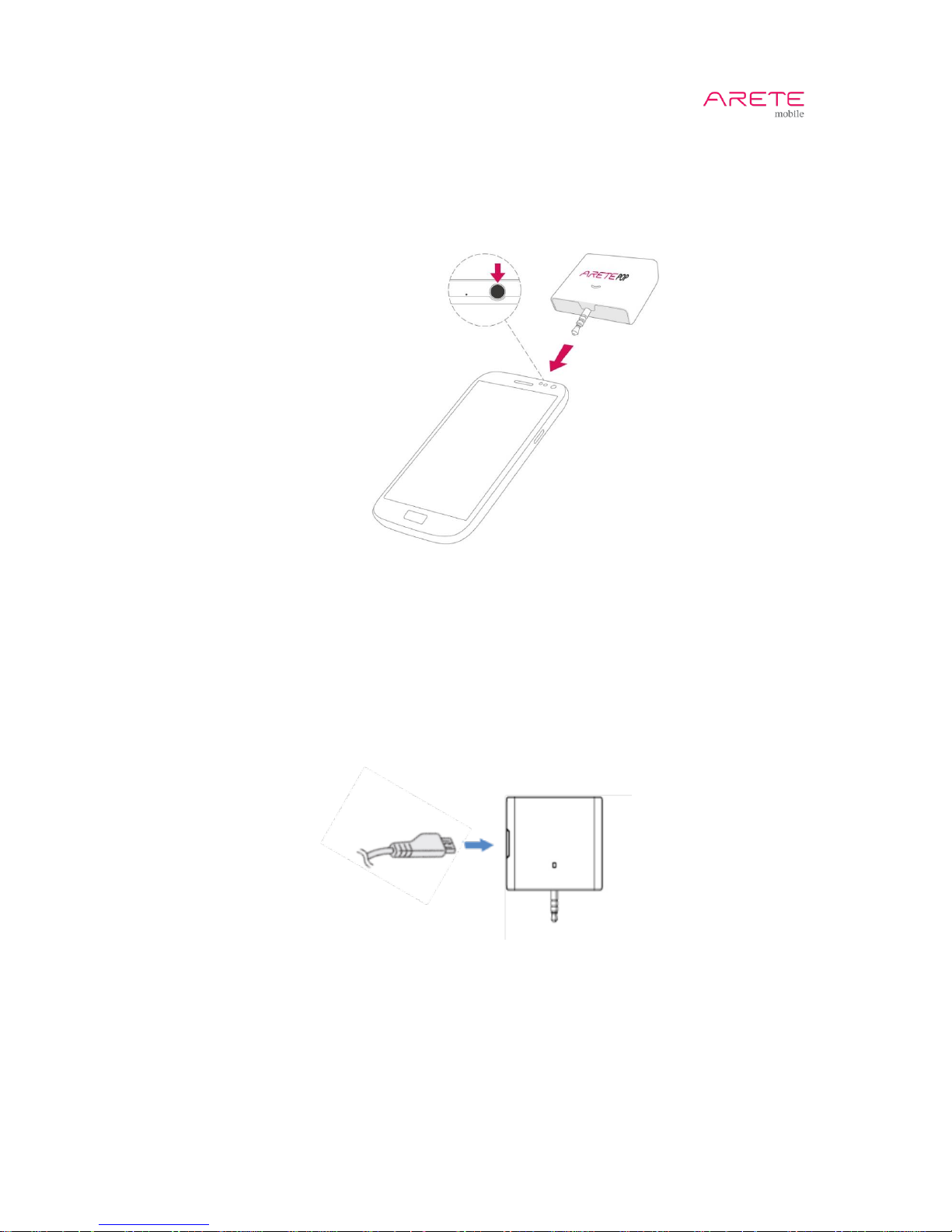
1. Insert ARETE POP RFID Reader to your Phone's headphone jack.
2. Turn volume up to 100%.
3. Switch the button to "On" in App.
4. LED indicator will be turned on in blue color.
2.2 Battery Charging
1. Plug the plug of USB cable into the USB connector of ARETE POP. Plug the other end of
USB cable into a USB hub.
2. Battery will be charged by Micro B USB connector. It is compatible with general Micro B
USB connector.
3. Charging time is about 2 hours
4. Red LED: under charging
5. Blue LED: completed charging
Page 7
ARETE POP User Guide
7 / 22
3 How to use application
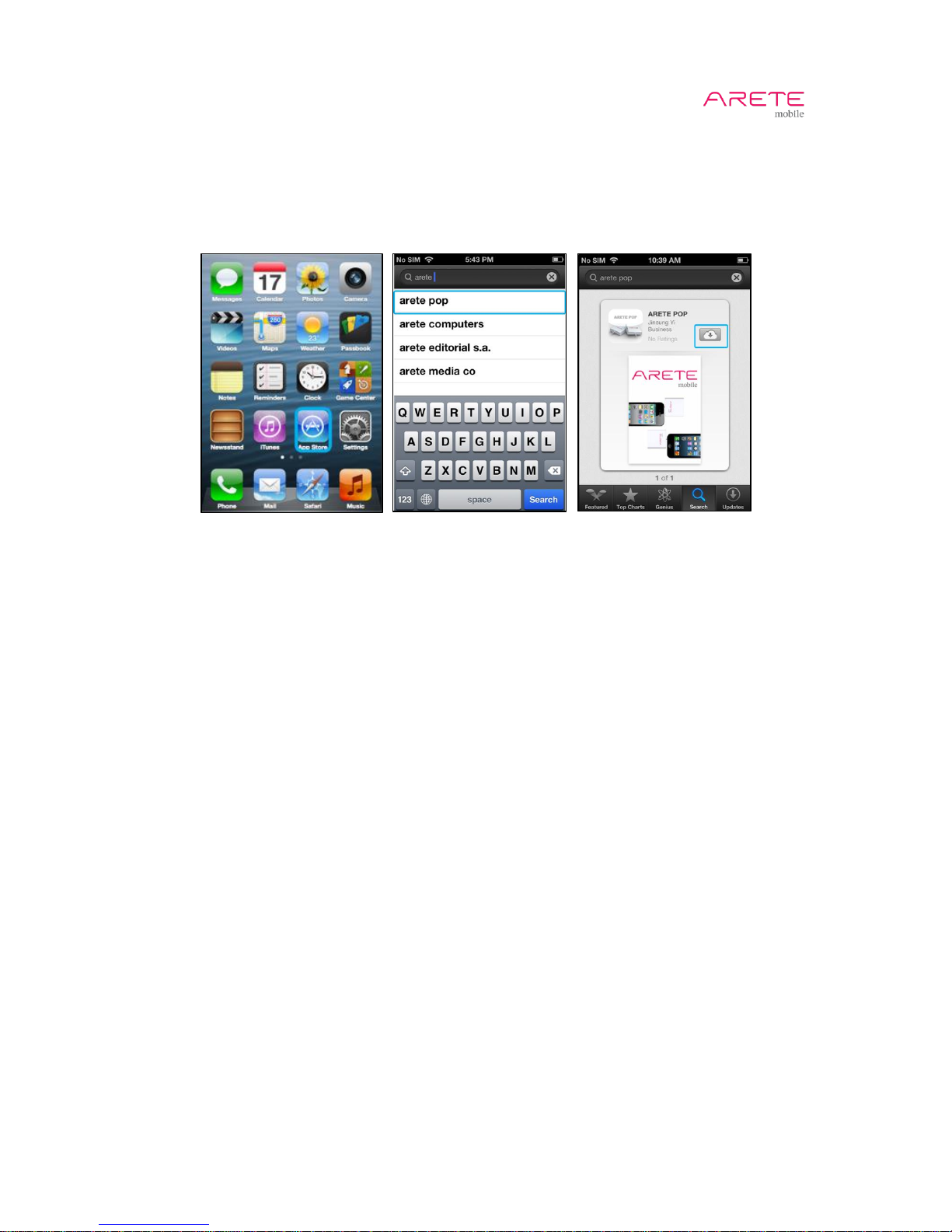
3.1 How to install application in your iPhone
1. Select App Store
2. Search ARETE POP application and install it.
Page 8
ARETE POP User Guide
8 / 22
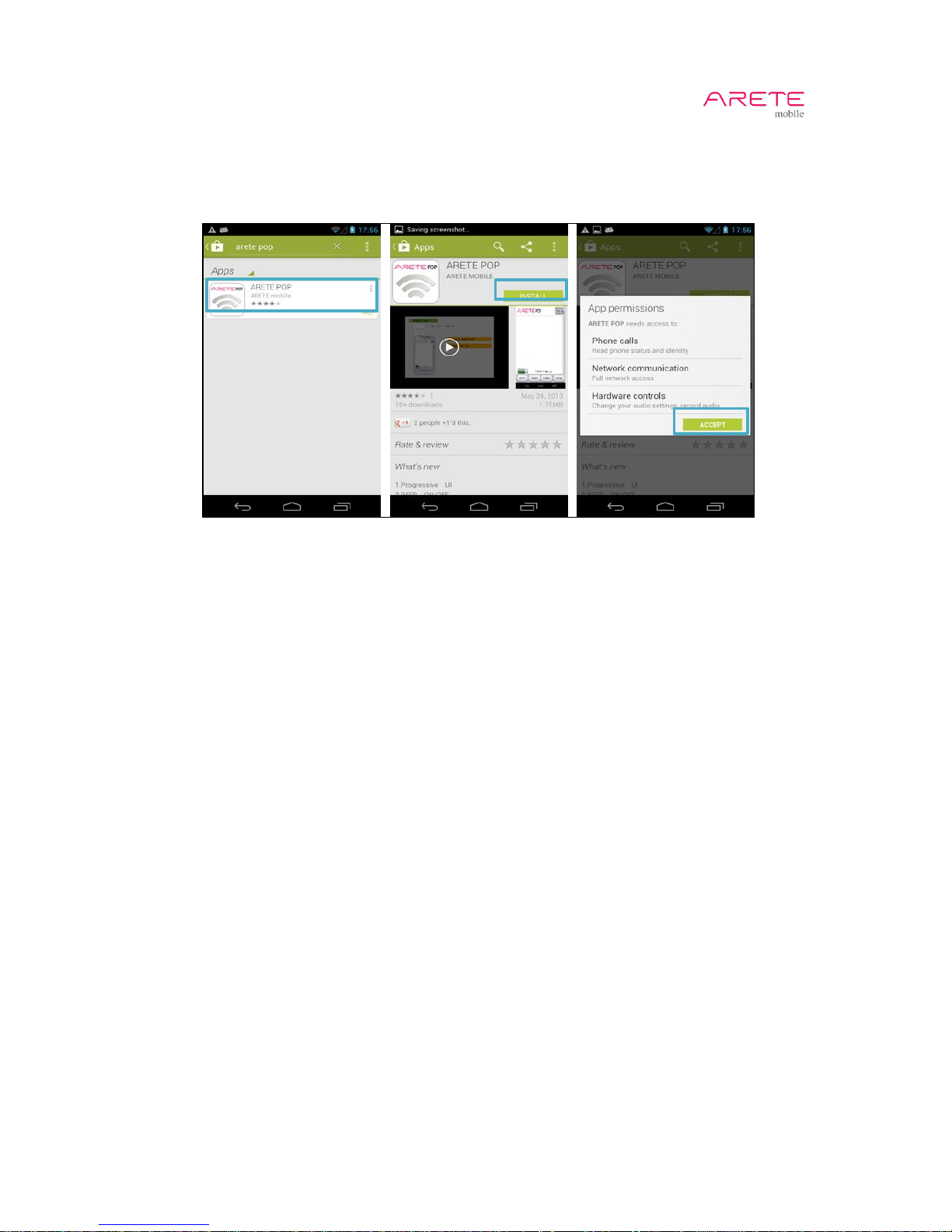
3.2 How to install application in your Android Phone
1. Connect your phone to Google Play Store.
2. Search “ARETE POP” and touch install.
Page 9
ARETE POP User Guide
9 / 22
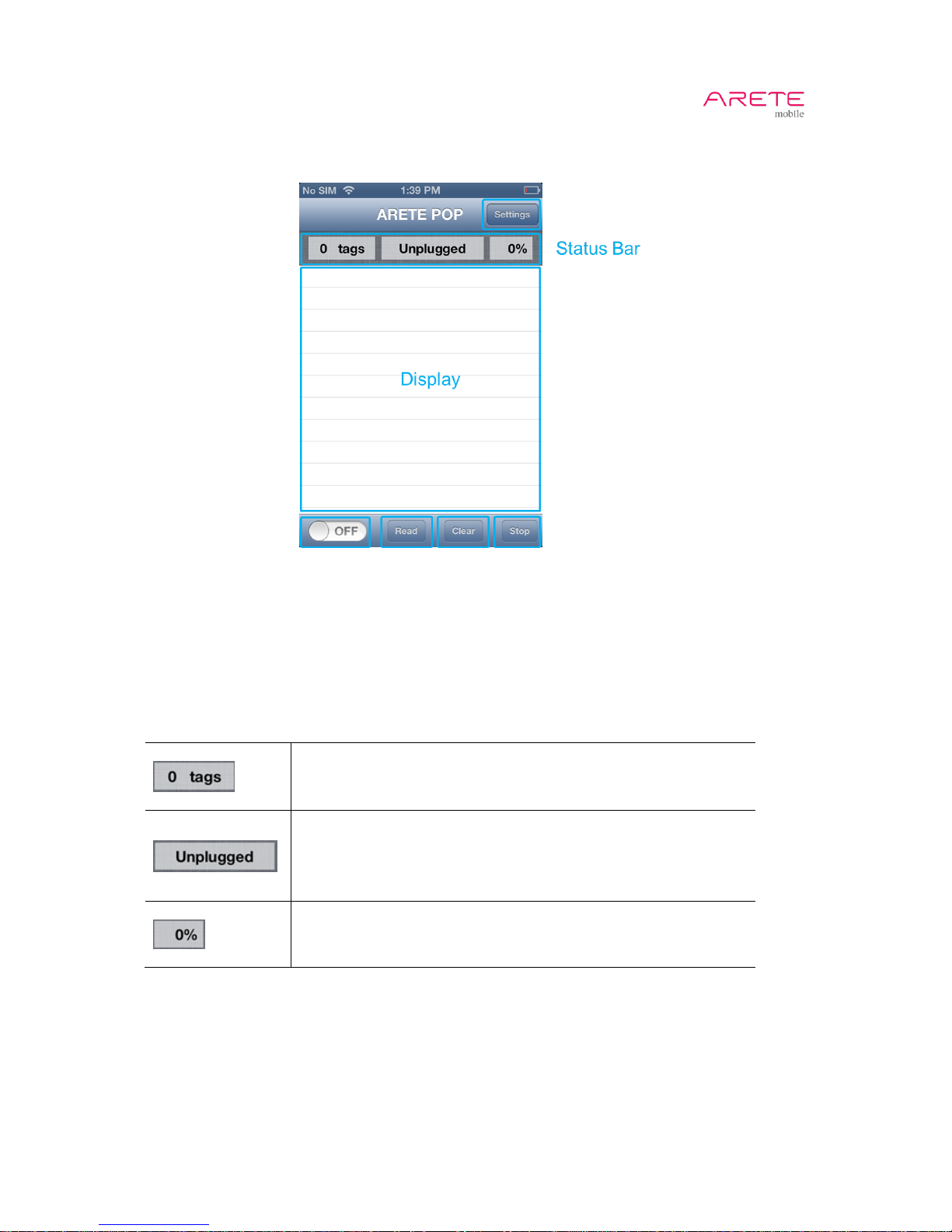
3.3 Main Display
- Switch: Turn on or off the Reader
- Read Button: Start to read “Tag EPC”
- Clear Button: Remove Read Record
- Stop Button: Stop Tag Reading
- Display: Show Tag Read Record
3.4 Status Bar
The number of tags displayed
ARETE POP Status
- Unplugged: ARETE POP is not inserted into headset jack.
- Plugged: ARETE POP is inserted into headset jack.
- Connected: ARETE POP is connected to app.
Battery gauge
Page 10
ARETE POP User Guide
10 / 22
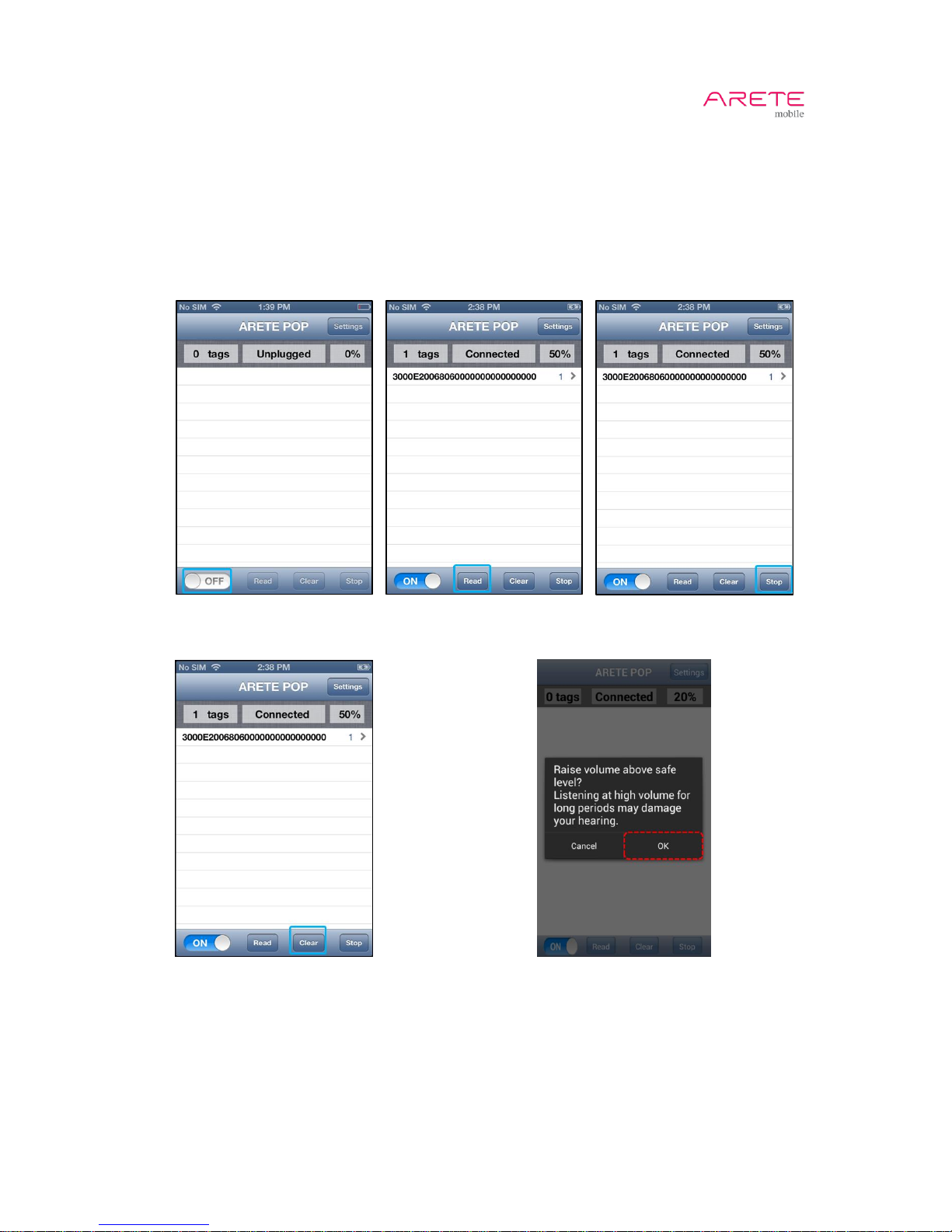
3.5 Inventory
1. Switch the button to "On"
2. Touch Read button to inventory tag continuously
A. PC + EPC will appear.
3. Touch Stop button to finish inventory tag
4. Touch Clear button to clear the list of tags.
5. Some Android phones warn the high volume. Touch OK.
1 2 3
4 5
Step 11.
Connected
Page 11
ARETE POP User Guide
11 / 22
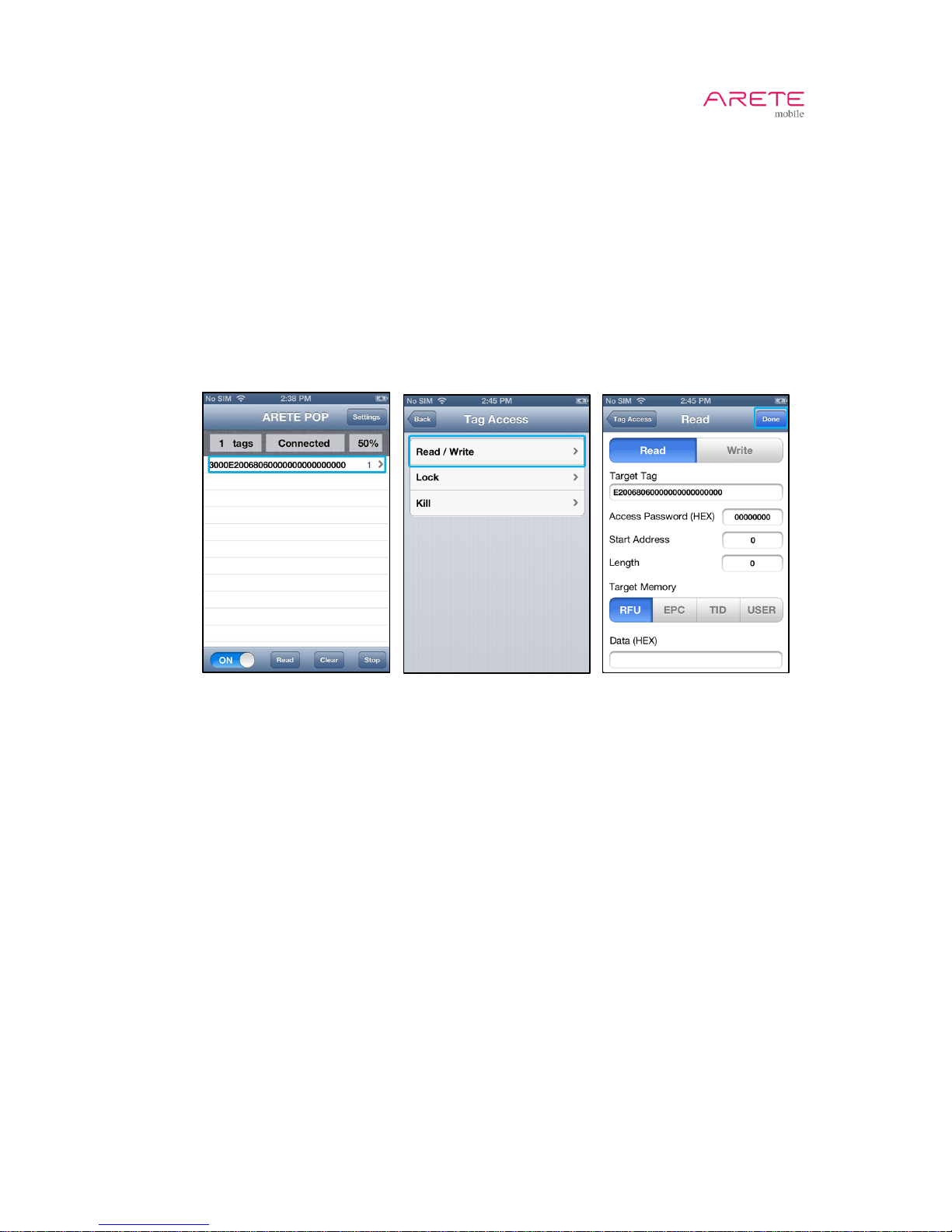
3.6 Read Tag Memory
1. Choose the target tag
2. Choose Read
3. Configure parameters
A. Target Tag: EPC will appear automatically.
B. Give 8 bytes Access Password in hexadecimal.
C. Give word-aligned Start Address in decimal.
D. Give word-aligned Length Word in decimal. Set to 0 to read whole memory bank (Up to
64 words).
E. Give Target Memory bank. RFU means reserved memory bank. Some tags have no
USER memory.
4. Touch Done button to read tag memory.
1 2 3, 4
Step 11.
Connected
Page 12
ARETE POP User Guide
12 / 22
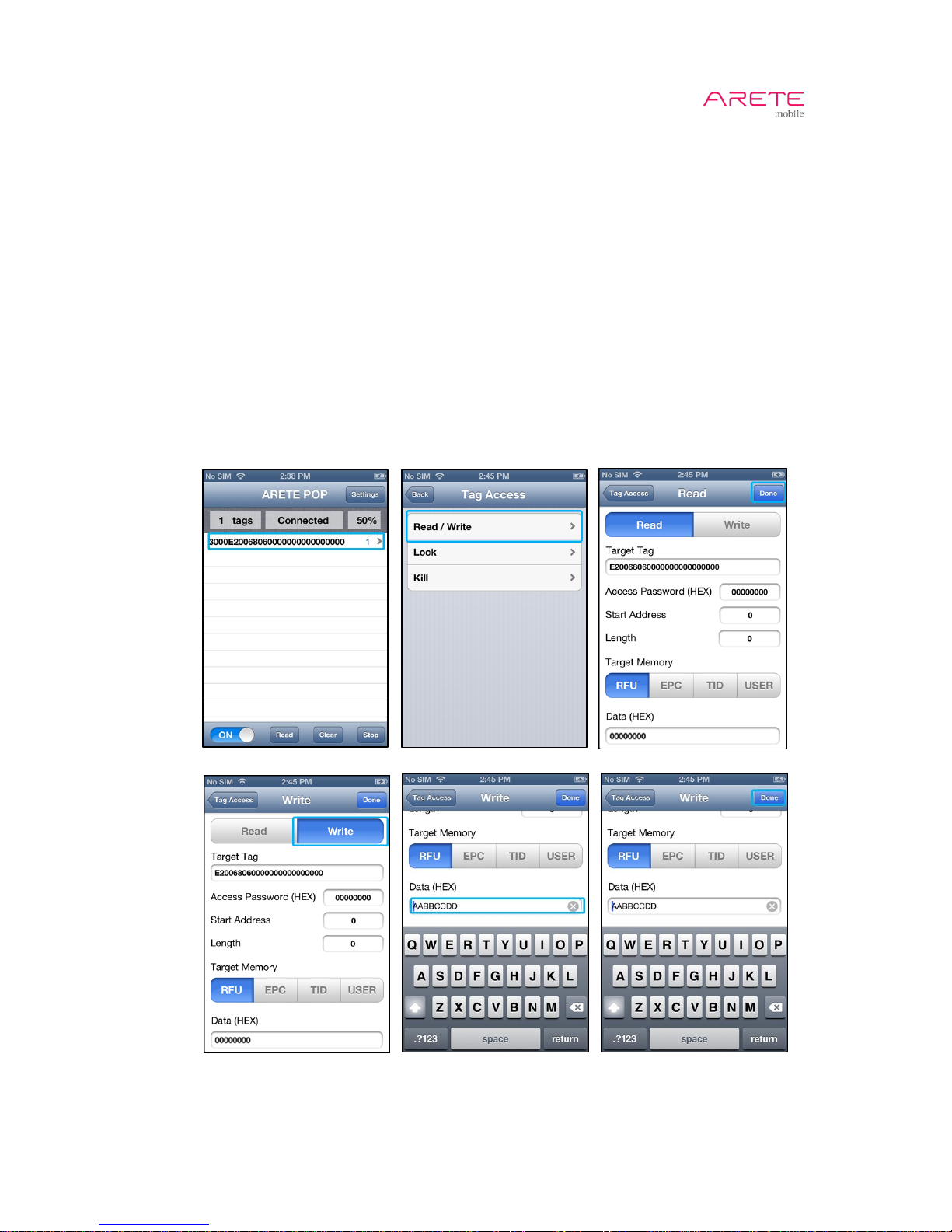
3.7 Write Tag Memory
1. Choose the target tag
2. Choose Write
3. Perform Read Tag Memory described in previous section.
4. Choose Write
5. Configure parameters
A. Target Tag: EPC will appear automatically.
B. Give 8-byte Access Password in hexadecimal.
C. Give word-aligned Start Address in decimal.
D. Give word-aligned Length Word in decimal. Set to 0 to read whole memory bank (Up to
64 words).
E. Give Target Memory bank. RFU means reserved memory bank.
6. Modify Data to write
A. TID bank is read only (not writable). Some tags have no USER memory.
B. If you want to change EPC, give start address to 2 (words).
7. Touch Done button to write data to tag memory.
1 2 3
4,5 6 7
Step 11.
Connected
Page 13
ARETE POP User Guide
13 / 22
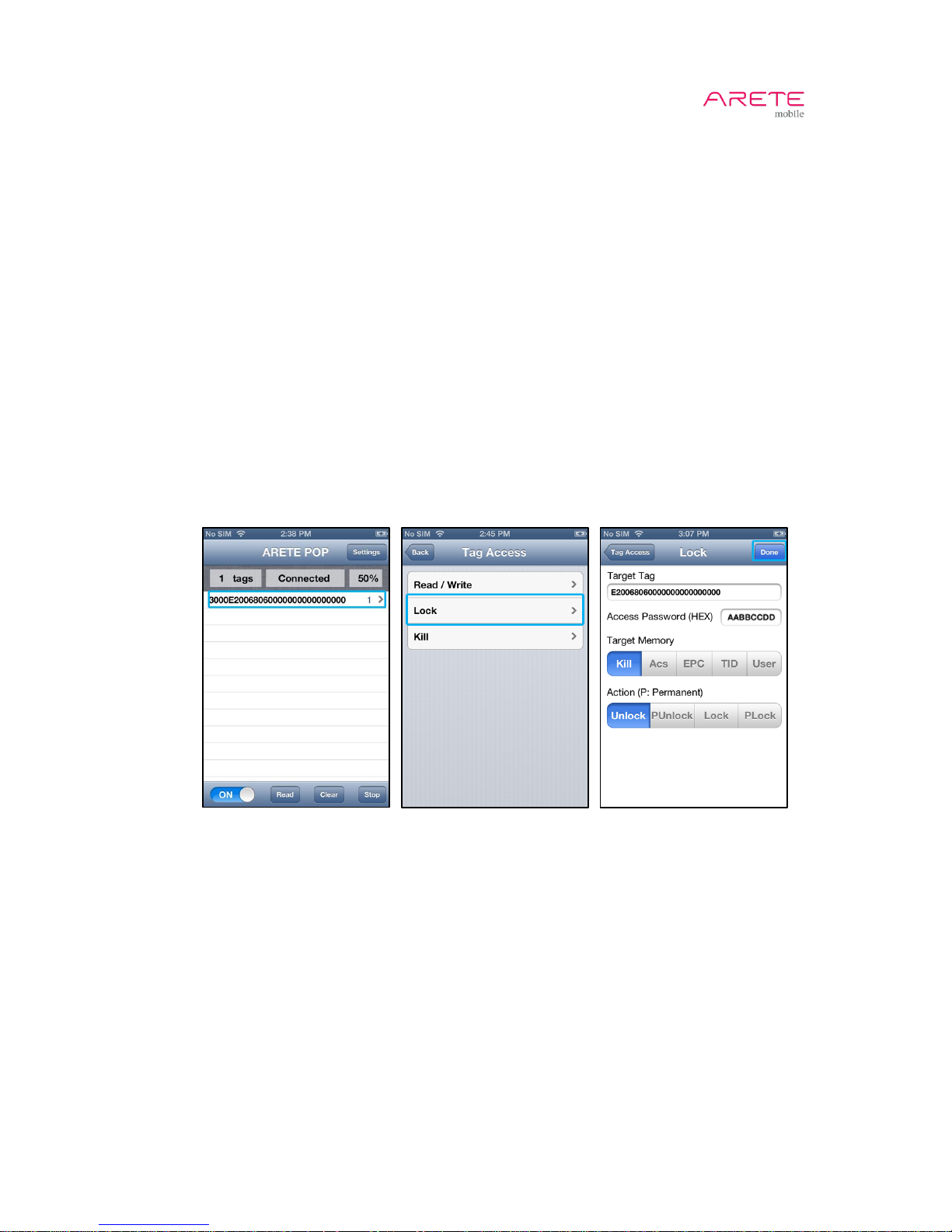
3.8 Lock Tag Memory
1. Choose the target tag
2. Choose Lock
3. Configure parameters
A. Target Tag: EPC will appear automatically.
B. Give 8-byte Access Password in hexadecimal.
i. Access password is all zeros, which is the factory default.
ii. Assign non-zeros access password performing Writing Tag Memory in previous
section.
C. Choose Target Memory to lock.
i. Kill / Access memory support read/write locking.
ii. EPC / User memory support write locking.
iii. Typically, TID memory is permanently locked at the factory.
D. Choose Action.
i. Unlock
ii. Permanent Unlock
iii. Lock
iv. Permanent Lock
4. Touch Done button to lock tag memory.
1 2 3, 4
Step 11.
Connected
Page 14
ARETE POP User Guide
14 / 22
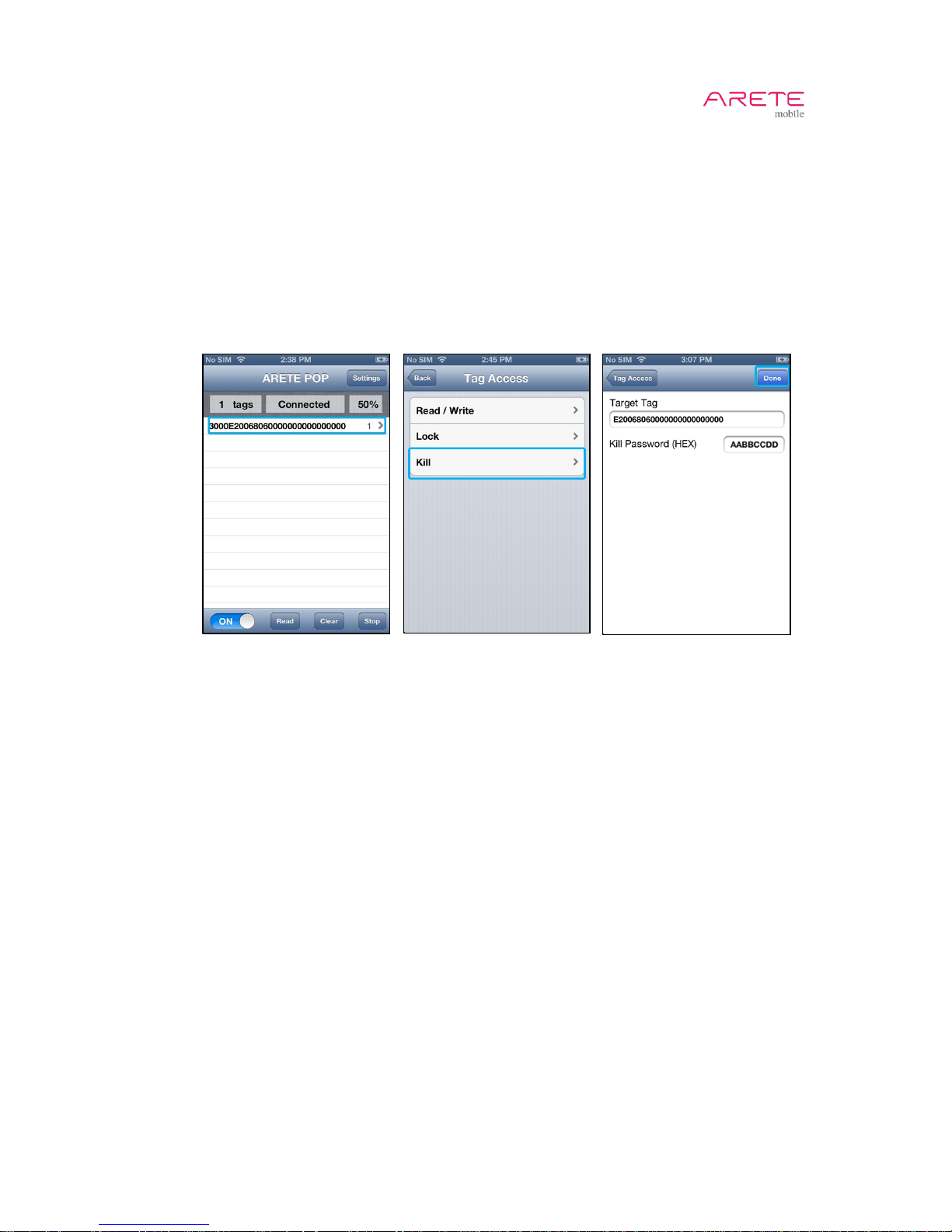
3.9 Kill Tag Memory
1. Choose the target tag
2. Choose Kill
3. Configure parameters
A. Target Tag: EPC will appear automatically.
B. Give 8-byte Kill Password in hexadecimal.
i. Kill password is all zeros, which is the factory default.
ii. Assign non-zeros kill password performing Writing Tag Memory in previous
section.
4. Touch Done button to kill tag.
1 2 3, 4
Step 11.
Connected
Page 15
ARETE POP User Guide
15 / 22
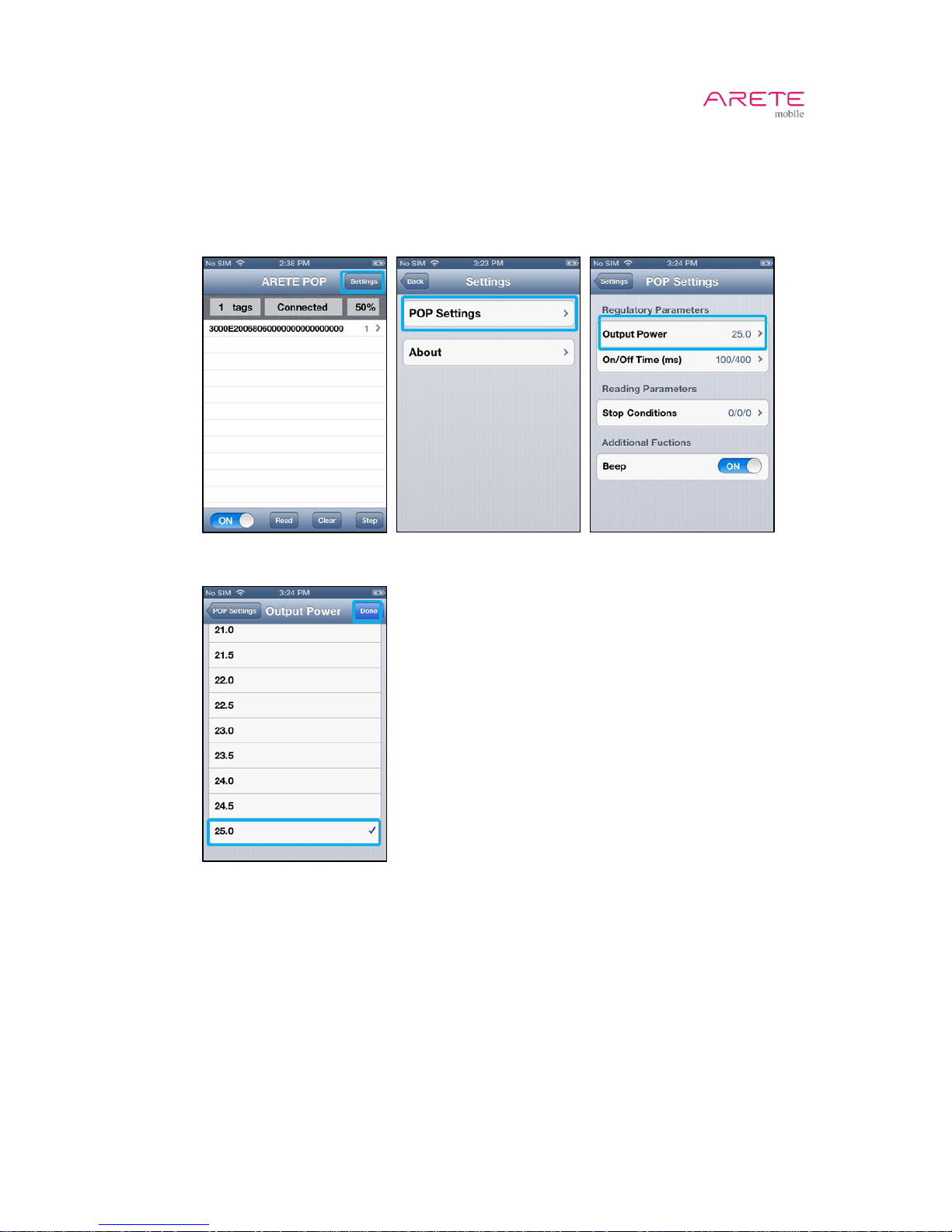
3.10 Output Power Setting
1. Touch Settings button
2. Choose Pop settings
3. Choose Output Power.
4. Choose target output power and touch Done button to change output power.
1 2 3
4
Step 11.
Connected
Page 16
ARETE POP User Guide
16 / 22
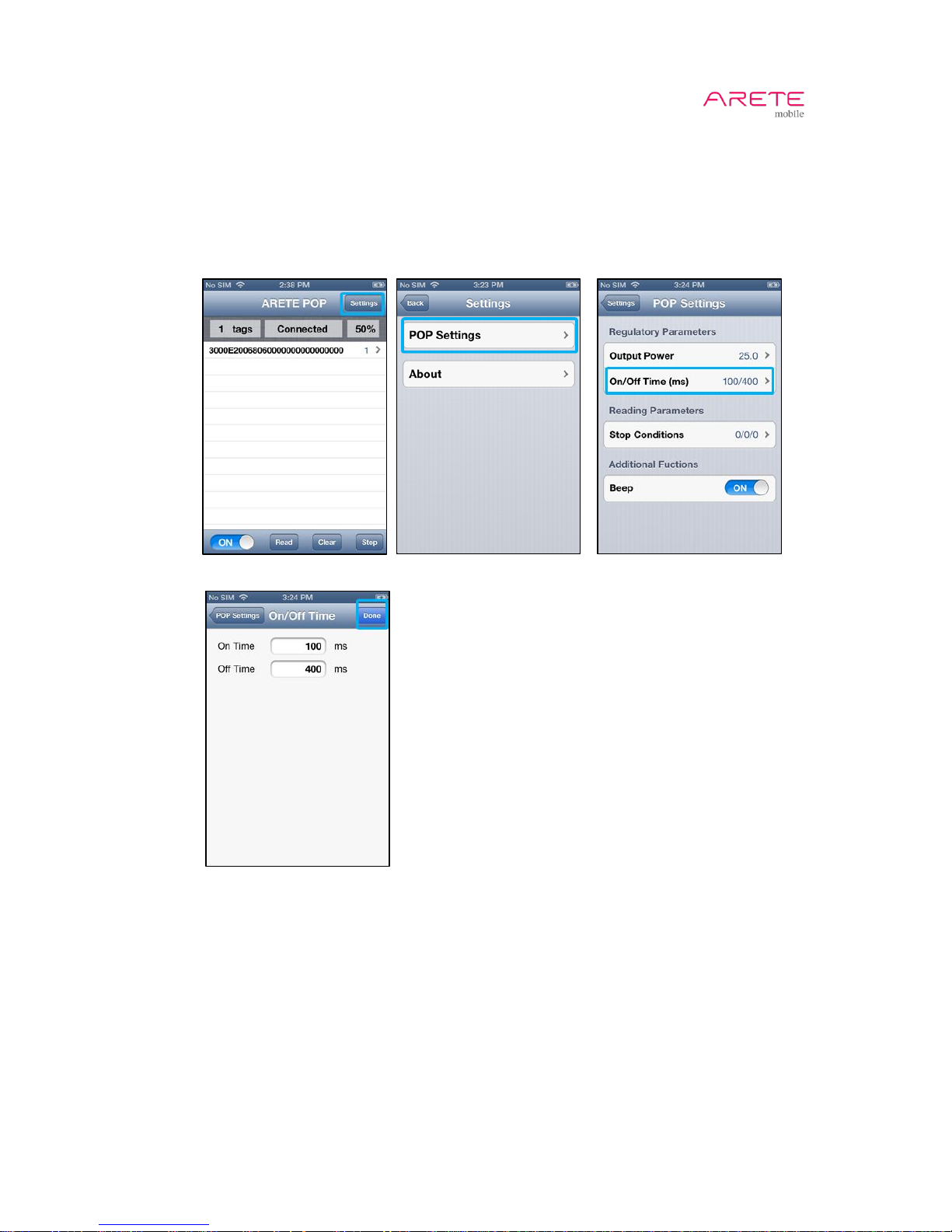
3.11 On/Off Time Setting
1. Touch Settings button
2. Choose Pop settings
3. Choose On/Off Time
4. Configure On/Off Time
5. Touch Done button.
1 2 3
4, 5
Step 11.
Connected
Page 17
ARETE POP User Guide
17 / 22
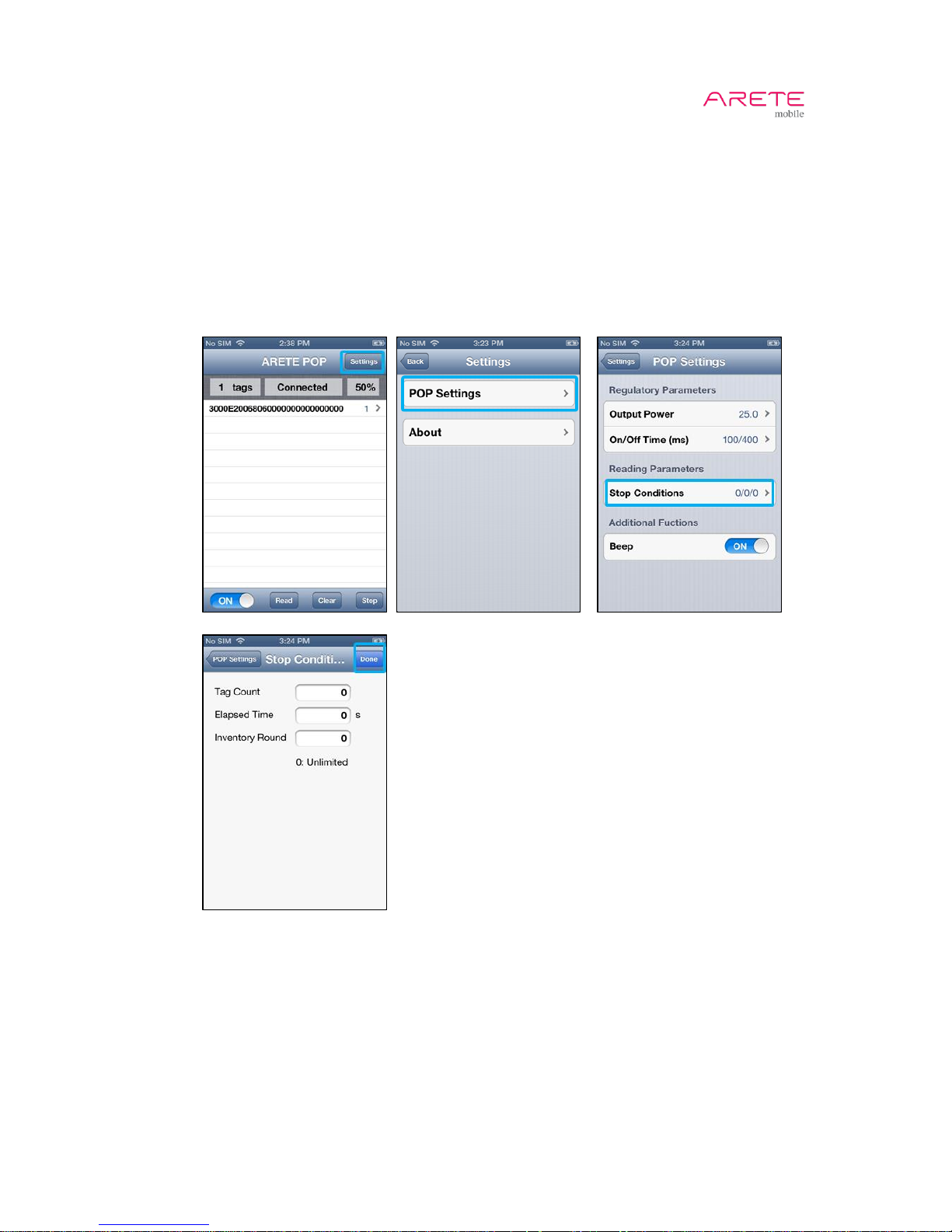
3.12 Stop Condition Setting
1. Touch Settings button
2. Choose Pop settings
3. Choose Stop Conditions. ARETE POP will stop reading after reading done.
4. Configure stop parameters
A. Tag Count (0~100): How many tags to read.
B. Elapsed Time (0~250): How long have ARETE POP read tags in second.
C. Inventory Round: How many times to read tag.
5. Touch Done button.
1 2 3
4, 5
Step 11.
Connected
Page 18
ARETE POP User Guide
18 / 22
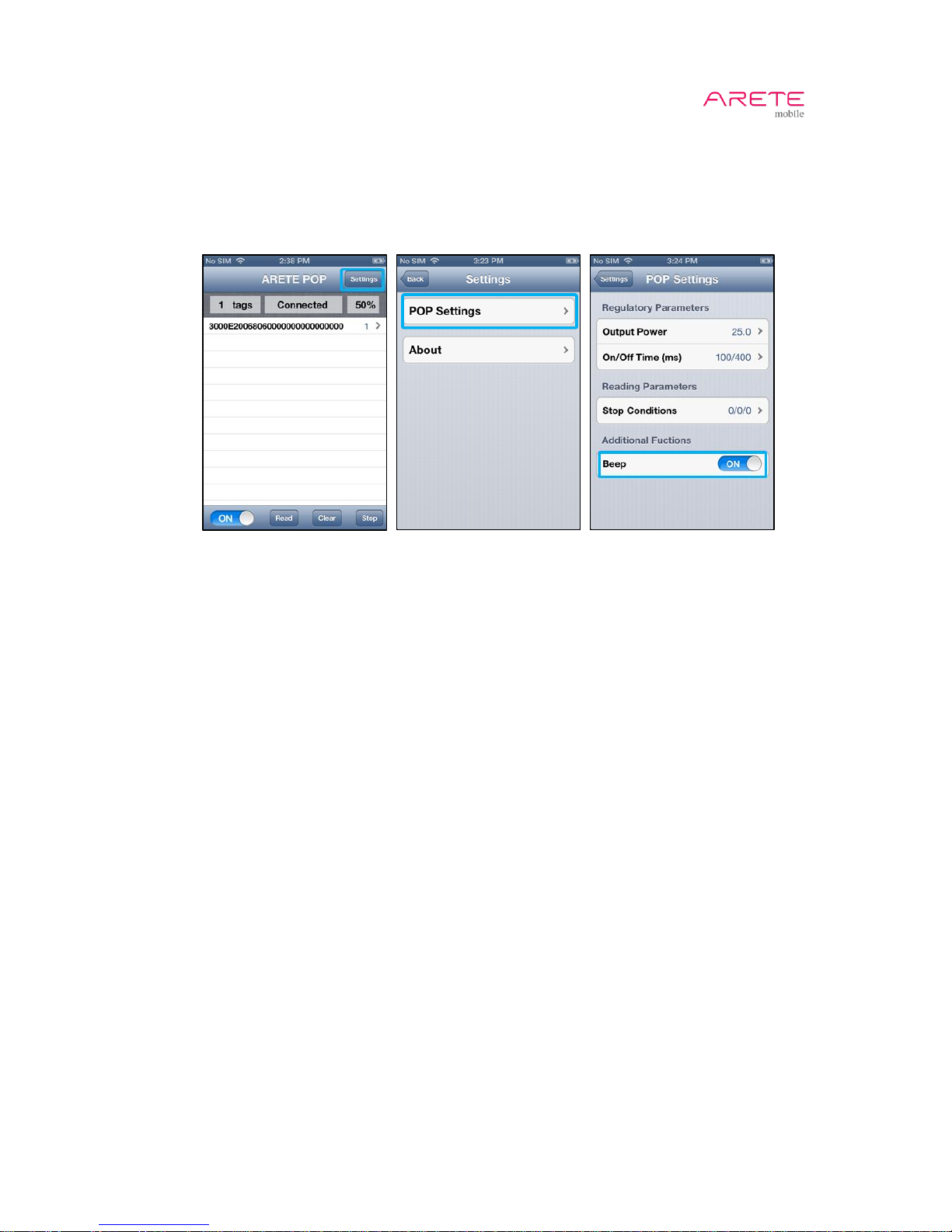
3.13 Beep Setting
1. Touch Settings button
2. Choose Pop settings
3. Switch Beep to turn beep on/off.
1 2 3
Step 11.
Connected
Page 19
ARETE POP User Guide
19 / 22
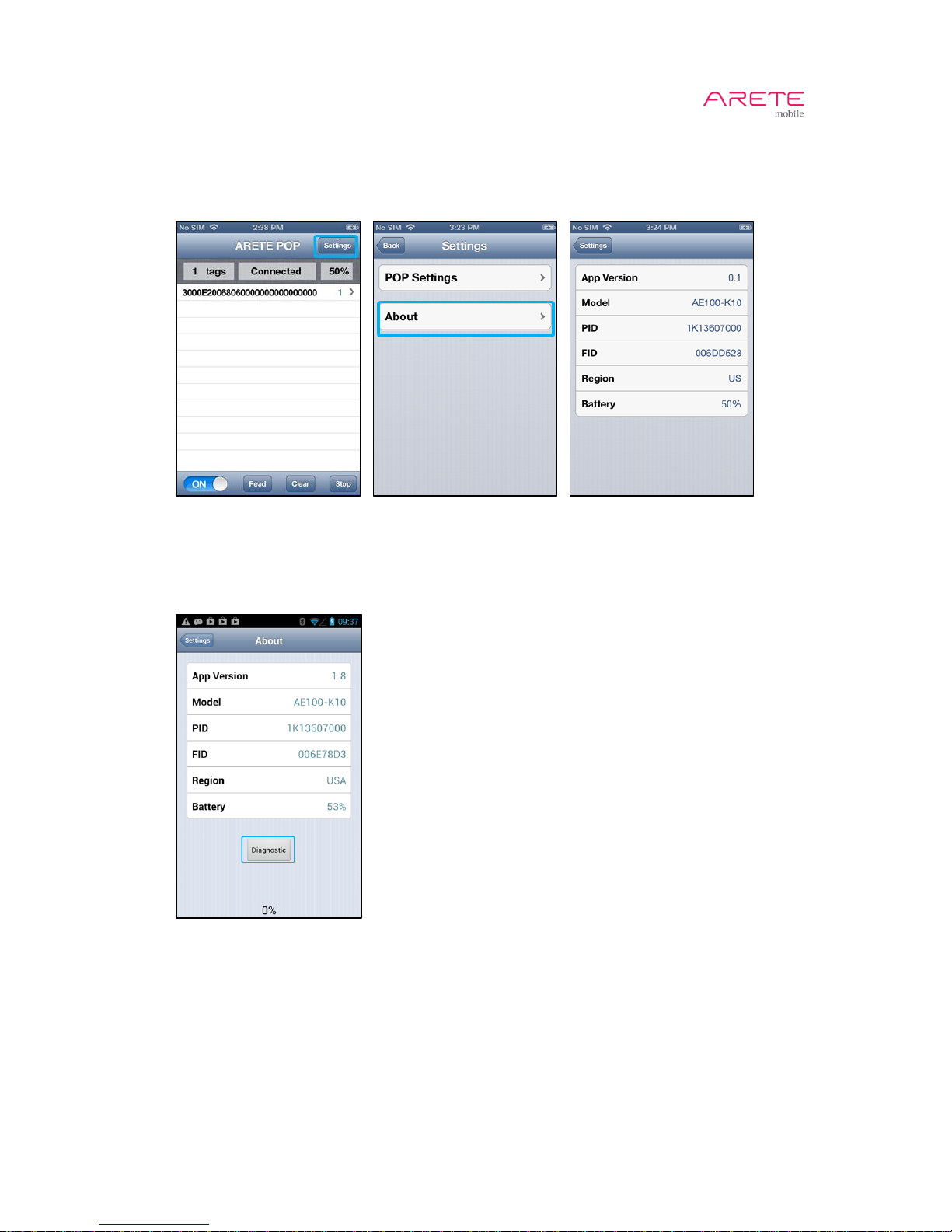
3.14 About
1. Touch Settings button.
2. Choose About to get ARETE POP information.
3. Touch Diagnostic when audio communication is not working properly. (Android Only)
4. Test Log will be generated at sdcard/AudioTest in your android smart phone.
5. Copy all files and send them to PHYCHIPS
Step 11.
Connected
Step 11.
Connected
Page 20

ARETE POP User Guide
20 / 22
4 Information
4.1 Safety Information
1. Do not disassemble or repair arbitrarily but contact where you buy when ARETE POP is in
trouble.
2. Do not use chemical substance(alcohol, benzene, detergent etc) and water to clean ARETE
POP
3. Please avoid vibrations and shocks. Please place in a safe place when not in use.
4. Please avoid high/low temperature and high humidity.
5. Please turn ARETE POP off in explosive area as there may be danger due to electric wave.
6. Please use medical device(pacemaker, hearing aid etc) which is blocked from RF energy.
7. Please stop using ARETE POP and consult a medical expert in case of any allergic reactions
and side effect.
Caution
Risk of explosion if battery is replaced by an incorrect type.
Dispose of used batteries according to the instructions.
4.2 RF Exposure Information
FCC
The equipment complies with FCC RF radiation exposure limits set forth for an uncontrolled
environment. This device and its antenna must not be co-located or operation in conjunction with any
other antenna or transmitter.
CE
The antenna must be installed in final product such that 20 cm is maintained between the antenna
and user.
KC
본 제품은 인체와 20 cm 이상 간격을 두고 사용을 해야 합니다. 본 제품의 밑면은 일반적인 사용
위치가 아닙니다. 전화 기능을 이용할 때에는 본 제품을 사용하지 말아야 합니다.
4.3 Compliance Information
FCC
This device complies with Part 15 of the FCC Rules. Operation is subject to the following two
conditions: (1) This device may not cause harmful interference, and (2) this device must accept any
interference received, including interference that may cause undesired operation
Note
This device has been tested and found to comply with the limits for a Class B digital device, pursuant
to Part 15 of the FCC Rules. These limits are designed to provide reasonable protection against
harmful interference in a residential installation. This equipment generates, uses and can radiate radio
frequency energy and, if not installed and used in accordance with the instructions, may cause
harmful interference to radio communications. However, there is no guarantee that interference will
not occur in a particular installation. If this equipment does cause harmful interference to radio or
television reception, which can be determined by turning the equipment off and on, the user is
encouraged to try to correct the interference by one of the following measures:
• Reorient or relocate the receiving antenna.
• Increase the separation between the equipment and receiver.
• Connect the equipment into an outlet on a circuit different from that to which the receiver is
Page 21

ARETE POP User Guide
21 / 22
connected.
• Consult the dealer or an experienced radio/TV technician for help.
Caution
Modifications not expressly approved by the party responsible for compliance could void the user’s
authority to operate the equipment.
CE
This device is in compliance with the essential requirements and other relevant provisions of directive
1999/5/EC.
TELEC
本機器は、電波法第38条の24第1項の規定に基づく認証を行ったものであることを証する。
KC
본 기자재는 전파법 제58조의2 제2항에 따라 인증되었습니다. 적합성평가표시 정보는 다음과 같
습니다. 적합성평가를 받은 자의상호: 주식회사 파이칩스. 기자재의 명칭 및 모델명: RFID/USN용
무선기기(900MHz 대역사용기기) / A100-K. 제조년월: 2013. 인증번호: MSIP-CRM-PHY-A100K. 제
조자: 주식회사 파이칩스. 제조국가: 대한민국
4.4 Troubleshooting
Q: What should I do if I fail to turn on ARETE POP?
A: First, check the batter power status.
Second, recharge for a certain amount of time and try again.
If you fail to turn it on again, please contact where you buy it.
Third, if red LED is blinking in standby status, it is battery failure.
Please contact where you buy it.
Q: What should I do if ARETE POP gets wet?
A: Dry it first.
If it does not working properly after being dried, then contact where you buy it.
Q: What should I do if I fail to read tag?
A: Turn volume up to 100%. Check power status of A100.
Third, it is possible to fail to read tag due to interference if other RFID readers are being used
in the same place.
Q: A100 beeps when it is reading tags. But EPC is not showing in the list.
A: Please touch diagnostic button in information tab. Wait for diagnostic process done.
Send generated files in yourPhone/sdcard/AUDIOTEST folder to [email protected].
4.5 Disposal and Recycling
You must dispose of ARETE POP properly according to your local laws and regulations.
Because electronic components and a battery are included in the ARETE POP
Page 22

ARETE POP User Guide
22 / 22
5 Customer Service
ARETE mobile Customer Service
Phone: + 82 42 864 2402
Fax: + 82 42 864 2403
Email: [email protected]
Address
PHYCHIPS Inc.
#205 Migun Technoworld 1, 533 Yongsan-dong, Yuseong-gu, Daejeon, Korea, 305-500
Working Day and time
Monday to Friday
09:00~18:00(Korean Time, GMT Time + 9 hours)
RMA Rule
http://www.arete-mobile.com/pdf/RMA%20Policy_ARETE%20mobile.pdf
Local Customer Service
Please contact where you buy.
 Loading...