

Page 1

Table of contents
Package contents.............................................................................................................
Description of the camera............................................................................................
Assembling..........................................................................................................................
Pairing devices..................................................................................................................
Interface description.......................................................................................................
For more information, please consult the FAQs on www.archos.com.
Make sure to read them before considering any product return. As we
are often updating and improving our products, your device’s software
may have a slightly dierent appearance or modied functionality than
presented in this Quick Start Guide.
EN
2
3
4
5
6
Page 2

Package Contents
Check your product box for the following items:
- Camera
- Camera stand
- Batteries Lithium cell CR 2450 3V
- Quick start guide
- Warranty Legal & Safety notices
The items supplied with your device and available accessories may vary
depending on your region or service provider.
The supplied items are designed only for your device and may not be
compatible with other devices.
Unapproved accessories may cause your device to malfunction.
2
Page 3
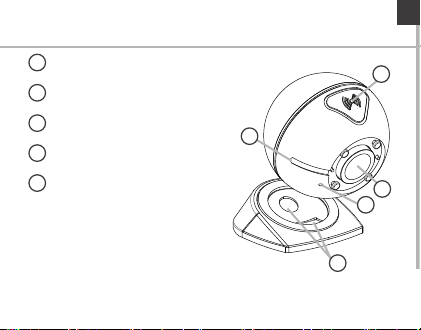
Description of the camera
Pairing button
1
Pairing indicator
2
Camera lens
3
Microphone
4
Holding magnets
5
EN
1
2
3
4
5
3
Page 4
Assembling
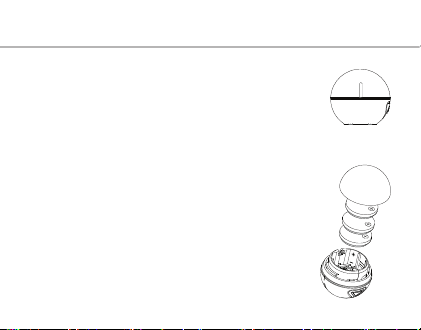
Your camera functions with 3 batteries Lithium cell CR 24 50.
1.
Unscrew the camera ball.
2. Insert each battery by keeping the marked side up.
3. Screw back on.
4. Place the camera on its stand. Holding magnets keep it
stable.
You can move the camera to point a direction.
4
Page 5
Pairing
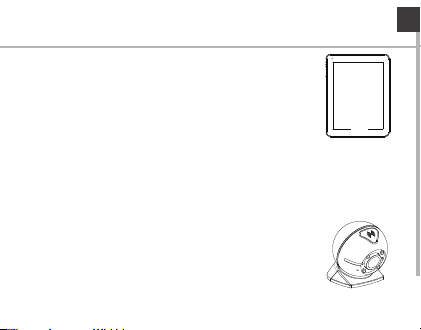
A Bluetooth standard BLE allows to pair your Android
device with your camera.
1. On your Android device, go to Settings > Wireless &
networks > Bluetooth.
2. Slide the Bluetooth switch to ON.
The Bluetooth icon is displayed in the status bar.
3. On your Camera, hold the pairing button until the pairing
indicator starts blinking. The camera enters the pairing mode.
4. Launch the ARCHOS@home app on your Android device
and select the Camera icon. The camer a is dect ected.
5. Select to start the pairing process. Once paired, you can
take pictures with your camera from your Android device.
You have 60 seconds to pair the devices.
EN
5
Page 6
Using the camera
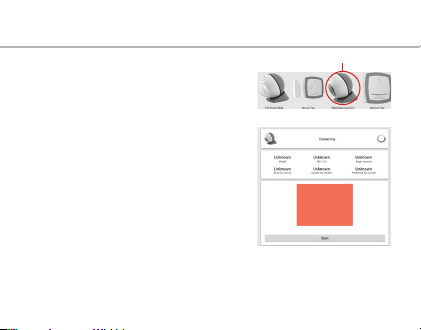
1. Launch the ARCHOS@Home app.
2. Select the Camera icon.
3. Press the Start button to take pictures.
6
Page 7

FCC Statements
Statement:
This device complies with part 15 of the FCC Rules. Operation is subject to
the following two conditions: (1) This device may not cause harmful
interference, and (2) this device must accept any interference re-ceived,
including interference that may cause undesired operation.
Warning:
Changes or modifications to this unit not expressly approved by the part
responsible for compliance could void the user's authority to operate the
equipment.
EN
7
 Loading...