

Page 1
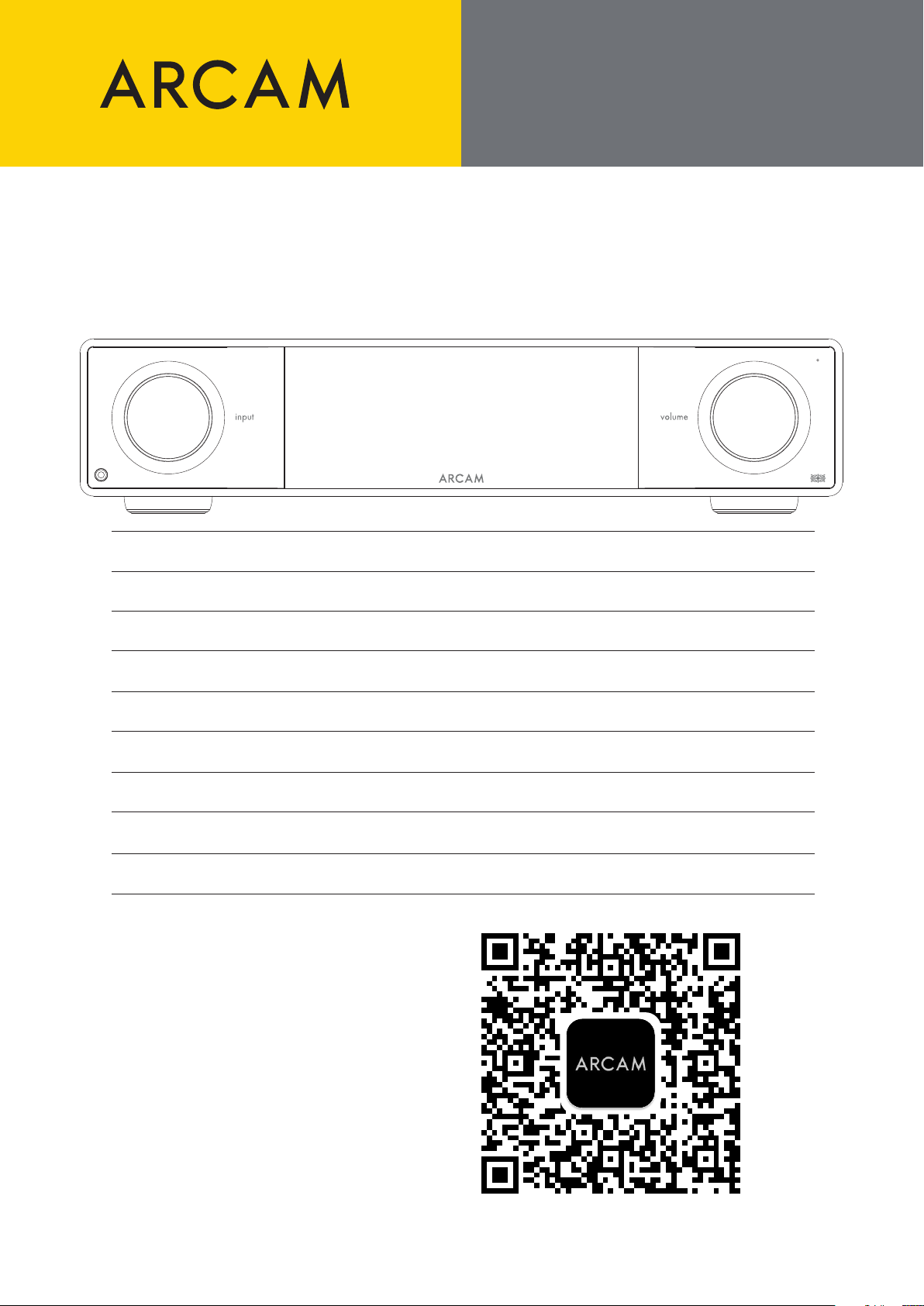
SA35
QUICK START GUIDE
Pg 2 – Quick Start Guide – Streaming Integrated Amplier
Pg 6 – Guide de démarrage rapide – Amplicateur intégré de streaming
Pg 10 – Kurzanleitung – Integrierter Streaming-Verstärker
Pg 14 – Snelstartgids – Geïntegreerde streamingversterker
Pg 18 – Guida di avvio rapido – Amplicatore di streaming integrato
Pg 22 – Guía de inicio rápido – Amplicador de transmisión integrado
Pg 26 – –
Pg 30 – クイックス タ ートガイド – 統 合ストリ ー ミングアンプ
Pg 34 – 快速入门指南 – 音频放大器
Download the setup app:
Télécharger l’application de conguration:
Laden Sie die Einrichtung-App herunter:
Download de setup-app:
Scaricare l’app di congurazione:
Descargar la aplicación de conguración:
クイックスタ ートガイド
快速入门指南
© ARCAM SA35 QSG Multi V2 – Harman International Industries, Incorporated. Features, specications, and appearance subject to change without notice.
Page 2
THANK YOU FOR
CHOOSING ARCAM
The “A” in ARCAM stands for Amplication - this is our core competence.
ARCAM has been producing specialist Hi-Fi and home
cinema products oering state of the art sound quality
for over 45 years.
The SA35 is the latest in more than 45 years of
amplier design and manufacture, going back to
our rst product in 1976 - the A&R Cambridge A60
amplier.
This amplier is designed to provide you with reliable
amplication for decades to come, all with exceptional
musicality so you get the most enjoyment from your
music.
In the unlikely event of any fault, or you require
technical assistance, please contact our dedicated
support teams by email at [email protected],
or by telephone using +441707668012 or
+18886914171.
Or, if you simply require further information about
ARCAM products, our network of dealers will be happy
to help you. Further information can also be found on
the ARCAM website at ARCAM.co.uk.
Placing The Unit
| Place the amplier on a level, rm surface, avoiding direct sunlight and sources of heat or damp.
| Do not place the SA35 on top of a power amplier or other source of heat.
| Make sure the remote-control receiver to the right of the front panel display is unobstructed, otherwise this will
impair the use of the remote-control.
| The SA35 is designed to run warm during normal operation.
Extended use at high volume levels can result in the
amplier casework becoming hot to the touch.
Do not place the amplier in an enclosed space such as a bookcase
or closed cabinet unless there is good provision for ventilation.
| Do not place any other component or item on top of the amplier as this may obstruct airow around the heat-
sink, causing the amplier to run hot (the unit placed on top of the amplier would become hot too).
| Do not place your record deck on top of this unit. Record decks are very sensitive to the noise generated by
mains power supplies which will be heard as a background ‘hum’ if the record deck is too close.
| The normal function of the unit may be disturbed by strong electromagnetic interference. If this occurs, simply
reset the unit with the power button, or move the unit to another location.
Package Contents
| ARCAM SA35 streaming integrated amplier
| IR remote
| 2x AAA batteries for the remote control
| Region specic power cords
| Measurement microphone for use with Dirac Live
| 5M USB-C cables for use with the microphone
| Quick start guide
| Safety and compliance document
Power Management
This product oers the user the option to deactivate power management functions. Note that doing this will
increase energy consumption of the product:
| By default, the SA35 will enter standby within 20 minutes with no user interaction or playback. The
ECOTimer can be disabled in the Menu.
| By default, the SA35 network connections will remain active in standby. To reduce standby power
consumption, all network connections, including Wi-Fi, can be disabled by setting NetworkStandby to OFF.
ARCAM SA35 QSG Multi V2
2
Page 3
WI-FI & BLUETOOTH
SETUP
REMOTE CONTROL
Wi-Fi Setup - ARCAM Radia App
| Links to the app are on the front page of this manual.
| To make a Wi-Fi connection, download the ARCAM app to your smartphone or tablet.
| Power on the ARCAM SA35 streamer and open the app to discover it after the SA35 is Ready.
| Select it and follow the prompts to connect it to your Wi-Fi router.
| When connected, the SA35 will appear with a “POWER” icon.
| Select the SA35 to access Podcasts, Internet Radio and presets, USB connected media, Local network storage
(UPnP), and settings.
Bluetooth Setup
| Select the Bluetooth input on the SA35. With no other Bluetooth connections, it is now discoverable.
| To pair your Bluetooth source device, open the Bluetooth settings on your source device and scan for
SA35###### from the list. Each product has a unique ID.
| The Amplier can recall 5 device pairings. If 5 are in memory already, the oldest will be replaced.
| Because portable devices often have a volume slider, there is a maximum volume setting in the amplier to
prevent excessive volume output being selected accidentally. The default is 40.
| To pair Bluetooth headphones, select Bluetooth Output from the Audio menu. Paired Headphones will be
listed.
| Bluetooth headphones cannot be used in conjunction with the Bluetooth input on the SA35.
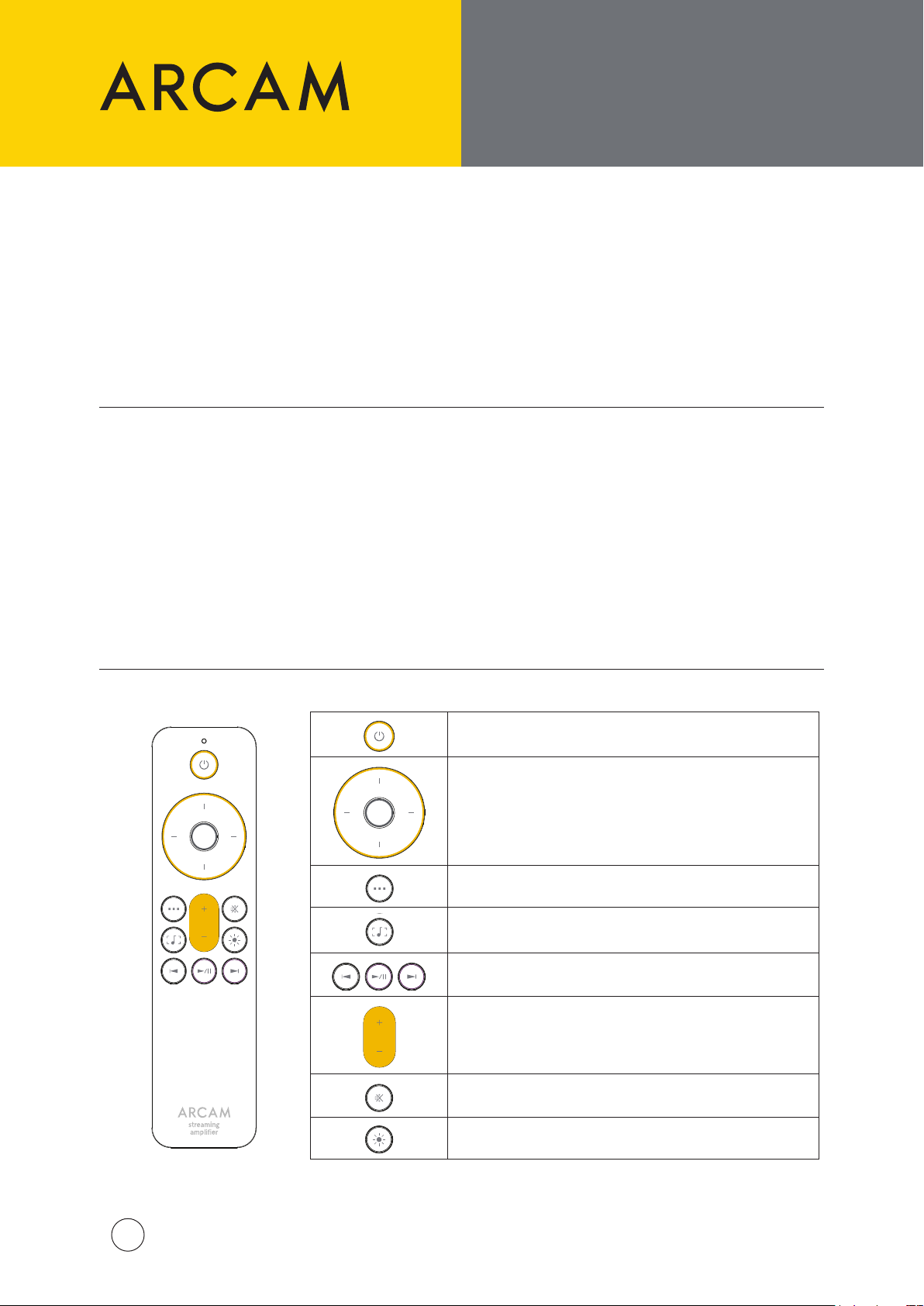
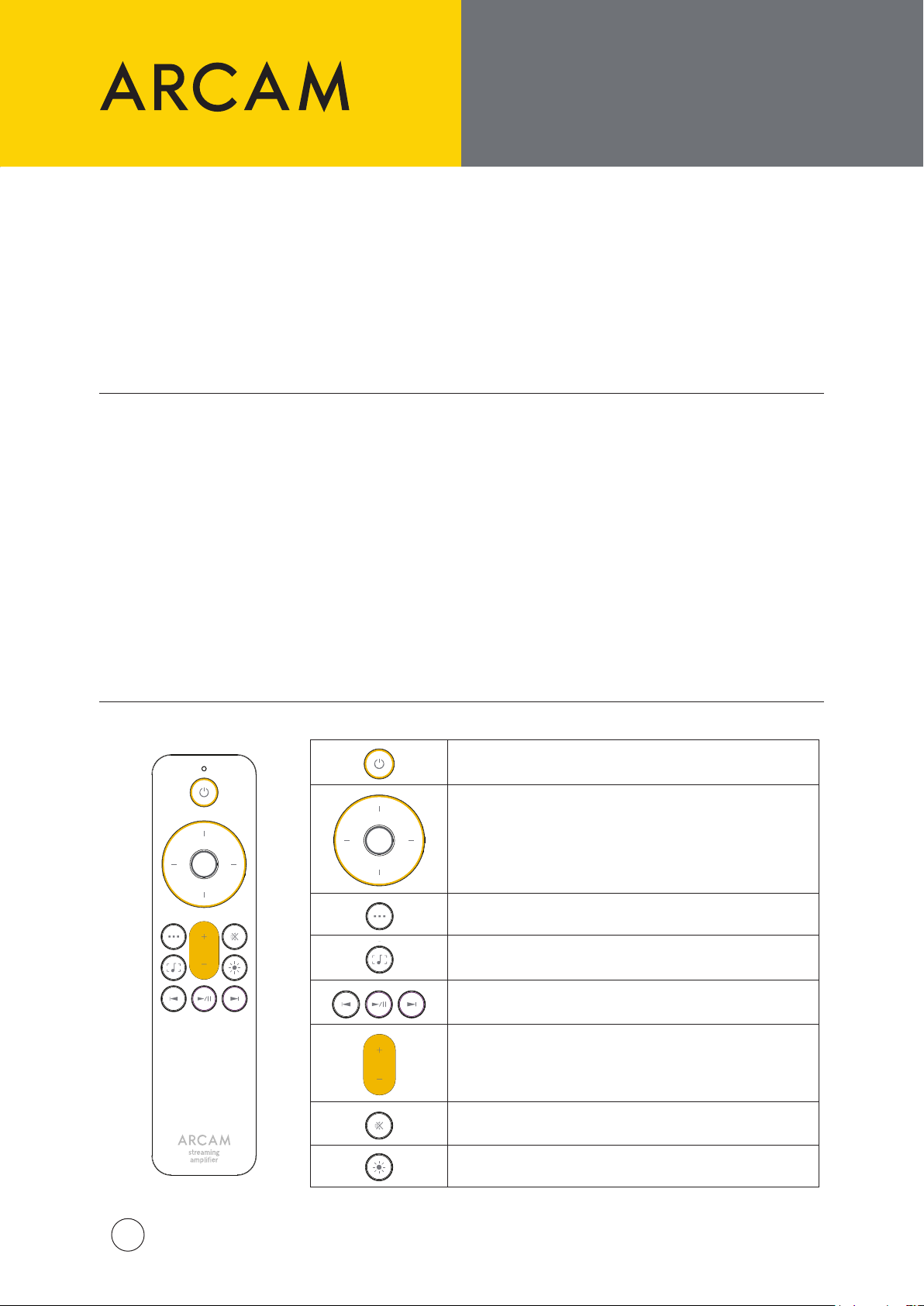
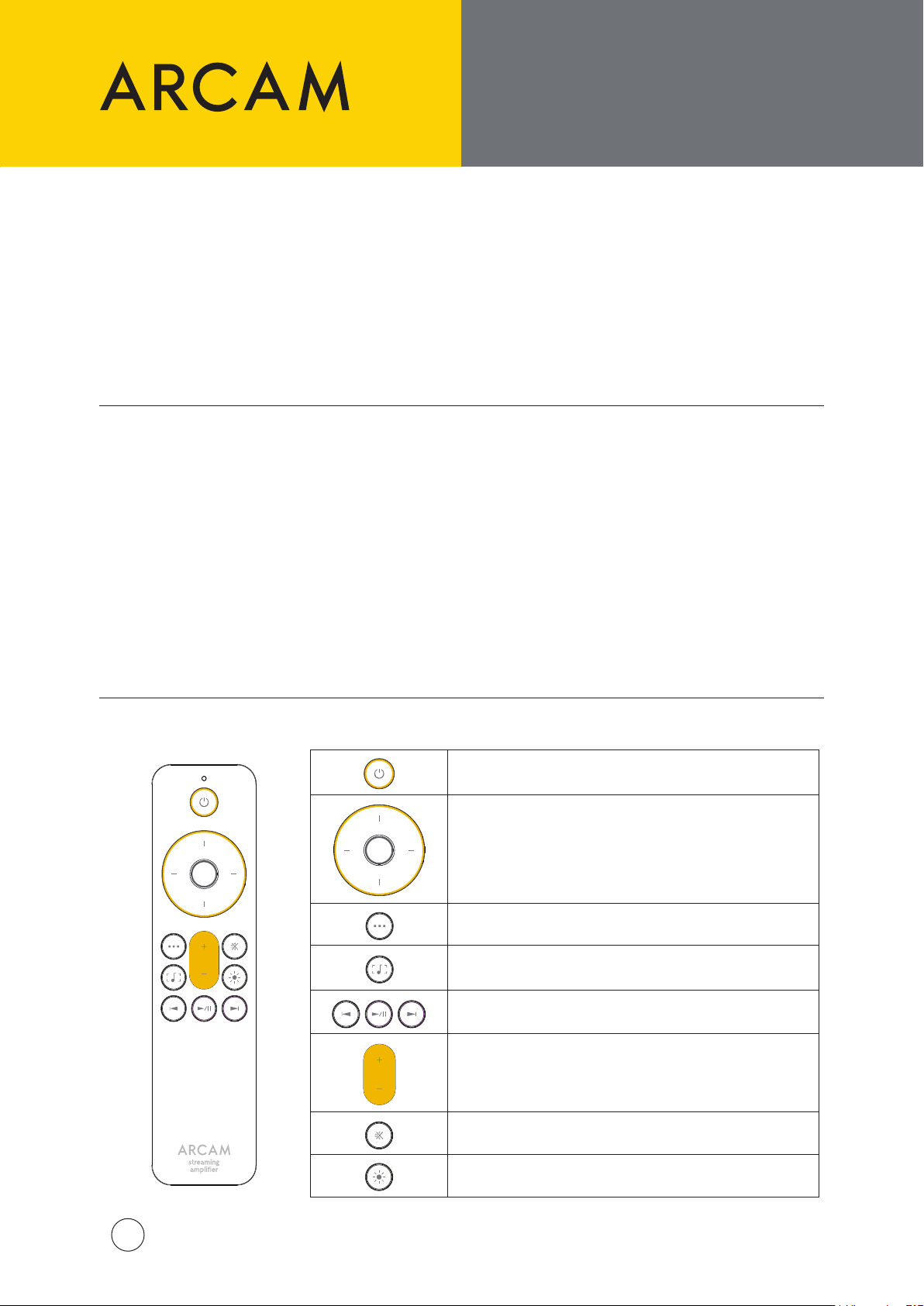
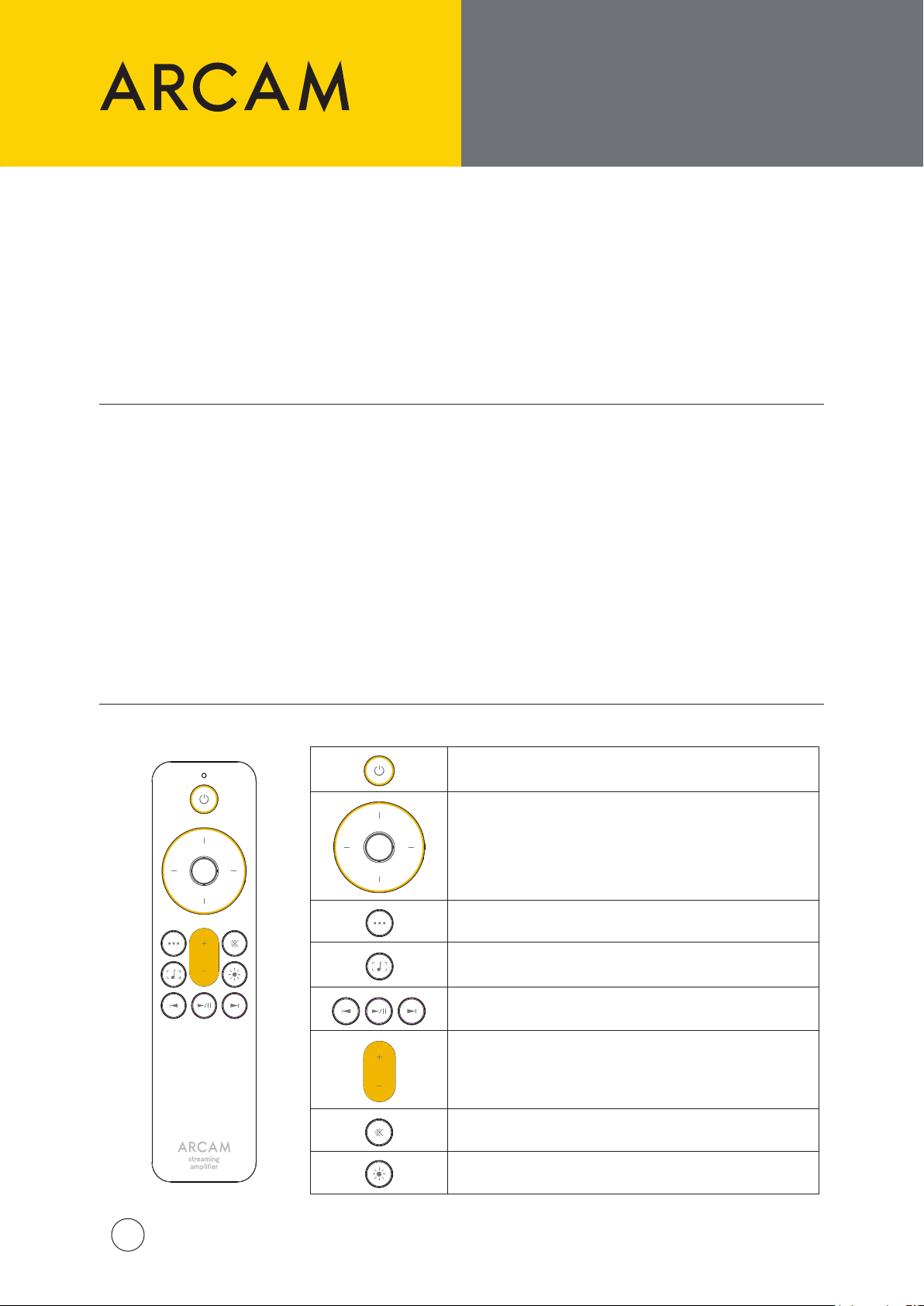
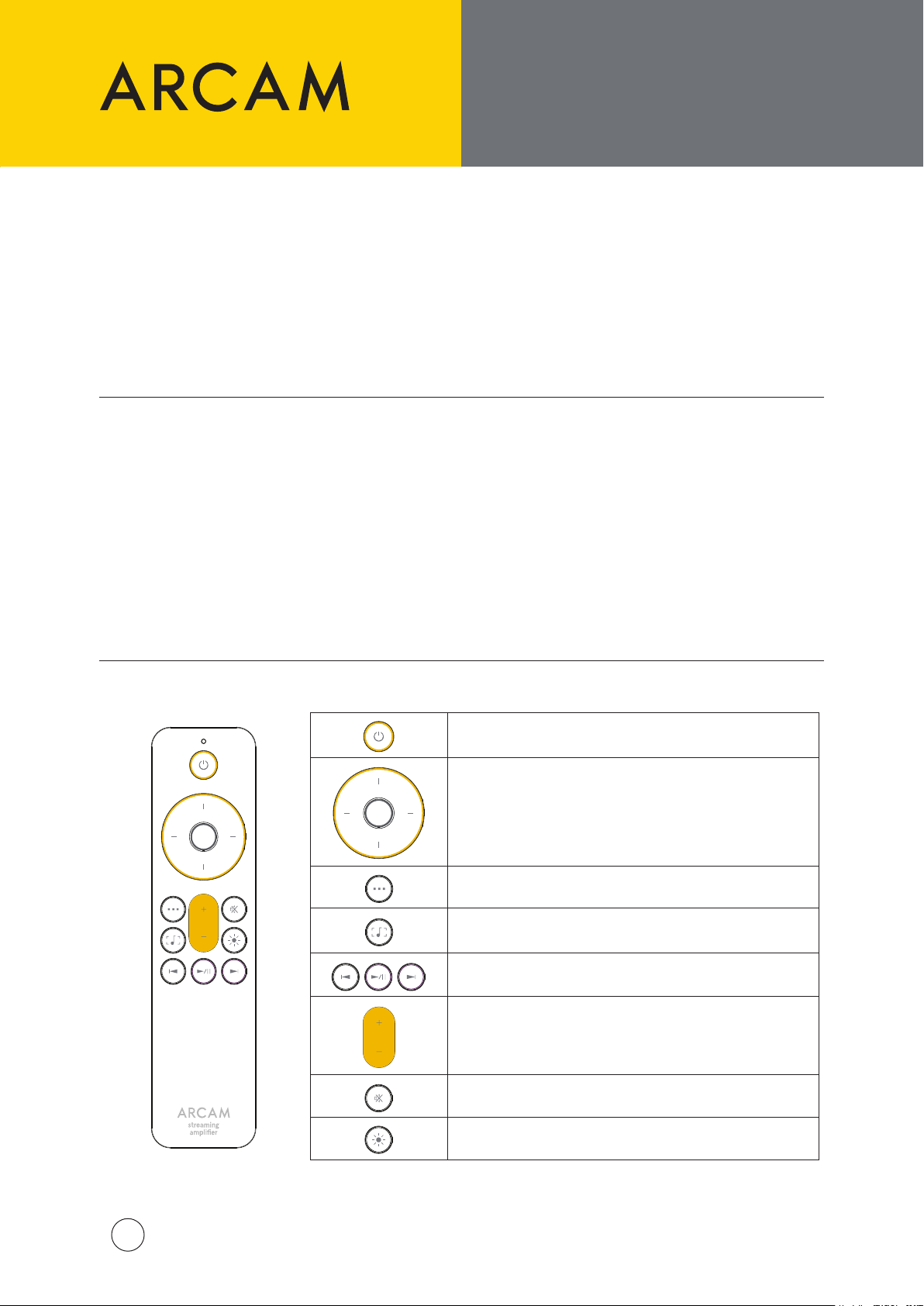
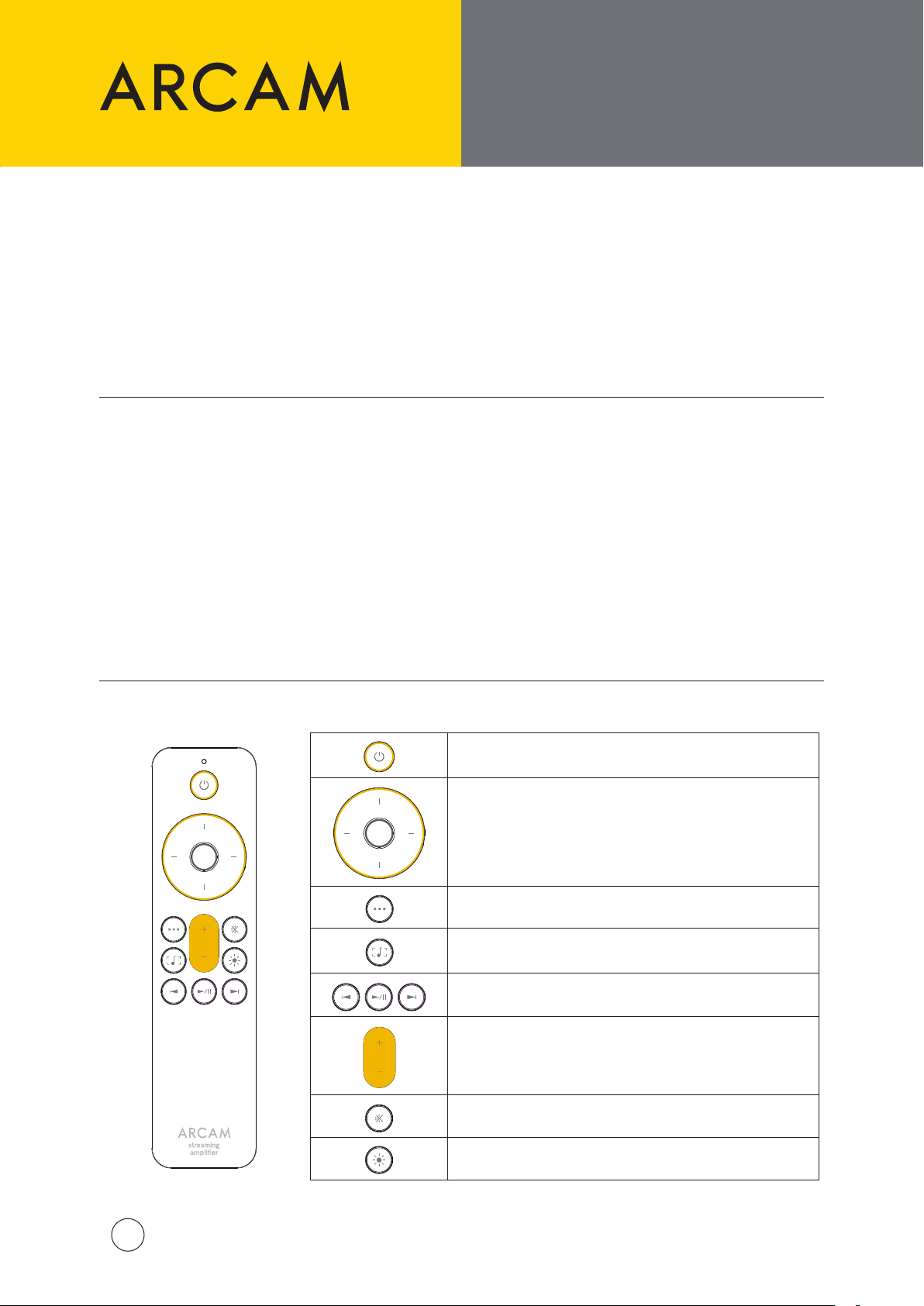
Remote Control
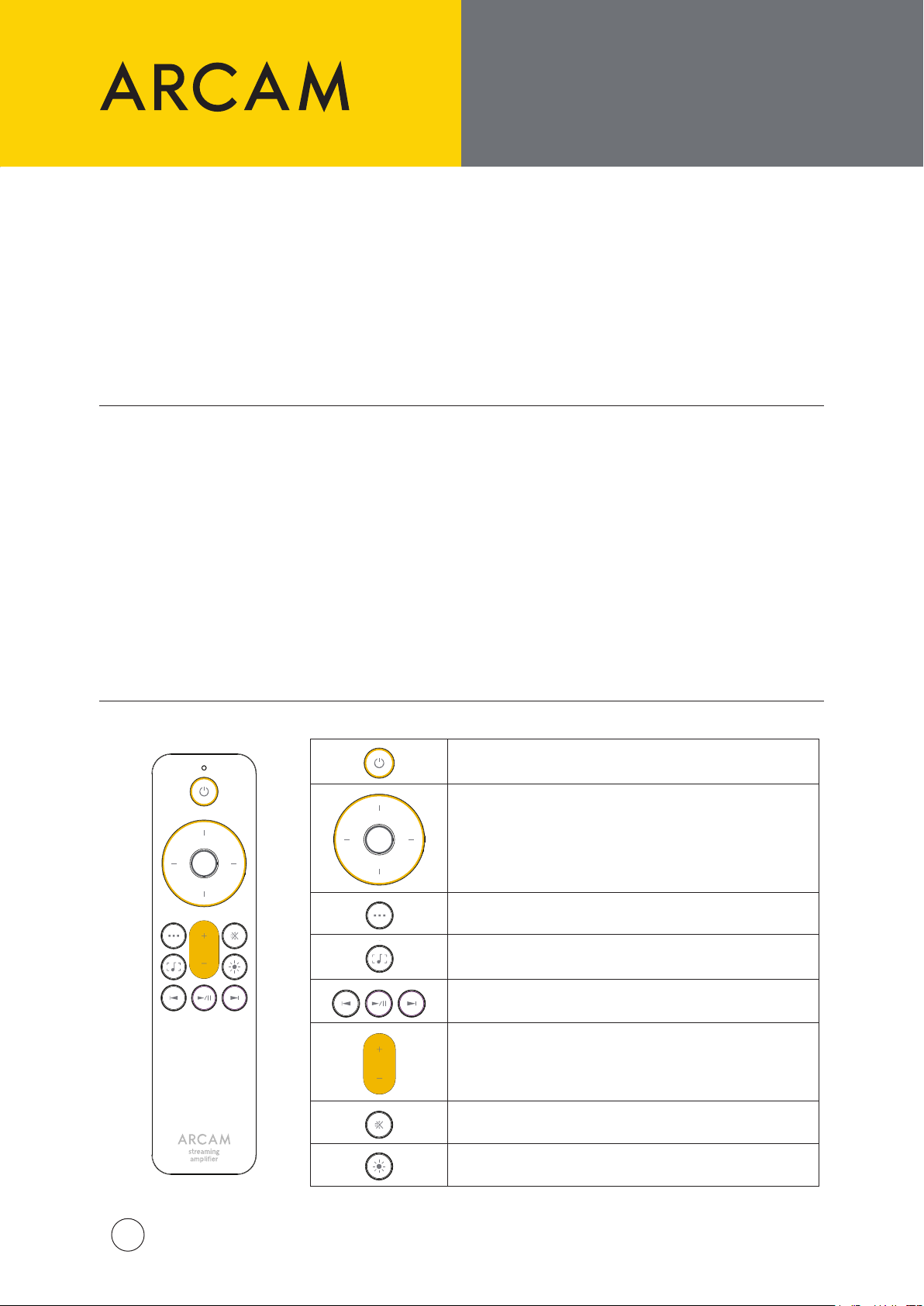
Standby On/O
Menu Navigation
Press the middle button to select
Home Menu / Back
Toggle Now Playing Display
Transport Keys (Play/Pause, Skip back/forward)
Volume Control
Mute On/O
Display Bright/Dim/O
ARCAM SA35 QSG Multi V2
3
Page 4
FRONT AND REAR PANELS,
100-120V/220-240V ~ 50/60Hz
700W MAX
POWER INLET
DIG 1
DIG 2 DIG 3 DIG 4
PRE
OUT
SUB2
SUB1
PHONO
(MM)
PHONO
(MC)
IR IN
USB NETWORK CONTROL
HDMI eARC
CLASS 2 WIRING
100-120V/220-240V ~ 50/60Hz
15W MAX
POWER INLET
COAX
OUT
OPTICAL
OUT
TRIGGER
OUT
NETWORK
CONTROL
USB
AND CONNECTING
SPEAKERS
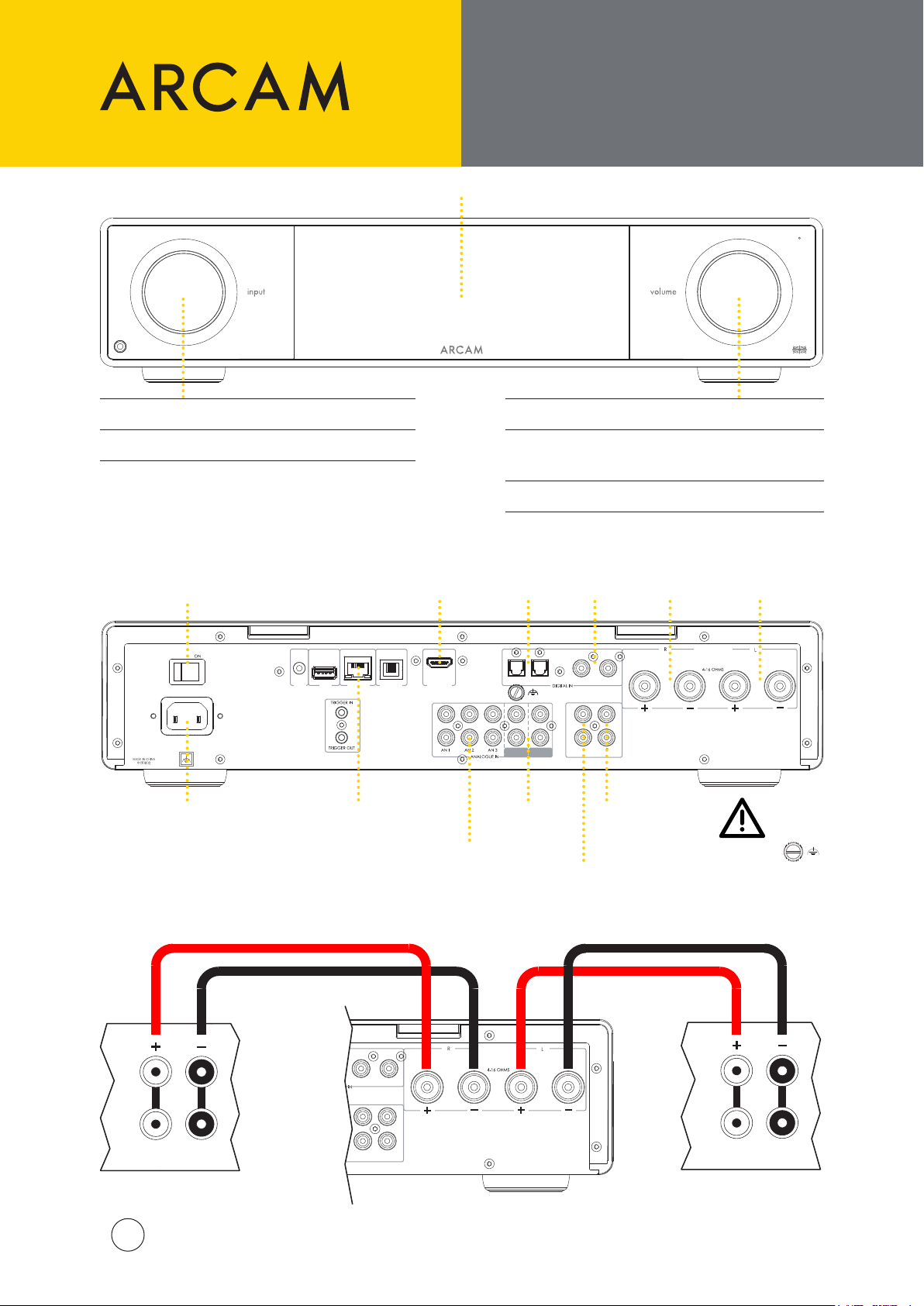
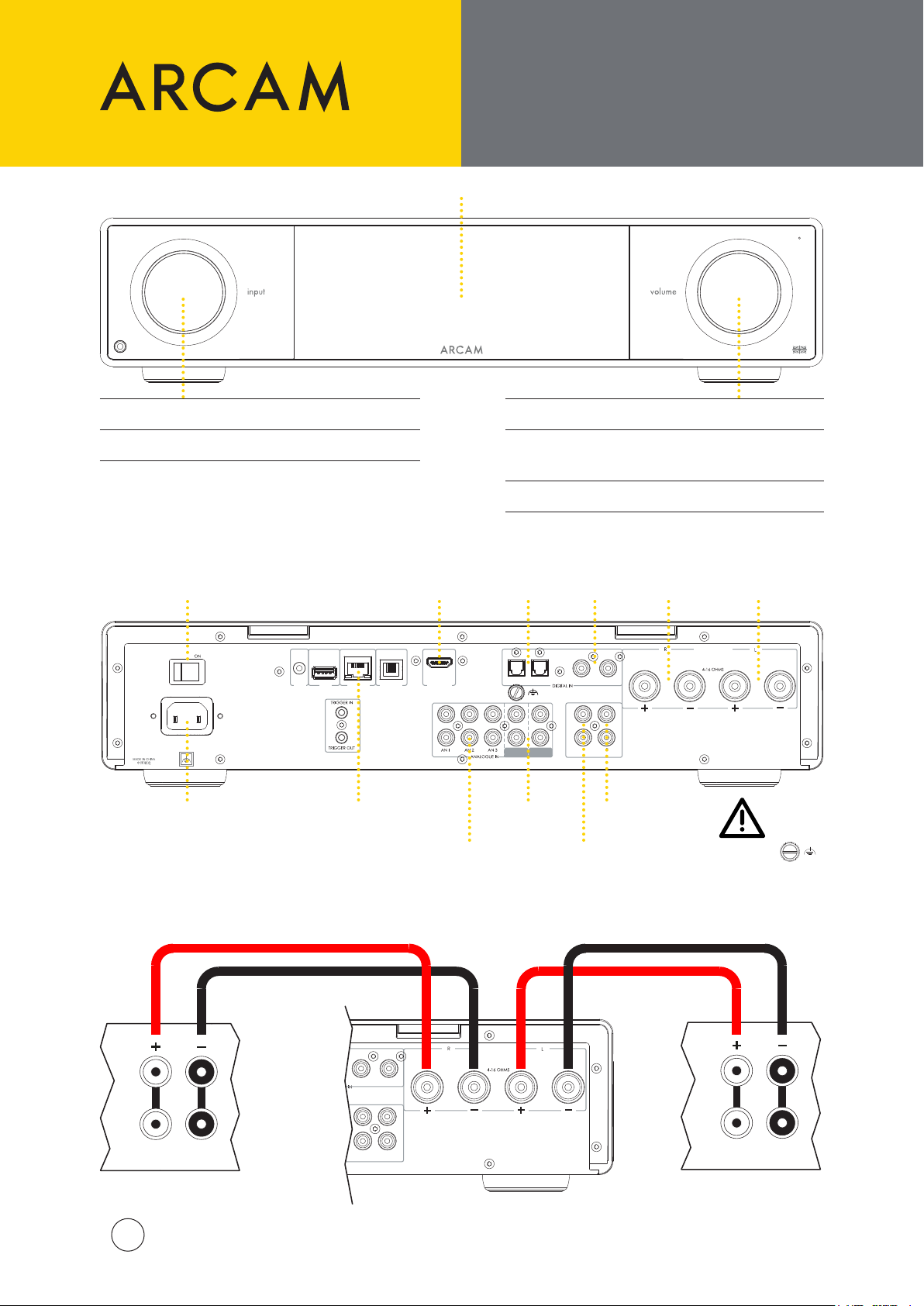
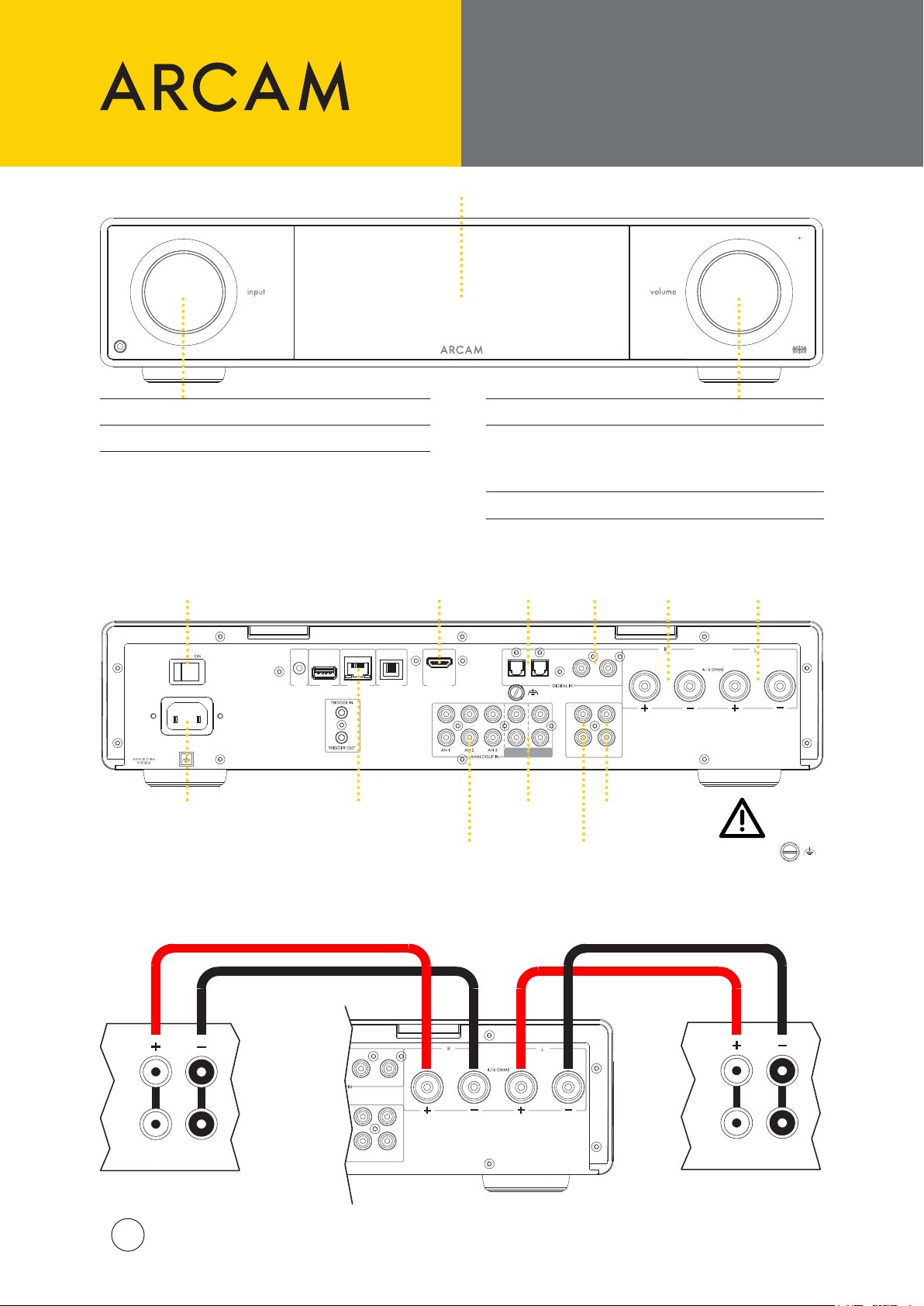
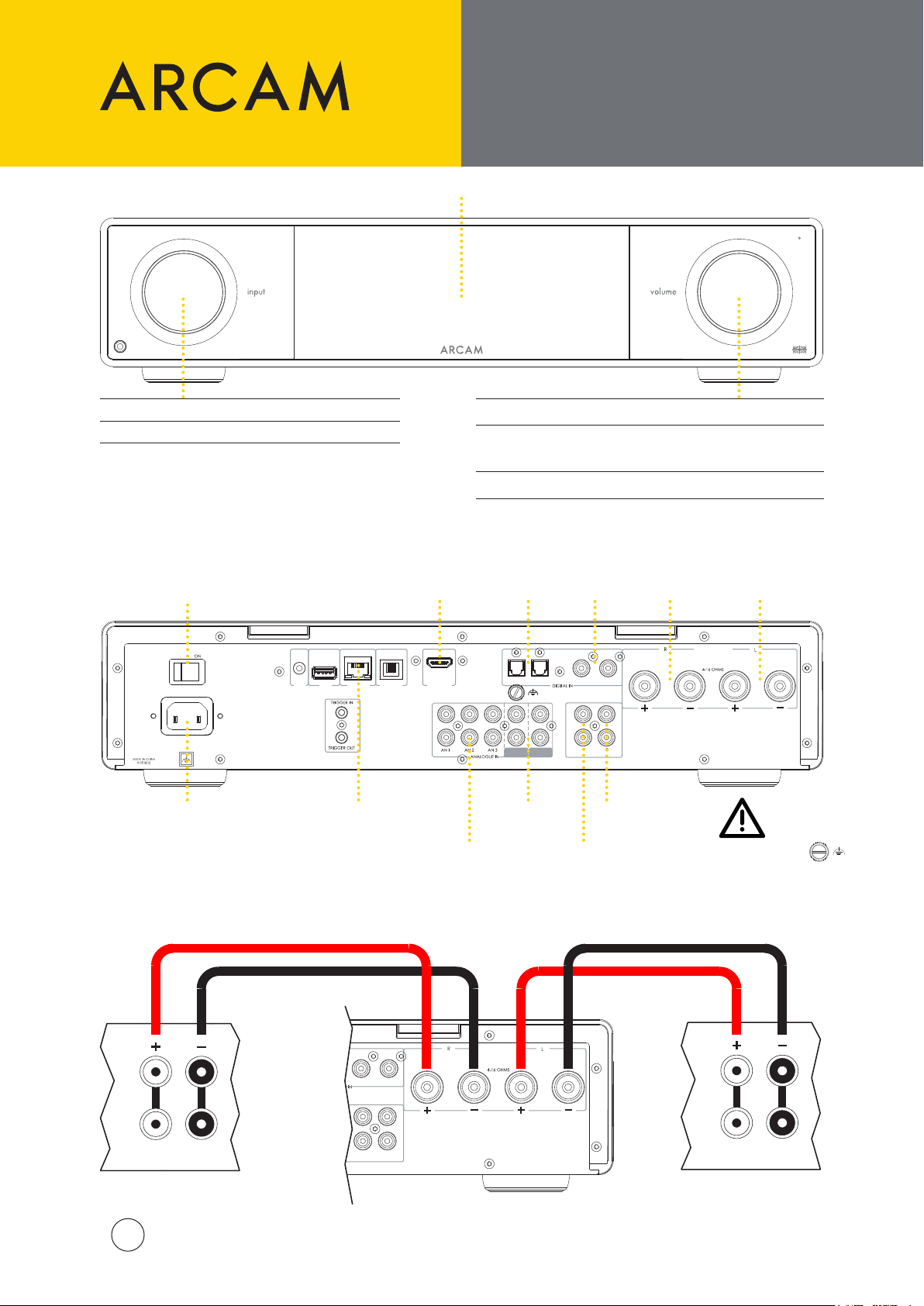
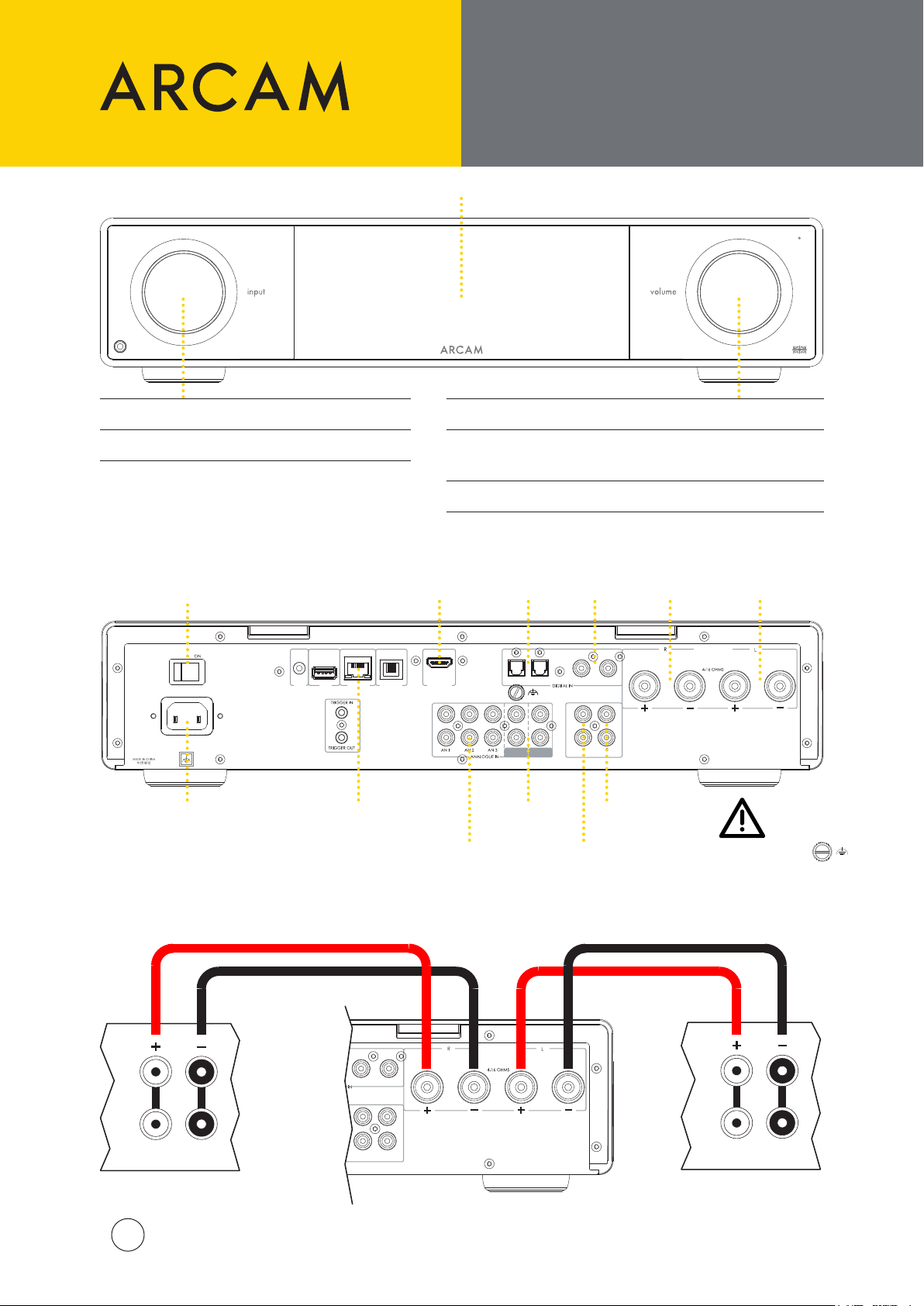
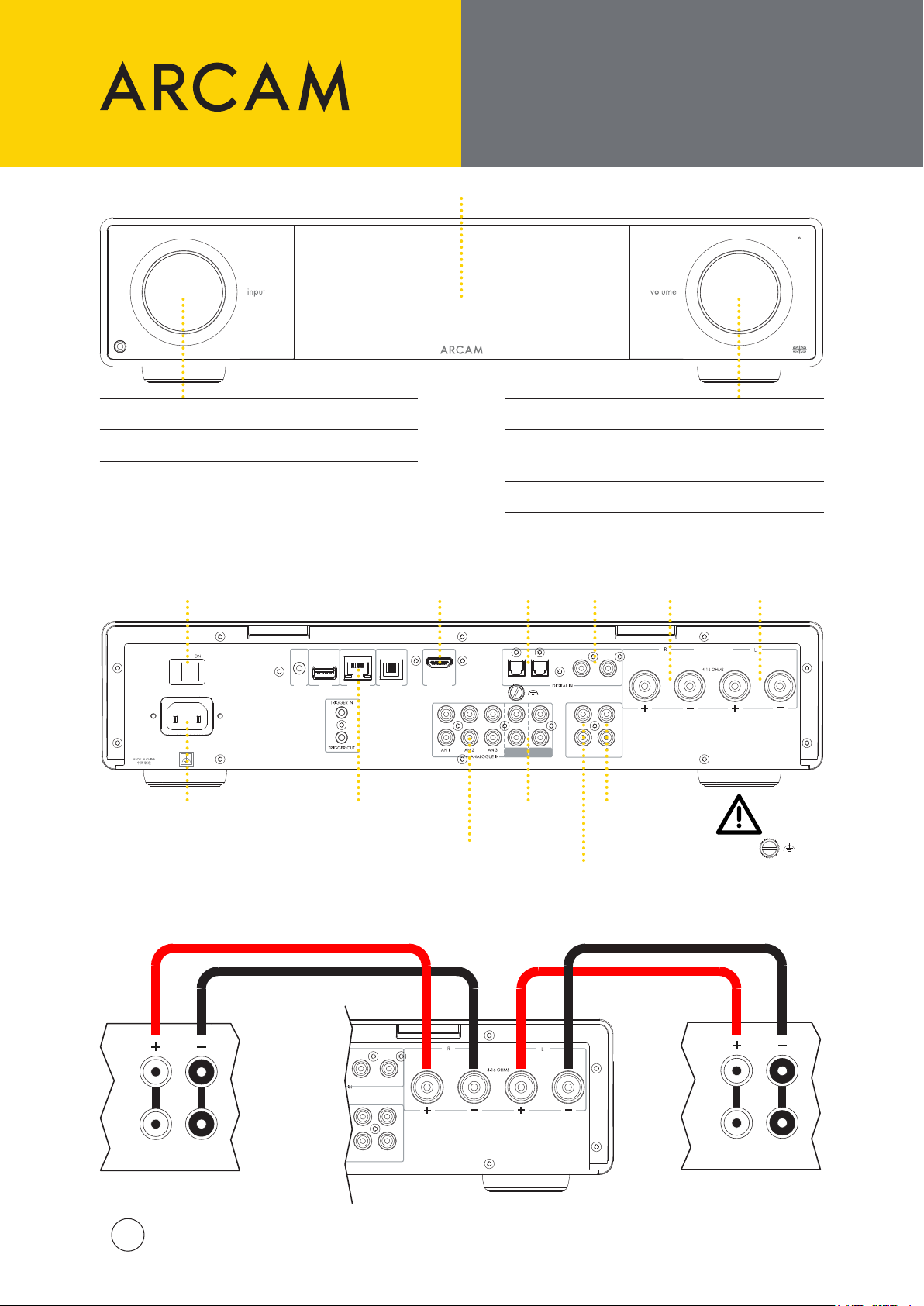
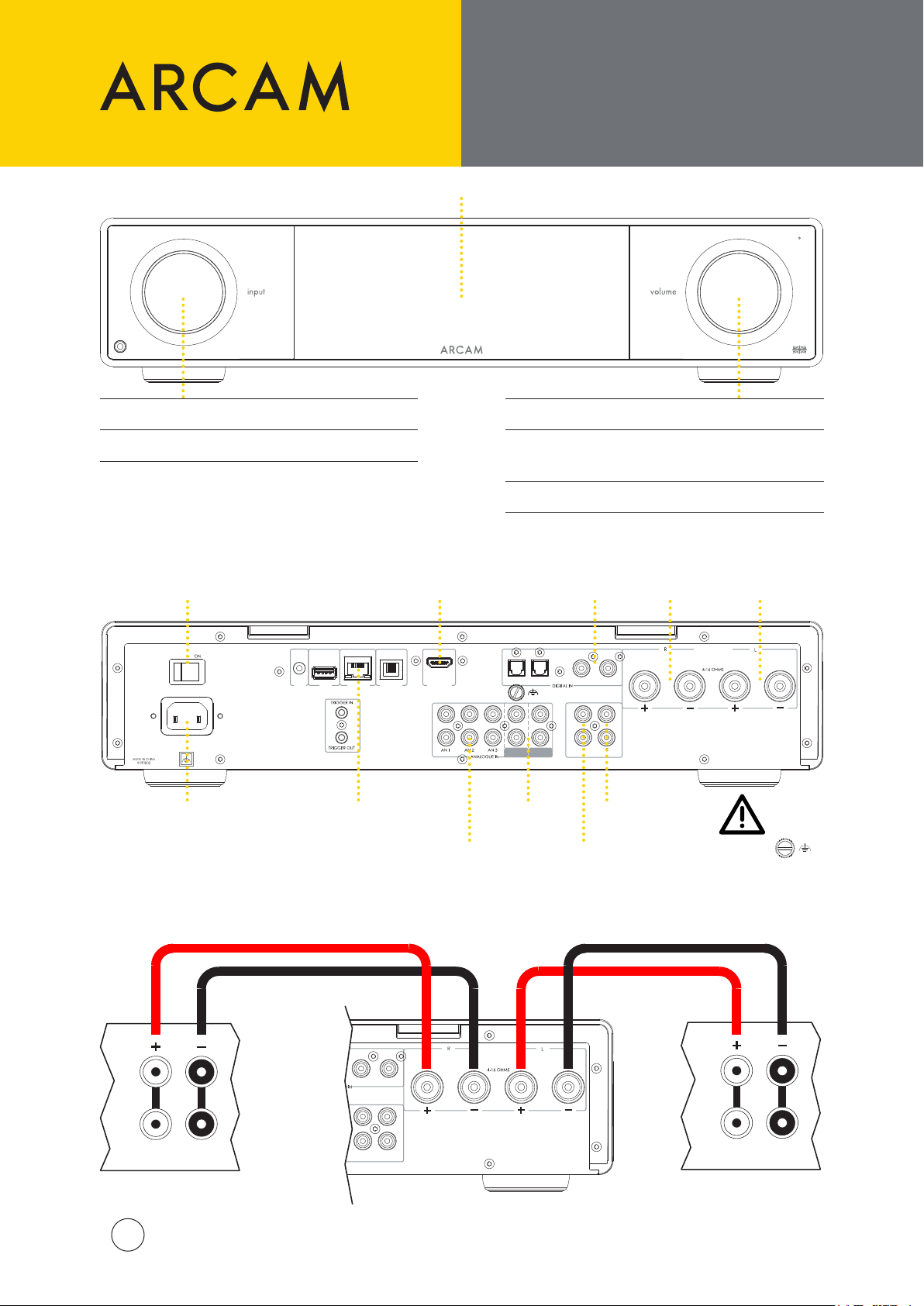
Front
Rotate: Input Carousel
Push: Select Input
Rear
Power
Switch
Display
HDMI
eARC/ARC
Input
Rotate: Volume Control
Push:
Mute/Unmute or
Wake up from Standby
Push and Hold: Standby
Optical
SPDIF
Inputs
Coaxial
SPDIF
Inputs
Right
Loudspeaker
Output
Left
Loudspeaker
Output
Power
Input
Connecting Loudspeakers
HF
LF
ARCAM SA35 QSG Multi V2
4
Ethernet Socket
for wired network
connections
DIG 3 DIG 4
SUB1
SUB2
PRE
OUT
Analogue
Inputs
Audio
CLASS 2 WIRING
Phono Inputs
(MM & MC)
Subwoofer
Pre-Amp
Outputs
Outputs
Phono Ground
This terminal must not be
used as a safety earth.
HF
LF
Page 5
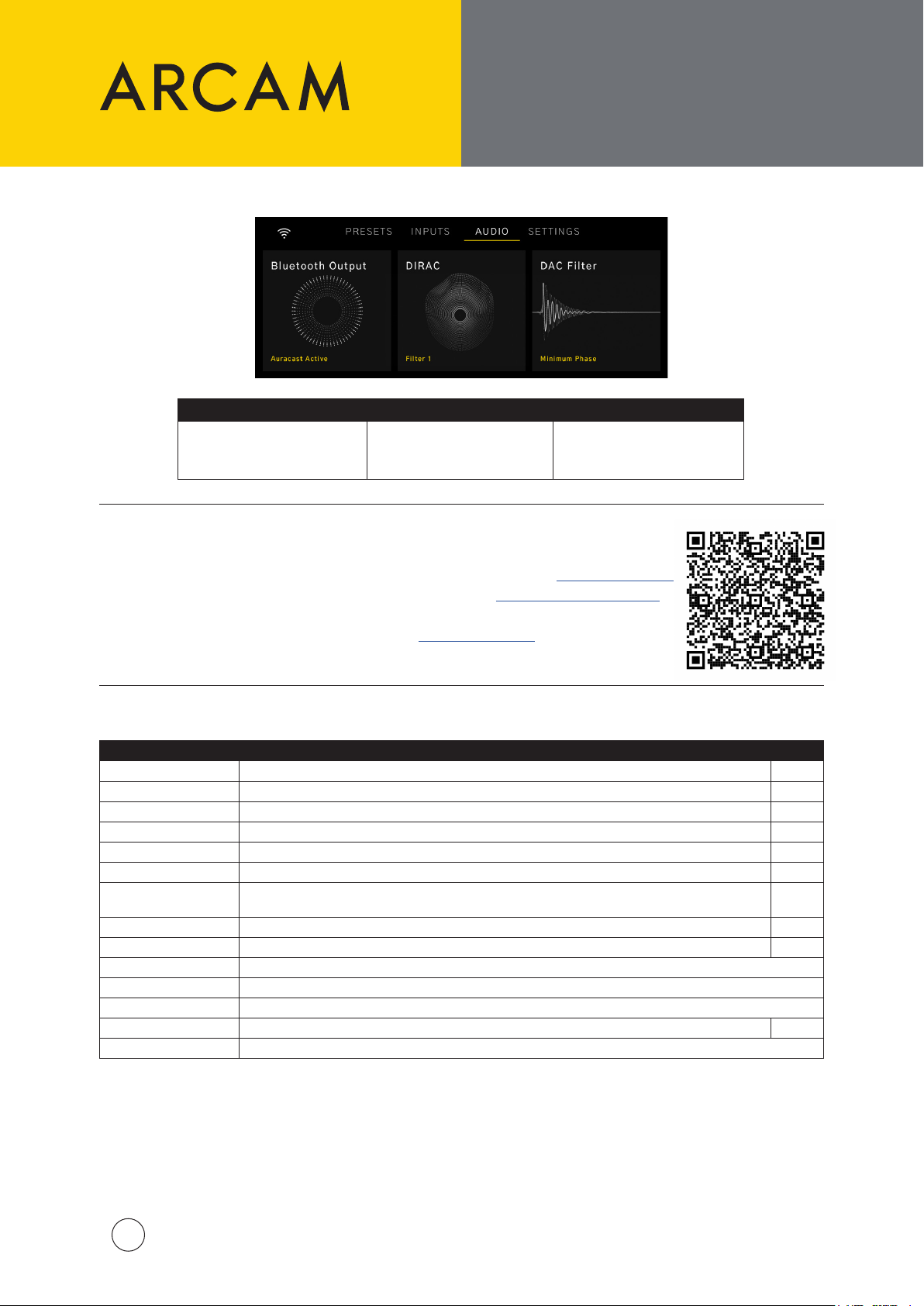
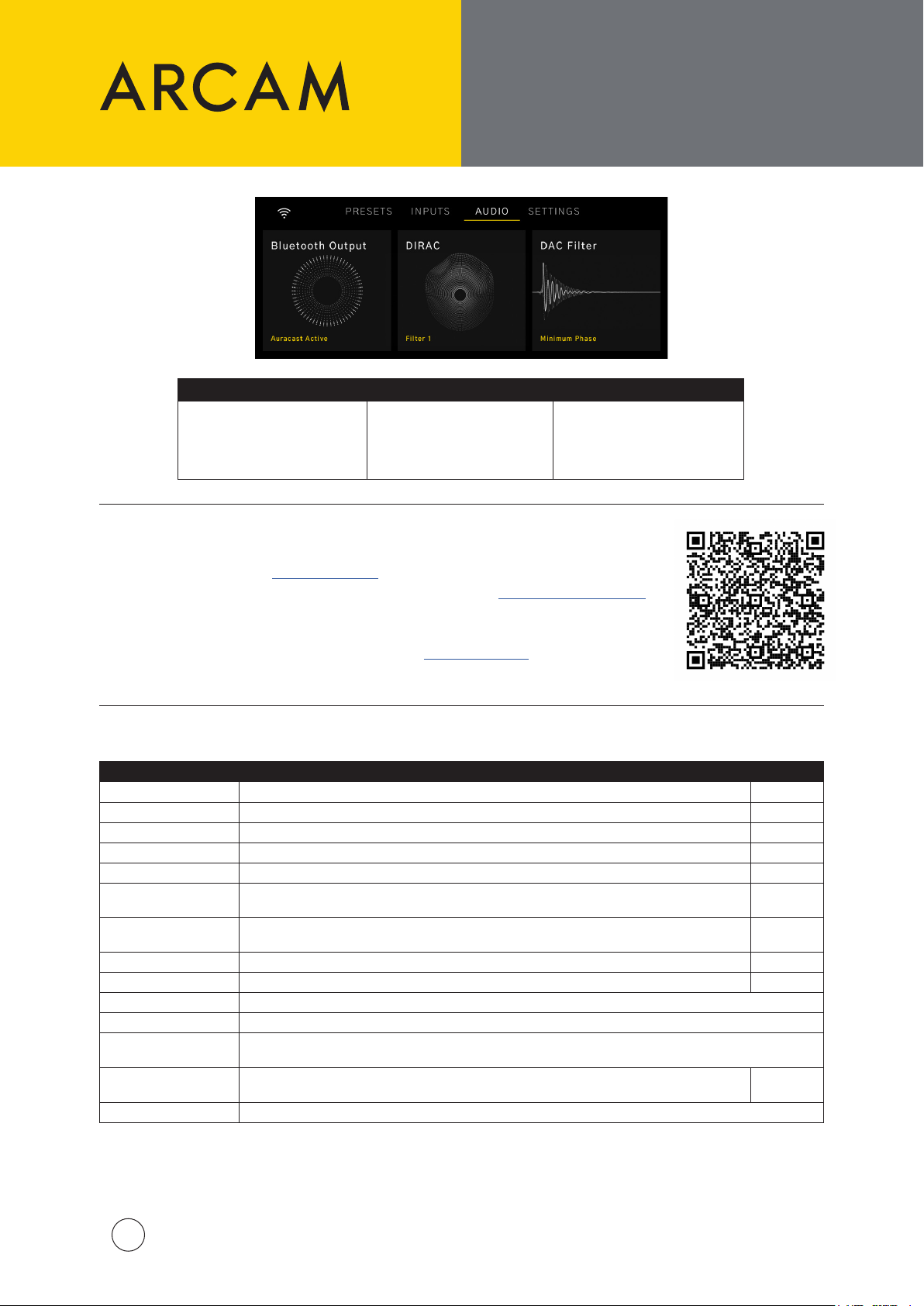
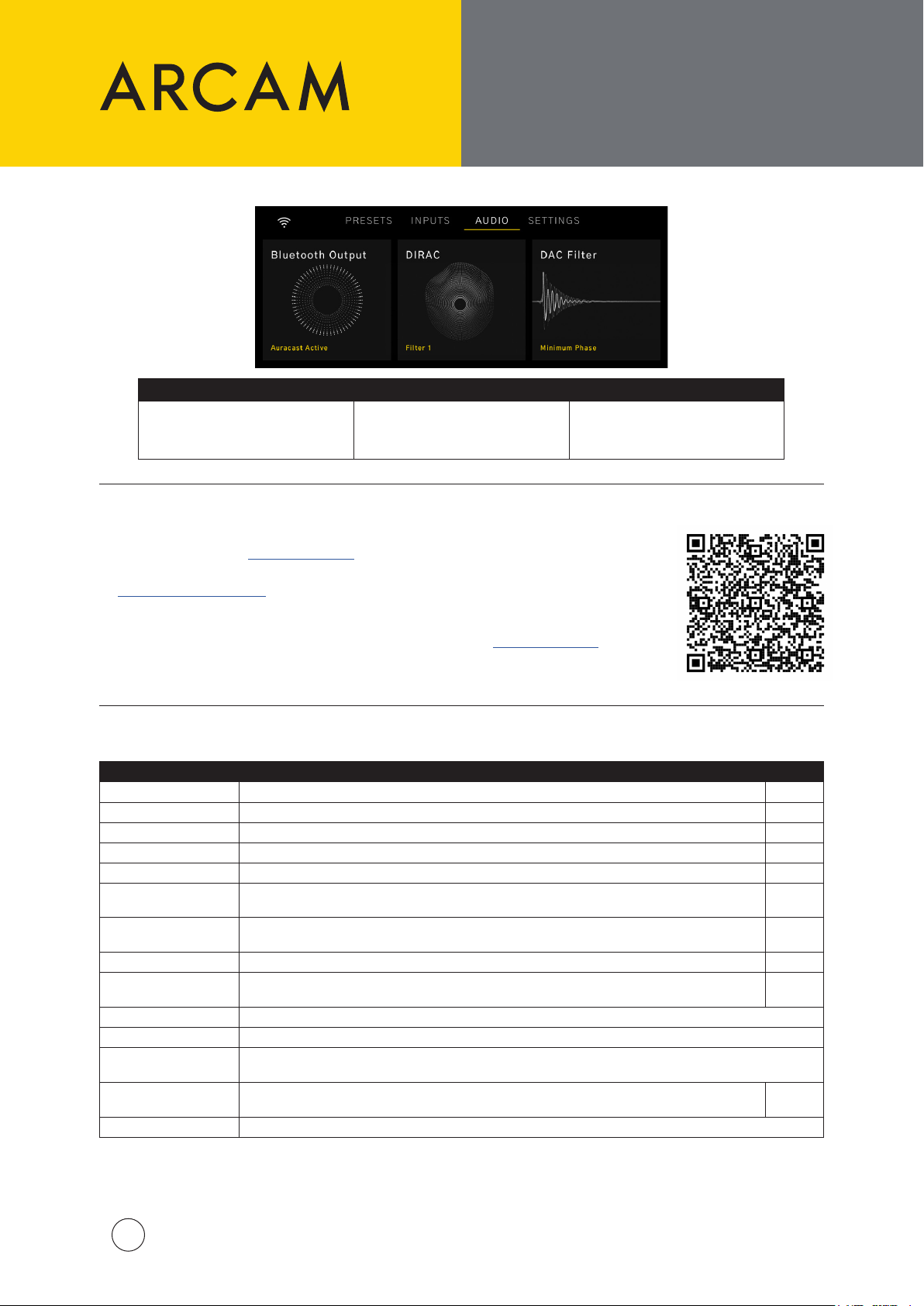
Audio Options
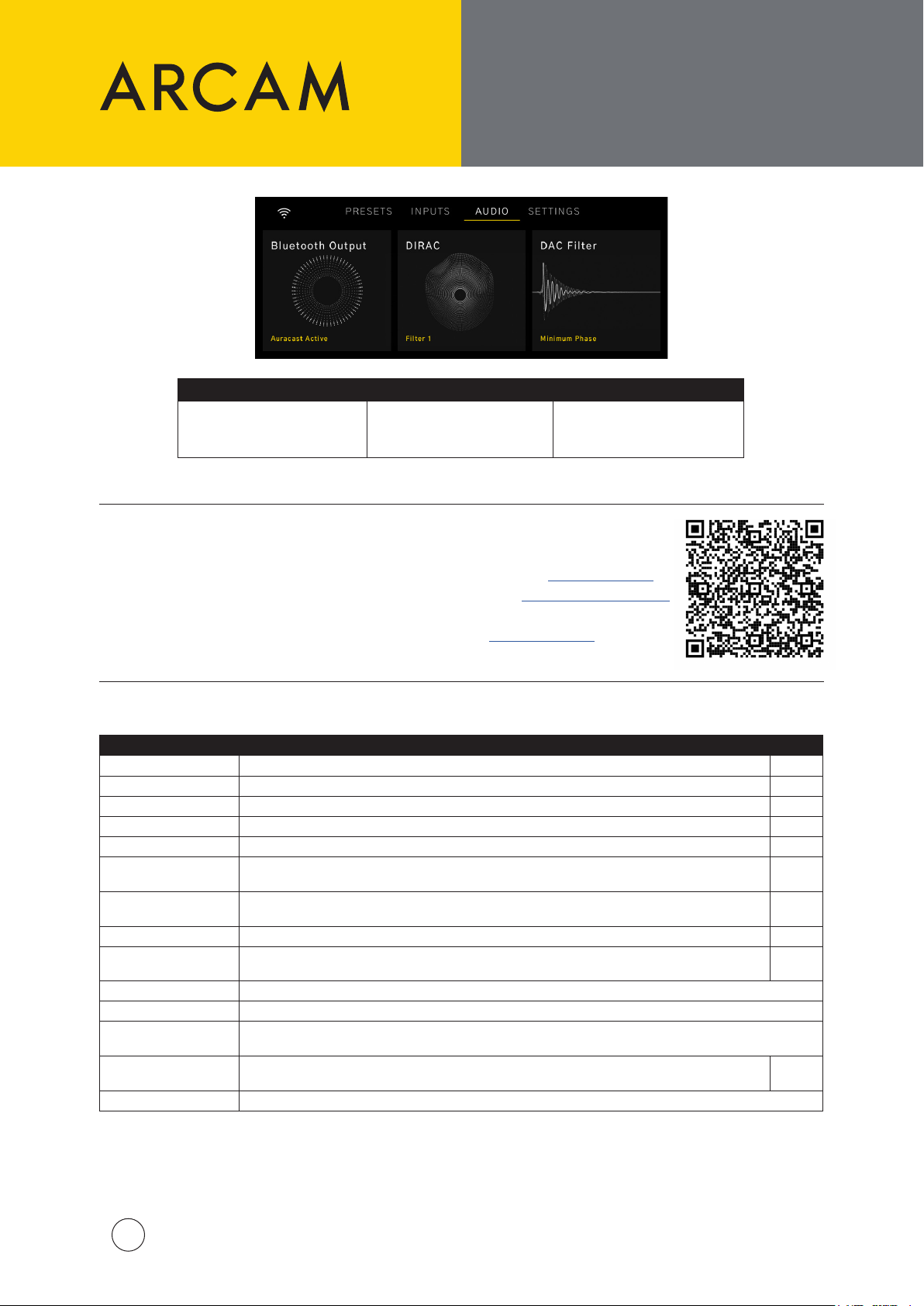
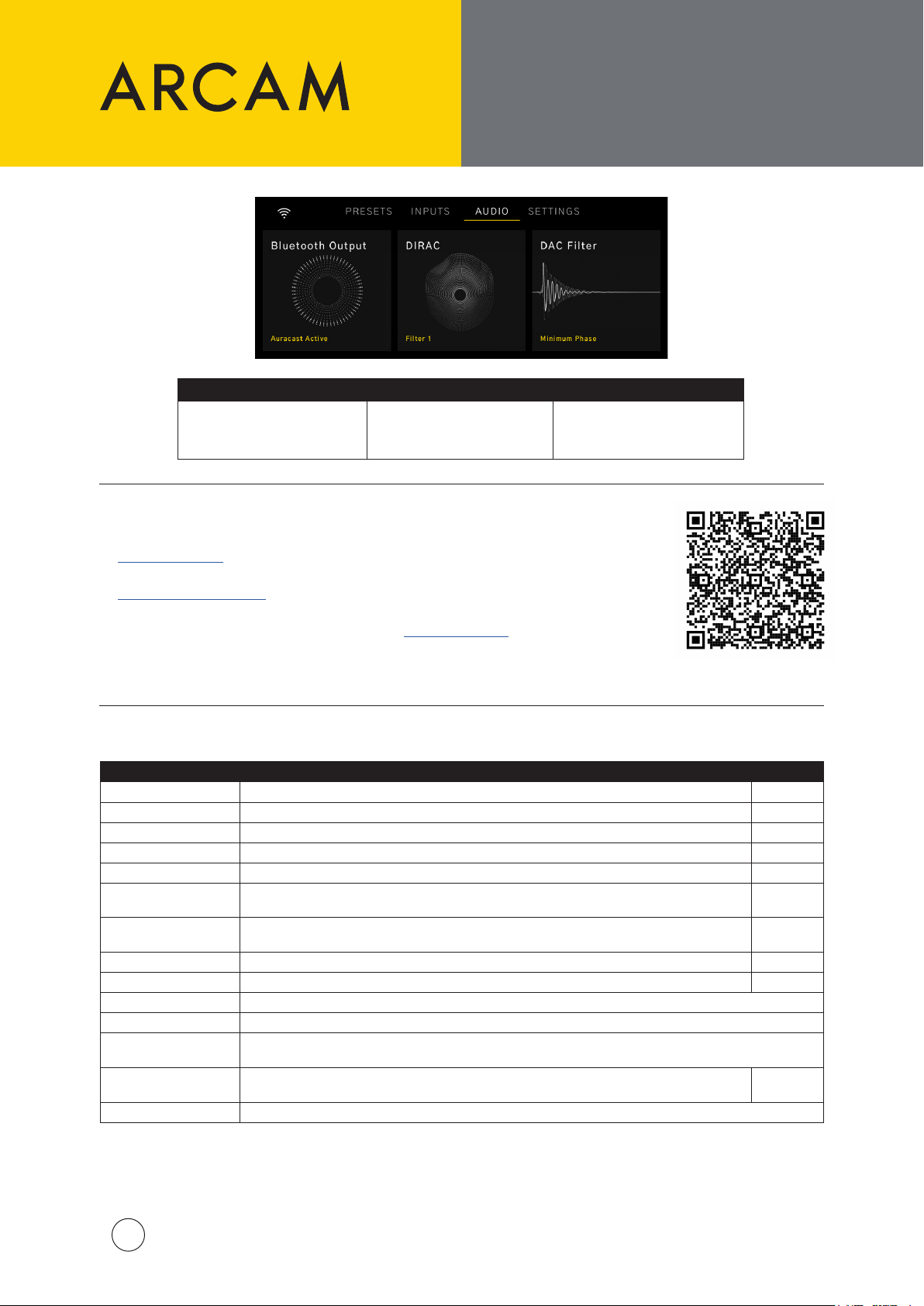
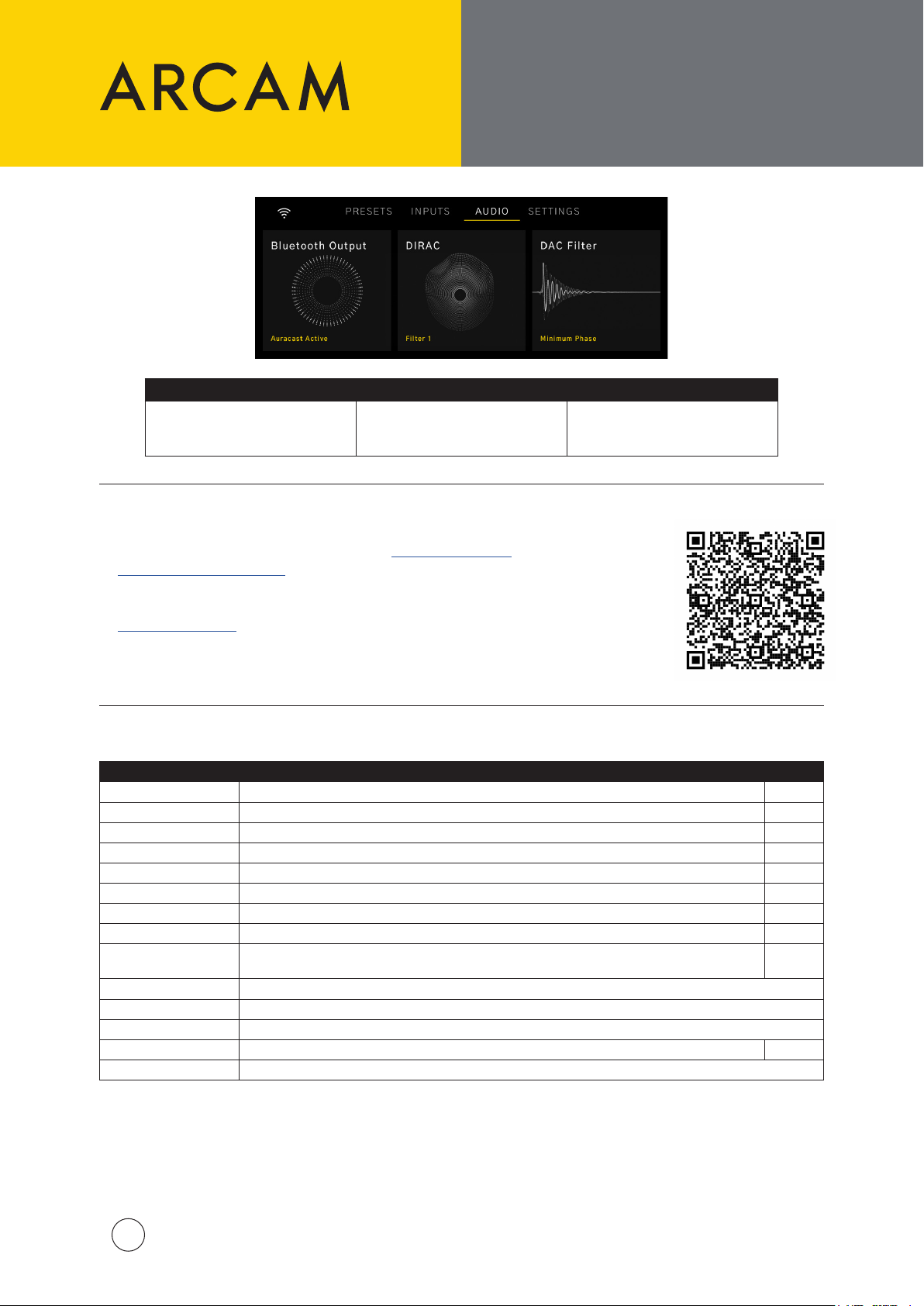
These audio options
can be accessed from
the Home Page:
Select wireless headphones
for quiet listening
MENU TREES AND
DIRAC LIVE
Bluetooth DIRAC DAC Filter
Select a saved room
correction lter
Select from a list of DAC
lters that can subtly
change the sound
DIRAC Live
| To get started with Dirac Live Room Correction, create an account at dirac.com/register
| Download the Dirac Live software suite for PC or MAC from dirac.com/live/downloads
| Use the supplied USB cable to connect the supplied USB microphone to your PC/MAC
| Download the microphone calibration le from arcam.co.uk/sa35
| Follow the steps in the Dirac Live software, or check out our video guide using this link:
Menu Tree
Menu Option Description Default
Halo Brightness Selects the brightness of the illumination of the front panel dials. Full
Subwoofer Cong Selects whether any subwoofers are connected to the subwoofer outputs. No Sub
Balance Selects whether audio is weighted to either of the left or right speakers. 0
Maximum Volume Denes maximum volume output. 40
Pre Amp Mode Disables the internal power amplier. O
Eco Timer When enabled, the SA35 will enter standby within 20 minutes with no user interaction or playback. On
Network Standby
BT/HDMI Autoswitch Automatically switch to Bluetooth and HDMI inputs when the input is active. On
TV Volume Control Enable volume control by a connected TV using the HDMI eARC/ARC connection. On
System Reset Press Select/OK to initiate a reset of all settings to default.
Bluetooth Reset Press Select/OK to clear the saved list of paired Bluetooth devices.
USB Update Press Select/OK to initiate a software update from a USB stick present in the USB socket on the rear panel
System Code Select a dierent remote control code set. 16
Product Information Displays SW versions, IP address and Network ID.
Selects whether the Network Connection is maintained in standby. Increases standby power
consumption.
On
ARCAM SA35 QSG Multi V2
5
Page 6
MERCI D’AVOIR CHOISI
ARCAM
Le « A » d’ARCAM signie Amplication, et c’est là notre principale compétence.
Depuis plus de 45 ans, ARCAM fabrique des produits
hi- et home-cinéma sophistiqués orant une qualité
sonore de pointe.
Le modèle SA35 est le dernier-né après plus
de 45 ans de conception et de fabrication
d’amplicateurs, depuis notre premier produit en
1976 : l’amplicateur A&R Cambridge A60.
Cet amplicateur est conçu pour vous fournir une
amplication able pour les décennies à venir, tout en
orant une musicalité exceptionnelle pour que vous
puissiez proter au maximum de votre musique.
Dans le cas improbable d’une panne ou si vous avez
besoin d’une assistance technique, veuillez contacter
nos équipes d’assistance spécialisées par courrier
électronique à l’adresse [email protected],
ou par téléphone au numéro +441707668012 ou
au numéro +18886914171.
Si vous souhaitez simplement obtenir de plus amples
informations sur les produits ARCAM, notre réseau de
revendeurs se fera un plaisir de vous aider. D’autres
informations sont disponibles sur notre site web
d’ARCAM à l’adresse ARCAM.co.uk.
Mise en place de l’appareil
| Mettez l’amplicateur sur une surface ferme, de niveau, évitant la lumière directe du soleil et des sources
de chaleur et d’humidité.
| Ne posez pas le SA35 au-dessus d’un amplicateur ou de toute autre source de chaleur.
| Assurez-vous que le récepteur de la télécommande sur la droite de l’achage de la façade n’est pas
obstrué, sinon cela peut générer l’utilisation de la télécommande.
| Le SA35 est conçu pour chauer pendant son fonctionnement normal.
Une utilisation prolongée à des niveaux de volume
élevés peut rendre l’amplicateur chaud au toucher.
| Ne placez aucun autre composant ou objet sur l’amplicateur, car cela pourrait obstruer la circulation de
l’air autour du dissipateur thermique, ce qui provoquerait une surchaue de l’amplicateur (l’appareil placé
sur l’amplicateur deviendrait chaud lui aussi).
| Ne posez pas votre platine-disque sur cet appareil. Les platines sont des appareils très sensibles aux bruits
générés par l’alimentation secteur. Ces derniers peuvent s’entendre en bruit de fond si la platine est trop
proche de l’appareil.
| Le fonctionnement normal de l’appareil peut être gêné par de fortes perturbations électromagnétiques.
Si cela se produit, il sut de réinitialiser l’appareil avec le bouton d’alimentation, ou de déplacer l’appareil
dans un autre lieu.
Ne mettez pas l’amplicateur dans un espace fermé tel qu’une bibliothèque
ou une armoire à moins qu’elle ne soit pourvue d’une bonne ventilation.
Contenu du paquet
| Amplicateur intégré de streaming ARCAM SA35
| Télécommande IR
| 2 piles AAA pour la télécommande
| Cordons d’alimentation spéciques aux régions
| Microphone de mesure à utiliser avec Dirac Live
| Câbles USB-C de 5M à utiliser avec le microphone
| Guide de démarrage rapide
| Document de sécurité et de conformité
Gestion de l’alimentation
Ce produit ore à l’utilisateur la possibilité de désactiver les fonctions de gestion de l’alimentation. Notez que
cela augmentera la consommation d’énergie du produit:
| Par défaut, le SA35 passe en veille dans les 20 minutes sans interaction de l’utilisateur ou lecture. La
minuterie ECOTimer être désactivée dans le menu.
| Par défaut, les connexions réseau du SA35 restent actives en mode veille. Pour réduire la consommation
d’énergie en veille, toutes les connexions réseau, y compris le Wi-Fi, peuvent être désactivées en réglant
NetworkStandby sur OFF.
ARCAM SA35 QSG Multi V2
6
Page 7
CONFIGURATION
WI-FI ET BLUETOOTH.
TÉLÉCOMMANDE
Conguration Wi-Fi - Application ARCAM Radia
| Les liens vers l’application se trouvent sur la première page de ce manuel.
| Pour établir une connexion Wi-Fi, téléchargez l’application ARCAM sur votre smartphone ou votre tablette.
| Allumez le streamer ARCAM SA35 et ouvrez l’application pour le découvrir une fois que le SA35 est prêt.
| Sélectionnez-le et suivez les instructions pour le connecter à votre routeur Wi-Fi.
| Une fois connecté, le SA35 s’ache avec l’icône « POWER ».
| Sélectionnez le SA35 pour accéder aux podcasts, à la radio Internet et aux présélections, aux supports
connectés en USB, au stockage en réseau local (UPnP) et aux réglages.
Conguration Bluetooth
| Sélectionnez l’entrée Bluetooth sur le SA35. En l’absence d’autres connexions Bluetooth, il est désormais
détectable.
| Pour jumeler votre appareil source Bluetooth, ouvrez ses paramètres Bluetooth et recherchez
SA35###### dans la liste. Chaque produit possède un identiant unique.
| L’amplicateur peut rappeler 5 jumelages d’appareils. S’il y en a déjà 5 en mémoire, le plus ancien sera
remplacé.
| Les appareils portables étant souvent dotés d’un curseur de volume, l’amplicateur dispose d’un réglage
de volume maximum an d’éviter qu’un volume excessif ne soit sélectionné accidentellement. La valeur par
défaut est 40.
| Pour jumeler un casque Bluetooth, sélectionnez BluetoothOutput dans le menu Audio. Les casques
jumelés seront indiqués.
| Les casques Bluetooth ne peuvent pas être utilisés conjointement avec l’entrée Bluetooth du SA35.
Télécommande
Activation/désactivation de la mise en veille
Navigation dans le menu
Appuyez sur le bouton du milieu pour eectuer
une sélection
Menu principal/Retour
Ache la lecture en cours
Touches de déplacement
(Lecture/Pause, Saut arrière/avant)
Contrôle du volume
Activation/désactivation de la sourdine
Achage lumineux/tamisé/éteint
ARCAM SA35 QSG Multi V2
7
Page 8
PANNEAUX AVANT ET
100-120V/220-240V ~ 50/60Hz
700W MAX
POWER INLET
DIG 1
DIG 2 DIG 3 DIG 4
PRE
OUT
SUB2
SUB1
PHONO
(MM)
PHONO
(MC)
IR IN
USB NETWORK CONTROL
HDMI eARC
CLASS 2 WIRING
100-120V/220-240V ~ 50/60Hz
15W MAX
POWER INLET
COAX
OUT
OPTICAL
OUT
TRIGGER
OUT
NETWORK
CONTROL
USB
ARRIÈRE, ET CONNEXION
DES ENCEINTES
Avant
Rotation : Carrousel des entrées
Pression : Sélection de l’entrée
Arrière
Bouton de
l’alimentation
Achage
Entrée
HDMI
eARC/ARC
Rotation : Contrôle du volume
Pression :
Coupure/Rétablissement
du son ou Sortie de la veille
Pression continue : Veille
Entrées
optiques
SPDIF
Entrées
coaxiales
SPDIF
Sortie haut-
parleur droit
Sortie haut-
parleur gauche
Entrée
d’alimentation
Connexion des haut-parleurs
HF
LF
8
ARCAM SA35 QSG Multi V2
Port Ethernet
pour les connexions
réseau câblées
DIG 3 DIG 4
SUB1
SUB2
PRE
OUT
Entrées Phono
(MM et MC)
Entrées audio
analogiques
CLASS 2 WIRING
Sorties de
préamplicateur
Sorties
subwoofer
Masse phono
Cette borne ne doit pas
être utilisée comme une
mise à la terre de sécurité.
HF
LF
Page 9
Options Audio
Ces options audio sont
accessibles à partir de
la page d’accueil:
Sélection et jumelage de
casques Bluetooth pour une
écoute personnalisée
ARBORESCENCES DES
MENUS ET DIRAC LIVE
Bluetooth DIRAC DAC Filter
Sélectionnez un ltre
d’optimisation parmi ceux qui
sont chargés
Choisissez parmi une liste
de ltres DAC qui peuvent
modier subtilement le son
DIRAC Live
| Pour commencer à utiliser Dirac Live Room Correction, créez un compte sur dirac.com/register.
| Téléchargez la suite logicielle Dirac Live pour PC ou MAC à partir du lien dirac.com/live/downloads
| Utilisez le câble USB fourni pour connecter le microphone USB à votre PC/MAC.
| Téléchargez le chier d’étalonnage du microphone à partir du lien arcam.co.uk/sa35
| Suivez les étapes du logiciel Dirac Live, ou consultez notre guide vidéo en cliquant sur ce lien:
Menu Tree
Menu Option Description Défaut
Halo Brightness Sélectionne la luminosité de l’éclairage des molettes du panneau avant. Full
Subwoofer Cong Permet de déterminer si des subwoofers sont connectés aux sorties de subwoofer. No Sub
Balance Sélectionne si l’audio est pondéré vers les haut-parleurs de gauche ou de droite. 0
Maximum Volume Dénit le volume maximal de sortie. 40
Pre Amp Mode Désactive l’amplicateur de puissance interne. O
Eco Timer
Network Standby
BT/HDMI Autoswitch Bascule automatiquement vers les entrées Bluetooth et HDMI lorsque l’entrée est active. On
TV Volume Control
System Reset Appuyez sur Select/OK pour réinitialiser tous les réglages par défaut.
Bluetooth Reset Appuyez sur Select/OK pour supprimer tous les enregistrements de jumelage Bluetooth.
USB Update
System Code
Product Information Ache les versions du logiciel, l’adresse IP et l’ID réseau.
Lorsque cette option est activée, le SA35 se met en veille au bout de 20 minutes en l’absence
d’interaction avec l’utilisateur ou de lecture.
Sélectionne si la connexion réseau est maintenue en veille. Augmente la consommation électrique
en veille.
Le volume sera contrôlé par le téléviseur connecté. Lorsque cette option est désactivée, les
commandes de volume du téléviseur sont ignorées.
Appuyez sur Select/OK pour lancer une mise à jour du logiciel à partir d’une clé USB présente dans le
port USB sur le panneau arrière.
Sélectionnez un autre jeu de codes de télécommande lorsque les codes sont partagés avec un
autre appareil dans la même pièce.
On
On
On
16
ARCAM SA35 QSG Multi V2
9
Page 10
VIELEN DANK, DASS
SIE SICHFÜR ARCAM
ENTSCHIEDENHABEN.
Das „A“ in ARCAM steht für Amplication – auf Deutsch Verstärkung –
und repräsentiert unsere Kernkompetenz.
ARCAM ist seit mehr als 45 Jahren ein Spezialist für
die Herstellung von HiFi- und Heimkinoprodukte mit
erstklassiger Klangqualität.
Der SA35 ist das jüngste Produkt aus mehr als
45 Jahren Verstärkerentwicklung und -herstellung,
die bis zu unserem ersten Produkt im Jahr 1976 –
dem A&R Cambridge A60 Verstärker – zurückreicht.
Unsere Verstärker sind so konzipiert, dass Sie
Ihnen jahrzehntelang eine zuverlässige Verstärkung
in außergewöhnlicher musikalischer Qualität für
unvergessliche Musikerlebnisse bieten.
Im unwahrscheinlichen Fall einer Störung oder wenn
Sie technische Unterstützung benötigen, wenden Sie
sich bitte per E-Mail an [email protected]
oder telefonisch unter +441707668012 oder
+18886914171 an unser engagiertes Support-Team.
Wenn Sie einfach nur weitere Informationen über
ARCAM Produkte benötigen, hilft Ihnen unser
Händlernetz gerne weiter. Weitere Informationen nden
Sie auch auf der ARCAM-Website ARCAM.co.uk.
Gerät aufstellen
| Stellen Sie den Verstärker auf einer ebenen, festen Oberäche auf. Achten Sie darauf, dass das Gerät keinem direkten
Sonnenlicht oder Wärme- bzw. Feuchtigkeitsquellen ausgesetzt ist.
| Stellen Sie den SA35 nicht auf einen Leistungsverstärker oder eine andere Wärmequelle.
| Vergewissern Sie sich, dass sich vor dem Fernbedienungsempfänger rechts auf der Frontblende keine Gegenstände
benden, da dies die Funktion der Fernbedienung beeinträchtigen würde.
| Der SA35 wird bei Normalbetrieb warm.
Bei längerem Gebrauch mit hohen Lautstärken kann
sich das Gehäuse des Verstärkers heiß anfühlen.
Stellen Sie den Verstärker nicht in ein geschlossenes Bücherregal
oder einen Schrank, es sei denn, es ist für ausreichende Belüftung
gesorgt.
| Stellen Sie kein anderes Gerät oder einen Gegenstand auf den Verstärker, da dies die Luftzirkulation um den Kühlkörper
behindern kann, und der Verstärker dadurch überhitzt (das Gerät, das auf dem Verstärker steht, würde ebenfalls heiß
werden).
| Stellen Sie keinen Plattenspieler auf dieses Gerät. Plattenspieler reagieren sehr empndlich auf das von Netzteilen
erzeugte Rauschen, das als Hintergrundbrummen zu hören ist, wenn sich der Plattenspieler zu dicht am Gerät bendet.
| Die normale Funktion des Geräts kann durch starke elektromagnetische Interferenzen gestört werden. Setzen Sie in
diesem Fall einfach das Gerät mit der Ein-/Austaste zurück oder stellen Sie es an einen anderen Standort auf.
Verpackungsinhalt
| ARCAM SA35 Streaming-integrierter Verstärker
| IR-Fernbedienung
| 2 x AAA-Batterien für die Fernbedienung
| Regionalspezische Netzkabel
| Messmikrofon zur Verwendung mit Dirac Live
| 5 m USB-C-Kabel zur Verwendung mit dem Mikrofon
| Kurzanleitung
| Sicherheits- und Konformitätsdokument
Power Management
Dieses Produkt bietet dem Benutzer die Möglichkeit, die Energieverwaltungsfunktionen zu deaktivieren. Beachten Sie,
dass dies den Energieverbrauch des Produkts erhöht:
| Standardmäßig schaltet der SA35 nach 20 Minuten in den Standby-Modus, wenn keine Benutzerinteraktion oder
Wiedergabe erfolgt. Der ECOTimer kann im Menü deaktiviert werden.
| Standardmäßig bleiben die Netzwerkverbindungen des SA35 im Standby-Modus aktiv. Um den Stromverbrauch im
Standby-Modus zu reduzieren, können alle Netzwerkverbindungen, einschließlich Wi-Fi, deaktiviert werden, indem
NetworkStandby auf OFF gesetzt wird.
ARCAM SA35 QSG Multi V2
10
Page 11
WLAN- UND BLUETOOTH-
EINRICHTUNG.
FERNBEDIENUNG
WLAN-Einrichtung – ARCAM Radia-App
| Links zur App nden Sie auf der ersten Seite in diesem Handbuch.
| Um eine WLAN-Verbindung herzustellen, laden Sie die ARCAM-App auf Ihr Handy oder Tablet herunter.
| Schalten Sie Ihren ARCAM SA35-Streamer ein und önen Sie die App. Sobald Ihr SA35 bereit ist, wird er in
der App angezeigt.
| Wählen Sie ihn aus und folgen Sie den Anleitungen, um ihn mit Ihrem WLAN-Router zu verbinden.
| Sobald die Verbindung hergestellt wurde, wird der SA35 mit einem „POWER“-Symbol angezeigt.
| Wählen Sie den SA35, um auf Podcasts, Internetradio und Senderspeicher, über USB angeschlossene
Medien, lokale Netzwerkspeicher (UPnP) und Einstellungen zuzugreifen.
Bluetooth-Einrichtung
| Wählen Sie den Bluetooth-Eingang auf dem SA35. Wenn keine anderen Bluetooth-Verbindungen bestehen,
ist das Gerät jetzt erkennbar.
| Um Ihr Bluetooth-Quellgerät zu koppeln, önen Sie die Bluetooth-Einstellungen Ihres Quellgeräts und
suchen in der Liste nach SA35######. Jedes Produkt besitzt eine eindeutige Produkt-ID.
| Der Verstärker kann 5 Gerätekopplungen abrufen. Danach wird immer der älteste Geräteeintrag mit dem
neu zu speichernden überschrieben.
| Da tragbare Geräte häug über einen Lautstärkeregler verfügen, gibt es im Verstärker eine maximale
Lautstärkeeinstellung, um zu verhindern, dass versehentlich eine zu hohe Lautstärke gewählt wird.
Die Standardeinstellung ist 40.
| Um Bluetooth-Kopfhörer zu koppeln, wählen Sie BluetoothOutput im Menü Audio. Daraufhin werden die
gekoppelten Kopfhörer aufgelistet.
| Bluetooth-Kopfhörer können nicht in Verbindung mit dem Bluetooth-Eingang des SA35 verwendet werden.
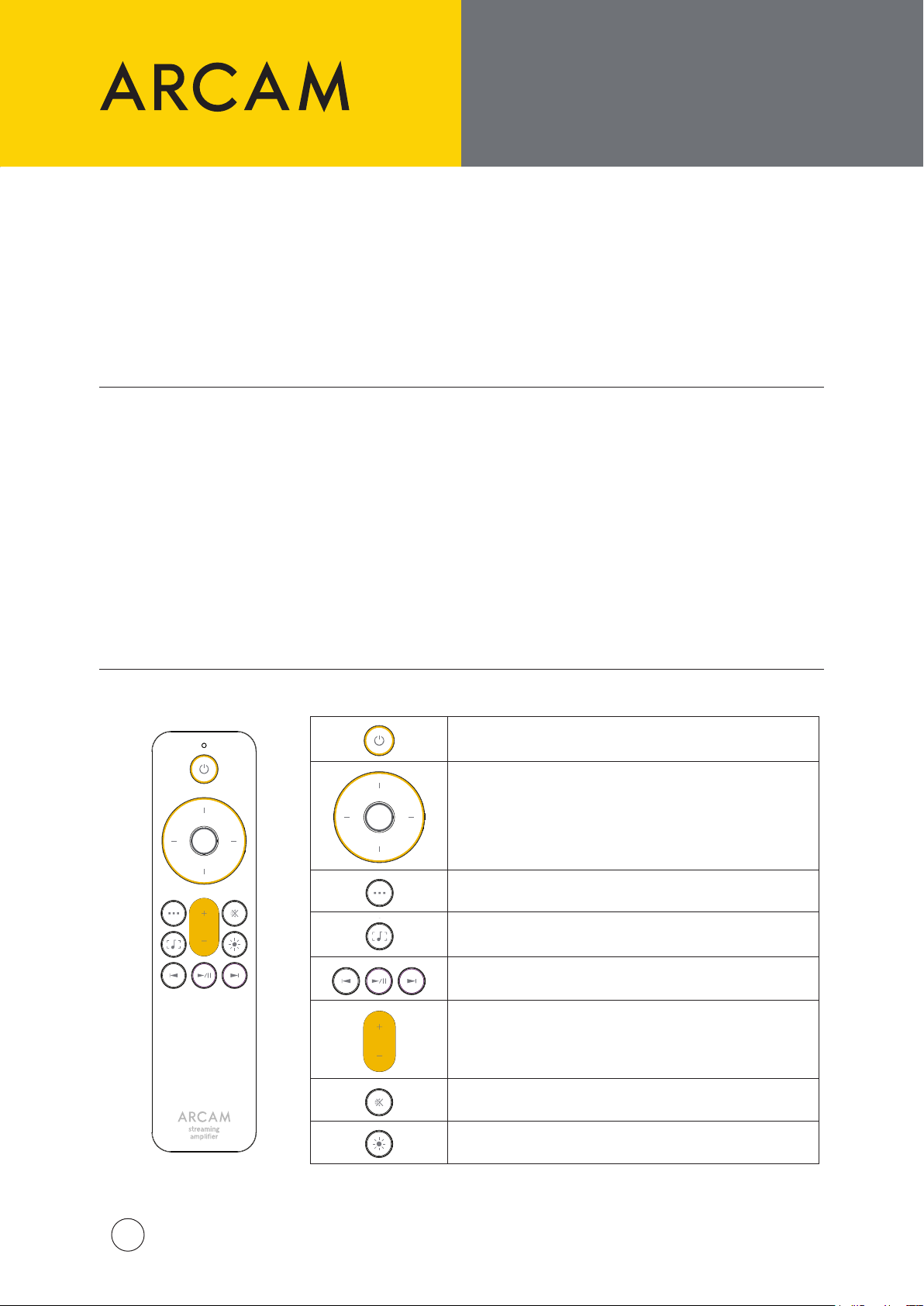
Fernbedienung
Standby Ein/Aus
Menü-Navigation
Drücken Sie die mittlere Taste zur Auswahl
Startmenü / Zurück
Anzeige der aktuellen Wiedergabe umschalten
Transporttasten
(Wiedergabe/Pause, Vorheriger/Nächster Titel)
Lautstärkeregler
Stummschaltung Ein/Aus
Display Hell/Dunkel/Aus
ARCAM SA35 QSG Multi V2
11
Page 12
FRONTBLENDE UND RÜCKSEITE
100-120V/220-240V ~ 50/60Hz
700W MAX
POWER INLET
DIG 1
DIG 2 DIG 3 DIG 4
PRE
OUT
SUB2
SUB1
PHONO
(MM)
PHONO
(MC)
IR IN
USB NETWORK CONTROL
HDMI eARC
CLASS 2 WIRING
100-120V/220-240V ~ 50/60Hz
15W MAX
POWER INLET
COAX
OUT
OPTICAL
OUT
TRIGGER
OUT
NETWORK
CONTROL
USB
UND LAUTSPRECHER
ANSCHLIESSEN
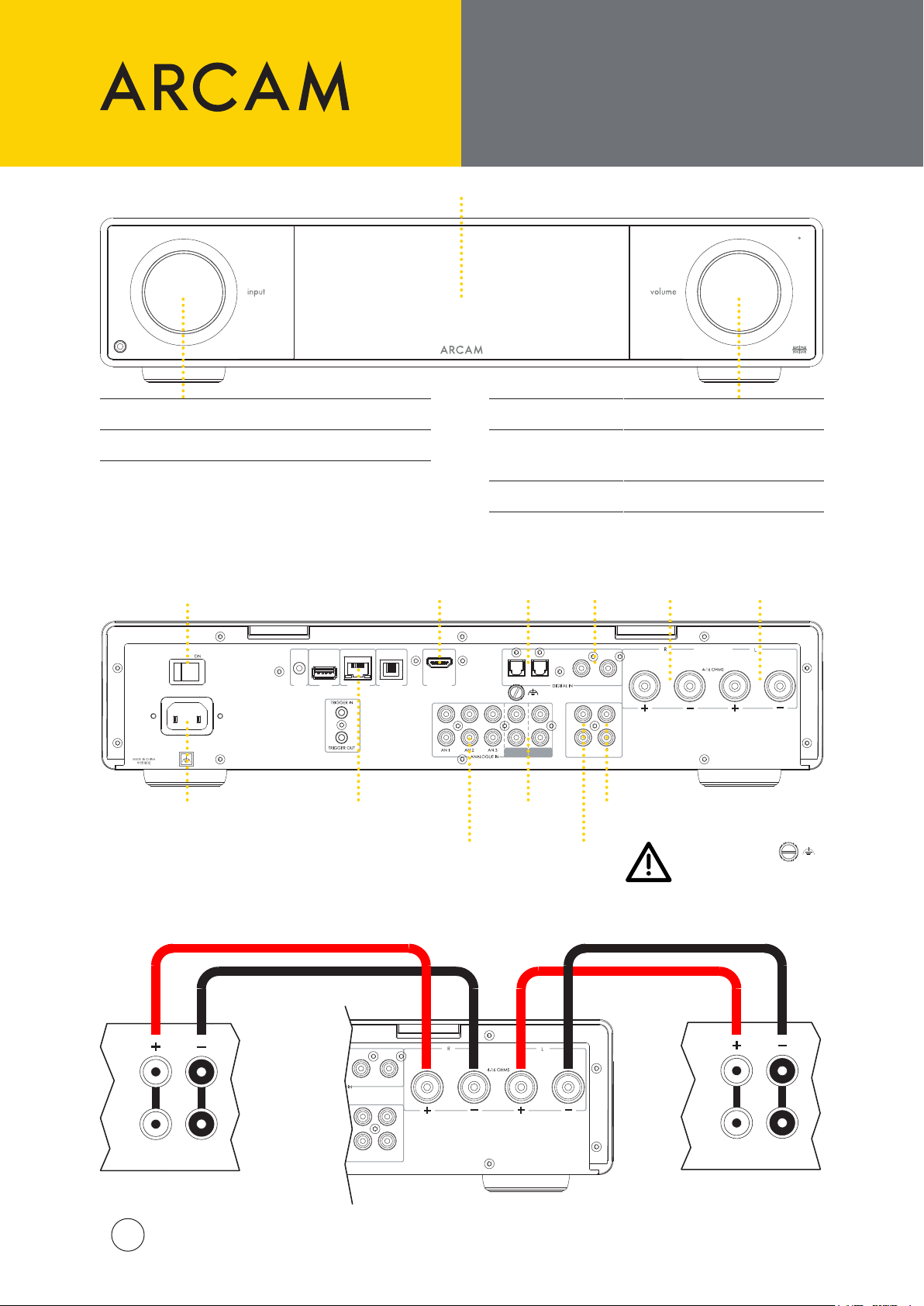
Frontblende
Drehen: Durch die Eingänge blättern
Drücken: Eingang wählen
Rückseite
Ein-/
Ausschalter
Display
HDMI
eARC/ARC
Eingang
Drehen: Lautstärkeregler
Stummschalten/Aufheben der
Drücken:
Stummschaltung oder Wecken
aus dem Standby-Modus
Gedrückt halten: Standby
Optische
SPDIF-
Eingänge
Koaxial
SPDIF-
Eingänge
Rechter
Lautsprecher-
ausgang
Linker
Lautsprecher-
ausgang
Stromeingang
Lautsprecher anschließen
HF
LF
ARCAM SA35 QSG Multi V2
12
Ethernet-Buchse
für kabelgebundene
Netzwerkverbindungen
DIG 3 DIG 4
SUB1
SUB2
PRE
OUT
Phono-Eingänge
(MM und MC)
Analoge
Audioeingänge
CLASS 2 WIRING
Vorverstärkerausgänge
Subwoofer-
Ausgänge
Phono-Masse
Dieser Anschluss darf nicht als
Schutzerde verwendet werden.
HF
LF
Page 13
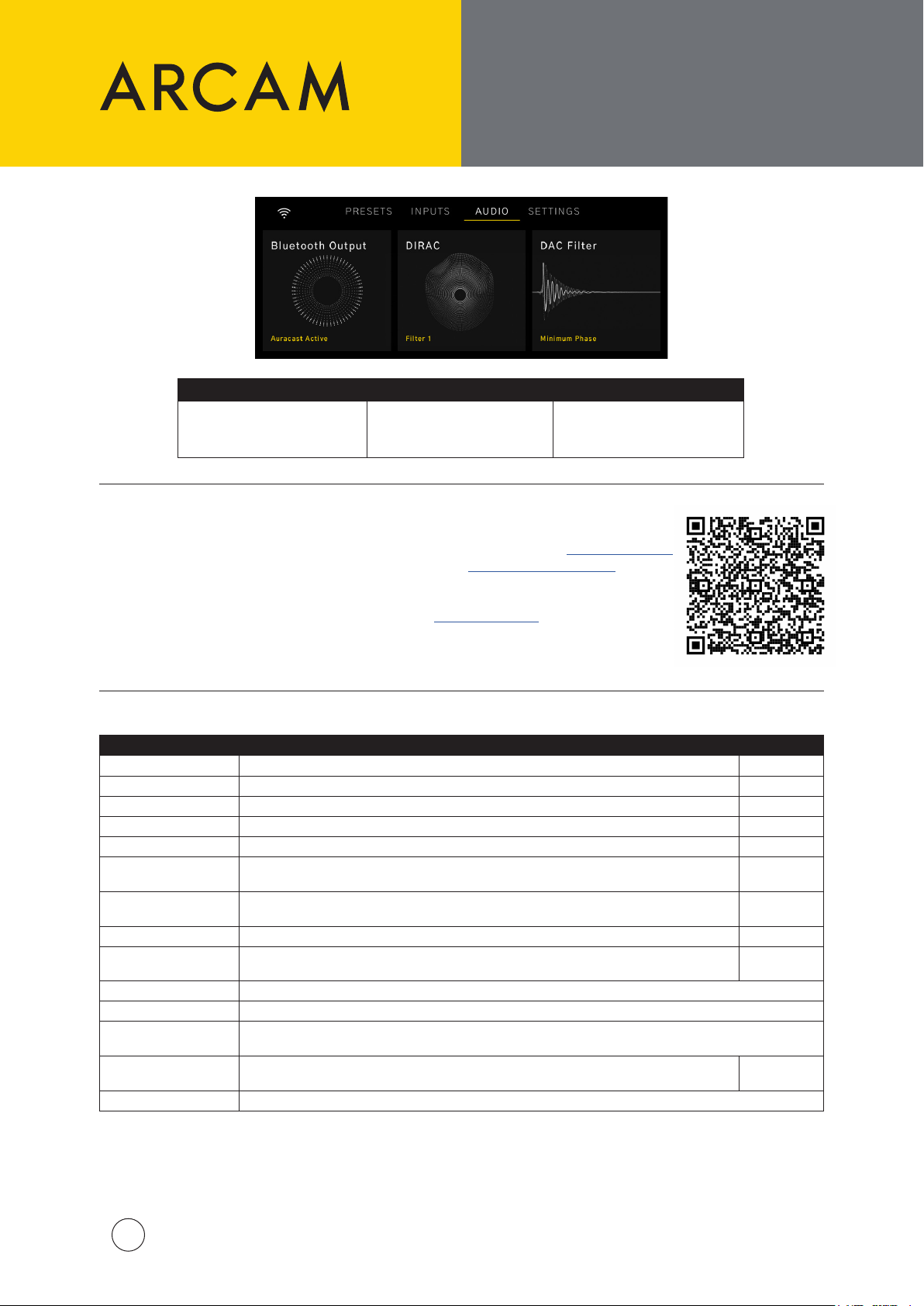
Audio-Optionen
Auf diese
Audiooptionen kann
von der Startseite aus
zugegrien werden:
Bluetooth Output DIRAC DAC Filter
Legt fest und koppelt
Bluetooth-Kopfhörer für
persönlichen Musikgenuss
DIRAC Live
Legt einen Optimierungslter
aus den geladenen Filtern fest
MENÜBÄUME
UND DIRAC LIVE
Legt aus einer Liste von DAC-
Filtern, die den Klang subtil
verändern können, fest
| Um mit der Dirac Live Raumkorrektur zu beginnen, erstellen Sie ein Konto bei dirac.com/register
| Laden Sie die Dirac Live Software Suite für PC oder MAC von dirac.com/live/downloads herunter
| Schließen Sie das im Lieferumfang enthaltene USB-Mikrofon über das mitgelieferte USB-Kabel
an Ihren PC/MAC an
| Laden Sie die Mikrofonkalibrierungsdatei herunter von arcam.co.uk/sa35 herunter
| Folgen Sie den Schritten in der Dirac Live Software, oder sehen Sie sich unsere Videoanleitung
über diesen Link an:
Menübaum
Menü-Option Beschreibung Voreinstellung
Halo Brightness Legt die Helligkeit der Beleuchtung der Bedienelemente auf der Frontblende fest. Full
Subwoofer Cong Legt fest, ob Subwoofer an den Subwoofer-Ausgängen angeschlossen sind. No Sub
Balance Legt fest, ob die Audiosignale auf den linken oder rechten Lautsprecher gewichtet werden. 0
Maximum Volume Legt die maximale Ausgangslautstärke fest. 40
Pre Amp Mode Deaktiviert den internen Endverstärker. O
Eco Timer
Network Standby
BT/HDMI Autoswitch Automatisches Umschalten auf Bluetooth- und HDMI-Eingänge, wenn der Eingang aktiv ist. On
TV Volume Control
System Reset Drücken Sie Select/OK, um alle Einstellungen auf die Standardwerte zurückzusetzen.
Bluetooth Reset Drücken Sie Select/OK, um alle Bluetooth-Kopplungsdatensätze zu löschen.
USB Update
System Code
Product Information Zeigt SW-Versionen, IP-Adresse und Netzwerk-ID an.
Wenn diese Funktion aktiviert ist, schaltet der SA35 innerhalb 20 Minuten ohne
Benutzerinteraktion oder Wiedergabe in den Standby-Modus.
Legt fest, ob die Netzwerkverbindung im Standby-Modus aufrechterhalten wird. Erhöht den
Stromverbrauch im Standby-Modus.
Die Lautstärke wird über den angeschlossenen Fernseher gesteuert. Ist die Funktion
ausgeschaltet, werden Befehle des Fernsehers zur Lautstärkeregelung ignoriert.
Drücken Sie Select/OK, um eine Software-Aktualisierung von einem am USB-Anschluss auf der Rückseite des
Geräts eingesteckten USB-Stick zu starten.
Legt einen anderen Code für die Fernbedienung fest, wenn Codes mit einem anderen Gerät
im selben Raum geteilt werden.
On
On
On
16
ARCAM SA35 QSG Multi V2
13
Page 14
HARTELIJK BEDANKT VOOR
HETKIEZEN VAN ARCAM
De “A” in ARCAM staat voor Amplicatie - daar draait het bij ons om.
ARCAM produceert al meer dan 45 jaar
gespecialiseerde hi- en thuisbioscoopproducten die
ultramoderne geluidskwaliteit bieden.
De SA35 is de nieuwste in meer dan 45 jaar ontwerp
en fabricage van versterkers, teruggaand tot ons eerste
product in 1976 - de A&R Cambridge A60-versterker.
Deze versterker is ontworpen om u de komende
decennia een betrouwbare versterking te bieden met
een uitzonderlijke muzikaliteit, zodat u altijd optimaal
van uw muziek kunt genieten.
In het onwaarschijnlijke geval van een storing of als
u technische assistentie nodig hebt, kunt u contact
opnemen met onze toegewijde klantendienst via
het e-mailadres op [email protected], of via
telefoonnummer +441707668012 of
+18886914171.
Of als u gewoon meer informatie over
ARCAM-producten wilt krijgen, helpt ons netwerk van
dealers u graag verder. U kunt ook meer informatie
vinden op de ARCAM-website ARCAM.co.uk.
Het apparaat plaatsen
| Plaats de versterker op een vlakke, stevige ondergrond, vermijd direct zonlicht en vocht- en warmtebronnen.
| Plaats de SA35 niet bovenop een eindversterker of andere warmtebron.
| Zorg ervoor dat de ontvanger van de afstandsbediening aan de rechterkant van de display op het
voorpaneel niet wordt belemmerd, anders zal dit het gebruik van de afstandsbediening aantasten.
| De SA35 is ontworpen om tijdens normaal gebruik warm te worden.
Langdurig gebruik op hoge volumeniveaus kan er
echter toe leiden dat de behuizing heet aanvoelt.
Plaats de versterker niet in een gesloten ruimte zoals een
boekenkast of een afgesloten kast, tenzij er een goede ventilatie is.
| Plaats geen ander component of voorwerp bovenop de versterker, omdat dit de luchtstroom rond het
koellichaam kan belemmeren, waardoor de versterker te heet wordt (het apparaat dat bovenop de
versterker is geplaatst zou ook te heet worden).
| Plaats geen platenspeler op dit apparaat. Platenspelers zijn zeer gevoelig voor het geluid dat wordt
geproduceerd door apparaten die op het lichtnet zijn aangesloten en dit vertaalt zich in achtergrondgeruis
als de platenspeler te dichtbij staat.
| De normale functie van het apparaat kan worden verstoord door krachtige, elektromagnetische
interferentie. Mocht dit het geval zijn, dan hoeft u het apparaat slechts te resetten met de aan-/uittoets of
deze naar een andere plek te verplaatsen.
Leveringsomvang
| ARCAM SA35 streaming geïntegreerde versterker
| IR-afstandsbediening
| 2x AAA-batterij voor de afstandsbediening
| Regiospecieke voedingskabels
| Meetmicrofoon voor gebruik met Dirac Live
| 5M USB-C-kabels voor gebruik met de microfoon
| Snelstartgids
| Veiligheids- en nalevingsdocumentatie
Energiebeheer
Dit product biedt de gebruiker de mogelijkheid om de energiebeheerfuncties uit te schakelen. Houd er echter
rekening mee dat hierdoor het energieverbruik van het product wordt verhoogd:
| Standaard gaat de SA35 na 20 minuten in stand-by zonder interactie van de gebruiker of weergave. De
ECOTimer kan worden uitgeschakeld in het menu.
| Standaard blijven de netwerkverbindingen van de SA35 actief in stand-by. Om het stroomverbruik in
stand-by te verminderen, kunnen alle netwerkverbindingen, inclusief Wi-Fi, worden uitgeschakeld door
NetworkStandby op OFF te zetten.
ARCAM SA35 QSG Multi V2
14
Page 15
WIFI & BLUETOOTH
INSTALLATIE.
AFSTANDSBEDIENING
Wi-installatie - ARCAM Radia-app
| Links naar de app staan op de voorpagina van deze handleiding.
| Download de ARCAM-app op uw smartphone of tablet om een Wi-verbinding tot stand te brengen.
| Schakel de ARCAM SA35-streamer in en open de app om deze te vinden nadat de SA35 gereed is.
| Selecteer het en volg de aanwijzingen om verbinding te maken met uw wi-router.
| Wanneer de SA35 is aangesloten, wordt het pictogram “POWER” weergegeven.
| Selecteer de SA35 voor toegang tot podcasts, internetradio en voorkeursinstellingen, USB aangesloten
media, lokale netwerkopslag (UPnP) en instellingen.
Bluetooth-installatie
| Selecteer de Bluetooth-ingang op de SA35. Zonder andere Bluetooth-verbindingen is het nu detecteerbaar.
| Open de Bluetooth-instellingen op uw bronapparaat en zoek naar SA35###### in de lijst uw
Bluetooth-bronapparaat te koppelen. Elk product heeft een unieke ID.
| De versterker kan 5 eerder gekoppelde apparaten herroepen. Als het geheugen er al 5 bevat, wordt de
oudste overschreven.
| Omdat draagbare apparaten vaak een volumeregelaar hebben, is er een maximale volume-instelling in
de versterker om te voorkomen dat er per ongeluk een te hoog volume wordt geselecteerd.
De standaard instelling is 40.
| Selecteer BluetoothOutput in het menu Audio om een Bluetooth-hoofdtelefoon te koppelen.
Gekoppelde hoofdtelefoons zullen worden vermeld.
| Bluetooth-hoofdtelefoons kunnen niet worden gebruikt in combinatie met de Bluetooth-ingang op de SA35.
Afstandsbediening
Stand-by Aan/Uit
Menunavigatie
Druk op de middelste toets om te selecteren
Startmenu/Terug
Nu wisselen afspelen display
Transporttoetsen (start/pauze, vorige/volgende)
Volumeregeling
Dempen Aan/Uit
Weergave Helder/Gedimd/Uit
ARCAM SA35 QSG Multi V2
15
Page 16
VOOR- EN
100-120V/220-240V ~ 50/60Hz
700W MAX
POWER INLET
DIG 1
DIG 2 DIG 3 DIG 4
PRE
OUT
SUB2
SUB1
PHONO
(MM)
PHONO
(MC)
IR IN
USB NETWORK CONTROL
HDMI eARC
CLASS 2 WIRING
100-120V/220-240V ~ 50/60Hz
15W MAX
POWER INLET
COAX
OUT
OPTICAL
OUT
TRIGGER
OUT
NETWORK
CONTROL
USB
ACHTERPANELEN,
ENAANSLUITEN
LUIDSPREKERS
Voor
Draaien: Bladeren door ingangen
Indrukken: Selecteer ingang
Achter
Aan/Uit-
schakelaar
Display
HDMI
eARC/ARC
ingang
Draaien: Volumeregeling
Indrukken:
Dempen/Opheen of uit
stand-by halen
Ingedrukt houden: Stand-by
Optische
SPDIF-
ingangen
Coaxiaal
SPDIF-
ingangen
Uitgang
rechter
luidspreker
Uitgang linker
luidspreker
Voedingsingang
Luidsprekers aansluiten
HF
LF
16
ARCAM SA35 QSG Multi V2
Ethernet-aansluiting
voor bekabelde
netwerkverbindingen
DIG 3 DIG 4
SUB1
SUB2
PRE
OUT
Phono-ingangen
(MM & MC)
Analoge
audio-
ingangen
CLASS 2 WIRING
Voorversterkeruitgangen
Subwoofer
uitgangen
Phono-aarde
Deze klem mag niet
worden gebruikt als
veiligheidsaarding.
HF
LF
Page 17
Audio-opties
Deze audio-opties zijn
toegankelijk vanaf de
startpagina:
Selecteer en koppel
Bluetooth-hoofdtelefoons
voor persoonlijk luisteren
MENUSTRUCTUREN
EN DIRAC LIVE
Bluetooth DIRAC DAC Filter
Selecteer een
optimalisatielter uit de
geladen
Selecteer uit een lijst met
DAC-lters die het geluid
op subtiele wijze kunnen
veranderen
DIRAC Live
| Maak een account aan op dirac.com/register om te beginnen met Dirac Live Room Correction
| Download de Dirac Live-softwaresuite voor pc of MAC van dirac.com/live/downloads
| Gebruik de meegeleverde USB-kabel om de meegeleverde USB-microfoon aan te
sluiten op uw pc/MAC
| Download het microfoonkalibratiebestand van arcam.co.uk/sa35
| Volg de stappen in de Dirac Live-software of bekijk onze videohandleiding via deze link:
Menustructuur
Menu Option Description Standaard
Halo Brightness Selecteert de helderheid van de verlichting van de draaiknoppen op het voorpaneel. Full
Subwoofer Cong Selecteert of er subwoofers op de subwooferuitgangen zijn aangesloten. No Sub
Balance Hiermee selecteert u of het geluid naar de linker- of rechterluidspreker wordt gestuurd. 0
Maximum Volume Denieert het maximale volume-uitvoer. 40
Pre Amp Mode Schakelt de interne eindversterker uit. O
Eco Timer
Network Standby
BT/HDMI Autoswitch Automatisch overschakelen naar Bluetooth- en HDMI-ingangen wanneer de ingang actief is. On
TV Volume Control Volumeregeling inschakelen door een aangesloten tv via de HDMI eARC/ARC-aansluiting. On
System Reset Druk op Select/OK om alle instellingen terug te zetten naar de standaardinstellingen.
Bluetooth Reset Druk op Select/OK om alle Bluetooth-koppelingsgegevens te verwijderen.
USB Update
System Code
Product Information Toont softwareversies, IP-adres en netwerk-ID.
Wanneer ingeschakeld, schakelt de SA35 automatisch op stand-by na 20 zonder afspelen of
bediening door de gebruiker.
Hiermee selecteert u of de netwerkverbinding in stand moet worden gehouden wanneer op
stand-by geschakeld. Verhoogt het stroomverbruik in stand-by.
Druk op Select/OK om een software-update uit te voeren vanaf een USB-stick die in de USB-aansluiting op
het achterpaneel zit
Selecteer een andere set afstandsbedieningscodes als de codes worden gedeeld met een
ander apparaat in dezelfde kamer.
On
On
16
ARCAM SA35 QSG Multi V2
17
Page 18
GRAZIE PER AVER
SCELTO ARCAM
La "A" in ARCAM sta per Amplicazione: questo è il nostro settore di
competenza chiave.
Da oltre 45 anni ARCAM produce prodotti Hi-Fi e
home cinema specializzati che orono una qualità
sonora all'avanguardia.
Il modello SA35 è la novità più recente in oltre 45 anni
di progettazione e produzione di amplicatori, una
tradizione che risale al 1976, anno in cui abbiamo
realizzato il nostro primo prodotto, l'amplicatore
A&R Cambridge A60.
I nostri prodotti sono stati progettati con l'obiettivo di
fornire un'amplicazione adabile per decenni, con
un'eccezionale resa che consenta di apprezzare al
massimo la musica.
Nell'improbabile eventualità di un guasto o qualora
sia necessaria assistenza tecnica, contattare i nostri
team di assistenza dedicati via e-mail all'indirizzo
[email protected], o chiamando il numero
+441707668012 o +18886914171.
Oppure, se semplicemente si desiderano ulteriori
informazioni sui prodotti ARCAM, la nostra rete di
rivenditori sarà lieta di orire il supporto necessario.
Ulteriori informazioni sono disponibili anche sul sito
ARCAM all'indirizzo ARCAM.co.uk.
Posizionamento dell'unità
| Posizionare l'amplicatore su una supercie piana e stabile, evitando l'esposizione alla luce solare diretta e
a fonti di calore o umidità.
| Non collocare l'unità SA35 sopra un amplicatore di potenza o altre fonti di calore.
| Assicurarsi che il ricevitore del telecomando sulla destra del display del pannello frontale non sia ostruito,
altrimenti potrebbe impedire il funzionamento del telecomando.
| È normale che l'unità SA35 si scaldi durante il normale funzionamento.
L’uso prolungato ad alto volume può rendere il telaio
dell’amplicatore caldo al tatto.
| Non collocare qualsiasi altro componente o elemento al di sopra dell'amplicatore in quanto potrebbe
ostruire il usso d'aria attorno al dissipatore di calore, causando il riscaldamento dell'amplicatore
(l'unità collocata al di sopra dell'amplicatore potrebbe diventare bollente).
| Non posizionare il giradischi sulla parte superiore di questa unità. I giradischi sono molto sensibili al rumore
generato dagli alimentatori elettrici, che sarà udibile come 'ronzio' di fondo se il giradischi è troppo vicino.
| Il normale funzionamento dell'unità potrebbe essere disturbato da forti interferenze elettromagnetiche.
Qualora ciò si verichi, resettare semplicemente l'unità utilizzando il pulsante di alimentazione o spostarla
in un luogo dierente.
Non posizionare l'amplicatore in uno spazio chiuso, come una
libreria o un armadietto chiuso a meno che non ci sia abbastanza
spazio per una buona ventilazione.
Contenuto della confezione
| Amplicatore di streaming integrato ARCAM SA35
| Telecomando a infrarossi
| 2 batterie AAA per il telecomando
| Cavi di alimentazione specici in base alla regione
| Microfono da misurazione per l’uso con Dirac Live
| Cavi USB-C da 5 m per l’uso con il microfono
| Guida di avvio rapido
| Documento di sicurezza e conformità
Gestione dell’energia
Questo apparecchio ore all’utente la possibilità di disattivare le funzioni di gestione della potenza.
Si precisa che così facendo il consumo di energia dell’apparecchio aumenta.
| Per impostazione predenita, SA35 andrà in standby dopo 20 minuti senza alcuna interazione o
riproduzione da parte dell’utente. ECOTimer può essere disabilitato nel Menu.
| Per impostazione predenita, le connessioni di rete SA35 rimarranno attive in standby. Per ridurre il
consumo energetico in standby, tutte le connessioni di rete, incluso il Wi-Fi, possono essere disattivate
impostando NetworkStandby su OFF.
ARCAM SA35 QSG Multi V2
18
Page 19
IMPOSTAZIONE
BLUETOOTH E WI-FI.
TELECOMANDO
Impostazione del Wi-Fi - App ARCAM Radia
| I link per scaricare l'app si trovano sulla pagina iniziale di questo manuale.
| Per stabilire una connessione Wi-Fi, scaricare l'app ARCAM su smartphone o tablet.
| Accendere l'amplicatore per streaming ARCAM SA35 e avviare l'app per rilevarlo quando l'unità è pronta
per l'associazione.
| Selezionarla e seguire le indicazioni per connetterla al router Wi-Fi.
| Una volta connesso, l'SA35 viene visualizzato con l'icona "POWER".
| Selezionare l'SA35 per accedere a podcast, Internet radio e preselezioni, supporti multimediali collegati via
USB, unità di archiviazione sulla rete locale (UPnP) e impostazioni.
Congurazione Bluetooth
| Selezionare l'ingresso Bluetooth sull'SA35. In assenza di altre connessioni Bluetooth, sarà ora rilevabile.
| Per associare il dispositivo sorgente Bluetooth, aprire le impostazioni Bluetooth del dispositivo sorgente e
cercare SA35###### nell'elenco. Ciascun prodotto ha un ID univoco.
| L'amplicatore può richiamare 5 associazioni di dispositivi. Se le 5 memorie sono occupate, l'associazione
meno recente verrà sostituita.
| Poiché i dispositivi portatili hanno spesso un dispositivo di scorrimento del volume, nell'amplicatore è
presente un'impostazione del volume massimo per evitare che venga selezionato accidentalmente un
volume eccessivo. il valore predenito è 40.
| Per associare cue Bluetooth, selezionare BluetoothOutput nel menu Audio. Le cue associate verranno
elencate.
| Le cue Bluetooth non possono essere utilizzate con l'ingresso Bluetooth dell'SA35.
Telecomando
Attiva/Disattiva standby
Navigazione del menu
Premere il pulsante centrale per eettuare la selezione
Menu principale/indietro
Attiva/disattiva la visualizzazione dei contenuti
in riproduzione
Tasti di navigazione
(Riproduci/Pausa, Salta indietro/avanti)
Controllo del volume
Disattiva/attiva l'audio
Luminosità display alta/bassa/disattiva
ARCAM SA35 QSG Multi V2
19
Page 20
PANNELLI ANTERIORE
100-120V/220-240V ~ 50/60Hz
700W MAX
POWER INLET
DIG 1
DIG 2 DIG 3 DIG 4
PRE
OUT
SUB2
SUB1
PHONO
(MM)
PHONO
(MC)
IR IN
USB NETWORK CONTROL
HDMI eARC
CLASS 2 WIRING
100-120V/220-240V ~ 50/60Hz
15W MAX
POWER INLET
COAX
OUT
OPTICAL
OUT
TRIGGER
OUT
NETWORK
CONTROL
USB
E POSTERIORE E
COLLEGAMENTO DEGLI
ALTOPARLANTI
Pannello anteriore
Ruotare: per scorrere tra ingressi
Premere: per selezionare un ingresso
Pannello posteriore
Interruttore di
alimentazione
Display
Ingresso
HDMI
eARC/ARC
Ruotare: Controllo del volume
Premere:
Disattiva/attiva l'audio o riattiva
dalla modalità standby
Tenere premuto: Standby
Ingressi
ottici
SPDIF
Ingressi
Coassiale
SPDIF
Uscita
altoparlante
destro
Uscita
altoparlante
sinistro
Ingresso di
alimentazione
Collegamento degli altoparlanti
HF
LF
20
ARCAM SA35 QSG Multi V2
Porta Ethernet
per connessioni di
rete cablate
DIG 3 DIG 4
SUB1
SUB2
OUT
PRE
Ingressi
analogico
Ingressi Phono
(MM e MC)
audio
CLASS 2 WIRING
Uscite del
preamplicatore
Uscite
subwoofer
Messa a terra Phono
Questo terminale non deve essere
utilizzato come messa a terra di
sicurezza.
HF
LF
Page 21
STRUTTURA DEL
MENU E DIRAC LIVE
Opzioni audio
È possibile accedere a
queste opzioni audio
dalla schermata Home:
Bluetooth Output DIRAC DAC Filter
Selezionare e associare
delle cue Bluetooth per
l’ascolto privato
Selezionare un ltro di
ottimizzazione tra quelli
caricati
Scelta tra un elenco di ltri
DAC in grado di apportare
leggere modiche al suono
DIRAC Live
| Per avviare la calibrazione della stanza con Dirac Live, visitare il sito
dirac.com/register per creare un account
| Scaricare la suite software Dirac Live per PC o MAC all’indirizzo
dirac.com/live/downloads
| Collegare il microfono USB utilizzando il cavo USB, entrambi forniti in dotazione, al PC/MAC
| Scaricare il le di taratura del microfono da arcam.co.uk/sa35
| Seguire la procedura descritta nel software Dirac Live o consultare la nostra guida video
utilizzando questo link:
Struttura del menu
Opzione di menu Descrizione Predenito
Halo Brightness Selezionare la luminosità dei quadranti del pannello anteriore. Full
Subwoofer Cong Selezionare se i subwoofer sono collegati alle uscite dei subwoofer. No Sub
Balance Consente di selezionare la distribuzione dell’audio agli altoparlanti destro e sinistro. 0
Maximum Volume Denisce l’uscita massima del volume. 40
Pre Amp Mode Disattiva l’amplicatore di potenza interno. O
Eco Timer
Network Standby
BT/HDMI Autoswitch Passa automaticamente agli ingressi Bluetooth e HDMI quando l’ingresso è attivo. On
TV Volume Control Abilita il controllo del volume tramite una TV collegata tramite la connessione HDMI eARC/ARC. On
System Reset Premere Select/OK per iniziare la reimpostazione ai valori predeniti di tutte le opzioni.
Bluetooth Reset Premere Select/OK per eliminare tutti i record di associazione Bluetooth
USB Update
System Code
Product Information Mostra la versione software, l’indirizzo IP e l’ID di rete.
Se attivato, l’SA35 entrerà in standby dopo 20 minuti in assenza di interazione dell’utente o di
riproduzione audio.
Qui è possibile specicare se la connessione di rete viene mantenuta in standby. Aumenta il
consumo energetico in standby.
Premere Select/OK per avviare l’aggiornamento del software da una chiavetta USB collegata alla porta USB
sul pannello posteriore
Selezionare un set di codici telecomando diverso in cui i codici vengono condivisi con un altro
dispositivo nella stessa stanza.
On
On
16
ARCAM SA35 QSG Multi V2
21
Page 22
GRACIAS POR
ELEGIR ARCAM
La “A” en ARCAM representa Amplicación, nuestra competencia fundamental.
ARCAM lleva más de 45 años fabricando productos
especializados Hi-Fi y Home Cinema con una calidad
de sonido vanguardista.
El SA35 es la última incorporación en más de
45 años de diseño y fabricación de amplicadores,
rememorando nuestro primer producto en 1976, el
amplicador A&R Cambridge A60.
Este amplicador está diseñado para proporcionarle
una amplicación able durante décadas, todo ello
con una musicalidad excepcional para que disfrute al
máximo de su música.
En el caso improbable de una avería, o que necesite
asistencia técnica, póngase en contacto con nuestros
equipos de apoyo dedicados mediante un correo
electrónico a [email protected], o por
teléfono llamando al +441707668012 o
+18886914171.
O, si sólo necesita información sobre productos
ARCAM, en nuestra red de comerciales estarán
encantados de ayudarle. Puede encontrar
información adicional en nuestra página web de
ARCAM en ARCAM.co.uk.
Cómo colocar la unidad
| Coloque el amplicador sobre una supercie rme y nivelada, evitando los rayos del sol, fuentes de calor o
la humedad.
| No coloque el SA35 encima de un amplicador de potencia o de otra fuente de calor.
| Asegúrese de que el receptor del mando a distancia, que se encuentra a la derecha de la pantalla del panel
frontal, no está tapado, de lo contrario impedirá la recepción del mando a distancia.
| El SA35 está diseñado para que se caliente ligeramente durante su uso normal.
Uso prolongado a un nivel de volumen alto puede
hacer que la carcasa del amplicador esté caliente
al tacto
No coloque el amplicador en un receptáculo cerrado, como en un
mueble librería o un mueble cerrado, a menos que haya una buena
ventilación.
| No coloque ningún otro componente u objeto encima del amplicador, ya que podría obstruir el ujo de aire
alrededor del disipador de calor, haciendo que el amplicador se caliente (la unidad colocada encima del
amplicador también se calentaría).
| No coloque el equipo de grabación encima de esta unidad. Los equipos de grabación son muy sensibles
al ruido generado por las fuentes de alimentación y se oirá como un «zumbido» de fondo si el equipo de
grabación está demasiado cerca.
| El funcionamiento normal de la unidad se verá afectado por las interferencias electromagnéticas fuertes. Si
esto ocurre, sólo tiene que reiniciar la unidad usando el botón de encendido/apagado, o cambiarla de sitio.
Contenido del paquete
| Amplicador integrado de transmisión ARCAM SA35
| Mando a distancia IR
| 2 pilas AAA para el mando a distancia
| Cable de alimentación correspondiente a la región
| Micrófono de medición para usar con Dirac Live
| Cables USB-C de 5 m para usar con el micrófono
| Guía de inicio rápido
| Documento de seguridad y conformidad
Gestión de energía
Este producto ofrece la opción de desactivar las funciones de gestión de energía. Tenga en cuenta que si hace
esto, el producto consumirá más:
| De manera predeterminada, el SA35 entrará en modo de espera en 20 minutos sin interacción del usuario
ni reproducción. El ECOTimer se puede desactivar en el menú.
| De forma predeterminada, las conexiones de red del SA35 permanecerán activas en modo de espera.
Para reducir el consumo de energía en modo de espera, se pueden desactivar todas las conexiones de red,
incluida la conexión Wi-Fi, congurando NetworkStandby en OFF.
ARCAM SA35 QSG Multi V2
22
Page 23
CONFIGURACIÓN
WIFI Y BLUETOOTH.
MANDO A DISTANCIA
Conguración del Wi-Fi - Aplicación ARCAM Radia
| Los enlaces a la aplicación están en la portada de este manual.
| Para realizar la conexión Wi-Fi, descargue la aplicación ARCAM en su smartphone o tableta.
| Encienda el transmisor ARCAM SA35 y abra la aplicación para que aparezca en la lista de dispositivos
Wi-Fi como SA35.
| Selecciónelo y siga los avisos para conectarlo a su rúter wi.
| Una vez conectado, el SA35 aparecerá con un icono de «POWER».
| Seleccione el SA35 para acceder a Podcasts, a la Radio por Internet y a las emisoras guardadas en memoria,
a los archivos multimedia conectados por USB, al almacenamiento en la red local (UPnP) y a los ajustes.
Conguración del Bluetooth
| Seleccione la entrada Bluetooth en el SA35. Sin otras conexiones Bluetooth, podrá verlo en la lista
Bluetooth de su dispositivo.
| Para emparejar su dispositivo fuente Bluetooth, abra los ajustes Bluetooth del dispositivo fuente y busque
SA35###### en la lista. Cada producto tiene un Identicador único.
| El amplicador puede recuperar hasta 5 emparejamientos a dispositivos. Si ya tiene 5 en memoria, el más
antiguo será reemplazado.
| Debido a que la mayoría de dispositivos portátiles tienen un control de volumen deslizante, el amplicador
admite una ajuste máximo de volumen para evitar que seleccione accidentalmente una salida de volumen
excesiva. El valor predeterminado es 40.
| Para emparejar unos auriculares Bluetooth, seleccione la BluetoothOutput en el menú de Audio. En la lista
aparecerán los auriculares emparejados.
| No es posible usar los auriculares Bluetooth si tiene activada la entrada Bluetooth en el SA35.
Mando a distancia
Encender/Apagar En espera
Navegación por el menú
Pulsar el botón central para seleccionar
Menú de Inicio / Atrás
Conmutar la visualización de reproducción en curso
Teclas de reproducción
(Reproducir/Pausa, Saltar atrás/adelante)
Control de volumen
Desactivar audio On/O
Brillo de pantalla Bright/Dim/O
ARCAM SA35 QSG Multi V2
23
Page 24
PANELES DELANTERO Y
100-120V/220-240V ~ 50/60Hz
700W MAX
POWER INLET
DIG 1
DIG 2 DIG 3 DIG 4
PRE
OUT
SUB2
SUB1
PHONO
(MM)
PHONO
(MC)
IR IN
USB NETWORK CONTROL
HDMI eARC
CLASS 2 WIRING
100-120V/220-240V ~ 50/60Hz
15W MAX
POWER INLET
COAX
OUT
OPTICAL
OUT
TRIGGER
OUT
NETWORK
CONTROL
USB
TRASERO, Y
CONEXIÓN DE ALTAVOCES
Panel delantero
Girar: Carrusel de entradas
Presionar: Seleccionar entrada
Panel trasero
Interruptor de
alimentación
Visualizador
Girar: Control de volumen
Presionar:
Desactivar/Activar salida de audio
o reactivar desde modo en espera
Mantener pulsado: En espera
Entrada
HDMI
eARC/ARC
Entradas
ópticas
SPDIF
Entradas
digitales
SPDIF
Salida del
altavoz
derecho
Salida del
altavoz
izquierdo
Entrada de
alimentación
Conexión de los altavoces
HF
LF
ARCAM SA35 QSG Multi V2
24
Puerto Ethernet
para las conexiones a
red cableada
DIG 3 DIG 4
SUB1
SUB2
PRE
OUT
Entradas Phono
(MM y MC)
Entradas
de audio
analógico
CLASS 2 WIRING
Salidas
preamplicadas
Salidas para
Subwoofer
Toma de tierra Phono
Este terminal no se debe utilizar
como conexión de seguridad a tierra.
HF
LF
Page 25
ÁRBOLES DE MENÚ
Y DIRAC LIVE
Opciones de audio
Se puede acceder
a estas opciones de
audio desde la página
de inicio:
Bluetooth Output DIRAC DAC Filter
Seleccione y empareje los
altavoces Bluetooth para una
audición privada
Seleccione uno de los ltros de
optimización de los que tenga
cargados
Seleccione entre una lista de
ltros DAC que pueden cambiar
ligeramente el sonido
DIRAC Live
| Para realizar el ajuste de sonido de la habitación con Dirac Live Room Correction,
cree una cuenta en dirac.com/register
| Descargue el programa Dirac Live software suite para PC o MAC desde
dirac.com/live/downloads
| Utilice el cable USB suministrado para conectar el micrófono USB suministrado a su
PC/MAC
| Descargue el archivo de calibración del micrófono desde arcam.co.uk/sa35
| Sigue los pasos del software Dirac Live y consulta nuestra guía en vídeo mediante
este enlace:
Árbol del menú
Opción del menú Descripción Default
Halo Brightness Seleccione la intensidad de la iluminación de los diales del panel delantero. Full
Subwoofer Cong Seleccione si hay subwoofers conectados a las salidas de subwoofer. No Sub
Balance Seleccione la ponderación del audio hacia los altavoces de la izquierda o de la derecha. 0
Maximum Volume Dene la salida máxima de volumen. 40
Pre Amp Mode Desactiva el amplicador de potencia interno. O
Eco Timer
Network Standby
BT/HDMI Autoswitch Cambia automáticamente a las entradas Bluetooth y HDMI cuando la entrada está activa. On
TV Volume Control
System Reset Pulse Select/OK para iniciar la restauración de todos los ajustes a sus valores de fábrica.
Bluetooth Reset Pulse Select/OK para eliminar todos los registros de emparejamiento Bluetooth
USB Update
System Code
Product Information Muestra la versiones del software, la dirección IP y el Identicador de red.
Con esta función activada, el SA35 entrará en modo en espera si no hay ninguna interacción del
usuario en 20 minutos o no está en reproducción.
Seleccione si la conexión de red se mantiene en espera. Aumenta el consumo energético en el modo
en espera.
Habilitar el control de volumen mediante un televisor conectado mediante la conexión HDMI
eARC/ARC.
Pulse Select/OK para iniciar la actualización del software desde una lápiz de memoria conectado al puerto
USB en el panel trasero
Seleccione un juego de códigos de mando a distancia diferente cuando los códigos se compartan
con otro aparato de la misma habitación.
On
On
On
16
ARCAM SA35 QSG Multi V2
25
Page 26
ARCAM
ARCAMAAmplication
ARCAM45
SA351976A&R Cambridge A60
45
[email protected]
+82-02-2135-5288
ARCAM
ARCAM ARCAM.co.uk
기기의 배치
|
| SA35
|
| SA35
|
|
|
포장 내용물
| ARCAM SA35
|
|
|
| Dirac Live
|
|
|
권력 관리
| SA35 ECO Timer
| SA35
NetworkStandby OFF
ARCAM SA35 QSG Multi V2
26
Page 27
WI-FI
Wi-Fi 설정 - ARCAM Radia 앱
|
| Wi-FiARCAM
| ARCAM SA35SA35
| Wi-Fi
| SA35POWER
| SA35
블루투스 설정
| SA35
| SA35######
|
|
| Bluetooth Output
| SA35
리모컨
ARCAM SA35 QSG Multi V2
27
Page 28
100-120V/220-240V ~ 50/60Hz
700W MAX
POWER INLET
DIG 1
DIG 2 DIG 3 DIG 4
PRE
OUT
SUB2
SUB1
PHONO
(MM)
PHONO
(MC)
IR IN
USB NETWORK CONTROL
HDMI eARC
CLASS 2 WIRING
100-120V/220-240V ~ 50/60Hz
15W MAX
POWER INLET
COAX
OUT
OPTICAL
OUT
TRIGGER
OUT
NETWORK
CONTROL
USB
전면
후면
라우드 스피커 연결
HF
LF
ARCAM SA35 QSG Multi V2
28
DIG 3 DIG 4
SUB1
SUB2
OUT
PRE
CLASS 2 WIRING
포노 접지
HF
LF
Page 29
오디오 옵션
Bluetooth Output DIRAC DAC Filter
DIRAC Live
DIRAC LIVE
| Dirac Live Room Correctiondirac.com/register
| dirac.com/live/downloadsDirac Live
|
| arcam.co.uk/sa35
| Dirac Live
설정 목록
Halo Brightness
Subwoofer Cong
Balance
Maximum Volume
Pre Amp Mode
Eco Timer
Network Standby
BT/HDMI Autoswitch
TV Volume Control
System Reset
Bluetooth Reset
USB Update
System Code
Product Information
Full
No Sub
0
40
O
On
On
On
On
16
ARCAM SA35 QSG Multi V2
29
Page 30
ARCAM製品をお選びいただきあ
りがとうございます
ARCAMの「 A」はアンプを表しており、これがわが社の事業の核となっています。
ARCAMは45年以上にわたり、最先端の音質を提供す
るHi-Fiおよびホームシネマに特化した製品を製造し
てきました 。
SA35は、1976年に最初の製品 A&R Cambridge A60
を発表して以来45年以上アンプの設計と製造をしてき
た当社の最新製品です。
このアンプは、今後数十年にわたって高信頼の増幅が
行えるように設計されており、優れた音楽性を有して
いるため、音楽を最大限に楽しむことができます。
万が一障害が発生した場合、または技術サポートが必
要な場合は、メール[email protected]もし
くは電話+441707668012または+18886914171
で、専門サポートチームにご連絡ください。
故障が発生した場合、もしくはARCAM製品に関する
し詳しい情報が必要になった場合、当社販売店ネット
ワークが喜んでお手伝いいたします。詳細については
ARCAMの サイト ARCAM.co.ukをご 覧ください。
本器の配置
| 本アンプは、直射日光や熱源や湿気を避けて、丈夫で平坦な水平面に設置してください。
| SA35は、パワーアンプなどの熱源の上に置かないでください。
| リモコンの動作が妨げられますから、フロントパネルディスプレイの右側にあるリモコン受光器の前に障害物
を置 かないでください。
| SA35 は、通常の動作中に暖かい温度で動作するように設計されています。
| 放熱器周辺の空気流が妨げられてアンプが過熱する恐れがありますから、本アンプの上に他のコンポーネン
大音量で長時間使用すると、アンプの筐体が手
で触れなくなるほど高温になることがあります。
本アンプは、十分な換気が行える場合を除き、本箱やキャビネ
ットなどの密閉空間に設置しないでください。
トなどの物体を置かないでください (アンプの上に置いた機器も高温になります)。
| 本器の上にレコードプレーヤーを置かないでください。レコードプレーヤーは主電源から発生する雑音に対
して大変敏感です。電源とレコードプレーヤーとの間が近すぎると、再生音にハム音が混ざって聞こえるよう
になります。
| 大音量で長時間使用すると、アンプの筐体が手で触れなくなるほど高温になることがあります。
| 本器の正常な動作は、強力な電磁妨害によって妨げられることがあります。これが発生した場合、電源ボタン
で本器をリセットするか、本器を別の場所に移動してください。
同梱品
| ARCAM SA35統 合ストリ ー ミン グアンプ
| 赤外線リモコン
| リモコン用単4電池2本
| 地域別の電源コード
| Dirac Live用測定用マイク
| マイク用USB-Cケーブル(5m)
| クイックスタートガイド
| 安全性と法令順守に関する文書
電源管理
本製品にはユーザー電源管理機能を無効にすることができるオプションがあります。これを行うと、製品の消費
電力が増加しますので注意してください。
| デフォルト で は 、SA35 はユーザーの操作や再生がない場合、20 分以内にスタンバイ状態になります。
ECOTimer はメニューで無効にできます。
| デフォルト で は 、SA35 のネットワーク接続はスタンバイ状態でもアクティブのままになります。スタンバイ時の
電力消費を抑えるには、Network Standby をオフに設定して、Wi-Fi を含むすべてのネットワーク接続を無効
にすることができます。
ARCAM SA35 QSG Multi V2
30
Page 31
WI-FI&BLUETOOTHセットア ッ
プ用
リモコン
Wi-Fiセットアップ - ARCAM Radiaアプリ
| アプリへのリンクは本マニュアルの表紙に記載されています。
| Wi-Fi接続を行うには、ARCAM アプリをスマートフォンやタブレットにダウンロ ードします。
| ARCAM SA35ストリーマー の 電 源 を入 れ 、SA35が 準 備 に な っ た 後 、ア プ リ を 開 い て 見 つ け ま す 。
| 選 択 し 、プ ロ ン プ ト に 従 っ て Wi-Fiルーター に 接 続します。
| 接 続すると、SA35に「 POWER」ア イ コ ン が 表 示 さ れ ま す 。
| SA35を選択すると、ポッドキャスト、インターネットラジオ、プリセット、USB接続メディア、ローカルネットワー
クストレージ(UPnP)、および設定にアクセスできます。
Bluetoothセット アップ
| SA35のBluetooth入力を選択します。他のBluetooth接続がないため、現在検出可能になっています。
| Bluetoothソースデバ イスをペアリングするには 、ソースデ バイスのBluetooth設 定 を 開 き 、リ ス ト か ら
SA35######をスキャンします。各製品には固有のIDがあります。
| 本アンプは5台のデバイスとのペアリングを呼び出すことができます。すでに5台が登録されている場合は、
一番古いものと置き換えられます。
| ポータブルデバイスにはボリュームスライダーが付いていることが多いため、誤って過大な音量が出力されな
いように、本アンプには最大音量設定が装着されています。デフォルトは40です。
| Bluetoothヘ ッ ド フ ォ ン を ペ ア リ ン グ す る に は 、オ ー デ ィ オ メ ニ ュ ー で Bluetooth Outputを選 択します。ペアリン
グされているヘッドフォンが表示されます。
| Bluetoothヘッドフォン は 、SA35のBluetooth入力に接続して使用することはできません。
リモコン
スタンバイ オン/オフ
メニュ ー ナビ ゲ ーション
中央ボタンを押して選 択します
ホームメニュー /戻る
再生中の表示の切り替え
トランスポ ートキー
(再生/一時停止、前のトラック/次のトラックにスキップ)
音量調節
ミュート オン/オフ
表示 明/暗/オフ
ARCAM SA35 QSG Multi V2
31
Page 32
フロントパネル、リアパネル、
100V ~ 50/60Hz
700W MAX
POWER INLET
DIG 1
DIG 2 DIG 3 DIG 4
PRE
OUT
SUB2
SUB1
PHONO
(MM)
PHONO
(MC)
IR IN
USB NETWORK CONTROL
HDMI eARC
CLASS 2 WIRING
100V ~ 50/60Hz
15W MAX
POWER INLET
COAX
OUT
OPTICAL
OUT
TRIGGER
OUT
NETWORK
CONTROL
USB
接続スピーカー
フロ ント
回 す: 入力カルーセル
押 す: 入力を選択
リア
電源スイ
ッチ
ディス プ レ イ
HDMI
eARC/ARC
入力
回 す: 音量調節
押 す:
ミュート/ミュート解 除また は
スタンバイ状態の解除
長 押 し: スタンバイ
同軸SPDIF
入力
右スピーカ
ー出力
左スピーカ
ー出力
電源入力
スピーカーの接続
HF
LF
ARCAM SA35 QSG Multi V2
32
有 線 ネ ットワー ク
接続用Ethernetソケット
DIG 3 DIG 4
SUB1
SUB2
OUT
PRE
アナロ グオー
ディオ入 力
フォノ入 力
(M M&MC)
CLASS 2 WIRING
プリアン
プ出力
サブウーハ
ー出力
フォノアース
この端子を、安全アースとし
て 使 用 し て は な り ま せ ん 。
HF
LF
Page 33
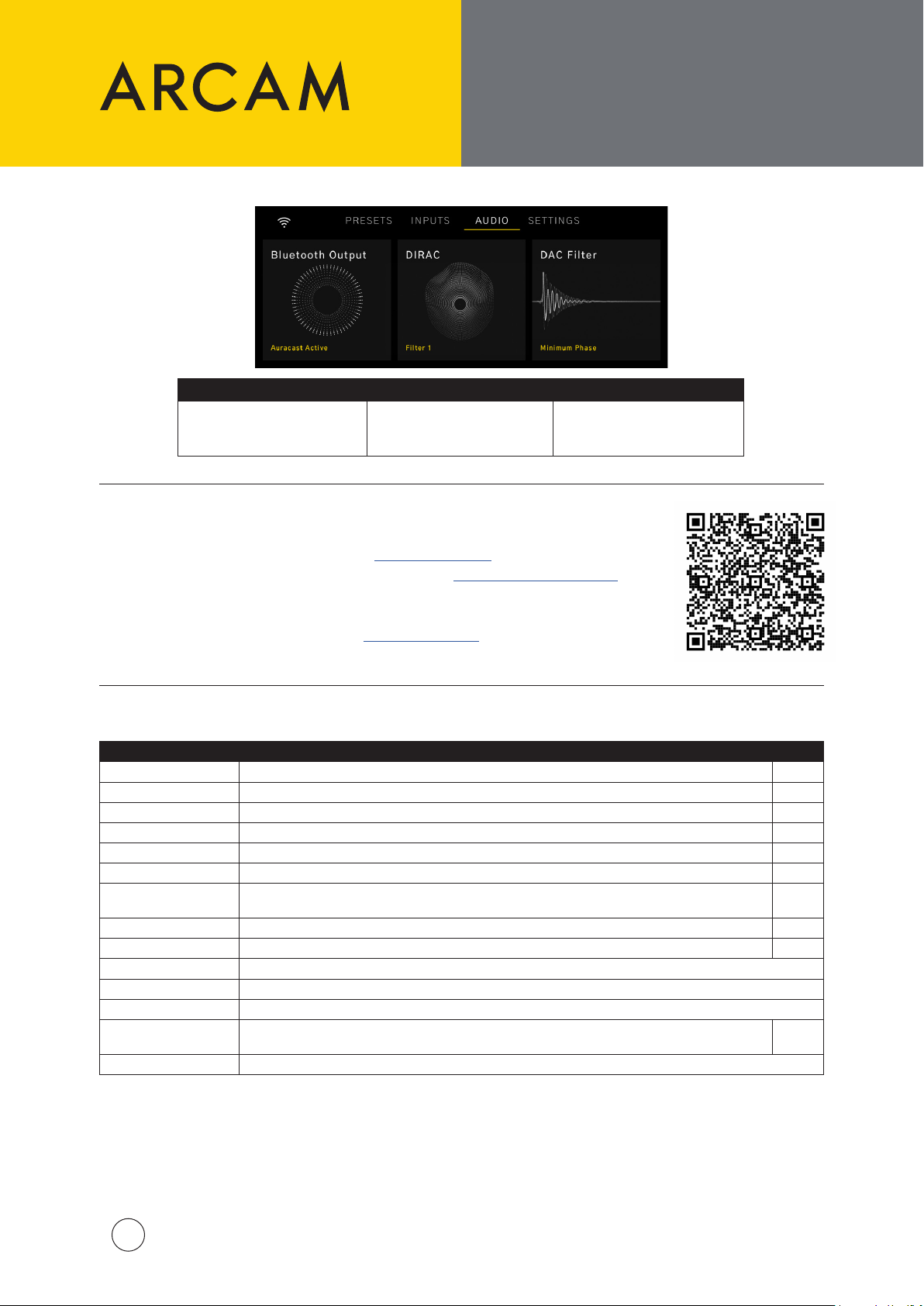
オーディオ オプション
これらのオーディオ オ
プションには、ホームペ
ージからアクセスでき
ます。します
Bluetooth Output DIRAC DAC Filter
個人的利用のための
Bluetoothヘッドフォン を 選
択してペ アリングします
DIRAC Live
読み込んだ最適化フィルタ
ーを選択します
メニューツリーおよび
DIRAC LIVE
音を微調整できるDAC Filter
のリストから 選 択します
| Dirac Live Room Correctionを始めるには、dirac.com/registerで ア カウ ント を 作 成 します。
| PCまたはMac用のDirac Liveソフト ウェア ス イート を dirac.com/live/downloadsからダウ
ンロードします。
| 同梱のUSBケーブルを使用して、同梱のUSBマイクをPC/Macに接続します。
| マイクの キャリブレ ーションファイル をarcam.co.uk/sa35からダウンロードします。
| Dirac Liveソフトウェアの手順に従うか、次のリンクから当社のビデオガイドをご覧ください:
メニューツリー
メニュー オプ ション 説明 既定値
Halo Brightness
Subwoofer Cong
Balance
Maximum Volume
Pre Amp Mode
Eco Timer
Network Standby
BT/HDMI Autoswitch
TV Volume Control
System Reset
Bluetooth Reset
USB Update
System Code
Product Information
フロントパネルのダイヤル照明の明るさを選択します。
サブウーハーをサブウーハー出力に接続するかどうかを選択します。
オーディオを左または右のスピーカーのいずれかに重み付けするかどうかを選 択します。
最大音量出力を設定します。
内部パワーアンプを無効にする。
有効の場合、SA35はユーザーによる操作や再生がない状態で20分後にスタンバイ状態になります。
ネットワーク接続をスタンバイ状態で維持するかどうかを選択します。ネットワークスタンバイ時の消
費電力が増えます。
入力がアクティブな場合、Bluetooth および HDMI 入力に自動的に切り替えます。
HDMI eARC/ARC接続を使用して接続されたテレビによる音量コントロールを有効にします。
Select/OKを押すと、すべての設定を初期設定に戻すためのリセットが開始されます。
Select/OKを押すと、すべてのBluetoothペアリング記録を削除します
Select/OKを押すと、リアパネルのUSBソケットにあるUSBスティックからソフトウェアアップデートを開始します
コードが同じ部屋に設置されている別のデバイスと共有されている場合、別のリモコンコードセット
を 選択してくだ さい 。
ソフトウェアバージョン、IPアドレス、ネットワークIDを表示します。
Full
None
0
40
O
On
On
On
On
16
ARCAM SA35 QSG Multi V2
33
Page 34
感谢您选择 ARCAM
ARCAM 中的“A”代表 Amplication (放大功能) - 其是我司的核心竞争力。
45 年来,ARCAM 一直致力于生产音质优越的专业高
保真音响和家庭影院产品。
SA35 是我司在超过 45 年的放大器设计和制造历程
中打造的最新产品,可追溯到我司于 1976 年推出的
首款产品 - A&R Cambridge A60 放大器。
这款放大器有望在未来数十年里为您提供可靠的放
大功能,并始终保持出色的音乐品质,让您尽享音乐
的乐趣。
如果发生任何故障(这种情况很罕见),或者您需要技
术援助,请通过电子邮箱[email protected]
或者致电 +441707668012 或 +18886914171 联系
我们专业的支持团队。
或者如果您只是想要了解有关 ARCAM 产品的更多信
息,我们的经销商网络将很乐意为您效劳。您还可登
录 ARCAM 网站 ARCAM.co.uk 查看更多信息。
放置设备
| 将放大器置于平坦结实的表面上,远离日光直射或热源,并避免接触湿气。
| 请勿将 SA35 放置在功率放大器或其他热源之上。
| 确保不会阻挡前端面板显示屏右侧的遥控接收器,否则可能会影响遥控器的使用。
| SA35 在正常工作期间会发热。
除非提供良好的通风,否则请勿将放大器置于
书柜或陈列柜等封闭空间。
| 请勿将其他任何组件或物体置于放大器之上,因为这可能会阻挡散热器周围的气流,导致放大器变得过热
(置于放大器之上的设备也会变得过热)。
| 请勿将唱机转盘置于本设备顶部。唱机转盘对主电源产生的噪声非常敏感,如果唱机转盘与主电源靠得太
近,噪声会表现为背景“嗡嗡声”。
| 强电磁干扰会影响本设备的正常工作。如果发生这种情况,只需使用电源按钮重置本设备,或者将本设备移
至另一位置。
长时间以高音量使用可能会导致放大器外壳变得很烫。
包装清单
| ARCAM SA35 流媒体集成放大器
| 红外遥控器
| 2 节 AAA 电池(用于遥控器)
| 适用于特定区域的电源线
| Dirac Live 配套测量麦克风
| 5M USB-C 麦克风电缆
| 快速入门指南
| 安全与合规文档
包装清单
本产品允许用户选择停用功率管理功能。请注意,停用此功能会导致本产品的功耗增大。
| 默认情况下,SA35 将在 20 分钟内进入待机状态,无需用户交互或播放。可以在菜单中禁用 ECOTimer
| 默认情况下,SA35 网络连接在待机状态下仍保持活动状态。为了降低待机功耗,可以通过将
NetworkStandby 设置为 OFF 来禁用所有网络连接(包括 Wi-Fi)
ARCAM SA35 QSG Multi V2
34
Page 35
WI-FI 和蓝牙设置
遥控器
Wi-Fi 设置 - ARCAM Radia App
| App 链接请参见本手册的首页。
| 要进行 Wi-Fi 连接,请在智能手机或平板电脑上下载 ARCAM App。
| 打开 ARCAM SA35 流媒体播放器的电源,并在 SA35 准备就绪之后打开 App 以发现其。
| 选择该流媒体播放器,并按照提示将其连接至 Wi-Fi 路由器。
| 连接完成后,SA35 将显示“POWER”图 标 。
| 选择 SA35 以访问播客、互联网广播和预设、USB 互连媒体、本地网络存储 (UPnP) 和设置。
蓝牙设置
| 在 SA35 上选择蓝牙输入。无其他蓝牙连接的情况下,均可发现它。
| 如需与蓝牙音源设备配对,打开音源设备上的蓝牙设置并扫描列表中的 SA35 #####。每个产品均有唯一
的 ID。
| 放大器可调用 5 组设备配对。如果内存中已有 5 个设备配对,则会替换最先存储的设备配对。
| 由于便携式设备通常配有音量滑块,所以放大器中带有最大音量设置,以防止不小心选中过大音量输出。
默认设置为 40。
| 如要与蓝牙耳机配对,请在音频菜单中选择 BluetoothOutput。列表中会显示已配对的耳机。
| 蓝牙耳机无法与 SA35 上的蓝牙输入接口配套使用。
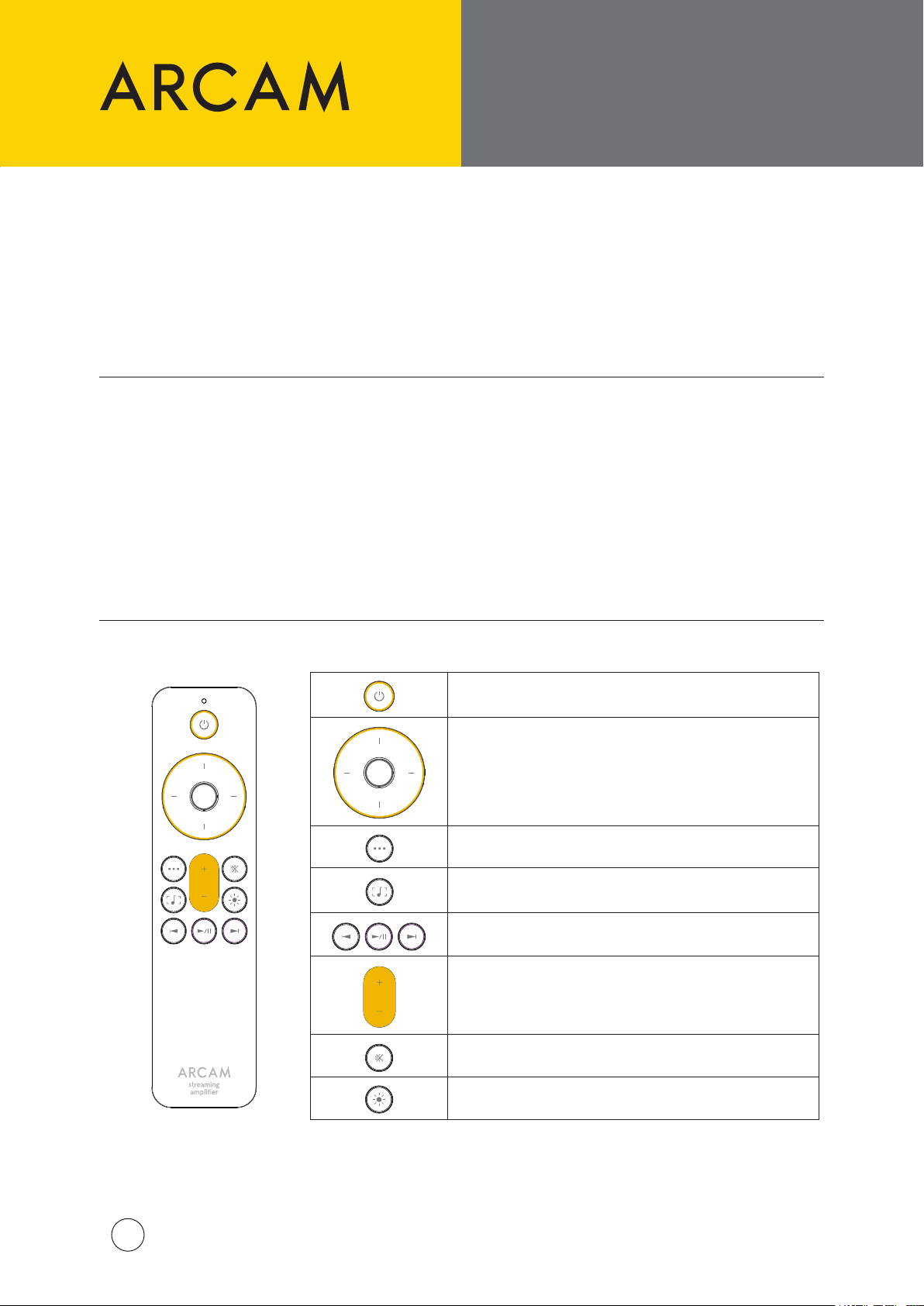
遥控器
待机打开或关闭
菜单导航
按中央按钮选定
主菜单/返回
切换当前播放的显示界面
播放键(播放/暂停、上一曲/下一曲)
音量控制
静音打开或关闭
显示屏变亮/变暗/熄灭
ARCAM SA35 QSG Multi V2
35
Page 36
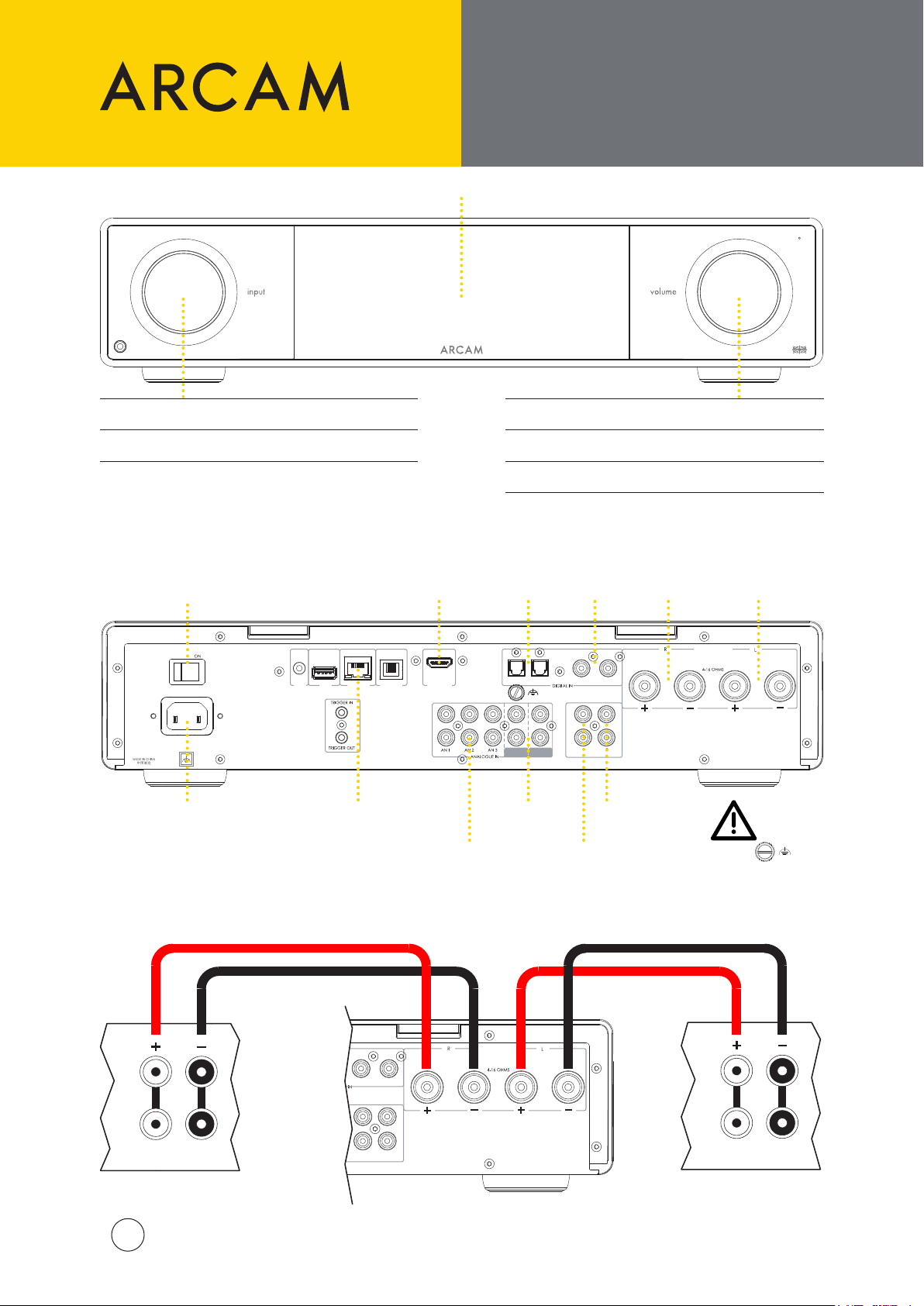
前后面板以及
100-120V/220-240V ~ 50/60Hz
700W MAX
POWER INLET
DIG 1
DIG 2 DIG 3 DIG 4
PRE
OUT
SUB2
SUB1
PHONO
(MM)
PHONO
(MC)
IR IN
USB NETWORK CONTROL
HDMI eARC
CLASS 2 WIRING
100-120V/220-240V ~ 50/60Hz
15W MAX
POWER INLET
COAX
OUT
OPTICAL
OUT
TRIGGER
OUT
NETWORK
CONTROL
USB
扬声器连接
前端
旋转:
短按:
后端
电源开关
输入选择
选择输入
显示屏
HDMI
eARC/ARC
输入
旋转: 音量控制
短按: 静音开/关或从待机状态唤醒
长按: 待机
光纤
SPDIF
输入
数字
SPDIF
输入
扬声器
右声道输出
扬声器
左声道输出
连接扬声器
电源输入
HF
LF
ARCAM SA35 QSG Multi V2
36
以太网插槽,
用于有线网络连接
DIG 3 DIG 4
SUB1
SUB2
OUT
PRE
模拟音频
输入
唱机输入
(MM & MC)
CLASS 2 WIRING
前置放大
器输出
低音炮输
出接口
唱机接地
此端子不得用作安全
接地端子。
HF
LF
Page 37
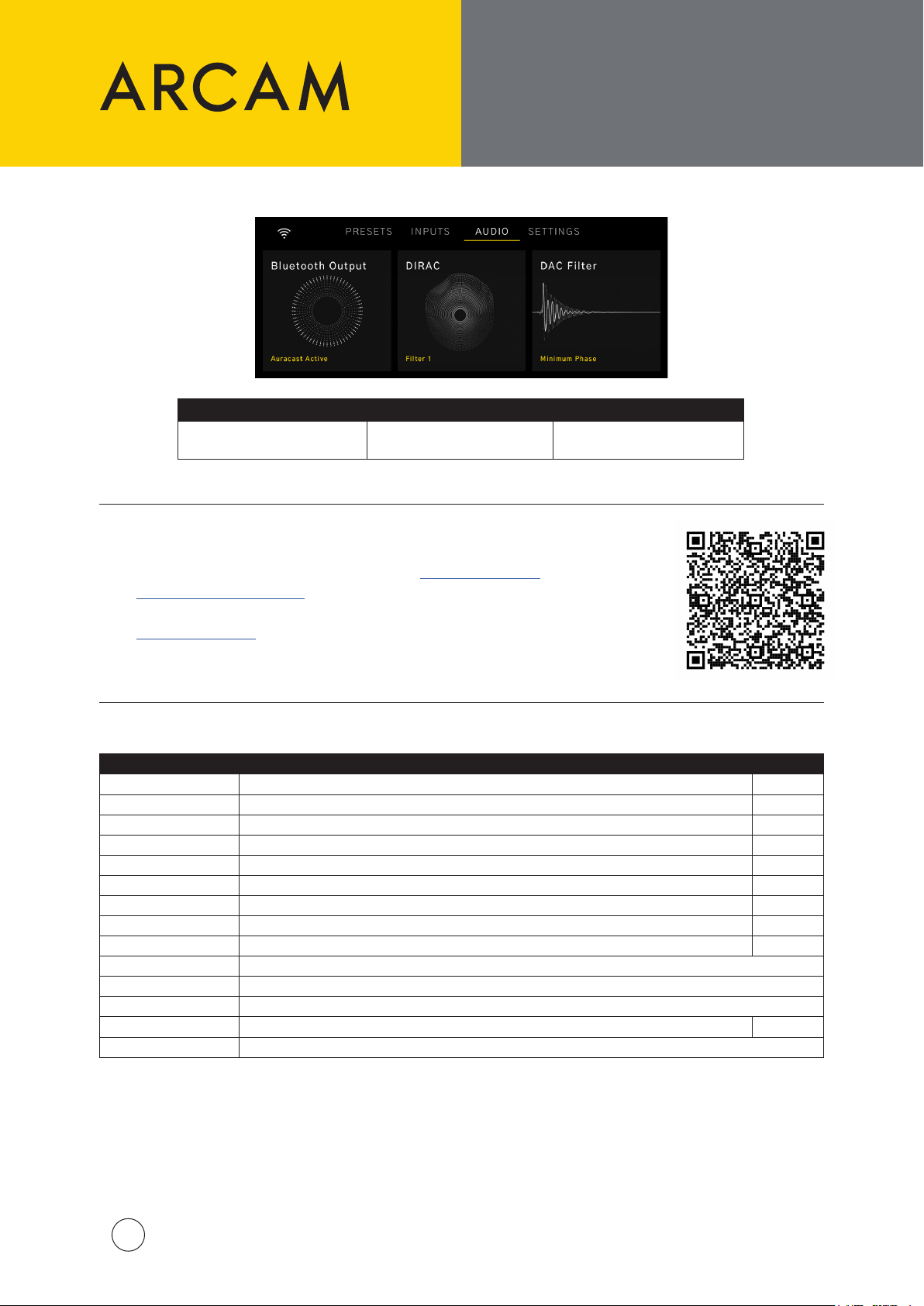
音频选项
这些音频选项可以
从主页访问:
选择并配对蓝牙耳机,以便
菜单树和
DIRAC LIVE
Bluetooth Output DIRAC DAC Filter
个人聆听
从已加载滤波器中选择一
个优化滤波器
从可以巧妙切换声效的
DAC 滤波器列表中选择
DIRAC Live
| 如需使用 Dirac Live 空间校正功能,请先访问 dirac.com/register 创建账户
| 从 dirac.com/live/downloads 下载 PC 或 MAC 版 Dirac Live 软件套装
| 使用随附的 USB 线缆将随附的 USB 麦克风连接到您的 PC/MAC
| 从 arcam.co.uk/sa35 下载麦克风校正文件
| 按照 Dirac Live 软件内的步骤操作,或者通过以下链接观看我们的视频指南:
设定列表
菜单选项 描述 默认设置
Halo Brightness
Subwoofer Cong
Balance
Maximum Volume
Pre Amp Mode
Eco Timer
Network Standby
BT/HDMI Autoswitch
TV Volume Control
System Reset
Bluetooth Reset
USB Update
System Code
Product Information
选择前面板旋钮的显示亮度。
选择是否将任何低音炮连接到低音炮输出接口。
选择是否进行左侧扬声器或右侧扬声器音频加权。
指定最大音量输出。
禁用内部功率放大器。
启用之后,SA35 将在无用户交互或未播放音频 20 分钟后进入待机模式。
选择网络连接是否维持待机状态。增大待机功耗。
当输入处于活动状态时自动切换到蓝牙和 HDMI 输入。
使用 HDMI eARC/ARC 连接通过连接的电视启用音量控制。
按 Select/OK 将所有设置重置为默认设置。
按 Select/OK 删除所有蓝牙配对记录 。
按 Select/OK 通过后面板 USB 接口上的 U 盘启动软件更新 。
如果此代码与同一房间内的另一设备共用,请另选一套遥控器代码集。
显示软件版本、IP 地址和网络 ID。
Full
None
0
40
O
On
On
On
On
16
ARCAM SA35 QSG Multi V2
37
Page 38

SPECIFICATIONS
Services
Work s with (apps) ARCAM Radia
Works with (services) Apple Airplay
ARCAM Radia supported services (Global) Internet Radio
Continuous power output (0.5% THD), per channel
2 channels driven, 20Hz ‑ 20kHz, 8Ω (FTC) 120W
2 channels driven, 1kHz, 4Ω 200W
Harmonic distortion, 80% power, 8Ω at 1kHz 0.002%
Analogue Inputs
Number of inputs 3 (RCA pairs)
Phono Inputs MM and MC
Frequency response 20Hz—20kHz ± 0.2dB
Signal/noise ratio (A-w td, ref. 50W, 1V input) 106 dB
Digital Inputs
Supported Streaming media: FLAC, WAV (LPCM), AAC, ALAC, AIFF, DSD (up to 256), MP3, OGG, WMA
Suppor ted Streaming Bit depth: 16, 24, 32
Suppor ted Streaming sample rates (kHz): Up to 384 kHz
Gapless Playback: Yes
Digital Audio Inputs 1x HDMI eARC/ARC, 2x Coaxial (RCA), 2x Optical (Toslink)
Supported Digital input Bit depth: 16, 24
Suppor ted Digital input sample rates (kHz): Up to 192 kHz
Frequency response (lter 1) 20Hz—20kHz ± 0.2dB
Signal/noise ratio (A-w td, ref. 50W, 0dBFS) 110 dB
Wireless Specications
Bluetooth Prole 5.4; A2DP Sink /Source, AVRCP, BLE, Snapdragon Sound, AAC, LE Audio, Auracast
Bluetooth Transmitter Frequency and Power 2,400 MHz to 2,483.5 MHz: <20dBm
Wi-Fi Network IEEE 802.11 a/b/g/n/ac/ax (2.4GHz /5GHz)
2.4G Wi-Fi Transmit ter Frequency Range and Power 2400-248 3.5 MHz (USA 11 Channels, Europe and Others 13 Channels): <20 dBm
5G Wi-Fi Transmit ter Frequency Range and Power
General
Mains voltage 100-120V/220-240V 50/60Hz
Power consumption (maximum) 700W
Power consumption (Network standby) <2W
Power consumption (standby) <0.5W
Dimensions W x D x H (including feet) 432 x 344 x 99mm
Weight (net) 12 kg
Weight (packed) 14 k g
Supplied accessories
Spotify Connect
Tidal Connect
Roon
Google Cast
Podcasts
UPnP
USB Media (using USB -A mass storage input)
5150-5250 MHz <23dBm
5250-5350 MHz <20dBm
5470-5725 MHz <20dBm (Not used in China)
5725-5850 MHz <14dBm for EU, <33dBm for other regions.
Mains lead(s)
Remote control with 2 x AAA batteries
Measurement Microphone
5m USB Cable
Quick Star t Guide
Important Safety Instructions
ARCAM SA35 QSG Multi V2
38
Page 39
TRADEMARKS, LICENSES
AND REGULATORY
COMMUNICATION
Apple®, AirPlay® and the AirPlay Logo™ are trademarks of Apple Inc.,
registered in the U.S. and other countries. App Store is a service mark of Apple Inc.
To use AirPlay with the ARCAM SA35, the latest version of iOS, iPadOS, or macOS is recommended.
Google Cast and YouTube Music are trademarks of Google LLC.
The Spotify Software is subject to third party licenses found here:
https://www.spotify.com/connect/third-party-licenses
The Tidal word mark and logo are registered trademarks owned by Tidal Music AS.
Qobuz is a trademark of Xandrie SA.
Being Roon Ready means that ARCAM uses Roon streaming technology, for an incredible user
interface, simple setup, rock-solid daily reliability, and the highest levels of audio performance,
without compromise.
The Wi-Fi CERTIFIED™ logo is a registered trademark of Wi-Fi Alliance®.
The Bluetooth® word mark and logos are registered trademarks owned by Bluetooth SIG,
Inc. and any use of such marks by HARMAN International Industries, Incorporated is under
license. Other trademarks and trade names are those of their respective owners.
The terms HDMI, HDMI High‑Denition Multimedia Interface, HDMI Trade dress and the
HDMI Logos are trademarks or registered trademarks of HDMI Licensing Administrator, Inc.
Restrictions in the 5 GHz band: According to Article 10 (10) of Directive 2014/53/EU, the packaging shows that this radio equipment
will be subject to some restrictions when placed on the market in Belgium (BE), Bulgaria (BG), the Czech Republic (CZ),Denmark
(DK), Germany (DE), Estonia (EE), Ireland (IE), Greece (EL), Spain(ES), France (FR), Croatia (HR), Italy (IT), Cyprus (CY), Latvia (LV),
Lithuania(LT), Luxembourg (LU), Hungary (HU), Malta (MT), Netherlands(NL), Austria(AT), Poland (PL), Portugal (PT), Romania (RO),
Slovenia (SI), Slovakia (SK),Finland (FI), Sweden (SE), the Turkey (TR), Norway(NO), Switzerland (CH), Iceland (IS), Liechtenstein (LI), and
the United Kingdom in respect of Northern Ireland (UK(NI)).
The 5150 to 5350 MHz frequency range is restricted to indoor use. This equipment should be installed and operated with a minimum
distance of 20cm between the product and your body.
Use Restrictions: This device is restricted to indoor use when operating in the 5150 to 5350 MHz frequency range in the following countries:
BE EL LT PT
BG ES LU RO
CZ FR HU SI
DK HR MT SK
DE IT NL FI
EE CY AT SE
IE LV PL UK(NI)
Belgium (BE), Greece (EL), Lithuania(LT), Portugal (PT),
Bulgaria (BG), Spain(ES), Luxembourg (LU), Romania (RO),
Czech Republic (CZ),France (FR), Hungary (HU), Slovenia (SI),
Denmark (DK), Croatia (HR), Malta (MT), Slovakia (SK),
Germany (DE), Italy (IT), Netherlands(NL), Finland (FI),
Estonia (EE), Cyprus (CY), Austria(AT), Sweden (SE),
Ireland (IE), Latvia (LV), Poland (PL), Northern Ireland (UK(NI)).
ARCAM SA35 QSG Multi V2
39
Page 40

www.arcam.co.uk
ARCAM is a trademark of HARMAN International Industries, Incorporated, registered in the United States
and other countries.
© 2024 HARMAN International Industries, Incorporated. All rights reserved.
Features, specications, and appearance are subject to change without notice.
HARMAN International Industries, Incorporated.
8500 Balboa Boulevard, Northridge, CA 91329 USA
EMEA Liaison Oce: Danzigerkade 16G 1013 AP Amsterdam, Netherlands
UK Business Address: Ground Floor, Westside 2, London Road, Apsley, Hemel
Hempstead, Hertfordshire, HP3 9TD, United Kingdom
© ARCAM SA35 QSG Multi V2 – Harman International Industries, Incorporated. Features, specications, and appearance subject to change without notice.
 Loading...