

Page 1

WAVE 2 AC WIRELESS ACCESS POINT
Quick Start Guide
AN-510-AP-I-AC
AN-810-AP-I-AC
Page 2

Support: 866.838.5052 © 2016 Araknis Networks®
Araknis Networks Wireless Access Point
Quick Start Guide
Federal Communication Commission Interference Statement
This equipment has been tested and found to comply with the limits for a Class B digital device, pursuant to Part
15 of the FCC Rules. These limits are designed to provide reasonable protection against harmful interference
in a residential installation. This equipment generates, uses and can radiate radio frequency energy and, if not
installed and used in accordance with the instructions, may cause harmful interference to radio communications.
However, there is no guarantee that interference will not occur in a particular installation. If this equipment does
cause harmful interference to radio or television reception, which can be determined by turning the equipment
o and on, the user is encouraged to try to correct the interference by one of the following measures:
• Reorient or relocate the receiving antenna.
• Increase the separation between the equipment and receiver.
• Connect the equipment into an outlet on a circuit dierent from that to which the receiver is connected.
• Consult the dealer or an experienced radio/TV technician for help.
FCC Caution: Any changes or modifications not expressly approved by the party responsible for compliance
could void the user’s authority to operate this equipment.
This device complies with Part 15 of the FCC Rules. Operation is subject to the following two conditions: (1) This
device may not cause harmful interference, and (2) this device must accept any interference received, including
interference that may cause undesired operation.
This device is designed for indoor use only.
IMPORTANT NOTE:
FCC Radiation Exposure Statement:
This equipment complies with FCC radiation exposure limits set forth for an uncontrolled environment. This
equipment should be installed and operated with minimum distance 20cm between the radiator & your body.
In the North American market, only channels 1–11 can be operated. Other channels cannot be selected.
Industry Canada Statement
This device complies with Industry Canada’s licence-exempt RSSs. Operation is subject to the following two
conditions:
(1) This device may not cause interference; and
(2) This device must accept any interference, including interference that may cause undesired operation of the
device.
Le présent appareil est conforme aux CNR d’Industrie Canada applicables aux appareils radio exempts de licence.
L’exploitation est autorisée aux deux conditions suivantes : (1) l’appareil ne doit pas produire de brouillage, et (2)
l’utilisateur de l’appareil doit accepter tout brouillage radioélectrique subi, même si le brouillage est susceptible
d’en compromettre le fonctionnement.
Caution:
(i) The device for operation in the band 5150-5250 MHz is only for indoor use to reduce the potential for harmful
interference to co-channel mobile satellite systems;
(ii) For product available in the USA/Canada market, only channel 1–11 can be operated. Selection of other
channels is not possible.
Avertissement:
(i) Les dispositifs fonctionnant dans la bande 5150-5250 MHz sont réservés uniquement pour une utilisation à
l’intérieur afin de réduire les risques de brouillage préjudiciable aux systèmes de satellites mobiles utilisant les
mêmes canaux;
(ii) Pour les produits disponibles aux États-Unis / Canada du marché, seul le canal 1 à 11 peuvent être exploités.
Sélection d’autres canaux n’est pas possible.
2
3
Page 3
Support: 866.838.5052 © 2016 Araknis Networks®
Araknis Networks Wireless Access Point
Quick Start Guide
Araknis Networks Wireless Access Point
Quick Start Guide
Industry Canada Statement, Continued
Radiation Exposure Statement:
This equipment complies with ISED radiation exposure limits set forth for an uncontrolled environment. This
equipment should be installed and operated with minimum distance 20cm between the radiator & your body.
Déclaration d’exposition aux radiations:
Cet équipement est conforme aux limites d’exposition aux rayonnements ISED établies pour un environnement
on contrôlé. Cet équipement doit être installé et utilisé avec un minimum de 20 cm de distance entre la source
de rayonnement et votre corps.
CE Statement
This equipment complies with EU radiation exposure limits set forth for an uncontrolled environment. This
equipment should be installed and operated with minimum distance 20 cm between the radiator & your body.
All operational modes:
2.4GHz: 802.11b, 802.11g, 802.11n (HT20), 802.11n (HT40), 802.11ac (VHT20), 802.11ac (VHT40)
5GHz: 802.11a, 802.11n (HT20), 802.11n (HT40), 802.11ac (VHT20), 802.11ac (VHT40), 802.11ac (VHT80)
The frequency and the maximum transmitted power in EU are listed below:
AN-510-AP-I-AC AN-810-AP-I-AC
2412-2472MHz: 14.7 dBm
5180-5240MHz: 17.4 dBm
2412-2472MHz: 2.4G: 17dBm
5180-5240MHz: 5G:18dBm
Industry Canada Warning
This product meets the applicable Innovation, Science and Economic Development Canada technical specifications.
Ce produit repond aux specifications techniques applicables a l'innovation, Science et Développement economique
Canada
CE Warning
This is a product with CE certification. In a domestic environment, this product may cause radio interference, in
which case the user may be required to take adequate measures.
These products are intended to be powered by either PoE/PoE+ or a 12V/2A power supply
These products use PoE/+ - IN(48V/0.53A) for both the AN-510-AP-I-AC and AN-810-AP-I-AC.
4
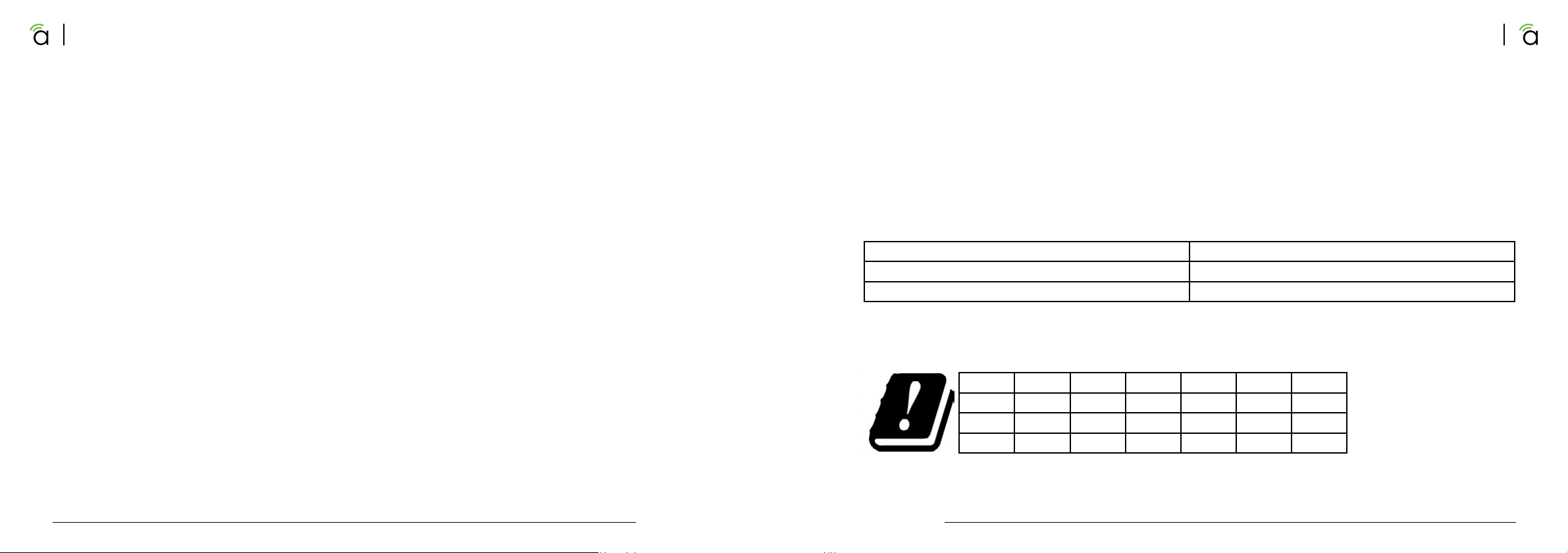
The device is restricted to indoor use only when operating in the 5150 to 5350 MHz frequency range..
AT BE BG HR CY CZ DK
EE FI FR DE EL HU IE
IT LV LT LU MT NL PL
PT RO SK SI ES SE UK
5
Page 4

Support: 866.838.5052 © 2016 Araknis Networks®
Araknis Networks Wireless Access Point
Quick Start Guide
Welcome to Araknis Networks™
Thank you for choosing an Araknis™ WAVE 2 AC Wireless Access Point (WAP). With newly designed circular
housing, an ingeniously easy new mounting system, convenient PoE power, and the latest WAVE-2 AC wireless
technologies, these products are ideal as staples in both residential and commercial applications.
.
Features
• Sleek Circular Design
• Unobtrusive recessed lighting
• 1 x Gigabit LAN Port (w/802.11af PoE-IN)
• 1 x Gigabit LAN Port (as jumper)
• Fanless
• AN-510-AP-I-AC: 2x2 Dual-Band Wave 2-AC 1300Mbps
• AN-810-AP-I-AC: 4x4 Dual-Band Wave 2-AC 2600Mbps
• 1 x USB 2.0
• OvrC Enabled with SSID Management!
AN-510-AP-I-AC
Step 1: Unbox
Wireless Access Point
(WAP)*
Male-to-Female
Jumper Cable
Mounting Bracket
Tile Ceiling
Mounting Hardware
Tile Ceiling Backing Plate
Drywall
Mounting Hardware
Wood Surface
Mounting Hardware
(510 has 2 screws)
AN-810-AP-I-AC
6
*This manual uses the 810 WAP for illustrative purposes throughout. .
7
Page 5
Support: 866.838.5052 © 2016 Araknis Networks®
Araknis Networks Wireless Access Point
Quick Start Guide
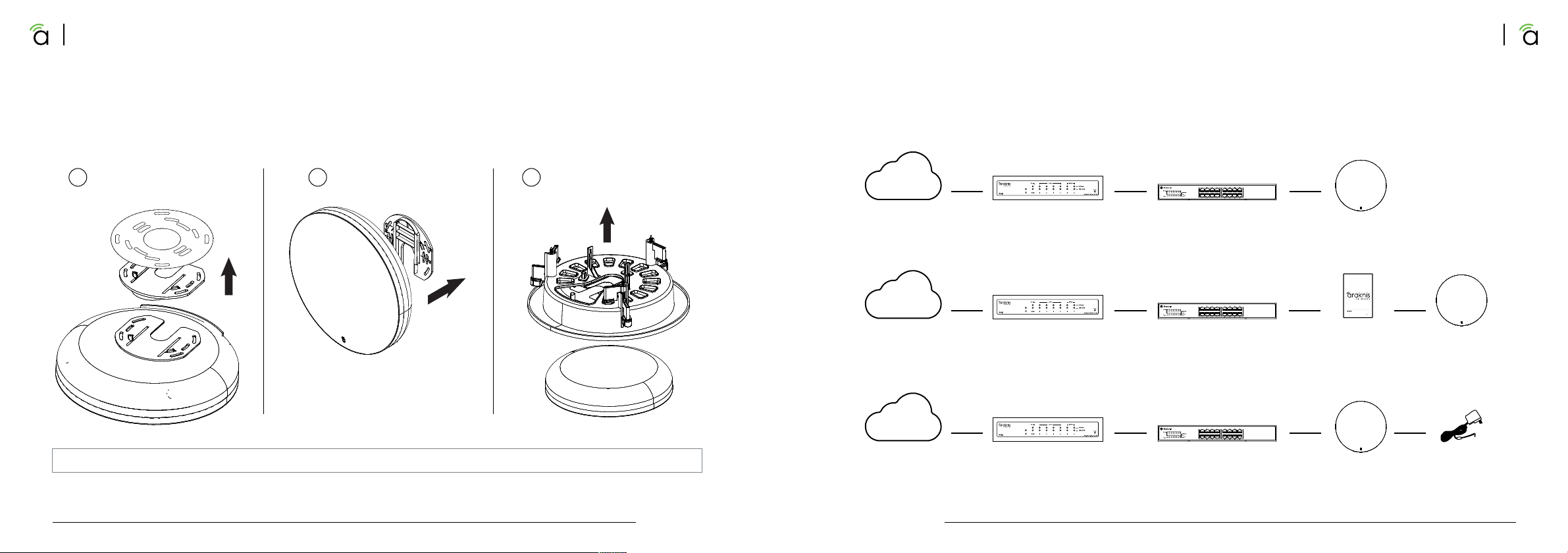
Step 2: Install
A B C
Ceiling Mount Wall Mount In-Ceiling Mount
NOTE: Use the ceiling backing plate on top of acoustic ceiling tiles to prevent the mounting nuts from pulling through.
Step 3: Connect
ENABLED
Internet
Internet
Internet
Router
ENABLED
Router
ENABLED
Router
PoE Switch
Switch
Switch
WAP
POWER + DATA (OUT)
AN-ACC-INJ-30W
DATA (IN)DC 48V Input Power
PoE Injector
(not included)
WAP
WAP
DC Power Supply
(not included)
8
9
Page 6
Support: 866.838.5052 © 2016 Araknis Networks®
Araknis Networks Wireless Access Point
Quick Start Guide
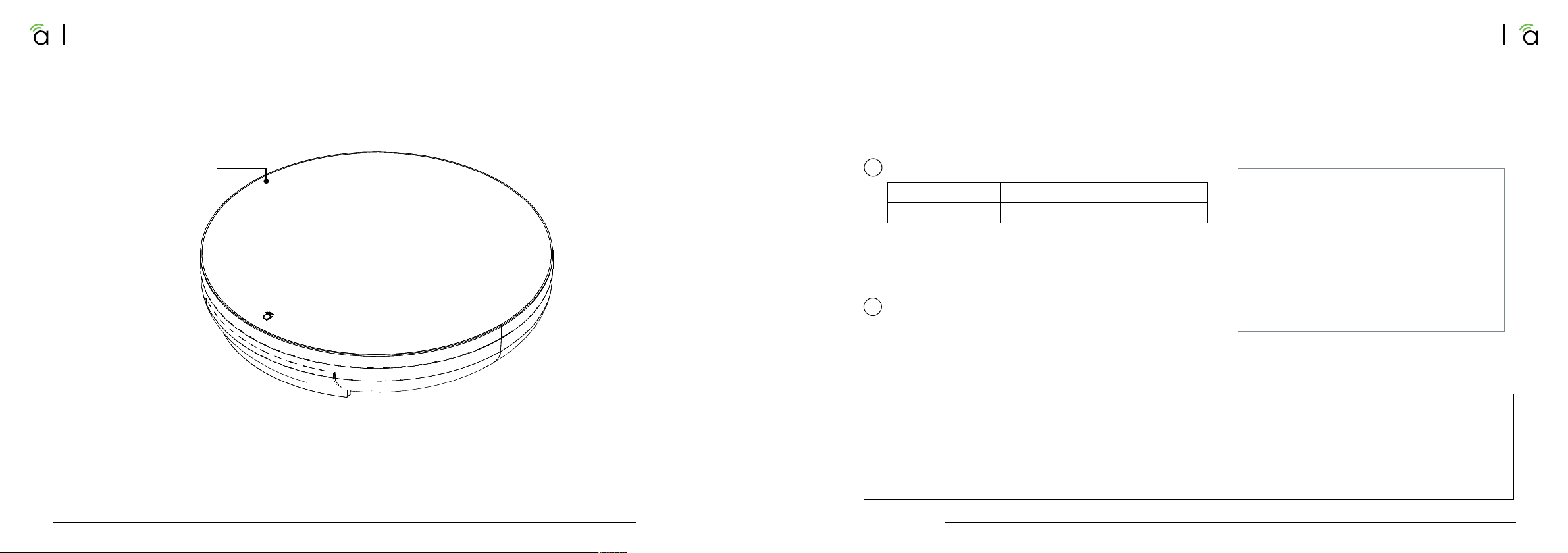
Step 4: Verify
LED*
*NOTE: The LED is located on the side of the device.
LED Status:
• Blinking: WAP is not working correctly. Refer to the full manual or contact Araknis technical support.
• Solid: WAP is operating correctly.
Step 6: Log Into Web Interface
Log in using the default credentials:
A
Username araknis
Password araknis
B
NOTE: If you can’t connect to the WAP using this method, or need to configure the device before connecting it to the network, try these
options for accessing your device:
• DHCP IP address – Page 11
• Default IP Address – Page 12
• OvrC – Page 15
10
11
Page 7
Support: 866.838.5052 © 2016 Araknis Networks®
Araknis Networks Wireless Access Point
Quick Start Guide
Pro Tip: Save and Apply Changes
After making changes to settings on a menu page, left-click the “Save” button on the menu to hold the new
settings in the Apply Changes field.
After all desired changes have been made, left-click “Apply Changes” to review the new settings. Left-click
"Apply" to make the changes or "Revert" to cancel the changes.
NOTE: Settings will take aect after the progress bar completes 100%.
Other Access Methods: DHCP IP Address
The WAP is configured to DHCP by default so that the DHCP server can assign an IP address when the WAP is
connected to the network (the DHCP server is usually the router). This address can be used for accessing the
web interface.
Use one of these methods to find the IP address of the WAP:
• Check the client table on your router
• Use a network scanner (e.g. Fing) to sni the network. The
Araknis WAP manufacturer field will display “Snap AV”
See the highlighted field in the "Fing" screenshot to the
right for an example of an Araknis device being identified.
12
13
Page 8
Support: 866.838.5052 © 2016 Araknis Networks®
Araknis Networks Wireless Access Point
Quick Start Guide
Other Access Methods: Default IP Address
If the WAP is not issued an IP address on the network, or needs to be accessed while not connected to a
network, you can configure your computer's network connection to allow access using the default IP address,
“192.168.20.253”.
Windows 7 screenshots shown for reference.
Connect your PC to the WAP
A B C
using a network patch cable.
Computer WAP
On your PC, open the Control
Panel and left-click “Network
and Internet”.
Left-click “Network and Sharing
Center”.
Other Access Methods: Default IP Address
Windows 7 screenshots shown for reference.
In the left bar, left-click “Change
D E F
adapter settings”.
Right-click the icon for the
wired network connection and
left-click "Properties".
Left-click to highlight “Internet
Protocol Version 4 (TCP/IPv4),
then left-click “Properties”.
14
15
Page 9

Support: 866.838.5052 © 2016 Araknis Networks®
Araknis Networks Wireless Access Point
Quick Start Guide
Other Access Methods: Default IP Address
Windows 7 screenshots shown for reference.
In the “General” tab, left-click
G H I
"Use the following IP address:"
and enter the IP address and
subnet mask.
IP Address 192.168.20.2
Subnet Mask 255.255.255.0
Left-click “OK” to close Internet
Protocol Version 4 (TCP/IPv4)
Properties, then left-click "OK"
to close wireless network
connection properties.
Open a web browser
and navigate to
“http://192.168.20.253/”.
Log in using the default
credentials:
Username araknis
Password araknis
Other Access Methods: OvrC
OvrC gives you remote device management, real-time notifications, and intuitive customer management, right
from your computer or mobile device. Setup is plug-and-play, with no port forwarding or DDNS address required.
To add this device to your OvrC account:
Connect the WAP to the Internet
A
Log Into OvrC (www.ovrc.com)
B
Add the Device (MAC address and Service Tag numbers needed for authentication)
C
Web Browser
Access
1 2 3 4 5 6 7 8
1 Gbps
Link/Act
AN-110-SW-R-8
Mobile
Apps
Internet
OvrC Server
ENABLED
16
17
Page 10

Contacting Technical Support
P
(866) 838-5052
E
2-Year Limited Warranty
Araknis Networks® products have a 2-Year Limited Warranty. This warranty includes parts
and labor repairs on all components found to be defective in material or workmanship under
normal conditions of use. This warranty shall not apply to products that have been abused,
modified, or disassembled. Products to be repaired under this warranty must be returned
to SnapAV or a designated service center with prior notification and an assigned return
authorization (RA) number.
US local representative information:
Company: Araknis Networks
Address: 1800 Continental Blvd. Suite 300,
Charlotte, North Carolina, 28273,
United States
Tel:704-945-7974
Fax: 800.782.2410
© 2019 Araknis Networks®
190305-
1430
 Loading...