

Page 1
Page 2

Page 3

Smart Wall Switch H1 EU (No Neutral)
User Manual
Smarter Lichtschalter H1 EU (ohne
Neutralleiter) Gebrauchsanleitung
Interruptor Inteligente de Pared H1 EU
(Sin Neutro) Manual de Usuario
Interrupteur Mural Intelligent H1 EU
(Sans Neutre) Manuel d'instructions
Interruttore da muro intelligente H1 EU
(Non neutro) Guida Utente
Умный настенный выключатель H1 EU
(без нейтрали) Руководство пользователя
·01
·12
·23
·34
·46
·57
智能牆壁開關H1 EU(單火線版)使用說明書
·67
Page 4
Product Profile
Based on the Zigbee 3.0 wireless communication protocol, the
Aqara Smart Wall Switch H1 EU (No Neutral) is a smart switch that
turns on and o the power of lights and other electrical devices.
Aer binding with an Aqara hub, it can implement remote control
via the Aqara Home app, timed control and other functions, and
can work with other smart devices in smart home automations.
* This product requires a compatible Zigbee 3.0 hub. Some features require a
specific hub. For a detailed list, please visit: www.aqara.com/support
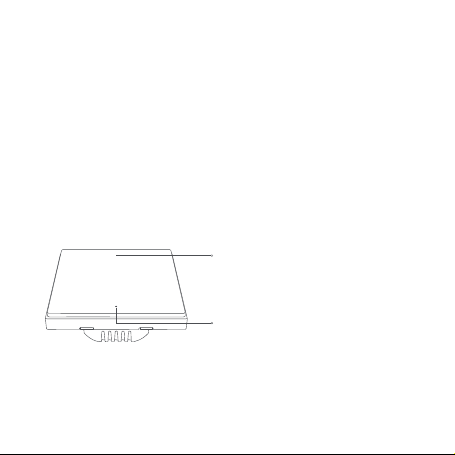
Push Button
Short Press Once: Turn on/o
Long Press for 5s: Reset the device/Enable
network connection
Quick Press 3 Times: Eective Range Test
Indicator Light
WS-EUK01
01
Page 5
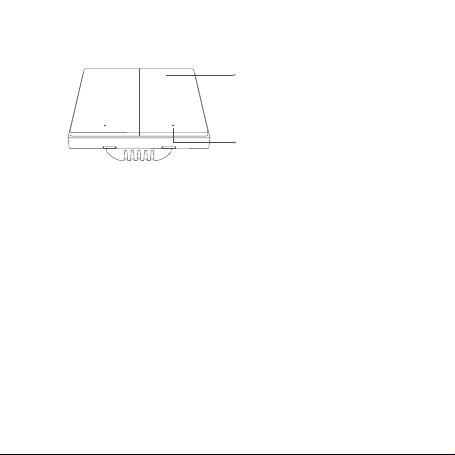
Push Button
Short Press Once: Turn on/o
Long Press for 5s: Reset the device/Enable
network connection
Quick Press 3 Times: Eective Range Test
Indicator Light
WS-EUK02
Warnings
1.
This product is not a toy. Please keep children away from this
product.
2.
This product is designed for indoor use only.
3.
Do not use in humid environments or outdoors.
4.
Beware of moisture. Do not spill water or other liquids onto the
product.
5.
Do not place this product near a heat source. Do not place it in
an enclosure unless there is normal ventilation. Do not attempt
to repair this product by yourself. All repairs should be
performed by an authorized professional.
02
Page 6
6. This product is suitable for improving the quality of your home
life and reminding you about the device status. If a user violates
the product use instructions, the manufacturer will not be liable
for any risks and property losses.
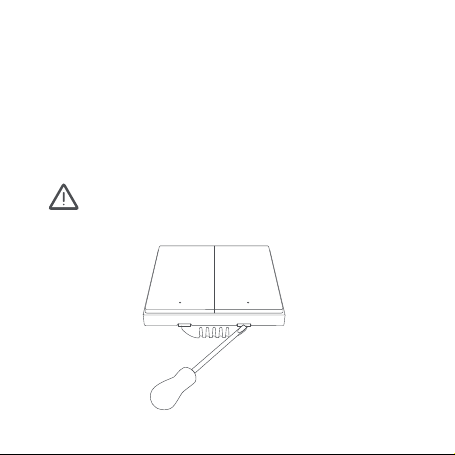
Installation Method (The picture shows the Double Rocker
version as an example)
Please make sure that the power at circuit breaker or fuse
box is turned o before wiring!
1. Open the switch panel with a flat-blade screwdriver.
03
Page 7
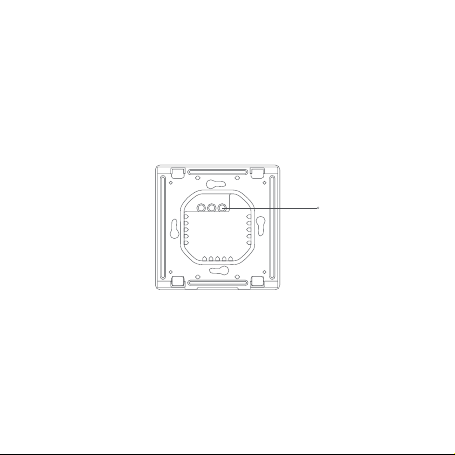
2. Loosen the terminal screw on the back of the switch with the
screwdriver, connect the live wire to the hole L, and the load
(light) wire to the hole L1 and L2 (corresponding to the le and
right buttons respectively), and tighten the terminal screws
aer confirming that the wiring is correct.
L1L L2
only the Double Rocker
Version has hole L2
3. Mount the switch to the wall junction box with the attached
screws and mount the switch plate.
04
Page 8
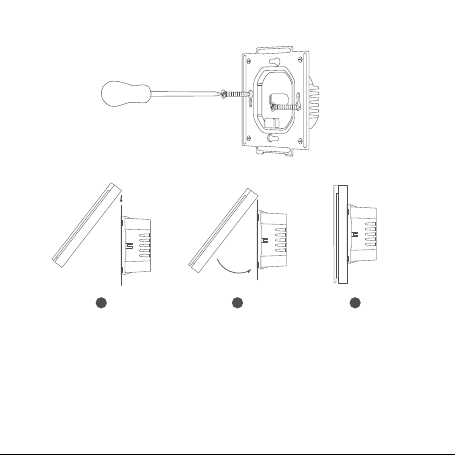
321
4. Turn on main power at the circuit breaker, and test the switch
by pressing the button. If the light can be controlled normally,
the switch is working properly!
05
Page 9

Quick Setup
1.
Please add the hub to the Aqara Home app according to the
Hub Quick Start Guide.
2.
Please open the Aqara Home app, and then tap “+” in the top
right corner to enter “Add Device (Accessory)” page. Tap the
code-scanning icon on the upper right corner, and scan the QR
code on the package box, user manual or the back of the
switch, or find and select “Smart Wall Switch H1 EU (No
Neutral,Single Rocker/Double Rocker)”, and add it according to
instructions.
* If the connection fails, please move the hub closer to the switch, connect to
power and try again.
Eective Range Test: Quick press the button on the device 3
times. If the Hub makes voice prompts, it indicates that the device
can communicate eectively with the Hub.
06
Page 10
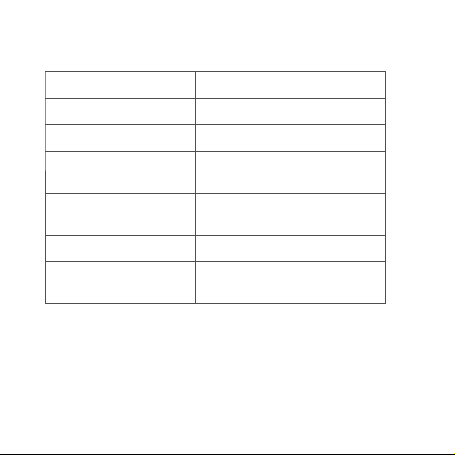
Indicator Light Description
Indicator Light Status
Blue light flashes once Device is powered on
Blue light flashes quickly Zigbee network is connecting
Blue light is steady on
Red light flashes quickly
Red light is steady on
Description
Zigbee network works properly
and the switch is turned on
Overload and high temperature
alarm
Zigbee network is not connectedRed light flashes slowly
The switch panel does not match
the in-wall power supply module
07
Page 11
Specifications
Model: WS-EUK01 / WS-EUK02
Dimensions: 85.8×86×37.55mm
Wireless Protocol: Zigbee 3.0
Electrical Rating: 100-250VAC, 50/60Hz, Max. 8A (resistive load), μ
Minimum Power: 3W (typical)
Operating Temperature: 0℃~40℃ (32°F~104°F)
Operating Humidity: 0%~95% RH, Non-condensing
Zigbee Operation Frequency: 2405-2480MHz
Zigbee Maximum Output Power ≤ 13dBm
What's in the Box: Smart Wall Switch x 1, Quick Start Guide x 1,
Screw x 2
08
 Loading...