

Page 1

MAMP PRO 3 - User Guide !
March 2014 (c) appsolute GmbH!
!
!
1
Page 2

I. What is MAMP PRO?! 3!
II. Installation! 3!
1. Installation requirements! 3!
2. Installing and upgrading MAMP PRO! 3!
3. Uninstall! 4!
III. First Steps! 4!
Main GUI Elements! 5!
2. Meaning of Icons! 6!
IV. Host and Server Settings! 6!
1. General! 6!
2. Hosts! 7!
3. Modules (Apache)! 17!
4. PHP! 18!
5. MySQL! 19!
6. Dynamic DNS! 20!
7. Postfix! 22!
V. Menu! 22!
1. MAMP PRO! 22!
2. File! 24!
3. Log! 25!
4. Tools! 25!
VI. FAQ! 25!
VII. Troubleshooting! 27!
VIII. How-tos! 28!
Activating Output Buffering! 28!
Check the Default Storage Engine of MySQL! 29!
Increase the PHP memory limit! 30!
Set the MySQL Default Storage Engine! 31!
Show the Postfix log file! 32!
Using MySQL command line! 33!
Connect to MySQL from PHP! 33!
2
Page 3

I. What is MAMP PRO?!
!
MAMP PRO is a configuration application that helps you set up and run the Apache web
server and the MySQL database server. It also takes care of the configuration of different
versions of PHP. It is the big brother of the free MAMP application. Both applications need
the MAMP folder to run.!
!
Note: MAMP PRO stores its databases in a different location than MAMP the application.!
!
II. Installation!
!
1. Installation requirements!
!
To use MAMP PRO, your system must meet the following requirements:!
!
•
A working MAMP installation (MAMP can be downloaded directly with the MAMP PRO
installation package).!
•
Apple OS X, version 10.6 or later.!
•
A user account that is part of the Admin Group. Go to Preferences > Users & Groups to
confirm this.!
!
2. Installing and upgrading MAMP PRO!
!
•
Download MAMP PRO from http://www.mamp.info.!
•
Double click on the MAMP.pkg file in your Downloads folder.!
•
The System Installer will guide you through the installation process.!
•
If the installer detects an existing MAMP folder it will rename the current MAMP folder to
MAMP_current_date.!
•
Your existing “htdocs” folder will be moved to your new /Applications/MAMP folder.!
•
Confirm that all data has been transferred correctly before starting MAMP PRO.!
•
Your /Applications/MAMP_current_date folder can now be deleted. You may however
keep it, so you can fall back to your original setup.!
!
Note: You need administrator permissions to install MAMP PRO!!
!
3
Page 4
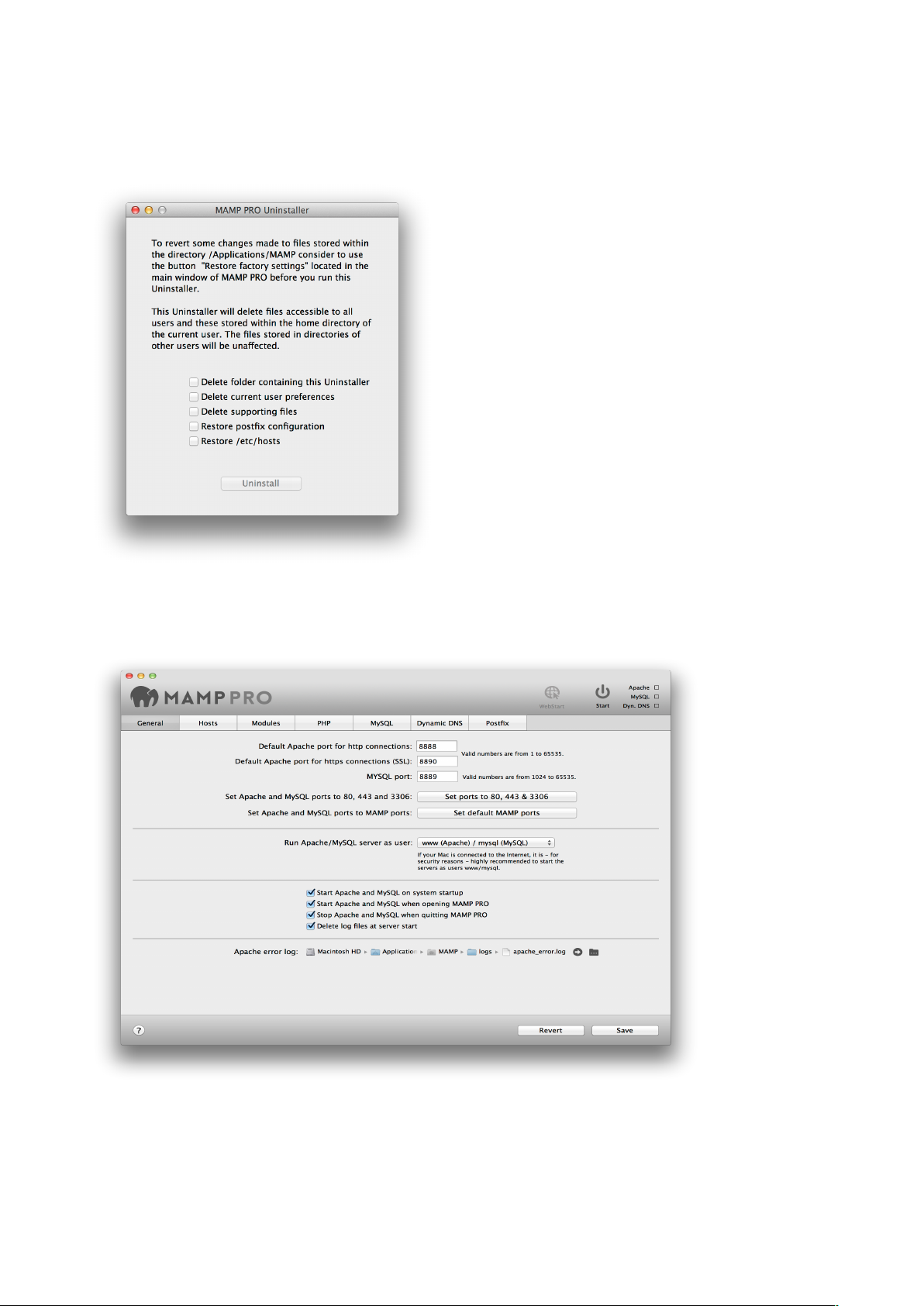
3. Uninstall!
#
Use the MAMP PRO Uninstaller located in /Applications/MAMP PRO to remove MAMP !
PRO.!
!
Drag the /Applications/MAMP folder to the Trash to complete uninstallation.!
!
III. First Steps
!
!
When the MAMP PRO application is launched for the first time helper tools will be
installed. You will be prompted to enter your password. !
!
4
Page 5
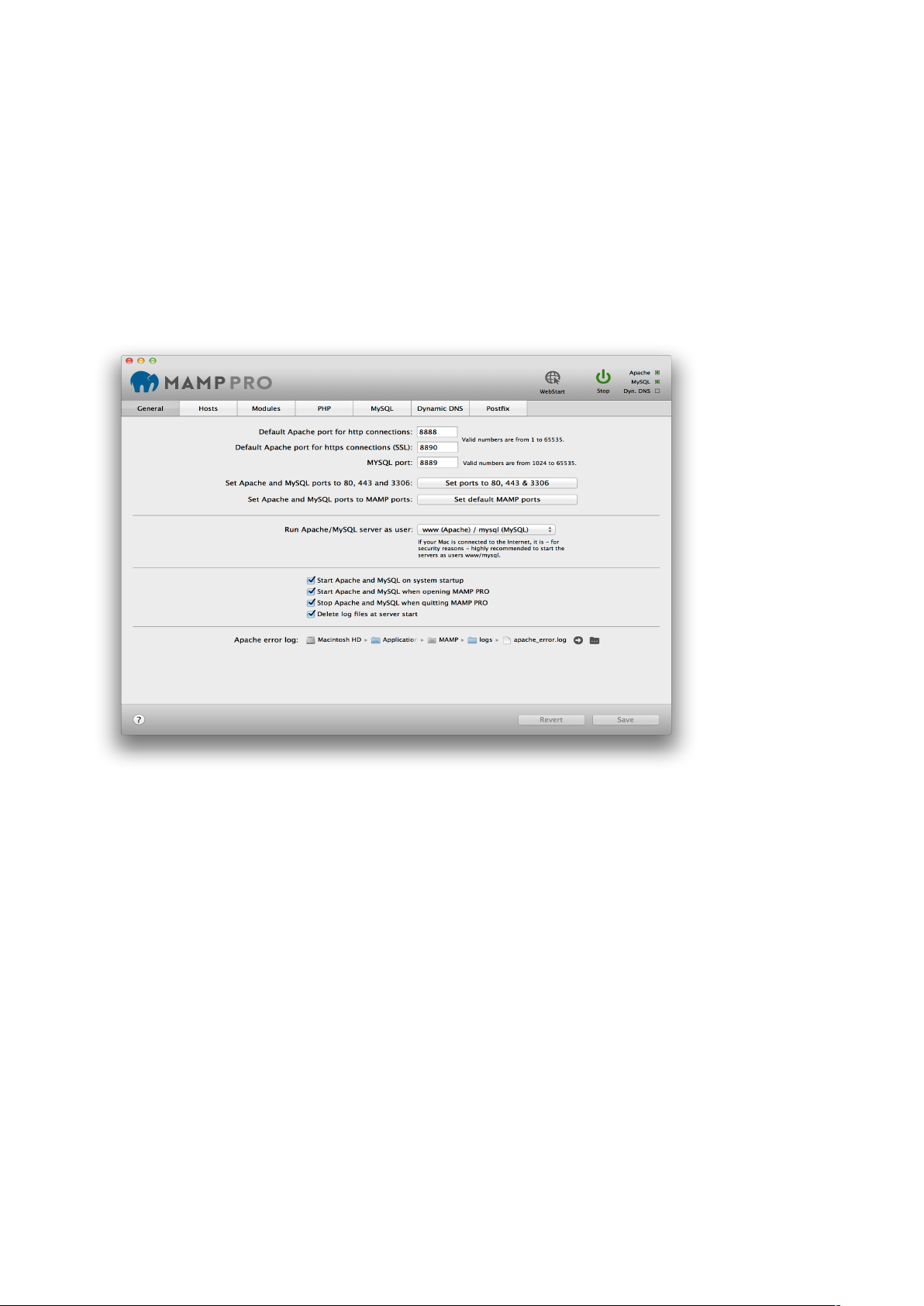
Click on the Start button in the title bar to launch Apache and MySQL. In the status display,
the launch status of the server is displayed. The web server uses port 8888 by default.
This port must be specified when calling the local web page in the browser, e.g.: http://
localhost:8888!!
!
Your default host for MAMP PRO is localhost. The files for localhost are located in the /
Applications/MAMP/htdocs folder. See the Hosts section for more information on what a
host is and how to create additional hosts.!
!
1. Main GUI Elements!
!
!
!
!
!
WebStart!
Open the MAMP PRO start page of your local web server. Additional information about the
MAMP PRO start page is in the ‘Hosts’ section.!
!
Start/Stop!
Starts or stops the Apache and MySQL services of the MAMP PRO server.!
!
Status!
The status display in the upper right corner shows the started services (Apache, MySQL
and Dyn. DNS).!
!
Revert!
Discards all changes, which have not already been confirmed with ‘Save’.!
!
Save!
Save your changed settings.$
5
Page 6
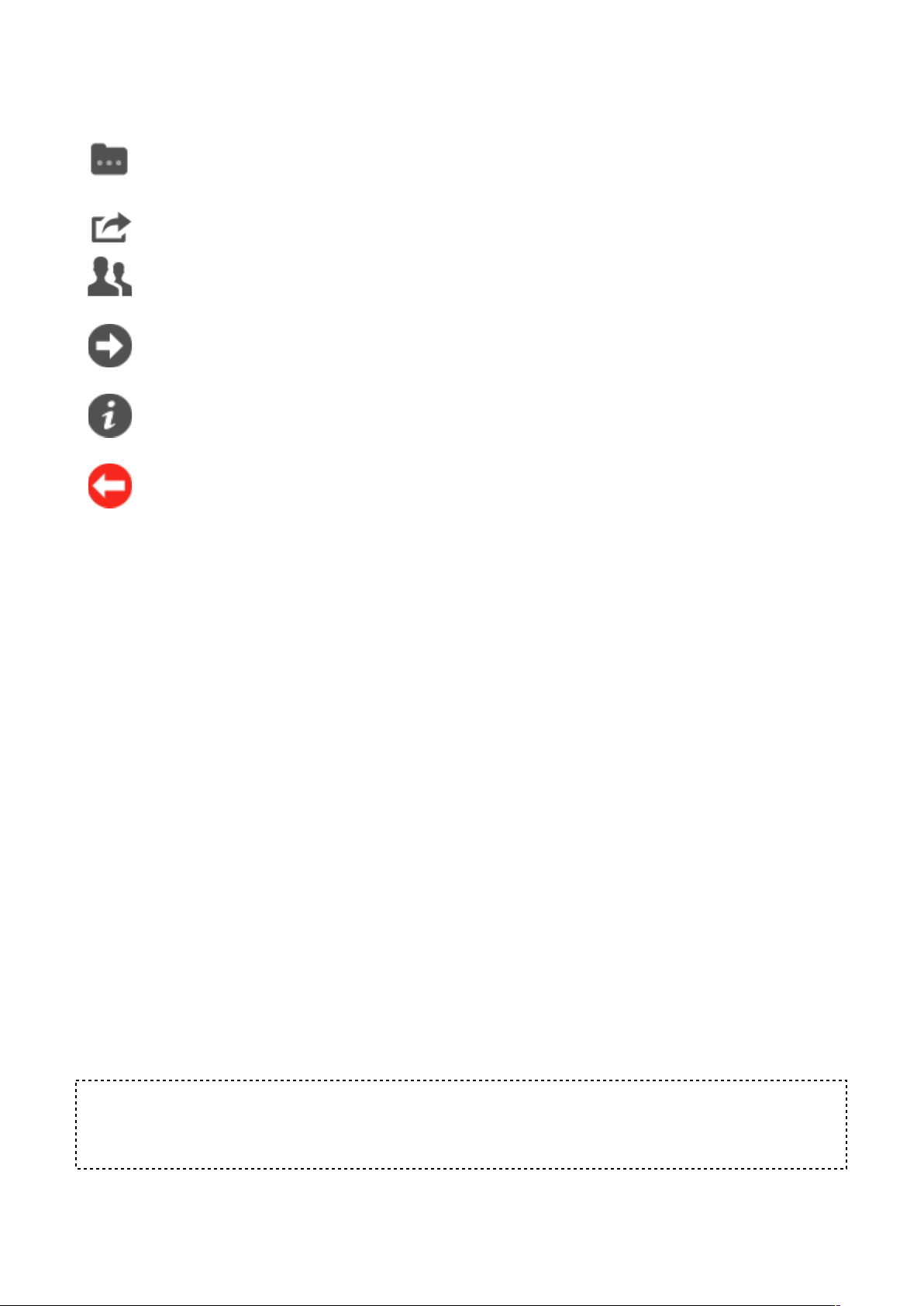
2. Meaning of Icons!
!
Change the file location, including the location of the document root, or log file.!
!
Open email client.!
Modify the access rights of the document root.!
!
Open up Finder disk location.!
!
More information provided, including PHPInfo().!
!
This field must be filled in to proceed.!
!
!
IV. Host and Server Settings!
!
1. General!
!
Ports!
Server programs, when addressed via the network, need to be assigned to a certain
network port. This way, multiple server programs may run on one server machine. Every
service has a default port: The Apache web server typically uses port 80, the MySQL
database server utilises port 3306.!
These ports are configurable. The default configuration for MAMP PRO uses ports 8888
and 8889 . That way, the MAMP servers can run alongside other servers installed on your
Mac. Should ports 8888 and 8889 be in use by a different application, please change the
values accordingly.!
The button Set ports to 80, 443 & 3306 will set the ports to the value commonly used on
the internet. The button Set default MAMP ports will reset the ports for Apache and MySQL
to 8888 and 8889.!
!
Start Apache / MySQL as user!
Production servers typically use www/msql to run Apache and MySQL. These users may
not have the right to access your files, therefore it’s generally a good idea to run them
under your own username.!
!
Note: You should only start the servers with your own user name when the machine is
adequately protected against malicious attacks from the internet. Malicious scripts on your
server may enable unlimited access to your personal data.!
!
!
6
Page 7

Start Apache and MySQL at system start!
Apache and MySQL are started during startup of the OS, this means that the services are
available before a user has logged into the system.!
!
Start Apache and MySQL at startup of MAMP PRO!
The services will start automatically at startup of MAMP PRO.!
!
Stop Apache and MySQL at shutdown of MAMP PRO!
The services will be stopped automatically when MAMP PRO shuts down.!
!
Delete log files at server startup!
The log files will be emptied before startup of the services. That way only current entries
will be in the log files.!
!
Apache Error Log!
If any errors occur at startup or during execution of the Apache server, the messages will
be saved in a log file.!
!
2. Hosts!
!
a) General Settings (Host)!
!
MAMP PRO uses virtual hosts to allow Apache to serve different websites. The virtual host
[localhost] is created by default and cannot be deleted. You can add an unlimited number
of hosts allowing you to create one host per project. Every host can have it’s own directory
to store html, php files, and images. This directory is called Document Root. !
!
The name of a host [server name] must be unique, often it’s practical to use a reverse
domain naming scheme to easily identify them (e.g. use de.appsolute.mamp instead of
mamp.appsolute.de). The unreversed name may conflict with an outside domain name.!
!
To create a new host press the ‘Plus’ button at the bottom left of the screen. Replace the
default host name. The second required field to complete the setup of a new host is a
location for its files [document root].!
!
Click on the folder icon to choose a document root. Use the Right Arrow button to open the
folder in the Finder.!
!
#
!
The document root is also known as the web root folder. MAMP PRO will automatically
add an index.php file and a MAMP image to this location when Apache is restarted and the
folder is empty.$
7
Page 8
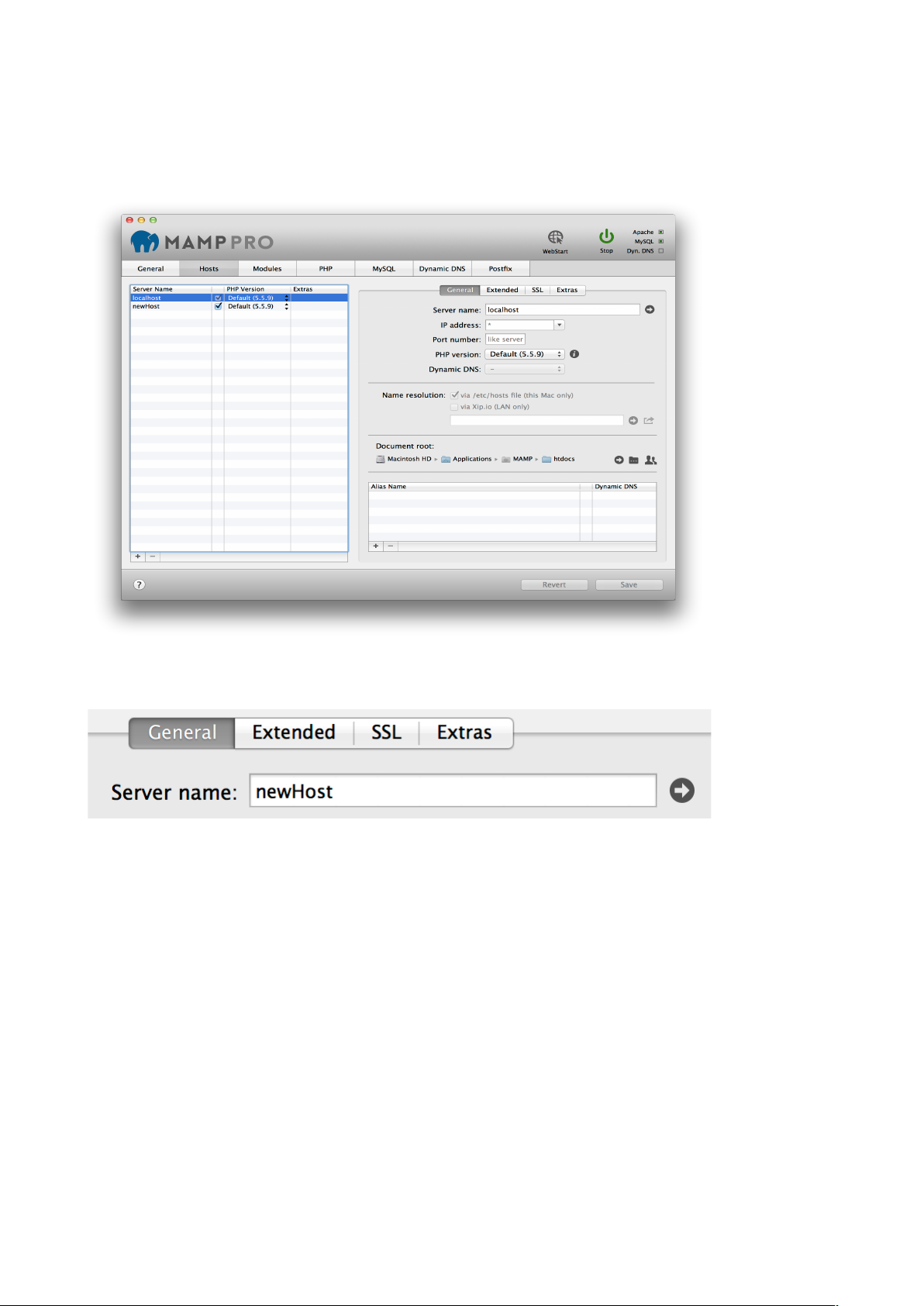
Server name!
The Server Name and Port number in combination must be unique within MAMP PRO.
The host name may only contain letters and/or numbers, as well as dashes ("-"); but it may
not begin or end with a "-" character. Names are not case-sensitive (upper and lower-case
letters are not distinguished.)!
!
If the servers are running you can use the Right Arrow button to open a host in your web
browser.#
!
!
!
#
!
IP Address!
If this field is left empty or contains an ‘*’ Apache will use one of the computer’s IP
addresses to access this host. If you want to choose which of the IP addresses should be
associated with a host, then select it from the pop up menu. !
!
Port Number!
Determine the port with which the virtual host is accessible. Valid values are from 1 to
65535. In most cases the preset value does not need to be changed.!
!
PHP version!
Determine which version of PHP a host will use. This can only be set when Individual PHP
version for every host (CGI) is set in the PHP section of MAMP PRO.!
If you select the Standard PHP version MAMP PRO will automatically adapt this setting if
you choose a new standard version in the PHP tab. Use a fixed setting to tell MAMP PRO
not to alter the PHP version.!
8
Page 9
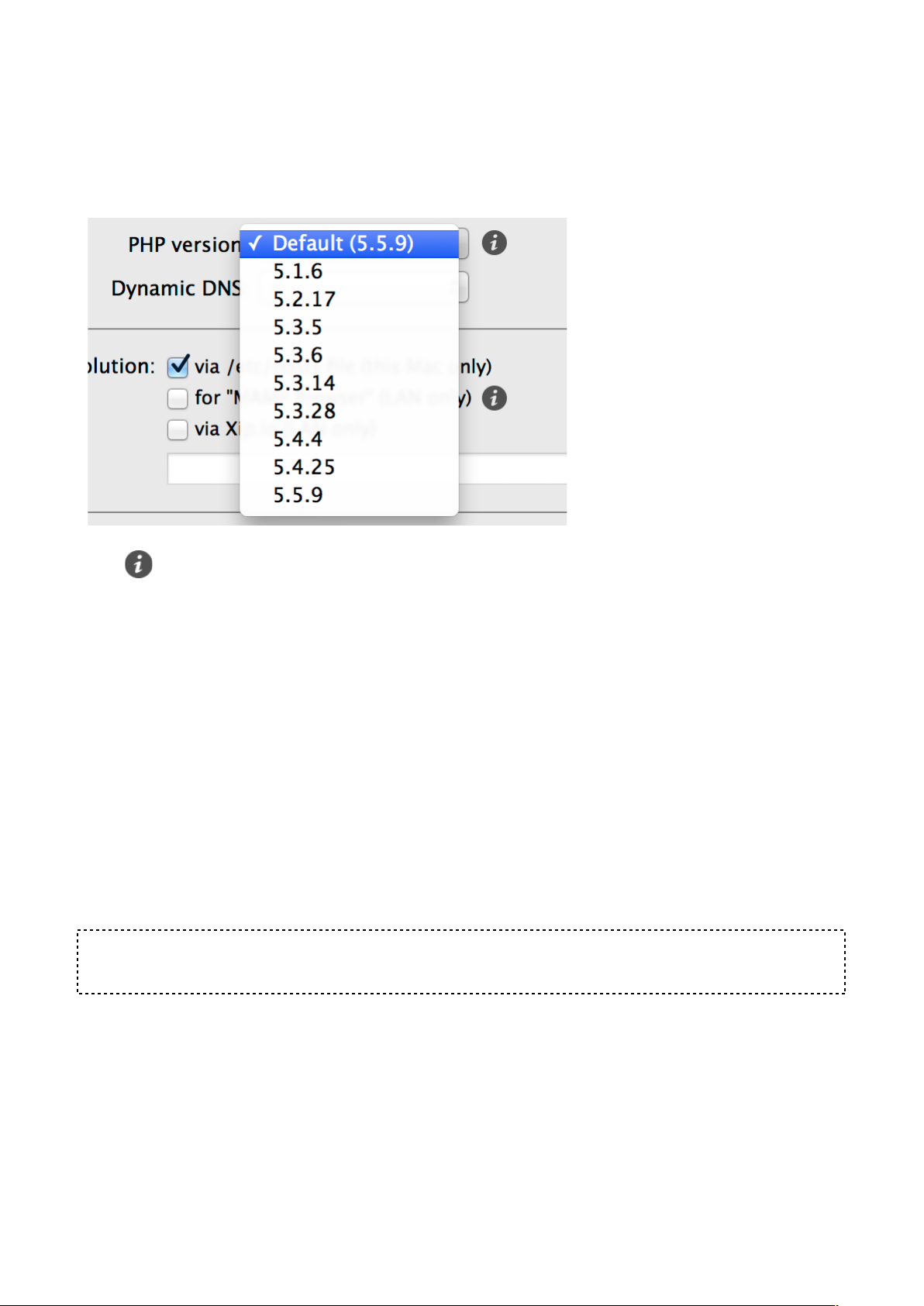
Sounds complicated? Let’s take a look at an example: The Standard version is set to
5.5.9. You have oneHost set to PHP version “Standard (5.5.9)” and anotherHost set to
“5.5.9”. If you set the PHP version in the PHP section to 5.4.25, MAMP PRO will adapt the
PHP version of oneHost to this version (it is set to always use the standard version).
AnotherHost will not be changed.!
!
!
!
The button will open up a webpage with information about the PHP version used,
including all its extensions.!
!
Dynamic DNS!
Determines, if this virtual host is accessible with the Dynamic DNS service from the
internet.!
!
Name resolution!
This will determine how your system will map host names to ip addresses.!
!
via/etc host file (this Mac only)!
The basic mapping mechanism which uses the the file /etc/hosts.!
!
via Xip.io (LAN only)!
Allow other computers on your local network to access your web site. Using the Share
button you can send the Xip.io address to other users.!
!
Note: The Xip.io addresses will only work in your local network. They are temporary and
may become invalid if you restart your Mac.!
!
Document root!
The location of the documents (HTML/PHP files etc.) of a virtual host is called a document
root.!
!
!
!
!
!
!
9
Page 10
Alias Name!
Aliases are additional names for your virtual host. The same constraints apply to these
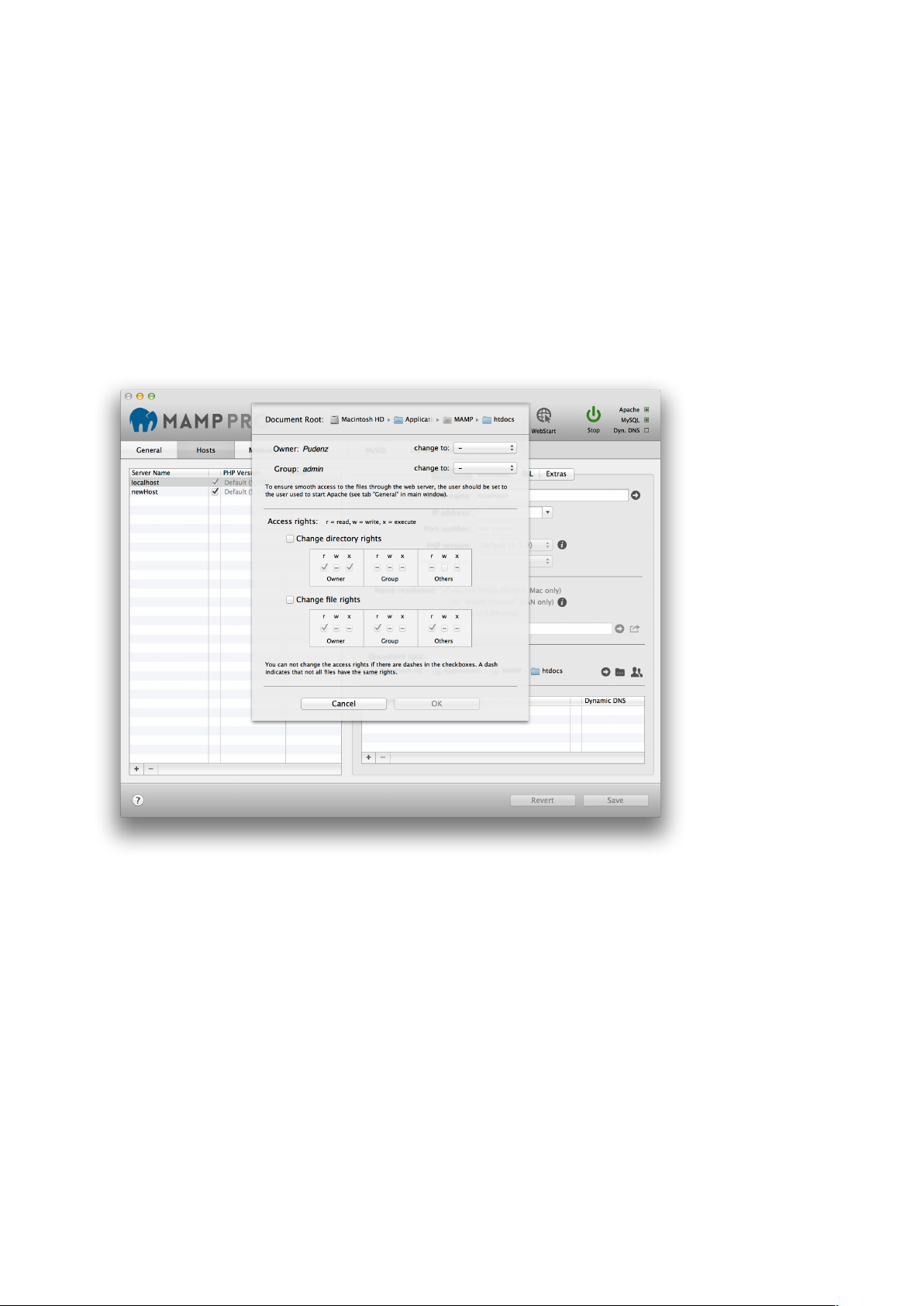
additional names as to the host itself. Add aliases with the plus-button. Access Rights for
Document Root Directory!
For Apache to be able to access the files inside the document root folder and serve them
to a web browser it needs adequate rights. If you use the user www to start Apache, then
this user must have the right to access the files inside the document root folder. Typically
this is not the case. You can either adapt the access rights or use the current Mac user to
start Apache.!
!
During the development phase of a site it is easier to use the current Mac user to start
Apache. The user www is generally only used on production servers.!
!
!
If Apache is reporting “access denied” in its error log or parts of your web pages are
missing this might be due to access rights problems. !
!
The rights dialog of MAMP PRO looks complicated at first sight but is actually very
powerful. Not only does it show you the access rights of the document root folder but also
all the rights of all the subdirectories and files inside it. A “-“ indicates that not all objects
have the same rights.!
!
Current Owner!
The user who owns the directory and all the subdirectories and files in it.!
!
Current Group!
The group who has access to the directory and all the subdirectories and files in it.!
!
Access Rights!
You can change directory and files access rights separately.!
10
Page 11
!
!
b) Extended (Host)"
!
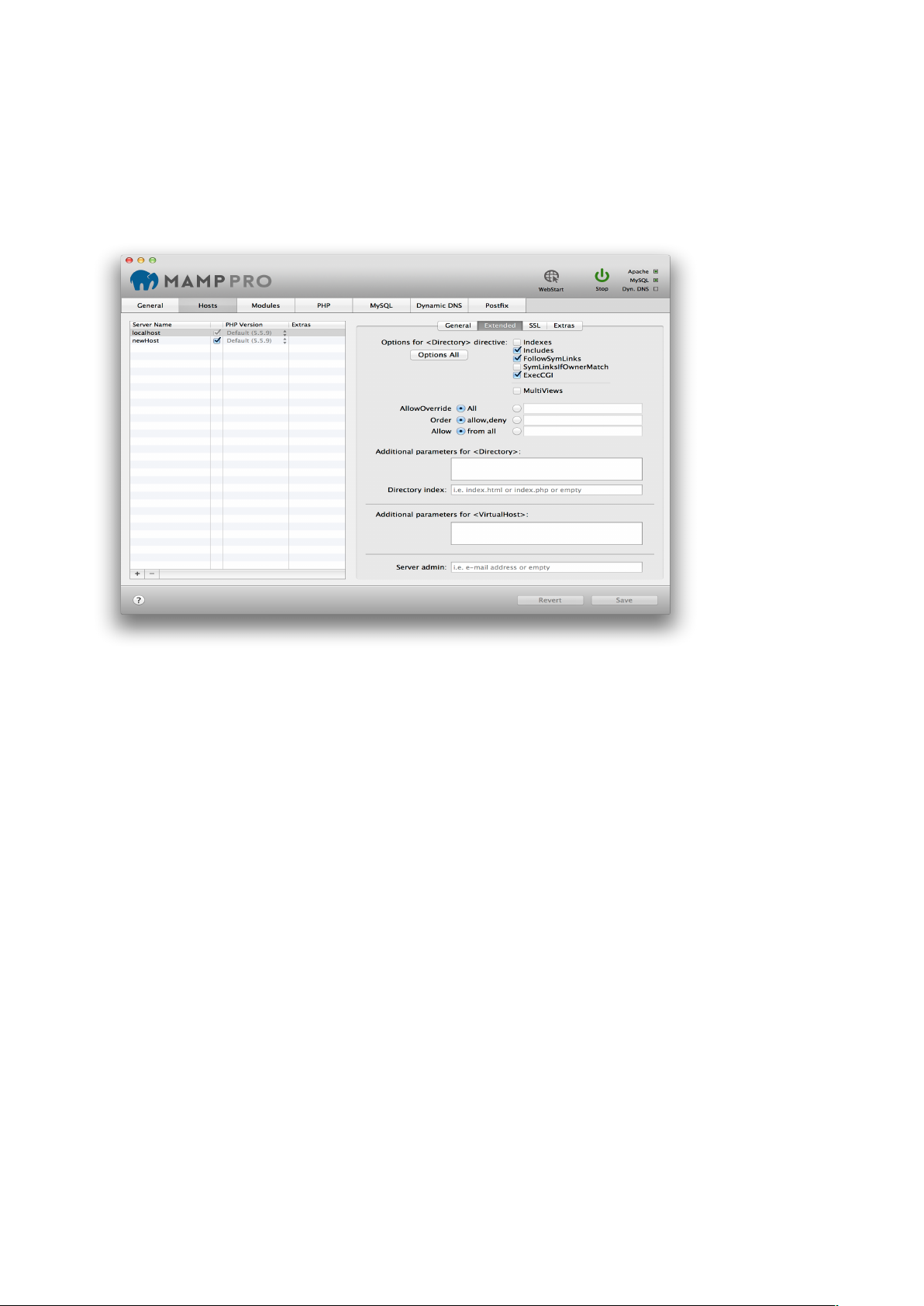
Extended options can be set for the selected virtual host in the table. These options are
security relevant!!
!
!
Options for <Directory> directive!
!
Indexes!
Activates or deactivates "directory browsing". If there is no index.html, index.php, etc in the
document root, the content of the folder is displayed when this option is enabled. Without
this option, nothing will be displayed or an error message will appear.!
!
Includes!
Allows the use of Server Side Includes (SSI).!
!
FollowSymLinks!
Allows the use of symbolic links as reference to documents in other directories. This is an
elegant feature if you would like to reference to objects, that are outside of the directory
tree (e.g. protocol files of the web server), but know you want to avoid the hiding of objects
through the URL tree.!
!
SymLinksIfOwnerMatch!
Restricted version of "FollowSymLinks". Allows reference to objects via symbolic links only
if the owner matches.!
!
Exec-CGI!
Permit CGI execution.!
!
Multiviews!
Allows the use or disabling of dynamic documents depending on the language.!
11
Page 12
!
Directory Index!
Determine which file Apache should serve if no filename is given in a address. By default it
is either index.html or index.php.!
!
Server admin!
The e-mail address Apache will send error messages to.!
!
Additional parameters for <Directory>!
Additional Parameters for <VirtualHost>!
These directives go directly to the httpd.conf file. !
!
Note: Watch out for typos, they will otherwise prevent Apache from starting up.!
!
c) SSL (Host)"
!
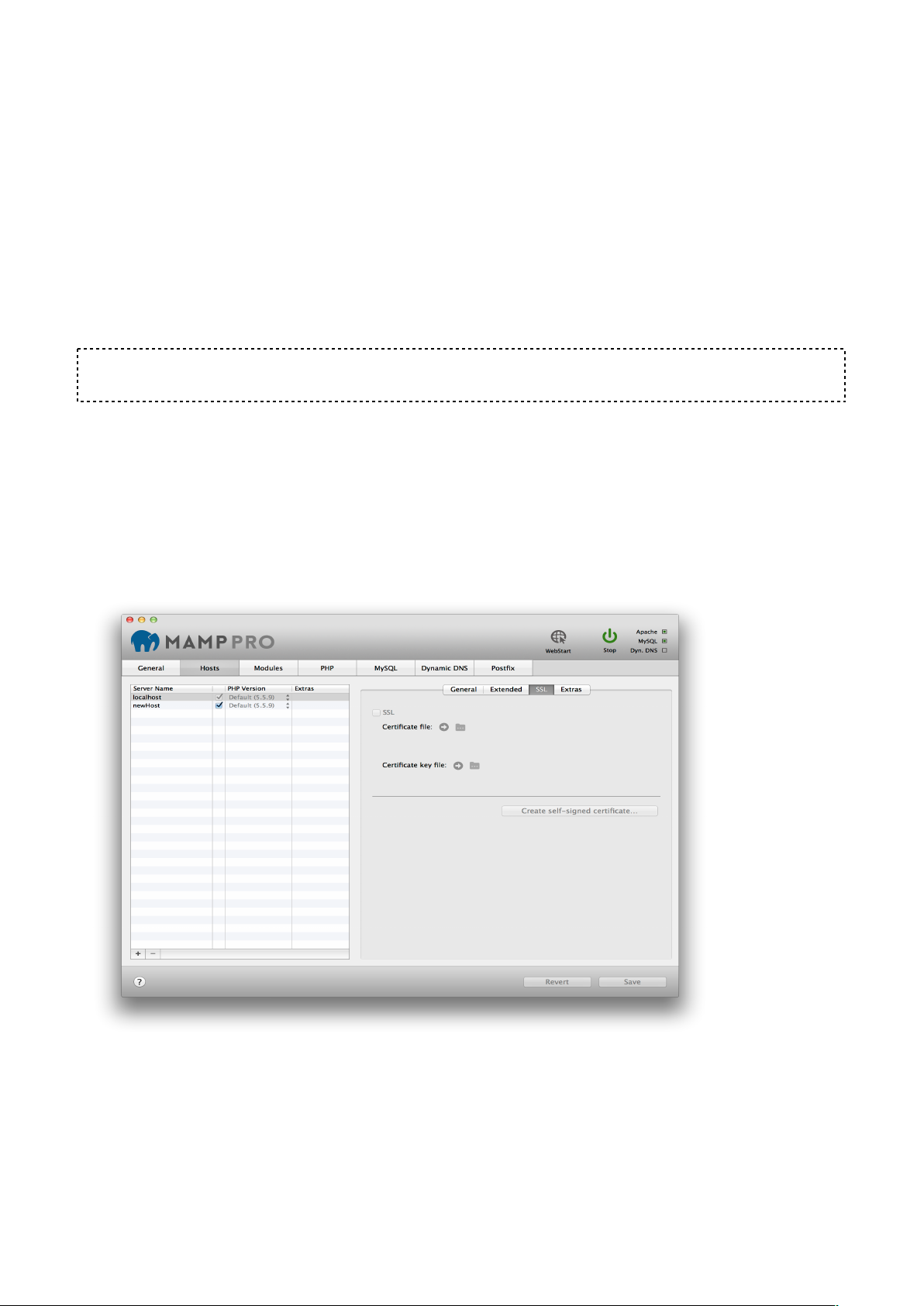
To encrypt traffic from Apache to a web browser you can use SSL.!
Use “Create self-signed certificate” if you want to test SSL functionality.#
!
If you want to secure a productive server you should get the Certificate file and the
Certificate key file from a Certified Authority (CA).#
#
$
12
Page 13
d) Extras (Host)"
!
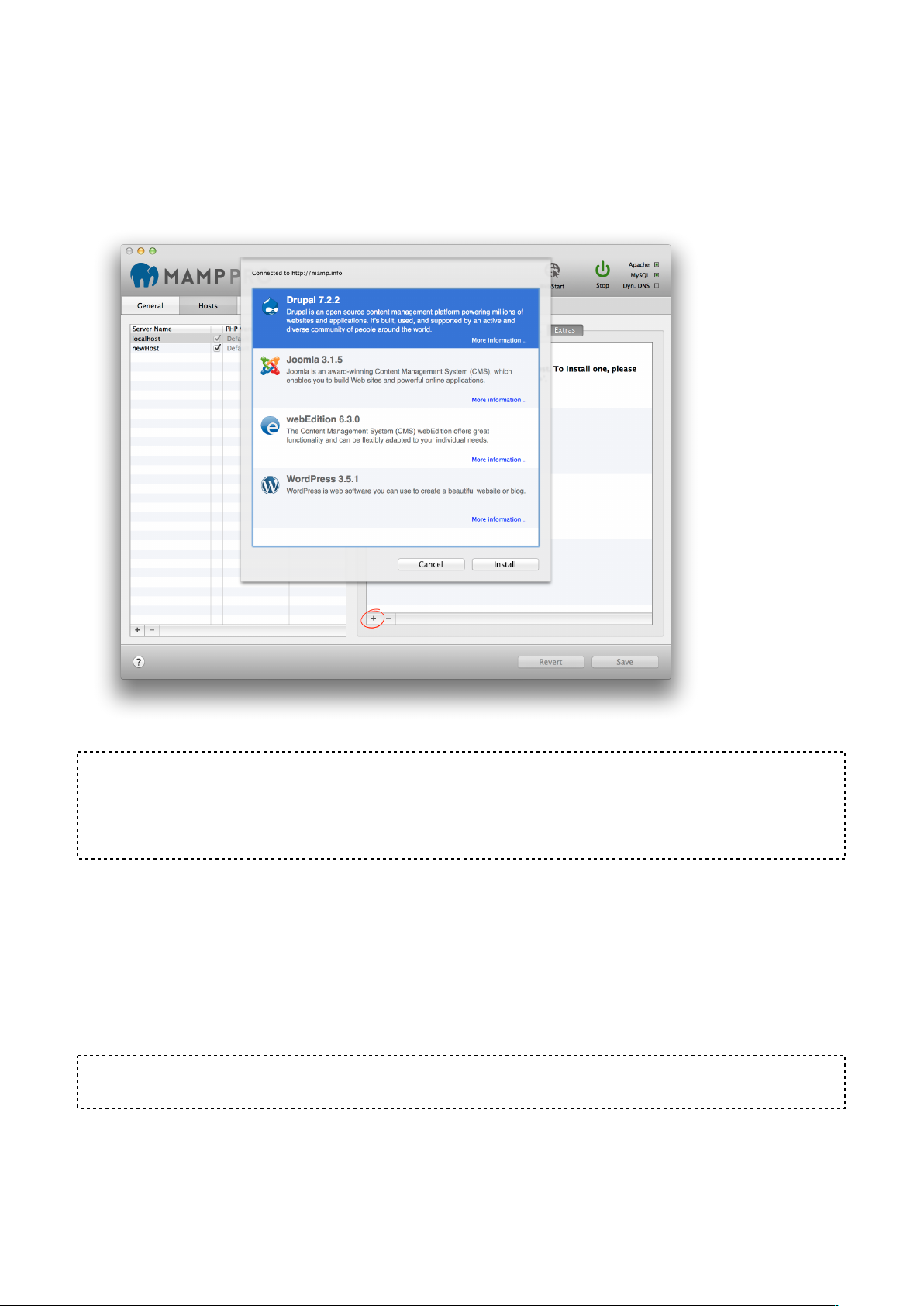
MAMP PRO allows you to easily add popular packages to your hosts which we call Extras.
Extras will always be loaded from the appsolute servers if you have an Internet
connection. Over time more Extras will become available.!
!
!
!
Note: The availability of an Extra will be affected by your hosts PHP version, Internet
connection, cached Extras and available disk space.To add an Extra, press the plus button
on the lower left side of the ‘Extras’ panel. The plus button has a red circle around it if you
have no Extras installed.!
!
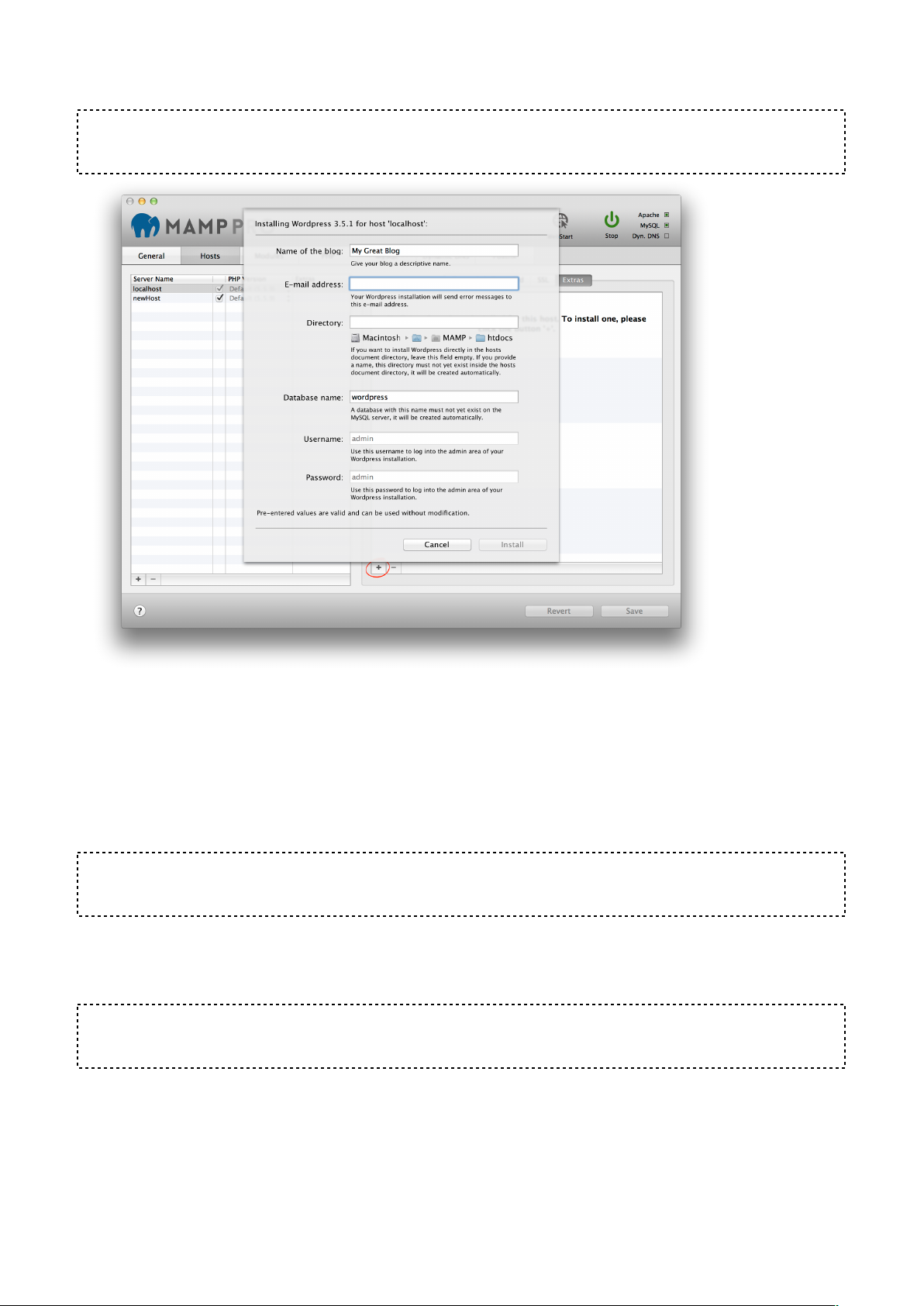
Wordpress"
!
Name of the blog:!
Name your blog.!
!
Email address:!
Your email address.!
!
Note: You must enter a valid email address to setup a Wordpress installation.!
!
!
Directory:!
The installation directory. If it is left blank the Wordpress files will be copied directly to the
document root folder.!
13
Page 14
!
Note: Do not install over a previous installation of Wordpress! Files will be overwritten
without warning!
!
Database name:!
Set the name of your database schema which will be added to your local database. After
installation you can view this database for this instance of Wordpress using phpMyAdmin,
Sequel Pro, or MySQLWorkbench. !
!
Username:!
The Wordpress admin.!
!
Note: You will need this username to login into your new of Wordpress blog, please write
this down.!
!
Password:!
The Wordpress admins default password.!
!
Note: You will need this password to login into your new Wordpress blog, please write this
down.!
!
!
14
Page 15
Joomla!
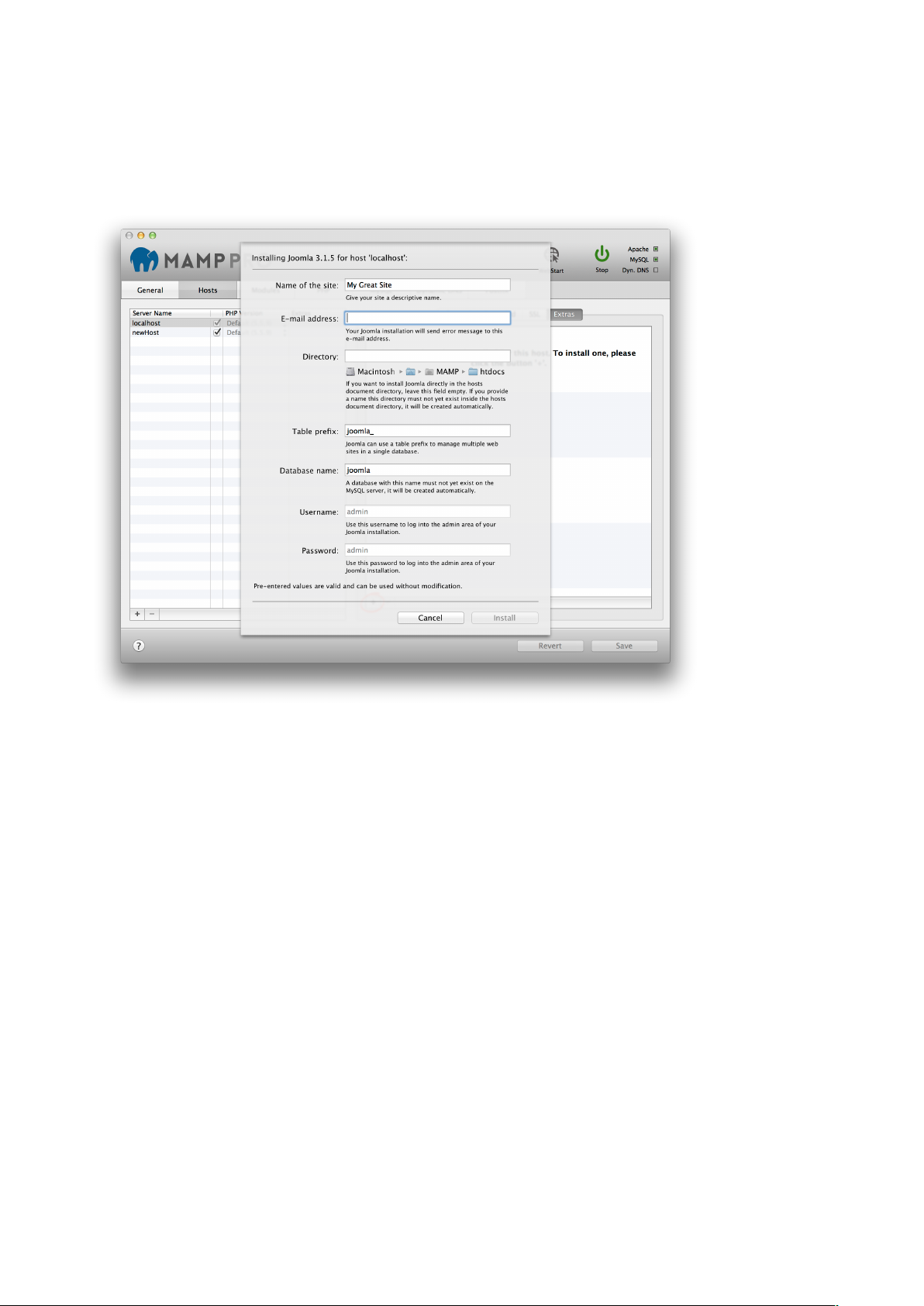
Joomla installations can share a single MySQL database if you provide a unique table
prefix during installation. To use an existing database enter the name of the database and
a unique table prefix. To create a new database use a unique database name, table prefix
must not be empty.!
!
Table prefix:!
Set the name of your database schema prefix. Joomla offers the ability to manage multiple
websites using a single database schema. !
Database name:!
Set the name of your database schema which will be added to your local database. After
installation you can view this database for this instance of Joomla using phpMyAdmin,
Sequel Pro, or MySQLWorkbench. !
!
15
Page 16
webEdition!
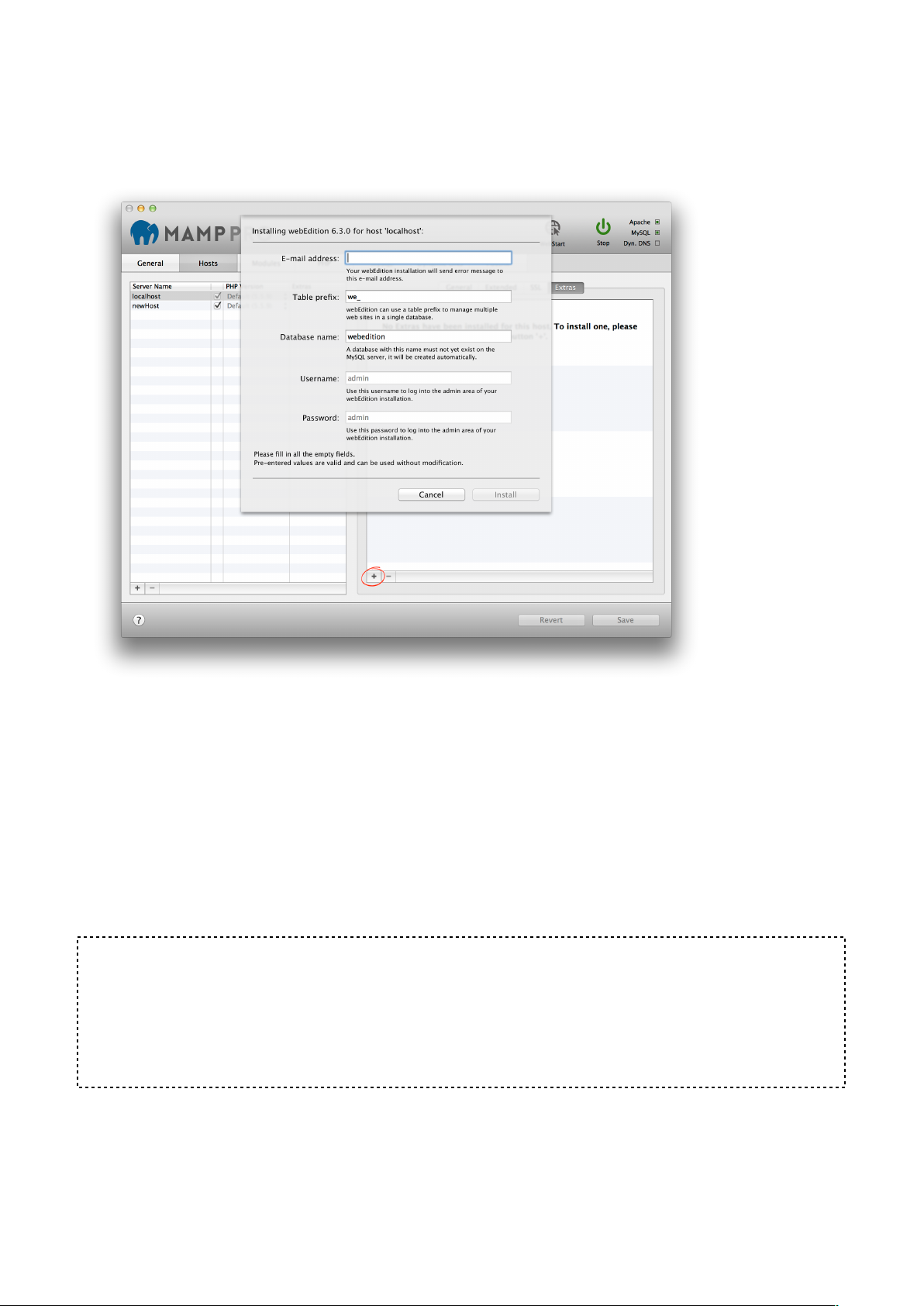
webEdition will always be installed in a folder called webedition inside the document root
folder.!
!
!
!
Table prefix:!
Set the name of your database schema prefix. webEdition offers the ability to manage
multiple websites using a single database schema.!
Database name:!
Set the name of your database schema which will be added to your local database. After
installation you can view this database for this instance of webEdition using phpMyAdmin,
Sequel Pro, or MySQLWorkbench. !
!
!
Note: When a Content Management System is setup the host name and Apache port
number is stored in its database. Going forward the Apache port in MAMP PRO cannot be
changed. A change in the Apache port will result in breaking the CMS, returning only a
vague error message. Content Management Systems usually provide a mechanism for
changing the host and port names. If changes are made in the CMS, then they must also
be made in MAMP PRO.!
!
!
16
Page 17
3. Modules (Apache)!
!
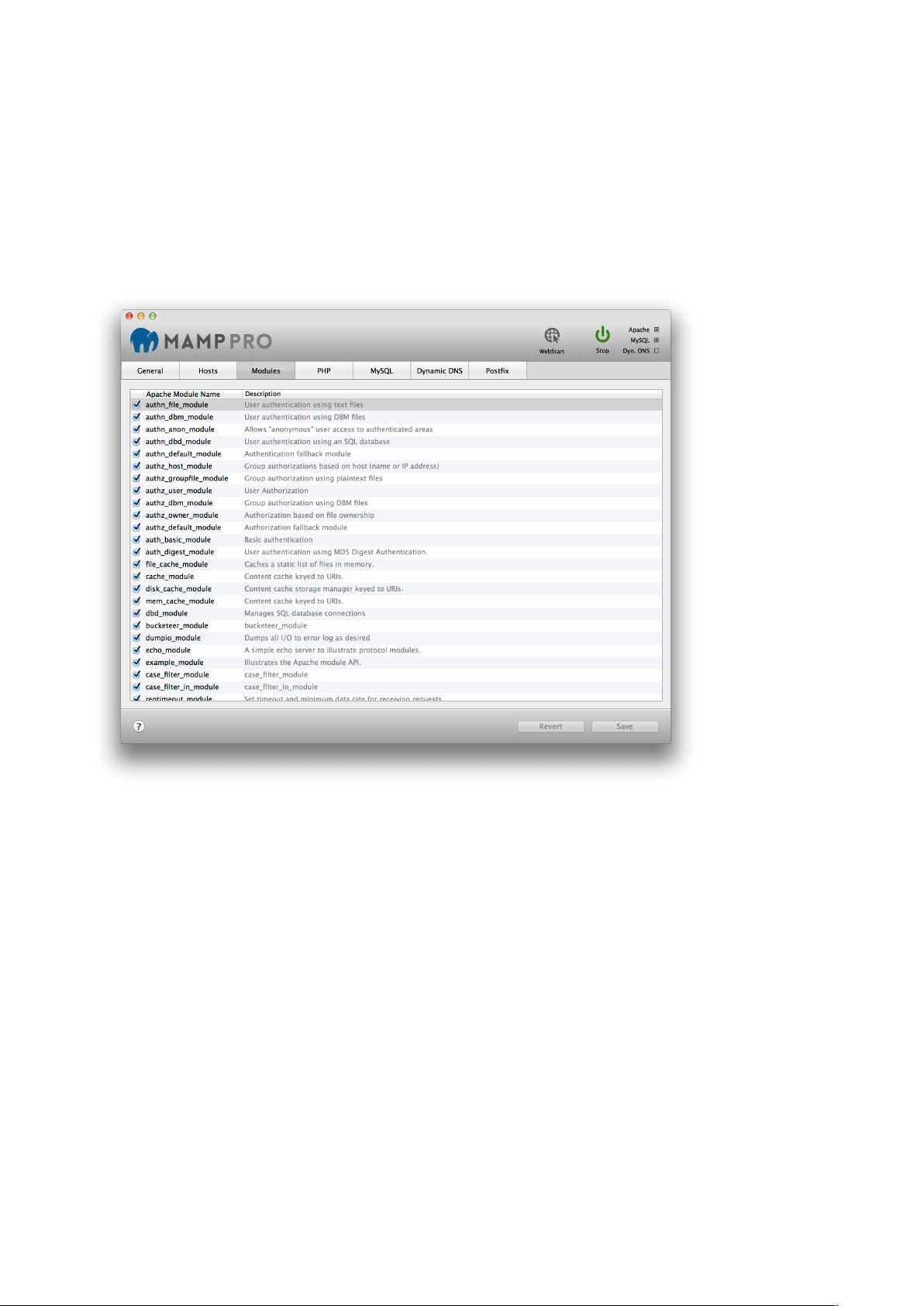
The Apache Web Server installed by MAMP PRO comes with many modules pre-installed.!
!
Apache Modules!
The web server modules can be activated or deactivated depending on your needs.
Module Description provides information pertaining to features and functions of the
selected module.!
!
!
!
If you want to use the PHP scripting language you must activate the php_module, if you
want to use Python you need mod_wsgi module, Perl needs perl_module.!
If you want to be able to switch to CGI mode and use multiple PHP versions you must
activate cgi_module.$
17
Page 18
4. PHP!
!
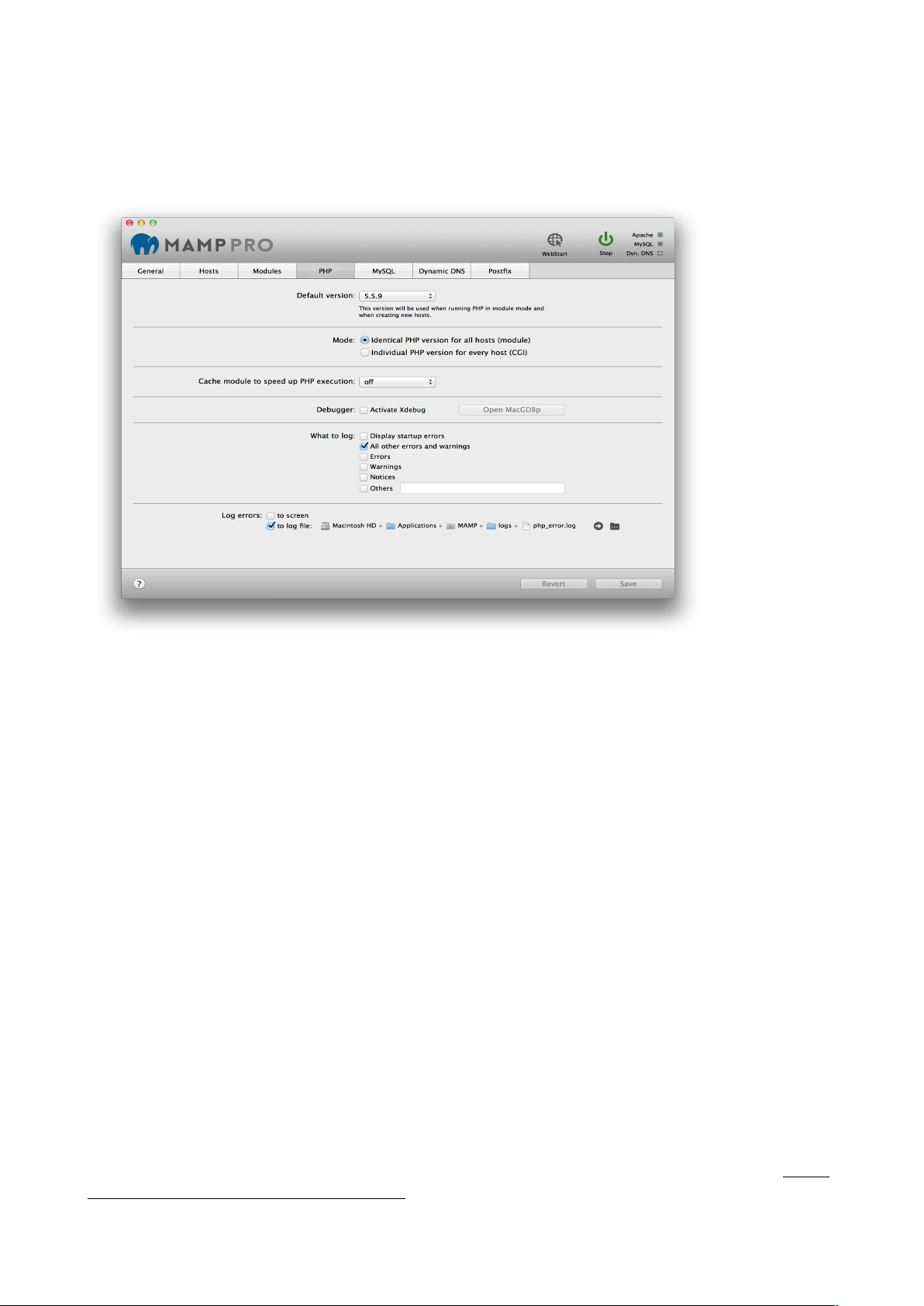
PHP is a popular web scripting programming language. MAMP PRO installs several
versions of the PHP script interpreter.!
!
!
Default version!
Choose which PHP version to use.!
!
Mode!
Choose whether to use identical PHP versions for all hosts [Module Mode] or on a host by
host basis [CGI Mode]. In CGI Mode the PHP settings will be identical for all hosts –
except for the PHP version. Navigate to the Hosts section to change the PHP version for
each individual host. More information on how to change the PHP version for an individual
host is covered in the ‘Hosts’ section.!
!
Cache Module to speed up PHP execution!
PHP has several cache extensions that can help speed up execution in certain
circumstances. This is set to ‘off’ by default. Enabling a cache extension does not
necessarily translate to greater execution speed.!
!
Debugger"
!
Activate Xdebug!
Activate Xdebug to allow PHP to create debugging information during script execution. By
default, Xdebug uses localhost and port 9000 in the PHP.ini file.!
!
Open MacGDBp!
With Xdebug activated you can open the MacGDBp debugger to enable PHP debugging.
By default, MacGDBp expects debugging information on port 9000 of localhost. See http://
www.bluestatic.org/software/macgdbp/ for more information.!
18
Page 19
!
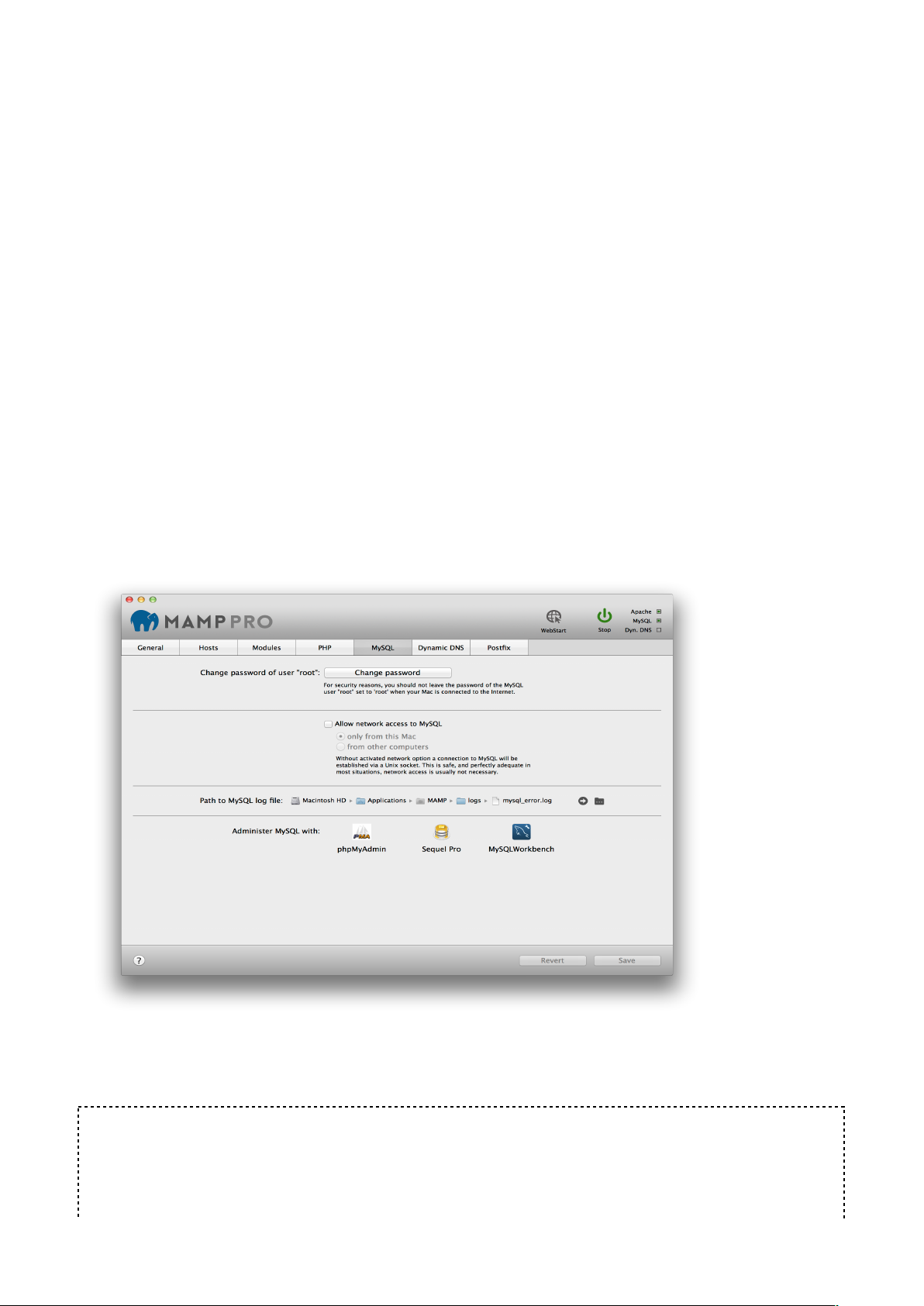
What to log!
Determine which error types should be reported.!
!
•
Display startup errors: Log PHP errors that occur when Apache loads the PHP module. !
•
All errors and warnings: All errors will be reported.!
•
Errors: Script errors that make the further execution of the current PHP script
impossible.!
•
Warnings: General errors in the PHP environment.!
•
Notices: Possible problems, that do not concern PHP, but which could be a notice of an
error in a script.!
•
Other: Report further error types through constants. Please turn to the PHP
documentation for further information.!
!
Log Errors!
Determine if these errors should be recorded in a log file and/or displayed in the web
browser window.!
!
5. MySQL!
!
The MySQL database server is a popular database used on production servers. An
installation of MySQL is installed on your computer by MAMP PRO.
!
!
Change password of user “root”!
The Head Database Administrator is called root. This user has unlimited access to all
databases. Therefore you should set the password to one only you know.!
Note: The default password of root is “root". To make things even more confusing there is
also a user root inside Mac OS X. Don’t confuse them. You can also use one of the
MySQL administration tools to create other MySQL users if you do not want to use
almighty root.!
19
Page 20

!
Allow network access to MySQL!
If the checkbox for Allow network access to MySQL is not checked, network access to the
database is prohibited, even from programs installed locally.!
!
Note: This is an advanced feature not need for local development.!
!
Only from this Mac!
Only programs installed on this Mac can access MySQL via network functions.!
!
From other computers!
MySQL will answer any network request, even from computers on the internet, depending
on you network settings.!
!
Path to MySQL log file!
Errors occurring at startup or during execution of the MySQL server will be saved in this
log file.! !
!
Administer MySQL !
MAMP PRO comes pre-installed with several MySQL administration tools.!
phpMyAdmin is a web-based administrational tool. It allows you to change data and
perform administrative duties like creating new databases.!
Sequel Pro™ is a native Mac application. It allows you to create and visualise database
schemas in addition to administrative duties.!
MySQL Workbench™ is also a native Mac application from the makers of MySQL. It allows
you to visually create database schemas in addition to administrative duties.!
!
6. Dynamic DNS!
!
If you would like to make your hosts accessible from the internet (Don’t forget about
security then!), but do not have a domain name that points to your Mac, you will need a
Dynamic DNS Service. !
If your network is connected to the internet via a router and it can handle Dynamic DNS
Services, then you don’t need to configure it with MAMP PRO. !
Otherwise you will need to register with a Dynamic DNS Service and enter the username
and password into the appropriate fields. Then you will need to tell MAMP PRO when to
inform the Dynamic DNS provider about a change in your Macs IP address. It may be
necessary when you restart your computer or a DSL/Cable modem re/establishes a
connection.!
!
!
!
!
!
!
!
!
!
!
!
20
Page 21
!
!
Note: To use the Dynamic DNS functions, you will need to register with one of the
supported providers. This is independent of MAMP PRO and is not a service provided by
appsolute GmbH.!
!
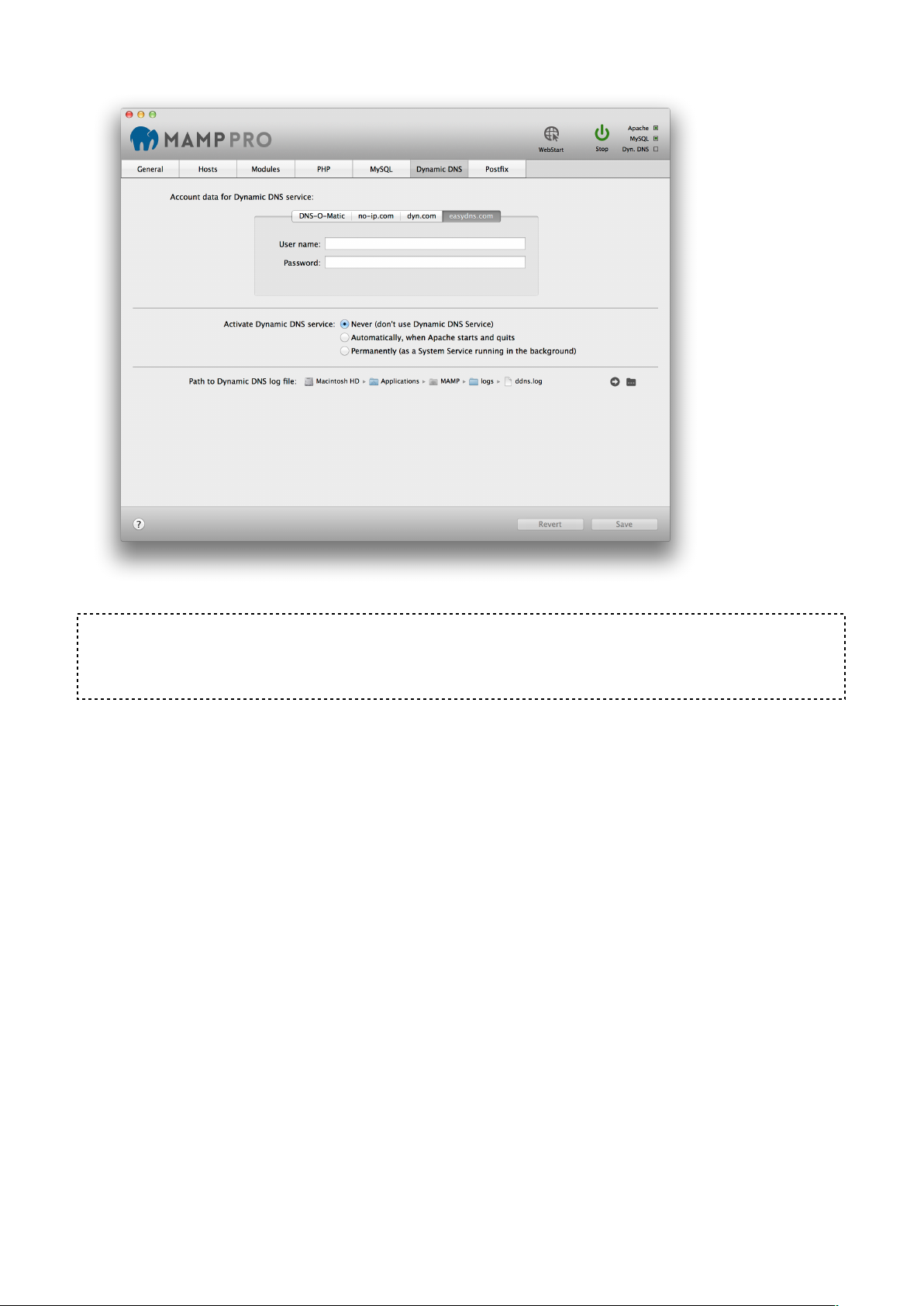
User name!
Enter the user name that was given to you by the provider of the Dynamic DNS Service.!
!
Password!
Enter the password that was given to you by the provider of the Dynamic DNS Service.!
!
Activate Dynamic DNS Service !
!
Never (don’t use Dynamic DNS Service)!
Deactivate the "Dynamic DNS" service.!
!
Automatically, when Apache starts and quits!
Starts the "Dynamic DNS" service with the start of the Apache server.!
!
Permanently (as a System Service running in the background)!
Starts the "Dynamic DNS" service with the operating system. Only use this when your
servers are running 24/7.!
!
Path to Dynamic DNS Log file!
All the events of the Dynamic DNS service will be recorded in a log file.!
!
21
Page 22

7. Postfix!
!
Sometimes you may need to send an email with PHP. To do so you have to configure and
start Postfix. An easy way getting Postfix to run is using the configuration tool built into
MAMP PRO.!
!
Set domain of outgoing e-mails to!
If you want to use the PHP function mail() for sending emails to your own email address
(like [email protected]) you just need to open MAMP PRO, go to Server -> Postfix and
add the value "johndoe.com" (without quotes and the according domain name) into the
field "Domain of outgoing mail”. Only if you want to send e-mail to others you will need to
fill in the other fields. In this case make sure that your e-mail provider allows the use of a
Smart host.!
!
Server name"
Fill in your server name for outgoing emails. This could be for instance
"smtp.johndoe.com" (without quotes). Ask your provider if you are unsure about the server
name.!
!
User!
Add the user name of your mail account.!
!
Password!
Add the password for your email user account.!
!
Authentication!
Leave to “None"!
!
Note: Some providers do not allow Smart-Hosts, like Google Mail.!
!
V. Menu!
!
!
1. MAMP PRO!
!
Check For Updates!
Check MAMP PRO updates checks for updates to the MAMP PRO application. It does not
check for new versions of individual components.!
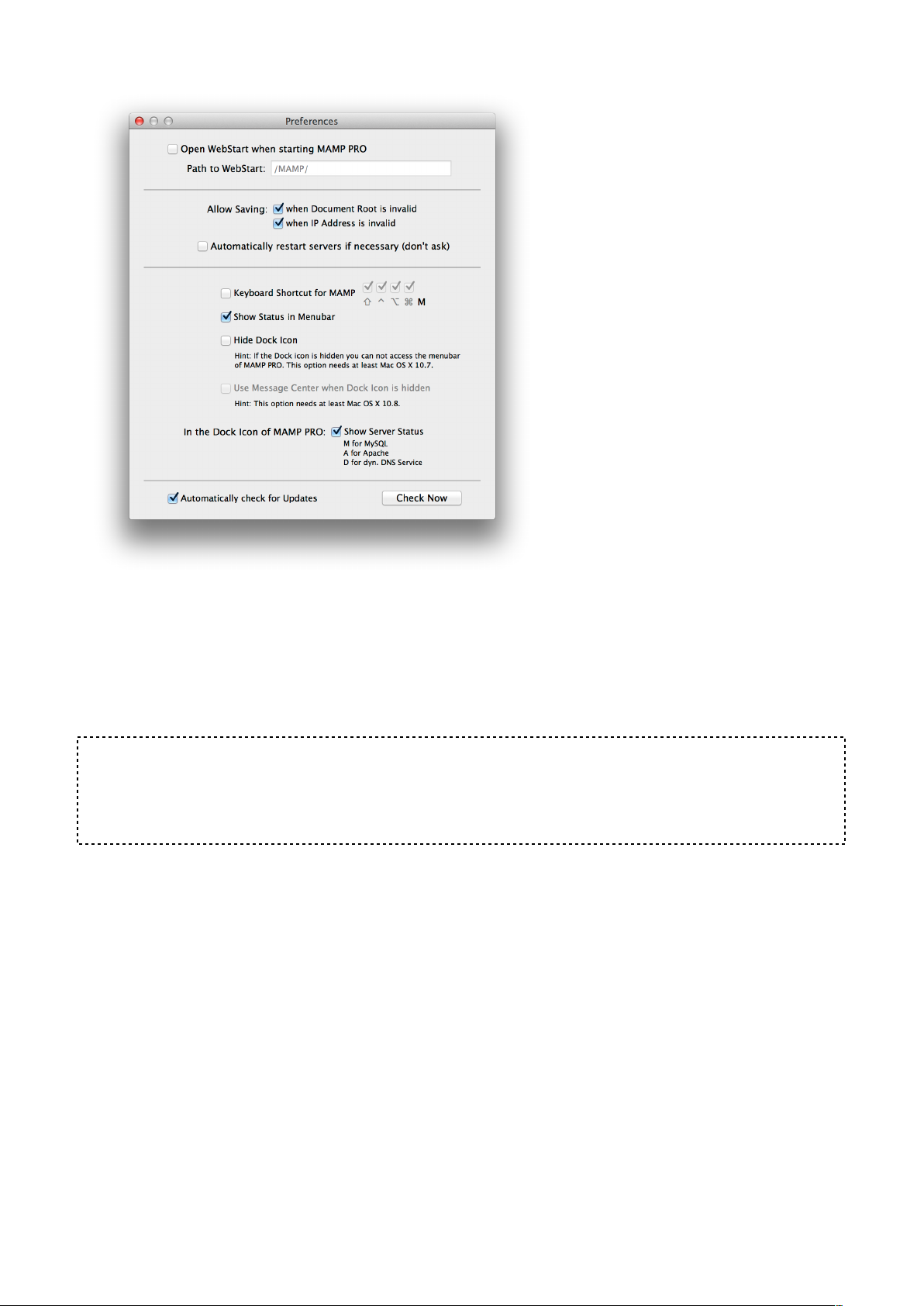
!
Preferences…!
Open WebStart when starting MAMP PRO!
Your default browser will bring up the web start page when MAMP PRO is launched.!
"
Path To Webstart!
The default MAMP start page provides links to access utilities such as phpMyAdmin,
phpInfo, SQLite Manager, phpLiteAdmin, FAQ, and the MAMP Website. !
!
22
Page 23

When left using the default setting (/MAMP/), you will be directed to the MAMP PRO
utilities start page using the Alias definition /MAMP/. If this field is left blank, you will be
taken to your default document root (http://localhost:8888 in the /Applications/MAMP/
htdocs). If you enter /subDirectory in this field, you will be taken to the /Applications/
MAMP/htdocs/subDirectory folder via your default web browser (http://localhost:8888/
subDirectory).!
!
Allow Saving when Document Root is invalid"
MAMP PRO will ignore invalid paths to hosts and proceed with saving your settings.!
!
Allow Saving when IP Address is invalid"
MAMP PRO will ignore invalid IP addresses for hosts and proceed with saving your
settings.!
!
Note: Setting these options may prevent Apache from starting up.!
!
Automatically Restart Servers if necessary (don’t ask)"
MAMP PRO will automatically restart when changes are made that require a restart.!
!
Keyboard shortcut for MAMP"
Only M cannot be used as a shortcut key. The ^ key stands for the ctrl key.!
!
Show Status in Menu Bar"
The elephant icon will appear in the Menu Bar. When MAMP PRO has the servers running
the elephant icon will be blue, when the servers are not running the elephant will be black.!
!
Hide Doc Icon (OS X 10.7 or later)"
The Doc Icon will be hidden. This option will only take affect after the restart of MAMP
PRO.!
!
Note: You will not be able to see the MAMP PRO Menu Bar.!
!
Use Message Center (OS X 10.9 or later)"
The Message Center will inform you of when Apache and MySQL have started. The
Message Center can only be used when the doc icon is hidden.!
!
!
!
!
!
!
!
!
!
!
!
!
23
Page 24
!
2. File!
!
Edit Template"
MAMP PRO uses templates to create the necessary server config files. You can edit these
templates from the menu item File > Edit template. Here, you have access to options
which are not accessible from the MAMP PRO user interface.!
!
Note: Edition errors in the templates of the configuration files can cause the servers not to
start. This could mean that you will have to reset the settings for MAMP PRO, and you
may lose all your other custom settings. You should edit these templates only if you are
familiar with the exact syntax and meaning of the options.!
!
Factory Settings"
!
Development!
Development will reset all your host and server settings back to default, including setting
your Apache ports back to 8888, 8890, 8889, and your Apache User/MySQL User to
username/username.!
!
Live#
Live will reset all your host and server settings back to default, including setting your ports
back to 80, 440, 3306, and your Apache User/MySQL User to www/mysql.!
!
Backup…!
Make a backup of all your host settings and database files.!
!
24
Page 25

Note: The backup feature makes a backup of your current host settings. It will not back up
the files (.php, .html, .js etc…) in a hosts document root! !
!
Restore From Backup!
Restore your host settings and MySQL database files.!
!
3. Log!
!
The MAMP server record events like errors in so-called log files. Use the MAMP PRO
menu to display the content of these files.!
!
4. Tools!
!
Extras!
Go directly to the Extras pane of the last selected host.!
!
Verify MySQL Databases!
Get a complete list of schemas and tables inside of your MySQL Database. The database
must be running in order for this function to work.!
!
Repair MySQL Databases!
Runs mysqlcheck which performs table maintenance.!
!
Update MySQL Databases!
Update your databases. The server must be shutdown to use this function.!
!
Save MySQL Databases!
Make a backup of your databases. The server must be shutdown to use this function.!
!
Show Hosts File!
The hosts file is located in the /etc directory, it maps host names to the IP address of your
Mac. The host file contains the host names. Host entries created by MAMP PRO are
marked by “# MAMP PRO - Do NOT remove this entry!”. These will disappear when
Apache is shut down.!
!
Start System Apache / Web Sharing!
Enable the Apache server that is included with Mac OS X.!
!
VI. FAQ!
!
What is MAMP PRO?"
MAMP PRO is the commercial, professional grade version of the classic local server
environment for Mac OS X: MAMP. Designed for professional web developers and
programmers, MAMP PRO allows easy installation and administration of their
development environment under Mac OS X.!
!
Where can I download MAMP PRO?"
Get the latest version of MAMP PRO from http://mamp.info.!
25
Page 26

!
Are updates free of charge?"
Yes, all updates in the current major version (3.x) are free of charge. To update MAMP
PRO from e.g. 3.1.2 to 3.9 just use the serial number you already have. Licenses are good
forever, they are not on a subscription basis.!
!
Can I use MAMP at the same time as MAMP PRO?"
Both applications, MAMP as well as MAMP PRO, are configuration tools for the tools
inside the folder MAMP. Though you could run them simultaneously you should not do it.
You would run into sporadic problems, even data loss may occur.!
!
Is MAMP PRO compatible with Mac OS X 10.9 (Mavericks)?"
Yes, MAMP PRO is indeed compatible with Mac OS X 10.9 (Mavericks).!
!
Where should I store my HTML and PHP pages?"
By default, PHP and HTML Pages should be stored inside the MAMP /Applications/MAMP/
htdocs folder. This folder is called "Document Root“. The location of the document root
folder can be changed in the host settings.!
!
Is it possible to add an updated version of PHP?"
Compiled binaries of the PHP interpreter can be found at http://www.mamp.info/en/
downloads/index.html . Drop this downloaded folder into your /Applications/MAMP/bin/php!
directory. Close and re-open your MAMP PRO application. Your new PHP version should
now appear in the PHP drop down menu. MAMP PRO will only support PHP versions from
the downloads page.!
!
Can the port assignment be the same for MAMP and MAMP PRO?"
You can set the same ports for MAMP and MAMP PRO but it is not recommended to run
both applications at the same time.!
!!
Is it possible to install MAMP PRO on an external drive?"
No, MAMP PRO (as well as MAMP) has to be installed on the system drive.!
!
Will MAMP work if the MAMP folder is not located in the Applications directory?"
No. In order to work properly the MAMP folder has to be located in the Applications folder.!
!
Is the amount of virtual hosts aliases limited?"
No, with MAMP PRO you can use as many hosts and aliases as you like.!
!
Where can I find the log files?"
Clicking the black right arrow will open the log file in the Console application.!
!
Where do I find my registration number?"
Open the dialog File/About MAMP PRO, it is shown there.!
!
Where exactly are the MAMP PRO files created or changed?"
The following list contains all files which are created and changed by MAMP PRO and are
not located within the MAMP PRO folder.!
!
MAMP PRO Settings and Files!
•
/Library/Application Support/appsolute/MAMP PRO!
•
~/Library/Application Support/appsolute/MAMP PRO!
26
Page 27

•
~/Library/Preferences/de.appsolute.mamppro.plist!
!
MySQL!
•
/Library/Application Support/appsolute/MAMP PRO/db/mysql!
!
Dynamic DNS!
•
/Library/LaunchDaemons/de.appsolute.mamp_dyndns.plist!
•
~/Library/LaunchAgents/de.appsolute.mamp_dyndns.plist!
!
Autostart at system start!
•
/Library/StartupItems/MAMP/MAMP!
•
/Library/StartupItems/MAMP/StartupParameters.plist!
!
Postfix!
An existing postfix configuration will be backed up to /etc/postfix/MAMP_backup before
writing a new config file!
!
Which Apache modules are included?"
Apache modules are located in the /Applications/MAMP/Library/modules folder.!
!
Is the ImageMagick PHP module included?"
The ImageMagick PHP module is included by default, but you must enable it inside the
php.ini template file. Remove the ‘;’ from the following line.!
!
;extension=imagick.so!
!
Which PHP modules are included?"
To find out which PHP modules are included click on the (i ) button in the host section
when the servers are running. It will open a web page showing information about the
selected PHP software.!
!
VII. Troubleshooting!
!
!
The last time I opened Extras there was a Content Management System that is now
not available?"
This could be due to several reasons. Please check your Internet connection. If it is not
working MAMP PRO will use only show Extras that you have previously installed. An Extra
will be missing if the PHP version a host uses does not meet the requirements of an Extra.
Do you have enough free disk space available? Some Extras can only be installed once
per host. e.g. webEdition.!
!
My Content Management System stopped working without any indication of what is
wrong?"
Most content management systems store the host location, including the port number, in
their database. If an CMS is setup with an Apache port of 8888, then this port must be
used every time the CMS is used. Changing the port may result in a blank screen in your
browser, and a vague error message.!
!
I setup up Wordpress and it is asking for a username and password?"
27
Page 28

Your default Wordpress username and password when setup through MAMP PRO are
admin/admin.!
!
My Apache Server will not start?"
The most common problem with Apache Server not starting is another Apache instance
already running on the same port. To check this!
!
- Quit MAMP PRO.!
- Open the Activity Monitor located in your /Applications/Utilities folder.!
- Type "httpd" into the search field on the top right.!
- Quit every process you find after your search.!
- Restart MAMP PRO.!
!
If Apache still refuses to start check the log file for error messages.!
!
My MySQL Server will not start?"
The most common problem with MySQL Server not starting is another mysql service
running on the same port. To check this !
!
- Quit MAMP PRO.!
- Open the Activity Monitor located in your /Applications/Utilities folder.!
- Type "mysqld" into the search field on the top right.!
- Quit every process you find after your search.!
-
Restart MAMP PRO.!
!
If MySQL still refuses to start check the log file for error messages.!
!
When I type http://localhost in my browser it brings me to Google search?"
!
You must include the port number when you type a your localhost url into the browser.!
e.g. http://localhost:8888!
!
What appears in your browser window thereafter may be shortened to localhost depending
on the browser settings.!
!
Changes to my php.ini file and/or my httpd.conf file are not showing up when I
restart MAMP PRO."
!
You must edit the httpd.conf, php.ini and my.cnf files through the Template Editor provided
by MAMP PRO. Go to File->Edit Template to edit template files.!
!
!
VIII. How-tos!
!
Activating Output Buffering!
1. Start MAMP PRO!
!
!
!
28
Page 29
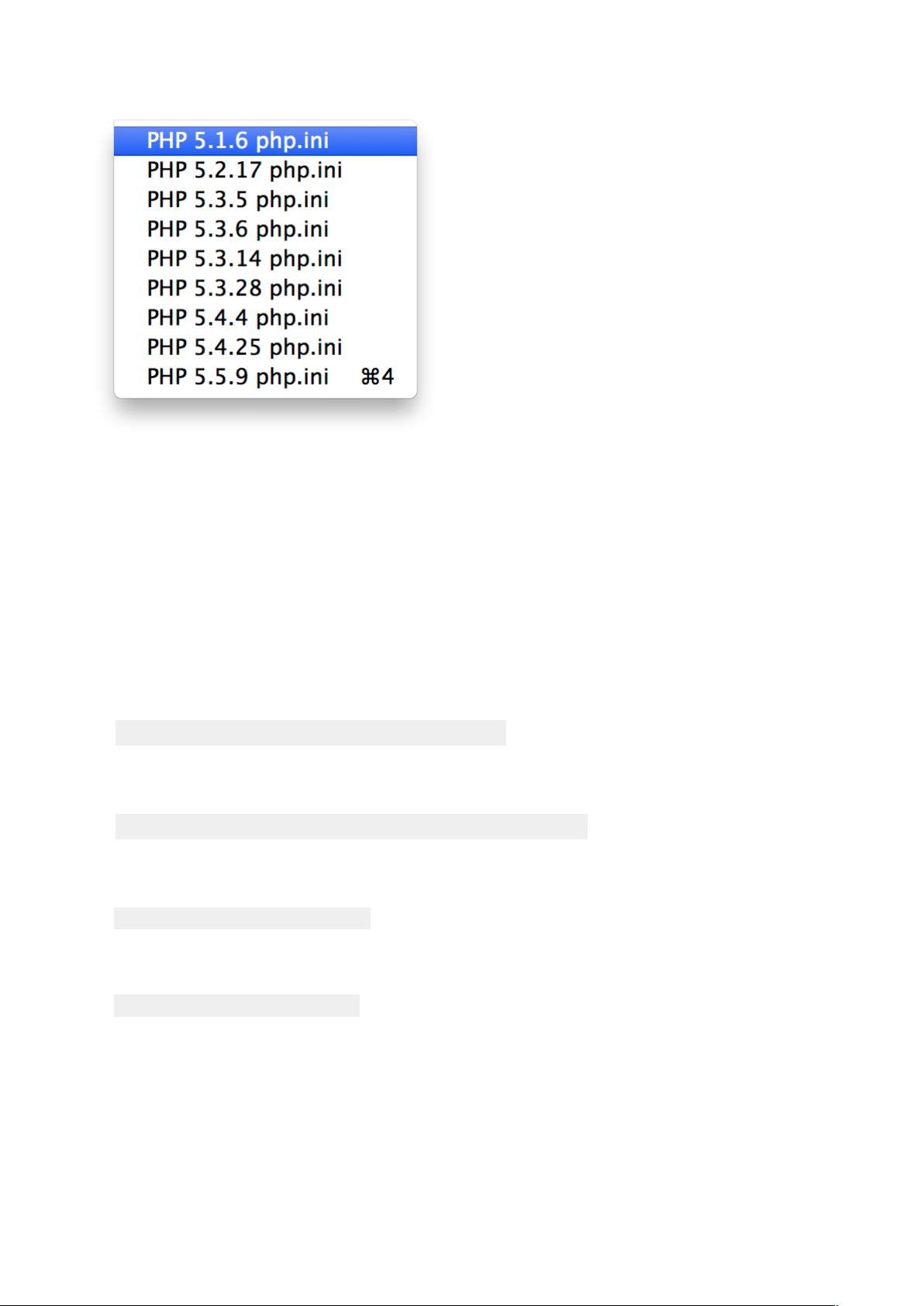
2. Select File -> Edit Template -> PHP 5.x.x php.ini / PHP 5.x.x php.ini#
!
3. Search this line "output_buffering = Off”!
4. Change "Off" to "On" or to a maximum number of bytes instead (for example "4096")!
5. Save the file!
6. Start Servers!
!
!
Check the Default Storage Engine of MySQL!
1. Open MAMP!
2. Start the servers!
3. Open Terminal.app (/Applications/Utilities)!
4. Enter the following line into the terminal and hit Enter:!
!
cd /Applications/MAMP/Library/bin!
!
5. Hit Enter !
!
./mysql --host=localhost -u root -proot!
!
6. Enter the following line into the MySQL prompt and hit enter:#
#
USE information_schema;#
!
7. Enter the following line into the MySQL prompt and hit enter:#
#
SELECT * FROM engines;#
!
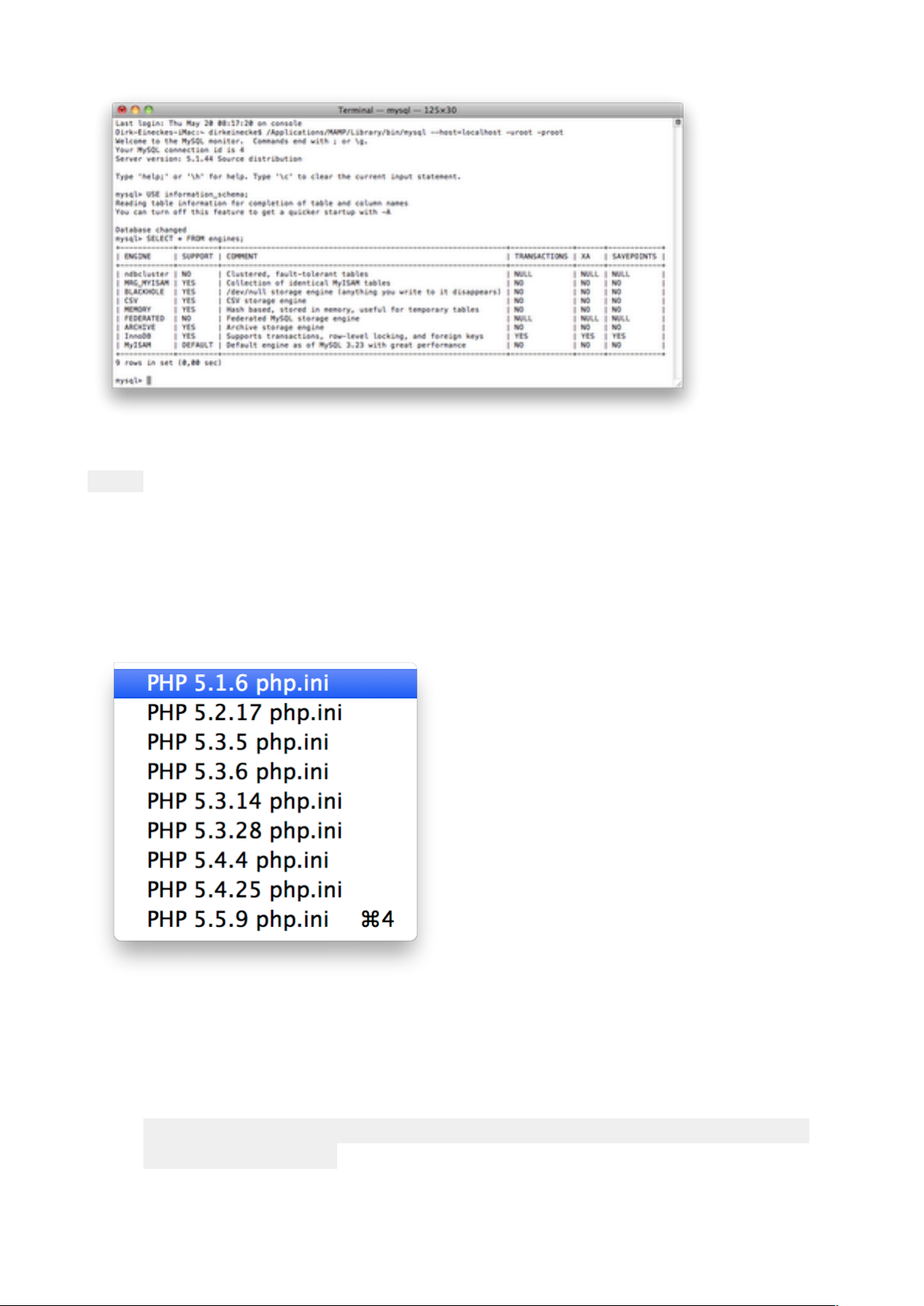
8. A table with the Storage Engines of MySQL will show up. Inside the Support column the
Default Storage Engine has the value "DEFAULT".#
#
29
Page 30
#
9. Enter the following line into the MySQL prompt and hit enter:#
#
exit;!
!
!
Increase the PHP memory limit!
1. Start MAMP PRO!
2. Stop the server if it's running!
3. Choose Menu -> File -> Edit Template -> PHP 5.x.x php.ini / PHP 5.x.x php.ini#
!
!
!
#
#
!
!
!
!
!
!
!
!
!
!
!
4. The PHP ini file will be opened.!
5. If a dialogue box pops up, read it and confirm with OK!
6. Search (Command-F) for "memory_limit" (without quotes)!
7. You should get the following line:!
!
!
memory_limit = 32M ; Maximum amount of memory a script
may consume (8M)!
!
30
Page 31
8. Now you can change the default value of 32M. For instance into 64M or even more (like
128M)!
9. Save (Command-S) your changes.!
10. Close (Command-W) the file.!
11. Start the Server.!
Set the MySQL Default Storage Engine!
The MySQL server of MAMP PRO uses the Default Storage Engine MyISAM. If you want
to change this, you have to change the configuration file of the MySQL server. With this
tutorial we want to show you how to manage this. As Default Storage Engine we are using
InnoDB.!
!
1. Start MAMP PRO.!
2. Stop the MAMP PRO server if it is running.!
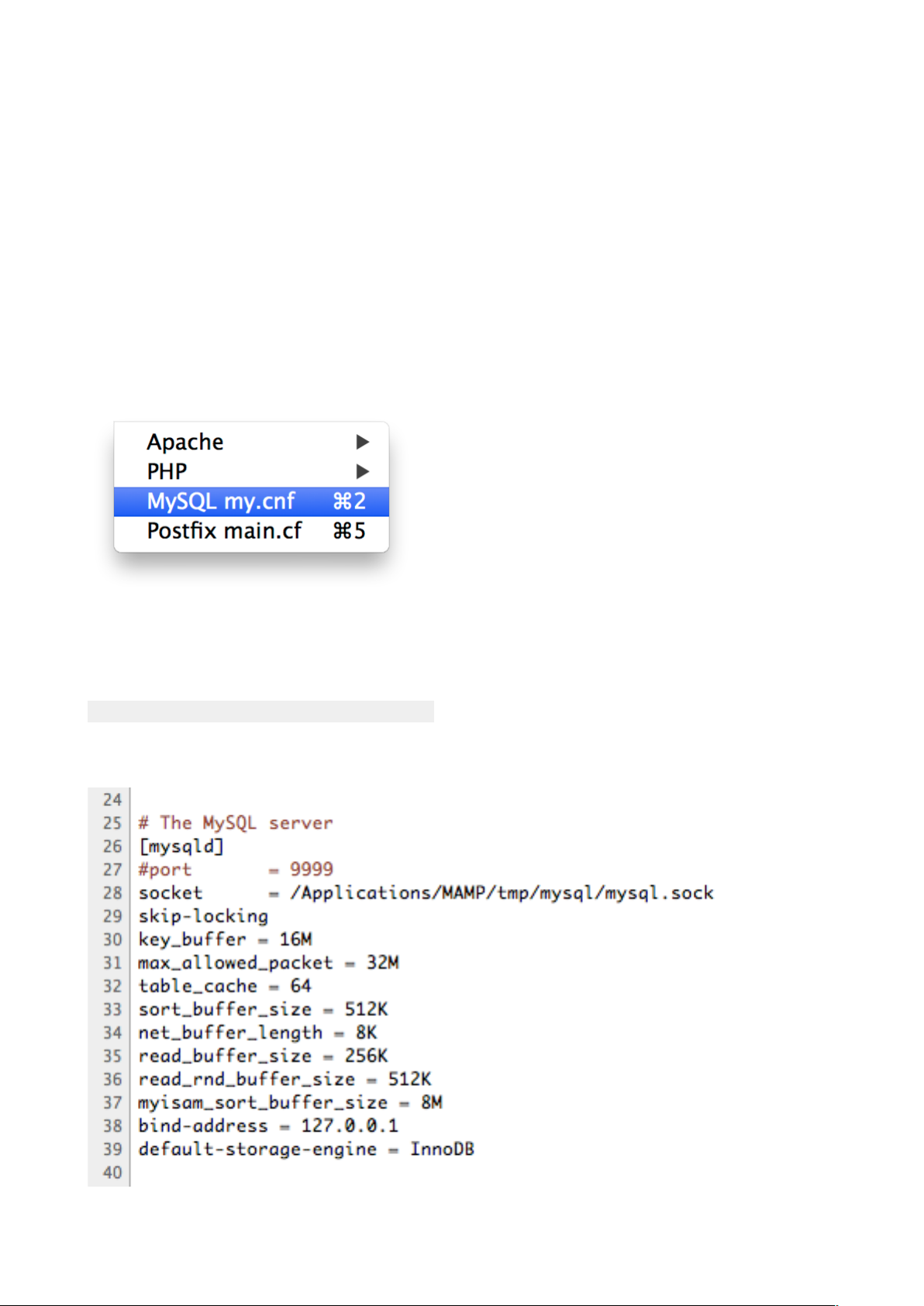
3. Select File -> Edit Template -> MySQL my.cnf#
!
!
!
!
!
!
#
#
!
4. An editor window appears.!
5. If a warning message appears confirm with OK.!
6. Find the section "[mysqld]"!
7. Beneath the last line of this section add this line:#
#
default-storage-engine = InnoDB#
!
8. The section "[mysqld]" now looks like this:#
#
#
!
31
Page 32
9. Save (Apple + S) all changes made on "my.cnf"!
10. Close the editor window (Apple + W)!
11. Start the MAMP PRO servers.!
!
!
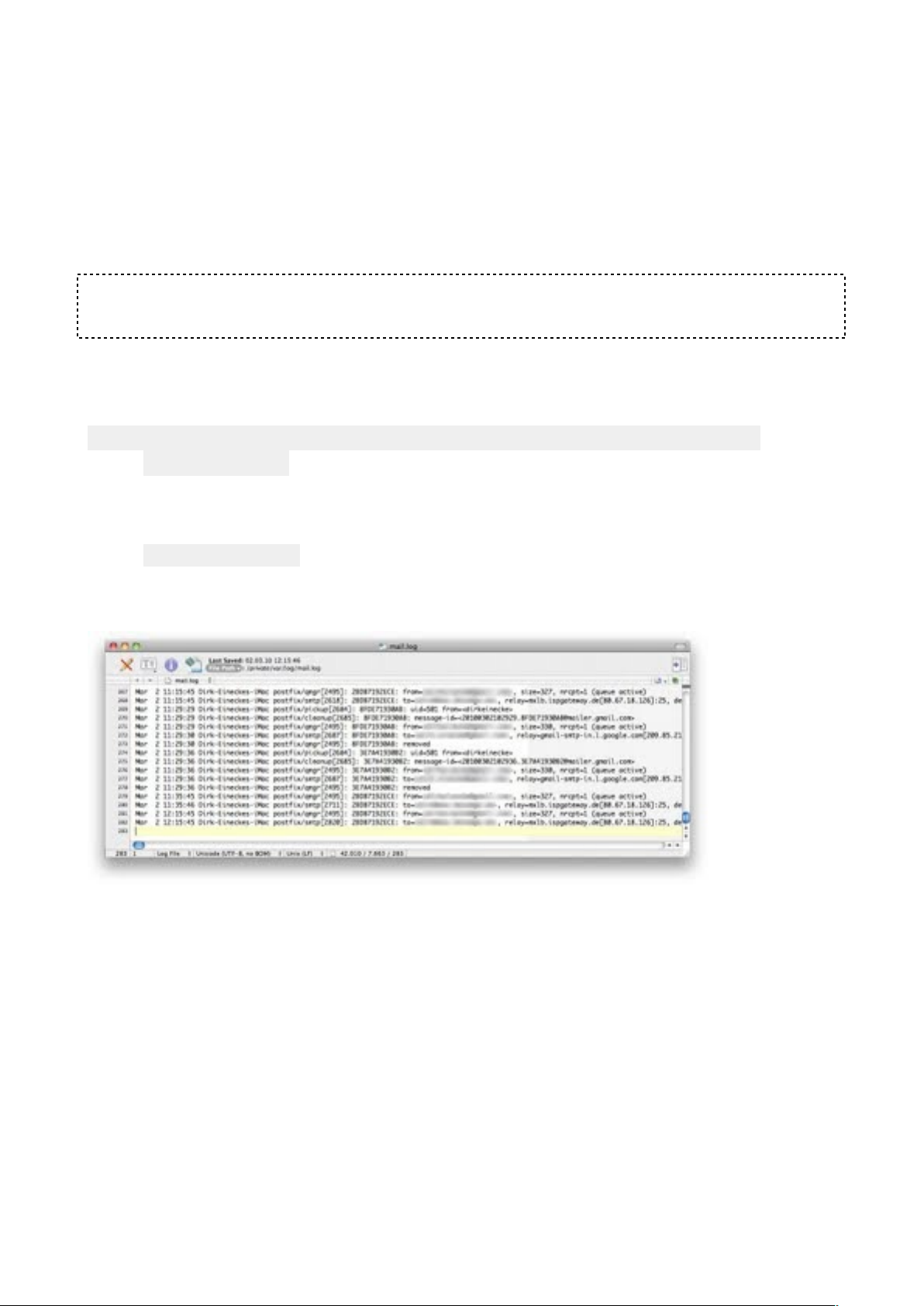
Show the Postfix log file!
With a text editor!
!
Note: If you want to open the Postfix log file with a text editor, you have to make the file
visible.!
!
1. Open the Terminal.app (Applications/Utilities)!
2. Enter the following and hit Enter#
!
!! defaults write com.apple.finder AppleShowAllFiles -
boolean true!
!
3. Restart the Finder by enter the following and hit Enter#
#
! Killall Finder#
!
4. Open the file "/private/var/log/mail.log" with your editor.#
#
!
!
With Console.app (recommended)!
1. Open Console.app (Applications/Utilities)!
2. Choose View -> Show Log List!
3. Open the folder "FILES" in the Log List!
4. Open the folder "/private/var/log"!
5. Click the mail.log entry in the Log List!
6. On the right side of the window you can see the content of the Postfix log file.#
#
!
With Terminal.app!
1. Open the Terminal.app (Applications/Utilities)#
!
2. Enter the following prompt and hit Enter#
#
32
Page 33

! tail -f /private/var/log/mail.log#
!
3. You can now read the Postfix log file within the Terminal. The log file keeps updating ! as
new entries apply.#
!
4. Press "Ctrl + c" to stop the process!
!
!
Using MySQL command line!
To use the MySQL command line, perform the following steps:!
!
1. Start MAMP PRO!
2. Start the servers!
3. Open Terminal.app (Applications -> Utilities)!
4. Type in an hit enter.!
!
cd /Applications/MAMP/Library/bin!
!
5. Type in and hit enter.!
!
./mysql --host=localhost -u root -proot!
!
Now you can use the MySQL command line. For example to show all your databases
with show databases;.!
!
Connect to MySQL from PHP!
The following example shows how to connect to a MySQL database using the mysqli()
library.!
!
<?php
!
" " DEFINE('DB_USERNAME', 'root');
" " DEFINE('DB_PASSWORD', 'root');
" " DEFINE('DB_HOST', 'localhost');
" " DEFINE('DB_DATABASE', 'performance_schema');
!
" " // http://www.php.net/manual/en/mysqli.connect.php
!
" " $mysqli = new mysqli(DB_HOST, DB_USERNAME, DB_PASSWORD,
DB_DATABASE);
!
" " if (mysqli_connect_error()) {
" " " " die('Connect Error (' . mysqli_connect_errno() . ') '
. mysqli_connect_error());
" " }
!
" " echo 'Connected successfully.';
33
Page 34

!
" " $mysqli->close();
!
?>
34
 Loading...