

Page 1
TM
OPERATION MANUAL
⚠ WARNING
COPYRIGHT © 2013 - APPION INC. - ALL RIGHTS RESERVED
TO REDUCE THE RISK OF INJURY OR PRODUCT DAMAGE,
READ OPERATION MANUAL PRIOR TO OPERATING PRODUCT.
Page 2

Introduction
AC/R system operating efciency depends on proper
evacuation - and proper evacuation depends on a
reliable vacuum gauge capable of monitoring the
entire evacuation process.
The AV760 accurately displays measurements from
atmosphere (760,000 microns) all the way to deep
vacuum (10 microns), so you can be sure your system
is clean, dry and tight.
Table of Contents
Safety .....................................................................3
Display & Controls .................................................. 4
Using the AV760 ..................................................... 5
Maintenance ........................................................... 6
Regulatory ...............................................................7
2
© 2013 APPION INC. - ALL RIGHTS RESERVED
AV760 OPERATION MANUAL
Page 3

Safety
• Do not connect to systems under pressure.
• Do not use leaky or damaged batteries.
• Use only specied batteries and cleaning agents.
• Dispose of batteries in accordance with any
applicable local laws and regulations.
3
© 2013 APPION INC. - ALL RIGHTS RESERVED
AV760 OPERATION MANUAL
Page 4
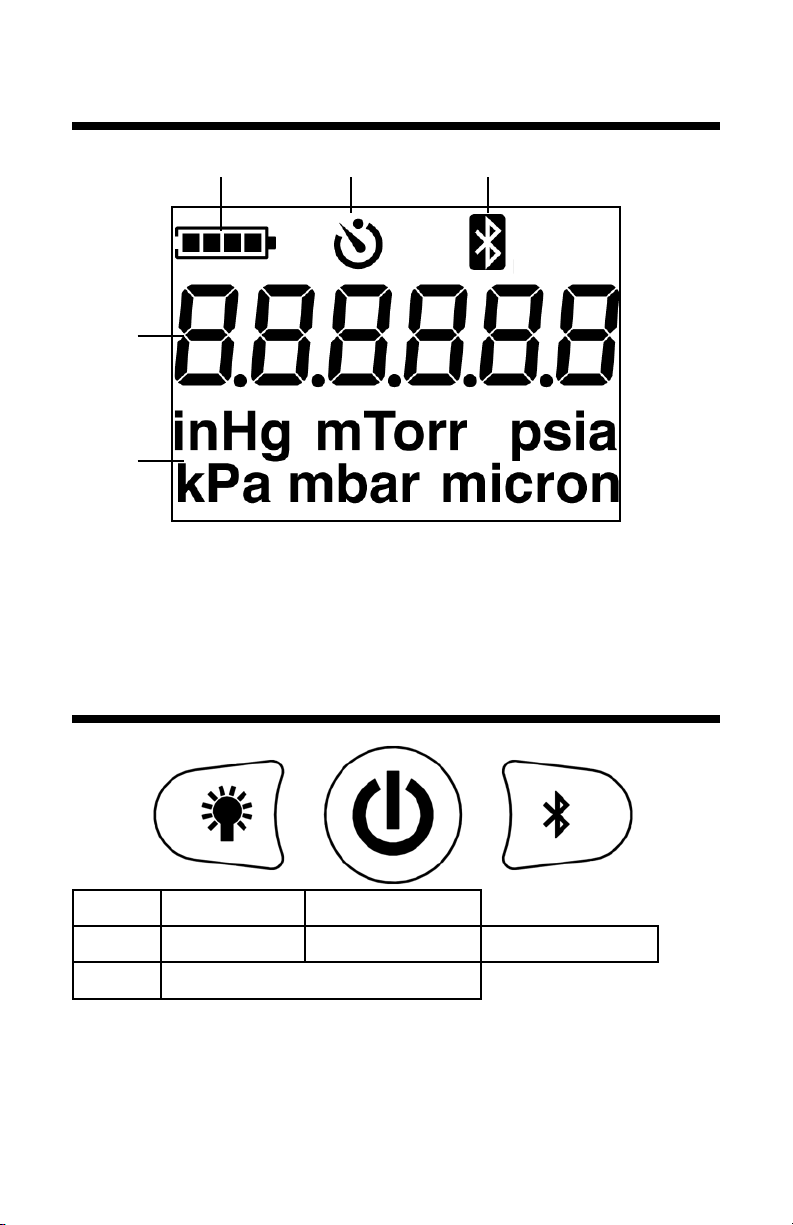
Display
1 2 3
4
5
1- Battery Indicator
2- Auto Power Off
3- Bluetooth Status
4- Measurement
5- Units
Controls
Press
Hold
Both
Press a button for the “Press” function above.
Hold a button for 1 second for the “Hold” function.
Press both Backlight and Power to toggle APO.
Backlight Power ON
Units Power OFF Connect BT
Toggle APO Timer
4
© 2013 APPION INC. - ALL RIGHTS RESERVED
AV760 OPERATION MANUAL
Page 5

Using the AV760
CAUTION: Do not connect the AV760 to systems
under high pressure. While the AV760 is designed to
withstand accidental exposure to positive pressures,
continued exposure may cause permanent damage.
1. Using a vacuum-rated connection, connect the
AV760 to an available service port furthest from
the vacuum pump.
2. Hand-tighten the connections to ensure a tight
connection.
3. Press the Power button to turn on the AV760. A
countdown will display while the AV760 starts up
and performs self testing.
Tip: Connect to the Side Access Port on a Valve
Core Removal Tool with the Appion Swivel Vacuum
Connector. Make sure the core depressor side is
attached to the Valve Core Removal Tool.
TIP: Make sure the AV760 is vertical, with the
fitting pointed downward. This will help minimize
contamination from any oil that may be pulled out of
the system during evacuation.
5
© 2013 APPION INC. - ALL RIGHTS RESERVED
AV760 OPERATION MANUAL
Page 6
Maintenance
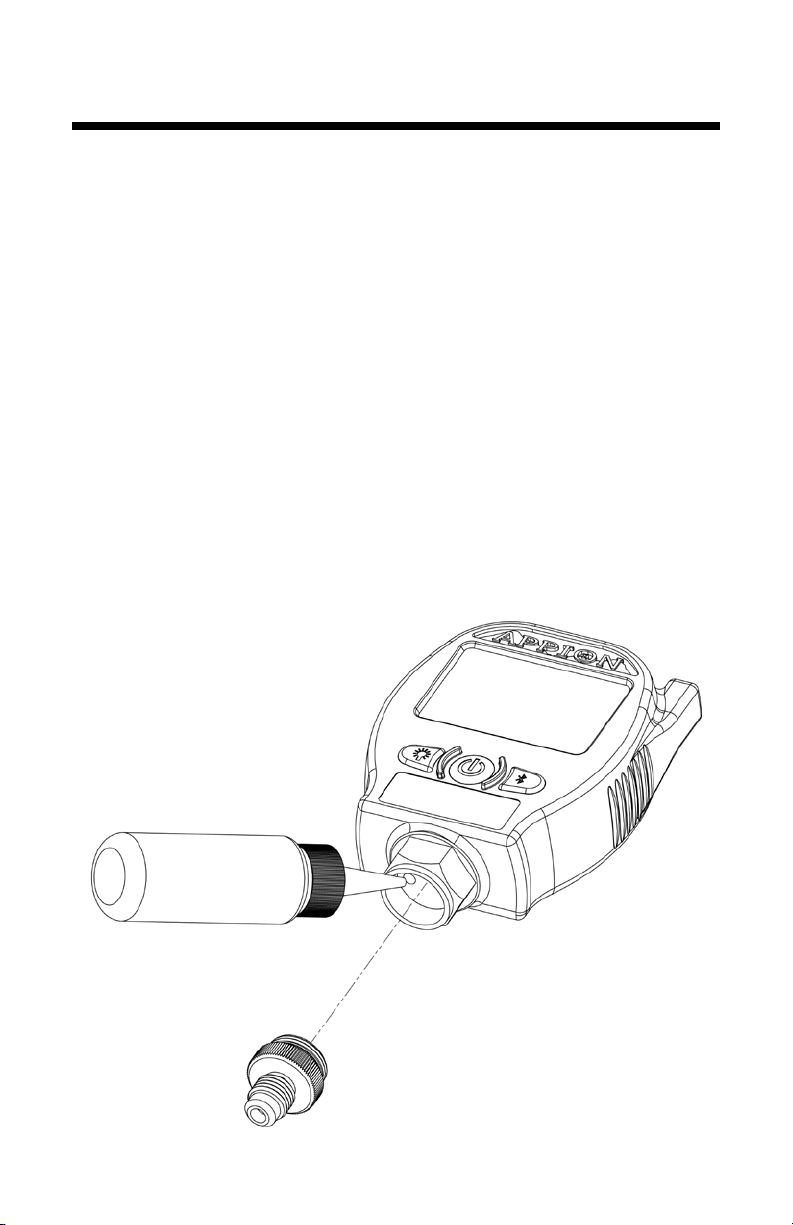
If the AV760 sensor gets dirty and no longer reads
correctly, the Sensor Housing can be removed to
enable easy cleaning of the sensors.
1. Use Isopropyl Alcohol (70% or higher), and ush
the sensor ports as shown below.
2. Drain the uid out of the sensor, and allow to dry
for at least 1 hour.
3. Connect the AV760 to a vacuum pump, and run
the pump until 100 microns or less.
6
© 2013 APPION INC. - ALL RIGHTS RESERVED
AV760 OPERATION MANUAL
Page 7

Regulatory Information
This device complies with Part 15 of the FCC Rules.
Operation is subject to the following two conditions:
(1) This device may not cause harmful interference, and
(2) This device must accept any interference received,
including interference that may cause undesired
operation.
Federal Communication Commission
Interference Statement
This equipment has been tested and found to comply with
the limits for a Class B digital device, pursuant to Part 15
of the FCC Rules. These limits are designed to provide
reasonable protection against harmful interference in a
residential installation.
This equipment generates, uses and can radiate radio
frequency energy and, if not installed and used in
accordance with the instructions, may cause harmful
interference to radio communications. However, there is
no guarantee that interference will not occur in a particular
installation. If this equipment does cause harmful
interference to radio or television reception, which can be
determined by turning the equipment off and on, the user
is encouraged to try to correct the interference by one of
the following measures:
• Reorient or relocate the receiving antenna.
• Increase the separation between the equipment and
receiver.
• Connect the equipment into an outlet on a circuit
different from that to which the receiver is connected.
• Consult the dealer or an experienced radio/TV
technician for help.
7
© 2013 APPION INC. - ALL RIGHTS RESERVED
AV760 OPERATION MANUAL
Page 8

Regulatory Information
FCC Radiation Exposure Statement
This equipment complies with FCC RF radiation
exposure limits set forth for an uncontrolled environment.
This transmitter must not be co-located or operating in
conjunction with any other antenna or transmitter.
FCC Caution
To assure continued compliance, any changes or
modifications not expressly approved by the party
responsible for compliance could void the user’s authority
to operate this equipment.
Industry Canada Radio Equipment
This device complies with Industry Canada licenceexempt RSS-210 standard. Operation is subject to
the following two conditions: (1) this device may not
cause interference, and (2) this device must accept
any interference, including interference that may cause
undesired operation of the device.
Équipement radio d’Industrie Canada
Le présent appareil est conforme aux CNR d’Industrie
Canada applicables aux appareils radio
exempts de licence. L’exploitation est autorisée aux deux
conditions suivantes :
(1) l’appareil ne
doit pas produire de brouillage, et
(2) l’utilisateur de l’appareil doit accepter tout brouillage
radioélectrique subi, même si le brouillage est susceptible
d’en compromettre le fonctionnement.
8
© 2013 APPION INC. - ALL RIGHTS RESERVED
AV760 OPERATION MANUAL
 Loading...