

Page 1
Wireless TV Audio Transceiver
TV Solodio
User Guide
Thank you for purchasing this wireless TV Midnight Sound.
Please read this User Manual carefully before using the machine.
Page 2
Table of Contents
SAFETY TIPS .................................. 19
COMPONENTS ................................ 21
PORTS AND BUTTONS .................. 22
Transmitter (Tx) .......................................22
Receiver (Rx) ...........................................22
OPERATION ................................... 23
Connecting ..............................................23
Charging .................................................26
USING .............................................. 27
Volume control .........................................27
Setting 3D-sound effect ...........................27
Mute .........................................................28
Restarting ................................................28
TROUBLESHOOTING ..................... 29
SPECIFICATIONS ........................... 31
WARRANTY .................................... 32
18
Page 3
Safety Tips
Be sure to comply with the following advice to
prevent danger or property damage by using your
TV Midnight sound as advised.
Warning
No compliance with the following advice may cause
the risk of death or serious injuries.
Be careful not to allow water, beverages or
chemicals to flow into the device.
•It may cause electric shocks, fire or device
damage.
Install the device in a place with no heat, for
example, heaters.
•Overheating may cause fire or electric shocks.
Do not leave the power adapter or the cable in
passageways.
•It may cause device damages and injuries.
Use a charger of which the safety is approved
•Non-approved chargers may cause electric
shocks, fire or device damage.
Keep the packaging materials (desiccant,
plastic materials) out of reach of children.
•The packaging materials may cause injuries or
suffocation.
Do not listen to high-volume sound for a long
period of time.
•It may cause hearing disorders.
19
Page 4
Safety Notice
Non-compliance with the advice may cause minor
injuries or device damage.
Do not leave the device next to an object with
strong electromagnetic waves or magnetic
properties.
•It may cause malfunction or failures, and reduce
the service life of the device.
Wipe the outside of the device with a dry soft
cloth and do not use benzene or alcohol for
cleaning.
•It may cause device deformation.
Do not drop the device or do not give shocks to
the device.
•It may cause failures of the device.
Do not dissemble, repair or alter the device.
•It may cause damage or failures of the device.
Do not place heavy objects on top of the
device.
•It may cause damage or failures of the device.
Disconnect the power adapter in lightning
strikes or if the device is not used for a long
period of time.
•It may cause damage or failures of the device.
20
Page 5
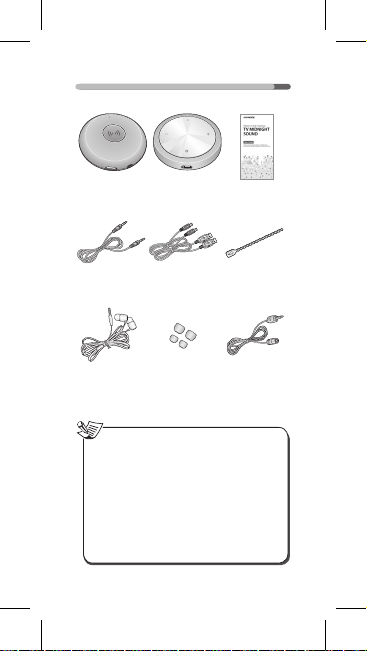
Components
Audio
Transmitter
AUX Cable Micro USB
Earphone Eartips
Notice
•Device information may change without
prior notice.
•The optical cable is optional, and you
can buy it if required.
•To use the optical cable, set the optical
output of your TV as PCM mode for
normal sound output. Be sure to check
PCM mode compatibility of the TV before
using the cable. (Do not support DOLBY
and DTS from.)
Audio
Receiver
Charging Cable
(2EA)
(S, L)
User Guide
Cable tie
Optical cable
(Rectangle /
Circle Type)
(optional)
21
Page 6
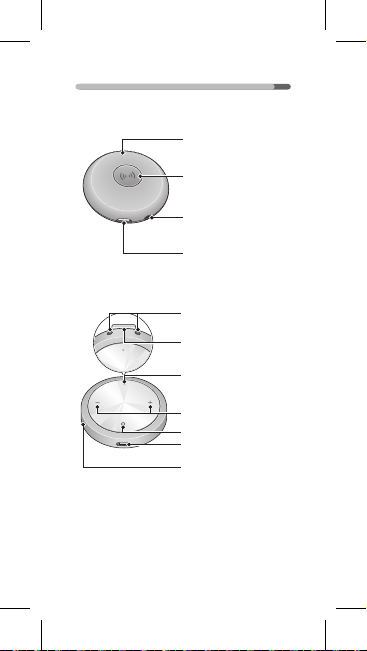
Ports and Buttons
Transmitter (Tx)
Status LED
Pairing button
Mini(3.5Φ) stereo
optical input port
Micro USB port
Receiver (Rx)
Earphone output port
Clip
Sound effect setting /
mute button
Status LED
Volume button /
pairing button
Power
Micro USB port
Reset hole
22
Page 7
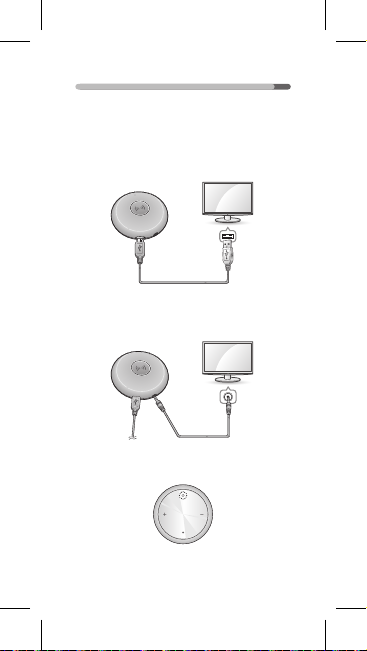
Operation
Connecting
Use the USB cable to connect the USB port
1
of your TV with the micro USB port of the
transmitter.
Use an analog or digital connection cable to
2
connect the input port of the transmitter with
the TV output port.
Press the power button on the receiver to
3
supply power.
23
Page 8
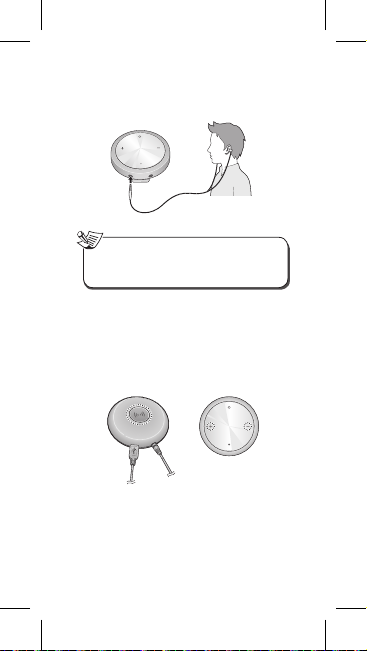
Connect the earphone cable with the earphone
4
output port.
•Enjoy TV sound.
Notice
•While power is ON, press the power
button for at least 2 seconds to turn it off.
Press both the pairing button of the
5
transmitter and the paring button of the
receiver (-/+) for at least 2 seconds at the
same time to carry out pairing, if no sound is
heard from the earphone although the USB
cable power is connected to the transmitter.
Receiver Transmitter
24
Page 9
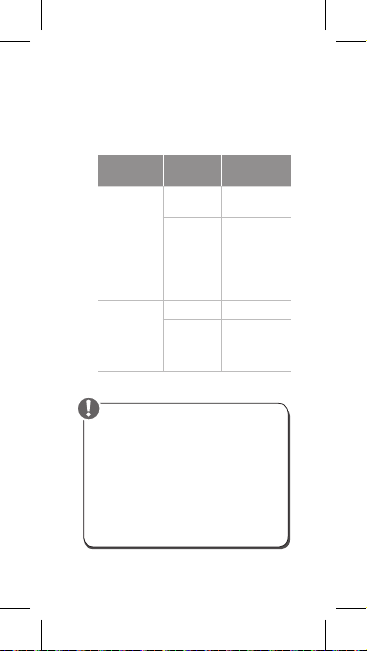
•Replay automatically starts when pairing
finishes.
•Automatic connection is conducted when
first pairing is completed after device
connection.
•Check LED colors to identify pairing.
receiver and
transmitter
completed
receiver and
transmitter
State
Pairing
between
Pairing
between
Device for
indication
Transmitter
Receiver
Transmitter Red
Receiver
LED
Red LED
blinking
Fast LED
blinking
alternately
between red
and blue
LEDs
blue LED
blinking every
1 second
Caution
•Set the optical output of your TV as PCM
for normal sound while using the optical
cable.
•Receiver power is automatically off when
pairing is unsuccessful for 3 minutes
after power is on or pairing is released.
•The device already paired cannot be
connected with other devices. Carry out
pairing for connection with other devices.
25
Page 10
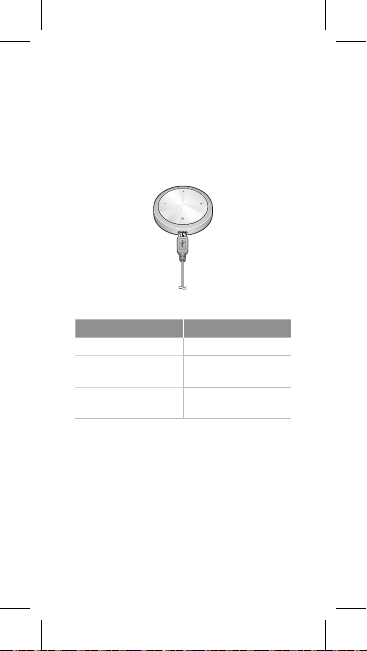
Charging
Connect the USB port of your PC or general
adapter with the micro USB port on the receiver
through the enclosed USB cable for charging.
•You can charge the device by connecting the
micro USB port of any charging adapter for
Android smartphones with the micro USB port
on the receiver.
•Check receiver charging with LED color.
State LED
Receiver charging Red
Receiver charging
completed
Low receiver battery
level
26
Blue
Red LED blinking every
1 seconds
Page 11
Using
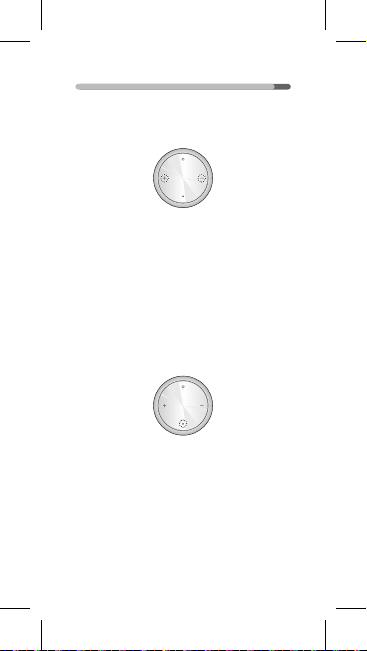
Volume control
Press the + / - button to control volume.
Setting 3D-sound effect
Press the sound effect setting button. The 3D
1
sound effect is then set.
•It returns to the original state after the red
LED blinks twice.
Press the sound effect setting button again.
2
The 3D sound effect is released.
•It returns to the original state after the red
LED blinks three times.
27
Page 12
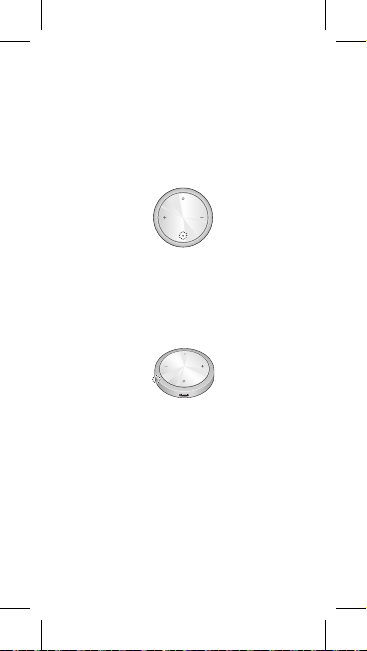
Mute
Press the mute button for at least 2 seconds to
1
mute all sounds.
•The purple LED blinks every 1 second in the
Mute mode.
Press the mute button again for at least 2
2
seconds to deactivate mute.
Restarting
You can restart your TV Midnight Sound if the
receiver does not normally operate.
Press the reset hole by using a clip or ballpoint pen
to restart the machine.
28
Page 13
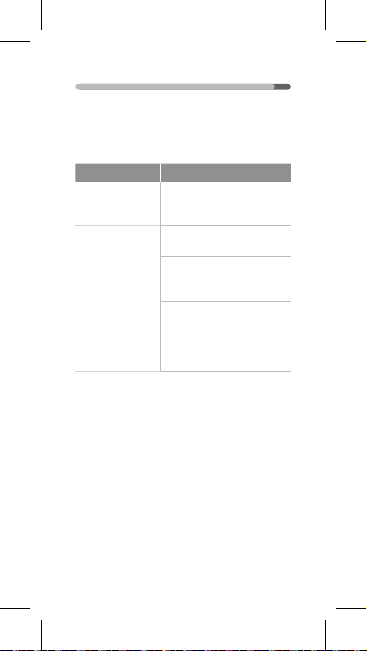
Troubleshooting
See the following troubleshooting tips before
requesting AS if you think your device has any
of the following problems. Contact the Customer
Service if you need additional help.
Difficulty Suggestions
Receiver power
is not ON.
The battery is not
charged.
•Check if the receiver
battery is flat. Charge the
receiver if it is flat.
•Check correct connection
of the micro USB cable.
•Disconnect and then reconnect the micro USB
cable.
•Check if the room
temperature is within the
chargeable range. This
device can be charged at 5°
C ~40°C.
29
Page 14
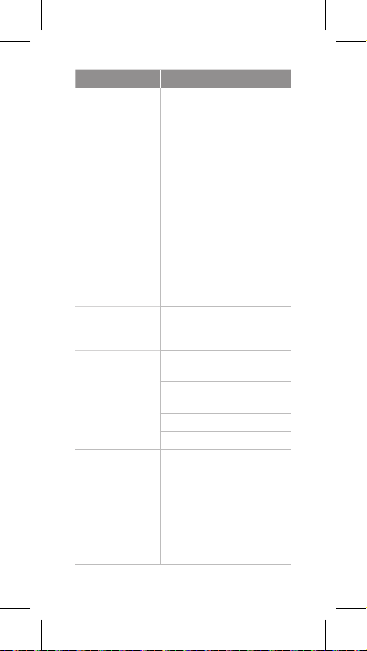
Difficulty Suggestions
The battery
rapidly goes flat.
The device does
not operate or
function properly.
No sound is
output.
If sound is
concurrently
output from the
TV speaker and
the receiver
•Check if the room
temperature is too low.
Too low room temperature
may reduce battery life.
•Check if the battery is
dead. The battery is dead
if the battery charging time
is prolonged or replay
time is significantly short.
The battery embedded
in this device can be
recharged about 300
times, and the number
of suggested chargings
depends on where you
keep the device.
•Use a clip or ballpoint pen
to press the reset hole for
initialization.
•Check correct connection of
the sound source cable.
•Check and then release
mute if it is set.
•Control the volume level.
•Carry out pairing.
•Reduce TV volume with
your TV remote control
to listen to the sound just
from the receiver.
※ Sound may not be output
from the TV speaker if
the TV has an Aux cable
plugged in.
30
Page 15
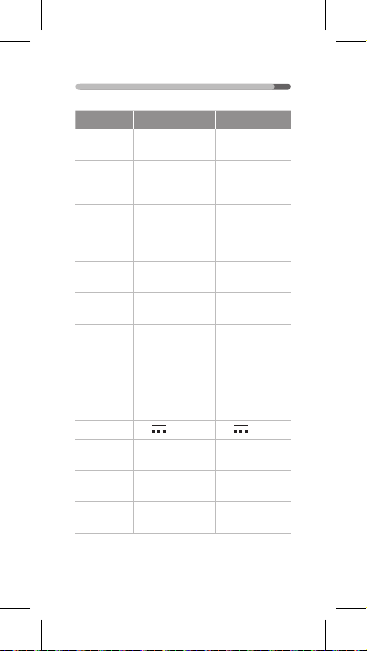
Specifications
Transmitter (TX) Receiver (RX)
Audio
24bit 48KHz 24bit 48KHz
process
Analog
Aux (3.5Φ) x 1
input/
(analog/digital
output
combo)
Optical (Circle
Digital
Type) x1
input/
(analog/digital
output
combo)
Micro USB
USB
(for power supply)
Communic
RF 2.4Ghz
ation
(max 10 m)
USB Cable
Power
(for connecting
supply
TV with the
(replay
transmitter USB
time)
port)
Input
5V 100 mA 5V 300 mA
Battery
charging
Operating
time
Dimension
(W x H x D)
55.7 x 55.7
x 15.5 mm
- 2 hours
Earphone
output x 2
-
Micro USB
(for charging)
RF 2.4Ghz
(max 10 m)
USB Cable
(for connecting
the USB
adapter)
Embedded
battery 350mAh
(6 hours)
6 hours
61 x 61
x 14.7 mm
31
Page 16
Warranty
•One-year warranty
•The warranty shall not apply to any defect,
failure or damage caused by End-User's
improper use or inadequate or improper
maintenance and care.
FCC Notice
This equipment has been tested and found to
comply with the limits for a Class B digital device,
pursuant to Part 15 of the FCC Rules. These limits
are designed to provide reasonable protection
against harmful interference in a residential
installation.
This equipment generates, uses and can radiate
radio frequency energy and, if not installed
and used in accordance with the instructions,
may cause harmful interference to radio
communications. However, there is no guarantee
that interference will not occur in a particular
installation. If this equipment does cause harmful
interference to radio or television reception, which
can be determined by turning the equipment off
and on, the user is encouraged to try to correct
the interference by one or more of the following
measures:
Reorient or relocate the receiving antenna.
Increase the separation between the equipment
and the receiver.
Connect the equipment to an outlet on a circuit
different from that to which the receiver is
connected.
Consult the dealer or an experienced radio/TV
technician for help.
32
Page 17
This device complies with part 15 of the FCC
Rules. Operation is subject to the following two
conditions:
(a) This device may not cause harmful
interference, and
(b) This device must accept any interference
received, including interference that may
cause undesired operation.
(FCC Part 15.21) Caution: changes or modifications
not expressly approved by the
party responsible for compliance could void the
user’s authority to operate the equipment.
33
Page 18
MEMO
Page 19
MEMO
Page 20
5707-00001-007-0S
Page 21
FCC Notice
This equipment has been tested and found to comply with the limits for a Class B digital device, pursuant to
part 15 of the FCC Rules. These limits are designed to provide reasonable protection against harmful interference
in a residential installation.
This equipment generates, uses and can radiate radio frequency energy and, if not installed and used in accordance
with the instructions, may cause harmful interference to radio communications. However, there is no guarantee that
interference will not occur in a particular installation. If this equipment does cause harmful interference to radio or
television reception, which can be determined by turning the equipment off and on, the user is encouraged to try to
correct the interference by one or more of the following measures:
- Reorient or relocate the receiving antenna.
- Increase the separation between the equipment and receiver.
- Connect the equipment into an outlet on a circuit different from that to which the receiver is connected.
- Consult the dealer or an experienced radio/TV technician for help.
This device complies with part 15 of the FCC Rules. Operation is subject to the following two conditions:
(1) This device may not cause harmful interference, and
(2) this device must accept any interference received, including interference that may cause undesired operation.
(FCC Part 15.21) Caution: changes or modifications not expressly approved by the party responsible for compliance
could void the user's authority to operate the equipment.
zOnly batteries of the same or equivalent type as recommended are to be used.
zInsert batteries with the correct polarity as indicated on the product.
zRemove batteries during long periods of non-use. Remove exhausted batteries promptly.
zThis product requires two AAA(UM-4) batteries
zDispose of batteries safety, Batteries may explode or leak if disposed of in a fire.
zProtect the enviroment by not disposing of the batteries or this product with houhold waste (2002/96/EC)
Check you local authority for recycling advice and facilities
KEEP PACKING FOR FUTURE REFERENCE.
 Loading...