

Page 1
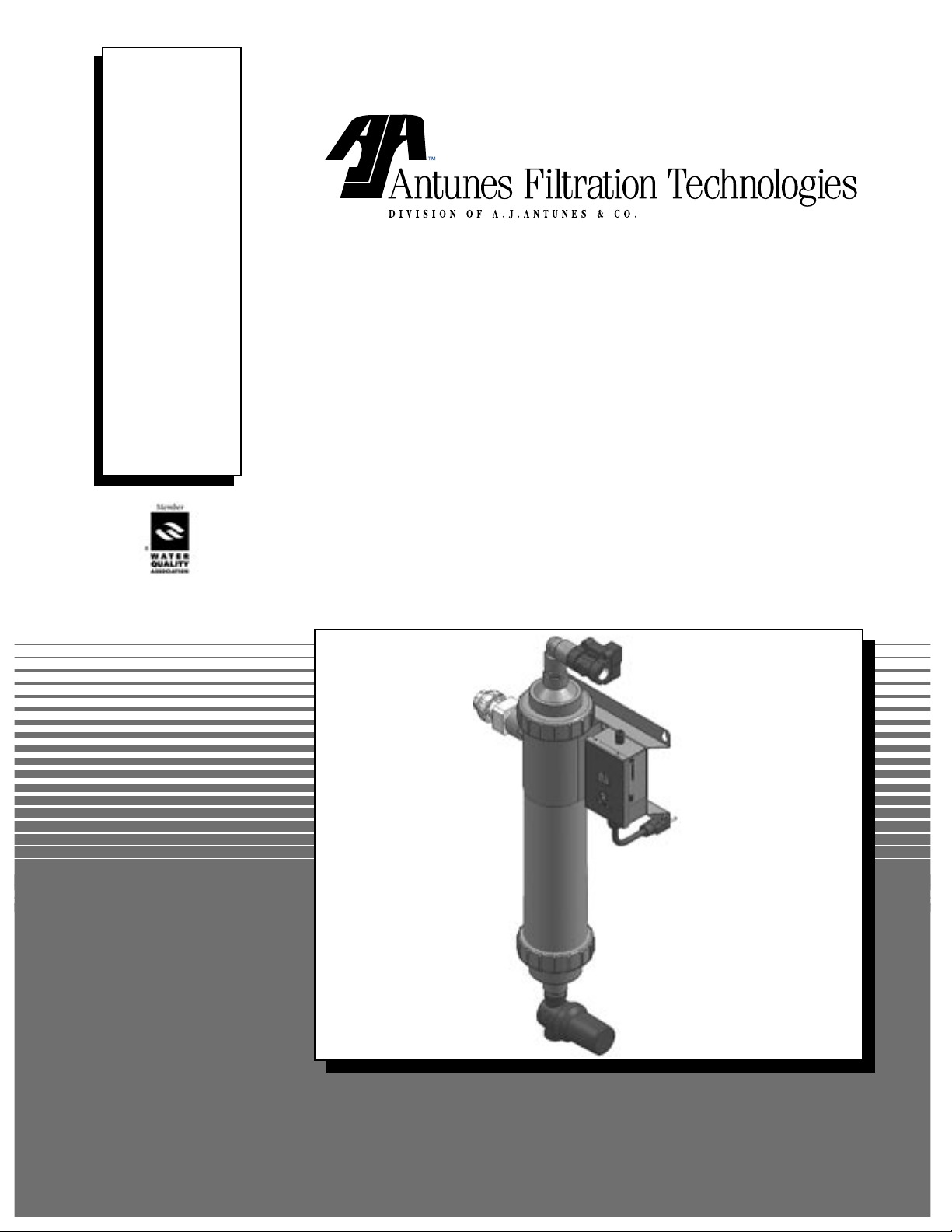
MANUFACTURING
NUMBERS:
9700440
9700442
9700443
9700450
9700452
9700453
WATER FILTRATION
SYSTEM
P/N 1010827 Rev.D 04/06
UF-420/440 Series
Owner’s Manual
Page 2
UF SERIES WATER FILTRATION SYSTEM
TABLE OF CONTENTS
Owner Information .....................................................2
General ......................................................................2
Warranty Information .................................................2
Service/Technical Assistance ....................................2
Important Safety Information ....................................3
Specifications .............................................................4
Electrical Ratings .......................................................4
Electrical Cord & Plug Configurations .......................4
Dimensions ................................................................4
Specifications (Filter Cartridges) ...............................4
Components ..............................................................5
Installation ...................................................................6
Unpacking ..................................................................6
Equipment Setup .......................................................6
Locating and Mounting the system ...........................6
OWNER INFORMATION
General
Antunes Filtration Technologies, a Division of
A.J. Antunes & Company, has partnered with companies from around the globe to produce the UF-Series
water filtration systems. The UF-Series removes bacteria and provides a substantial reduction of viruses
that can enter a typical water supply. This patented
technology is now available to you, sized for your particular application. All filter configurations utilize NeoH
capillary membranes, providing the latest innovation in
reusable surface filtration technology.
This manual provides the safety, installation and
operating procedures for the UF-Series water filtration
systems. We recommend that all information contained
in this manual be read prior to installing and operating
the unit.
Filtration Process .......................................................9
LED Display ...............................................................9
Operation .....................................................................9
Starting the System ...................................................9
Programming Timer During Startup ........................ 10
Programming Timer During Interval (FI) Mode ....... 10
Manual Flushing ......................................................11
Maintenance .............................................................. 12
Checking the Timer Program .................................. 12
Changing the Cartridges ........................................ 12
Troubleshooting .......................................................13
Replacement Parts UF-420/440 ...............................14
Wiring Diagram .........................................................14
LIMITED WARRANTY ............................... Back Cover
Your UF-Series unit is manufactured from the finest
materials available and is assembled to AFT’s strict
quality standards. This unit has been tested at the
factory to ensure dependable trouble-free operation.
Warranty Information
Please read the full text of the Limited Warranty in this
manual.
If the unit arrives damaged, contact the carrier immediately and file a damage claim with them. Save all
packing materials when filing a claim. Freight damage
claims are the responsibility of the purchaser and are
not covered under warranty.
IMPORTANT! Keep these instructions for future reference. If the unit changes ownership,
be sure this manual accompanies the equipment.
2
P/N 1010827 Rev. D 04/06
P/N 1010827 01/03
Page 3
UF SERIES WATER FILTRATION SYSTEM
OWNER INFORMATION (continued)
Service/Technical Assistance
If you experience any problems with the installation
or operation of your unit, contact Antunes Filtration
Technologies at 1-630-784-1000, or toll free in the
United States only at 1-800-253-2991.
Fill in the information in the next column and have it
handy when calling for assistance. The serial number
is on the specification plate located on the unit.
Purchased From:
Date of Purchase:
Model No.:
Serial No.:
Mfg. No.:
IMPORTANT
A.J. Antunes and Company reserves the right to change specifications and product design with-
out notice. Such revisions do not entitle the buyer to corresponding changes, improvements,
additions or replacements for previously purchased equipment.
Throughout this manual, you will find the following
safety words and symbols that signify important safety
issues with regards to operating or maintaining the unit.
WARNING
GENERAL WARNING. Indicates information important to the proper operation of
the equipment. Failure to observe may
result in damage to the equipment and/or
severe bodily injury or death.
In addition to the warnings and cautions in this manual,
use the following guidelines for safe operation of the
unit.
• Read all instructions before using equipment.
• Install or locate the equipment only for its intended use as described in this manual. Do not use
corrosive chemicals in this equipment.
• Do not operate this equipment if it has a damaged cord or plug; if it is not working properly, or
if it has been damaged or dropped.
• This equipment should be serviced by qualified
personnel only. Contact Everpure for repair.
WARNING
ELECTRICAL WARNING. Indicates information relating to possible shock hazard.
Failure to observe may result in damage
to the equipment and/or severe bodily
injury or death.
CAUTION
GENERAL CAUTION. Indicates information important to the proper operation of
the equipment. Failure to observe may
result in damage to the equipment.
P/N 1010827 Rev. D 04/06
• Do not immerse cord or plug in water.
• Keep cord away from heated surfaces.
3
Page 4
UF SERIES WATER FILTRATION SYSTEM
IMPORTANT SAFETY INFORMATION (continued)
The following warnings and cautions appear throughout
this manual and should be carefully observed.
• Disconnect the power source before performing
any service or
maintenance on the unit.
• All electrical connections must be in accordance
with local electrical codes and any other applicable codes.
• WARNING ELECTRICAL SHOCK HAZARD.
FAILURE TO FOLLOW THESE INSTRUCTIONS
COULD RESULT IN SERIOUS INJURY OR
DEATH.
- Do not modify the power supply cord plug. If
it does not fit the outlet, have a proper outlet
installed by a qualified electrician.
- Do not use an extension cord with this appliance.
• If the supply cord is damaged, it must be
replaced by the manufacturer or its service agent
or a similarly qualified person.
• This equipment is to be installed to comply with
the local plumbing code and any other applicable
code.
IMPORTANT SAFETY INFORMATION
• Water pressure must not exceed the membrane
dif ferential pressure of 45 psig (3.1 bar). To
reduce water pressure, install a water pressure
regulator and set system inlet water pressure to
45 psi (3.1 bar).
Protect from becoming dry
If the membrane dries out, irreversible damage to the
membrane may result. Protect the filter from becoming
dry by keeping it wet and sealed at all times.
Protect from freezing
If the membrane freezes during operation or storage,
irreversible damage to the membrane and brittle cracking of the cartridge or housing may result.
Protect from direct sunlight or other UV sources
Avoid long-term exposure to direct sunlight or other UV
sources. The filter should be stored in a dark spot.
Protect from high temperatures or abrupt variation
in temperature
The maximum operating temperature is 100oF (40oC).
Avoid abrupt variations in temperature. Any temperature variation should be made slowly.
Protect from rough handling or dropping
Mechanical damage, external breakage, and/or internal
breakage of the filter can result if the system is dropped
or bumped. Handle with care at all times during transportation and installation.
Protect from organic solvents and concentrated
acids
Prevent any and all contact of the membrane with
strong solvents, solvents containing chlorine, or concentrated acids. Do not use strong solvents or concentrated acids on any plastic parts of the filter system.
Examples of some solvents to avoid: acetone, methyl
acetate (nail polish remover); hexane (spot removers);
turpentine, toluene (paint thinners); dry cleaning solutions, insecticides.
Protect from abrasive material
The membranes must be protected from abrasive
materials like shavings left in a pipe. Abrasive materials
in contact with the membrane can cause irreversible
damage to the membrane. All pipes must be flushed
clean before installing the filter. All plastic parts of the
filter system must be protected from sharp objects like
knives, sand paper or other tools. Cutting or nicking
a plastic part can weaken it and cause a leak. Do not
use abrasive cleansers on any plastic parts.
Protect from water hammer
The system must be protected from shock, pressure
surges, or pulsation that may occur inside water pipes.
Water hammer occurs in pipes when a valve or faucet
shuts quickly. Install a water hammer arrestor (pressure vessel containing compressed air separated from
the water by a diaphragm) to reduce pressure shock.
4
P/N 1010827 Rev. D 04/06
Page 5
UF SERIES WATER FILTRATION SYSTEM
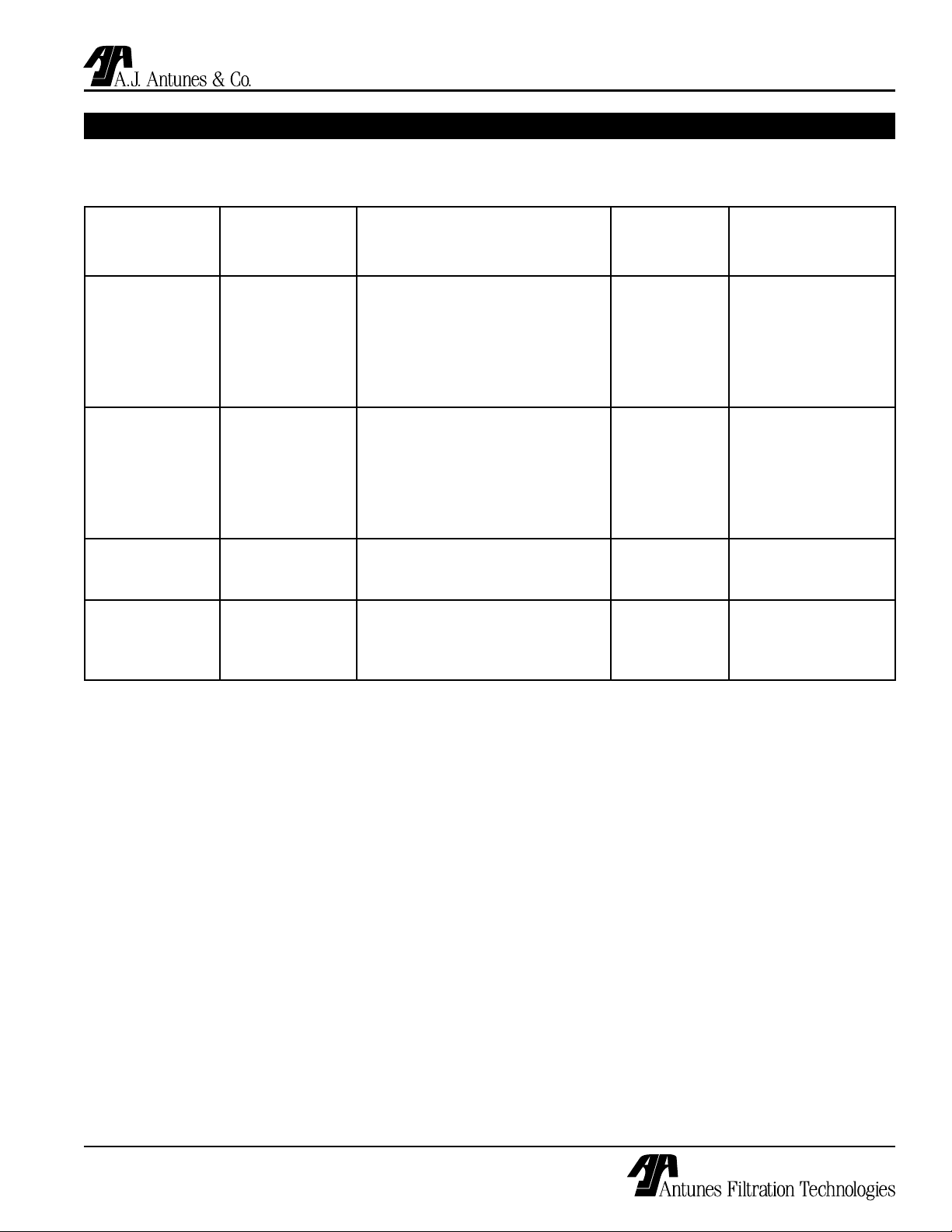
WATER CONDITION EQUIPMENT GUIDELINES
The following table describes the required or recommended equipment and suggested flush programming to be used
with your filtration system based on the Inlet Water Pressure, Inlet Turbidity, and daily water use.
Inlet Water
Pressure
(psi)
Less than 45 psi Less than 1 NTU Required: No additional equipment
Greater than
45 psi
Less than 45 psi Greater than
Greater than
45 psi
Inlet Turbidity
(NTU)
Less than 1 NTU Required: Pressure regulator
1 NTU
Greater than
1 NTU
Required Additional Equipment
Installed
Recommended: Inlet water strainer
(150 micron/ 100 mesh screen)
Recommended: Permeate Tank
Recommended: Inlet water strainer
(150 micron/ 100 mesh screen)
Recommended: Permeate Tank
Required: Inlet water strainer (150
micron/ 100 mesh screen)
Required: Permeate Tank
Required: Pressure regulator
Required: Inlet water strainer (150
micron/ 100 mesh screen)
Required: Permeate Tank
Water Use
(Gallons Per
Day)
Less than
300 GPD
Greater than
300 GPD
Less than
300 GPD
Greater than
300 GPD
Any Flush Program:
Any Flush Program:
Flush Program
Flush Program:
Interval: 6 hour
Duration: 15 seconds
Flush Program:
Interval: 1 hour
Duration: 15 seconds
Flush Program:
Interval: 6 hour
Duration: 15 seconds
Flush Program:
Interval: 1 hour
Duration: 15 seconds
Interval: 1 hour
Duration: 15 seconds
Interval: 1 hour
Duration: 15 seconds
P/N 1010827 Rev. D 04/06
5
Page 6
UF SERIES WATER FILTRATION SYSTEM
WHT
BLK
GRN
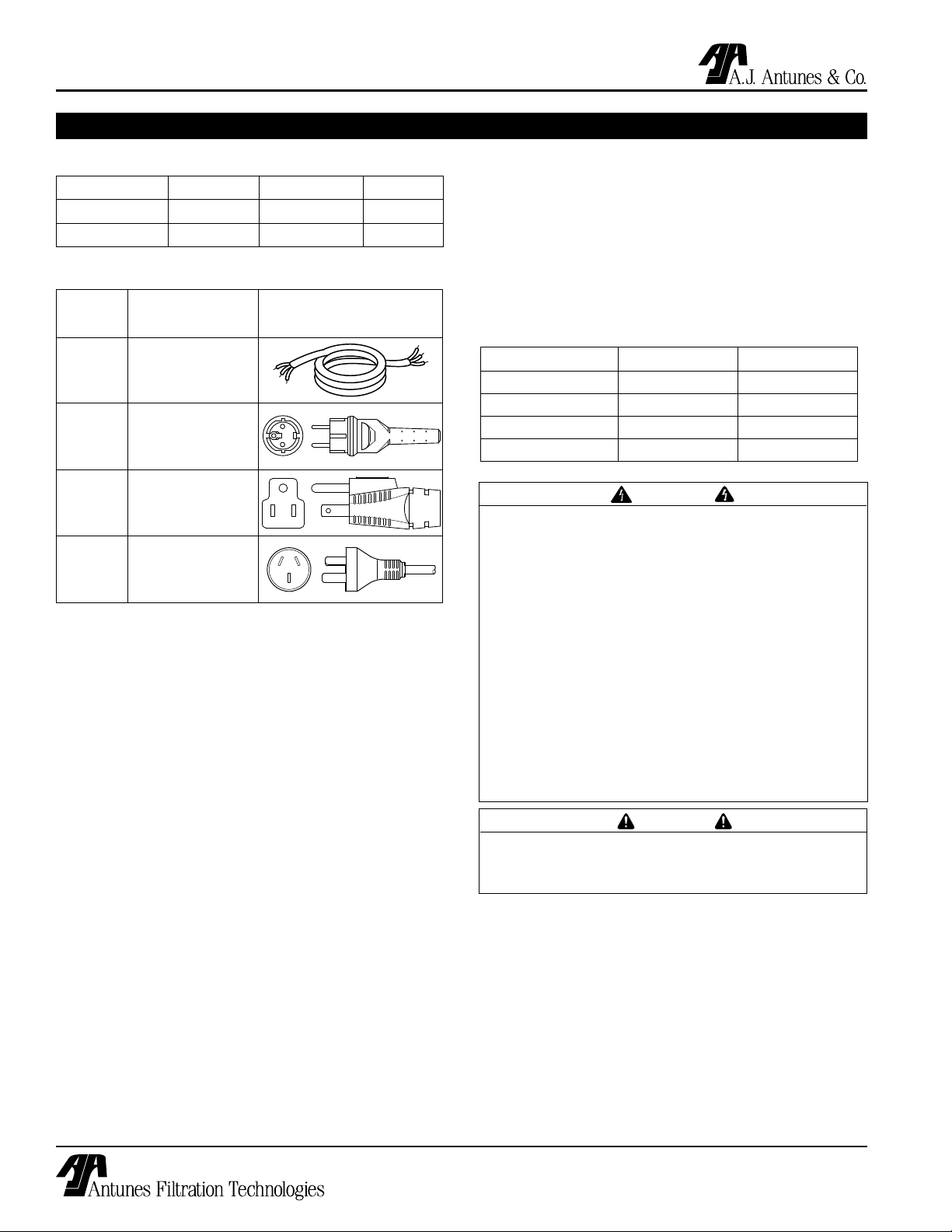
SPECIFICATIONS
Electrical Ratings
Model Voltage Watts Hertz
UF-420 120 10 50/60
UF-440 230 10 50/60
Electrical Cord & Plug Configurations
Letter
Description Configuration
Code*
C
H
(H)C** CEE 7/7, 16 Amp.,
(C)F*** 5-15P, 15 Amp., 120
(H)K Chinese/Australian,
Commercial Cord
Harmonized Cord
250 VAC (Assembly
Only).
VAC., Non – Locking
(Assembly Only).
10 Amp., 250 VAC.
(Assembly only)
Filter Cartridge Capacities
Maximum Operating Pressure 100 psig (690 kPa)
Maximum Operating Temp. 104°F (40°C)
Minimum Operating Temp. 40° F ( 4° C)
Maximum Membrane Differential Pressure 45 psi
pH Range 3-10
MWCO 100 kD
System Capacities
Series UF-420 UF-440
Liters per hour 1500 2000
Liters per minute 25 33.3
Gallons per hour 396 528
Gallons per minute 6.6 8.8
WARNING
ELECTRICAL SHOCK HAZARD.
FAILURE TO FOLLOW THE INSTRUCTIONS IN
THIS MANUAL COULD RESULT IN SERIOUS INJURY OR DEATH.
* Used in Model Designation
** Indicates that the Plug comes with a Harmonized Cord
** Indicates that the Plug comes with a Commercial Cord
• Electrical ground is required on this appliance.
• Do not modify the power supply cord plug. If
it does not fit the outlet, have a proper outlet
installed by a qualified electrician.
• Do not use an extension cord with this
appliance.
• Check with a qualified electrician if you are in
doubt as to whether the appliance is properly
grounded.
CAUTION
All electrical connections must be in accordance
with local electrical codes and any other
applicable codes.
6
P/N 1010827 Rev. D 04/06
Page 7

UF SERIES WATER FILTRATION SYSTEM
A
B
C
SPECIFICATIONS (continued)
Dimensions
Components
Drain
Permeate
LED
Display
Program
Button
Figure 1. Dimensions
Unit A
(inches)
Width
B
Depth
(inches)
Height
(inches)
C
Operating
Weight
(w/water)
(lbs)
UF-420 6-1/16 14-7/8 33-7/8 30
UF-440 6-1/16 14-27/32 53-17/32 51
Filter
Cartridge
Inlet
Power
Cord
Strainer
Figure 2. Components
P/N 1010827 Rev. D 04/06
7
Page 8

UF SERIES WATER FILTRATION SYSTEM
INSTALLATION
Unpacking
1. Remove the system and all packing materials
from the shipping carton.
2. Remove all packing materials and protective coverings from the system
3. Remove the information packet. To prevent any
delay in obtaining warranty coverage, fill out and
mail the warranty card.
NOTE: If any parts are damaged, contact Antunes
Filtration Technologies IMMEDIATELY at 1-800-2532991 (in the U.S. only) or 1-630-784-1000.
Equipment Setup
GENERAL
When placing the unit into service, pay attention to the
following guidelines:
• Make sure power to the unit is off.
• Do not immerse cord or plug in water.
• Keep cord away from heated surfaces.
ELECTRICAL
Ensure that the line voltage corresponds to the stated
voltage on the units specification label. Make sure that
the plug on the power cord from the system and the
outlet match. For proper operation, and to ensure the
highest quality water from the system, make sure that
the system is not connected to a switched electrical
outlet.
PLUMBING
NOTE: This unit is designed to use tap water not
to exceed 104°F (40°C).
The UF-420 and UF-440 systems use the following connections (Figure 1):
• Water Inlet 3/4” NPT
• Permeate (Product Water) 3/4” NPT
• Drain 3/4” NPT
When making a plumbing connection to the system,
remember to use a back-up wrench on the supporting
plumbing. Always use a good quality, approved, pipe
sealant or Teflon® tape on pipe threads. Be careful not
to get the pipe sealant inside the pipe when making the
connections.
Do not over-tighten the connections. It is recommended that plastic fittings be used when connecting to the
plastic connections of the system. This will reduce the
possibility of cracking the connections due to overtightening.
If soldered plumbing is used, do not apply heat to, or
near, the filtration system. The use of union (O-ring
seal) connections is highly recommended for ease of
installation and future servicing.
SUGGESTED TOOLS AND SUPPLIES FOR INSTALLATION
The following tools and supplies are suggested to make
the installation easier:
• Screwdriver
• Drill with bits
• Strap wrench
(up to 6” diameter)
• Tape measure
• Two gallon bucket
• Fresh 5 1/4% liq uid chlorine bleach
(such as Clorox®)
This equipment is to be installed to comply with
the basic plumbing code of the Building Officials
and Code Administrators, Inc. (BOCA) and the
Food Service Sanitation Manual of the Food and
Drug Administration (FDA).
Water pressure must not exceed a membrane
burst pressure of 7 bar (100 psi). To reduce water
pressure, install a water pressure regulator and
set water pressure to suit application. Note that
the trans membrane pressure must be .5 - 2.5 bar
(7 - 36 psi).
• Adjustable wrenches
• Pipe wrenches
• Level
• Pipe dope or Teflon®
tape
CAUTION
CAUTION
Locating and Mounting the system
Consider these points before mounting the system:
• Note the location of the water supply, drain, and
an appropriate electrical outlet when choosing a
mounting location.
• Remember to allow for access to the timer/
programmer controls.
• Do not mount the system above any electrical
equipment, or above items that may be damaged if
they get wet.
8
P/N 1010827 Rev. D 04/06
Page 9

UF SERIES WATER FILTRATION SYSTEM
9 3/4"
(24.8 cm)
6 7/8"
(17.5 cm)
INSTALLATION (continued)
• Install the system in a location that will allow for
future service access.
• Mount the system on a wall using appropriate
mounting hardware.
• Remember to consider the operating weight of
the system when choosing mounting hardware.
Depending on the type of wall the system is being
mounted to, wall reinforcement may be necessary.
Mount the filtration unit using the Mounting Bracket
(Figure 3) using 1/4” by 1” bolts or bolts of the metric
equivalent.
Figure 3. Mounting Bracket (Front View)
INLET WATER PLUMBING
It is recommended that the inlet water plumbing line
be 3/4” NPT or larger. A shutoff valve (not supplied)
should be installed in the line leading to the system.
The valve should be mounted close to the system inlet
and sized properly for the inlet plumbing line. This
valve will allow for easier servicing and future cartridge
change-out. The system should only be connected to
the cold water line.
To ensure that the highest quality water is produced
from the system, the plumbing leading to the filter
system must be flushed clear of all debris before the
system is hooked up. Before making the connection to
the inlet of the filter system, hold a bucket or other container at the inlet water line and slowly open the inlet
water valved. Allow the pipe to flush until all debris is
removed.
PERMEATE LINE PLUMBING
To ensure the highest quality and safest water, it is
recommended that a check valve (to prevent backflow)
is installed in the water line after the permeate connection. This helps prevent possible contamination of the
filter system due to other equipment downstream. The
check valve (not supplied) should be mounted close to
the system outlet and sized properly for the plumbing
line. Check with local codes for the proper specification.
DRAIN LINE PLUMBING
The drain line is used to flush away the particle buildup
when cleaning the filter. The drain line must be able
to support the flow rate when the system flushes. The
flow rate from the flush depends on the inlet water pressure, inlet pipe size, and system selected. It is recommended that the drain line be as large as, or larger
than, the inlet plumbing line. The drain line should be
as short as possible, sloping downward without kinks
or loops. Be sure that the drain used is not blocked or
restricted.
The filter system must be protected from possible back
contamination by the installation of an air gap between
the drain connection of the system and the drain
(Figure 4). This gap in the line, with no physical contact
between the system and sewer, prevents contamination
of the system in the event of a backed-up sewer.
NOTE: Make sure that the end of the drain line is
positioned and secured at least 2 inches above
the drain so that the water flow is directed into the
drain, without splashing.
FLUSHING AND STARTING THE SYSTEM
To ensure that the highest quality water is produced
from the system, the plumbing leading from the filter
system must be flushed clear of all debris after the
system is hooked up. After making the connection
to the outlet of the filter system, open a faucet or tap
closest to the filter system, then slowly open the inlet
water valve. Allow the pipe to flush until all debris is
removed.
The unit also must be flushed to remove air and the
shipping/storage solution. For maximum quality, the
permeate water produced during the flushing procedure
must be discarded. Direct this permeate water to drain.
P/N 1010827 Rev. D 04/06
9
Page 10

UF SERIES WATER FILTRATION SYSTEM
INSTALLATION (continued)
1. Plug the power cord into the appropriate electrical
outlet. The unit will power up and the LED display
will display the following for about two seconds
each:
• 8.8
• F8 followed by its time settings in seconds
• Fi and its time setting in minutes or hours.
The F8 and Fi sequence repeats for 30 seconds
after which the unit automatically returns to the
Flush Interval Mode (Fi). The time setting for Fi will
be displayed and the decimal point will flash in one
second intervals.
CAUTION
Ingesting the protective solution may cause irritation of the gastrointestinal tract, colic, diarrhea, or
other similar symptoms
2. Open the tap or faucet closest downstream to the
filter system.
3. Slowly open the inlet water valve and allow water
to enter the system.
4. Press and hold the Start button. After 6-7 seconds, the drain valve will open and FL will appear
on the display.
5. Continue holding the Start button down for at least
30 seconds to keep the drain open. This flushes
air out of the center of the hollow fibers of the cartridge filter. The drain will remain open as long as
the Start button is pressed. Check to make sure
that the drain water is directed into the drain without splashing.
6. Release the Start button. This closes the drain
valve. Water should continue to flow through the
system and out of the open tap. Allow water to
flow out of the tap for at least 15 minutes at maximum flow rate.
7. Close the tap and let the system stand without
water flow for 15 minutes to allow any trapped air
to come out of the hollow fibers. Check for leaks
at all fittings.
8. After 15 minutes without water flow, open the
tap for 5 minutes to allow any trapped air to be
flushed out.
9. Close the tap. Flushing is complete.
SANITIZING THE SYSTEM AND LINES
The plumbing must be sanitized to eliminate possible
contamination that may have occurred during the installation process. Chlorine bleach can be used to sanitize
the plumbing. The amount of bleach used depends
on the size of the system installed and the amount of
plumbing downstream of the filter system. Generally,
one ounce (30 ml) of bleach will be sufficient to sanitize
the system.
1. Make sure that the system has been flushed of
air and debris as described in the Flushing and
Starting up the System section of this manual.
2. Open the tap closest downstream to the filtration
system and close the inlet water valve and allow
the system to depressurize.
3. Place a bucket under the strainer at the inlet
connection to the system. Open the strainer by
unscrewing the cap. Water will flow out of the
strainer as the system drains.
4. When the water flow from the strainer stops, pour
the liquid bleach into the strainer. Be careful not
to spill bleach onto clothing or skin. Re-attach the
cap on the strainer.
5. Slowly open the inlet water valve and allow water
to flow out of the tap until the smell of bleach is
present.
6. Close the tap and let the system stand without
water flow for at least 15 minutes to allow the
bleach to sanitize the pipes.
7. After 15 minutes without water flow, open the tap
and flush until the presence of bleach is gone. All
other taps should be opened to flush any bleach
from the plumbing.
8. Close the tap. The sanitization is complete.
Program the timer following the procedure outlined in
the Operation section of this manual.
O-Ring
Strainer
Screen
Inlet (Bottom
of Filtration
Unit)
Strainer Cap
10
Figure 4. Sanitizing the System
P/N 1010827 Rev. D 04/06
Page 11

UF SERIES WATER FILTRATION SYSTEM
START
INSTALLATION (continued)
Secure
End
Standpipe
Drain
Drain Line
from System
2” (5.1 cm)
minimum
Figure 4. Proper Draining
OPERATION
Filtration Process
Water filtration in the UF Series is accomplished using
two modes:
• Flush Interval (Fi on the LED display)
• Flush Duration (Fd on LED display).
During the Flush Interval mode, water enters the inlet
and flows through the filter element before exiting the
Permeate outlet as usable product water. After a certain period of time, depending upon water quality, the
filter has to be cleaned. This is accomplished through
the Flush Duration Mode. During this mode, the drain
valve opens and flushes the membrane to remove
debris collected inside the membrane walls.
Drain Line
from System
Secure
End
2” (5.1 cm)
minimum
Floor
Drain
Starting the System
Power up the unit.
The LED read-out displays the following for about two
seconds each:
1. 8.8
2. Fd followed by its time settings in seconds.
3. Fi and its time setting, in minutes or hours.
The Fd and Fi sequence repeats for 30 seconds
after which, the unit automatically returns to the
Flush Interval Mode (Fi). The time setting for Fi
will be displayed and the decimal point will flash in
one second intervals.
NOTE: Both the Flush Interval Mode and the Flush
Duration Mode can be automated by programming
the timer. During the Flush Interval Mode, the valve
is not powered in order to keep water filtering during
a power outage.
LED Display
Fi - Flush Interval Mode is the time between flushings
and is displayed in minutes or hours.
Fd - Flush Duration Mode is the amount of time used
to flush and remove debris from filter cartridge and
is displayed in seconds.
FL - Manual Flush Mode operation, solenoid is
manually activated by the user.
P/N 1010827 Rev. D 04/06
NOTE: The timer can be programmed immediately
after start-up or while in Flush Interval Mode.
Figure 5. LED Display, Front Panel
11
Page 12

UF SERIES WATER FILTRATION SYSTEM
START
START
START
START
OPERATION (continued)
Programming Timer During Startup
NOTE: Once the UF unit is powered up, the
LED display cycles through the default or current
settings: Flush Duration (Fd) and its setting will
be followed by Flush Interval (Fi) and its settings.
At any time during this sequence (which lasts
approximately 30 seconds) the UF unit can be programmed.
SETTING THE FLUSH INTERVAL (FI)
1. When Fi (Figure 5) is displayed, press and
release the Start button to view the current setting.
2. To make a program change, press and hold the
Start button to scroll through settings - release
the Start button at the desired setting (Figure 5).
3. If, after ten seconds, the Start button is not
pressed, the unit automatically returns to the
Flush Interval Mode.
Figure 6. LED Display for Flush Interval Mode
Figure 7. Time Setting Fi Mode (22 Hours)
NOTE: Flush Interval times are displayed in ten
minute intervals. After fifty minutes, Flush Interval
times are displayed in hours (Table A).
SETTING FLUSH DURATION (FD)
2. When Fd is displayed, press and release the
Start button to view the current setting (Figure 8).
3. To make a program change, press and hold the
Start button to scroll through settings - release
the Start button at the desired setting (Figure 9).
4. After ten seconds, unless button is depressed,
unit automatically returns to Flush Interval Mode.
NOTE: Fd times are displayed in 5 second intervals
up to 60 seconds (Table A).
Fi - Flush Interval
Mode
Fd - Flush Duration
Mode
1- (10 minutes) 5 (5 seconds)
5- (50 Minutes ) 10 (10 seconds)
01 (1 Hour) 15 (15 Seconds)
12 (12 Hours) 30 (30 Seconds)
24 (24 hours) 60 (60 Seconds)
Figure 8. LED Display for Flush Duration Mode
Figure 9. Time Setting Fd Mode (55 Seconds)
Programming Timer During Interval (FI) Mode
TO SET FI - FLUSH INTERVAL MODE
NOTE: After power-up and cycling - Fi time setting
displays a flashing decimal point.
1. Press and hold down start button for four
seconds. Release button, LED will display Fd
followed by its setting.
2. When Fi (Figure 10) is displayed, press and release
button to view current setting.
3. To make a change, press and hold down the start
Table A. LED Display Settings
12
P/N 1010827 Rev. D 04/06
Page 13

UF SERIES WATER FILTRATION SYSTEM
START
START
START
START
OPERATION (continued)
button to scroll through settings - release button at
desired setting (Figure 11).
4. After ten seconds, if start button is not pressed, unit
automatically returns to Flush Interval Mode.
NOTE: Fi times are displayed in ten minute intervals, after fifty minutes they are displayed in hours
(Table B).
TO SET FD - FLUSH DURATION MODE
1. Press and hold the Start button for four
seconds. Release button, LED will display Fd.
Figure 12. LED Display for Flush Duration
2. When Fd is displayed (Figure 12), press and
release the Start button to view the current setting
3. To make a change, press and hold the Start button to scroll through settings - release the Start
button at desired setting (Figure 13).
4. If, after ten seconds, the Start button is not
pressed, the unit automatically returns to the
Flush Interval Mode.
NOTE: Fd times are displayed in 5 second intervals
up to 60 seconds (Table B).
Fi - Flush Interval
Mode
Fd - Flush Duration
Mode
1- (10 minutes) 5 (5 seconds)
5- (50 Minutes ) 10 (10 seconds)
01 (1 Hour) 15 (15 Seconds)
12 (12 Hours) 30 (30 Seconds)
24 (24 hours) 60 (60 Seconds)
Table B. LED Display Settings
Figure 13. Time Display for Fd Mode (15 Seconds)
Manual Flushing
NOTE: Manual flushing only works when unit is in
Flush Interval Mode (Fi).
While the unit is in Flush Interval Mode (decimal point
flashing), hold the start button down for 6-7 seconds
until the LED displays FL (Figure 14). Continue holding the button down to keep the drain open. Drain will
remain open for as long as start button is depressed.
(FL will flash on LED.) Releasing the button closes the
drain and puts the unit back into startup mode. After ten
seconds, if the start button is not pressed the unit automatically returns to the Flush Interval Mode (Fi).
Figure 10. Fi - LED Display for Flush Interval Mode
Figure 11. Time display for Fi Mode (30 Minutes)
P/N 1010827 Rev. D 04/06
13
Page 14

UF SERIES WATER FILTRATION SYSTEM
START
MAINTENANCE
The filtration system is designed to require very little
maintenance. To ensure that the water is of the highest
quality, occasionally some service is required.
Checking the Timer Program
During normal operation, the system displays the time
setting for the Flush Interval Mode (FI) and the decimal will flash in one second intervals. This is the time
between flushing, not a time of day setting.
Over time, it is possible that the time that the system
flushes occurs at a time of high water use. If this creates a problem, the timer can be reset by unplugging
the power cord, waiting for 5 seconds, and plugging the
power cord in again. The timer then begins timing from
the point power is restored to the system. Follow the
procedures within the Operation section of this manual
to check and set the timer settings.
Changing the Cartridges
While the filtration system is designed for long life,
eventually the cartridges will need to be replaced.
1. Open the faucet or tap closest downstream to the
filtration system.
8. Using a screwdriver, remove the screws from the
cartridge bracket and set the bracket and screws
aside.
9. Unscrew the cartridge end caps from the cartridge, being careful to retain the O-rings from
each cap. Set the O-rings aside.
10. Install a new cartridge to the system using the
cartridge bracket and screws saved from Step 8.
11. Connect the permeate port connection.
12. Inspect the O-rings to make sure they are clean
and are not splitting or cut. For all O-rings, make
sure they are lubricated with an approved food
grade lubricant acceptable for drinking water use.
13. For each end cap, position the O-ring between the
end of the cartridge and cap and screw the cap
onto the cartridge. Tighten with strap wrench as
necessary.
14. Follow the Flushing and Starting the System and
Sanitizing the System and Lines procedures in the
Installation section of this manual to complete the
cartridge change.
2. Close the inlet water valve and allow the system
to depressurize.
3. Place a bucket under the strainer at the inlet
connection to the system. Open the strainer by
unscrewing the cap. Water will flow out of the
strainer as the system drains.
4. Press and hold the Start button to help drain the
system.
5. Reattach the cap on the strainer when the water
flow stops. Unplug the power cord.
Figure 14. Manual Flush
6. Using a strap wrench (up to 6” capacity), loosen
the top and bottom end caps. DO NOT remove
the top and bottom End Caps yet.
System sanitization
Over time and use, the plumbing downstream from the
system may require sanitization. It is recommended
that the system and downstream plumbing be sanitized at least once a year. When necessary, follow the
Sanitizing the System and Lines procedure in the
Installation section of this manual.
7. Disconnect the permeate port connection.
14
P/N 1010827 Rev. D 04/06
Page 15

UF SERIES WATER FILTRATION SYSTEM
TROUBLESHOOTING
Problem Possible Cause Corrective Action
Unit does not have power. The power cord is not correctly plugged
in.
The Control Display is blank. The power cord is not correctly plugged
in.
Control Board is inoperable. Contact your maintenance person or Authorized
Transformer is inoperable.
No water comes out of the filter
system
Low water flow/pressure out of
system
Water tastes bad. Storage/shipping solution not completely
Flush runs continuously. Drain Valve stuck open. Replace/rebuild the Drain Valve.
Flush runs too long. Program duration set too long. Re-program the unit to flush for a shorter dura-
Flush occurs at time of high water
usage.
Water splashes at drain during
flush.
Water leaks at the ends of the
Filter Cartridge after changing
cartridges.
Water leaks from Permeate port. Permeate port is not tight enough Tighten, with strap wrench if necessary.
Water leaks from system fitting or
connection.
Inlet Valve closed Open the Inlet Valve
Inlet Strainer is plugged Clean/replace Inlet Strainer
End of the capillaries plugged Clean/replace Filter Cartridge
See above. See above.
The system may be in a flush cycle. Wait for the flush cycle to end.
Flushing program not set correctly for
water conditions.
Drain Valve is stuck open. Replace/rebuild the Drain Valve.
The inlet water pressure is too low. Boost the inlet water pressure/replace pipes.
flushed out of system.
Biological growth in pipes. Sanitize plumbing.
Water conditions changed. Consider installing taste and odor filtration.
Broken capillary in Filter Cartridge. Replace Filter Cartridge.
Controller sending continuous signal to
valve.
The Flush Interval is set to interfere with
water use.
Drain line not positioned properly. Reposition the end of the drain line.
Cartridge end connections are not tight
enough.
O-rings not lubricated. Lubricate O-rings with food-grade lubricant.
O-rings are split, cut, or twisted Replace O-rings.
O-ring not lubricated. Lubricate O-ring with food-grade lubricant.
O-ring split, cut, or twisted. Replace O-ring.
Fitting broken or loose. Retighten or replace the fitting.
Not enough pipe thread sealant used. Redo the fitting with the proper amount of seal-
Plug power cord in correctly.
Plug power cord in correctly.
Service agency.
Decrease the flush interval and increase the
flush duration (refer to the Operation section of
this manual).
Flush system for a longer period of time.
Replace the controller.
tion of time.
Change Flush Interval/reprogram time. Unplug
unit and plug in at a time of lower water usage.
Tighten with strap wrench if necessary.
ant.
P/N 1010827 Rev. D 04/06
15
Page 16

UF SERIES WATER FILTRATION SYSTEM
TIMER
BOARD
SOLENOID
VALV
E
RED
BLK
T2
T3
T4
WHT
BLK
GND
TERMINAL
BLOCK
GRN-YEL
WHT/BLU
BLK/BRN
POWER
CORD
NOTE: ALL WIRED TO BE 16 GA.. AWM-105ºC
UNLESS OTHERWISE SPECIFIED
14 GA. AWM - 105ºC
22 GA. AWM - 105ºC
WIRING DIAGRAM
REPLACEMENT PARTS UF-420/440
Item Part Description Qty.
No.
1 7000432 Timer, 120V (For Mfg. #s 1
9700440 & 9700450)
7000433 Timer, 230V (For Mfg. #s 1
9700442 & 9700452)
2 1001116 Label, Timer 1
3 0700463 Power Cord 5-15P (CF) (For 1
models 9700440 & 9700450)
0700634 Power Cord CEE 7/7 (HC) 1
(For Mfg. #s 9700442 & 9700452)
0700354 Power Cord Chinese/Australian, 1
10 Amp., 250 VAC. (Assembly only)
(for Mfg. # 9700443 & 9700453 only)
4 040K251 Strain Relief, Power Cord 1
5 4060355 Terminal Block 1
6 0503983 Control Housing 1
7 7000359 Cover Gasket Kit 1
8 7000362 Cover, Control Housing Kit 1
(Incl. Items 2 & 7)
9 4040173 Solenoid Valve 120V 1
NC 3/4” NPT (For Mfg. #s
9700440 & 9700450)
4040174 Solenoid Valve 230V 1
NC 3/4” NPT (For Mfg. #s
9700442 & 9700452)
10 7000357 Solenoid Valve/Coil Kit 120 V 1
(For Mfg. #s 9700440 & 9700450)
Item Part Description Qty.
No.
7000358 Solenoid Valve/Coil Kit 230V 1
(For Mfg. #s 9700442 & 9700452)
13 0504034 Clamp, Filter 4” 1
14 0504033 Mounting Bracket 4” 1
15 2090122 Cartridge, Filter 4” x 20” (For 1
Mfg. #s 9700440 and 9700442)
2090123 Cartridge, Filter 4” x 40” (For 1
Mfg. #s 9700450 and 9700452)
16 0011911 Connector, End Cap 4” 2
17 2180177 Cap, End 2” 2
18 0200224 “O” Ring 4” 2
19 2190134 Tee Strainer 3/4” NPT 1
20 2090133 Screen, Tee Strainer 3/4” NPT 1
21 0200223 Gasket, Tee Strainer 3/4” NPT 1
22 2070117 Close Nipple 3/4” NPT 1
23 2190126 90° Elbow 3/4” NPT 1
24 2190141 Union 3/4” 1
25 2190131 Adaptor 1.25” to 3/4” 1
26 7000361 Strain Relief Kit 1
28 1001101 Label - Wiring Diagram 1
29 308P157 Screw Tap #8-32 x 3/8” 12
30 308P143 Nut Keps #8-32 2
31 306P101 Nut Hex #6-32 2
32 304P105 Nut Keps #4-40 4
33 308P124 One Way Screw #8-32 1
34 06P123 Screw #6-32 x 7/8” 2
16
P/N 1010827 Rev. D 04/06
Page 17

UF SERIES WATER FILTRATION SYSTEM
14
6
13
5
26
1
2
15
17
17
25
23
19
20
21
22
28
3
4
8
18
24
16
16
18
7
32
29
30
31
9
10
29
29
34
33
REPLACEMENT PARTS UF-420/440 (continued)
P/N 1010827 Rev. D 04/06
17
Page 18

LIMITED WARRANTY
A.J. Antunes & Co.
Headquarters/Manufacturing
180 Kehoe Boulevard
Carol Stream, Illinois 60188
USA
Phone (630) 784-1000
Toll Free (800) 253-2991
Fax: (630) 784-1650
Antunes Equipment
Manufacturing (Suzhou) Ltd.,
9 Hou Ju Road, Building #24,
S&T Park, SND
Suzhou, Jiangsu, China 215011
Phone: 86-512-6841-3637
Fax: 86-512-6841-3907
www.ajantunes.com
Equipment manufactured by Antunes Filtration Technologies, Division of A.J. Antunes & Co. has been
constructed of the finest materials available and manufactured to high quality standards. These units
are warranted to be free from mechanical and electrical defects for a period of one year from date of
purchase or 18 months from shipment from factory, whichever occurs first, under normal use and service, and when installed in accordance with manufacturer’s recommendations.
To insure continued proper operation of the units, follow the maintenance procedure outlined in the
Owner’s Manual.
1. This warranty does not cover cost of installation, defects caused by improper storage or handling prior to
placing of the equipment. This warranty does not include overtime charges or work done by unauthorized
service agencies or personnel. This warranty does not cover normal maintenance, calibration, or regular
adjustments as specified in operating and maintenance instructions of this manual, and/or labor involved
in moving adjacent objects to gain access to the Equipment. This warranty does not cover consumable
items such as filtration membranes. This warranty does not pay travel, mileage, or any other charges
for an authorized service agency to reach the equipment location.
2. Antunes Filtration Technologies reserves the right to make changes in design or add any improvements
on any product. The right is always reserved to modify equipment because of factors beyond our control
and government regulations. Changes to update equipment do not constitute a warranty charge.
3.
If shipment is damaged in transit, the purchaser should make a claim directly upon the carrier. Careful
inspection should be made of the shipment as soon as it arrives and visible damage should be noted
upon the carrier’s receipt. Damage should be reported to the carrier. This damage is not covered under
this warranty.
4. Warranty charges do not include freight or foreign, excise, municipal or other sales or use taxes. All such
freight and taxes are the responsibility of the purchaser.
5. THIS WARRANTY IS EXCLUSIVE AND IS IN LIEU OF ALL OTHER WARRANTIES, EXPRESSED OR
IMPLIED, INCLUDING ANY IMPLIED WARRANTY OR MERCHANTABILITY OR FITNESS FOR A PARTICULAR PURPOSE, EACH OF WHICH IS HEREBY EXPRESSLY DISCLAIMED. THE REMEDIES
DESCRIBED ABOVE ARE EXCLUSIVE AND IN NO EVENT SHALL ROUNDUP BE LIABLE FOR SPECIAL CONSEQUENTIAL OR INCIDENTAL DAMAGES FOR THE BREACH OR DELAY IN PERFORMANCE OF THIS WARRANTY.
 Loading...