

Page 1
MANUFACTURING
A
S
D
L
I
S
T
E
CM
O
I
N
N
I
T
A
T
C
T
I
S
L
US
E
D
NUMBERS:
9100420
9100424
9100426
9100425
9100428
9100430
9100432
9100433
9100436
9100438
9100439
9100450
9100452
9100456
9100458
9100460
9100462
9100466
9100468
9100480
9100486
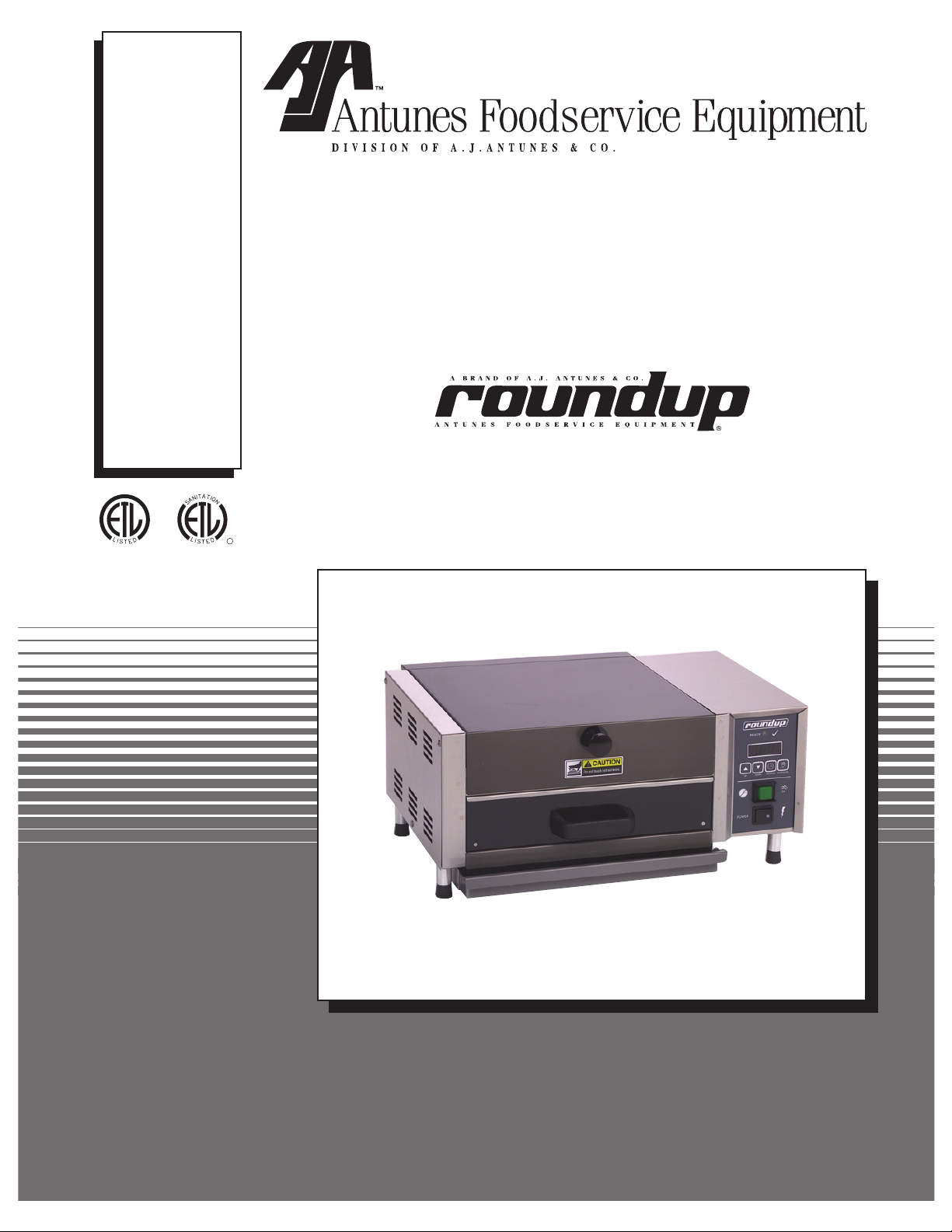
MIRACLE STEAMER
P/N 1010699 Rev. M 12/06
Models MS-150/155,
MS-250/255 & MS-355
MS-255 Shown
Owner’s Manual
Page 2

MIRACLE STEAMER
TABLE OF CONTENTS
Owner information .....................................................2
General ......................................................................2
Warranty Information .................................................2
Service/Technical Assistance ....................................3
Important safety information .....................................3
Specifications .............................................................5
Electrical Ratings .......................................................5
Electrical Cord & Plug Configurations .......................5
Model Designation .....................................................5
Dimensions ................................................................6
Installation ...................................................................7
Unpacking ..................................................................7
Model MS-150/155 & MS-355 ...................................8
Models MS-250/255 ..................................................9
Operation ...................................................................10
General (All Units Except MS-150/250
Mfg. #9100424, 432, 433 & 439) .......................... 10
OWNER INFORMATION
General
The Miracle Steamer produces steam using plain tap
water for quick heating and reconstituting of food items.
Simple push button action delivers a fully adjustable
impulse of steam. Because the amount of steam is
consistent, it removes the guesswork and produces a
uniform finished product from one operator to the next.
This manual provides the safety, installation and oper
ating procedures for the Miracle Steamer. We recom
mend that all information contained in this manual be
read prior to installing and operating the unit.
-
-
General (MS-150/250 - Mfg. #9100424, 9100432,
433, & 9100439 Only) ........................................... 10
Operating Instructions (Except MS-150/250
Mfg. #9100424, 432, 433, & 439) ...........................11
Operating Instructions (for MS-150/250
Mfg. #9100424, 432, 433, & 439 ONLY) .................11
Programming ........................................................... 11
Hi-Limit Reset Button ............................................. 13
Status Indicator LEDs ............................................. 13
Fault Codes ............................................................ 13
Maintenance .............................................................. 14
Daily ........................................................................ 14
Monthly ................................................................... 14
Technical Theory of Operation ............................... 18
Troubleshooting .......................................................19
Replacement parts ...................................................22
Wiring diagrams .......................................................31
Limited Warranty ......................................Back Cover
If the unit arrives damaged, contact the carrier immediately and file a damage claim with them. Save all
packing materials when filing a claim. Freight damage
claims are the responsibility of the purchaser and
not covered under warranty.
The warranty does not extend to:
• Damages caused in shipment or damage as
result of improper use.
• Installation of electrical service.
• Normal maintenance as outlined in this manual.
are
Your Miracle Steamer is manufactured from the finest
materials available and is assembled to Roundup’s
strict quality standards. This unit has been tested at
the factory to ensure dependable trouble-free opera
tion.
-
Warranty Information
Please read the full text of the Limited Warranty in this
manual.
• Malfunction resulting from improper maintenance.
• Damage caused by abuse or careless handling.
• Moisture damage to electrical components.
• Damage from tampering with, removal of, or
changing any preset control or safety device.
IMPORTANT
A.J. Antunes & Co. reserves the right to change specifications and product design
without notice. Such revisions do not entitle the buyer to corresponding changes,
improvements, additions or replacements for previously purchased equipment.
IMPORTANT! Keep these instructions for future reference. If the unit changes owner-
ship, be sure this manual accompanies the equipment.
2
P/N 1010699 Rev. M 12/06
Page 3
MIRACLE STEAMER
Service/Technical Assistance
If you experience any problems with the installation
or operation of your unit, contact your local Roundup
Authorized Service Agency. They can be found in the
service agency directory packaged with the equipment.
Fill in the information below and have it handy when
calling your authorized service agency for assistance.
The serial number is on the specification plate located
on the rear of the unit.
Purchased From:
Date of Purchase:
Model No.:
Serial No.:
Mfg. No.:
IMPORTANT SAFETY INFORMATION
Refer to the service agency directory and fill in the
information below:
Authorized Service Agency
Name:
Phone No.:
Address:
Use only genuine Roundup replacement parts in this
unit. Use of replacement parts other than those sup
plied by the manufacturer will void the warranty. Your
Authorized Service Agency has been factory trained
and has a complete supply of parts for this unit.
You may also contact the factory at
1-630-784-1000 if you have trouble locating your local
authorized service agency.
1-877-392-7854 or
-
Throughout this manual, you will find the following safety words and symbols that signify important safety
issues with regards to operating or maintaining the Miracle Steamer.
WARNING
GENERAL WARNING. Indicates information important to the proper operation of
the equipment. Failure to observe may
result in damage to the equipment and/or
severe bodily injury or death.
CAUTION
GENERAL CAUTION. Indicates information important to the proper operation of
the equipment. Failure to observe may
result in damage to the equipment.
ELECTRICAL WARNING. Indicates information relating to possible shock hazard.
Failure to observe may result in damage
to the equipment and/or severe bodily
injury or death.
HOT SURFACE WARNING. Indicates
information important to the handling of
equipment and parts. Failure to observe
caution could result in personal injury.
WARNING
WARNING
P/N 1010699 Rev. M 12/06
3
Page 4

MIRACLE STEAMER
IMPORTANT SAFETY INFORMATION (continued)
In addition to the warnings and cautions in this manual,
use the following guidelines for safe operation of the
unit.
• Read all instructions before using equipment.
• For your safety, the equipment is furnished with
a properly grounded cord connector. Do not
attempt to defeat the grounded connector.
• Install or locate the equipment only for its intend
ed use as described in this manual. Do not use
corrosive chemicals in this equipment.
• Do not operate this equipment if it has a dam
aged cord or plug, if it is not working properly, or
if it has been damaged or dropped.
• This equipment should be serviced by qualified
personnel only. Contact the nearest Roundup
authorized service facility for adjustment or repair.
• Do not block or cover any openings on the unit.
• Do not immerse cord or plug in water.
• Keep cord away from heated surfaces.
• Do not allow cord to hang over edge of table or
counter.
The following warnings and cautions appear
throughout this manual and should be carefully
observed.
• Turn the unit off, disconnect the power source
and allow unit to cool down before performing
any service or maintenance on the unit.
• The equipment should be grounded accord
ing to local electrical codes to prevent the
possibility of electrical shock. It requires a
grounded receptacle with separate electrical
lines, protected by fuses or circuit breaker of
the proper rating.
• All electrical connections must be in accor
dance with local electrical codes and any
other applicable codes.
• WARNING ELECTRICAL SHOCK HAZARD.
FAILURE TO FOLLOW THESE INSTRUCTIONS
COULD RESULT IN SERIOUS INJURY OR
DEATH.
- Electrical ground is required on this appli
ance.
- Do not modify the power supply cord plug.
If it does not fit the outlet, have a proper
outlet installed by a qualified electrician.
- Do not use an extension cord with this
appliance.
-
-
-
-
-
- Check with a qualified electrician if you
are in doubt as to whether the appliance is
properly grounded.
• This equipment is to be installed to com
ply with the basic plumbing code of the
Building Officials and Code Administrators,
Inc. (BOCA) and the Food Service Sanitation
Manual of the Food and Drug Administration
(FDA).
• If the supply cord is damaged, it must be
replaced by the manufacturer or its service
agent, or a similarly qualified person.
• Do not clean this appliance with a water jet.
• Do not use a sanitizing solution or abrasive
materials. The use of these may cause dam
age to the stainless steel finish.
• To ensure proper steaming characteristics,
some calcium/mineral deposits must be pres
ent on the generator surface. If, during clean
ing, the surface does become free of calcium/
mineral deposits, one approved method is to
add plain tap water to the surface and allow
it to boil off. This will ensure proper steam
ing characteristics by creating a thin layer of
deposits on the surface.
Chlorides or phosphates in cleansing agents
•
(such as bleach, sanitizers, degreasers or
detergents) could cause permanent damage
to stainless steel equipment. The damage is
usually in the form of discoloration, dulling
of metal surface finish, pits, voids, holes or
cracks. This damage is permanent and not
covered by warranty.
• The following tips are recommended for main
tenance of your stainless steel equipment,
- Always use a soft, damp cloth for cleaning,
rinse with clear water and wipe dry. When
required, always rub in direction of metal
polish lines.
- Routine cleaning should be done daily
using soap, ammonia detergent and water.
- Stains and spots should be sponged using
a vinegar solution as required.
- Finger marks and smears should be
rubbed off using soap and water.
- Hard water spots should be sponged using
a vinegar solution.
-
-
-
-
-
-
4
P/N 1010699 Rev. M 12/06
Page 5
WHT
BLK
GRN
SPECIFICATIONS
MIRACLE STEAMER
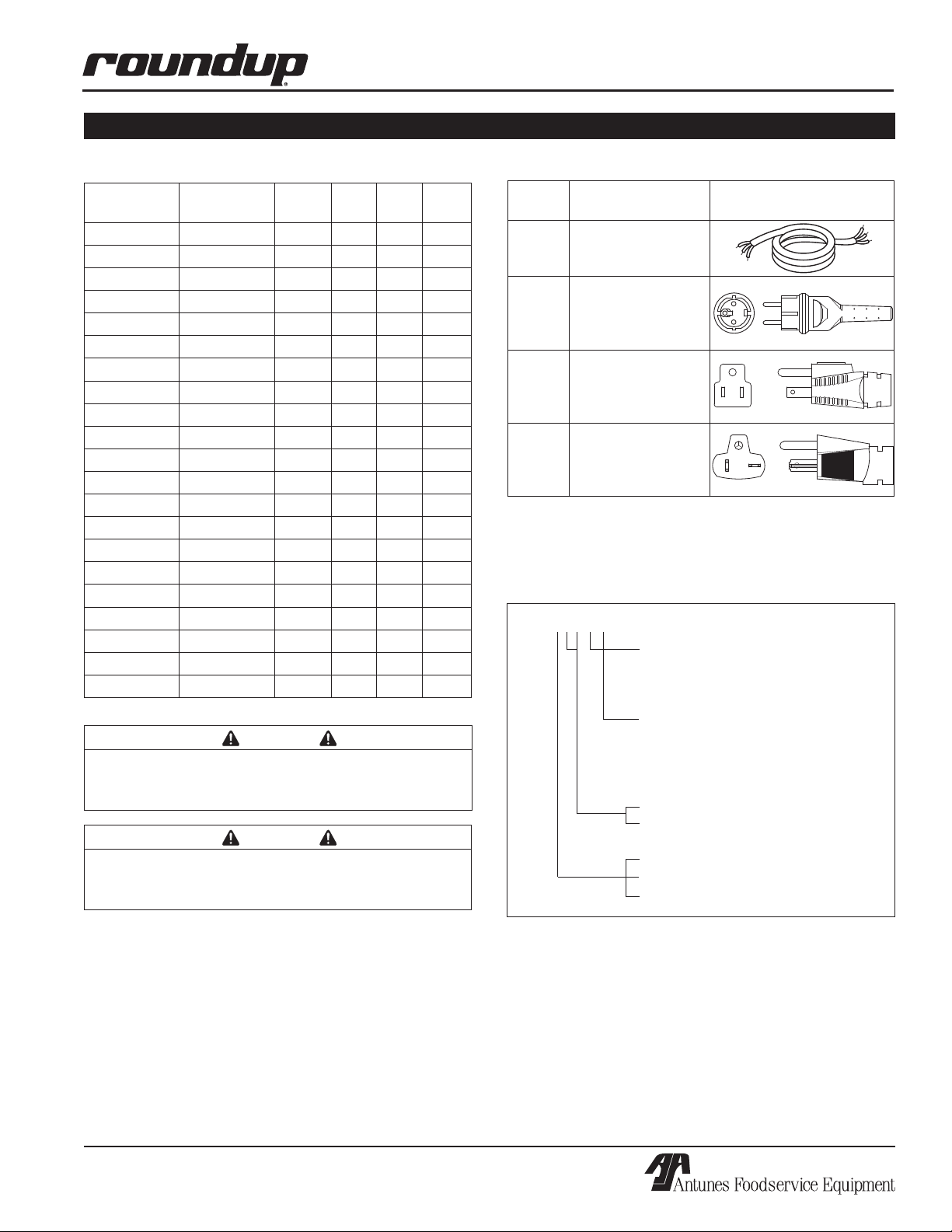
Electrical Ratings
Model Mfg.
Number
MS-150CV 9100420 208 3300 15.9 50/60
MS-150CV 9100424 208 3300 15.9 50/60
MS-150CV 9100426 230 3300 14.4 50/60
MS-150CF 9100425 120 1800 15.0 50/60
MS-150HC 9100428 230 3300 14.4 50/60
MS-250CV 9100430 208 3300 15.9 50/60
MS-250CV 9100432 208 3300 15.9 50/60
MS-250CV 9100433 230 3300 14.4 50/60
MS-250CV 9100436 230 3300 14.4 50/60
MS-250HC 9100438 230 3300 14.4 50/60
MS-250CF 9100439 120 1800 15.0 50/60
MS-155CV 9100450 208 3300 15.9 50/60
MS-155CF 9100452 120 1800 15.0 50/60
MS-155CV 9100456 230 3300 14.4 50/60
MS-155HC 9100458 230 3300 14.4 50/60
MS-255CV 9100460 208 3300 15.9 50/60
MS-255CF 9100462 120 1800 15.0 50/60
MS-255CV 9100466 230 3300 14.4 50/60
MS-255HC 9100468 230 3300 14.4 50/60
MS-355CV 9100480 208 3300 15.9 50/60
MS-355CV 9100486 230 3300 14.4 50/60
Voltage Watts
Amps Hertz
Electrical Cord & Plug Configurations
Letter
Code*
C
H
(H)C** CEE 7/7, 16 Amp.,
(C)F*** 5-15P, 15 Amp.,
(C)V*** 6-20P, 20 Amp.,
* Used in Model Designation
** Indicates that the plug comes with a Harmonized Cord
*** Indicates that the plug comes with a Commercial Cord
Description Configuration
Commercial Cord
Harmonized Cord
250 VAC
(Assembly Only).
120 VAC.,
Non – Locking
(Assembly Only).
250 VAC., Non –
Locking (Assembly
Only).
Model Designation
MS-150XX
TYPE OF POWER CORD
H = HARMONIZED
C = COMMERCIAL
CAUTION
All electrical connections must be in accordance
with local electrical codes and any other applicable codes.
CAUTION
Be sure to follow all safeguards and precautions
in the Important Safety Instructions section of this
manual.
P/N 1010699 Rev. M 12/06
TYPE OF PLUG
C = CEE 7/7 Schuko
F NEMA 5-15P
V = NEMA 6-20P
50 = Timer/Spatula Model
55 = Timer/Drawer Model
1 = Self-Contained Water Tank
2 = Direct Water Hook-Up
3 = Front Water Drawer
5
Page 6
MIRACLE STEAMER
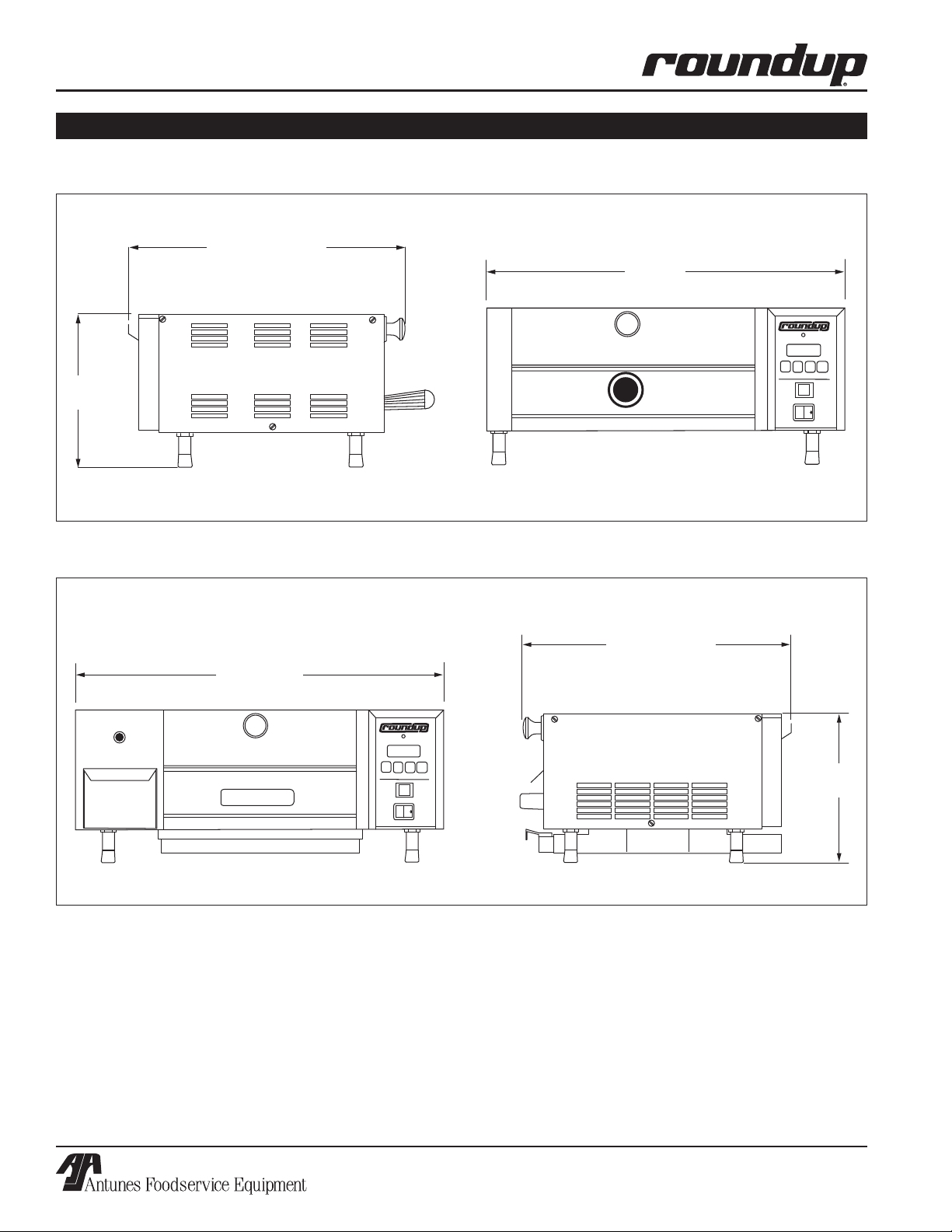
Dimensions
MS-150/155 & MS-250/255
SPECIFICATIONS (continued)
9-1/2”
(234 mm)
MS-355
17-1/8” (435 mm)
20-3/4”
(527 mm)
17-1/8” (435 mm)
25” (635 mm)
9-1/2”
(234 mm)
6
P/N 1010699 Rev. M 12/06
Page 7
INSTALLATION
THIS UNIT IS DESIGNED TO
OPERATE ON 208 VOLTS
ONLY. APPLICATION WITH ANY
OTHER VOLTAGE SUPPLY
COMPLETELY VOIDS ALL
WARRANTY. PLEASE CHECK
YOUR LINE VOLTAGE BEFORE
INSERTING THIS PLUG INTO THE
RECEPTACLE.
W
A
R
N
I
N
G
W
A
R
N
I
N
G
THIS UNIT IS DESIGNED TO
OPERATE ON 120 VOLTS
ONLY. APPLICATION WITH ANY
OTHER VOLTAGE SUPPLY
COMPLETELY VOIDS ALL
WARRANTY. PLEASE CHECK
YOUR LINE VOLTAGE BEFORE
INSERTING THIS PLUG INTO THE
RECEPTACLE.
W
A
R
N
I
N
G
W
A
R
N
I
N
G
120 VAC
ONLY
208 VAC
ONLY
T
H
I
S
A
P
P
L
I
A
N
C
E
M
U
S
T
B
E
E
A
R
T
H
E
D
(
G
R
O
U
N
D
E
D
)
T
H
I
S
A
P
P
L
I
A
N
C
E
M
U
S
T
B
E
E
A
R
T
H
E
D
(
G
R
O
U
N
D
E
D
)
T
H
I
S
A
P
P
L
I
A
N
C
E
M
U
S
T
B
E
E
A
R
T
H
E
D
(
G
R
O
U
N
D
E
D
)
T
H
I
S
A
P
P
L
I
A
N
C
E
M
U
S
T
B
E
E
A
R
T
H
E
D
(
G
R
O
U
N
D
E
D
)
THIS UNIT IS DESIGNED TO
OPERATE ON 220-240 VOLTS
ONLY. APPLICATION WITH ANY
OTHER VOLTAGE SUPPLY
COMPLETELY VOIDS ALL
WARRANTY. PLEASE CHECK
YOUR LINE VOLTAGE BEFORE
INSERTING THIS PLUG INTO THE
RECEPTACLE.
W
A
R
N
I
N
G
W
A
R
N
I
N
G
220-240
VAC ONLY
T
H
I
S
A
P
P
L
I
A
N
C
E
M
U
S
T
B
E
E
A
R
T
H
E
D
(
G
R
O
U
N
D
E
D
)
T
H
I
S
A
P
P
L
I
A
N
C
E
M
U
S
T
B
E
E
A
R
T
H
E
D
(
G
R
O
U
N
D
E
D
)
MIRACLE STEAMER
Unpacking
1. Remove the unit and all packing materials from
the shipping carton.
2. The unit should come with the items listed below:
• Owner’s Manual
• Authorized Service Agency Directory
• Inlet Hose Assembly (MS-250/255 only)
• Spatula Assembly (MS-150/250 only)
• Drawer Assembly (MS-155/255/355 only)
NOTE: If any parts are missing or damaged, con
tact Antunes Technical Service IMMEDIATELY at
1-877-392-7854 or 1-630-784-1000.
3. Remove all packing materials and protective cov
erings from the unit.
4. Remove and wash all removable parts in soap
and water. Rinse with clean hot water and allow
to air dry.
5. Wipe all surfaces of the unit with a hot, damp
cloth.
-
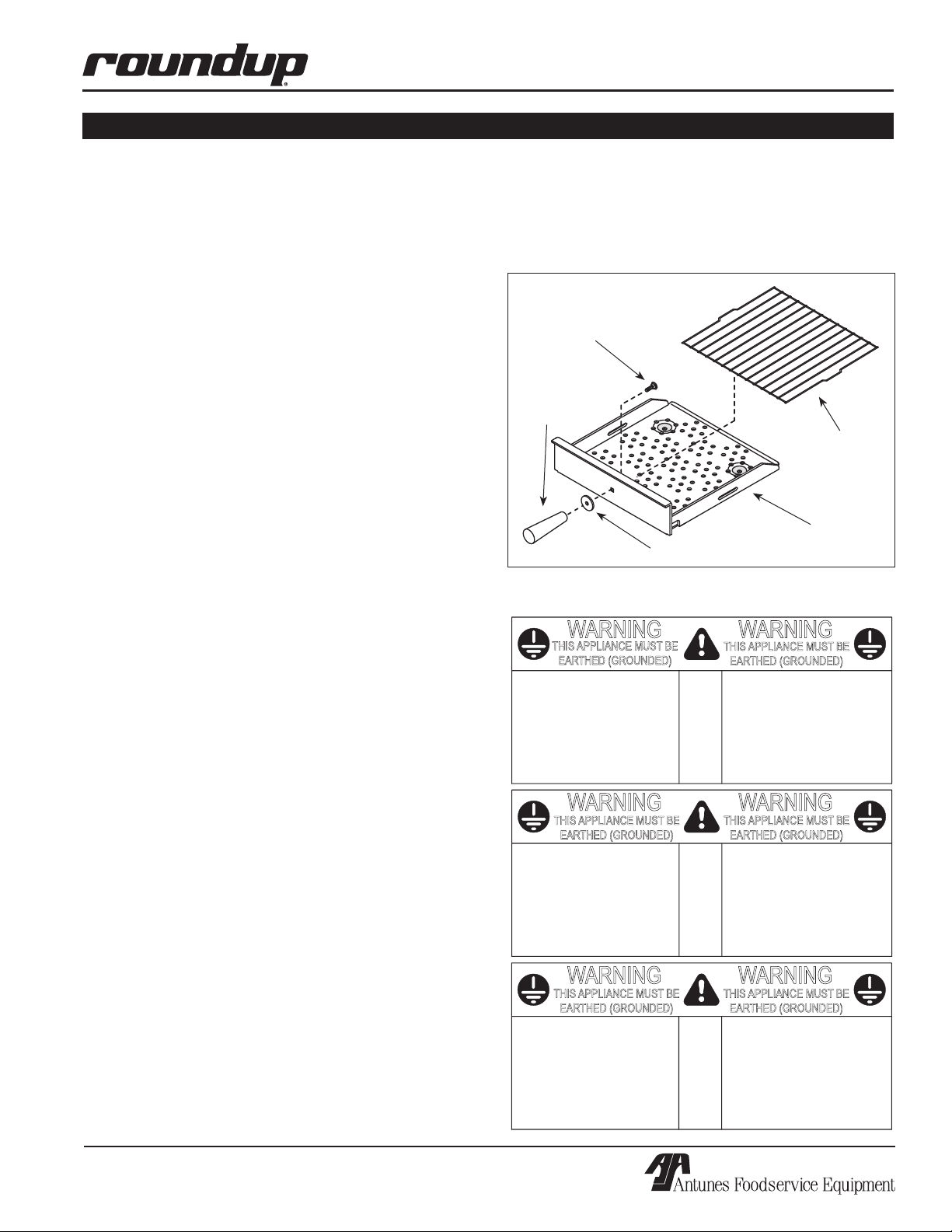
Guard and Mounting Bolt to the Spatula as shown in
Figure 1.
7. Install the Wire Trivet into side slots on Spatula.
8. Re-install all removed parts.
Bolt
Handle
-
Handle Guard
Wire Trivet
Spatula
Figure 1. Assembling Handle–MS-150/250 Only
NOTE: Do not use a dripping wet cloth. Wring out
before use.
6. MS-150/250 Models: Assemble the
P/N 1010699 Rev. M 12/06
7
Page 8
MIRACLE STEAMER
R
E
A
D
Y
READY
ADD
WATER
INSTALLATION (continued)
CAUTION
Be sure to follow all safeguards and precautions
in the Important Safety Instructions section of this
manual.
CAUTION
All electrical connections must be in accordance
with local electrical codes and any other applicable codes.
PLUMBING
NOTE: Miracle Steamer models are designed to
use cold tap water. Distilled water may be used
to reduce calcium/mineral deposit build-up and
reduce maintenance costs.
CAUTION
This equipment is to be installed to comply with
the basic plumbing code of the Building Officials
and Code Administrators, Inc. (BOCA) and the
Food Service Sanitation Manual of the Food and
Drug Administration (FDA).
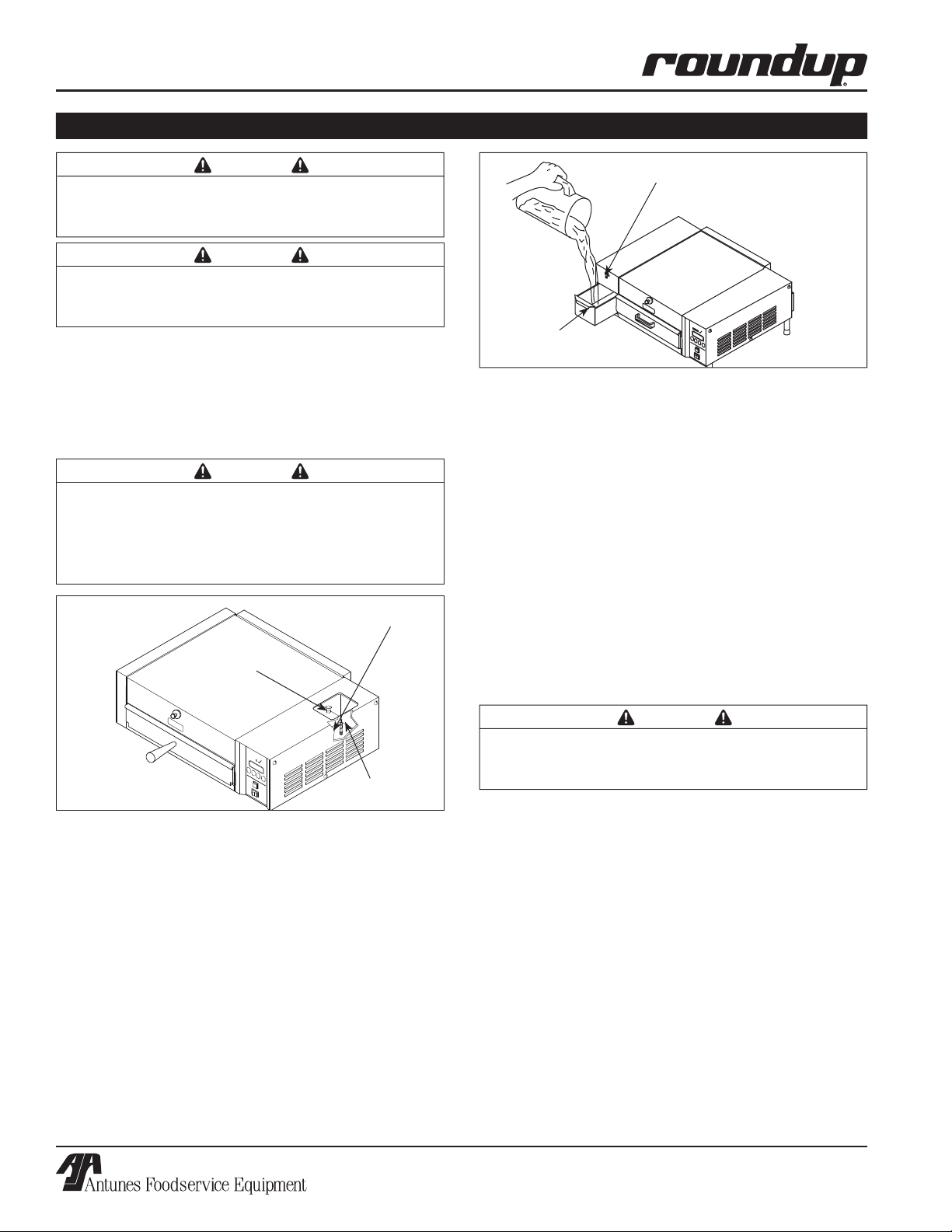
Filter
Sliding Cover
Indicator Light (Low water)
Tank
Figure 3. Filling Water Tank–MS-355
Model MS-150/155 & MS-355
The MS-150/155 & MS-355 models have a self-contained water tank. To fill the self-contained water tank:
1.
MS-150/155: Open the sliding tank cover on top
of the unit (Figure 2).
NOTE: Make sure filter inside tank is installed
properly.
MS-355: Open the sliding tank drawer on the side
of the unit (Figure 3).
2. Pour in cold tap water. The tank will hold
approximately 3 quarts (2.81 liters).
3. Close the sliding tank drawer.
Tank
Figure 2. Filling Water Tank–MS-150/155
CAUTION
Do NOT overfill the unit water tank. Fill the tank to
90% full ONLY.
8
P/N 1010699 Rev. M 12/06
Page 9
INSTALLATION (continued)
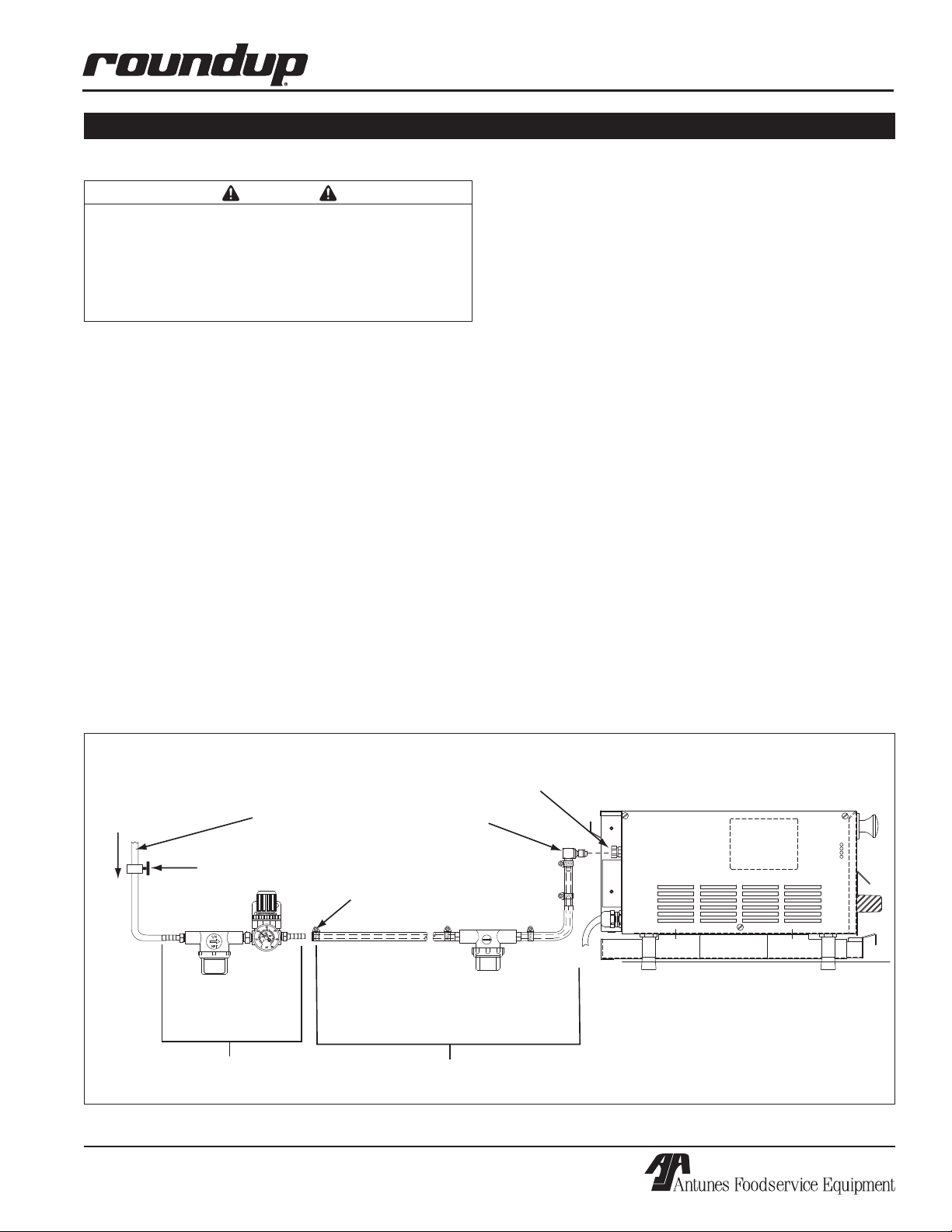
Connect Quick
Disconnect
Insert Here
Inlet Hose & Strainer
Assy. (Supplied)
Optional Water Pressure Regulator
with Strainer (P/N 7000314)
Shut Off Valve
(Not Supplied)
Cold
Water
Flow
Flexible Nylon Braided
1/4 " I.D. Tubing (Not Supplied)
Quick
Disconnect
Insert
Worm
Clamp
NOTE: The use of only one strainer is
acceptable instead of two.
MIRACLE STEAMER
Models MS-250/255
CAUTION
Water pressure must not exceed 30 psi (2.1 kg/
cm2 or 207 kPa). Higher water pressures may
cause poor performance or flooding. To reduce
water pressure, install a water pressure regulator,
and set water pressure to 20-25 psi (1.4 - 1.7 kg/
cm2 or 138 - 172 kPa).
These models require a direct cold water hookup. A
Water Inlet Hose and Strainer Assembly (Figure 4) is
supplied.
NOTE: Incoming water is controlled by a normally
closed (NC) solenoid valve located inside the
Steamer’s electrical housing.
1. Turn off the water valve (not supplied) that sup
plies water to the unit (Figure 4).
2. Connect the 1/4” (6.5 mm) I.D. Flexible Tubing to
the outlet side of the Water Pressure Regulator
and secure using the worm clamp as shown in
Figure 4.
-
3. Turn the water valve on.
4. Over a bucket, press and hold the white plastic
tip on the Quick Disconnect Insert (Figure 4) until
good, steady water flow is noted (this will purge
all air out of the line). Release and note the pres
sure on the Water Pressure Regulator gauge. It
should read 20-25 PSI. If it reads more or less,
adjust the pressure by pulling the black knob
upwards and turning it clockwise to increase or
counter-clockwise to decrease the water pressure.
Push the knob down to lock it in place.
NOTE: When adjusting the knob, you must relieve
the existing pressure by pressing the white plastic
tip on the Quick Disconnect Insert for 3 seconds.
This allows the newly set pressure to register on
the gauge. Repeat this until the gauge reads 20-25
PSI.
5. Push the Quick Disconnect Insert into the fitting at
the rear of the unit until a “click” is heard
(Figure 4).
-
NOTE: A Water Pressure Regulator must first be
installed as shown in Figure 4. Failure to do so will
result in poor steaming and possible flooding. For
a single steamer, use Water Pressure Regulator P/N
7000314. For two adjacent steamers, use Water
Pressure Regulator P/N 7000235.
P/N 1010699 Rev. M 12/06
Figure 4. Connecting Water Supply to MS-250/255
9
Page 10
MIRACLE STEAMER
UP
DOWN
PRGM
START/STOP
POWER
READY
UP DOWN
SINGLE SHOT
PROGRAM
POWER
READY
OPERATION
General (All Units Except MS-150/250 Mfg. #9100424, 432, 433 & 439)
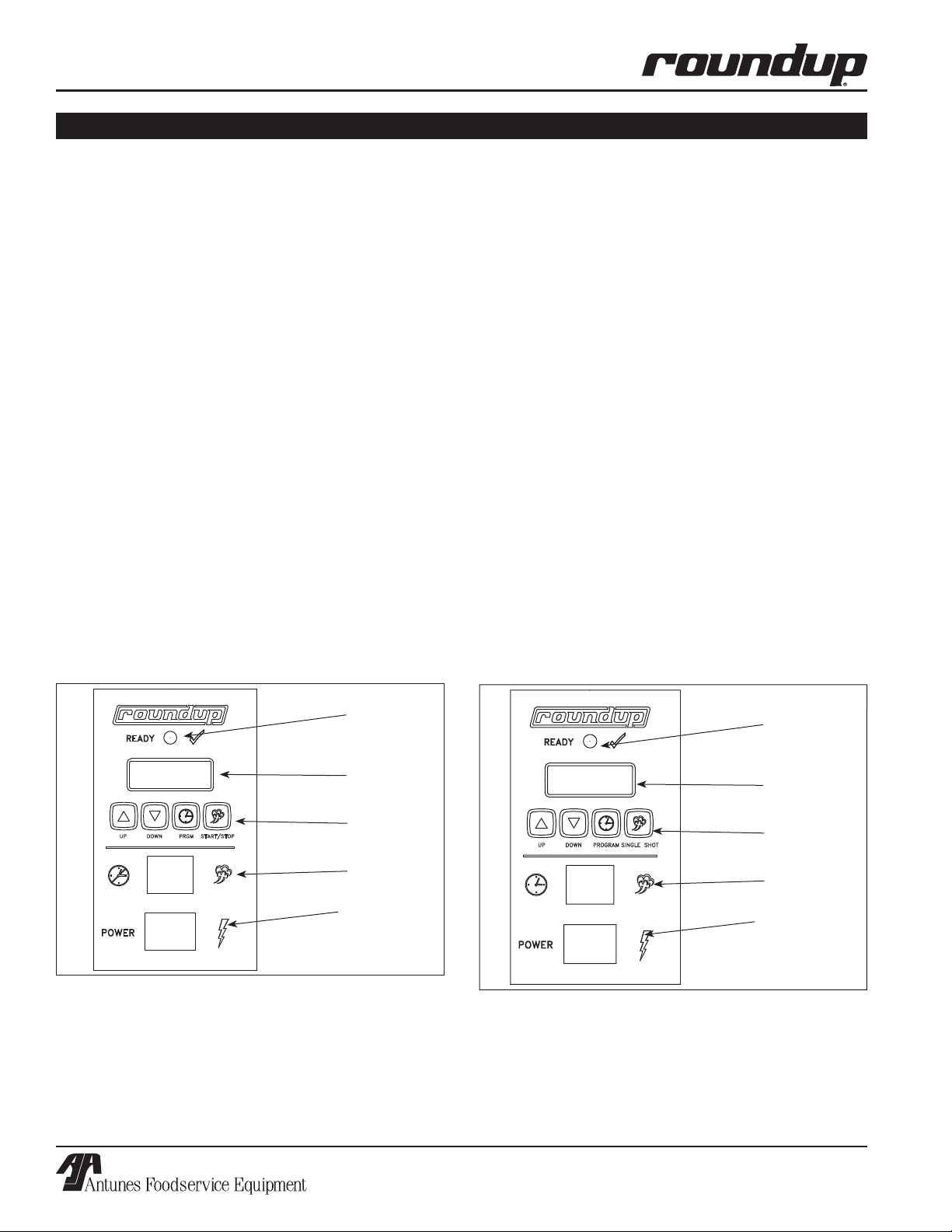
When the Operate button (Figure 5a) is pressed, power
is supplied to the water pump (MS-150/155/355) or
the solenoid valve (MS-250/255). The pump/solenoid
operates and water sprays onto the heated Steam
Generator. The water flashes immediately into live
steam and shoots down onto the product.
One of two operational modes can be used:
Single Shot or Timed Cycle
SINGLE SHOT
The Operate button is pressed to initiate a single steam
shot. The control board applies power to the water
pump/solenoid and a “shot” of steam occurs.
TIMED CYCLE
The control is used to set the desired cook time (up
to 99 minutes, 59 seconds). When the Start/Stop but
ton is pressed, the Control Board applies power to the
water pump/solenoid at regular intervals for the dura
tion of the displayed cycle time. The display counts
down to zero and, when the cycle is complete, sounds
an audible signal, and then reverts back to the original
programmed cycle time. The unit is ready for the next
cycle when the green ready light is on.
-
-
General (MS-150/250 - Mfg. #9100424,
9100432, 433, & 9100439 Only)
When the Single Shot button (Figure 5b) is pressed,
power is supplied to the Solenoid/Water Pump. The
solenoid/ water pump operates and water sprays onto
the heated Steam Generator. The water flashes imme
diately into live steam and shoots down onto the prod
uct.
One of two operational modes can be used:
Single Shot or Timed Cycle
SINGLE SHOT
The Single Shot button is pressed to initiate a single
steam shot. The Control Board applies power to the
Solenoid/Water pump and a “shot” of steam occurs.
TIMED CYCLE
The control is used to set the desired cook time (up
to 99 minutes, 59 seconds). When the Operate but
ton is pressed, the Control Board applies power to
the solenoid at regular intervals for the duration of
the displayed cycle time. The display counts down
to zero and, when the cycle is complete, sounds an
audible signal, and then reverts back to the original
programmed cycle time. The unit is ready for the next
cycle when the green ready light is on.
-
-
-
Figure 5a. Operating Controls (all units EXCEPT
MS-150/250 Mfg. #9100424, 9100432, 9100433, &
9100439)
Ready Light
Message
Display
Start/Stop
Button
Operate
Button
Rocker Switch
(Power On/Off)
Ready Light
Message
Display
Single Shot
Button
Operate
Button
Rocker Switch
(Power On/Off)
Figure 5b. Operating Controls
(MS-150/250Mfg. #9100424, 9100432, 9100433,
&9100439 ONLY)
10
P/N 1010699 Rev. M 12/06
Page 11

OPERATION (continued)
IMPORTANT: 208V and 220/240V Miracle Steamers
are factory programmed for the following recom
mended settings:
• Total Cycle Time (CYC) = 15 min., 00 secs.
(Range: 3 seconds to 99 minutes 59 seconds)
• Shot Interval Time (SHO) = 00 min., 20 secs.
(Range: 3 seconds to 5 minutes 59 seconds)
• Steam Shot Time (H
MS-150/155/355 - (1_00)
MS-250/255 - (0_70)
(Range: 0_10 second to 2_50)
This converts approximately 3/4 oz. (25 milliliters)
of water to steam every 20 seconds for a 15 minute
cooking cycle. To change any of these settings see
PROGRAMMING on this page.
IMPORTANT: 120V Miracle Steamer is factory pro
grammed for the following recommended settings:
• Total Cycle Time (CYC) = 2 min., 00 secs.
(Range: 3 seconds to 99 minutes 59 seconds)
• Shot Interval Time (SHO) = 00 min., 20 secs.
(Range: 3 seconds to 5 minutes 59 seconds)
• Steam Shot Time (H
MS-250/255 - (0_40)
MS-150/155/355 - (0_80)
(Range: 0_10 seconds to 2_50)
O) =
2
O) =
2
Operating Instructions (Except MS-150/250
Mfg. #9100424, 432, 433, & 439)
1. Turn the Rocker Switch (power On/Off) to ON
(Figure 5a).
2. Allow the unit to preheat for approximately 20-30
minutes.
NOTE: Do not push any of the buttons during
warm-up time. The flashing green ready light indi
cates that the unit is
flashing green ready light will become
when the unit is up to temperature.
NOT up to temperature. The
STEADY
-
-
-
MIRACLE STEAMER
Timed Cycle: Press the Start/Stop button to
begin the steaming cycle. The display will count
down to zero and an audio signal will sound at
the end of the steaming cycle.
WARNING
To avoid injury, be careful when pulling Spatula
or Drawer out from unit. Be sure to allow steam
to escape before putting hands or face over the
steamer.
6. Remove steamed product.
Operating Instructions (for MS-150/250 Mfg. #9100424, 432, 433, & 439 ONLY)
1. Turn the unit on (Figure 5b).
2. Allow the unit to preheat for approximately 20-30
minutes.
NOTE: Do not push any buttons during warm-up
time. The flashing green ready light indicates that
the unit is NOT up to temperature. The flashing
green ready light will become STEADY when the
unit is up to temperature.
3. Pull out the spatula and place the product to be
steamed onto the spatula.
4. Push the spatula fully into the steamer.
5. Single Shot: Press and release the Single Shot
button, wait 20 seconds for the steam to pen
etrate the product.
Timed Cycle: Press the Operate button to begin
the steaming cycle. The display will count down
to zero and an audio signal will sound at the end
of the steaming cycle.
To avoid injury, be careful when pulling spatula
or Drawer out from unit. Be sure to allow steam
to escape before putting hands or face over the
steamer.
6. Remove steamed product.
WARNING
-
3. Pull out the Spatula or Drawer Assembly and
place the product to be steamed onto the
Spatula.
4. Push the Spatula or Drawer Assembly fully into
the steamer.
5. Single Shot: Press and release the Operate but
ton, wait 20 seconds for the steam to penetrate
the product.
P/N 1010699 Rev. M 12/06
Programming
CYC (Total Cycle Time) refers to the total pro-
grammed steam time set for the product.
SHO (Shot Interval Time) is the time set between
-
shots of steam during a complete cycle.
H2O setting (Steam Shot Time) is used to adjust the
water volume consumed during each water pump or
solenoid valve activation.
11
Page 12

MIRACLE STEAMER
U
P
D
O
W
N
P
R
G
M
S
T
A
R
T
/
S
T
O
P
R
E
A
D
Y
1500
U
P
D
O
W
N
P
R
G
M
S
T
A
R
T
/
S
T
O
P
R
E
A
D
Y
15
U
P
D
O
W
N
P
R
G
M
S
T
A
R
T
/
S
T
O
P
R
E
A
D
Y
00
U
P
D
O
W
N
P
R
G
M
S
T
A
R
T
/
S
T
O
P
R
E
A
D
Y
SHO
U
P
D
O
W
N
P
R
G
M
S
T
A
R
T
/
S
T
O
P
R
E
A
D
Y
00
U
P
D
O
W
N
P
R
G
M
S
T
A
R
T
/
S
T
O
P
R
E
A
D
Y
20
U
P
D
O
W
N
P
R
G
M
S
T
A
R
T
/
S
T
O
P
R
E
A
D
Y
H20
U
P
D
O
W
N
P
R
G
M
S
T
A
R
T
/
S
T
O
P
R
E
A
D
Y
OPERATION (continued)
The amount of steam produced by your Miracle
Steamer depends on the amount of water sprayed onto
the steam generator.
Flooding of the generator may occur if the H2O setting
is set too high. To prevent flooding, the Shot Interval
Time (SHO) can be increased to allow more time for
generator heat recovery. Adjustments should be made
to both values to determine the optimum settings for
your cooking needs.
To program the control, refer to Figure 6 and follow the
procedure below:
1. Turn the unit on. The unit displays the factory
programmed Total Cycle Time in minutes and
seconds (Item A, Figure 6).
2. Press and release
change the control from
OPERATION to PROGRAM mode.
3. To change the Total Cycle Time in minutes, press
▲ or ▼ to change the time (Item B, Figure 6).
4. Press and release
again, and press ▲ or ▼
to change the Total Cycle Time in seconds (Item
C, Figure 6).
5. To change the SHO factory settings, make sure
the control is in PROGRAM mode, then press
and hold both ▲ and ▼ simultaneously for 1-2
seconds and then release. SHO will be displayed
(Item D, Figure 6).
6. Press and release
and then press ▲ or ▼ to
change the SHO in seconds (Item E, Figure 6).
7. Press and release again and press ▲ or ▼ to
change the SHO in minutes (Item F, Figure 6).
NOTE: 00 minutes is recommended.
8. Press and release the Program button again and
H2O will be displayed (Item G, Figure 6).
9. To change the H
O (Steam Shot time), press
2
and release the Program button again to display
the setting (Item H, Figure 6). Use ▲ or ▼ to
increase or decrease the time.
NOTE: Recommended settings are:
MS-150/155/355 (0_80) 120 Volt units only
MS-250/255 (0_40) 120 Volt units only
MS-150/155/355 (1_00) 208-240 Volt units only
MS-250/255 (0_70) 208-240 Volt units only
10. Press either the Start/Stop, Single Shot, or
Operate buttons to store the changes, exit the
PROGRAM Mode and initiate the cooking cycle.
NOTE: The Start/Stop, Single Shot, or Operate but
tons may be pressed at any time during program
-
ming to store the changes and exit the PROGRAM
Mode.
NOTE: If a change is not made within 5 seconds
at any time during the programming process, all
changes made up to that point are stored in memo
ry and the control reverts to the OPERATION Mode.
-
NOTE: 20 seconds is recommended.
A. Total Cycle Time
E. SHO Time in Seconds F. SHO Time in Minutes G. H
B. Total Cycle Minutes C. Total Cycle Seconds
O Cycle H. H2O Setting
2
Figure 6. Control Programming Sequence
12
D. SHO Cycle
P/N 1010699 Rev. M 12/06
Page 13

R
E
A
D
Y
OPERATION (continued)
UP
DOWN
PRGM
START/STOP
POWER
READY
MIRACLE STEAMER
Hi-Limit Reset Button
A hi-limit thermostat turns off electrical power to the
steam generator if it overheats. To reset this thermo
stat, allow approximately 45 minutes for the unit to cool
down, remove the black cap, and then press the black
reset button located on the rear of the unit (Figure 7).
If the unit requires continuous resetting, contact your
Roundup authorized service agency.
Hi-Limit Reset Button
Power Cord
Cap
Figure 7. Hi-Limit Reset Button (MS-150 shown)
-
Fault Codes
When the programming parameters for Minutes/
Seconds/SHO/H2O have been inadvertently changed
below or above their limits, the unit displays the “
fault code. If this code appears, clear these settings
using the procedure below:
1. Turn the unit off.
2. Press and hold the Program and Start/Stop
buttons simultaneously (for all units except MS150/250 with Mfg. number 9100424, 432, 433
& 439) or Up and Down Arrow buttons for MS150/250 with Mfg. number 9100424, 432, 433, &
439 only).
3. Turn the unit on while holding the appropriate
buttons. Release the buttons when the unit stops
beeping,
4. The display will now register the cycle time.
NOTE: Repeat these steps if the unit still displays
the ERR fault code.
NOTE: It is recommended that the SHO and H2O
settings be adjusted to the recommended settings
shown in the Programming section of this manual.
ERR”
Status Indicator LEDs
The Miracle Steamer’s Control Board has 4 Status
Indicator LEDs described below:
Green (Program): When lit, indicates the unit is in
Program mode.
Yellow (Audio): When lit, indicates 10-15 VDC is being
supplied to the audio signal. The audio signal sounds
and the LED lights for approximately 3 seconds.
Red (Heat): When lit, indicates the Control Board is
calling for heat by supplying 10-15 VDC to the Solid
State Relay. When off, indicates that the unit is satis
fied.
Green (H2O): When lit, indicates that 24 VAC is being
supplied to operate the solenoid valve (MS-250/255) or
water pump (MS-150/155/355). This LED is only lit for
approximately 1 second.
ERR
-
The “ERR” Fault Code
P/N 1010699 Rev. M 12/06
13
Page 14

MIRACLE STEAMER
MAINTENANCE
WARNING
Turn the unit off, disconnect the power source
and allow the unit to cool down before performing
any service or maintenance on the unit.
CAUTION
Chlorides or phosphates in cleansing agents
(such as bleach, sanitizers, degreasers or deter
gents) could cause permanent damage to stain
less steel equipment. The damage is usually in
the form of discoloration, dulling of metal surface
finish, pits, voids, holes or cracks. This damage
is permanent and not covered by warranty. The
following tips are recommended for maintenance
of your stainless steel equipment:
• Always use a soft, damp cloth for cleaning,
rinse with clear water and wipe dry. When
required, always rub in direction of metal polish
lines.
• Routine cleaning should be done daily using
soap, ammonia detergent and water.
• Stains and spots should be sponged using a
vinegar solution.
• Finger marks and smears should be rubbed off
using soap and water.
• Hard water spots should be sponged using a
vinegar solution.
NOTE: Frequency of cleaning is determined by
water conditions, usage and water filtration sys
tems.
CAUTION
Do not use a sanitizing solution or abrasive mate
rials. The use of these may cause damage to the
stainless steel finish.
CAUTION
If a chemical cleaner is used, be sure it is safe to
use on cast aluminum. Observe all precautions
and warnings on product label.
-
Daily
1. Turn the unit OFF. Unplug the power cord and
allow the unit to cool down before proceeding.
2. Check the Water Pressure Regulator gauge (MS250/250 only) and verify that it reads 20 - 25 PSI
(1.4 - 1.7 kg/cm2 or 138-172 kPa). If not, adjust
-
-
the water pressure as described in the Installation
section of this manual. Check the rear water
Quick Disconnect Fitting and Hose Clamp for
leakage. Tighten clamps or replace parts if need
ed.
3. Remove the Spatula (MS-150/250 only), Drawer
(MS-155/255/355 only), Liner, Drip Pan, Top
Cover, and Steam Vent (Figure 8).
4. Wash items in hot, soapy water and then rinse
and WIPE DRY.
5. Wipe down the food compartment and the entire
exterior of the unit (Figure 8) with a clean, hot,
damp cloth (not dripping wet) and wipe dry.
6. Reinstall the Steam Vent first, followed by the
remaining items.
NOTE: Install steam vent before installing liner and
drawer/spatula.
NOTE: Failure to properly clean and dry the above
mentioned items prior to reassembly may result in
the accumulation of water/moisture overnight. This
may lead to permanent damage of the equipment’s
finish and its accessories. This damage is not cov
ered by warranty.
-
-
Monthly
-
The Miracle Steamer utilizes an open steam generator.
Water sprayed onto the generator surface flashes into
steam immediately, but the minerals in the water do not
steam, they stay on the generator surface. A small
amount of calcium/mineral deposits are needed for
proper operation, but a build-up of excessive calcium/
mineral deposits causes poor steaming efficiency,
excessive moisture (wet steam) and will eventually
severely retard the steaming action completely.
CAUTION
Unplug power cord before moving and servicing
this appliance.
14
P/N 1010699 Rev. M 12/06
Page 15

MAINTENANCE (continued)
MIRACLE STEAMER
CLEANING STEAM GENERATOR
1. Turn the unit off and unplug the power cord.
Allow the unit to cool down before proceeding.
2. Perform the Daily cleaning, but DO NOT reas
semble the unit
3. Remove the wing nut, Generator Cover, and
Diffuser (Figure 8). Wash these items in hot,
soapy water, rinse and WIPE DRY
4. With the unit cool, use a wire brush and/or scrap
er to loosen and remove the excessive calcium/
mineral deposits from the generator surface
(Figure 8). Next, take a wire brush and clean
out any build up that has accumulated in the 28
steam ports (26 vertical and 2 horizontal) of the
generator (Figure 8). Remove the loose build up,
wipe the generator with a clean, damp cloth, and
reassemble the unit.
NOTE: If deposits are still excessive and/or diffi
cult to remove, refer to Steps 5 and 10.
5. Pour delimer solution (not supplied) onto the gen
erator surface. Follow the delimer manufacturer’s
instructions for proper mixture and use.
CAUTION
If a chemical cleaner/delimer is used, be sure it is
safe to use on cast aluminum. Observe all precautions and warnings on the product label.
6. Using a sponge or a dry towel, remove the
delimer solution from the generator surface, then
rinse with clean water.
.
-
-
NOTE: To ensure proper steaming characteristics,
some calcium/mineral deposits must be present on
the generator surface. If, during cleaning, the sur
face does become free of calcium/mineral deposits,
add plain tap water to the surface and allow it to
boil off. If necessary, repeat this process to formu
late a thin coating of calcium/mineral deposits.
NOTE: In soft water areas, it may be necessary
to add a small amount of lime to the generator to
“season” it. This will ensure proper steaming char
-
acteristics by producing a thin coating of calcium/
mineral deposits on the generator surface.
Seasoning mixture consists of 3/4 ounces (25ml/
25cc) baking soda, 3/4 ounces (25ml/25cc) lime
mixed with 1 quart (950ml/950cc) of water. Stir
mixture and pour 1/4” deep onto the hot generator
surface. After mixture is converted to steam, the
remaining loose power can be removed.
7. Plug the power cord into the appropriate outlet.
8. Turn the unit ON. Allow the unit to warm up for
-
approximately 30 minutes.
9. Push and release the Operate button or the
Single Shot button several times to operate the
steamer. This purges any remaining delimer
residue from the generator surface.
10. Turn the unit off, reinstall all parts and accesso
ries, and return the unit to service.
-
-
-
-
P/N 1010699 Rev. M 12/06
15
Page 16

MIRACLE STEAMER
R
E
A
D
Y
A
D
D
W
A
T
E
R
MAINTENANCE (continued)
Spatula
Trivet
Spatula
(MS-150/250 only)
Drawer
(MS-155/255/355
only)
Wingnut
Diffuser
Top
Cover
Generator
Cover
Spatula Liner
(MS-150/250
Only)
Steam
Generator
Food
Compartment
Steam Ports (26
vertical and 2
horizontal)
Drawer Liner with Rollers
(MS-155/255/355 only)
Steam Vent
MS-355 Shown
Condensate
Drip Pan
Figure 8. Miracle Steamer Components
16
P/N 1010699 Rev. M 12/06
Page 17

MAINTENANCE (continued)
MIRACLE STEAMER
WATER TANK FILTER–MODELS MS-150/155 ONLY
The Water Tank Filter is used to prevent solids or food
products from entering and damaging the water pump.
The unit uses a water filter (Figure 9). Inspect and
clean this filter monthly or more regularly using the fol
-
lowing procedure:
NOTE: The water level should be very low or near
empty.
1. Turn the unit OFF. Unplug the power cord and
allow the unit to cool down before proceeding.
2. Open the Slide Door (Figure 9).
3. Remove the filter, located inside the tank, by pull
ing it upwards and out of the bottom hole.
4. Clean the Filter by running it under tap water.
Replace the Filter if the screen is torn or damaged.
CHECKING AND CLEANING THE WATER
STRAINER (MONTHLY MS-250/255 ONLY)
The Water Strainer protects your equipment from any
foreign debris in the water line that could get into the
food, damage the unit’s solenoid (causing the unit to
leak or flood) and protect from interference with the
equipment’s proper and consistent operation
To ensure proper and consistent steaming results,
visually check the water pressure regulator gauge and
strainer cup regularly. If the pressure on the gauge
has dropped, visually check the clear, plastic strainer
“cup” and clean out the accumulated debris as follows.
1. Shut off the water supply valve to the unit,
unscrew the clear, plastic strainer “cup” and care
fully remove the mesh strainer screen.
5. Reinstall the filter stem into the bottom hole of the
tank (Figure 9).
6. Fill the Water Tank and test the unit.
NOTE: The MS-355 does not use a water filter.
Slide Door
Bottom
Hole
of Water
Tank
Water Tank Filter
Filter Stem
Access
Cover
with Tank
(dotted line)
-
Figure 9. Water Tank Filter–MS-150/155 Only
2. At the sink, gently flush all of the accumulated
debris from the strainer cup and mesh strainer.
Be especially careful not to damage the mesh
strainer screen.
3 Carefully place the mesh strainer screen into its
seat at the bottom of the clear, plastic cup and
confirm that the orange O-ring is properly seated
in its place before screwing the strainer cup and
top back together.
4. Purge the air out of the strainer and tubing by
disconnecting the male quick disconnect insert
from the equipment and, over a bucket, push the
“white” plastic tip in until there is good water flow.
-
5. Replace damaged or warn parts as needed.
6. Verify that the Water Pressure Regulator is set to
20-25 PSI (1.4-1.7 kg/cm2 or 138-172 kPa).
Tubing
P/N 1010699 Rev. M 12/06
O-ring
Strainer Cup
Figure 10. Inlet Hose Assembly
17
Mesh
Screen
Male Quick
Disconnect Insert
Page 18

MIRACLE STEAMER
MAINTENANCE (continued)
Technical Theory of Operation
When the Rocker Switch (power On/Off) is ON, line
voltage flows to the primary side of the step down
transformer. The transformer’s secondary side supplies
12 and 24 VAC to the Control Board.
Once powered, and provided that the Generator tem
perature is below 380° F (193° C), the Control Board
calls for heat by supplying 10 - 15 VDC to the Solid
State Relay terminals 3(+) 4(-). Once powered, the
Solid State Relay closes terminals 1 and 2 which allows
line voltage to flow to the Generator.
As the Generator begins to heat up, a type “K” thermo
couple monitors the internal Generator temperature. As
the heat continues to increase, so does the thermocou
ple’s DC millivolts. Once the Generator’s temperature
rises to 380-420° F (193 - 215° C), the thermocouple is
generating approximately 7.5 - 9.0 DC millivolts.
The Control Board receives these millivolts and pro
ceeds to remove the 10 - 15 VDC to the Solid State
Relay since the heating circuit has now become sat
isfied. Then, relay terminals 1 and 2 open, and the
Generator stops heating.
When the Operate, Single Shot, or Start/Stop button
is pressed, the Control Board is signaled to supply 24
VAC to the solenoid valve used in models MS-250/255
or the water pump used in models MS-150/155/355 for
a split second.
-
-
-
-
-
The solenoid valve opens, or the water pump runs, and
allows a shot of water (approximately 25ml or 3-4 table
spoons) to flow onto the generator surface for steam
ing.
NOTE: If the display is in a Timed Cycle (counting
down), the Control Board will continue to activate
the solenoid valve or water pump for repeated
shots of water, once every 20 seconds, and for
the duration of the cycle time displayed. See the
Programming section of this manual for more infor
mation.
Since the Generator Cover is secured in place with
a wing nut, the steam is forced downward through
the Generator Steam Ports and onto the product.
The Control Board’s parameters can be custom pro
grammed for the over all cycle steam time (CYC), as
well as the interval time in seconds (SHO) when each
shot of water occurs, and also the water volume (H2O)
used per each shot of water. This Control Board also
incorporates several Status Indicator LEDs. See the
Operating and Programing sections of this manual).
An audio signal will sound for 3 seconds at the end of
a Time Cycle. If the heating circuit continues to call for
heat and the Generator overheats, a manual, resettable
Hi-Limit Thermostat will trip and open the generator
circuit.
-
-
-
-
18
P/N 1010699 Rev. M 12/06
Page 19

MIRACLE STEAMER
TROUBLESHOOTING
WARNING
To avoid possible personal injury and/or damage to the unit, inspection, test and repair of electrical equip
ment should be performed by qualified service personnel. The unit should be unplugged when servicing,
except when electrical tests are required.
Problem Possible Cause Corrective Action
Control Display is Blank (power On/
Off switch is On but indicator light is
off).
Control Display is blank (power On/
Off switch is on and indicator light is
on).
Unit does not heat up (Control
Display is on)
The unit’s main electrical panel cir
cuit breaker trips.
Water leaking inside electrical hous
ing.
“ERR” appears in the Control
Display.
The power cord is not correctly
plugged in.
The power cord and/or electrical
plug is damaged.
The main electrical panel circuit
breaker is off or has been tripped.
Switch is inoperable. Contact your maintenance person or
Control Board is inoperable Contact your maintenance person or
Transformer is inoperable.
Loose, burnt, or broken wires in cir
cuit.
Hi-Limit Thermostat is tripped or
inoperable.
Solid State Relay is inoperable.
Thermocouple is inoperable.
Control Board is inoperable.
Steam Generator is inoperable.
Loose, burnt, or broken wires in cir
cuit.
-
Damaged receptacle, plug, or cord;
a loose connection or an internal
component failure.
Pinhole leak in rubber hoses (MS-
150/155/355).
Loose or damaged water line tubes
and/or fittings inside electrical hous
ing.
Programming and/or SHO and
H2O values were adjusted/changed
improperly.
Plug the power cord into the appro
priate outlet.
Inspect electrical wire, plug, and
receptacle.
Reset circuit breaker. Contact your
maintenance person or Authorized
Service Agency if it trips again.
Authorized Service Agency for ser
vice.
Authorized Service Agency for ser
vice.
-
Reset the Hi-Limit Thermostat
according to the Operations section of this manual. If the Hi-Limit
Thermostat requires continuous
resetting, contact your Authorized
Service Agency for service.
-
Turn the unit off, allow it to cool to
room temperature, and then restart
the unit. Contact your maintenance
person or Authorized Service Agency
if the condition repeats.
Replace hoses.
Tighten or replace tubes and/or fit
-
tings.
Reset the Control Board as
described in the Programing section
of this manual. See Fault Codes.
-
-
-
-
-
P/N 1010699 Rev. M 12/06
19
Page 20

MIRACLE STEAMER
TROUBLESHOOTING (continued)
Problem Possible Cause Corrective Action
Unit heats but there
is little or no steam
produced
and/or
The product requires
more steaming than
usual.
Excessive con
densation in Food
Compartment.
Steam coming out
around top covers or
sides.
-
Water Line Valve is closed (MS250/255).
Filter Strainer is restricted. Check and clean the Filter Strainer as described in
Quick disconnect is not fully
engaged at rear of the unit or is
damaged (MS-250/255).
Low or no water pressure in the
water line (MS-250/255).
Improper water pressure to unit (MS250/255).
Unit is not being cleaned properly
(daily/monthly).
Programming and/or SHO, H2O val
ues were adjusted/changed improp
erly.
Insufficient or excessive calcium/
mineral deposits on the Generator
surface.
Generator surface is bare. Generator surface must have a thin calcium/min
Generator Steam Ports are restrict
ed.
Generator Cover is warped or loose. Verify that the Generator Cover wingnut is tight. If
Generator Diffuser is missing. Install Generator Diffuser or replace if missing.
Generator surface temperature is too
low.
Water pressure is too high (MS250/255).
Programming and or SHO and H2O
values were adjusted improperly.
Generator Cover’s wingnut is loose. Tighten wingnut.
Generator Cover is warped. Replace Generator Cover.
Check that the Water Line Valve is Open
the Maintenance section of this manual.
Remove and reengage the Quick Disconnect firmly
until a “click” is heard. Replace if damaged.
Remove the Quick Disconnect Insert from the rear
of the unit. While holding over an empty cup, press
the white plastic tip. Strong, steady water flow
should be noted. If so, reengage firmly into unit. If
not present, or pressure is low, contact your mainte
nance person or plumber.
Verify that a Water Pressure Regulator is installed
and set to 20-25 PSI.
Clean unit daily and monthly as described in the
Maintenance section of this manual.
-
Reprogram the SHO and H2O values as described
-
in the Programming section of this manual.
Verify that thin layer of calcium/mineral deposits
is present on the Generator surface. Refer to the
Maintenance section of this manual.
eral coating for proper steaming. Refer to the
Maintenance section of this manual.
Clean the Steam Ports as described in the
Maintenance section of this manual.
noticeable steam escapes around the Generator
Cover, replace the cover.
Verify Generator surface temperature to be 380420° F (193 - 215° C).
Verify that the Water Pressure regulator is set to 20
- 25 PSI. Adjust accordingly.
Reprogram the SHO and H2O values as described
in the Programming section of this manual.
-
-
20
P/N 1010699 Rev. M 12/06
Page 21

Problem Possible Cause Corrective Action
Unit floods overnight and/or
continues to steam even when
in idle mode.
TROUBLESHOOTING (continued)
Solenoid Valve is leaking due to
debris trapped inside the plung
er (MS-250/255).
Solenoid Valve is installed incor
rectly (MS-250/255).
There is no pre-strainer or filter
on the water line just before the
unit (MS-250/255).
Attempt to flush the debris out of the valve
-
by rapidly operating the unit on a number of
“single shot” cycles and then letting it rest. If
the unit still leaks, disassemble the Solenoid
Valve and clean out the plunger. Reassemble
unit and test. If a leak is still present, replace
the Solenoid Valve. Contact your maintenance
person or Authorized Service Agency.
-
If the Solenoid Valve was replaced, verify that
the “IN” and “OUT” labels on the valve corre
spond to the water flow.
Equipment was supplied with a strainer. If
missing, install strainer.
MIRACLE STEAMER
-
P/N 1010699 Rev. M 12/06
21
Page 22

MIRACLE STEAMER
89
81
88
93
81
80
85
79
84
83
82
86
87
85
REPLACEMENT PARTS
MS-150/155/250/255
NOTE: Refer to parts list on page 25.
22
P/N 1010699 Rev. M 12/06
Page 23

MIRACLE STEAMER
READY
43
31
32
33
23
55
28
46
72
69
49
48
67
49
71
51
57
55
37
68
19
55
26
59
60
27
43
1
9
39
55
4
49
43
46
2
96
96
96
REPLACEMENT PARTS (continued)
MS-150/155 Service Compartment
NOTE: Refer to parts list on page 25.
P/N 1010699 Rev. M 12/06
23
Page 24

MIRACLE STEAMER
READY
22
55
READY
72
49
48
67
50
71
51
57
55
68
69
19
55
26
59
60
27
29
32
33
23
55
28
46
30
5
55
46
37
2
97
REPLACEMENT PARTS (continued)
MS-250/255 Service Compartment
NOTE: Refer to parts list on page 25.
24
P/N 1010699 Rev. M 12/06
Page 25

REPLACEMENT PARTS (continued)
MS-150/155/250/255
Item Part No. Description Qty.
1 0010159 Filter Assy., Water Tank (MS-150/155) 1
2 7000652 Relay 1
3 0010584 Inlet Hose Assy. w/ strainer 1
(MS-250/255)
4 7000137 Pump/Tube Assy., 24VAC 1
(MS-150/155)
5 4040145 Solenoid Valve 24VAC 1
(MS-250/255)
6 7000237 Top Cover Assy. (Includes #41 & #42) 1
7 0011314 Steam Vent Assy. 1
8 0021131 Floor/Chassis Weldment 1
9 0021179 Access Cover Weldment 1
(MS-150/155)
10 7000246 Generator, 230V 1
7000245 Generator, 208V 1
7000300 Generator, 120V 1
11 0300129 Stud, Cover Hold Down 1
12 040P138* Locknut, 1/2” 1
13 040K251 Strain Relief (includes #12) 1
14 05P2199* Spacer 2
15 0503431 Diffuser, Steam 1
17 0503433 Cover, Generator 1
18 0503434 Cover, End Housing 1
19 0503435 Retainer, Thermocouple 1
20 0503988 Spatula MS-150/250 1
21 0021314 Liner, Cavity (MS-150/250) 1
22 0503441 Access Cover (MS-250/255) 1
23 0503472 Bracket, Hi-Limit Support 1
24 0700452 Power Cord, NEMA 6-20P 1
0700453 Power Cord, CEE 7/7 1
0700463 Power Cord, Nema 5-15P 1
26 100P967 Label, Marking 1
27 1001036 Label, Control Panel 1
1001102 Label, Control Panel (MS-150/250 1
Mfg. # 9100432, 433, 424, & 439)
28 2000203 Tube, Restrictor, 1/4” 1
29 2000207 Tube, Inlet, 1
1/4 x 2-1/2” Long (MS-250/255)
30 2040103 Connector, Male, 1
1/4 x 1/8 NPT (MS-250/255)
31 2040106 Adapter, Tube/Hose (MS-150/155) 1
32 2040145 Elbow, Female, 1/8” x 1/4” 1
33 2040146 Tee, Female, 1/8” x 1/4” 1
35 210K108 Foot, Rubber (4 Pack) 1
36 2100119 Handle, Spatula (MS-150/250 only) 1
37 4050180 Heat Sink 1
39 2100170 Knob, Chrome (MS-150/155) 1
41 2100249 Guard, Knob 1
MIRACLE STEAMER
Item Part No. Description Qty.
42 2100273 Knob 1
43 211P101 Clamp, Hose, 3/8 (MS-150/155) 1
44 211P103 Clamp, Hose, 1/2” (MS-150/155) 1
46 7000449 Generator Tube, Teflon, 4-1/2” Lg. 1
(MS-250/255)
7000446 Generator Tube, Teflon, 3-5/8” 2
(MS-150/155)
48 300P102* Nut, Speed, “U”, #8-32 2
49 304P105* Nut, Hex, KEPS, #4-40, Zinc 4
50 306P101* Nut, Hex, #6-32 2
51 306P105* Screw, Machine, #6-32 x 1/2” 2
52 306P123* Screw, Machine, #6-32 x 7/8” 2
53 306P130* Nut, Hex, KEPS, #6-32 2
54 306P134* Screw, Machine, #6-32 x 3/8 3
55 308P103* Screw, Machine, #8-32 x 1/4” 6
57 308P105* Screw, Machine, #8-32 x 1/2” 4
58 308P120* Screw, Machine, 4
#8-32 x 5/8” (sltrshd)
59 308P124* Screw, Machine, 1
#8-32 x 1/2” (one-way)
60 308P143* Nut, Hex, KEPS, #8-32 2
61 310P136* Screw, Machine, 4
#10-32 x 1-1/4” (splanhd)
62 310P149* Screw, Machine, 2
#10-32 x 7/8”
63 310P149* Screw, Machine, 2
#10-32 x 7/8” (MS-150)
64 325P170* Nut, Wing, 1/4-20 1
65 4010137 Rocker Switch, Power On/Off 250V 1
4010151 Rocker Switch, Power On/Off 120V 1
66 4010166 Switch, Momentary (GREEN) 1
4010190 Switch, Momentary (WHITE) 1
(for Mfg #9100432, 433, 424, & 439)
67 7000319 Transformer, 115-230/24V 1
68 7000135 Thermostat, Hi-Limit 1
69 4050214 Thermocouple, Type-K 1
70 406P107 Cable Tie 3
71 7000136 Terminal Block, 3-Pole 1
72 7000317 Control Board, 1
Temperature/Timer, 24V, 50/60 Hz
74 338P102* Bolt, Handle Mounting 1
(MS-150/250 only)
79 0011471 Drawer Assy. (Incl. #80-87) 1
(MS-155/255 only)
80 0021283 Drawer Weldment 1
(MS-155/255 only)
81 210K195 Bearing, Roller, SS 4
(MS-155/255 only) Incl. #85
P/N 1010699 Rev. M 12/06
25
Page 26

MIRACLE STEAMER
REPLACEMENT PARTS (continued)
MS-150/155/250/255 (continued)
Item Part No. Description Qty.
82 2100257 Handle (MS-155/255 only) 1
83 2100264 Guard, Handle (MS-155/255 only) 1
84 325P132* Screw, Machine, 1/4-20 x 1/2” 2
(MS-155/255 only)
85 05P2991 Spacer (MS-155/255 only) 2
86 306P137* Stud, PEM, #6-32 x 3/8” 2
(MS-155/255 only)
87 306P107* Acorn Nut, #6-32 (MS-155/255 only) 2
88 0021237 Liner Weldment (MS-155/255 only) 1
89 0503536 Drip Pan 1
90 2100118 Guard, Handle 1
91 See page 29 for Strainer Parts Identification.
Item Part No. Description Qty.
92 7000139 Quick Disconnect Insert (MS-250/255) 1
93 0011413 Liner Assy. (MS-155/255) 1
94 0011370 2” Leg Kit (Incl. #35) 4
94a 210K134 4” Leg Kit (not shown) 1
94b 210K123 4” Leg Kit (optional) (not shown) 1
95 0800359 Trivet, Spatula MS-150/250 1
96 7000134 Silicon Tube Kit, Water Pump 1
(MS-150/155)
97 7000138 Quick Disconnect Female Kit 1
98 0503429 Support, Generator Upper. 1
99 7000320 Spatula Kit (incl. #20, 36, 74, 90, 95) 1
MS-150/250
* Only available in quantities of 10.
26
P/N 1010699 Rev. M 12/06
Page 27

MIRACLE STEAMER
INSET C (Model MS 355)
49
49
READY
32
48
42
57
50
51
45
44
62
58
47
43
28
47
READY
ADD
W
A
TER
INSET A (Model MS 355)
59
51
78
79
38
38
41
41
36
37
33
29
47
ADD
W
A
TER
INSET B (Model MS 355)
63
39
78
17
20
34
54
51
14
81
60
23
15
12
REPLACEMENT PARTS (continued)
MS-355 Service Compartment
NOTE: Refer to parts list on page 28.
P/N 1010699 Rev. M 12/06
27
Page 28

MIRACLE STEAMER
READY
ADD
WATER
53
27
26
46
46
46
10
19
74
75
77
76
73
2
1
11
18
52
16
55
56
9
8
65
64
69
65
69
72
68
67
66
70
71
61
7
4
3
6
13
25
30
82
REPLACEMENT PARTS (continued)
MS-355
NOTE: Refer to parts list on page 28.
28
P/N 1010699 Rev. M 12/06
Page 29

MIRACLE STEAMER
REPLACEMENT PARTS (continued)
MS-355
Item Part No. Description Qty.
1 0011314 Steam Vent Assy. 1
2 7000237 Top Cover Assy. (Incl. #73-77) 1
3 0011413 Liner Assy. (Incl. #65, 69, 72) 1
4 0011471 Drawer Assy. (Incl. #64-71) 1
6 040P138 Locknut, Conduit, 1/2” 1
7 040K251 Strain Relief (includes #6) 1
8 0503441 Cover, Access 1
9 0503536 Drip Pan, Water 1
10 0503712 Cover, Tank Housing 1
11 0700452 Power Cord, NEMA 6-20P 250v 1
0700463 Power Cord, 5-15P 120V 1
12 7000652 Relay 1
13 1001066 Label, Wiring Diagram 1
14 7000317 Control Board, 24V, 50/60 Hz 1
15 4050180 Heat Sink 1
16 0011370 Leg Assy., 2” 4
17 0021241 Channel Weldment 1
18 0021242 Floor/Chassis Weldment 1
19 7000245 Generator, 208V 1
7000246 Generator, 230V 1
7000300 Generator, 120V 1
20 0011447 Float Switch Assy. 1
21 0300129 Stud, Cover 1
22 040P119 Bushing, Shorty, 3/8” 4
23 0500281 Bracket, Pump Mounting 2
24 05P2199 Spacer 2
26 0503431 Diffuser 1
27 0503433 Cover, Generator 1
28 0503435 Retainer, Thermocouple 1
29 0503472 Bracket, Hi-Limit Thermostat Support 1
30 0503713 Guard, Wire 1
31 0700600 Wire Set (not shown) Float Switch 1
32 1001036 Label, Control Panel 1
33 2000203 Tube, Restrictor, 1/4” 1
34 2000208 Tube, Supply 1
35 2040106 Adapter, Tube/Hose 1
36 2040145 Elbow, Female, 1/8” x 1/4” 1
37 2040146 Tee, Female, 1/8” x 1/4” 1
38 211P101 Clamp, Hose, 3/8” 2
39 211P103 Clamp, Hose, 1/2” 2
40 218P112* Nut, Nylon, 1/2-13 2
41 7000446 Pipe, Teflon, 3-5/8” Long 2
42 300P102* Nut, Speed, “U”, #8-32 2
Item Part No. Description Qty.
43 304P105* Nut, Hex, KEPS, #4-40, Zinc 4
44 306P101* Nut, Hex, #6-32 2
45 306P123* Screw, Machine, #6-32 x 7/8” 2
46 306P134* Screw, Machine, #6-32 x 3/8” 3
47 308P103* Screw, Machine, #8-32 x 1/4” 20
48 308P105* Screw, Machine, #8-32 x 1/2” 4
49 308P120* Screw, Machine, #8-32 x 5/8” 2
50 308P124* Screw, Machine, 1
One-Way, #8-32 x 1/2”
51 308P143* Nut, Hex, KEPS, #8-32 8
52 310P110* Screw, Machine, #10-32 x 1/2”, SS 4
53 325P170* Wingnut, 1/4-20 1
54 0500229 Retainer 1
55 4010137 Switch, Rocker 250V 1
4010151 Switch, Rocker 120V 1
56 4010166 Momentary Switch (Green) 1
57 7000319 Transformer, 115-230/24V 1
58 7000135 Thermostat, Hi-Limit 1
59 4040144 Water Pump, Oscillating, 24V 1
60 4050214 Thermocouple, Type-K 1
61 406P107* Cable Tie, 1/8” Wide x 5” Long 3
62 7000136 Terminal Block, 3-Pole 1
63 4060371 Indicator Light, Blue, 12V 1
64 0021283 Drawer Weldment 1
65 210K195 Bearing, Roller, Nylon, SS 4
(includes #69)
66 2100257 Handle 1
67 2100264 Guard, Handle 1
68 325P132* Screw, Machine, 1/4-20 x 1/2” 2
69 05P2291 Spacer 2
70 306P137* Stud, PEM, #6-32 x 3/8” 2
71 306P107* Acorn Nut, #6-32 2
72 0021237 Liner Weldment 1
73 0503686 Cover, Top 1
74 2100273 Knob 1
75 2100249 Guard, Knob 1
76 390P101* Bolt, M8 x 1.25 x 14mm Long 1
77 100P864 Label, Caution HOT 1
78 0011446 Silicone Tube Assy., 26” 1
79 0021358 Silicone Tube Assy., 17” 1
81 0011415 Water Tank Assembly 1
82 210K108 Foot, Rubber (4 Pack) 1
* Only available in quantities of 10.
P/N 1010699 Rev. M 12/06
29
Page 30

MIRACLE STEAMER
! WARNING
18
MISUSE O
F PRODU
CTMAY C
AUSE
PERS
ONALINJU
RY.READ
ASME
INSTAL
ATION/OP
ERATING
INTRU
CT
1/4
NPT
MADE IN USA IMI
R91G-24K-NLN
INLET 150 PSIG MAX
OUTLET 125 PSIGMAX
TEMP 125 F°MAX
50
40
60
10
20
30
1/4
NPT
0
psi
200
300
100
0
400
kPa
1/4
NPT
REPLACEMENT PARTS (continued)
Dual Water Pressure Regulator Kit - Part No. 7000235
To Steamer
1
To Steamer
2
4
5
13
9
11
6
7
8
12
Item Part Description Qty.
No.
1 7000139 Elbow, Quick Disconnect - 1/4” 2
2 2030126 Tubing 1/4” I.D. PVC BRD. 24” Long 1
10
3 2030125 Tubing 1/4” I.D. PVC BRD. 12” Long 1
4 2040150 Elbow, Male - Nylon 2
1/4” Barb x 3/8” NPT
3
5 0503615 Bracket, Manifold Mtg. 1
6 2190129 Nipple 1/4” NPT x 1/4” NPT 1
7 7000333 Strainer - 1/4” FPT 1
8 2080118 Quick Disconnect - 1/8” NPT 1
9 2190113 Manifold 1
10 2110160 Clamp, Ear Med. 4
11 2040151 Nipple, HEx - 3/8” x 1/4” NPT Nylon 1
12 7000306 Gauge, Water Pressure 1
13 2170113 Regulator, Pressure 1
IMPORTANT: Two adjacent steamers can be fed
with a dual water pressure regulator.
Water Supply
Single Water Pressure Regulator Kit - Part No. 7000314
4
2
3
2
6
NOTE: Item 1 is
made up of items
2 - 4
3
Item Part Description Qty.
No.
1
1 0503849 Bracket 1
2 2040130 Male Adapter, Barbed 1/4” 2
2
3 See Below for Strainer Parts Identification
4 2170113 Regulator, Pressure 1
5 7000306 Gauge, Water Pressure 1
6 2190129 Nipple, 1/4” NPT x 1/4” NPT 1
7 2110104 Clamp, Worm (not shown) 2
5
Item Part Description Qty.
No.
1 7000333 Water Line Strainer Kit 1
2
2 2040130 Male Adapter, Barbed 1/4” 2
3 7000334 Replacement Screen and O-ring kit 1
4 2110104 Clamp, Worm (not shown) 2
30
P/N 1010699 Rev. M 12/06
Page 31

WIRING DIAGRAMS
54
21
POWER
SWITCH
GND
GRN
TERMINAL
POWER
BLOCK
CORD
WHT
BLK
WHT
T6
T5
SOLENOID
PUMP
OR
120V 230V
WHT
BLK
WHT
BLK
BLK
MOMENTARY
SWITCH
T1
T2
T4
#
#
ORG
BRN
BRN
BLU
GND
(PUMP ONLY)
YEL
RED
T7
T3
213+
4-
BLU
DIODE
(PUMP ONLY)
BLK
#
6
2
1
TRANSFORMER
4
5
8
10
#
# 18 GA. AWM-105°C
BLK/BRN
WHT/BLU
GRN
GRN-YEL
UNLESS OTHERWISE SPECIFIED.
NOTE: ALL WIRES TO BE 14 GA. AWM-105°C
HEATER
THERMOSTAT
HI-LIMIT
CONTROL
THERMOCOUPLE
22 GA. AWM-105°C
S.S. RELAY
BOARD
54
21
POWER
SWITCH
GND
TERMINAL
BLK/BRN
WHT/BLU
GRN
GRN-YEL
POWER
BLOCK
CORD
WHT
BLK
TRANSFORMER
10
1
5
8
6
HEATER
WHT
THERMOSTAT
HI-LIMIT
CONTROL
2
4
T6
T5
THERMOCOUPLE
230V
WHT
BLK
# WHT
# BLK
BLK
MOMENTARY
SWITCH
T1
T2
T4
#ORG
#ORG
BRN
BRN
BLU
GND
YEL
RED
S.S. RELAY
T7
T3
213+
4-
BOARD
BLU
LIGHT
FLOAT SW.
BLUE
VIOLET
# BLK
WHT
DIODE
WHT
WATER
PUMP
120V
# 18 GA. AWM-105°C
UNLESS OTHERWISE SPECIFIED.
NOTE: ALL WIRES TO BE 14 GA. AWM-105°C
22 GA. AWM-105°C
MS-150/155/250/255
MIRACLE STEAMER
P/N 1010699 Rev. M 12/06
MS-355
31
Page 32

A.J. Antunes & Co.
Headquarters/Manufacturing
180 Kehoe Boulevard
Carol Stream, Illinois 60188
USA
Phone (630) 784-1000
Toll Free (800) 253-2991
Fax: (630) 784-1650
Antunes Equipment
Manufacturing (Suzhou) Ltd.,
9 Hou Ju Road, Building #24,
S&T Park, SND
Suzhou, Jiangsu, China 215011
Phone: 86-512-6841-3637
Fax: 86-512-6841-3907
www.ajantunes.com
LIMITED WARRANTY
Equipment manufactured by Roundup Food Equipment Division of A.J. Antunes & Co. has been constructed of the
finest materials available and manufactured to high quality standards. These units are warranted to be free from
mechanical and electrical defects for a period of one year from date of purchase or 18 months from shipment from
factory, whichever occurs first, under normal use and service, and when installed in accordance with manufacturer’s
recommendations.
To insure continued proper operation of the units, follow the maintenance procedure outlined in the Owner’s Manual.
1. This warranty does not cover cost of installation, defects caused by improper storage or handling prior to placing of the
Equipment. This warranty does not include overtime charges or work done by unauthorized service agencies or person
nel. This warranty does not cover normal maintenance, calibration, or regular adjustments as specified in operating and
maintenance instructions of this manual, and/or labor involved in moving adjacent objects to gain access to the Equipment.
This warranty does not cover consumable items such as the Platen, Release Sheets, Conveyor Belt Wraps, gaskets, Orings, light bulbs, nor does it cover water contaminant problems such as foreign material in water lines or inside solenoid
valves. It does not cover water pressure problems or failures resulting from improper/incorrect voltage supply. This war
ranty does not pay travel, mileage, or any other charges for an Authorized Service Agency to reach the equipment
location.
2. Roundup reserves the right to make changes in design or add any improvements on any product. The right is always
reserved to modify equipment because of factors beyond our control and government regulations. Changes to update
equipment do not constitute a warranty charge.
3.
If shipment is damaged in transit, the purchaser should make a claim directly upon the carrier. Careful inspection should be
made of the shipment as soon as it arrives and visible damage should be noted upon the carrier’s receipt. Damage should be
reported to the carrier. This damage is not covered under this warranty.
-
-
4. Warranty charges do not include freight or foreign, excise, municipal or other sales or use taxes. All such freight and taxes
are the responsibility of the purchaser.
5. THIS WARRANTY IS EXCLUSIVE AND IS IN LIEU OF ALL OTHER WARRANTIES, EXPRESSED OR IMPLIED, INCLUDING ANY IMPLIED WARRANTY OR MERCHANTABILITY OR FITNESS FOR A PARTICULAR PURPOSE, EACH OF
WHICH IS HEREBY EXPRESSLY DISCLAIMED. THE REMEDIES DESCRIBED ABOVE ARE EXCLUSIVE AND IN
NO EVENT SHALL ROUNDUP BE LIABLE FOR SPECIAL CONSEQUENTIAL OR INCIDENTAL DAMAGES FOR THE
BREACH OR DELAY IN PERFORMANCE OF THIS WARRANTY.
 Loading...