

Page 1
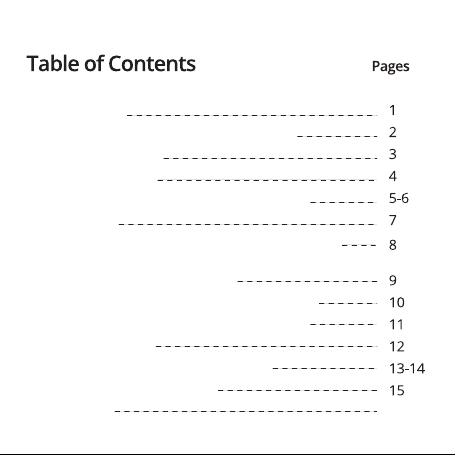
Page 2
In the Package
Getting to know your OontZ Angle 3 BudZ
Charging the Battery
Turning On and Off
Pairing & Connecting to your Mobile Device
Play Controls
To Hear the Best Sound and Best Bass from your OontZ
Angle 3 BudZ Select the Best Fitting In-Ear OontZ Angle 3 BudZ
Comfort Fit with Iso-Fit Cushions
Wearing your OontZ Angle 3 BudZ Under-Ear
Wearing your OontZ Angle 3 BudZ Over-Ear
Phone Call Controls
Troubleshooting & Customer Support
Product Safety & Precautions
FCC Warning 16-17
Page 3
In the Package
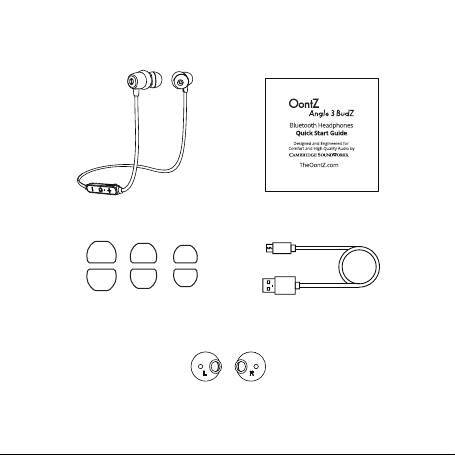
OontZ Angle 3 BudZ Headphones
3 - pairs of in-ear earphones
Large | Small |mini
iso-Fit Cushions
Quick Start Guide
1 - USB Micro
Charging Cable
1
Page 4
Getting to know your OontZ Angle 3 BudZ
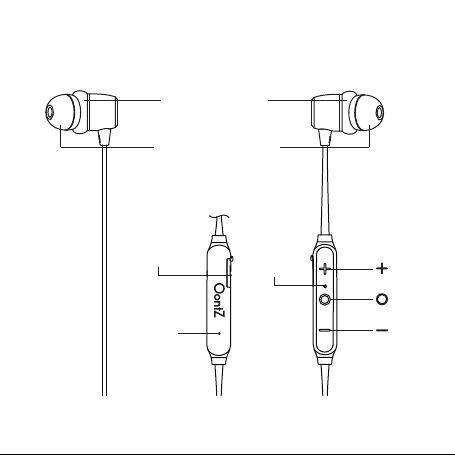
Left
Iso-Fit Cushion
In-ear earphones
Backside of
Inline Controls
Rubber Flap
Covers Micro USB
Charging Port
LED Indicator
Light
Mic
Note: When you wear the OontZ Angle 3 BudZ headset, note
that the side with the control button is to the right.
Right
2
Page 5
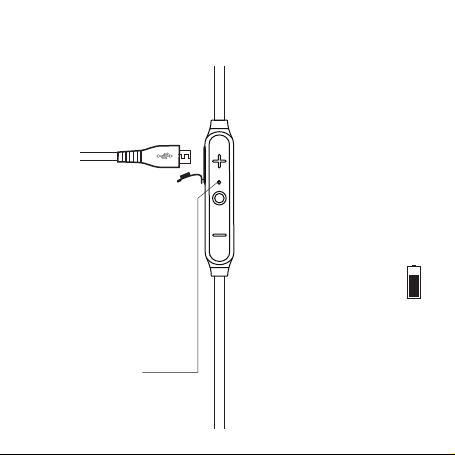
Charging the Battery
Step 1: Carefully lift the rubber
flap that covers the Micro USB
Charging Port and rotate the
flap to the rear
Step 2: Insert the smaller end of
the Micro USB Cable into the Micro
USB Charging Port as shown.
Step 3: Insert the other end of the
Micro USB cable into either a USB
wall charger for a smartphone or
a USB port on your laptop to
charge the battery.
Indicator Light will come on.
The LED Indicator Light
Slowly flashing Red when charging
Solid Red when fully charged
charge a low battery
The LED
Your OontZ Angle 3 BudZ rechargeable
battery will have a partial charge and
be ready to play. For maximum
playtime, fully charge the battery.
Music Play Time
Up to 8 hours on a full charge, with
volume at 60%. Louder volume will
reduce play time.
Automatic Turn Off
The OontZ Angle 3 BudZ will turn off
minutes after being disconnected
15
from your mobile device.
Charge indicator on iPhone
The vertical battery charge level
will appear in the top right
corner of your iPhone screen
Low Charge Remaining Indicator
When the battery charge gets down
to 20% there will be a voice prompt
and the RED LED Light will flash in
rapid succession.
Charging Time
It will take about 2 to 3 hours to fully
charge a low battery
3
Page 6
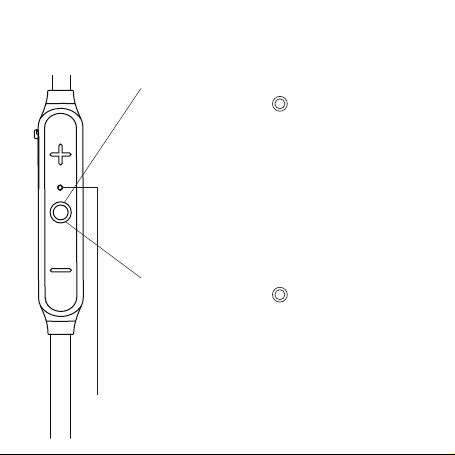
Turning On and Off
Turn ON
Press and Hold Down button for 2 Seconds
Voice prompt: “Hello”
LED Indicator Light
will turn on
Flashing Blue rapidly
indicates OontZ
Flashing Blue 3 times every 5 seconds
indicates OontZ
mobile device and is ready to play
Turn OFF
Press and Hold Down button for 2 Seconds
Voice prompt: “Goodbye”
LED Indicator Light
flashes RED twice and turns off
LED Indicator Light
Angle 3 BudZ
Angle 3 BudZ
is in pairing mode
is connected to a
4
Page 7
Pairing & Connecting to your mobile device
- Your mobile device needs to be within 30 unobstructed feet of the OontZ Angle 3 BudZ
- Make sure your OontZ Angle 3 BudZ battery has a sufficient charge
Turn ON your OontZ Angle 3 BudZ
The LED Indicator Light will turn on
If the blue light is rapidly flashing
the OontZ Angle 3 BudZ is ready to pair and connect.
If the blue light is flashing 3 times every 5 seconds
the OontZ Angle 3 BudZ has automatically reconnected to the
mobile device it was connected to and is ready to play.
last
The OontZ Angle 3 BudZ will try to reconnect each time it is
turned on.
The OontZ
device at
device, you need to disconnect the currently paired mobile device.
To disconnect it:
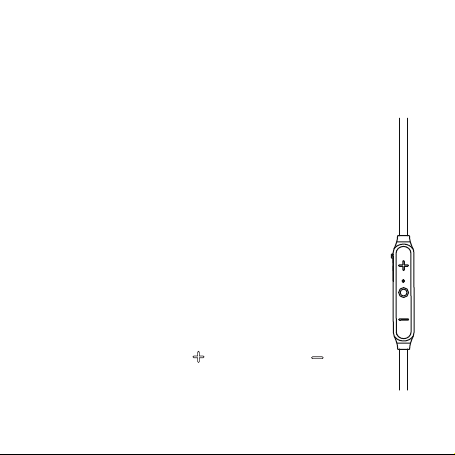
press and hold down the button and the button
together for 3 seconds.
The blue light will begin flashing and the OontZ Angle 3 BudZ is
ready
Angle 3 BudZ
a time. To pair and connect to a different mobile
to pair and connect.
can be connected to one mobile
Voice prompt: "Pairing"
5
Page 8

Pairing & Connecting to your
Mobile Device
To pair and connect from an iPhone, iPad, or iPod:
- Go to Settings > Bluetooth, check Bluetooth is on
- Select ‘OontZ Angle 3 BudZ ’ when it appears under OTHER DEVICES
- The OontZ Angle 3 BudZ will connect in a few seconds
- The LED Light on your
every 5 seconds and you are ready to play
To pair and connect from a Smartphone or Tablet:
- Go to Settings > Bluetooth, check Bluetooth is on
- Scan or Search and select ‘ OontZ Angle 3 BudZ ’ when it appears
under AVAILABLE DEVICES
- The OontZAngle 3 BudZ will connect in a few seconds
- The LED Light on your
every 5 seconds and you are ready to play
Note: Your Smartphone or Tablet instructions may vary, please check
your mobile device’s manual for specific pairing instructions
(continued)
OontZ Angle 3 BudZ
OontZAngle 3 BudZ
will flash BLUE 3 times
will flash BLUE 3 times
6
Page 9
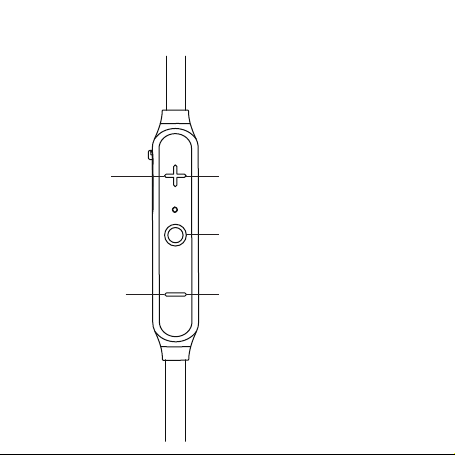
Play Controls
Volume Up
Press and Release
Volume Down
Press and Release
Track Advance
Press and Hold Down for 2 Seconds
Play Pause
Press and Release
Track Back
Press and Hold Down for 2 Seconds
Repeat to go to Previous Track
7
Page 10
To Hear the Best Sound and Best Bass
from your OontZ Angle 3 BudZ Select the
Best Fitting In-Ear OontZ Angle 3 BudZ
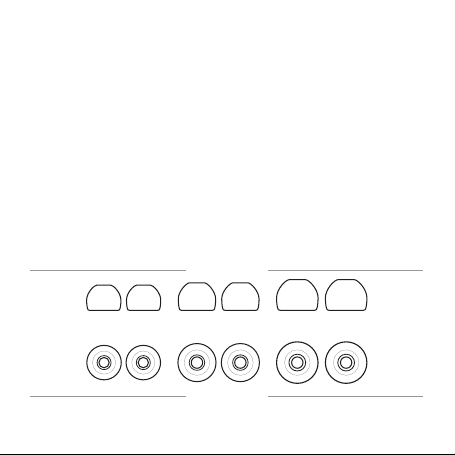
A comfortable snug fit of the In-Ear OontZ Angle 3 BudZ provides
the highest quality listening experience with the OontZ Angle 3
BudZ.We suggest starting with the medium size In-Ear OontZ
Angle 3 BudZ to learn if they are snug and comfortable. If they do
not feel snug try the large In-Ear OontZ Angle 3 BudZ, and if the
medium are too tight try the small In-Ear OontZ Angle 3 BudZ.
The largest size In-Ear OontZ Angle 3 BudZ that are comfortable
will provide the best overall sound experience.
Large | Small | Mini
Side View
LARGESMALLMINI
Top View
8
Page 11
Comfort Fit with Iso-Fit Cushions
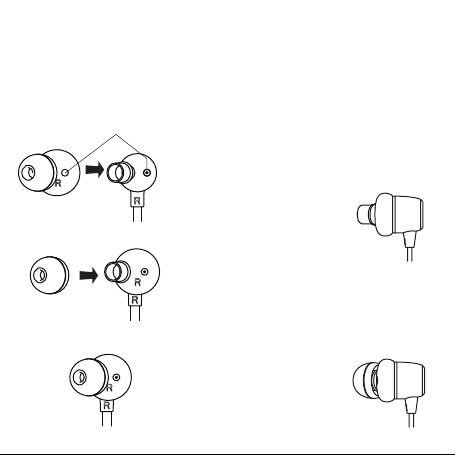
The Iso-Fit Cushions help provide a comfortable snug fit,
perfect for listening during sports and physical activity.
Line up holes
Iso-Fit Cushion
In-Ear OontZ Angle 3 BudZ
Step 1: With the In-Ear OontZ Angle 3
BudZ removed, slide the
Iso-Fit Cushion over the
shaft of the earbud with the
Side view
smaller tube opening
facing outwards from the
earbud and the small holes
lined up
Step 2: Slide the In-Ear OontZ Angle
3 BudZ onto the earbud shaft
Step 3: Your OontZ Angle
Side view
3 BudZ are now ready to
insert into your ear
9
Page 12
Wearing your OontZ Angle 3 BudZ Under-Ear
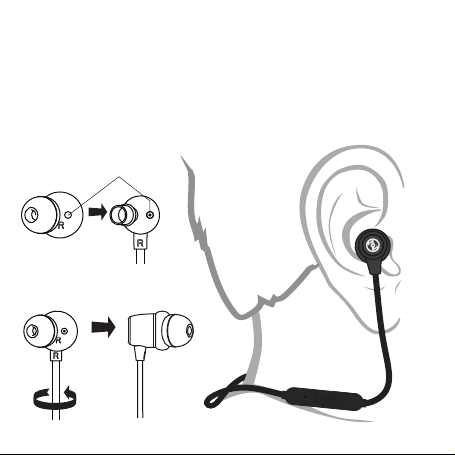
Install the Right (R) Iso-Fit Cushion onto the Right (R)
earbud, with the holes lined up as shown. Insert the Right
earbud into your right ear canal. The Iso-Fit Cushion
should fit comfortably and snugly in your ear, allowing for
the best sound quality.
Line up holes
Right
Iso-Fit Cushion
Right Earbud
10
Page 13
Wearing your OontZ Angle 3 BudZ Over-Ear
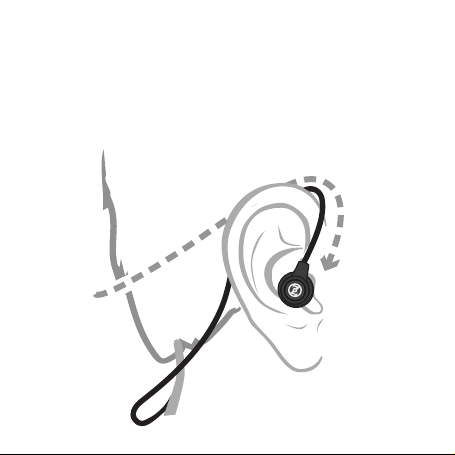
For an even more secure fit during rigorous activity you
can wear your OontZ Angle 3 BudZ Over-Ear, putting your
Left earbud in your right ear and your Right earbud in your
left ear. The inline controls will then be on your left side.
Lay cable behind ear, drape Left earbud
upside down, and insert Left earbud
into right ear canal
11
Page 14
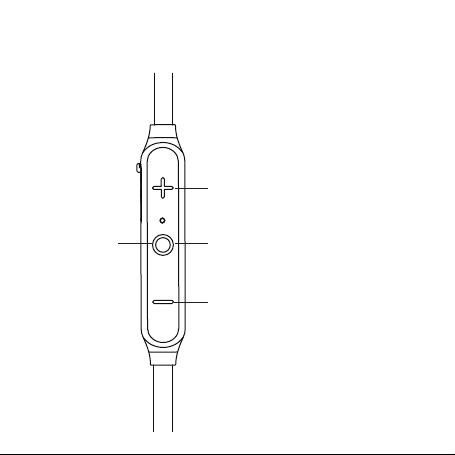
Phone Call Controls
Answer
Incoming Call
or End Call
Press and Release
Reject Call or Transfer
Call Between OontZ
Angle 3 BudZ & Smartphone
Press and Hold Down for 2 Seconds
Last Number Redial
Press and Release Twice
Call Mute
Press and Hold Down for 2 Seconds
12
Page 15
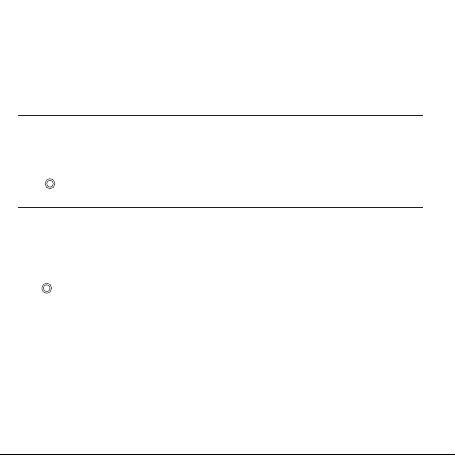
Troubleshooting & Customer Support
For assistance with questions or any issue with your OontZ Angle 3 BudZ
that is not answered in the troubleshooting tips below, please contact us by
OontZ Angle 3 BudZ will not turn on
• The battery may have become fully drained. Charge the OontZ Angle 3 BudZ using a
USB wall charger from a Smartphone/iPhone or tablet for at least 15 minutes, then press
the button to turn the OontZ
Cannot pair or connect the OontZ Angle 3 BudZ with my mobile device
• Your mobile device may be out of range (signal loss) and you will hear a double beep
every 15 seconds. Move back within 30 unobstructed feet of the mobile device. The
Angle 3 BudZ
OontZ
the button to start playing again.
• Check that your OontZ
may not connect when the battery has a low charge. Connect the OontZ
to a charging source and try again to pair and connect.
• Check the LED light to make sure it is flashing Blue rapidly. If it is solid blue the OontZ
Angle 3 BudZ
can be connected to one mobile de vice at a ti me. You need to disconnect t he
connected mobile device then you can connect to the ne
instructions on page 5.
• Your mobile device may have a temporary Bluetooth connection issue please try the
following steps which can resolve this: (continued next page)
is already connected to another mobile device. The OontZ
Angle 3 BudZ
will reconnect, there will be a voice prompt “ connected
Angle 3 BudZ
on. Then continue charging the battery.
has a sufficient battery charge, the headphones
xt mobile device. Please see
”. Click
Angle 3 BudZ
Angle 3 BudZ
13
Page 16

Cannot pair or connect the OontZ
(continued) For iPhone, iPad, iPod
•
Turn off the OontZ
or iPod and ch
the OontZ
BudZ
removed from the list or if it was not listed, do a hard reset on your iPhone,
iPad or iPod by pressing and holding down the Home and sleep buttons at the
same time for about 10 seconds until the Apple icon appears and it restarts. When
it restarts turn on the OontZ
Angle 3 BudZ
eck if the OontZ
Angle 3 BudZ
and then forget this device, twice. With the OontZ
Angle 3 BudZ
, go to the Bluetooth device list on your iPhone, iPad
Angle 3 BudZ
Angle 3 BudZ
with my mobile device
is listed. If it listed press the icon next to
and then try again to pair and connect.
Angle 3
For Smartphones and Tablets
Turn off the OontZ
•
or Tablet and check if the OontZ
to the OontZ
3 BudZ
Tablet. When it restarts t
and connect.
No audio from your mobile device
• Make sure the volume is up on your OontZ
• Remove the OontZ
restart your mobile device, and then re-pair and connect to the OontZ
• Make sure your mobile device is playing audio, not paused and volume is up.
• Your mobile device may be out of range, move closer within 30 unobstructed feet.
• Turn your OontZ
• Some mobile device have a default volume when they connect to a new device, try
turning up the volume on the OontZ
Angle 3 BudZ
Angle 3 BudZ
unpaired or if it was not listed, do a hard restart on your Smartphone or
Angle 3 BudZ
, go to the Bluetooth device list on your Smartphone
Angle 3 BudZ
and then press Unpair this device. With the OontZ
urn on the OontZ
Angle 3 BudZ
from the Bluetooth device list on your mobile device,
off and back on.
is listed. If it listed press the icon next
Angle 3 BudZ
Angle 3 BudZ
Angle 3 BudZ
and then try again to pair
.
and the mobile device after connecting.
Angle
Angle 3 BudZ.
14
Page 17

Poor sound quality from a mobile device
• Your mobile device may be out of range, move closer within 30 unobstructed feet.
• If your iPhone, iPad, or iPod has an option to select stereo or Mono, select Stereo.
• Try another track or music app.
• Turn your OontZ
• Some mobile devices need to have their WIFI turned off to improve audio quality
over Bluetooth.
• It may be that you need to re-pair the OontZ
Remove it from your paired devices list, restart the mobile device and then follow the
steps to re-pair the headphones.
Angle 3 BudZ
off and back on.
Angle 3 BudZ
with your mobile device.
OontZ Angle 3 BudZ won’t fit or stay in place
• Try one size larger In-Ear OontZ
• Make sure you have the Iso-Fit Cushions in place.
• Be sure the
OontZ
for which side it should be worn on.
Angle 3 BudZ
Angle 3 BudZ
is being worn correctly by checking on each earbud
.
Product Safety & Precautions
1.Follow all instructions – All operating and use instructions should be followed.
2.Do not use this apparatus near water while plugged in for charging, due to risk of
electric shock.
3.Protect the Micro USB charging cable from pinched particularly at the connectors.
4.Unplug the Micro USB charging cable during lightning storms or when unused for
long periods of time.
PLEASE LISTEN RESPONSIBLY
Avoid listening at excessive volume levels or for prolonged periods.
Do not use near traffic.
15
Page 18
16
Page 19
V1.0
17
 Loading...