

Page 1
C46
5418
rev
A
-
Congratulations on your purchase
of the Andrea Anti-Noise
®
PC
Headset NC-8!
The Andrea Anti-Noise® PC NoiseCanceling Headset NC-8 features stateof-the-art noise-canceling microphone
technology that removes background
noise and echo speaker feedback for
optimal voice recognition. Users
receive:
• Andrea Anti-Noise
technology in a ultra-light headset
that can be easily folded flat for
convenient storage.
• Enhanced sound quality and accuracy
of PC speech-driven applications.
COMPATIBILITY:
The NC-8 is compatible with most major
sound cards.
C46-5418 rev A
®
microphone
Package includes: One (1) NC-8 Headset
and NC-8 Headset Publication.
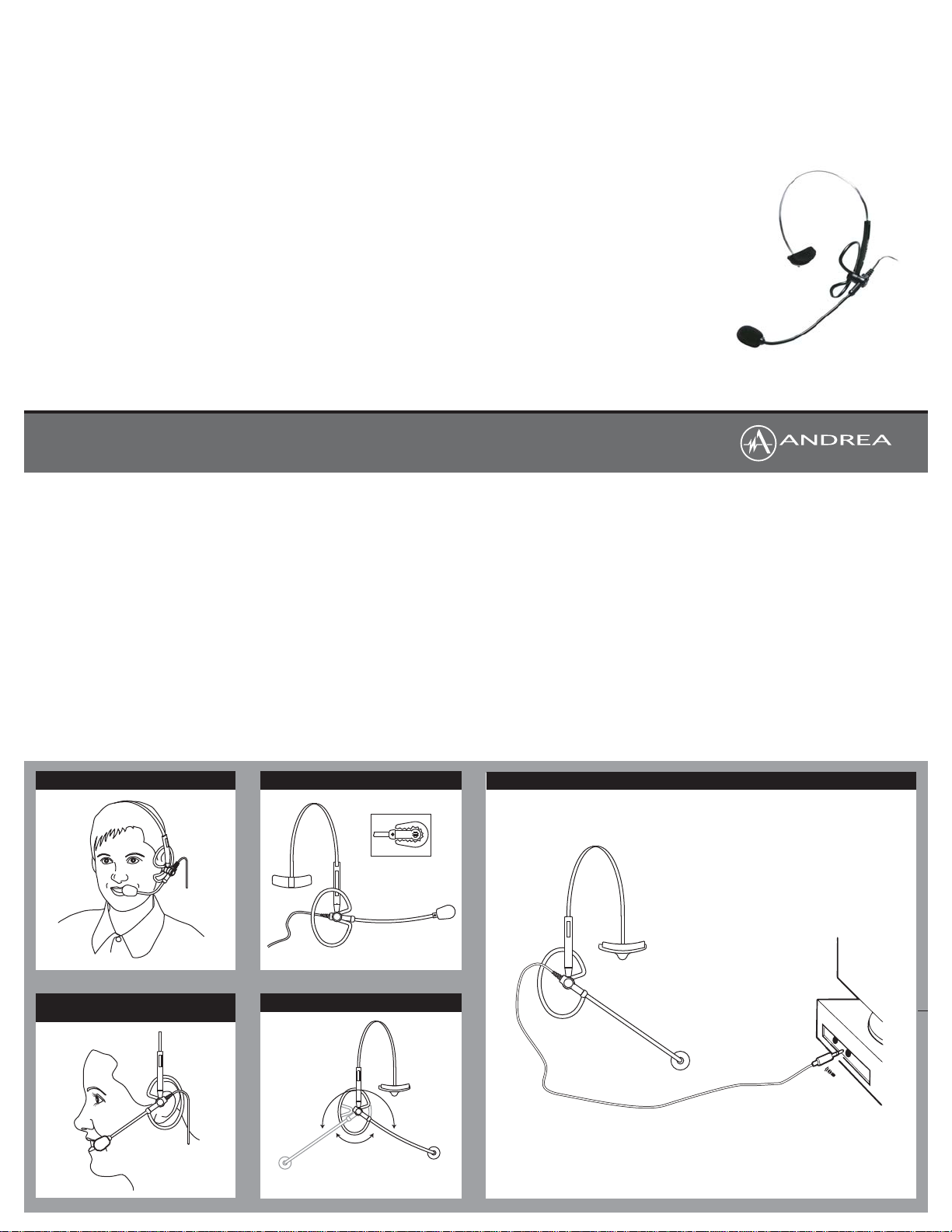
Connecting the NC-8 Headset:
To connect the Andrea Anti-Noise
Headset NC-8 to your computer's sound
card:
1. Plug the pink microphone jack
(indicated by a microphone icon) into
the "mic in" port.
HEADSET INSTRUCTIONS:
1. Fit the adjustable headband over
your head to secure the headset with
the ear ring resting comfortably
around your ear and the temple pad
about one to two inches over the
other ear.
2. Adjust the microphone boom so that
the microphone is approximately 3/4"
in front of your mouth, making sure
that you are talking into the voice
side of the microphone, indicated by
the white dot.
3. To wear the headset on your other
ear rotate the ear ring and flexible
boom 180°.
®
PC
TROUBLESHOOTING:
If you encounter the following problems:
Problem:
Microphone does not record sound when
using a voice-recording application.
Solution:
A. Check all connections.
B. Bring the microphone closer to your
mouth.
C. Check input control for proper level in
software.
TECHNICAL SERVICE
We hope that you enjoy your Andrea
NC-8 Microphone. If you have additional
questions, please visit our website at:
www.AndreaElectronics.com/faq/
Analog_Headsets.htm or call Andrea
Electronics Corporation's Technical
Service team at 1-800-707-5779 (USA
& Canada) for assistance.
WARRANTY INFORMATION
Please visit our website at:
www.AndreaElectronics.com/warranty.htm
for all warranty information.
NC-8
Headset
C46-5418 rev A
FIT NC-8 COMFORTABLY ON HEAD
POSITION MICROPHONE 3/4" (20mm)
FROM MOUTH
MICROPHONE ORIENTATION
Talk into side of
microphone indicated
by white dot
ROTATE BOOM
Rotate left to
right at socket
Bend flexible boom for
proper microphone
positioning
CONNECTING THE NC-8 TO YOUR COMPUTER - STANDARD SETUP
 Loading...