

Page 1
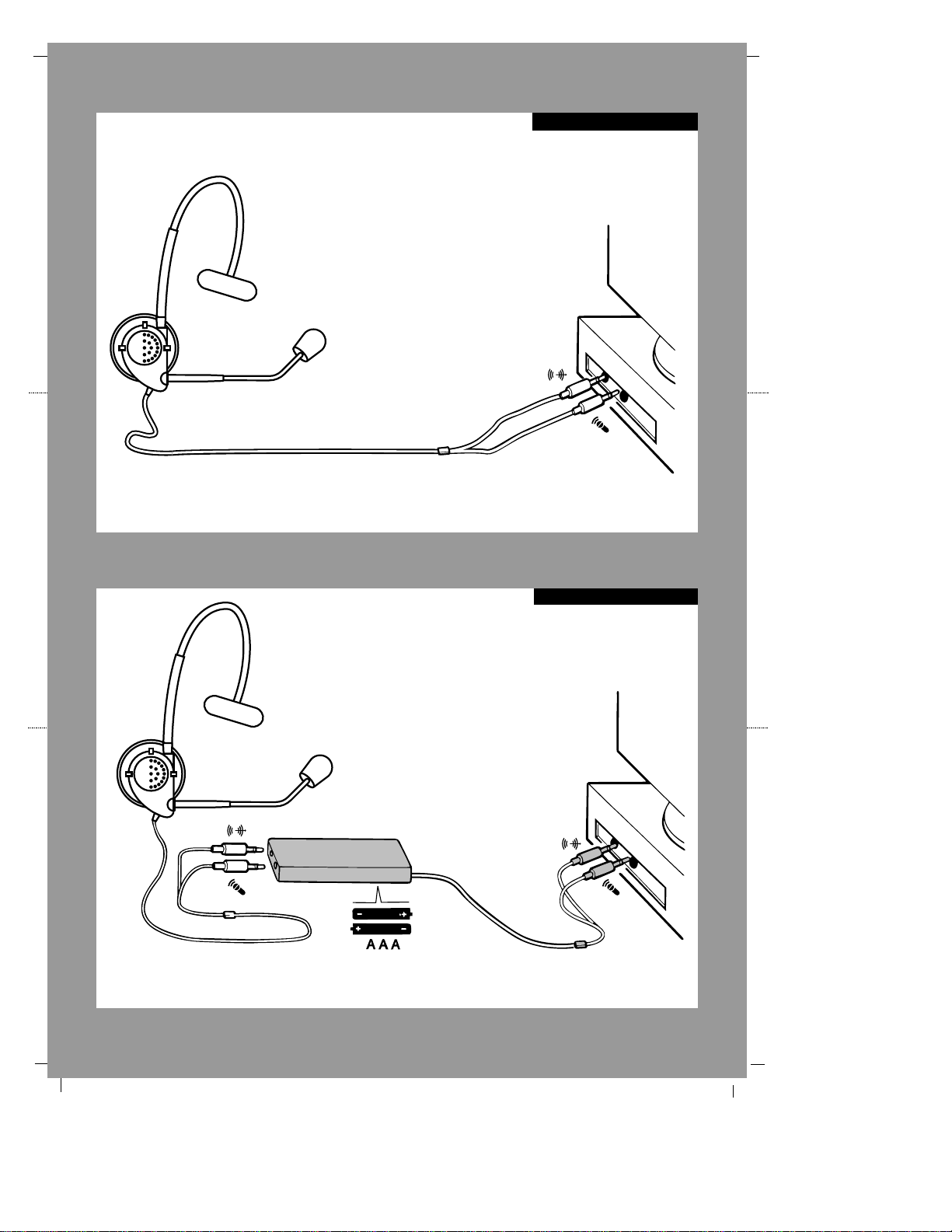
APS-100
Some sound cards and laptops without sufficient power (1.25 volts) in mic port will require an APS-100.
Call 1-800-707-5779 (USA/Canada) to order an APS-100. See warranty for international local numbers.
To prolong battery life, disconnect
the microphone jack from the APS100 when the headset is not in use.
Standard Set-up
Page 2
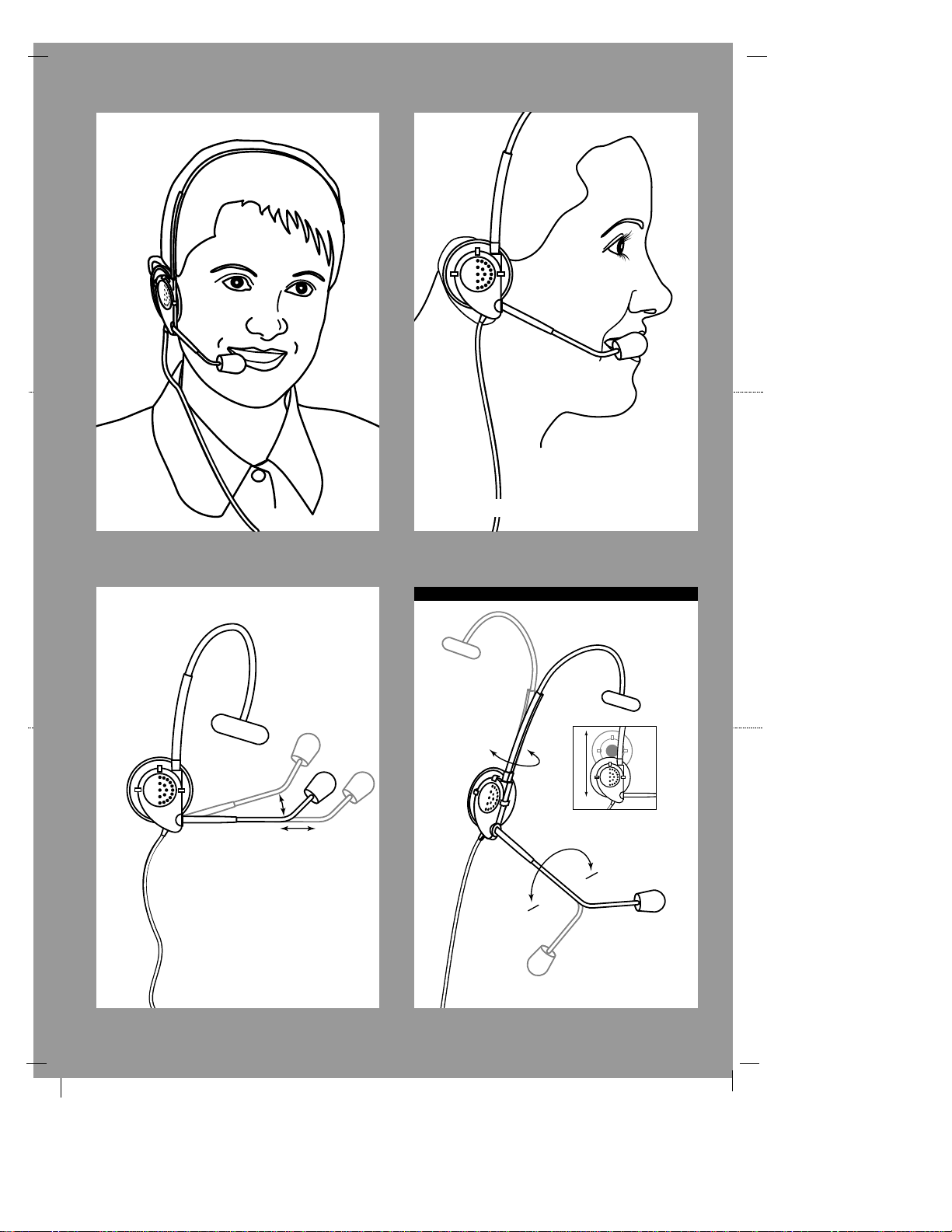
Position microphone 3/4'' (20mm) from mouth
Ear Cushion removes
for use on either ear.
Rotate
Headset adjustable for use on right/ left ear
C46-5132D
Page 3

Congratulations on your purchase of the Andrea
Anti-Noise® PC Headset NC-50!
The Andrea Anti-Noise®PC Noise-Canceling Headset NC-50 features state-of-the-art, noise-canceling
microphone technology that removes background noise and echo speaker feedback for optimal voice
recognition. Users receive:
• Andrea Anti-Noise®microphone technology in a high-fidelity headset that can be
easily folded flat for convenient storage
• An earphone cushion that can be adjusted on either ear by pulling the cushion up
(as illustrated in the enclosed pub sheet)
• Enhanced speed and accuracy of PC speech-driven applications
Connecting the NC-50
To connect the Andrea Anti-Noise®PC Headset NC-50 to your computer’s sound card:
1. Plug the pink microphone jack (indicated by a microphone icon) into the “mic in” port.
2. Plug the orange speaker jack (indicated by a sound icon) into the “speaker”port.
COMPATIBILITY The NC-50 is compatible with most major sound cards. (*) Some computers
and laptops without sufficient power (1.25 volts) in the microphone port will require a
three-volt, auxilliary power supply (APS-100). Contact Andrea Electronics at
800
•707•5779 (USA & Canada) to order the APS-100. See warranty for international local numbers.
HEADSET INSTRUCTIONS
1. Fit the adjustable headband over your head to secure the headset with the speaker
resting comfortably on your ear and the temple pad about one to two inches over the
other ear. Note: The ear piece and temple pad can rotate to adapt to either the right
or left side of your head.
2. Adjust the rotating and telescoping microphone arm so that the microphone boom is
approximately 3/4” in front of your mouth.
TROUBLESHOOTING
If you encounter the following problems:
Problem Solution
No sound from headset while
an
A. Check all connections.
audio CD plays from computer. B. Consult your sound card instruction booklet.
C. Check output volume level adjustment in soft-
ware; see reverse.
Microphone does not record sound A. Check all connections.
when using a voice-recording application. B. Bring the microphone closer to your mouth.
C. Check input control for proper level in software,
see reverse.
D. Consult your sound card instruction booklet and
check power (minimum 1.25 volts) in microphone port; you may need an APS-100. See
COMPATIBILITY section above.
TECHNICAL SERVICE
We hope that you enjoy your Andrea Anti-Noise®PC Noise-Canceling Headset NC-50. If you have
additional questions, please call Andrea Electronics Corporation’s Technical Service team at
800•707•5779 (USA/Canada) for assistance. See warranty for international local numbers.
C46-5139E
5139E 4/24/08 8:15 AM Page 1
Page 4

5139E 4/24/08 8:15 AM Page 2
 Loading...