

Page 1
C46 5431 Rev A
Congratulations on your purchase
of the Andrea Anti-Noise
Headset NC-181VM!
The Andrea Anti-Noise® PC Noise Canceling
Headset NC-181VM features, state-of-the-art,
Noise Canceling microphone technology that
removes background noise and echo speaker
feedback for optimal voice recognition. Users
receive:
• Andrea Anti-Noise
in a high-fidelity, headset that can be easily
folded flat for convenient storage
• Quality metal flex boom keeps microphone
accurately positioned in place
• Increased speed and accuracy of PC speechdriven applications
• Cable module with earphone volume control
and microphone on/off mute switch.
Connecting the NC-181VM
To connect the Andrea Anti-Noise
NC-181VM to your computer's sound card:
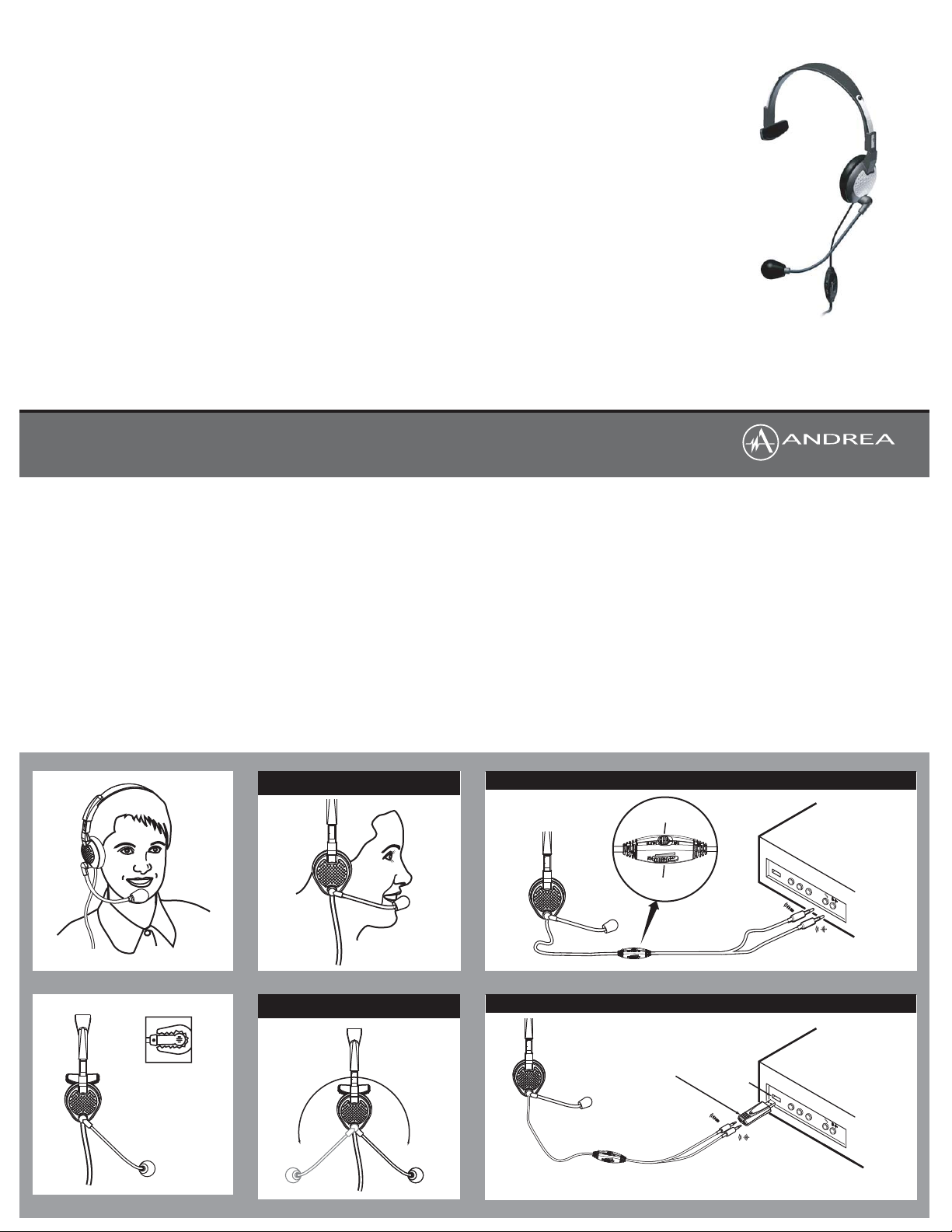
1. Plug the pink microphone jack (indicated by
a microphone icon) into the "mic in" port.
2. Plug the green speaker jack (indicated by a
sound icon) into the "speaker" port.
COMPATIBILITY
The NC-181VM is compatible with most major
sound cards, computers and laptops.
®
microphone technology
®
PC
®
PC Headset
C46-5431
Package includes: One (1) NC-181VM Headset,
One (1) NC-181VM Headset Publication.
and
HEADSET INSTRUCTIONS
1. Fit the adjustable headband over your head
to secure the headset with the speaker
resting comfortably around your ear and the
temple pad about one to two inches over
the other ear. Note: The microphone boom
can rotate to adapt to either the right or left
side of your head.
2. Adjust the microphone boom so that the
microphone is approximately 3/4" in front of
your mouth, making sure that you are
talking into the voice side of the
microphone, indicated by the white dot.
TROUBLESHOOTING
If you encounter the following problems:
No sound from headset ear piece while
an audio CD plays from computer.
A. Check all connections.
B. Consult your sound card instruction booklet
C. Check output volume level adjustment in
software and on the cable module.
Microphone does not record sound when
using a voice-recording application.
A. Check all connections.
B. Bring the microphone closer to your mouth.
C. Check input control for proper level in
software.
D. Check that microphone is not muted on
cable module or in the PCs microphone
audio panel.
Visit www.andreaelectronics.com to enhance
your analog headset with Andrea's PureAudio
USB-SA Digital Audio Adapter. With the
adapter, you will receive Andrea Electronic's
AudioCommander
state-of-the-art-software which includes:
AudioCommander
• A virtual dashboard to audio features and
functions.
• 10-band graphic equalizer with built-in
presets.
• Microphone volume control with audio
enhancements.
• Basic voice recorder.
• Microsoft XP and Vista compatible.
PureAudio
• Patented noise reduction speech
enhancement algorithm.
• Designed for hi-fidelity sound quality and
compatible with speech recognition software.
• Reduces repetitive background noise on both
acoustic and electronic system noise.
• Can be utilized on microphone output and
received earphone audio.
TECHNICAL SERVICE
We hope that you enjoy your Andrea NC181VM Headset. If you have additional
questions, please visit our website at:
www.AndreaElectronics.com/faq/
Analog_Headsets.htm or call Andrea
Electronics Corporation's Technical Service
team at 1-800-707-5779 (USA & Canada) for
assistance.
www.AndreaElectronics.com/warranty.htm
®
and PureAudio
®
®
WARRANTY INFORMATION
Please visit our website at:
®
for all warranty information.
NC-181VM Headset
C46-5431 Rev A
Talk into side of
microphone indicated
by white dot
POSITION MICROPHONE 3/4" (20 MM)
FROM MOUTH
HEADSET ADJUSTABLE FOR USE
ON RIGHT/LEFT EAR
STANDARD SET-UP
MICROPHONE MUTE
HEADSET VOLUME
USB CONNECTION WITH USB-SA (OPTIONAL)
OPTIONAL USB-SA
USB Port
Visit www.Andreaelectronics.com or call 1-800-707-5779 U.S.A./Canada to order a USB-SA Adapter.
 Loading...