

Page 1

THWD-3 and TH-3
Relative Humidity and
Temperature Meters
User Manual
For detailed specifications and ordering info go to www.TestEquipmentDepot.com
Page 2

THWD-3 and TH-3
Relative Humidity and
Temperature Meters
English
English
Page 3

Contents
Relative Humidity Temperature Meters
Introduction ................................................................................... 3
Safety Information ........................................................................ 3
Symbols Used in this Manual ........................................................ 3
Operating Instructions .................................................................. 4
Power-Up ....................................................................................... 4
Selecting Temperature Units ........................................................ 4
Data-Hold Operation .................................................................... 4
Relative Operation ........................................................................ 4
MIN/MAX Operation ..................................................................... 4
Auto Power Off ............................................................................ 4
Dew Point and Wet Bulb Temperature ........................................ 4
Low Battery Condition .................................................................. 5
Wet Bulb Temperature Readings ................................................. 5
Psychrometric Chart ...................................................................... 5
Repair ............................................................................................. 6
WARRANTY ................................................................................... 7
Specifications ................................................................................. 8
1
Page 4

2
The THWD-3 and TH-3 are instruments to measure relative humidity
and temperature. The extended probe allows the user to make
measurements inside ducts or hard to reach areas. The Relative
and MIN/MAX functions enable measurements to be made in two
different areas and then compared. The large dual display and
Data Hold function both make viewing the measurement results
convenient. Both models utilize a capacitive sensor for humidity
measure temperature in °C or °F with 0.1 %RH resolution. Both meters
utilizes a capacitive sensor for humidity measurements up to 100%
with a tenth percent resolution. With an auto power off feature to
save battery life, protective cap for sensor life, vinyl carry case for
transportation and battery installed, the TH-3 is the right choice for
your atmospheric humidity measurement needs. Model THWD-3 has
two extra features with the capability to also indicate Dew Point and
Wet Bulb readings.
Safety Information
This meter has been designed and tested according to:
• EN50081-2
• EN50082-2
Symbols Used in this Manual
Caution! Refer to the explanation in this Manual
Caution! Risk of electric shock
Conforms to relevant Australian standards
Complies with European Directives
Power ON / OFF
Do not dispose of this product as unsorted municipal
waste
Page 5

3
Operating Instructions
Power-Up
• Press the key to turn the Humidity/Temperature meter ON or
OFF.
Selecting Temperature Units
When the meter is first powered on, the default scale setting is set
to the Celsius (°C ) scale. To change to Fahrenheit (°F) press the
button. Press again to revert to Celsius. The next time the meter
is turned on, the scale setting will be the same as it was when you
powered off last time.
Data-Hold Operation
The present reading may be held on the display by pressing the
button. When the held data is no longer needed, release the datahold operation by pressing the button again. When the meter is
in the Data Hold mode, the , , and buttons are disabled.
Relative Operation (TH-3 only)
Pressing the button causes the meter to memorize the present
reading. The difference between the new reading and the memorized
data will be displayed. Press the button again to exit the Relative
mode.
MIN/MAX Operation
Pressing the button places the meter in the MIN/MAX mode.
In this mode the maximum value and minimum value is kept in the
memory simultaneously and updated with every new data reading.
Pressing the button displays the MAX indicator and the Maximum
value on the display. Pressing again will display the MIN indicator
and the Minimum value on the display. Pressing again causes
the MAX and MIN indicators to blink together. This means that these
data have been updated in the memory and the reading is the present
temperature and humidity. When the meter is in MIN/MAX mode, the
and buttons are disabled. To exit MIN/MAX mode, press and
hold for two seconds.
Page 6

4
Dew Point and Wet Bulb Temperature
DP WB
DP WB
DP WB
(THWD-3 only) Operation
The Meter displays ambient temperature when first turned on. To
display dew point (DP) temperature, press
to switch to wet bulb (WB) temperature. Pressing
returns the Meter to ambient temperature. The display indicates when
dew point and wet bulb temperatures are selected.
once. Press
a third time
again
Auto Power Off
By default, when the meter is powered on, it is in the auto power
off mode. The meter will power itself off after 30 minutes if no key
operation is performed. To disable the auto power off feature, press
and hold the button and then power on the meter, The auto
power off symbol will disappear to indicate that auto power off is
disabled.
Low Battery Condition
When the battery voltage is under proper operation requirement, the
symbol displays on the LCD and the battery needs to be replaced.
Wet Bulb Temperature Readings (TH-3)
Occasionally the Wet Bulb temperature is required. Use the following
procedure and your TH-3 to obtain the wet bulb temperature.
1. Determine RH% condition with the TH-3.
2. Determine temperature (dry-bulb) with the TH-3.
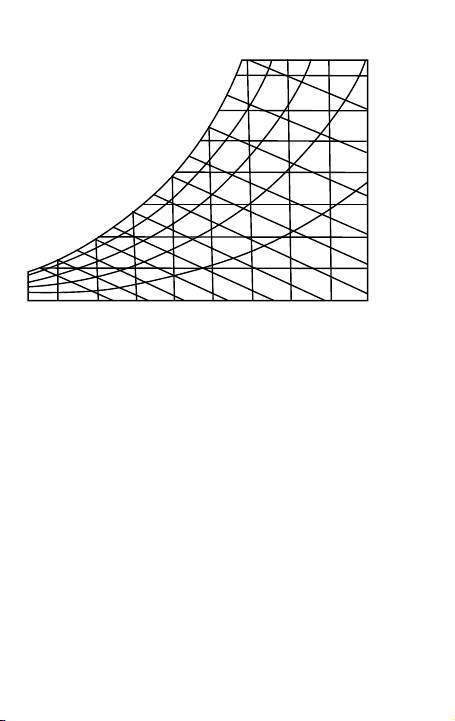
3. Locate dry bulb (DB) temperature line on the Psychrometric chart
(vertical line across the bottom of the chart).
4. Locate relative humidity (RH) line on the chart (curved line across
the chart).
5. Find the intersection of the DB and RH lines on the chart.
6. Draw a diagonal line, starting at your intersectioin point, until the
Wet Bulb (WB) point is determined. (The wet bulb temperature line
is at the outmost curve of the chart).
For example, locate the DB temperature of 78 °F on the Psychrometer
chart. Locate the RH conditions of 50% RH on the chart. Draw a
diagonal line up to the 65 °F WB point.
Page 7
5
Psychrometric Chart
Wet Bulb (F)
40
40
DRY BULB TEMPERATURE (F)
HUMIDITY RATIO (Lbv/Lba)
50
50
60
60
70
70
80
80
80%
60%
40%
20%
90
90 100 120
.028
.024
.020
.012
.008
.004
.016
Page 8

6
Limited Warranty and Limitation of Liability
Your Amprobe product will be free from defects in material and
workmanship for 1 year from the date of purchase. This warranty
does not cover fuses, disposable batteries or damage from accident,
neglect, misuse, alteration, contamination, or abnormal conditions
of operation or handling. Resellers are not authorized to extend
any other warranty on Amprobe’s behalf. To obtain service during
the warranty period, return the product with proof of purchase to
an authorized Amprobe Test Tools Service Center or to an Amprobe
dealer or distributor. See Repair Section for details. THIS WARRANTY
IS YOUR ONLY REMEDY. ALL OTHER WARRANTIES - WHETHER
EXPRESS, IMPLIED OR STAUTORY - INCLUDING IMPLIED WARRANTIES
OF FITNESS FOR A PARTICULAR PURPOSE OR MERCHANTABILITY, ARE
HEREBY DISCLAIMED. MANUFACTURER SHALL NOT BE LIABLE FOR
ANY SPECIAL, INDIRECT, INCIDENTAL OR CONSEQUENTIAL DAMAGES
OR LOSSES, ARISING FROM ANY CAUSE OR THEORY. Since some states
or countries do not allow the exclusion or limitation of an implied
warranty or of incidental or consequential damages, this limitation of
liability may not apply to you.
Repair
All test tools returned for warranty or non-warranty repair or for
calibration should be accompanied by the following: your name,
company’s name, address, telephone number, and proof of purchase.
Additionally, please include a brief description of the problem or the
service requested and include the test leads with the meter. Nonwarranty repair or replacement charges should be remitted in the
form of a check, a money order, credit card with expiration date, or a
purchase order made payable to Amprobe® Test Tools.
Page 9

7
In-Warranty Repairs and Replacement – All
Countries
Please read the warranty statement and check your battery before
requesting repair. During the warranty period any defective test
tool can be returned to your Amprobe® Test Tools distributor for an
exchange for the same or like product.
Non-Warranty Repairs and Replacement – US and Canada
Non-warranty repairs in the United States and Canada should be sent
to a Amprobe® Test Tools Service Center. Call Amprobe® Test Tools or
inquire at your point of purchase for current repair and replacement
rates.
Page 10

8
Specifications
Display: Dual display
Operating Conditions: 0°C to 40°C; <80% RH
Storage Conditions: -10°C to 60°C; <70% RH
Altitude: Up to 2000 meters, Indoor operation.
Sample Rate: 2.5 times per second
Battery: 9 V Battery, NEDA 1604 or JIS 006P or IEC6F22
Battery Life: 85-hours continuous; (with alkaline battery)
Dimension: 240x54x34 mm (9.5x2.1x1.3 in)
Weight: Approx.180g (6.4 oz.)
Accessories: Battery, instruction manual
TH-3, THWD-3
Humidity: 0% RH to 99% RH at 23°C
Range Accuracy
10% RH to 90% RH ± 3% RH
<10, >90 %RH ± 5% RH
0˚C to 55˚C
32˚F to 131˚F
Temperature Coefficient: 0.1x(specified accuracy)/ °C
Sensor hysteresis: +/-1 %RH
Resolution: 0.1%RH
Response Time (@ t90; in slowly moving air): 180 sec
TH-3, THWD-3
Temperature:
Range Accuracy
-20°C to 60°C ± 0.8 °C
-4°F to 140°F ± 1.6°F
(<23 °C or >23 °C)
Page 11

9
THWD-3
Wet Bulb Temperature:
Range Accuracy
0°C to 55°C ± 0.8 °C
32°F to 131°F ± 1.6°F
Dew Point Temperature:
0°C to 55°C ± 0.8 °C
32°F to 131°F ± 1.6°F
Resolution: 0.1°C / 0.1°F
Response Time (@ t90; in slowly moving air): 10 sec
Page 12

 Loading...