

Page 1
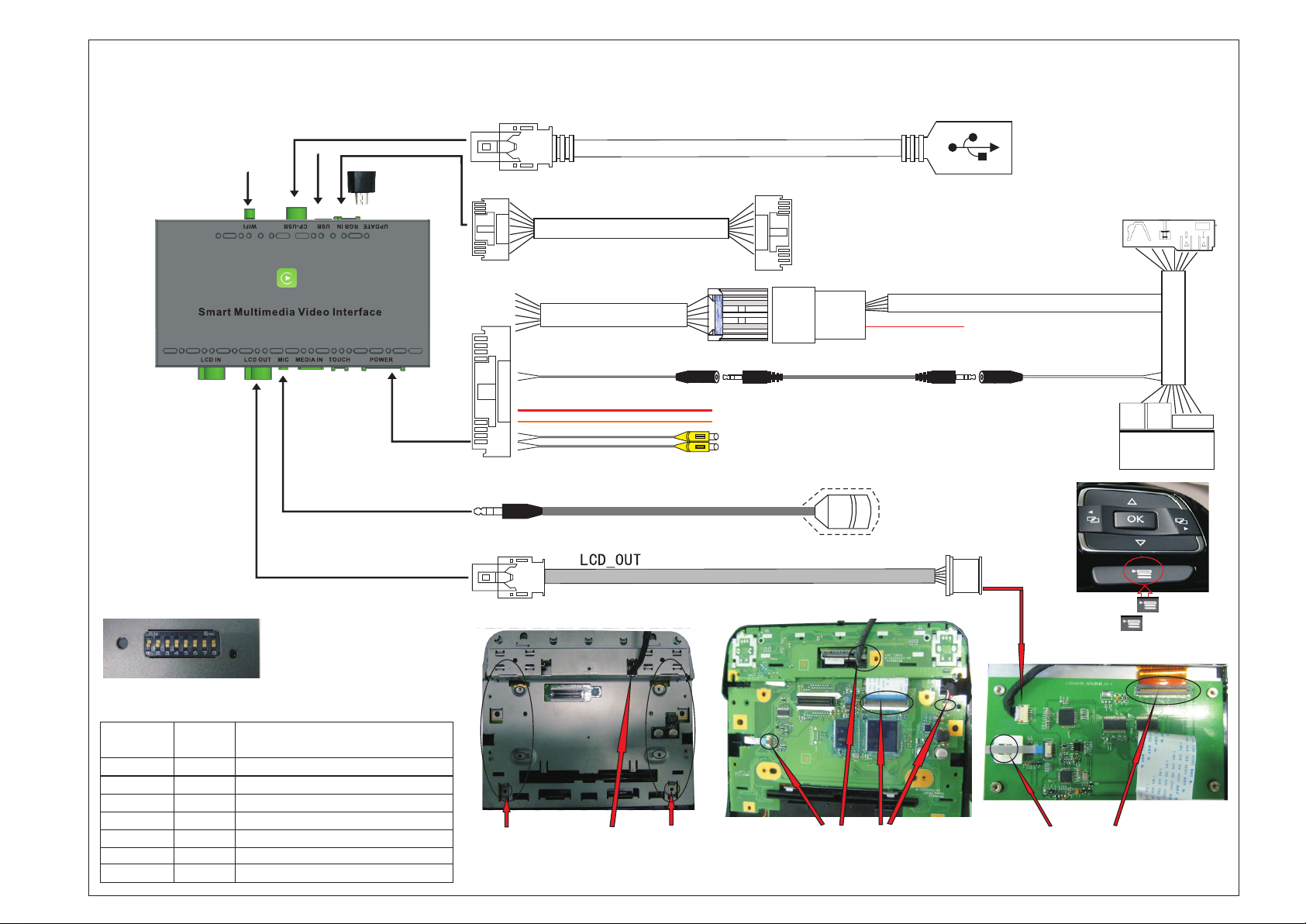
VW Touareg (6.5 inch) WIRING DIAGRAM
---LDS-VWT65-CP
WIFI ANTENNA
Connect to CARPLAY-USB cable
Multimedia USB
Microphone cable
LCD OUT cable
RGB input cable
Update adapter
Power cable
Optional cable
BLACK---Stereo audio output
Connect to RGB output device
Stereo audio cable
RED---12V output for rear view camera
ORANGE--Reverse control cable (connect to reversing light)
for AVM /without reversing gridline
YELLOW---RCA Front/Rear video input(Connect to front
/ rear view camera/360 AVM/DVR
REMARK:Please keep in the AUX
interface when switch the
CarPlay interface .
Microphone
Connect to the Phone's original cable
RED---ACC 12V (NG)
AUX IN
Connect to the ISO
original cable of the
original headunit
Connect to original
headunit's ISO socket
Reset Dip Switch LED
ON
OFF
DIP SWITCH SETTING
(After changing the dip code,press "reset"or power-on again)
DIP S/W Status Function
PIN 1 OFF/ON
PIN 2 OFF/ON
PIN 3 OFF/ON
PIN 4 OFF/ON
PIN 5 OFF/ON
PIN 6 OFF/ON
PIN 7 OFF/ON
PIN 8 OFF/ON
NG / NG
NG/Touch point coordinate correction,and then turn"OFF"
NG / NG
Reversing gridline/Enable 360 panoramic
NG / NG
Rear view camera CVBS input / RGB input
NG / NG
After market rear view camera/Original rear view camera
lvds cable
Step 3
4) Cover back housing and lock screws
(Notice the position of the LVDS cable,
as shown above).
lvds cable
4Pin
2) Recover the original panel board and keyboard.
(Notice the position of the LVDS cable,as shown above)
3) Conect the 4P&60P cable from the pinboard to the
original panel board,as shown above.
60Pin
Step 2
1) Long press and hold " " button to switch
MENU,long press" " button again,
exit the switch MENU.
2)Other functions use touch screen to control it.
Step 1
1)Open the original monitor,and install the panel pinboard
behind the original panel,plug in the panel&LCD OUT
cable as shown above.
Remark:An insulating strip needs to be attached to the back
of the panel pinboard
 Loading...