

Page 1
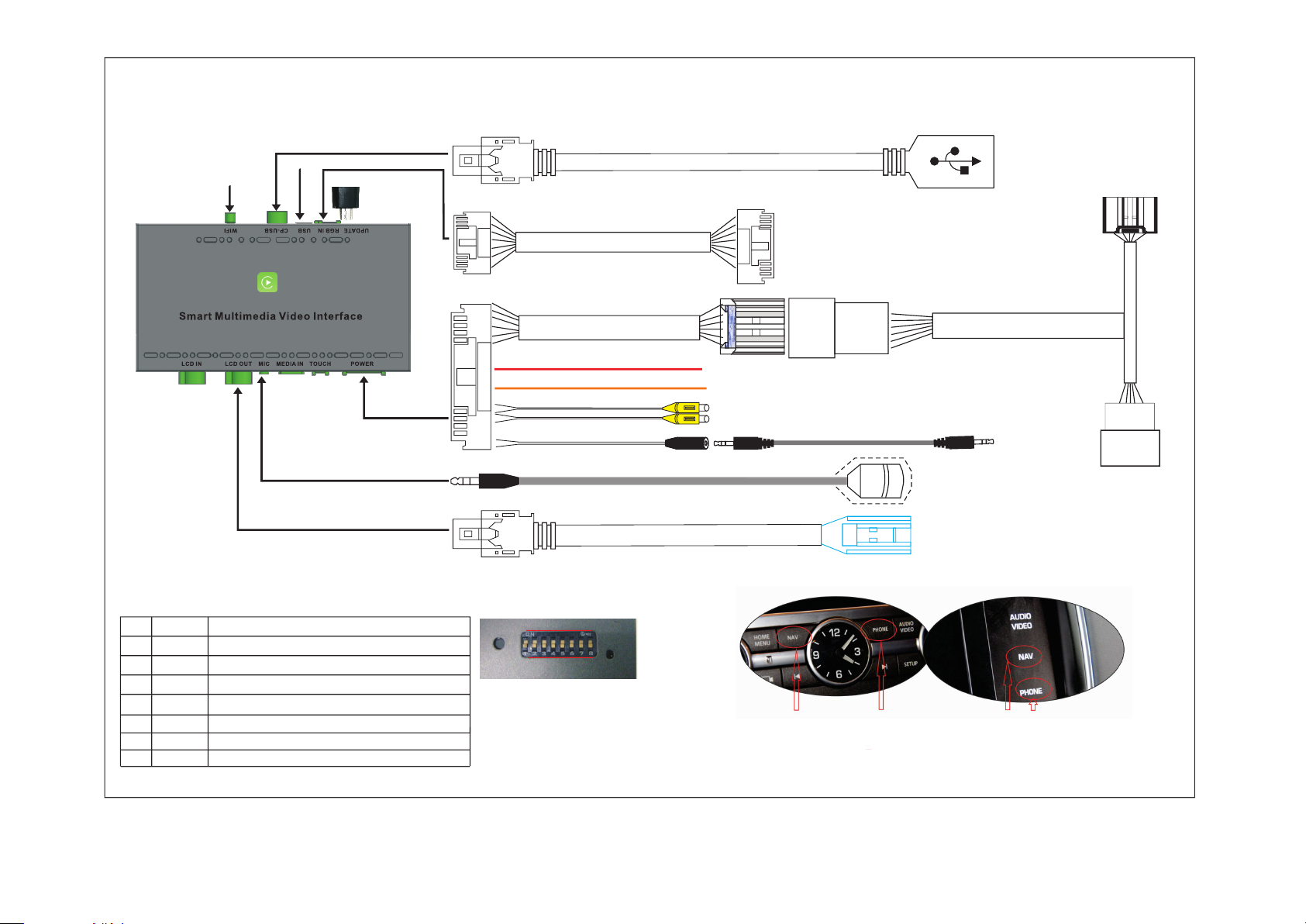
Jaguar/Land Rover(
BOS
CH
7"/8"
monitor)WIRING DIAGRAM
---LDS-LHBCH-CP
WIFI ANTENNA
Connect to CARPLAY-USB cable
Multimedia USB RGB input cable
Upgrade adapter
Power cable
Microphone cable
LCD OUT cable
Optional cable
BLACK---Stereo audio output
LCD_OUT
Connect to RGB output device
RED---12V output for rear view camera
ORANGE--Reverse control cable (connect to reversing light)
for AVM /without reversing gridline
YELLOW---RCA Front/Rear video input(Connect to front
/ rear view camera/360 AVM/DVR
AUX stereo audio cable
Microphone
Connect to the original monitor's
blue LVDS port(Unplug the
original blue LVDS cable,wrap it
in tape).
Connect to the Phone's original cable
Connect to the original
monitor's connector
the
16P female connector plug into
cable of the
original headuint
Plug into the
original AUX IN
Connect to the
original monitor's
cable
.
DIP SWITCH SETTING
(After changing the dip code,press "reset"or power-on again)
PIN 1 OFF/ON
PIN 2 OFF/ON
PIN 3 OFF/ON
PIN 4 OFF/ON
PIN 5 OFF/ON
PIN 6 OFF/ON
PIN 7 OFF/ON
PIN 8 OFF/ON
NG / Another screen parameter(Offset or gridline abnormal)
NG / NG
NG / NG
Reversing gridline/Enable 360 panoramic
NG / NG
Rear view camera CVBS input / RGB input
NG / Touch point coordinate correction,and PIN1"ON"
Aftermarket rear view camera/Original rear view camera
Reset
Dip Switch
ON
OFF
REMARK:Please keep in the AUX interface
when switch the CarPlay interface)
LED
1) Long press and hold "NAV" button to switch MENU,long press other function button,
exit the switch MENU.
2)Other functions use touch screen to control it.
 Loading...