

Page 1
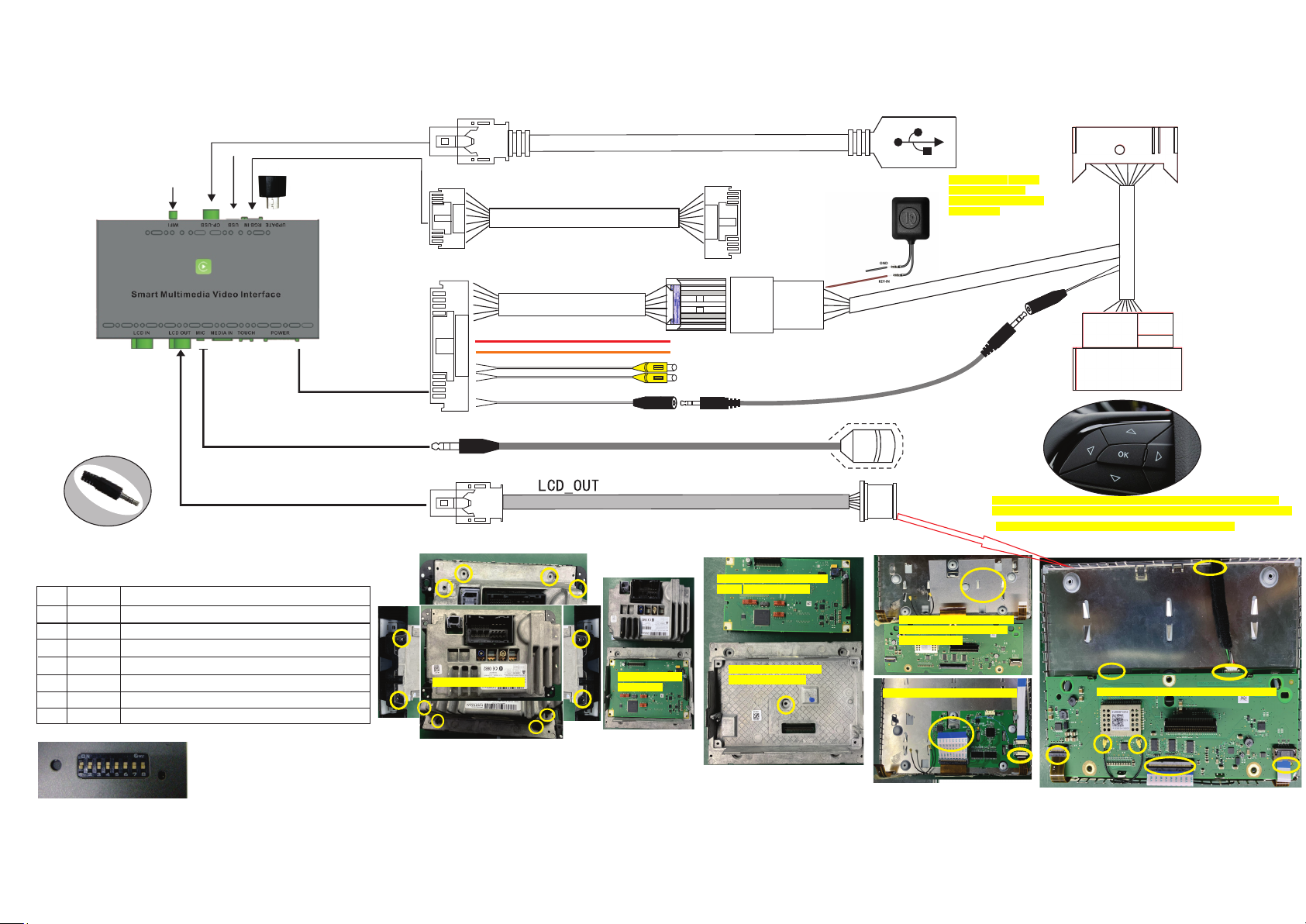
JEEP Compass/Cherokee/Commander/Grand Cherokee(2014~2020) 8.4inch Radio WIRING DIAGRAM---LDS-JP84-CP
WIFI ANTENNA
Connect to CARPLAY-USB cable
Multimedia USB
LCD OUT cable
RGB input cable
Update adapter
Power cable
Microphone cable
Optional cable
Connect to the Phone's original cable
Connect to RGB
output device
Connect to GND
RED---12V output for rear view camera
ORANGE--Reverse control cable for AVM /without
reversing gridline
YELLOW---RCA Front/Rear video input(Connect
to front /rear view camera/360 AVM/DVR
Stereo audio cable
Short Press to switch
into CarPlay,other
functions controled by
Touch panel
Remark:Keep the original
system is in AUX status
when switch to CarPlay.
Microphone
Connect to the original
monitor's 54P port
Audio in
Connect to the orginal
Cable from the monitor
Press the external button to swicth CARPLAY and press again to exit
CARPLAY. SWC up and down keys can quickly switch from one song to
the next song, other operations through the touch screen .
DIP SWITCH SETTING
(After changing the dip code,press "reset"or power-on again)
PIN1
OFF/ON
PIN2
OFF/ON
PIN3
OFF/ON
PIN4
OFF/ON
PIN5
OFF/ON
PIN6
OFF/ON
PIN7
OFF/ON
OFF/ON
PIN8
Reset Dip Switch LED
NG / NG
NG / Touch point coordinate correction,and then turn "OFF"
NG/ Open front view camera
Reversing gridline/Enable 360 panoramic
NG / NG
Rear view camera CVBS input / RGB input
NG / NG
After market rear view camera/Original rear view camera
ON
OFF
(1) Remove the Screw
1) Remove the screw/rear cover/PCB board like the pictures (1)-
(4)13PCS in toal,and then you will find the FPC cable for swtich
board panel and touch board.
(2) Remove the
rear cover
(3) Remove the board that
needs to be converted
(4) Remove the screw
in the middle cover
(5) Remove the original car
interface board and install
isolation gasket
(6) Install the panel switch board
2) As shown in the figure(5)-(7) remove the original screen FPC cable, antenna and interface
board, then install isolation gasket and screen adapter board, connect the 60P cable and 8P
touch cable on the original screen, restore the original interface board, original FPC cable,
antenna, additional screen cable and touch cable(Note that all the cable must be inserted
evenly).Finally, install LVDS Cable (Pay attention to the insertion direction and outlet position),
check all interfaces, install the back cover of the original car screen.
(7) Connect the FPC cable and LVDS cable
 Loading...