

Page 1

Advanced Mobile Payment Inc.
8 Series
Quick Reference Guide
v 1.0
PQR-8200-1.0-E
Note: This information is CONFIDENTIAL and must be used exclusively for the operation of
Advanced Mobile Payment Inc.™ (AMP) products. It may not be duplicated, published, or
disclosed without prior written permission.
Page 2

8 Series Quick Reference Guide
PROPRIETARY NOTICE
All pages of this document contain information proprietary to
Advanced Mobile Payment Inc (AMP). This document shall not be
duplicated, transmitted, used, or otherwise disclosed to anyone
other than the organization or specific individuals to which this
document is delivered, and then only for the purpose of evaluation
of the AMP proposal. This restriction is applicable to all sheets of
this document. AMP reserves the right to have the recipient return
all copies of this document at any time.
© 2017 AMP Inc. All Rights Reserved
Advanced Mobile Payment Inc.
www.amobilepayment.com
Page 3
8 Series Quick Reference Guide
DOCUMENT PROPERTIES
Information
ID
Title
Category
Access Level
PQR-8200-1.0-E
8 Series Quick Reference Guide
AMP POS 8 Series - 8200
General
Version Control
Version Date Summary of Change Updated by
1.0 Dec 2017 Initial version R. Gibbs
Supported Hardware & Software
Version Software Release Supported Hardware Model
1.0+ 1.0
Advanced Mobile Payment Inc.
AMP POS 8 Series - 8200
www.amobilepayment.com
Page 4

8 Series Quick Reference Guide
CONTENTS
1 Introduction
2 8 Series - 8200 Architecture
2.1 Front View
2.2 Back & Side View
3 General Precautions
4 Installing Terminal Battery
5 Installing SIM/SAM Card
6 Powering Device On/Off
7 Installing Printer Paper
8 Troubleshooting Common Problems
9 Technical Specifications
The following items should be found inside the original packaging:
8 Series POS terminal
AC power supply and plug
Micro USB cable
Li-Ion battery
Thermal paper roll
Product Quick Reference Guide
4
4
4
5
6
7
7
9
9
10
11
Advanced Mobile Payment Inc.
www.amobilepayment.com
Page 5
8 Series Quick Reference Guide
1 Introduction
Maximize your point of sale capabilities by combining easy payment acceptance with
customer desired features such as QR code scanning and value-added applications. With
functions designed to improve the transaction flow for merchants like the charging base,
expandable ports, handsfree scanning and simple touch interface, the AMP 8 Series
delivers the latest technology without sacrificng the connectivity and security of a traditional
POS. Running on a powerful Android-based OS, the 8 Series is easy to use and open to
customization, providing a platform to integrate payment with external applications.
2 8 Series - 8200 Architecture
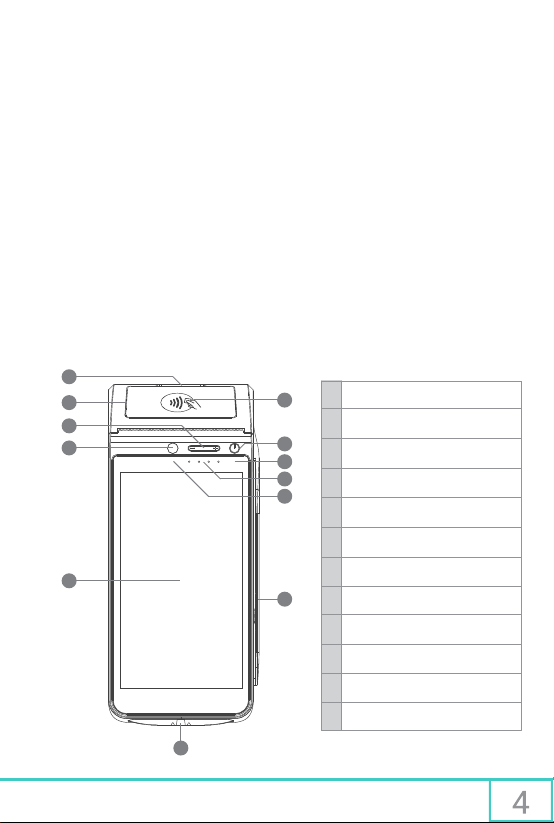
2.1 Front View
1
1
2
7
3
4
8
9
10
11
5
12
Printer paper roll door
Printer door release
2
Volume buttons
3
Front-facing camera
4
5
Touchscreen LCD
6
EMV chip insert slot
7
NFC contactless reader
On / Off button
8
9
Charging indicator light
LED indicators
10
Camera indicator light
11
Magstripe reader
12
6
Advanced Mobile Payment Inc. www.amobilepayment.com
Page 6
8 Series Quick Reference Guide
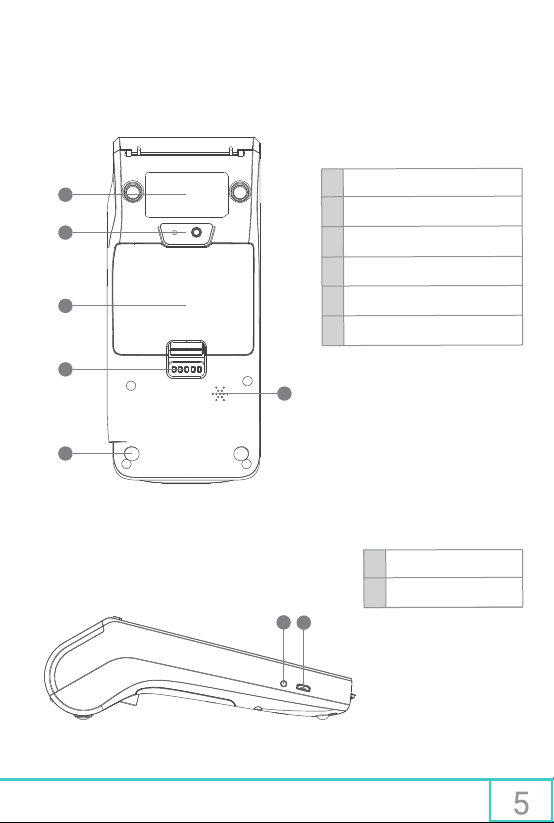
2.2 Back & Side View
1
2
3
4
5
1
Identification label
2
Camera and 1D/2D scanner
Battery compartment cover
3
4
Charging contacts for base
Anti-slip rubber pads
5
6
Built-in speaker
7
1
Headphone jack
Micro USB port
2
1
2
Advanced Mobile Payment Inc. www.amobilepayment.com
Page 7

8 Series Quick Reference Guide
3 General Precautions
Basic care and consideration should be used when handling, operating or installing the 8
Series terminal. This is a secure device, with both physical and logical tamper protection,
and no attempt should be made by the user to open or service the device in any way other
than approved troubleshooting methods. Keep these basic guidelines in mind to prolong the
longevity and functionality of your product:
Use only the dedicated power supply and battery provided with the terminal to avoid
damage to the device’s electrical components
Avoid spills or exposure to liquid, which could cause the terminal to short circuit
Protect the terminal from impact, including: vibration, shaking, knocks, falling objects,
being dropped, etc.
Keep the terminal from environments that produce excessive dust, humidity, high or
low temperatures, or electromagnetic fields
While charging, do not attach or remove any components to avoid damage to the
internal circuitry
There are no user-serviceable internal parts or mechanisms, do not try to open, modify
or repair the device
This terminal contains a failsafe where all internal data will be erased immediately
upon detection of tampering (such as opening the housing)
If a fault occurs, immediately disconnect power supply, discontinue use and contact
your service provider to request repairs and diagnostics
When the battery reaches the end of its service life, it cannot be thrown in the garbage,
instead it should be safely disposed of according to local hazardous disposal laws
Advanced Mobile Payment Inc.
www.amobilepayment.com
Page 8
8 Series Quick Reference Guide
4 Installing Terminal Battery
Installing the battery
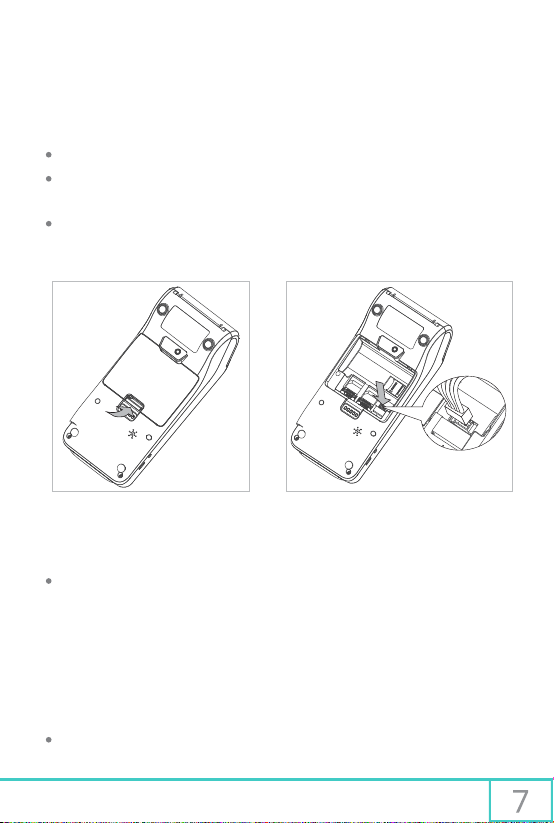
Open the rear battery cover using the bottom tab to expose the battery compartment
Connect the cable on the battery to the open connection port on the right side of the
compartment, and securely insert the battery with the label tag facing upwards
After installation, close the rear battery cover
Open rear battery cover Install the battery
NOTE
When removing the battery, support its weight and gently unplug the connector to
avoid damage to the wires or connections
5 Installing SIM/SAM Card
Installing SIM/SAM cards
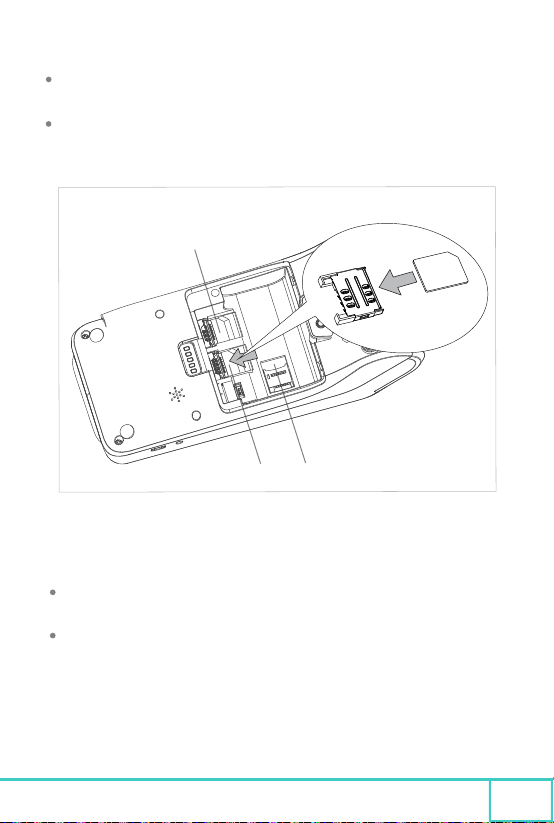
Open the rear battery cover using the bottom tab and remove the battery
Advanced Mobile Payment Inc. www.amobilepayment.com
Page 9
8 Series Quick Reference Guide
With the exposed chip facing downward, and the angled corner oriented away from the
slot, insert the card until it is seated right at the bottom of the slot
After installing the card, connect the battery and close the rear battery cover
SAM
SIM SD
Install the SIM, SAM, or SD card
NOTE
Ensure the terminal is powered off completely when attempting to install or uninstall a
SIM/SAM card to avoid damaging the card or terminal
Do not affix any labels or stickers to the SIM/SAM card, as they may cause the card to
damage the receiver or become jammed inside of the device
Advanced Mobile Payment Inc. www.amobilepayment.com
8
Page 10
8 Series Quick Reference Guide
6 Powering Device On/Off
Powering On the device
First ensure that the battery is adequately charged, then press and hold the power key for at
least six (6) seconds to turn the terminal on.
Powering Off the device
While the terminal is on, press and hold the power key for at least two (2) seconds, and
select “Shutdown” from the on-screen prompt, or hold the power key for eight (8) seconds
to perform a forced shutdown.
7 Installing Printer Paper
Installation of thermal receipt printer paper
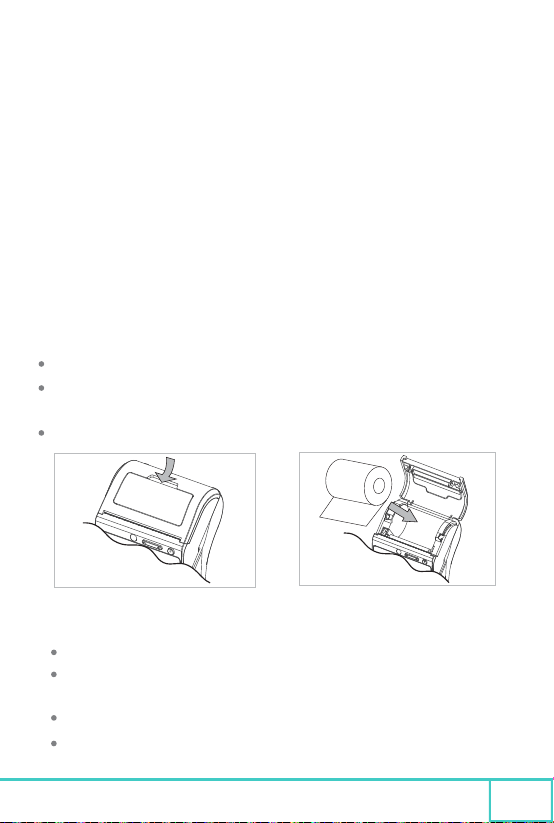
Pull up on the plastic release handle to pop open the paper holder lid
Insert the thermal paper roll into the paper holder, ensuring the orientation and spool
direction matches the below diagram
After installation, ensure the paper holder lid is closed and securely in place
Open the printer paper door Insert the printer paper
NOTE
When installing paper, ensure thermal media side is facing print head
Do not leave the printer without paper for extended periods of time, to prevent the
rubber roller from sticking to the plate
The heating plate operates at a high temperature, do not touch until it has fully cooled
The manual paper cutter edge is sharp, keep clear to avoid injury
Advanced Mobile Payment Inc. www.amobilepayment.com
9
Page 11
8 Series Quick Reference Guide
8 Troubleshooting Common Problems
If problems occur with the terminal, try these simple troubleshooting methods to correct
the fault, or contact a service representative to further diagnose the issue.
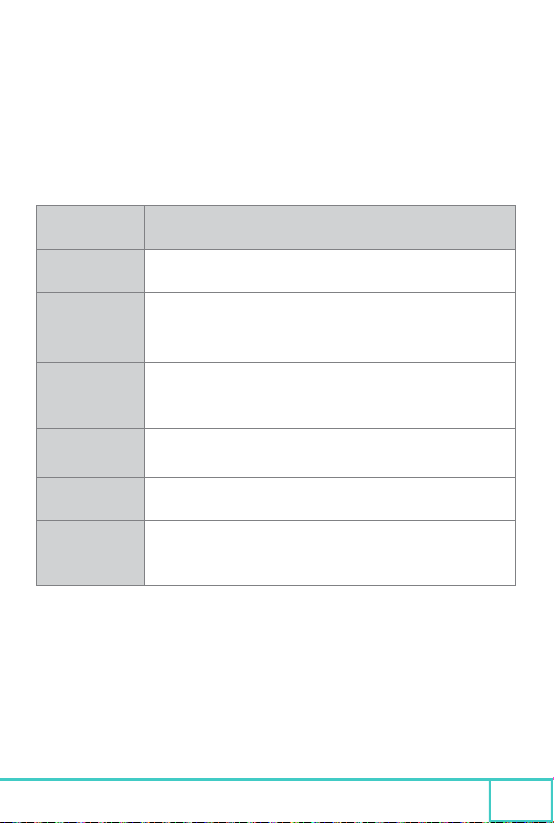
Problem Troubleshooting
Nothing displayed
on screen
Unable to
read card
Magnetic reader
data read error
Chip card
data read error
Contactless card
data read error
Communication
error
Ensure the battery is charged and properly connected
Ensure that the slot is free of debris or foreign objects
Swipe the card in both directions, and check if the error has been corrected
Ensure the test card is operational, and test with an alternate card
Swipe the card with constant speed, tight to the bottom edge of the slot
Ensure the card strip is facing the screen and aligned properly in the slot
Try swiping the card in the opposite direction
Ensure the chip portion is facing upwards, and is properly inserted into the slot
Check the card for excessive scratches, dirt, or other damage
Confirm that the card supports contactless communication
Check whether the card is properly aligned above the contactless reader area
Restart the terminal in order to re-establish communications
Ensure that the SIM card is properly installed, and that the contacts are clean
If using WiFi, ensure the connection is enabled on the terminal
If problems persist after completing these troubleshooting procedures, please contact your
sales or service representative, do not attempt to open the terminal or make further repairs.
Advanced Mobile Payment Inc. www.amobilepayment.com
10
Page 12

8 Series Quick Reference Guide
9 Technical Specifications
Below are specifications relating to the overall capabilities of the AMP 8 Series, including
optional or variable elements. To get the specifications for your individual terminals, please
refer to your original sales order, or your sales representative for more information.
PROCESSOR
MEMORY
DISPLAY
CONNECTIVITY
CERTIFICATION
CARD READERS
SECURITY 3DES Encryption, Master/Session and DUKPT key management
CAMERA Front & rear cameras, 1D / 2D scanning, flash, front camera active indicator
BATTERY Rechargeable, 2600mAH, 7.2v,
POWER 5V DC, 2A
DIMENSIONS
BUTTONS
SYSTEM
WEIGHT
OPERATION
STORAGE
PERIPHERAL
Dual processor, Quad-core A9 & high speed secure processor
8 or 16GB flash, 1GB DDR
Full color 5.5” 720x1280 LCD, touch screen, signature capture, video capable
WiFi, Bluetooth 4.0, 2G, 3G, 4G, GPS, Micro USB OTG, headphone audio jack
EMV 4.3e level I and II, NFC, D-Pass, Expresspay, Interac Flash, JCB Contactless,
Mastercard Contactless, Visa Paywave, PCI PTS 5.X, CE
Triple-track bi-directional magstripe reader, NFC contactless, ISO7811, ISO7812,
ISO4443 A/B, Mifare, SIM, 2 SAM slots, SD card
High speed , easy loading, 58mm paper width, 40 mm roll diameterPRINTER
(190x84x62mm) - (7.5” x 3.3” x 2.4”) LxWxH
1 Power button, volume controls
Android OS 5.X
450 g (0.99 lbs)
O°C ~ 50°C (32°F ~ 122°F), 10% -90% humidity (non-condensing)
-20°C ~ 60°C (-4°F ~ 140°F), 5% -95% humidity (non-condensing)
Docking base - charging, expansion ports, handsfree countertop scanning
Advanced Mobile Payment Inc. www.amobilepayment.com
11
 Loading...