

Page 1
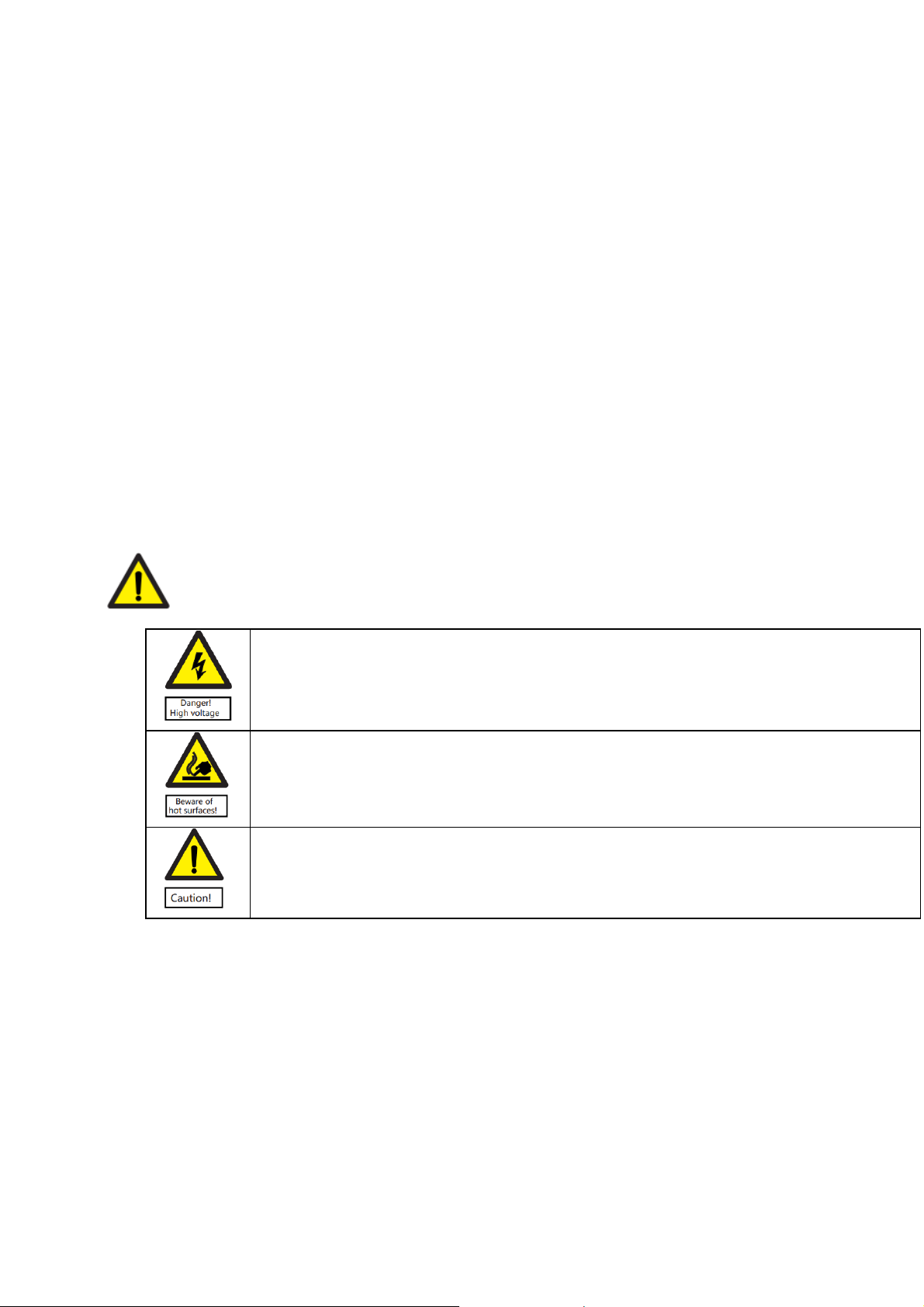
Important Information
Please read this user manual before you use this product, it contains all the notes, and instructions reg arding
the operating this product. In accordance with safety precautions and operatin g instructions listed on this user
manual applies, provided the product is handled properly for its intended use, but may not apply to the cases
below:
• Repairs of product modification and alternations have been executed by unauthorized
personnel.
• The damages are caused by accidents including but not limited to lightning, fire, exposed to
rain, water or moisture.
• The damages are caused by the use of the provided power adapter with power voltages which
are not compliant with the rated voltage range in the attached label of the power adapter in
the package.
• The model label on the product has been modified or the w a rr anty ta g has been removed by
unauthorized personnel.
Safety Precaution
To reduce the risks of electricity, do not remove or open the cover. No use
serviceable parts are inside. Please return to original factory for maintenance.
To reduce the risks of electricity, do not remove or open the cover. No use serviceable parts
are inside. Please return to original factory for maintenance.
Please use our standard power adapter. For detailed information, please refer to the rated
voltage range showed on the label at the back of power adapter.
Page 2
Danger: Be careful with electricity
• As connecting any equipment (such as any player or TV, etc.), please turn off the power of
the product before any operation is undertaken.
• Power outlet: to prevent electric shock, fire or short circuit, please make sure the type of
electrical plug used on the receiver’s and transmitter’s power cord are compliant with the
rated voltage range in the attached label of the power adapter in the package.
• Power cord: Do not place any heavy articles on top of the power cord. To avoid being stepped
on or pinched by heavy items, the power cord should not be located in a place where people
pass by frequently.
• Power overloading: Avoid overloading wall’s electrical outlets and extension cord or other
multi-socket; otherwise could result in electric shock or fire.
• FCC Radiation Exposure Statement: This equipment complies with FCC radiation exposure
limits set forth for an uncontrolled environment. This equipment should be installed and
operated with a mi ni m um distance of 20cm be tw e e n th e equipment and the us e r ’ s bo dy .
Warning
• This product should not be exposed to dripping or splashing. Don not place any object filled
with liquid on the product (eg. Vases).
• Please place the receiver/ transmitter on a flat and stable surface.
• Ventilation: please do not block the air vents on the receiver/ transmitter, or place any heavy
objects on top of them. Blocking the air flow can damage the product. Please make sure there
is adequate ventilation distance between the receiver and TV.
• Please put the product away from direct sunlight or any source of heat.
• Water exposure: to reduce the risk of electric shock or fire, please do not expose the receiver/
transmitter to rain or moisture.
• We assume no responsibility for any damage or result caused by using other adapters instead
of the standard adapter provided in the package.
Page 3

Special Notice
• Although the product has provided the function of data encryption when transmitting, you still
• The impact of radio waves (such as the following environments) may cause abnormal audio
• This product has been tested and manufactured to comply with national electrical safety rules,
• The product is susceptible to interference from 5GHz wireless local area network or other
need to pay attention to deliberate signal interception. There will be the possibility of a third
party intentionally intercept the transmission signal since the product adopt wireless
communication. Please do not use the product on confidential communication, or life-related
communication. The main concern is that the content of wireless communication might be
received by the third party’s wireless devices deliberately or accidentally.
and video (blocked image, noise, etc.)
o Transmit through a brick wall.
o Transmit close to a refrigerator, metal objects, or a crowded environment.
however, there will be noise caused by interference with other machines in rare cases. If the
interference is present, please keep a certain distance away from other machines.
wireless devices.
• Optimal range be tw e en transmitter and rec e i v e r is be tween 1 meter and 30 meters within line
of sight in an indoor environment.
• Please do not set up the transmitter and receiver in metal shelf or it will hinder the wireless
communications.
• 1080p/60 Hz Wireless transmitting.
• It will take 15-20 seconds to boot the system before wireless communication start, the media
receiver can not be operated during this time.
• Keep the product 20cm away from the body.
• Indoor use only.
• No enclosure provided. Need to add a complete enclosure.
Page 4
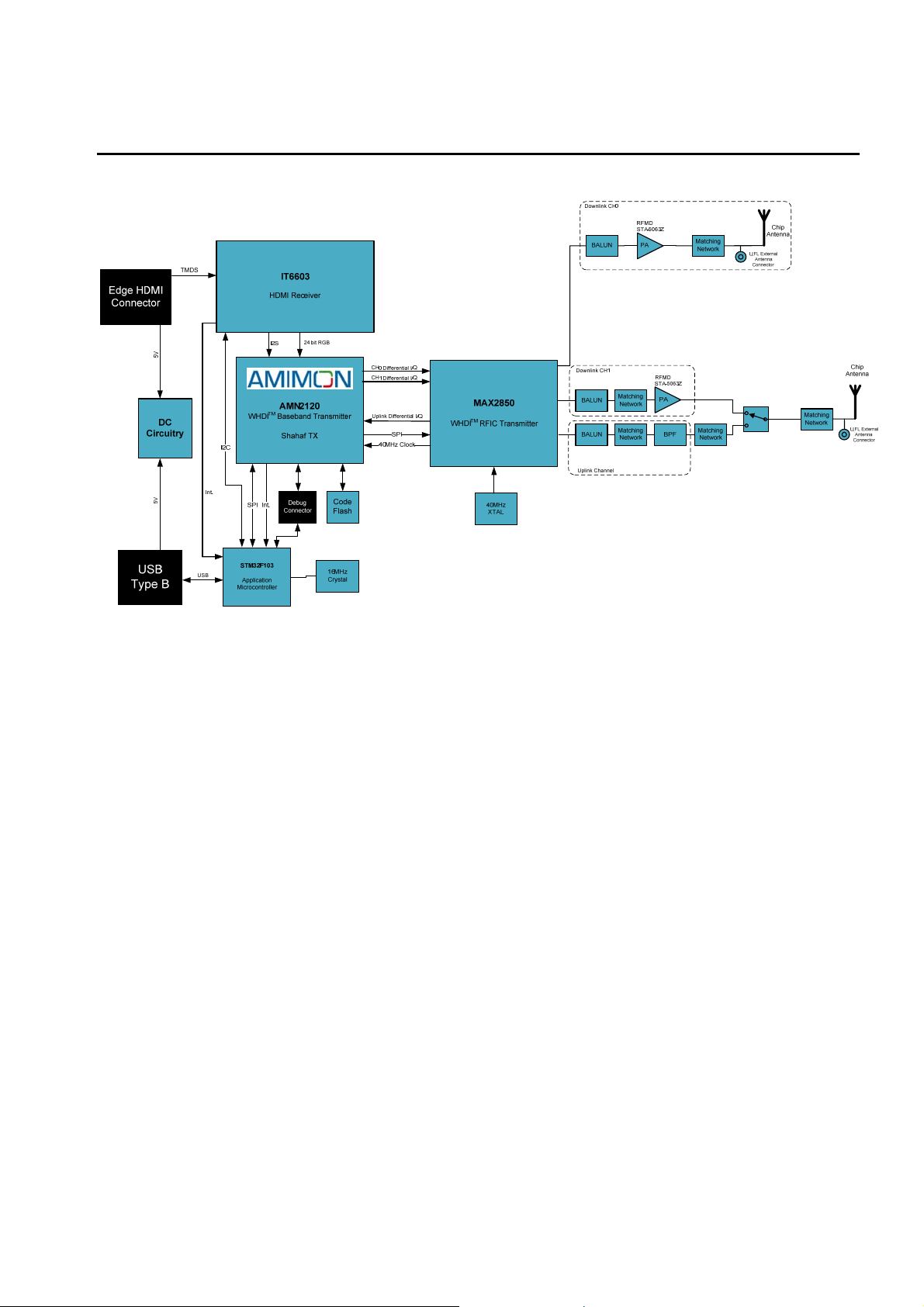
1. AMN31292 Block Diagram
2. Features
1. Uncompressed and uncompromised FHD video quality
2. Supports 40MHz channels for supreme video quality and high rate video/audio signals
3. Supports WHDI, Unicast, Multicast
4. Supports HDMI
5. Strong 256-bit/128-bit AES bas ed e nc ry ption
6. Supports MIMO technology
7. Supports OSD display
8. Supports HDCP
Page 5
M 50
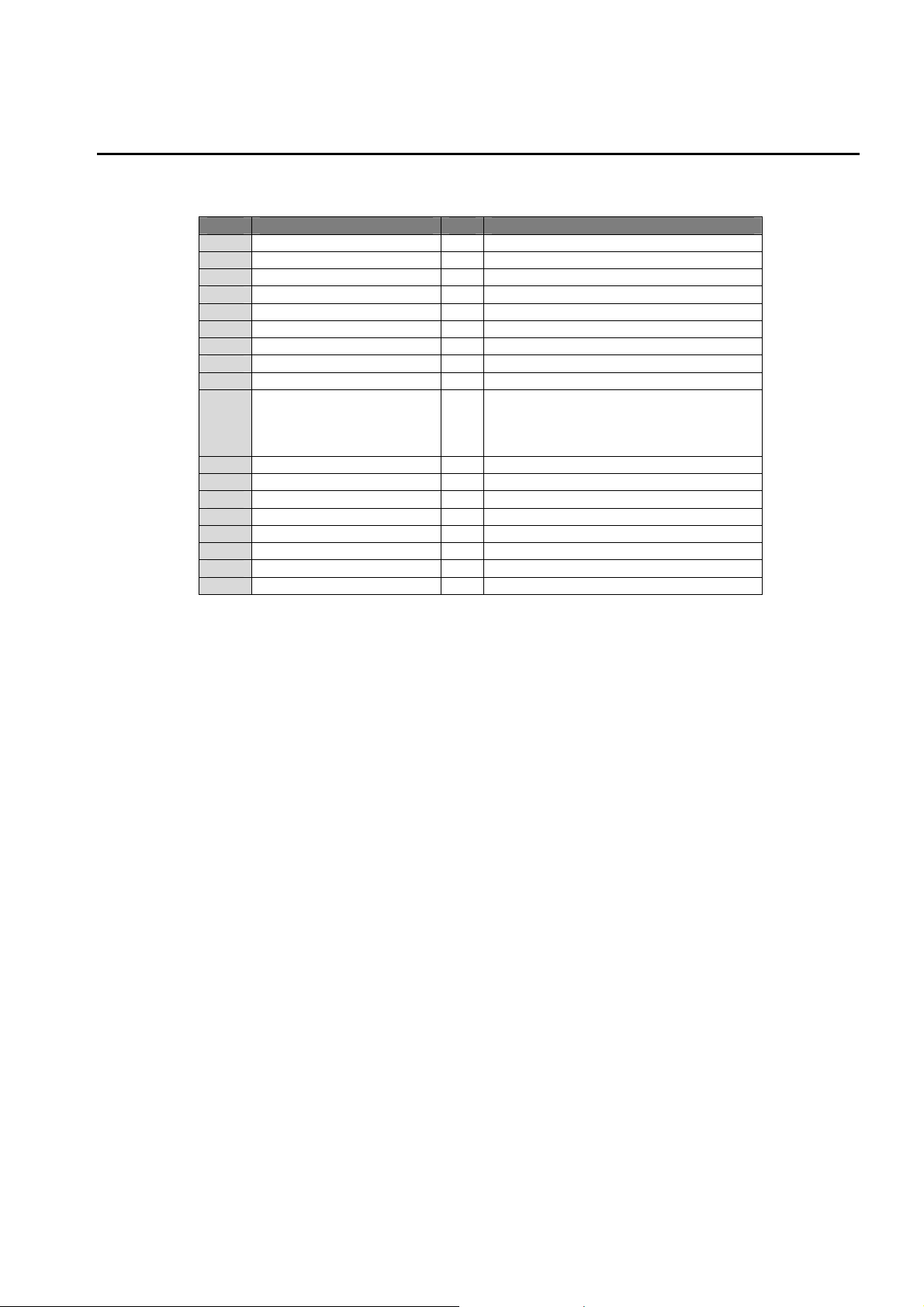
3. Performance parameters
Number Item
1 Transmitter & Receiver Frequency
2 RF Communication System MIMO
3 Modulation Mode
4 Frequency Stability PPM +-20
5 Operating Bandwidth MHz 40
6 Typical Transmit Power dBm 16(MAX)
7 Receiver Sensitivity dBm -70
8 System Delay Ms <1
9 Transmit Channel & Receive Channel
10 HD Video System HD: 480i, 480p, 576i, 576p, 720p, 1080i, 1080p
11 HD Video Encryption
12 Multi-path Transmission Distance
13 Consumption Current mA
14 Power Supply VDC 5
15 Operation Temperature C
16 Storage Temperature C
17 Operation Humidity RH 15% - 85%
18 Dimensions mm L89.5mm x W27mm x H9.05
Unit Specification
GHz 5.15~5.25, 5.25~5.35, 5.47~5.725, 5.725~5.825
OFDM
2 & 1
PC: VGA (640x480), SVGA (800x600), XGA (1024x768)
Panel: 854x800, 1280x768, 1366x768, 1920x1080
HDCP 1.2
-20 - +40
-20 - +60
Page 6
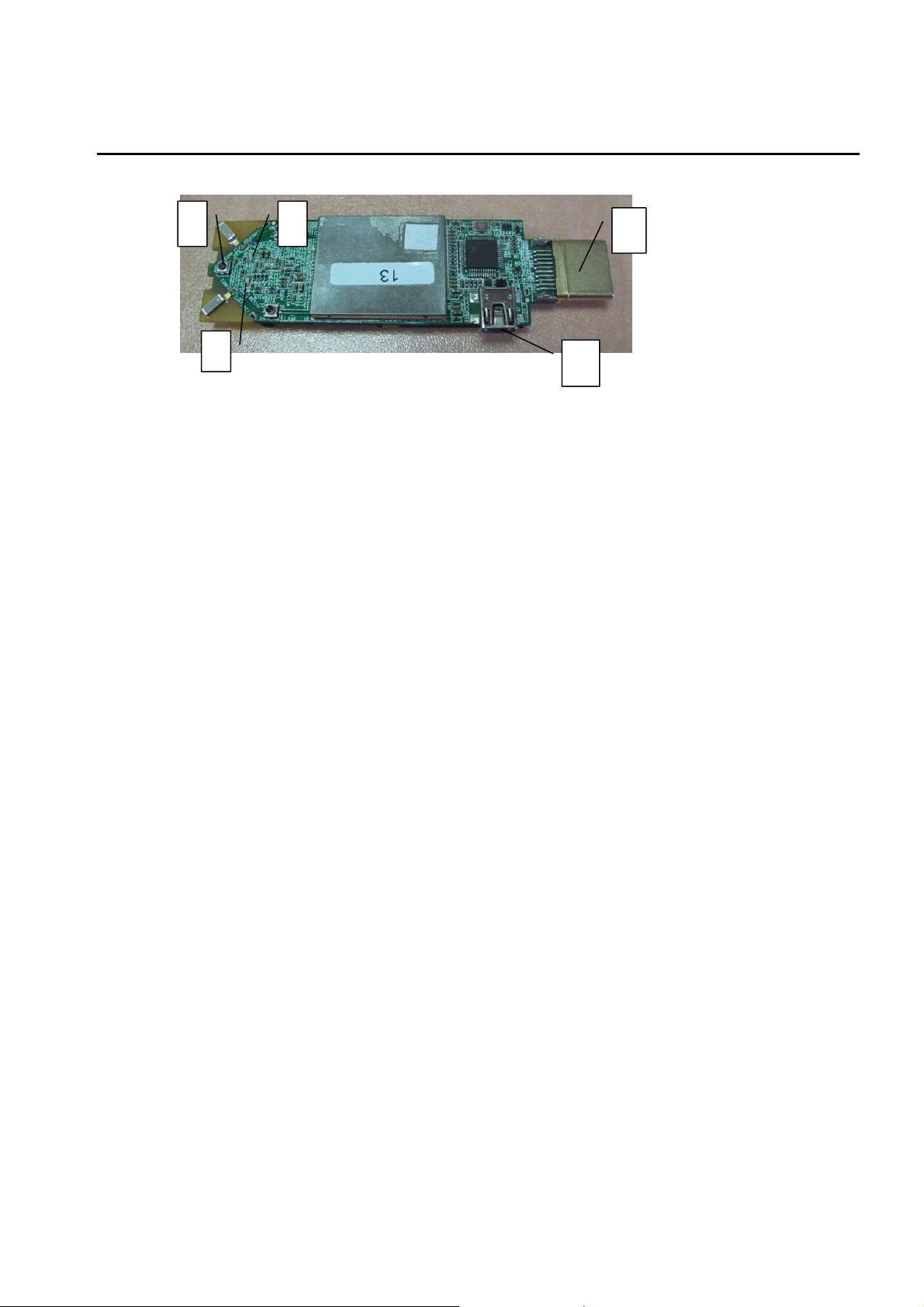
4. AMN31292 Product Appearance and Interface Definition
1
3
2
1. Registration button:
The registration button is used in order
to register the transmitter to additional
receivers, in Unicast or Multicast
products.
2. VIDEO status LED:
The VIDEO LED is used to indicate
the video connection status.
3. NETWORK status LED:
The NETWORK LED is used to
indicate the wireless network state.
4
5
4. HDMI Input port:
The HDMI input port is used to
connect the video source to the
transmitter.
5. USB Port:
The USB port is used to provide
power to the system. The USB port
can also be used for log collection and
firmware updates.
Page 7
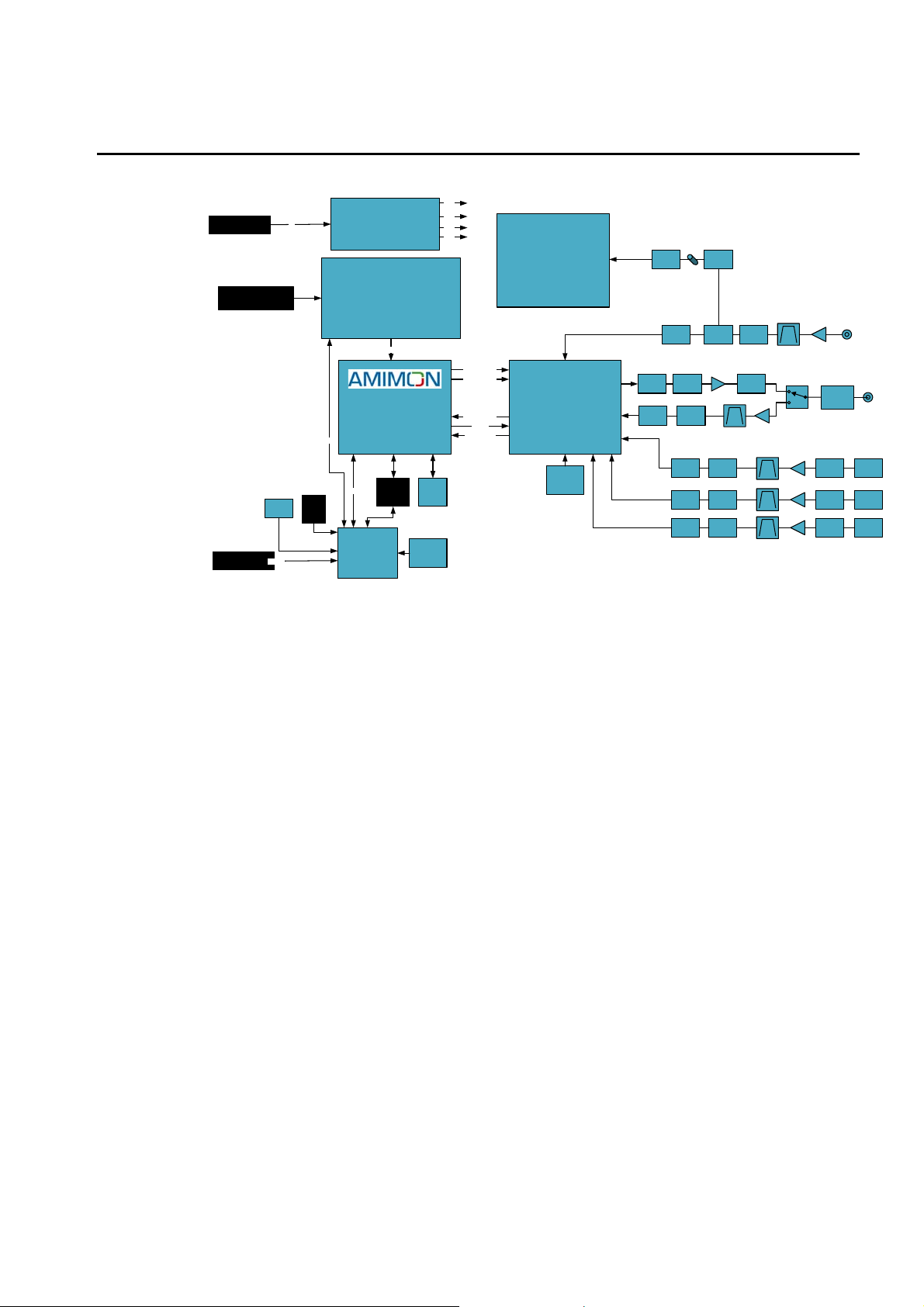
1. AMN36223 Block Diagram
3.3V
Code
Flash
25MHz
Crystal
2.8V
1.8V
1.0V
Differential I/Q
Differential I/Q
Differential I/Q
Control
40MHz Clock
Power Socket
HDMI Connector
Mini USB
Push
Button
Control
5V
IR RX
Jack
WHDITMBaseband Receiver
Control
Control
SMT32F105
Application
Microcontroller
DC Circuitry
ITE IT6613E
HDMI transmitter
Audio/Video
AMN2220
Shahaf RX
Debug
Connector
2. Features
AL7230
RFIC Receiver
(DFS)
MAX2851
RFIC Receiver
(WHDI)
40MHz
Crystal
BALUN
BALUN
Matching
Network
V
Matching
i
Network
a
BALUN Coupler
Matching
Network
PA
Matching
Network
Matching
BALUN
Network
Matching
BALUN
Network
Matching
BALUN
Network
Matching
Network
LPF
LNA
External
Antenna
Connector
External
Antenna
Connector
Murata
Push
LNA
Connector
LNA
Matching
Chip
Network
Antenna
LNA
Matching
Chip
Network
Matching
Network
Antenna
Chip
Antenna
LNA
1. Uncompressed and uncompromised FHD video quality
2. Supports 40MHz channels for supreme video quality and high video/audio signals
3. Supports WHDI, Unicast, Multicast
4. Supports HDMI
5. Strong 256-bit/128-bit AES bas ed e nc ry ption
6. Supports MIMO technology
7. Supports OSD display
8. Supports HDCP
Page 8
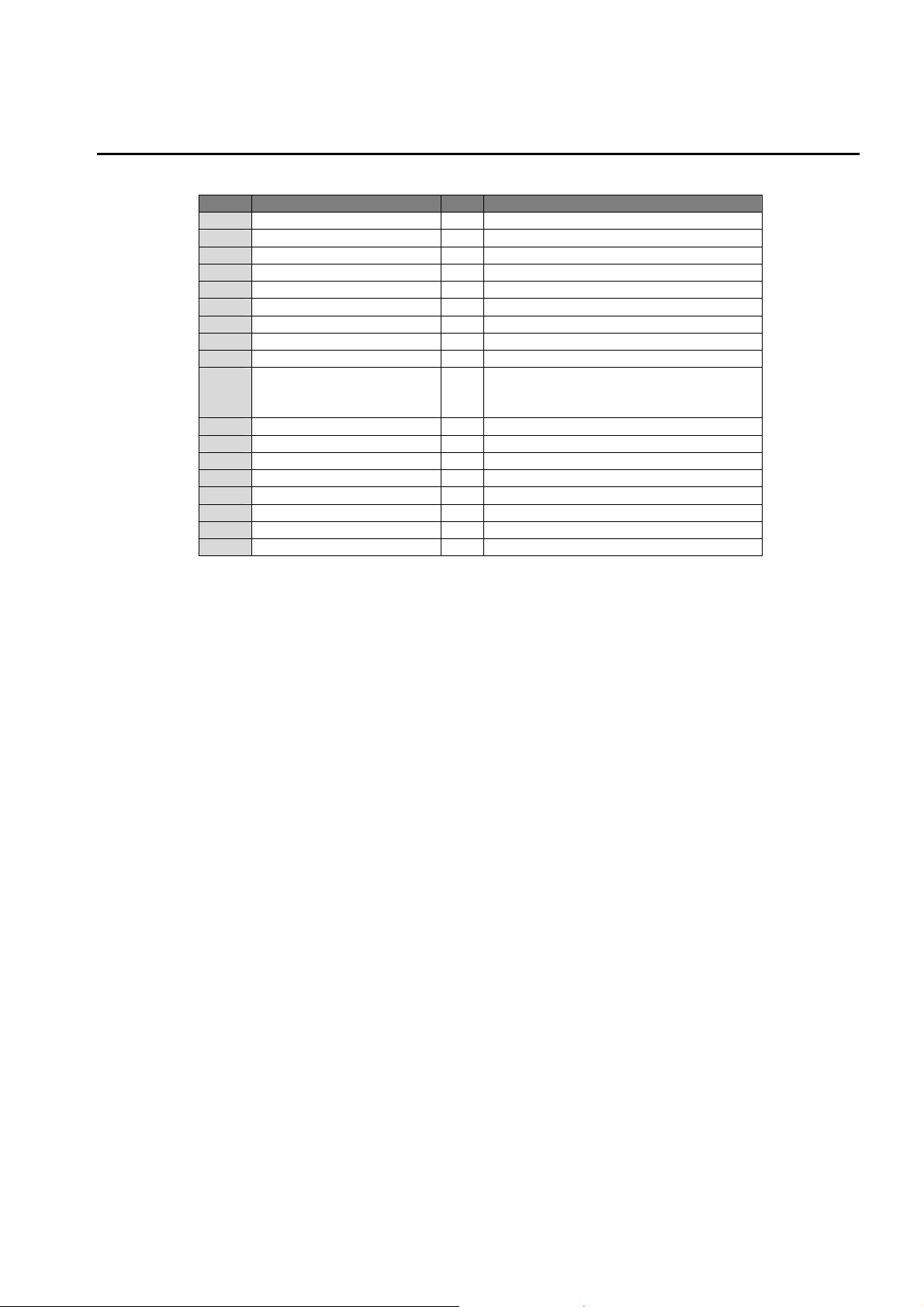
3. Performance Parameters
m 50
Number Item Unit Specification
1 Transmitter & Receiver Frequency
2 RF Communication System
3 Modulation Mode
4 Frequency Stability PPM +-20
5 Operating Bandwidth MHz 40
6 Typical Transmit Power dBm 16(MAX)
7 Receiver Sensitivity dBm -70
8 System Delay ms <1
9 Transmit Channel & Receive Channel 1 & 5 + 1 for DFS only
10 HD Video System
11 HD Video Encryption
12 Multi-path Transmission Distance
13 Consumption Current mA
14 Power Supply VDC 5
15 Operation Temperature C
16 Storage Temperature C
17 Operation Humidity RH 15% - 85%
18 Dimensions mm L85mm x W51.4mm x H10.95
GHz 5.15~5.25, 5.25~5.35, 5.47~5.725, 5.725~5.825
MIMO
OFDM
HD: 480i, 480p, 576i, 576p, 720p, 1080i, 1080p
PC: VGA (640x480), SVGA (800x600), XGA (1024x768)
Panel: 854x800, 1280x768, 1366x768, 1920x1080
HDCP 1.2
0 - +40
-20 - +60
Page 9
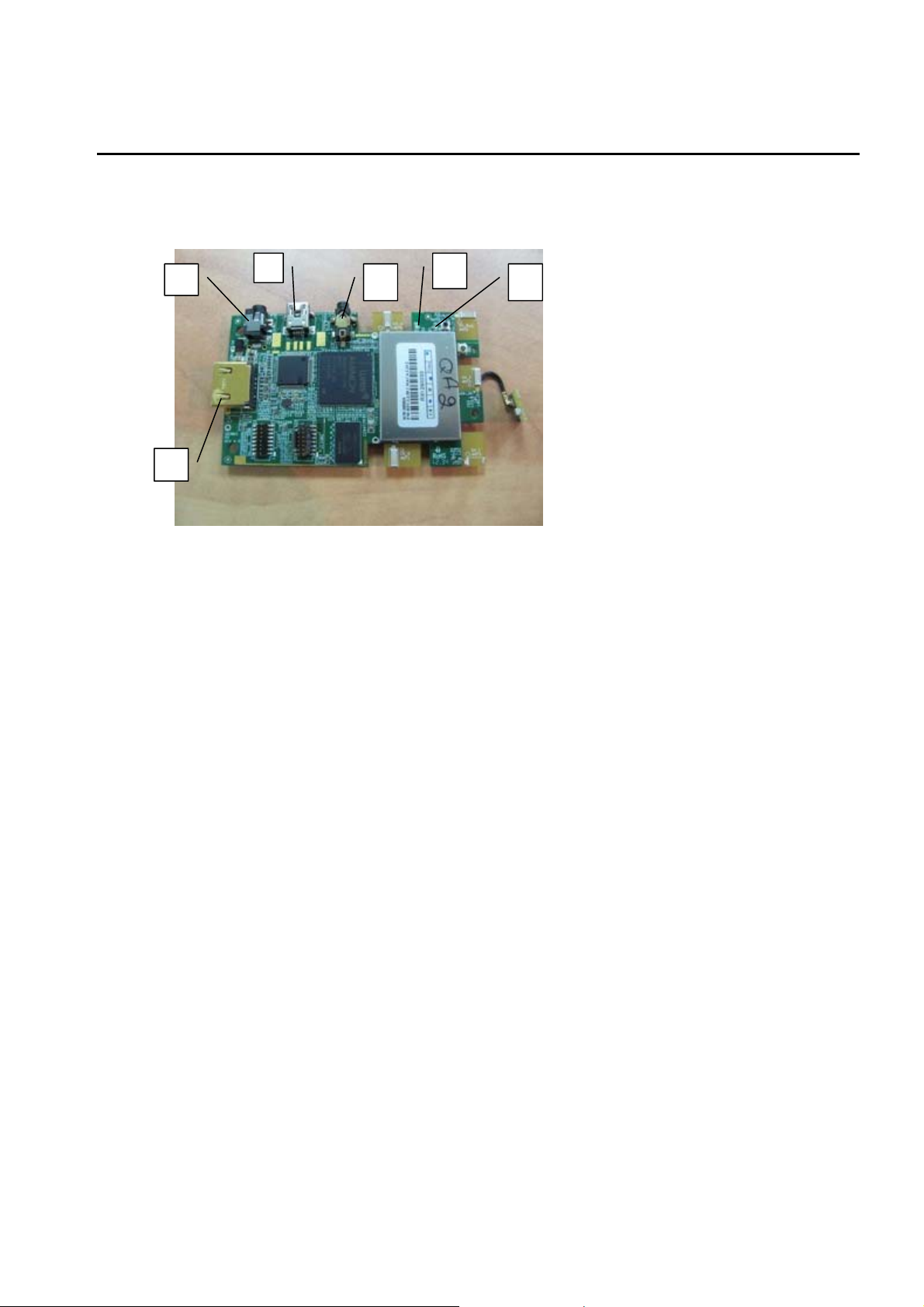
4. AMN36223 Product Appearance and Interface Definition
4 5 6
1
2
3
1. Power Input Port:
The 5v power supply provided with the system should be connected to the power input port.
2. HDMI Output port:
The HDMI output port is used to connect the receiver to the video sink, using a HDMI cable
supporting HDMI 1.3
3. Mini USB port:
The mini USB port is used for SW upgrades and logs collection.
4. NETWORK status LED:
The NETWORK LED is used to indicate the wireless network state.
5. VIDEO status LED:
The VIDEO LED is used to indicate the video connection status.
6. IR receiver jack:
The IR receiver is used for receiving IR messages from the product’s remote control, or from
any other remote control working on 38KHz (Set-top-box, HD disk player, etc.)
Page 10

FCC Caution:
Any changes or modifications not expressly approved by the responsible party could void the
user’s authority to operate this equipment.
Notice:
The module in its final integration requires the end-product to comply with DFS requirements.
A Class II Permissive Change may be required for operation not already described in the FCC
grant filling.
OEM Labeling Requirements
NOTICE: The OEM or final integrator must ensure that FCC labeling requirements are met.
This includes an additiona l label o n the o utside of the fina l product housing wit h the fol lowing
contents:
Company Name
MODEL:
Contains Model:
AMN31292, FCC ID: VQSAMN3129201
This device complies with Part 15 of the FCC Rules. Operation is
subjected to the following two conditions: (1) This device may not
cause harmful interferences, and (2) this device must accept any
interference received, including interference that may cause undesired
operation.
Company Name
MODEL:
Contains Model:
This device complies with Part 15 of the FCC Rules. Operation is
subjected to the following two conditions: (1) This device may not
cause harmful interferences, and (2) this device must accept any
interference received, including interference that may cause
undesired operation.
AMN36223, FCC ID: VQSAMN3622301
Page 11

The applicable usage is to be used as a wireless device, connected to the back of a camera, or
other video source and transmitting video to a monitor, or any other video sink, with less than
1msec delay.
FCC Radiation Exposure Statement
This equipment complies with FCC RF radiation exposure limits set forth for an uncontrolled
environment. This transmitter must be co-located or operating in conjunction with any other
antenna or transmitter.
This equipment complies with Part 15 of the FCC Rules. Operation is subject to the following
two conditions:
(1) This device may not cause harmful interference, and
(2) This device must accept any interference received, including interference that may cause
undesired operation.
Caution!
The manufacturer is not responsible for any radio or TV interference caused by unauthorized
modifications to this equipment. Such modifications could void the user authority to operate
the equipment.
IC Warning:
Under Industry Canada regulations, this radio transmitter may only operate using an antenna
of a type and maximum (or less) gain approved fo r the transmitter by Industry Canada. To
reduce potential radio interference to other users, the ante nna type and its gain should b e
chosen that, the equivalent isotropically radiated power (e.i.r.p.) is not more than that
necessary for successful communication.
This device complies with Industry Canada license-exempt RSS standard(s).
Operation is subject to the following two conditions:
(1) This device may not cause harmful interference, and
(2) This device must accept any interference received, including interference that may cause
undesired operation.
 Loading...