

Page 1

Installation and Operation Manual
Wireless LED Message Board
Part # H004621
Rev. 2
November 2011
Page 2

Specications
Model Number: AT S112
Input Voltage: 120vac
Frequency: 450- 470MHz
Channel Spacing: 12.5KHz
Array: 160x16
Dimensions: 28"w x 6.3"h x 2.75"d
Weight: 8.5lbs
Features
• 4.75” alphanumeric characters in single line mode
• Display 10 characters in single line mode; up to 40 characters in double line mode
• Real Time Clock (option)
• Operates with Messaging Tab in Remote Connect
• Manually activated buzzer with 9 tones
• 24 modes of operation: Scroll, Roll, Flash, etc.
Model Number: ATS120
Input Voltage: 120vac
Frequency: 450- 470MHz
Channel Spacing: 12.5KHz
Array: 320x16
Dimensions: 52"w x 6.3"h x 2.75"d
Weight: 15.3lbs
Features
• 4.75” alphanumeric characters in single line mode
• Display 20characters in single line mode; up to 80 characters in double line mode
• Real Time Clock (option)
• Operates with Messaging Tab in Remote Connect
• Manually activated buzzer with 9 tones
• 24 modes of operation: Scroll, Roll, Flash, etc.
American Time
140 3rd Street South
PO Box 707
Dassel, MN 55325-0707
Phone: 800-328-8996
Fax: 800-789-1882
american-time.com
2
© American Time
Page 3

Installation
1. Choose a location within range of your SiteSync IQ System Controller.
2. Mount Message Board according to the following diagram
x 2
x 8
x 2
x 8
x 4
x 2
3. Plug in Message Board to 120vac outlet
4. Log into Remote Conect to program the Message Board.
© American Time
3
Page 4
Remote Connect Web Interface
The Remote Connect Web Interface allows remote access to your SiteSync IQ system controller via a
web browser. This feature is available to all SiteSync IQ system controllers with the Ethernet option.
Please reference the SiteSync IQ Installation and Operation Manual for more details.
To Access Remote Connect:
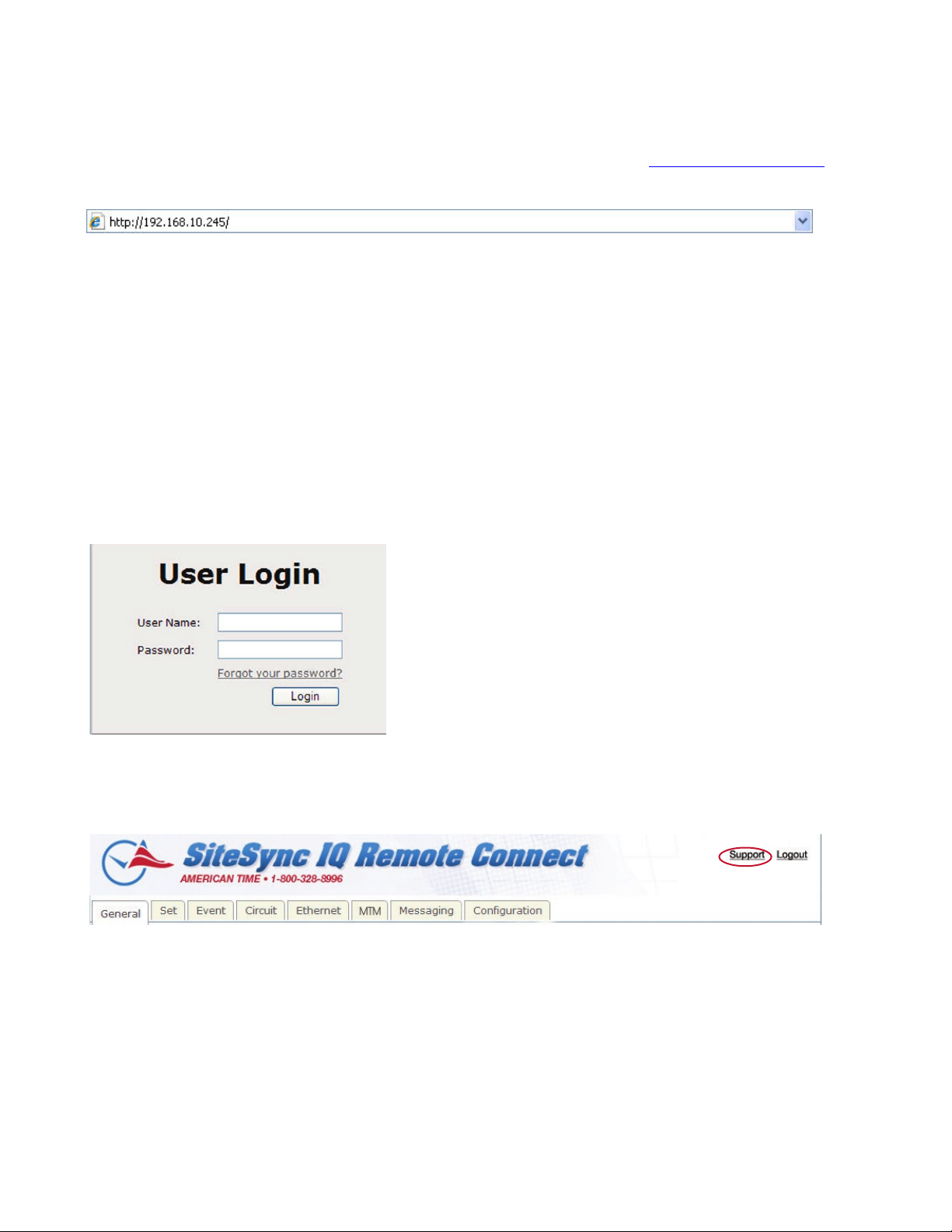
1. Open a web browser. Enter the IP address for your system controller as http://xxx.xxx.xxx.xxx in
the web browser’s Address eld (Figure 1). Press the Enter key.
Figure 1
2. A User Login window, (Figure 2) will appear. There are two available user names, uclock and
sclock, which represent the user and service access levels. The user security level allows access
to everything but the Conguration Tab.
User Level Access:
Enter uclock in lowercase letters in the User Name eld and uclock in the Password eld. This
user login allows access to time/date, messaging, and event menus.
Service Level Access:
Enter sclock in lowercase letters in the User Name eld and sclock in the Password eld. This
user login allows access to all menus.
Note: Passwords may be changed in the Conguration Tab.
Then, click the Login button.
Figure 2
3. The Remote Connect utility will appear with the General tab selected. The tabs displayed may
differ depending on the conguration of the unit.
Figure 3
For more details on the features of Remote Connect, click on the Support link in the upper right-
hand corner of the utility (Figure 3).
4
© American Time
Page 5

Messaging Tab
The Messaging Tab allows for the entry and storage of 10 pre-canned messages. These messages
can be sent to Message Boards throughout the facility.
Figure 4
1. Cap Code: The Cap Code must match the Cap Code of the device receiving the message.
2. Message: The message entered may need to follow a certain format. Reference the
Message Board reception format.
3. Description: This allows the user to enter a description of their message.
4. Enabled: Check this box and press Update to transmit the message.
© American Time
5
Page 6

Message Board Control Commands V2.00 (use for firmware V6.0 up)
Item Features Command Parameters Description
1 Timer display On/Off GALEDTM= ON or OFF ON=Timer display enable; OFF=Timer display disable
2 Timer Date On/Off GALEDDT= ON or OFF Date display ON or OFF
3 Timer Date Setting GALEDDATE= YYMMDD YY=year from 0 to 99; MM=month from 1 to 12; DD=day
from 1 to 31
4 Timer Date Mode GALEDDTMD= X 0=DD-MMM-YY; 1=MMMM DD,YY; 2=MM/DD/YY; 3=DD/
MM/YY; 4=MM-DD-YY; 5=DD-MM-YY;
6-MM.DD.YY; 7=DD.MM.YY; 8=MM DD YY;
9=DD MM YY
5 Timer Time Setting GALEDTIME= HHmmSS HH=hour from 00 to 23; mm=minute from 00 to 59;
SS=second from 00 to 59
6 Timer Month Language
of Date
7 Timer Display Mode GALEDTMD= X This control command will not work on LED Sign Type=A or
8 Timer Hour Type GALEDTMHR= 12 or 24 24=24 hours type (default); 12=12 hours type with AM, PM
9 Timer Display Hold Time GALEDSHTM= XXX From 001 to 999 seconds
10 Buzzer On/Off GALEDBZ= ON or OFF ON=Buzzer beep enable; OFF=Buzzer beep disable
11 Buzzer On Time GALEDBZTM= XXX From 001 to 999 seconds
12 Buzzer Music Type GALEDBZTY= X Music type from 0 to 9
13 Scroll Speed Control GALEDSPEED= X X=1 (slowest) to 5 (fastest); This scroll feature only active
14 Default Message GALEDMESG= xxxxx… It keeps 50 characters for message to replace default
15 Message Counter GALEDMGCT= XX 01=only use one message slot for any cap code and
16 Auto Clear Delay Time GALEDCLRDY= XXX 000=auto clear disable, delay time=001 to 999 seconds,
17 Auto Clear Count Times GALEDCLRCT= XXX 000=auto clear disable, display how many times=001 to 999
18 Clear by "Reset"
Command
19 Time Stamp Mode GALEDTMSM= X 0=Off; 1=time stamp in the head of message; 2=time stamp
20 Non Scroll Hold Time GALEDMGTM= XXX From 001 to 999 seconds, this feature is only active when
21 Delete All Messages GALEDDELALL This command will clear all messages, then it will show the
GALEDLANG= XXX ENG=English; FRA=France
B mode.
1=Timer display after every message.
2=Timer display once after nished all messages.
indicator
if the message is more than display's character length. It
will be setting to default value when the LED Sign Type
command is changed.
message of "Gold Apollo LED signs moving display". If use
"GALEDTIME=HHmmSS" as the default message then the
default message will show time information on the display.
function bits; 24=each cap code and function will locate its
message slot; AU=Auto can have 24 memory but does not
care about cap codes. This 24 memory will do FIFO action,
meaning if it's memory is full then oldest memory will move
out of memory.
message will auto clear itself after delay time is time out.
times, message will auto clear itself after display times is
time out.
GALEDRESCM= ON OR OFF ON=if the message has the header or trailer word "reset",
then the message will be cleared. The header format is reset
+ message, the trailer format is message + reset. The word
reset can be lower or upper case letters.
at the end of message. Time stamp format is HH:MM (24
hour time format)
the message length is less than message board's character
length. The default time is 3 seconds.
default message on the display.
6
© American Time
Page 7

Message Board Control Commands V2.00 (use for firmware V6.0 up)
Item Features Command Parameters Description
22 LED Sign Type GALEDTYPE= X 1=1 line
2=2 lines
A=2 lines with timer on second line
B=2 lines with timer on rst line
a=2 lines with default message is on second line
b=2 lines with default message on rst line
23 Message Display
Sequence
24 Appear Message Mode GALEDAPPM= X This feature only works for LED Sign Type=1 or 2
25 Disappear Message
Mode
GALEDSEQU= X 0=FIFO (1st in 1st out); 1=LIFO (last in 1st out)
0=Fly to Left (default); 1=Enter to Right
2=Extended to Bottom; 3=Fly from Top
4=Fly from Bottom; 5=Raining; 6=Snow Flakes
7=Appear right away; 8=Animation 1
GALEDDISM= X This feature only works for LED Sign Type=1 or 2
0=Continue (default); 1=Run to Left; 2=Curtain Right;
3=Curtain Down; 4=Fly Away; 5=Sink; 6=Flash & Invert;
7=Vapor; 8=Dissolve; 9=Flash; A=Disappear right away;
B=Animation 1
Control Command Instruction and Examples
1: Timer display On/Off
GALEDTM=ON
Description: Timer display enables
2: Timer Date On/Off
GALEDDT= OFF
Description: Date disable at timer display
3: Timer Date Setting
GA LE D DAT E=111025
Description: The timer's date will set to 2011, Oct 25
4: Timer Date Mode
GALEDDTMD=5
Description: If the timer is set to 2011, Oct. 25, then it will show 25-10-11 on the display
5: Timer Time Setting
Timer Time Setting=061025
Description: The timer's time will set to 6:10AM 25 seconds
6: Timer Month Language of Date
Description: If the timer set to 2011, Oct. 25 and Date mode set to DD-MMM-YY, then it will show 25-OCT-11 on
the display
7: Timer Display Mode
GALEDTMD =1
Description: If there are 3 messages, then it will show as follows: Message 1
timer display
Message 3 timer display Message 1…(repeat)
GALEDTMD=2
Description: If there are 3 messages, then it will show as follows: Message 1
display
Message 1…(repeat)
8: Timer Hour Type
GALEDTMHR=12
Description: The timer's hour type can be selected 12 hours. The default type is 24 hours
9: Timer Display Hold Time
GALEDSHTM=005
Description: The timer's time will show and hold 5 seconds
timer display Message 2
Message 2 Message 3 timer
© American Time
7
Page 8

Control Command Instruction and Examples
10: Buzzer On/Off
GALEDBZ=ON
Description: The buzzer's beep is enabled
11: Buzzer On Time
GALEDBZTM=008
Description: The beep time is selected to 8 seconds
12: Buzzer Music Type
GALED B Z T Y= 0
Description: The beep type is selected to 0
13: Scroll Speed Control
GALEDSPEED=5
Description: The Scroll Speed is selected to fastest. Please note the scroll feature only works when your
message is more than the message board's character length. If your board's length is 20 characters, then your
message must be more than 21 characters for the scroll feature to work. Otherwise the message will hold for the
hold time dened by command item 20 (Non Scroll Hold Time).
14: Default Message
GALEDMESG=Gold Apollo default message
Description: The default message will be "Gold Apollo default message". This message will show when you
delete all messages.
15: Message Counter
GALEDMGCT=X X
Description: If the LED sign is deleted all messages and do a following paging example: (it uses Message Display
Sequence=LIFO)
Step 1. Paging cap code 1 tone A: message 1
GALEDMGCT=01 (this is the command's selection)
GALEDMGCT=24 (the last message will show rst)
GALEDMGCT=AU (the last message will show rst) message 1
the LED sign)
Step 2. Paging cap code 1 tone B: message 2
GALEDMGCT=01 message 2
…repeat
GALEDMGCT-24
GALEDMGCT-AU message 2
message 1 …repeat
Step 3. Paging cap code 1 tone C: message 3
GALEDMGCT-01 message 3
…repeat
GALEDMGCT-24
GALEDMGCT-AU message 3
message 2 message 1 …repeat
Step 4. Paging cap code 1 tone D: message 4
GALEDMGCT-01 message 4
…repeat
GALEDMGCT-24
GALEDMGCT-AU message 4
message 3 message 2 message 1 …repeat
Step 5. Paging cap code 1 tone A: message 5
GALEDMGCT-01 message 5
GALEDMGCT-24 message 5
GALEDMGCT-AU message 5
…repeat
message 4 message 3 message 2 …repeat
message 4 message 3 message 2 message 1 …repeat
Step 6. Paging cap code 1 tone B: message 6
GALEDMGCT-01 message 6
GALEDMGCT-24 message 6
GALEDMGCT-AU message 6
…repeat
message 5 message 4 message 3 …repeat
message 5 message 4 message 3 message 2 message 1 …
repeat
16: Auto Clear Delay Time
GALEDCLRDY=030
Description: The receiving message will show 30 seconds then clear itself.
…repeat (this is the message display on
8
© American Time
Page 9

Control Command Instruction and Examples
17. Clear Count Times
GALEDRESCM-030
Description: The receiving message will show 30 times then clear itself.
18: Clear by "Reset" Command
GALEDRESCM-ON
Description: The Clear by "Reset" command is enabled. You can now clear messages as follows:
Example 1: Message content is "this is a test"
This head reset command will clear the message.
Example 2: Message content is "this is a test"
This trailer reset command will clear the message.
19: Time Stamp Mode
GALEDTMSM=1
Description: The receiving message will add a time stamp to the head of the message
Example: Message content is " this is a test", Time is 17:58
The message will display as
20: Non Scroll Hold Time
GALEDMGTM=005
Description: The non scroll message will show and hold 5 seconds. Also refer to Command Item 13 (Scroll
Speed Control).
21: Delet All Messages
GALEDDELALL
Description: All messages will be deleted and the default message will display. Also refer to Command Item 14
(Default Message).
22: LED Sign Type
GALEDTYPE=2
Description: The Message Board will change to two line display mode.
23: Message Display Sequence
GALEDSEQU =1
Description: The Message Board will display message in FIFO (rst in rst out) mode.
24: Appear Message Mode
GALEDAPPM=8
Description: The Message Board will display an animation before the message
25: Disappear Message Mode
GALEDDISM=B
Description: The Message Board will display an animation after the message
reset this is a test
this is a test RESET
17:58 this is a test
© American Time
9
 Loading...