

Page 1
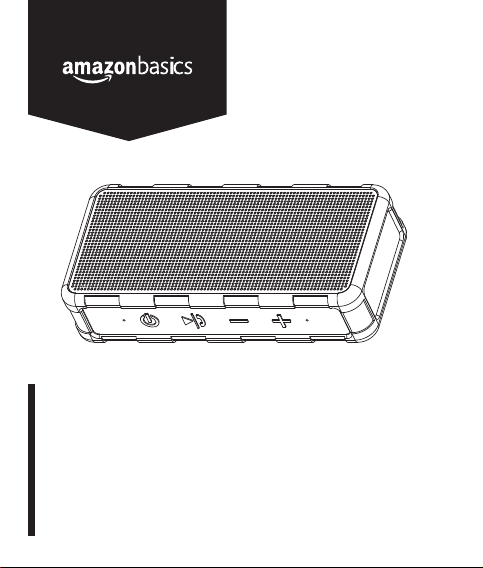
Portable Outdoor IPX5 Waterproof Bluetooth Speaker
Enceinte Portative Bluetooth Étanche IPX5 pour l’Extérieur
Tragbarer, Wasserfester Outdoor-Bluetooth-Lautsprecher, IPX5
Altoparlante Bluetooth Impermeabile IPX5Portatile per Esterno
Altavoz Bluetooth Impermeable IPX5Portátil Para Exterior
Draagbare IPX5Waterdichte Bluetooth-Luidspreker voor Buiten
B081HCHC4Y, B081HD1ZR1, B081HD9TRN
Page 2

English . . . . . . . . . . . . . . . . . . . . . . . . . . 3
Français . . . . . . . . . . . . . . . . . . . . . . . . 16
Deutsch . . . . . . . . . . . . . . . . . . . . . . . . 28
Italiano . . . . . . . . . . . . . . . . . . . . . . . . . 40
Español . . . . . . . . . . . . . . . . . . . . . . . . 52
Nederlands . . . . . . . . . . . . . . . . . . . . . 64
Page 3
EN
IMPORTANT SAFETY INSTRUCTIONS
Read these instructions carefully and retain them for future
use. If this product is passed to a third party, then these
instructions must be included.
When using electrical appliances, basic safety precautions should
always be followed to reduce the risk of fire, electric shock, and/or
injury to persons including the following:
• Read these instructions.
• Keep these instructions.
• Heed all instructions.
• To avoid accidental falls into pools, bathtubs or other water
containers, do not place it at the edge.
• Do not install near any heat sources such as radiators, heat
registers, stoves, or other products (including amplifiers) that
produce heat.
• Refer all servicing to qualified service personnel.
• No naked flame sources, such as lighted candles, should be
placed on the product.
• This product is only suitable for use in moderate climates. Do not
use it in tropical or in particularly humid climates.
To prevent possible hearing damage, do not listen at
high volume levels for long periods.
3
Page 4

EN
Battery Warnings
WARNING
to excessive heat such as sunshine, fire or the like.
• The battery contained in this product is non-replaceable. Do not
throw the product into a fire. Before disposal, the battery must be
removed from the product. Contact qualified professional.
• Do not leave the battery charging for a prolonged period of time
when the product is not in use.
• Do not charge the battery overnight.
• If the product appears to be bulging or shows other undesirable
phenomena (e.g. excess noise), stop using the product
immediately.
• Do not cover the product while charging the battery. Charge the
product in a well-ventilated environment.
• Charge the product once every 3 months to avoid shortening its
battery life.
4
Risk of explosion! Batteries shall not be exposed
Page 5
EN
Symbols Explanation
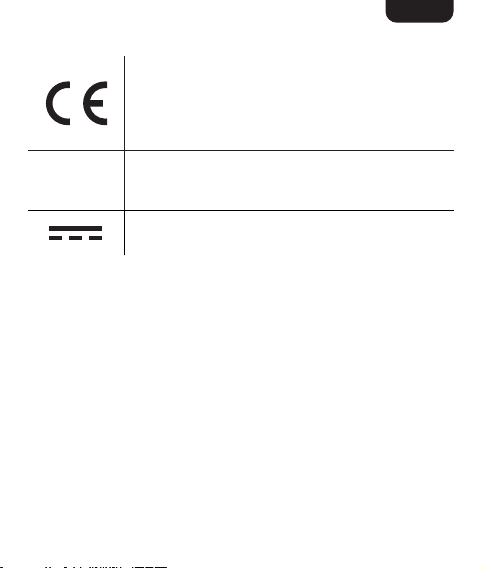
This symbol stands for “Conformité Européenne”,
which means “Conformity with EU-directives”. With
the CE-marking the manufacturer confirms that
this product complies with applicable European
directives and regulations.
This product is protected against water jets from
IPX5
any direction (when the lid of charging port is
closed). Do not immerse in water.
Direct current (DC)
Intended Use
• This product is intended for outdoor and household use only.
• No liability will be accepted for damages resulting from improper
use or non-compliance with these instructions.
5
Page 6
EN
Product Description
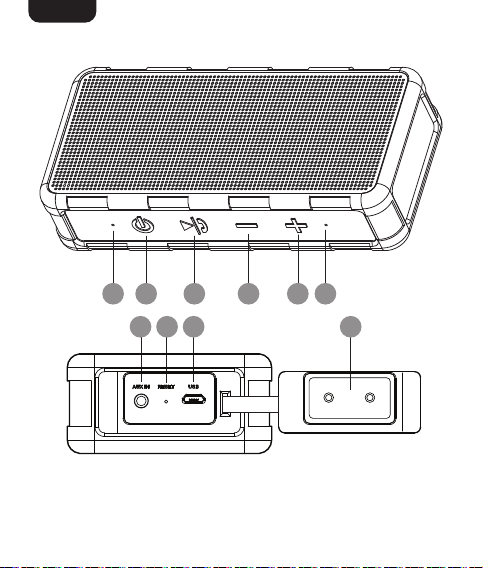
A B C D E F
G H I J
6
Page 7
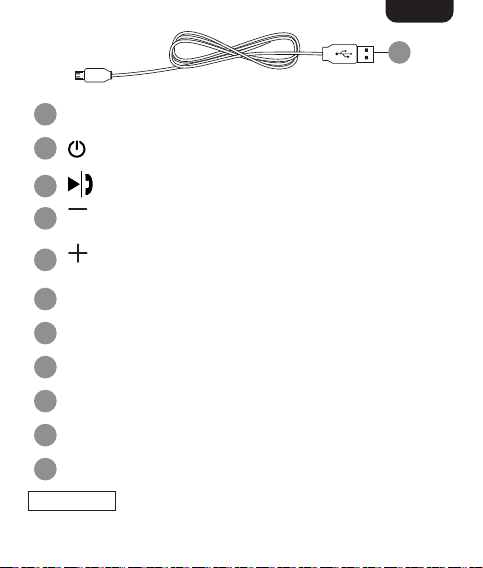
A Charging/pairing indicator
B
On/off
C
Press to play/pause the playback
Long press to return to the previous track. Short press to
D
decrease volume
Long press to skip to the next track. Short press to
E
increase volume
F Microphone
G AUX IN socket
H RESET switch
I USB socket
J Side flap
K USB cable
NOTICE
flap (J) is closed.
To keep the product splash-proof, make sure the side
EN
K
7
Page 8
EN
Before First Use
• Check the product for transport damages.
• Remove all the packing materials.
DANGER
away from children – these materials are a potential source of danger,
e.g. suffocation.
Risk of suffocation! Keep any packaging materials
Operation
Charging built-in battery
• Connect the USB cable (K) to the USB socket (I).
• Connect the other end of the USB cable (K) to a USB-A port on a
computer or a suitable power adaptor 5 V 1 A. The charging
indicator (A) stays lit when charging.
• The product is fully charged when the charging indicator (A) goes
off.
Switching on/off
Press and hold the button (B) for 2 seconds.
NOTICE
after 20 minutes of inactivity.
Pairing mode
NOTICE
the first time with a new Bluetooth® enabled device.
8
The product automatically switches off approximately
Bluetooth® pairing is required if the speaker is used for
Page 9
EN
Model number: Bluetooth® device name:
B081HCHC4Y
B081HD1ZR1
B081HD9TRN
• After switching on, the pairing indicator (A) flashes slowly
for approximately 10 seconds while the speaker scans for a
previously paired devices.
• To go straight to pairing new device, press and hold the button
(C) for 2 seconds.
• When the pairing indicator (A) flashes rapidly, the speaker is ready
for pairing.
• Activate Bluetooth® on the device you wish to pair and search for
a new device.
• When searching finishes, select “AmazonBasic WP522 from the
list on your device.
• Once the devices are paired, the pairing indicator (A) stays lit.
Disconnecting Bluetooth
• Press and hold down the button (C) to disconnect a
connected device.
• The product returns to pairing mode once disconnect from a
paired device.
Auxiliary input mode
• Connect an 3.5 mm audio cable (not included) to the AUX IN
socket (G) and to the desired playback device e.g. MP3 player.
AmazonBasics WP522
®
9
Page 10
EN
• The indicator (A) stays lit after AUX cable is connected.
Music playback
: Press to play/pause the playback.
: Long press to skip to the next track.
: Long press to return to the previous track.
Calling
: Press to accept/end call.
: Press and hold to reject call.
: Press and hold during a call to switch back to mobile device
speakers, and vice versa.
Volume control
NOTICE
startup.
: Short press to increase volume.
: Short press to decrease volume.
Factory reset
If the product is not functioning properly, press and hold the RESET
switch (H) with a pointed object (for example a paper clip) to reset to
original factory settings.
The volume resets tothe medium level after each
10
Page 11
EN
Cleaning and Maintenance
NOTICE
NOTICE
the product in water or other liquids. Never hold the product under
running water.
Cleaning
• To clean the product, wipe with a soft, slightly moist cloth.
• Never use corrosive detergents, wire brushes, abrasive scourers,
Storage
• Store the product in its original packaging in a dry area. Keep
Switch the product off before cleaning.
During cleaning do not immerse the electrical parts of
metal or sharp utensils to clean the product.
away from children and pets.
Trademarks
The Bluetooth® word mark and Logos are registered trademarks
owned by Bluetooth SIG, Inc. and any use of such marks by
AmazonBasics is under license. Other trademarks and trade names
are those of their respective owners.
Simplified EU Declaration of Conformity
• Hereby, Amazon EU Sarl declares that the radio equipment type
B081HCHC4Y, B081HD1ZR1, B081HD9TRN is in compliance
with Directive 2014/53/EU.
11
Page 12

EN
• The full text of the EU declaration of conformity is available at the
following internet address: https://www.amazon.co.uk/amazon_
private_brand_EU_compliance
FCC Compliance Statement
1. This device complies with Part 15 of the FCC rules. Operation is
subject to the following two conditions:
(1) this device may not cause harmful interference, and
(2) this device must accept any interference received, including
2. Changes or modifications not expressly approved by the party
FCC Interference Statement
This equipment has been tested and found to comply with the limits
for a Class B digital device, pursuant to part 15 of the FCC Rules.
These limits are designed to provide reasonable protection against
harmful interference in a residential installation. This equipment
generates, uses and can radiate radio frequency energy and, if not
installed and used in accordance with the instructions, may cause
harmful interference to radio communications. However, there is no
guarantee that interference will not occur in a particular installation. If
this equipment does cause harmful interference to radio or television
reception, which can be determined by turning the equipment off and
on, the user is encouraged to try to correct the interference by one or
more of the following measures:
12
interference that may cause undesired operation.
responsible for compliance could void the user’s authority to
operate the equipment.
Page 13

EN
• Reorient or relocate the receiving antenna.
• Increase the separation between the equipment and receiver.
• Connect the equipment into an outlet on a circuit different from
that to which the receiver is connected.
• Consult the dealer or an experienced radio / TV technician for
help.
Canada IC Notice
• This device contains licence-exempt transmitter(s)/receiver(s) that
comply with Innovation, Science and Economic Development
Canada’s licence-exempt RSS(s). Operation is subject to the
following two conditions:
(1) this device may not cause interference, and
(2) this device must accept any interference, including
interference that may cause undesired operation of the
• This equipment complies with FCC and Industry Canada radiation
• This Class B digital apparatus complies with Canadian
device.
exposure limits set forth for an uncontrolled environment.
CANICES-3(B) / NMB-3(B) standard.
13
Page 14
EN
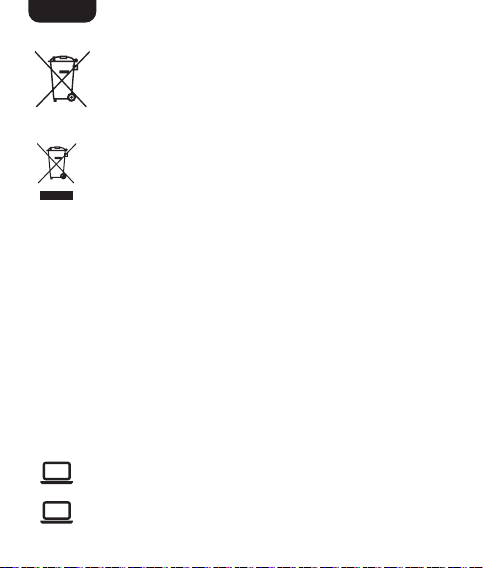
Battery Disposal
Do not dispose of used batteries with your household
waste. Take them to an appropriate disposal/collection site.
Disposal
The Waste Electrical and Electronic Equipment (WEEE) Directive
aims to minimise the impact of electrical and electronic goods
on the environment, by increasing re-use and recycling and by
this product or its packaging signifies that this product must be disposed
separately from ordinary household wastes at its end of life. Be aware that
this is your responsibility to dispose of electronic equipment at recycling
centers in order to conserve natural resources. Each country should have its
collection centers for electrical and electronic equipment recycling. For
information about your recycling drop off area, please contact your related
electrical and electronic equipment waste management authority, your local
city office, or your household waste disposal service.
reducing the amount of WEEE going to landfill. The symbol on
Feedback and Help
Love it? Hate it? Let us know with a customer review.AmazonBasics
is committed to delivering customer-driven products that live up to
your high standards. We encourage you to write a review sharing your
experiences with the product.
US: amazon.com/review/review‑your‑purchases#
UK: amazon.co.uk/review/review‑your‑purchases#
US: amazon.com/gp/help/customer/contact‑us
UK: amazon.co.uk/gp/help/customer/contact‑us
14
Page 15

Specifications
Input: 5 V 1A
Battery type:
Operation frequency: 2.402 GHz – 2.480 GHz
RF power: Max. 5 dbm
Charging time: 4 hours
Rated power output: 2 x 2.5 W
Driver size: 2 x 1.5"
Frequency response: 60 Hz – 20 kHz
Sensitivity: -5.3 dB
Impedance: 4 Ω
Bluetooth® version: 5.0
Operating distance (range): 32.8 foot (10 m)
IP Rating:
Net weight: approx. 0.66 lbs (0.3 kg)
Dimensions:
(W x H x D)
Lithium battery, 3.7 V,
1300 mAh
IPX5 (when the lid of charging port
is closed)
approx. 6.37 x 1.45 x 2.99"
(16.2 cm x 3.7 cm x 7.6 cm)
EN
15
Page 16
amazon.com/AmazonBasics
MADE IN CHINA
FABRIQUÉ EN CHINE
HERGESTELLT IN CHINA
PRODOTTO IN CINA
HECHO EN CHINA
GEMAAKT IN CHINA
FCC ID: HBOWP522B
IC: 1055A-WP522B
V01-04/20
 Loading...