

Page 1

!
!
AMBR
Amatis Border Router
Installation Manual
and
Energy Dashboard User Guide
!
!
Page 2
!
!
pg. 2
AMBR Installation Manual & User Guide v3.0
CUSTOMER SUPPORT
970-300-1344
TABLE OF CONTENTS
1.0 INTRODUCTION
1.1 BEFORE YOU START
1.2 NETWORK FIREWALL REQUIREMENTS
2.0 INSTALLING AMBR
2.1 TROUBLESHOOTING AMBR CONNECTIVITY
2.2 AMBR INDICATOR LIGHTS
3.0 ENERGY DASHBOARD
3.1 REGISTRATION AND SET UP
3.2 AMATIS DASH USER GUIDE
4.0 END USER LICENSE AGREEMENT
Page 3

!
!
pg.3
AMBR Installation Manual & User Guide v3.0
1.0 INTRODUCTION
Thank you for choosing Amatis Controls. This AMBR
Installation Manual will guide you through the process of
installing AMBR. Within an hour or so your system will be
reporting valuable energy data to the Amatis Energy
Dashboard, which you can access online. All components
must be installed correctly to ensure the overall accuracy of
this kit.
1.1 BEFORE YOU START
Before beginning your installation, make sure the installation
site has:
! High speed Internet connection (configured for DHCP)
(AMBR can also be configured to use a static IP address
Contact Amatis for assistance)
! Ethernet and electric outlets for AMBR (within 200ft of
meter)
1.2 NETWORK FIREWALL REQUIREMENTS
TCP 1195 outbound to vpn.amatiscontrols.com
UDP 1195 outbound to vpn.amatiscontrols.com
TCP 3306 outbound to vpn.amatiscontrols.com
TCP 80 outbound to checkip.dyndns.org
TCP 80 outbound to vpn.amatiscontrols.com
Page 4
!
!
pg. 4
AMBR Installation Manual & User Guide v3.0
2.0 INSTALLING AMBR
AMBR connects your Amatis system to the Internet. Follow the
steps below:
1. Connect one end of the blue Cat5/Ethernet wire to
the back of AMBR.
2. Connect the other end of the blue Cat5/Ethernet
wire to an available Ethernet port.
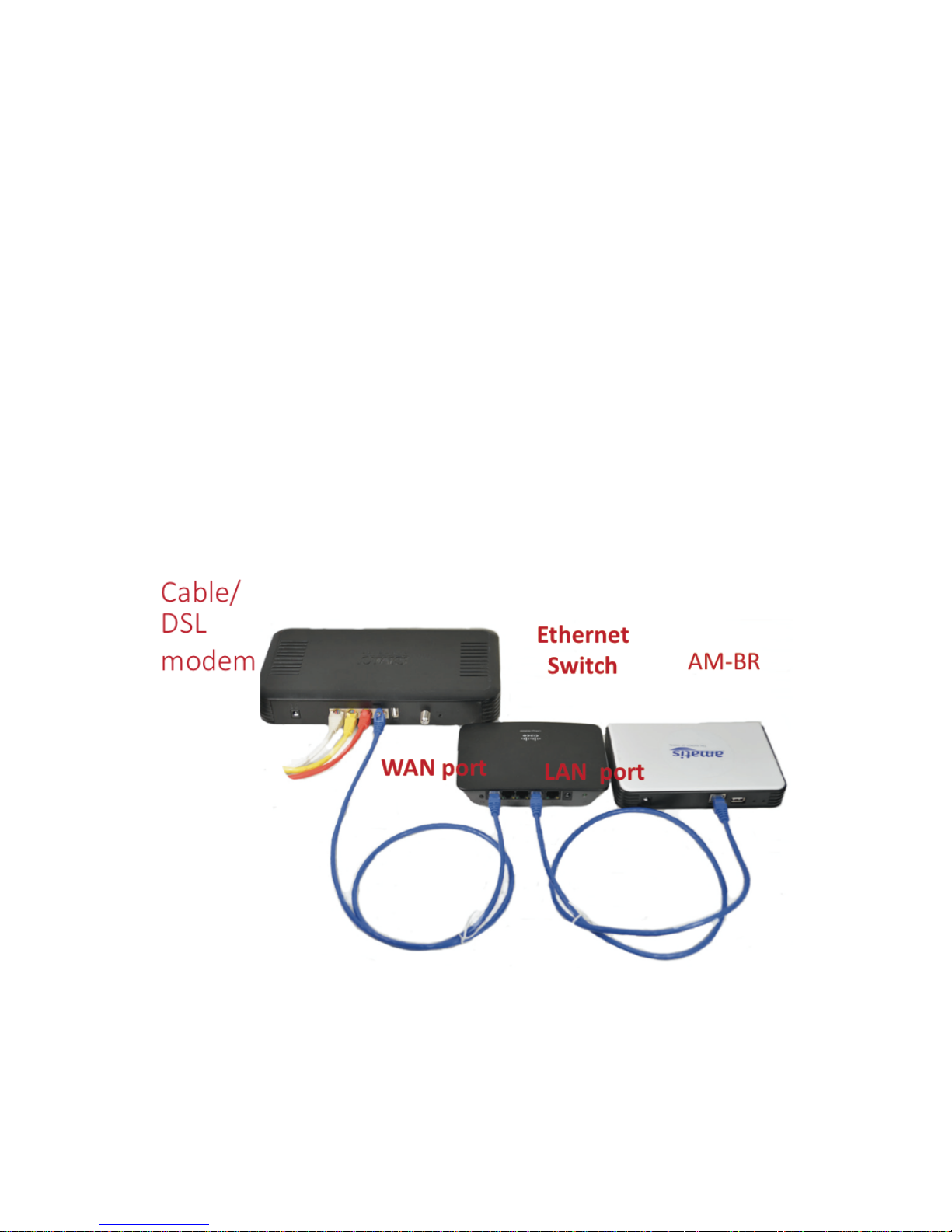
NOTE: Some cable & DSL modems have only one Ethernet
port. In order to connect AMBR you may need to add
another Ethernet port. Ethernet Switches are available to
add more Ethernet ports to the same Internet connection.
Page 5

!
!
pg.5
AMBR Installation Manual & User Guide v3.0
One option is illustrated below:
3. Plug the barrel end of the white 5V power supply
into the back of AMBR and the plug into the wall
socket.
4. Wait for 1-2 minutes while AMBR boots up and
connects to the Internet.
5. On the front of AMBR a blue blinking light confirms
AMBR has booted up correctly and is connected to
the Internet.
6. If AMBR does not show a blinking blue light after 5
minutes, you may be experiencing an Internet
connectivity problem. Follow the troubleshooting
steps in the next section.
2.1 TROUBLESHOOTING AMBR CONNECTIVITY
1. Restart your modem and AMBR.
a. Power both devices off
b. Power modem on
c. After modem reboots and shows Internet
activity
d. Plug AMBR back in
e. Verify AMBR shows blue blinking light
2. Confirm your modem is configured in DHCP mode
a. Follow modem owner’s manual directions
b. Contact your Internet service provider
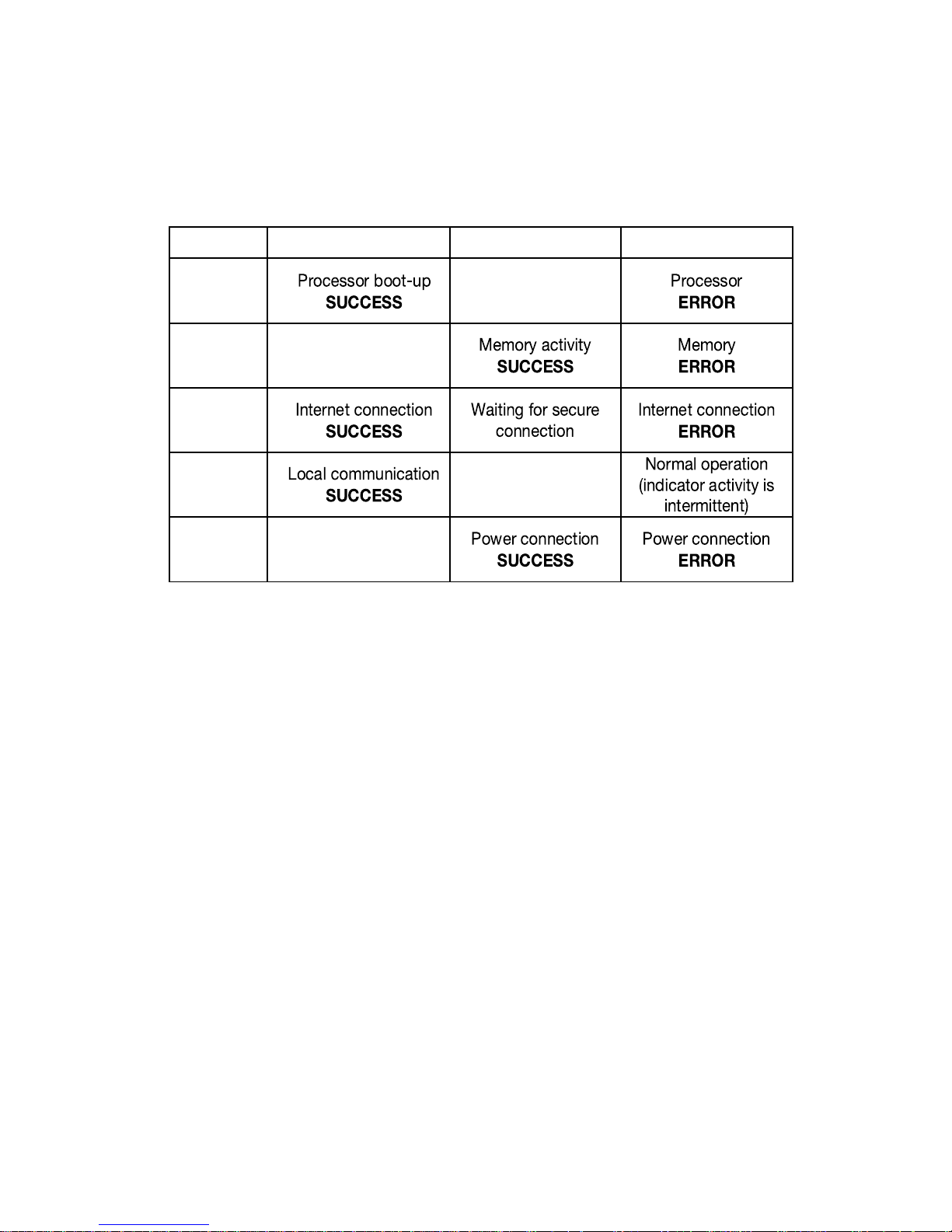
3. Identify which AMBR indicator lights are active.
NOTE: When AMBR is connected to power, all lights turn
on, then turn off, then turn back on one-by-one. Indicators
Page 6
!
!
pg. 6
AMBR Installation Manual & User Guide v3.0
can be diagnosed in the table below:
2.2 AMBR INDICATOR LIGHTS
LED
Flashing
Solid
Off
Green
Orange
Blue
White
Red
Page 7

!
!
pg.7
AMBR Installation Manual & User Guide v3.0
3.0 END USER SOFTWARE LICENSE AGREEMENT
1. USER NOTICE
Please read this End User Software
License Agreement (“License
Agreement”) carefully before using
your Amatis product. By installing and
registering an Amatis device you
hereby agree with the terms of this
License Agreement. If you do not
agree with the terms of this License
Agreement, do not use the Amatis
Product and Amatis Software.
2. TERMS
The terms of this License Agreement
are applicable to anyone who uses
Amatis Controls Software and
Firmware included in a product
purchased from Amatis and/or Amatis
partners. This license does not permit
the use of the Amatis Software in any
other product. Amatis Controls
reserves the right to take legal action
against anyone else using, selling or
distributing the software. By using the
Amatis Product and Amatis Software,
you agree to the terms of this License
Agreement.
3. LICENSE
Amatis Controls grants a single, nonsublicensable, non-exclusive, nontransferable license to use the Amatis
Software solely as part of products
obtained from Amatis and/or any
Amatis partner for which applicable
fees have been paid. Except for the
limited license rights expressly granted
in this License Agreement, Amatis
Controls reserves all rights in and to
the Amatis Software and any
modifications or copies thereto.
4. GENERAL RESTRICTIONS
In exchange for the license, you agree
not to: decompile, disassemble, or
reverse engineer the Amatis Software;
alter, modify or create any derivative
works based on the Amatis Software;
use, copy, sell, sublicense, lease, rent,
loan, assign, convey or otherwise
transfer the Amatis Software except as
expressly authorized in writing by
Amatis Controls; distribute, disclose,
or allow use of the Amatis Software, in
any format, through any timesharing
service, service bureau, network or by
any other means; allow any service
provider or other third party, with the
exception of Amatis Controls
authorized resellers, distributors, and
their designated employees who are
acting solely on behalf of and for the
benefit of the end user, to use or
execute any software commands that
cause the Amatis Software to perform
functions that facilitate the
maintenance or repair of any product.
TO THE MAXIMUM EXTENT
PERMITTED BY APPLICABLE LAW,
AMATIS CONTROLS PROVIDES THE
AMATIS SOFTWARE “AS IS” AND “AS
AVAILABLE” WITH ALL FAULTS AND
WITHOUT WARRANTY OF ANY KIND.
AMATIS CONTROLS HEREBY
DISCLAIMS WITH RESPECT TO THE
AMATIS SOFTWARE ALL
WARRANTIES AND CONDITIONS,
WHETHER EXPRESS, IMPLIED OR
STATUTORY, INCLUDING BUT NOT
LIMITED TO ANY (IF ANY)
WARRANTIES OR CONDITIONS OF
OR RELATED TO: NONINFRINGEMENT, MERCHANTABILITY,
FITNESS FOR A PARTICULAR
PURPOSE, LACK OF VIRUS,
ACCURACY, OR COMPLETENESS OF
RESPONSE.
Page 8

!
!
pg. 8
AMBR Installation Manual & User Guide v3.0
6. TERMINATION
If you breach the license limitations or
restrictions in this License Agreement,
Amatis Controls may, with immediate
effect, terminate the software licenses
granted in this License Agreement
without prejudice to any available
rights and remedies. Upon termination
or expiration of the license for any
reason, you shall immediately return
the Amatis Software and any copies to
Amatis Controls, or, at Amatis
Controls’ discretion, you shall
permanently destroy all copies of the
Amatis Software and any related
materials in your possession or
control. Inadvertent copies of the
Amatis Software and any related
materials remaining in the possession
of the End User subsequent to
termination or expiration shall not be
implied or construed as Amatis
Controls consenting to transfer
ownership of the software and any
related materials to the End User.
7. LIMITATION OF LIABILITY
TO THE EXTENT NOT PROHIBITED
BY APPLICABLE LAW, IN NO EVENT
SHALL AMATIS CONTROLS BE
LIABLE FOR ANY CONSEQUENTIAL,
INDIRECT, SPECIAL, EXEMPLARY,
OR PUNITIVE DAMAGES
WHATSOEVER (INCLUDING BUT NOT
LIMITED TO DAMAGES FOR: LOSS
OF PROFITS, LOSS OF
CONFIDENTIAL OR OTHER
INFORMATION, BUSINESS
INTERRUPTION) ARISING OUT OF OR
IN ANY WAY RELATED TO THE USE
OF OR INABILITY TO USE THE
AMATIS SOFTWARE, EVEN IF
AMATIS CONTROLS HAS BEEN
ADVISED OF THE POSSIBILITY OF
SUCH DAMAGES.
8. COMPLIANCE
Amatis Controls will have the right to
inspect your compliance with these
License Agreement terms.
9. GOVERNMENT END USERS
The Amatis Software is classified as
“commercial computer software” and
the Documentation is classified as
“commercial software documentation”
or “commercial items.” Any use,
modification, reproduction, release,
performance, display or disclosure of
the Amatis Software or Documentation
shall be governed solely by the terms
of this License Agreement and shall be
prohibited except to the extent
expressly permitted.
10. APPLICABLE LAWS
This License Agreement will be
governed by and construed in
accordance with the laws of the United
States. Severability in the event that
any part or parts of this agreement
shall be held illegal or null and void by
any court or administrative body of
competent jurisdiction, such
determination shall not affect the
remaining parts of this agreement, and
they shall remain in full force and
effect as if such part or parts determined illegal or void had not been
included.
 Loading...