

Page 1
2 / 4-Port VGA Video Splitter
model AVS02 / AVS04
Quick Start Guide
qsg Q10013 / Q10014
Introduction
Thank you for choosing Aluratek® to serve your VGA Video Splitter needs. We hope
you are pleased with the Aluratek® product you purchased. In no time, you will able to
share or extend the distance of your VGA video to multiple monitors. In addition to
making sure only quality materials are used for manufacturing, Aluratek® is also
dedicated to provide the best customer satisfaction and support.
The goal of Aluratek is to embody "Simple Elegance" in every product it designs,
manufactures and sells.
The product focus of Aluratek is to bring simple yet elegant connectivity solutions to the
consumers to enhance their consumer electronics, communications and computing
experience. Each product is carefully designed with the consumer in mind. Each product
is solution-driven to address the need of the consumers and deliberately planned to
provide the ultimate user experience.
Read this guide thoroughly and follow the installation and operation procedures carefully
to prevent any damage to the unit and / or any of the devices it connects to.
Features & Requirements
Features:
•
Split an identical VGA signal to
• Amplify the VGA signal to transmit over distance of up to 210 ft - that is 8 times
farther than the support of a typical video card
• High signal bandwidth of 350MHz to support high quality video
• Daisy chainable to increase monitor support
• Supports VGA, SVGA, and Multi-Sync monitors
• Plug-n-Play, No driver needed
• Limited 5 Year Warranty
Requirements:
• Computers and monitors with HDB15 VGA connector
win
mac
mac
win
2 / 4 outputs
Package Contents
Your order has been carefully packaged and inspected. The following should be included in your package.
Please inspect the contents of the package to ensure that you have received all items and that nothing has
been damaged. If you discover a problem, please contact us immediately for assistance.
VGA Cable (6ft)
Quick Start Guide
Power Adapter 2 / 4-Port VGA Video Splitter
Warranty / Registration
Card
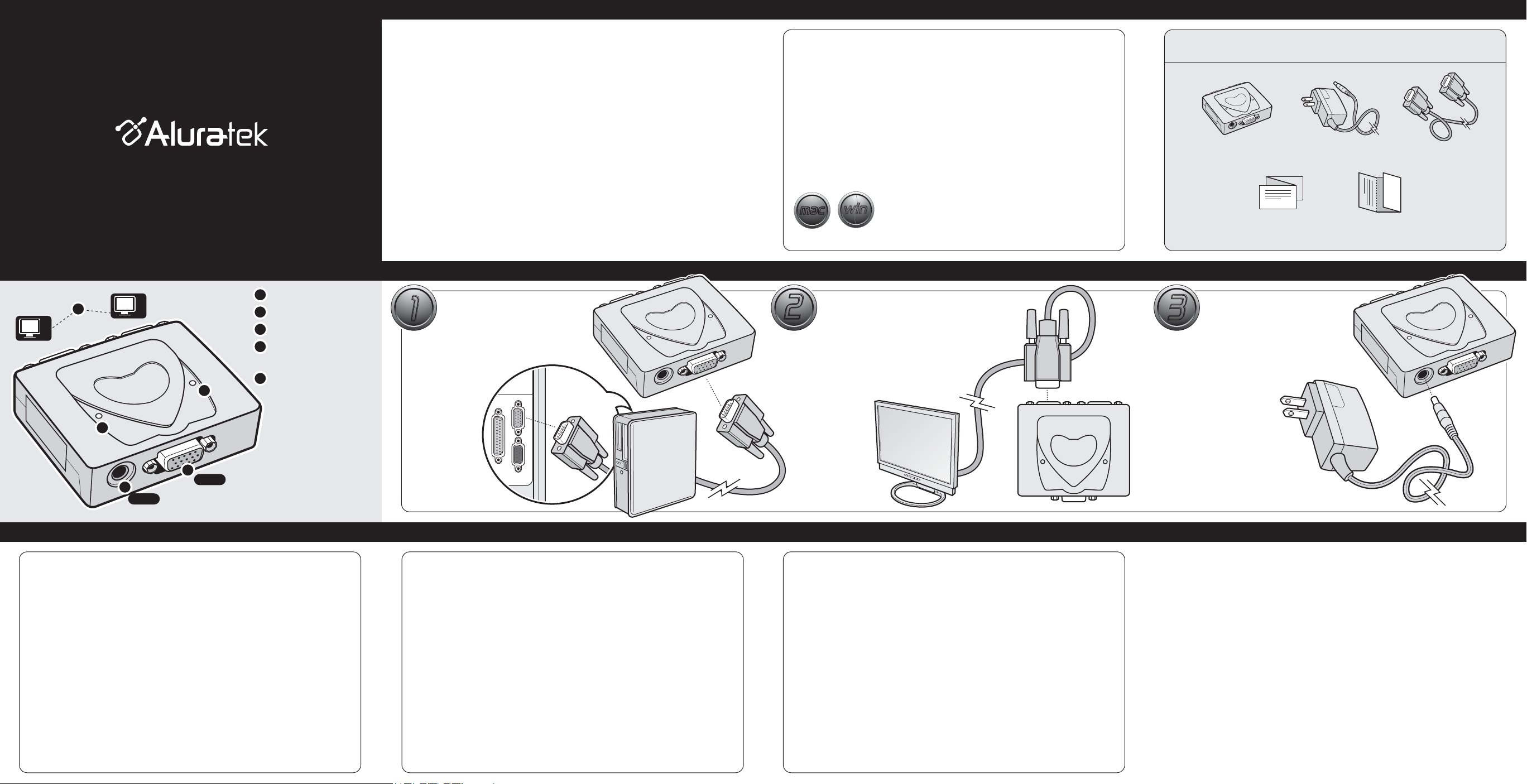
Video Splitter Highlights (2-port model shown)
1
Power Adapter Port
VGA IN Port
2
VGA OUT Ports 1 & 2
3
Power LED
4
Turns on when the Video Splitter
is powered by the power supply
5
Active LED
Turns on when there is an active
source at the VGA IN port
1
1
5
2
VGA IN
AC 9V
3
2
4
Technical Support Warranty
If you need further assistance, please contact the Aluratek support department
for troubleshooting prior to returning this device.
E-mail: [email protected]
Web: www.aluratek.com/support
Local (Irvine, CA): 949-419-6504
Toll free: 1-866-580-1978
Hardware Installation
STEP 1: CPU Connection -
1
1
Connect the VGA output from
your computer to the VGA IN port
of AVS02 / AVS04 with the VGA
cable included.
Radio and TV Interference Statement
WARNING!!! This equipment has been tested and found to comply with the limits
of a Class B digital device, pursuant to part 15 of the FCC rules. These limits are
designed to provide reasonable protection against harmful interference in a
residential installation.
This equipment generates, uses and can radiate radio frequency energy and, if
not installed and used in accordance with the instruction, may cause harmful
interference to radio communications. However, there is no guarantee that
interference will not occur in a particular installation. If this equipment does cause
harmful interference to radio or television reception, which can be determined by
turning the equipment off and on, the user is encouraged to try to correct the
interference by whatever measures may be required to correct the interference.
STEP 2: Video Connection -
2
2
Connect the VGA output of the video
splitter to the monitor.
Note: this cable is not included.
Cable usually comes with the monitor
Repeat step 2 for all monitors that
you would like to connect.
Aluratek warrants this product against defect in material or workmanship for 5 Years
from the date of purchase.
This warranty becomes invalid if the factory-supplied serial number or "warranty void" sticker
has been removed or altered on the product.
This warranty does not cover:
A) Cosmetic damage or damage due to acts of God
B) Accident, misuse, abuse, negligence or modification of any part of the product.
C) Damage due to improper operation or maintenance, connection to improper equipment,
or attempted repair by anyone other than Aluratek.
D) Products sold AS IS or WITH FAULTS.
IN NO EVENT SHALL ALURATEK'S LIABILITY EXCEED THE PRICE PAID FOR THE
PRODUCT FROM DIRECT, INDIRECT, SPECIAL, INCIDENTAL, OR CONSEQUENTIAL
DAMAGES RESULTING FROM THE USE OF THE PRODUCT, IT'S ACCOMPANYING
SOFTWARE, OR IT'S DOCUMENTATION.
Aluratek makes no warranty or representation, expressed, implied, or statutory, with respect
to it's products, contents or use of this documentation and all accompanying software, and
specifically disclaims it's quality, performance, merchantability, or fitness for any particular
purpose. Aluratek reserves the right to revise or update it's product, software or documentation
without obligation to notify any individual or entity.
3
3
STEP 3: Power Connection -
Connect the power supply to the
video splitter.
You are now ready to turn on your
computer and share your video.
 Loading...