

Page 1
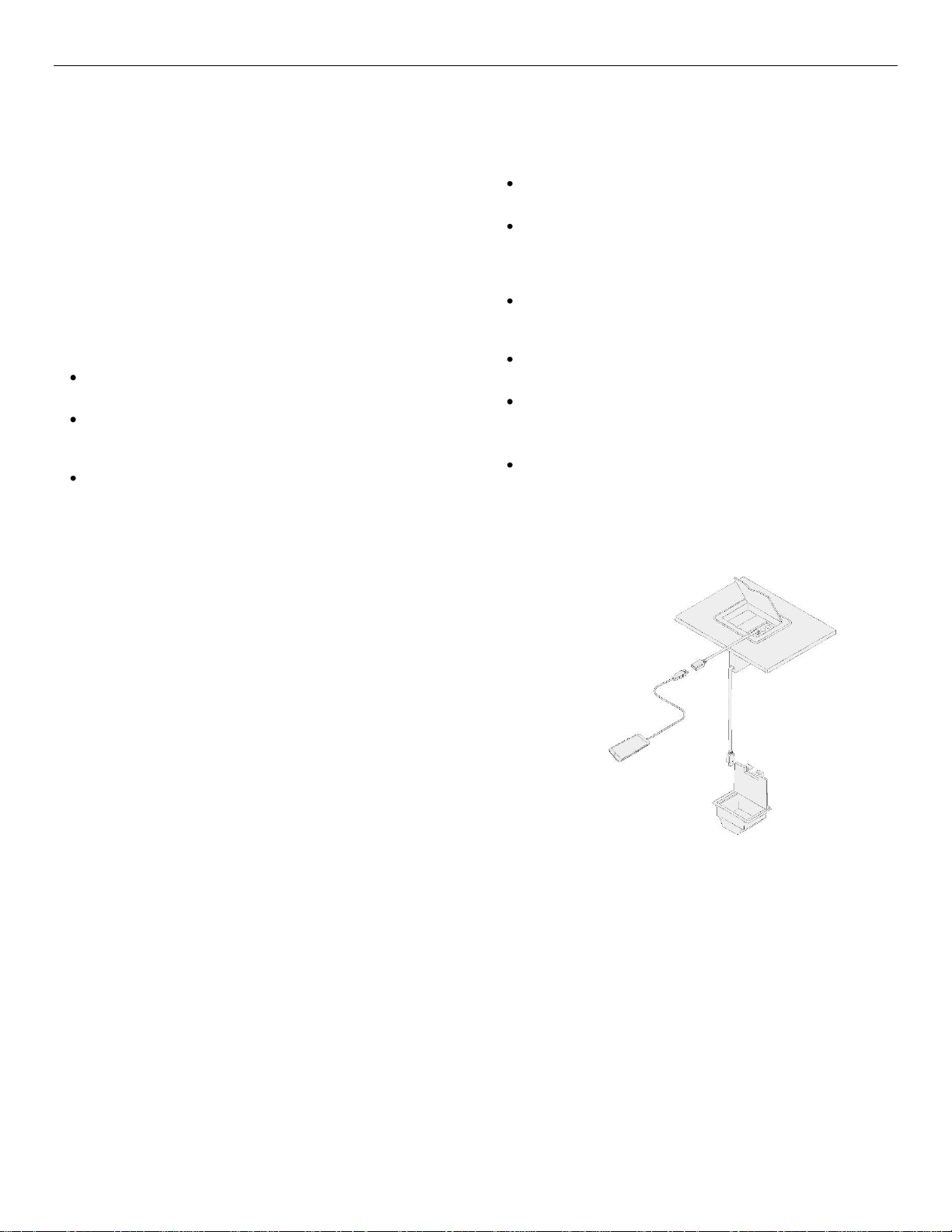
RT300-155 USB RETRACTABLE CABLE User’s Guide
Welcome!
Thank you for purchasing the MINI-ME™ RT300-155 USB cable
retractor. We know you will find it easy to install, easy to use and
easy to maintain.
Our goal is to provide our customers with unique Signal
Management Solutions® for Audio Visual applications.
1. Precautions and Safety Warnings
Please read this manual carefully before using MINI-ME RT300155 USB Cable Retractor. Keep this manual handy for future
reference. These safety instructions are to ensure the long life of
your cable retractor and to prevent fire and shock hazards.
1.1 General
The RT300-155 does not contain any user serviceable
parts inside.
Do not disassemble the unit. RT300-155 contains high-
tension spring that can uncoil rapidly causing cutting
hazard.
Only qualified Altinex service personnel is allowed to
perform cable retractor repairs. Removal of the warranty
sticker will void the warranty.
2. Installation Procedures
Step 1 Mount the RT300-155 onto the AC200-125 or AC221-125 mounting
bracket and secure it with the four 4x40 screws provided.
Step 2 Slide mounting bracket onto the CNK200 or CNK221 exterior hooks and
secure the thumbscrews with the wing nuts provided by the accessories.
Step 3 Feed retractable cable through the bottom of the CNK unit and the
faceplate.
Step 4 Connect the fixed cable to a display or a switcher
Step 5 Refer to CNK200 or CNK221 user guide for installation instructions.
3. Limited Warranty/Return Policies
Please visit Altinex website at www.altinex.com for details on warranty and return
policies. If you have any questions, please call us at 1-800-ALTINEX or 714-990-2300.
1.2 Installation
Use the RT300-155 USB cable retractor in a dry area away
from dust and moisture.
Do not place the RT300-155 USB cable retractor in direct
sunlight, near heaters or heat-radiating appliances, or near
any liquid. Exposure to direct sunlight, heat, and moisture
will damage internal precision components.
Handle the RT300-155 USB cable retractor with care.
Dropping, straining, or shaking can damage internal
components.
Do not place heavy objects on top of the RT300-155 USB
cable retractor.
Follow installation instructions RT300-155 for optimum
performance.
1.3 Cleaning
Clean surfaces with a dry or slightly damp cloth. Do not use
detergents or solvents.
Page 2
RT300-155 User’s Guide
2
Features/Description
Inputs
USB
USB 2.0
Outputs
USB
USB 2.0
Compatibility
Tabletop enclosures
CNK200 & CNK221
Stand-alone mounting
Mounting holes with
4x40 threads are
provided
Additional Accessories
Mounting Hardware
AC200-125 for
CNK200
AC221-125 for
CNK221
Mechanical
Dimensions
Height
4.8 in (122 mm)
Width
4.8 in (122 mm)
Depth
1.4 in (37 mm)
Other
Normal Pull force
0.3lb (+/- 0.1)
End of the cable pull
force
Max 10lb (+2lb)
(Damage may occur if
customer forces retract past
the end of cable)
Weight
0.78 lbs. (0.353 kg)
Color
Black
Material
Plastic
T Operating
10 C - 35 C
T Maximum
50 C
Humidity
90 non-condensing
MTBF (tested)
10,000 retractions
Electrical
RT300-155 USB
Retractable Cable
Cable Gauge
30AWG/26AWG 1
Pair/2 Conductors
Voltage Rating for Cable
30V
Power
none
Amplifier
none
4. Technical Specification
Specifications are subject to change. Please visit www.altinex.com for up-to-date specification
Table 3 RT300-155 Electrical Specifications
Table 1 RT300-155 General Specifications
Table 2 RT300-155 Mechanical Specifications
400-0591-001
Page 3
RT300-155 User’s Guide
3
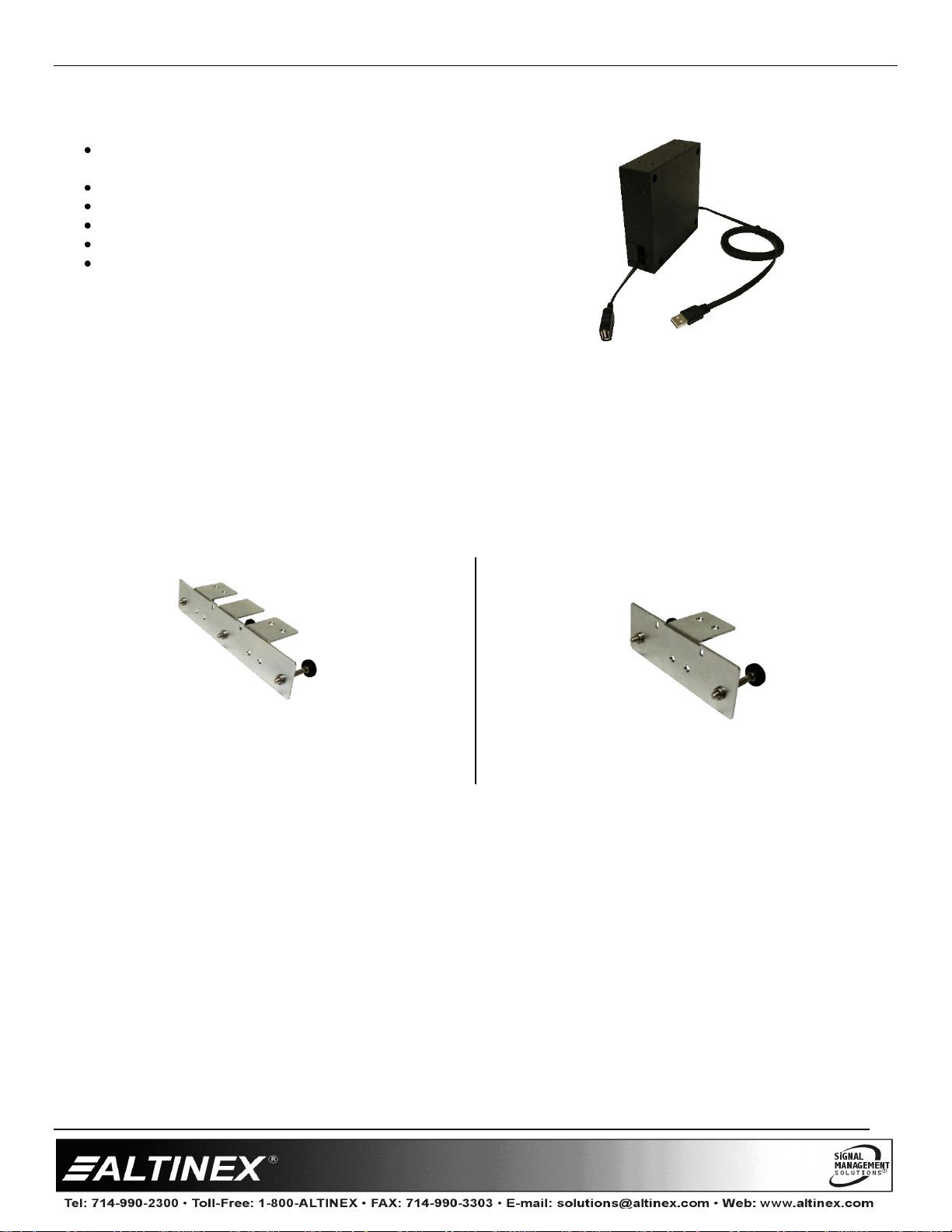
5. The MINI-ME RT300-155 USB Retractable Cable features
Convenient, easy to install cable retraction system for
CNK200, CNK221 interconnect box and stand alone
Simple operation for AV connectivity
USB 2.0 compliant cable
CNK200 supports four MINI-ME RT300-155 units
CNK221 supports two MINI-ME RT300-155 units
Tested to 10,000 retracts
The RT300-155 offers a solution for managing USB cables. The cable assembly was designed to provide optimum
performance . The RT300-155 has 4.0 ft of retractable cable and 4 ft of the fixed length cable. The cable and the retractor
has been tested to over 10,000 extensions/retractions. The AC200-125 and AC221-125 mounting hardware securely
mounts the cable retractors to CNK200 and CNK221 table top units.
AC200-125 mounting bracket for the CNK200
400-0591-001
AC221-125 mounting bracket for the CNK221
Page 4
RT300-155 User’s Guide
4
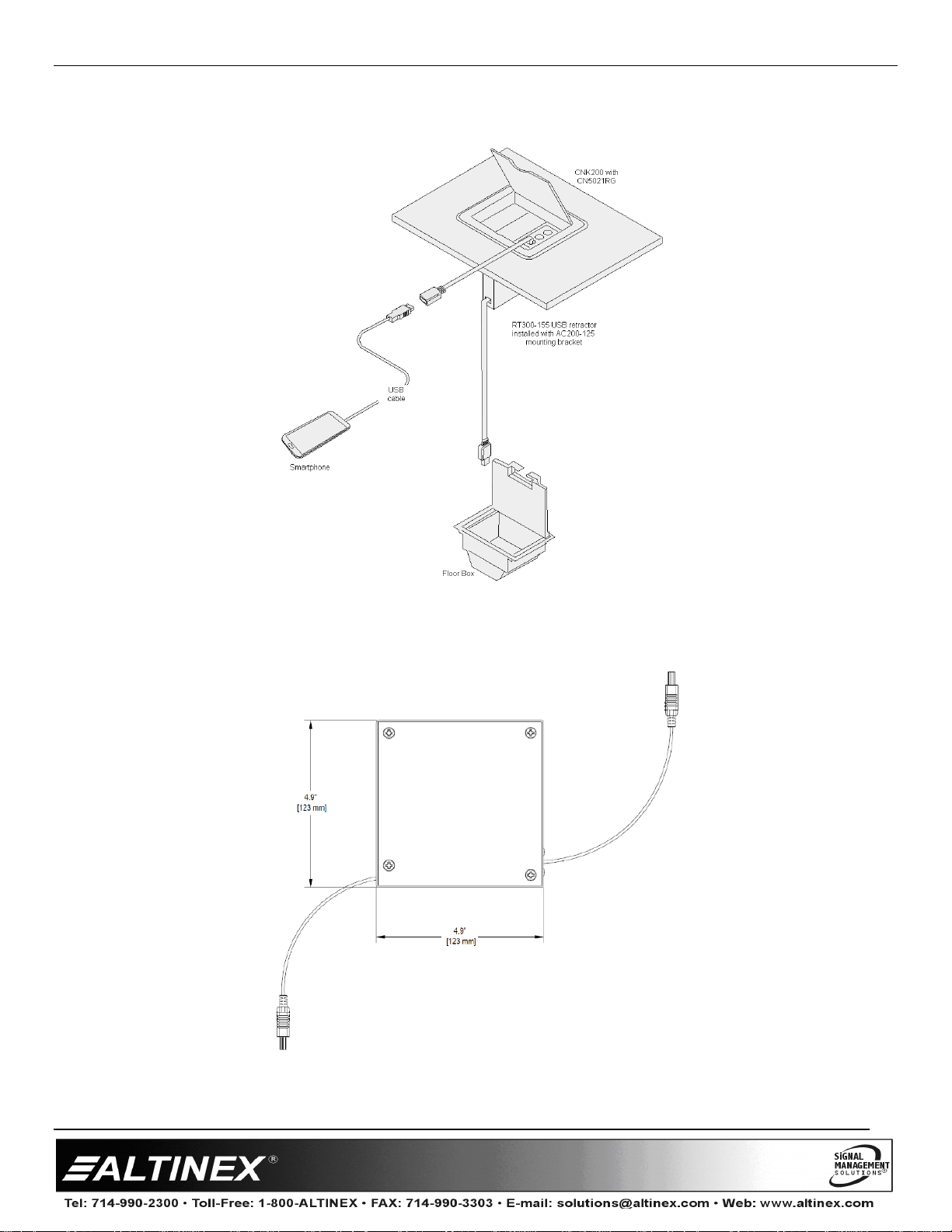
6. Application Diagram
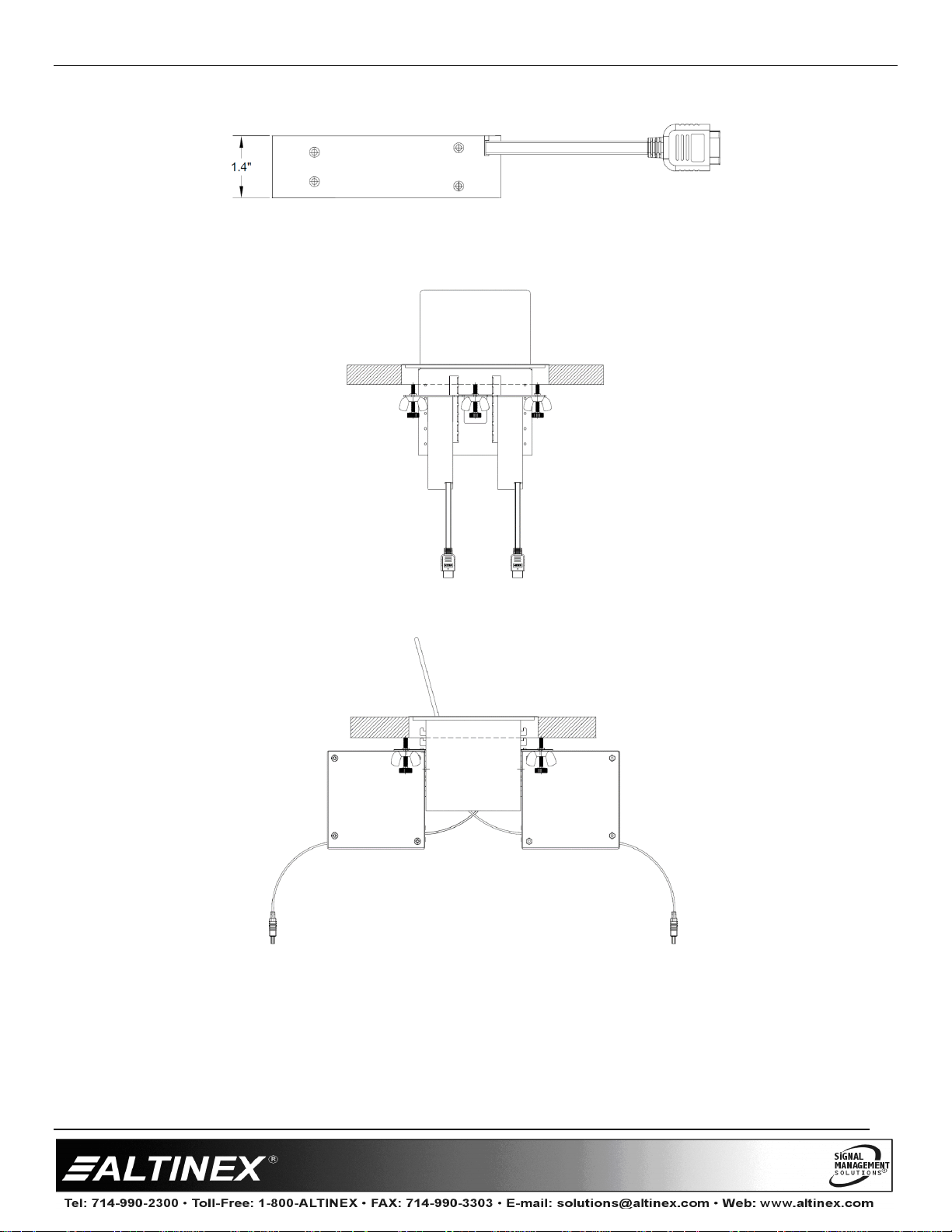
Diagram 1: Typical RT300-155 Installation and use
Diagram 2: Retractor Side Dimensions
400-0591-001
Page 5
RT300-155 User’s Guide
5
Diagram 3: Front Dimensions
Diagram 4: Mounted on a CNK200 Front View
Diagram 5: Mounted on a CNK200 Side View
400-0591-001
Page 6
RT300-155 User’s Guide
6
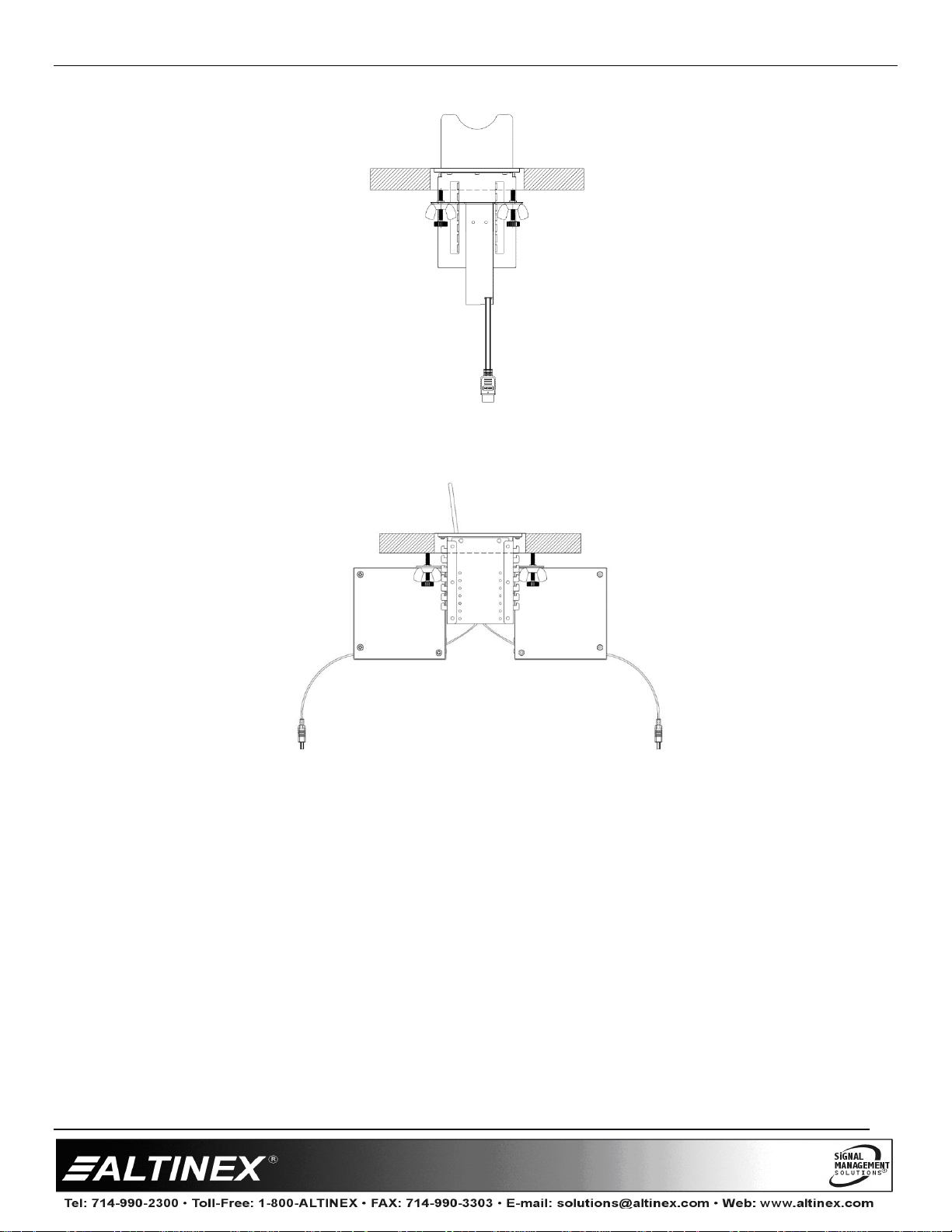
Diagram 6: Mounted on a CNK221 Front View
Diagram 7: Mounted on a CNK221 Side view
7. Operation
7.1 Accessing the RT300-155 USB Retractable Cable
After proper installation, no further configuration is
needed. To connect, simply open the CNK bezel and
pull on the cable. Connect to desired source. When
finished, disconnect the source and automatically the
cable will retract back into the bezel.
400-0591-001
8. Troubleshooting Guide
The RT300-155 USB Retractable Cable supplied was
carefully tested and no problems were detected.
However, we would like to offer the following
suggestions:
Please make sure that the highest quality cables are
used in addition to the retractable cable.
Make sure that no cable or power cord is damaged or
pinched. If there has been damage, do not use the
CNK200 or the retractable cable. Please call the Altinex
Customer Service Department at (714) 990-2300 to
have the unit repaired.
 Loading...