

Page 1
R
FOR CAR USE ONLY/NUR FÜR AUTOMOBILGEBRAUCH/POUR APPLICATION AUTOMOBILE
UNIQUEMENT/SOLO PARA USO EN AUTOMÓVILES/PER IL SOLO UTILIZZO IN AUTOMOBILE
CAN Interface for Mercedes Benz Vito (W447)
APF-X304MB
OK
+
Quick Reference Guide
Kurzreferenz
Guide de Référence Rapide
Guia de Referencia Rapida
Guida Rapida
Page 2

Page 3

Compatibility/ Kompatibilität/ Compatibilité/ Compatibilidad/ Compatibilità
EN
This interface can be used for the following
vehicles:
Vito (W447)
Note:
Some functions are only available when the
multifunctional display in the instrument
cluster was set to ‘Audio’ or ‘Navigation’.
If no navigation screen is available, navigation can be enabled by a Mercedes Benz
partner.
DE
Dieses Interface kann in den folgenden
Fahrzeugen verwendet werden:
Vito (W447)
Hinweis:
Einige Funktionen sind nur verfügbar, wenn
im Multifunktionsdisplay im Kombiinstrument ‘Audio’ oder ‘Navigation’ ausgewählt ist.
Wenn ‘Navigation’ nicht verfügbar ist, kann
diese durch einen Mercedes Benz Partner
aktiviert werden.
FR
Cette interface est compatible avec les
véhicules suivants:
Vito (W447)
ES
Esta interfaz se puede utilizar para los siguientes vehículos:
Vito (W447)
Nota:
Algunas funciones solo están disponibles
cuando en la pantalla multifunción en el
cuadro de instrumentos se selecciona el
modo ‘Audio’ o ‘Navegación’.
Si no hay un modo “Navegación” disponible,
un distribuidor Mercedes-Benz puede habilitar dicho modo en la pantalla multifunción
del cuadro de instrumentos.
IT
Questa interfaccia può essere utilizzata per i
seguenti veicoli:
Vito (W447)
Nota:
Alcune funzioni sono disponibili solo quando
il display multifunzionale nel quadro strumenti è impostato su “Audio” o “Navigazione”.
Se non è disponibile una schermata di navigazione, la navigazione può essere abilitata
da un ocina concessionaria Mercedes Benz.
Note:
Certaines fonctions ne sont disponibles que
lorsque l’achage multifonctions du tableaux de bord est réglé sur “Audio” ou “Navigation”. Si aucun écran de navigation n’est
disponible, la navigation peut être activée
par un partenaire Mercedes Benz.
Page 4
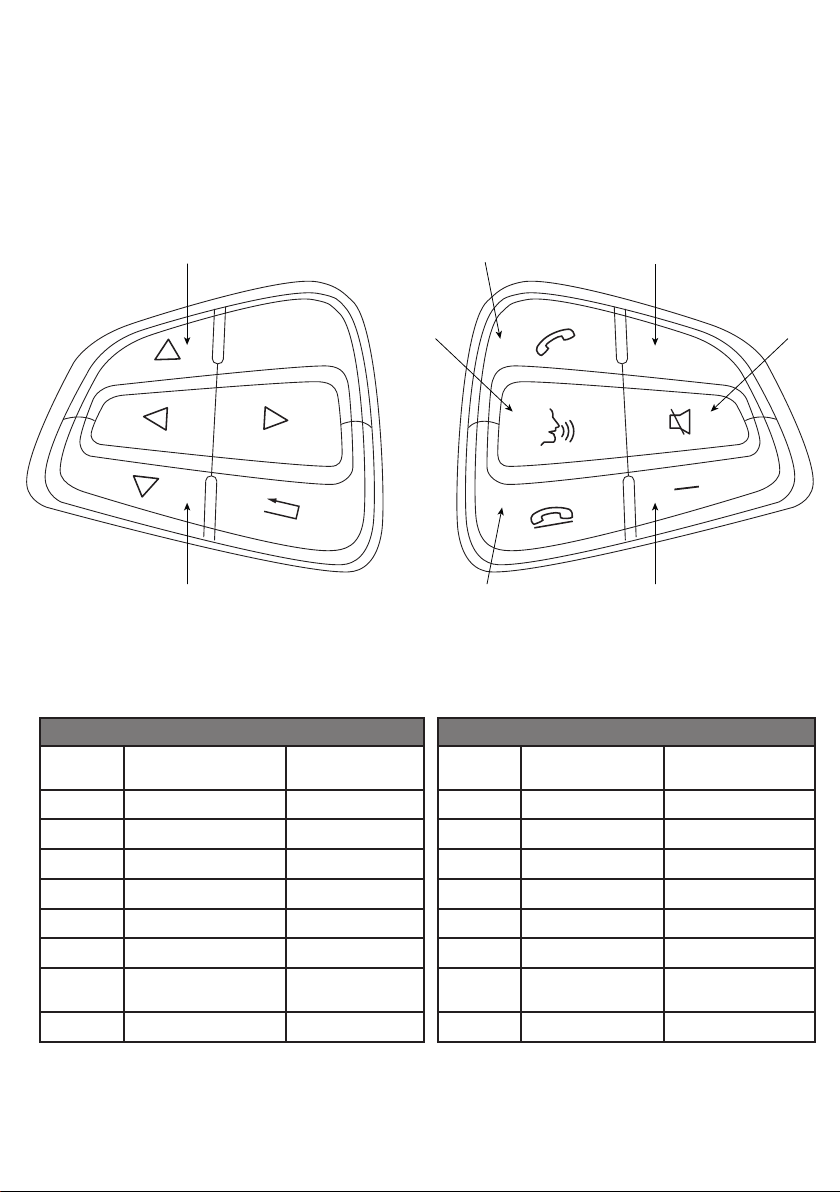
Steering Wheel Remote Control/ Lenkradfernbedienung/
Commandes au volant/ Control remoto del volante/ Comandi al volante
a
b
EN
Button Radio/ USB
a
b
c
d
e
f
g
h
Seek/ Skip Up -
Seek/ Skip Down -
Volume Up Volume Up
Volume Down Volume Down
- Reject/ End Call
Source Accept Call
Voice Command to
Phone
Mute -
OK
Incoming/ Active
Call*
-
f
c
g h
+
e
Taste Radio/ USB
a
b
c
d
e
f
g
h
Suche aufwärts -
Suche abwärts -
Lauter Lauter
Leiser Leiser
Quelle Abheben
Sprachbefehl an
Telefon
Stummschaltung -
d
DE
Eingehender/
Aktiver Anruf*
- Abweisen/ Auegen
-
Page 5
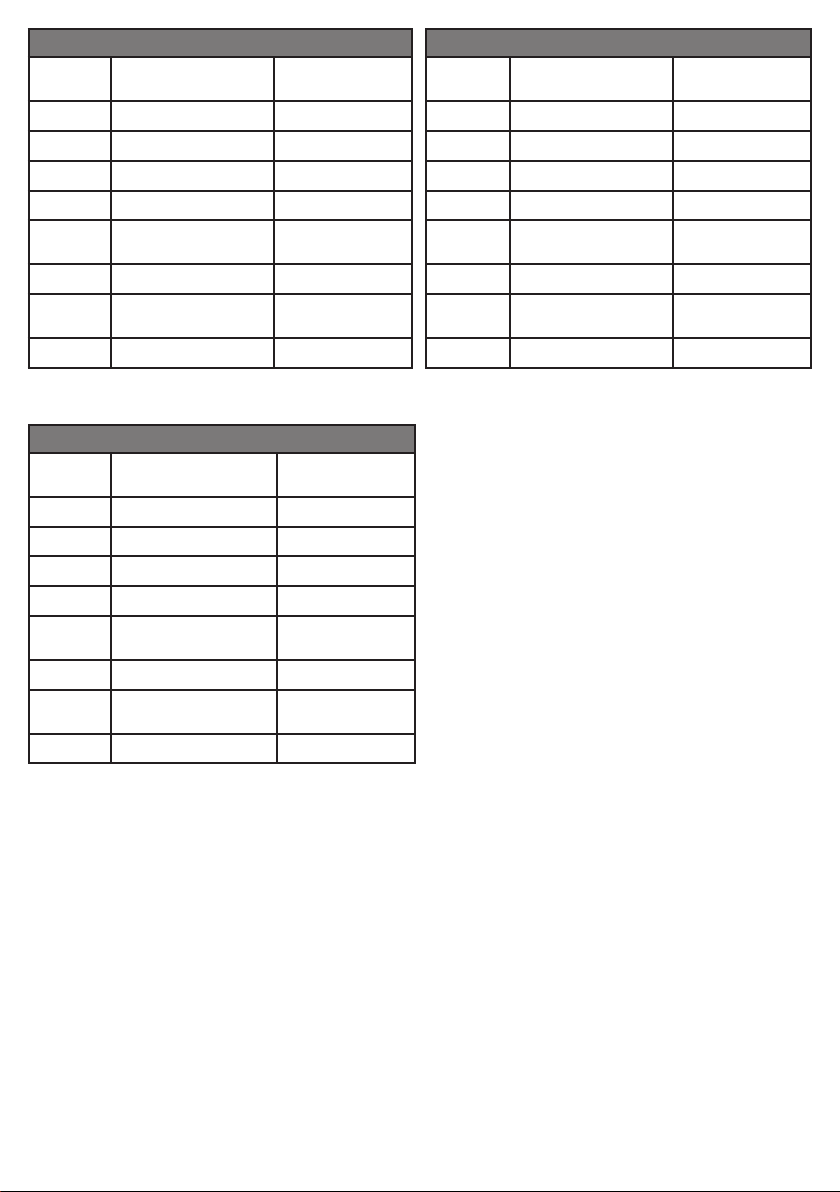
FR
Touche Radio/ USB
a
b
c
d
e
f
g
h
Pulsante Radio/ USB
a
b
c
d
e
f
g
h
Recherche avant -
Recherche arrière -
Volume + Volume +
Volume – Volume –
- Rejeter /
Source Décrocher
Commande vocale du
téléphone
Coupure du son -
IT
Ricerca giù -
Ricerca su -
Volume + Volume +
Volume – Volume –
- Riuto/
Sorgente Accettazione
Comando vocale a
telefono
Silenziamento -
Incoming/ Active
Call*
Raccrocher
-
Incoming/ Active
Call*
riaggancio
-
ES
Botón Radio/ USB
Búsqueda hacia arriba -
a
Búsqueda hacia abajo -
b
c
d
e
f
g
h
Volumen + Volumen +
Volumen – Volumen –
- Rechazar /
Fuente Descolgar
Comando de voz para
teléfono
Silenciador -
Llamada entran-
te / activa*
Colgar
-
*
EN: The behaviour of the phone buttons can deviate when using Apple CarPlay or Android Auto.
The functions can dier depending on the vehicle equipment.
DE: Die Funktion der Telefontasten kann bei Verwendung von Apple CarPlay oder Android Auto anders sein.
Die Funktionen können je nach Fahrzeugausstattung abweichen.
FR: Le comportement des boutons du téléphone peut varier lorsque vous utilisez Apple CarPlay ou Android Auto.
Les fonctions peuvent varier en fonction de l’équipement du véhicule.
ES: El comportamiento de los botones del teléfono puede desviarse cuando se usa Apple CarPlay o Android Auto.
Las funciones pueden variar dependiendo del equipo del vehículo.
IT: Il comportamento dei pulsanti del telefono può variare quando si utilizza Apple CarPlay o Android Auto.
Le funzioni possono variare a seconda dell’equipaggiamento del veicolo.
Page 6
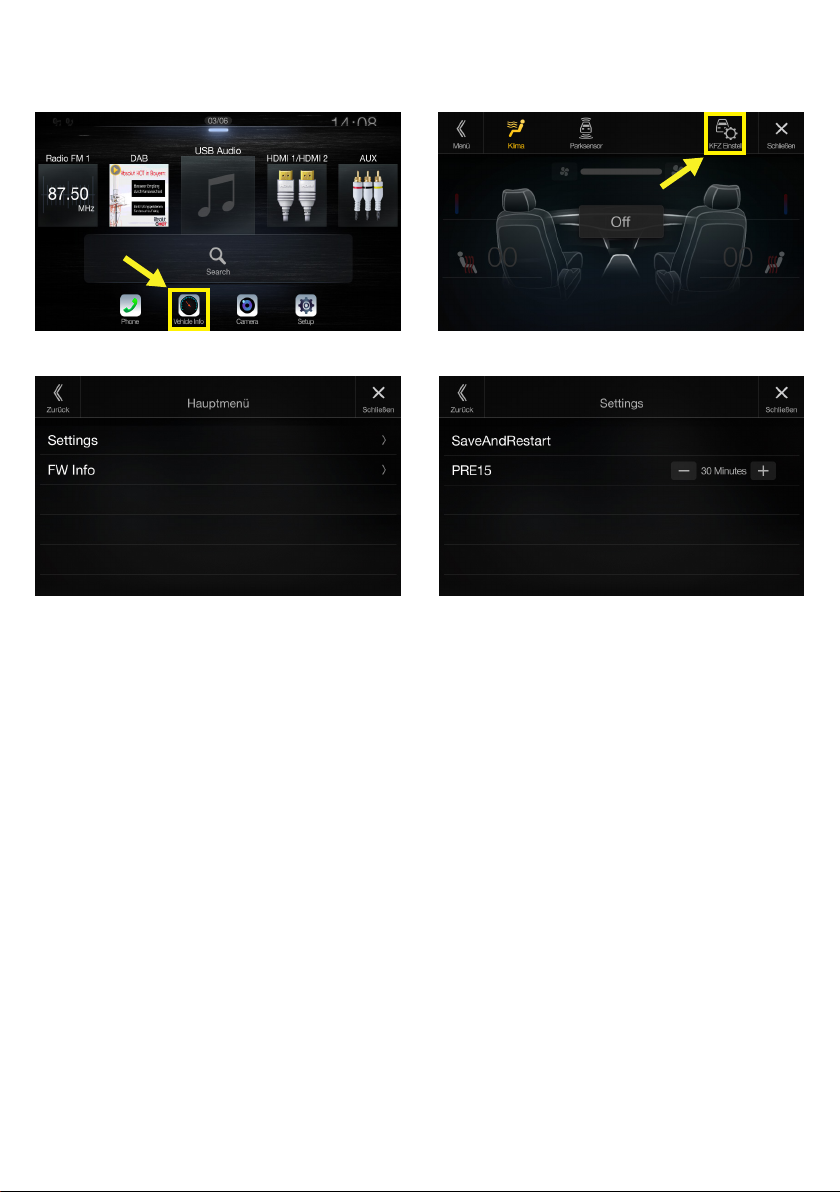
Interface Settings/ Interface Einstellungen/ Réglages
Interface/ Ajustes Interface/ Impostazioni dell’interfaccia
Page 7

EN
Pre 15
This feature allows to start the Alpine unit
when the doors of the car are unlocked. The
running time to automatic shutdown can be
set using the +/- buttons. Enter ‘0’ to disable
this feature.
Store the settings by selecting [Save and
Restart].
ES
Pre 15
Esta característica permite encender la
unidad Alpine cuando se desbloquean las
puertas del vehículo. Se puede establecer el
tiempo de funcionamiento hasta el apagado
automático usando los botones +/-. Introduzca ‘0’ para deshabilitar esta función.
Guarde la conguración seleccionando
[Save and Restart].
DE
Pre 15
Diese Einstellung erlaubt es dem Alpine
Gerät bereits bei Entriegeln des Fahrzeugs
zu starten. Die Laufzeit bis zum automatischen Abschalten kann mit den +/- Tasten
eingestellt werden. Wählen Sie ‘0’ um dieses
Feature zu deaktivieren.
Speichern Sie die Einstellung durch die Auswahl von [Save and Restart].
FR
Pre 15
Ce réglage est disponible dans votre station
Alpine, quand les portes du véhicule sont
déverrouiller. Le temps d’arrêt automatique
peu être réglé à laide des touches +/-. Entrez
‘0’ pour désactiver cette option.
Sauvegardez les réglages avec le bouton
[Save and Restart].
IT
Pre 15
Questa funzione consente di accendere
l’unità Alpine, quando le porte della vettura
vengono sbloccate. Il tempo di esecuzione
dello spegnimento automatico può essere
impostato utilizzando i pulsanti +/-. Inserire
‘0’ per disabilitare la funzione di autoaccensione.
Memorizza le impostazioni selezionando
[Save and Restart].
Page 8
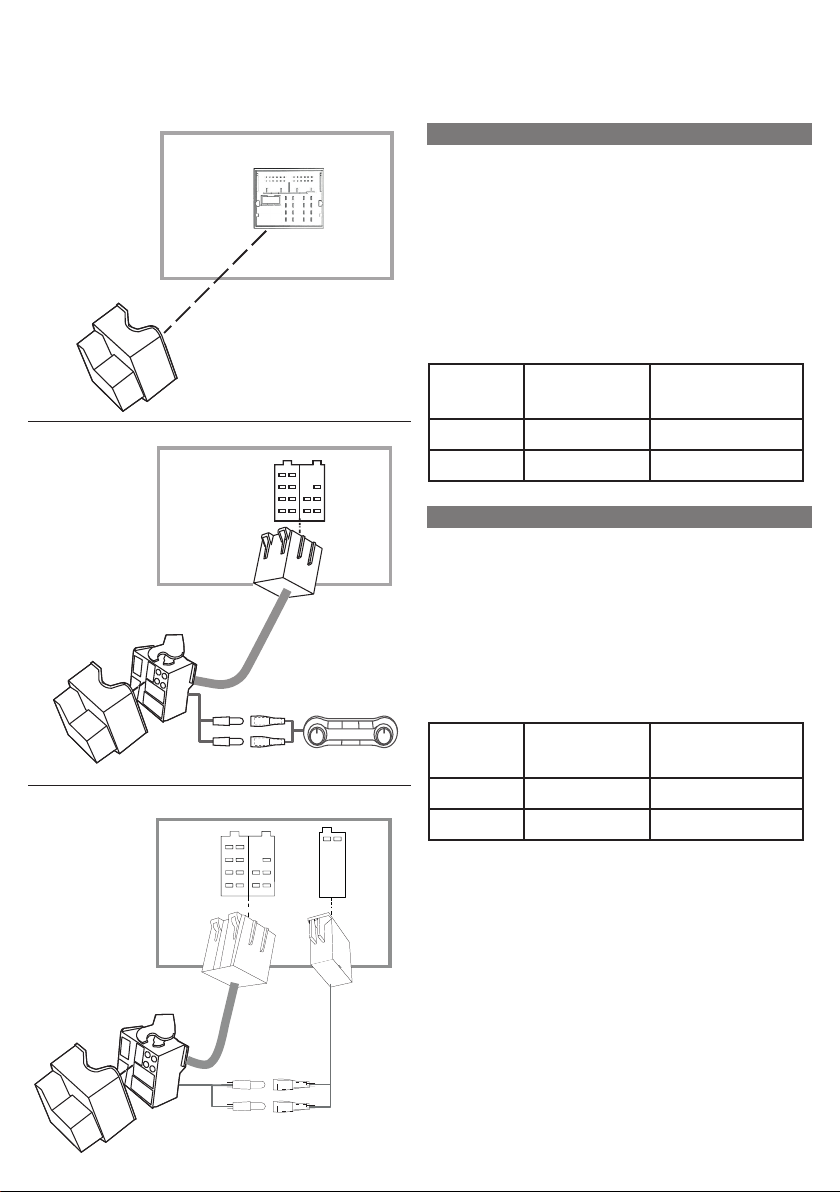
CAN Bus Connection/ CAN Bus Anschluss/ Connexion
CAN Bus/ Conexión del CAN bus/ Connessione bus CAN
CAN LOW
CAN HIGH
Radio Dock
Radio Dock
Climate Control
Radio Dock
EN
Depending on the equipment of the vehicle,
you may need to adapt to the vehicle harness
with the supplied Quadlock to ISO adapter.
If the vehicle has no Mini-ISO connector (this
is usually the case in cars with radio preparation), you need to get the CAN signal from
the air condition control panel or the CAN
distributor in the passenger footwell.
Signal Colour in
Vehicle
CAN High brown/ red white/ yellow
CAN Low brown white/ brown
Colour in Radio
Harness
DE
Abhängig von der Fahrzeugaustattung
benötigen Sie eventuell einen der mitgeliefen
Adapter Falls das Fahrzeug keinen Mini-ISO
Anschluss hat (Fahrzeuge mit Radiovorberitung), müssen Sie das CAN Signal an anderer
Stelle abgreifen, z.B. vom Klimabedienteil
oder vom CAN Verteiler im Beifahrerfußraum.
Signal Farbe im
Fahrzeug
CAN High braun/ rot weiss/ gelb
CAN Low braun weiss/ braun
Farbe im Radiokabelbaum
CAN LOW
CAN HIGH
Page 9

FR
Selon l’équipement du véhicule, vous devrez
peut-être vous adapter au faisceau du
véhicule avec l’adaptateur Quadlock vers ISO
fourni. Si le véhicule n’a pas de connecteur
Mini-ISO (c’est généralement le cas dans les
voitures équipées d’une préparation radio),
vous devez obtenir le signal CAN du panneau
de commande de climatisation ou du distributeur CAN dans le plancher du passager.
IT
A seconda dell’equipaggiamento del veicolo,
potrebbe essere necessario adattare le connessioni del veicolo con l’adattatore da Quadlock a ISO in dotazione. Se il veicolo non-dispone di connettore Mini-ISO (di solito nelle
auto con predisposizione radio), è necessario
connettere il segnale CAN dal pannello di
controllo dell’aria condizionata o dal distributore CAN nel vano piedi del passeggero.
Signal Couleur dans
le véhicule
CAN Haut marron/rouge blanc/ jaune
CAN Bas marron blanc/ marron
Couleur sur
l’interface de
l’autoradio
ES
Dependiendo del equipamiento del vehículo, es posible que deba adaptarse al arnés
del vehículo con el adaptador Quadlock a
ISO suministrado. Si el vehículo no tiene
conector Mini-ISO (este suele ser el caso en
automóviles con preparación de radio), debe
obtener la señal CAN desde el panel de control del aire acondicionado o del distribuidor
CAN en el espacio para los pies del pasajero.
Señal Color en el
vehículo
CAN High marrón/ rojo blanco / amarillo
CAN Low marrón blanco / marrón
Color en el arnés
de la radio
Segnale Colore nel
Veicolo
CAN High marrone/ rosso bianco/ giallo
CAN Low marrone bianco/ marrone
Colore del cablaggio radio
Page 10
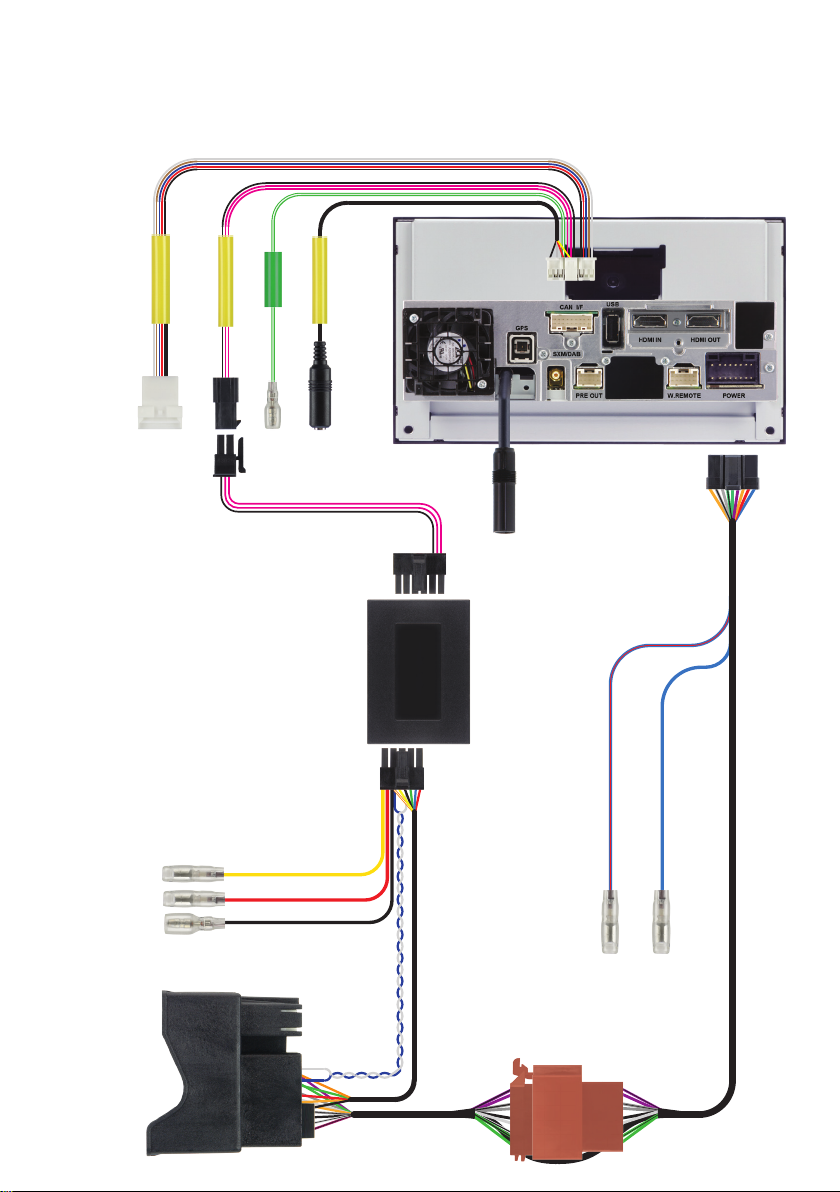
Connections/ Anschlüsse/ Raccordements/
Conexiones/ Collegamenti
APF-X304MB
CAMERA
SPEED
CAN BOX I/F
CAN I/F Harness
AUX INPUT
UART
Connector
CAN Interface
AVN Unit
Quadlock
BAT
ACC
GND
Camera Control
Antenna Power (12Volt)
Power Harness
Page 11

Page 12

R
Designed by Alpine Electronics (Europe) GmbH
Printed in Italy
ALPINE ELECTRONICS
MARKETING, INC.
1-7, Yukigaya-Otsukamachi, Ota-ku,
Tokyo 145-0067, JAPAN
Phone: 03-5499-4531
ALPINE ELECTRONICS OF
AMERICA, INC.
19145 Gramercy Place
Torrance, California 90501 U.S.A.
Phone: 1(310)326-8000
ALPINE ELECTRONICS OF
AUSTRALIA PTY. LTD.
161-165 Princes Highway, Hallam
Victoria 3803, Australia
Phone: 61 (3)8787-1200
ALPINE ELECTRONICS GmbH
Wilhelm-Wagenfeld-Strasse 1-3,
80807 Munich, Germany
Phone: 49(0)89-324264-0
ALPINE ELECTRONICS OF U.K. LTD.
Alpine House Earlplace Business Park,
Fletchamstead Highway,
Coventry CV4, 9TW, U.K.
Phone: 44-2476-719500
ALPINE ELECTRONICS FRANCE
S.A.R.L
184 allée des Erables
CS 52016 – Villepinte
95 945 Roissy CDG cedex, France
Phone: 33 1 48 63 89 89
ALPINE ITALIA S.p.A.
Viale C. Colombo 8,
20090 Trezzano Sul Naviglio (MI), Italy
Phone: 39 (02) 484781
ALPINE ELECTRONICS DE ESPAÑA,
S.A.
Portal de Gamarra 36, Pabellón 32
01013 Vitoria (Álava). APDO. 133, Spain
Phone: 34 (945) 283588
ALPINE ELECTRONICS OF ASIA
PACIFIC CO., LTD
555 Rasa Tower 1, Unit 2601-2602, 26th
oor
Phaholyothin Road, Chatuchak
Bangkok 10900, ailand
Phone: 662-937-0505
 Loading...