

Page 1
User's
Instructions
Alpha CD25C/28C/35C
Range of Wall Mounted, Fan Assisted, Room Sealed,
Gas Fired, High Efficiency Condensing Combination Boilers
For Technical help or for Service call ...
ALPHA HELPLINE Tel: 0870 3001964
website:www.alpha-innovation.co.uk
Nepicar House, London Road,
Wrotham Heath, Sevenoaks,
Kent TN15 7RS
British Gas
Service Listed
Alpha CD25C G.C. No. 47 532 31
0051
Leave these instructions with the User
Alpha CD28C G.C. No. 47 532 33
Alpha CD35C G.C. No. 47 532 35
For use with Natural Gas only
Page 2
1 DESCRIPTION
The Alpha CD range of high efficiency condensing combination boilers are wall mounted, fan assisted room-sealed boilers.
The CD25C, CD28C and CD35C are combination boilers providing both central heating and domestic hot water at mains pressure.
The CD25C boiler is suitable for central heating loads of between 5.5 and 19.5 kW (18 780 and 66 550 Btu/h).
The CD28C boiler is suitable for central heating loads of between 6.3 and 25.9 kw (21 500 and 88 400 Btu/h).
The CD35C boiler is suitable for central heating loads of between 7.8 and 30.3 kw (26 600 and 103 400 Btu/h).
The boilers will provide central heating (as required) during the 'on' times set on your clock (if fitted). Hot water is always
available from the boilers whenever a hot tap is opened and takes priority over the central heating.
The burner is lit electronically.
2 USER CONTROLS
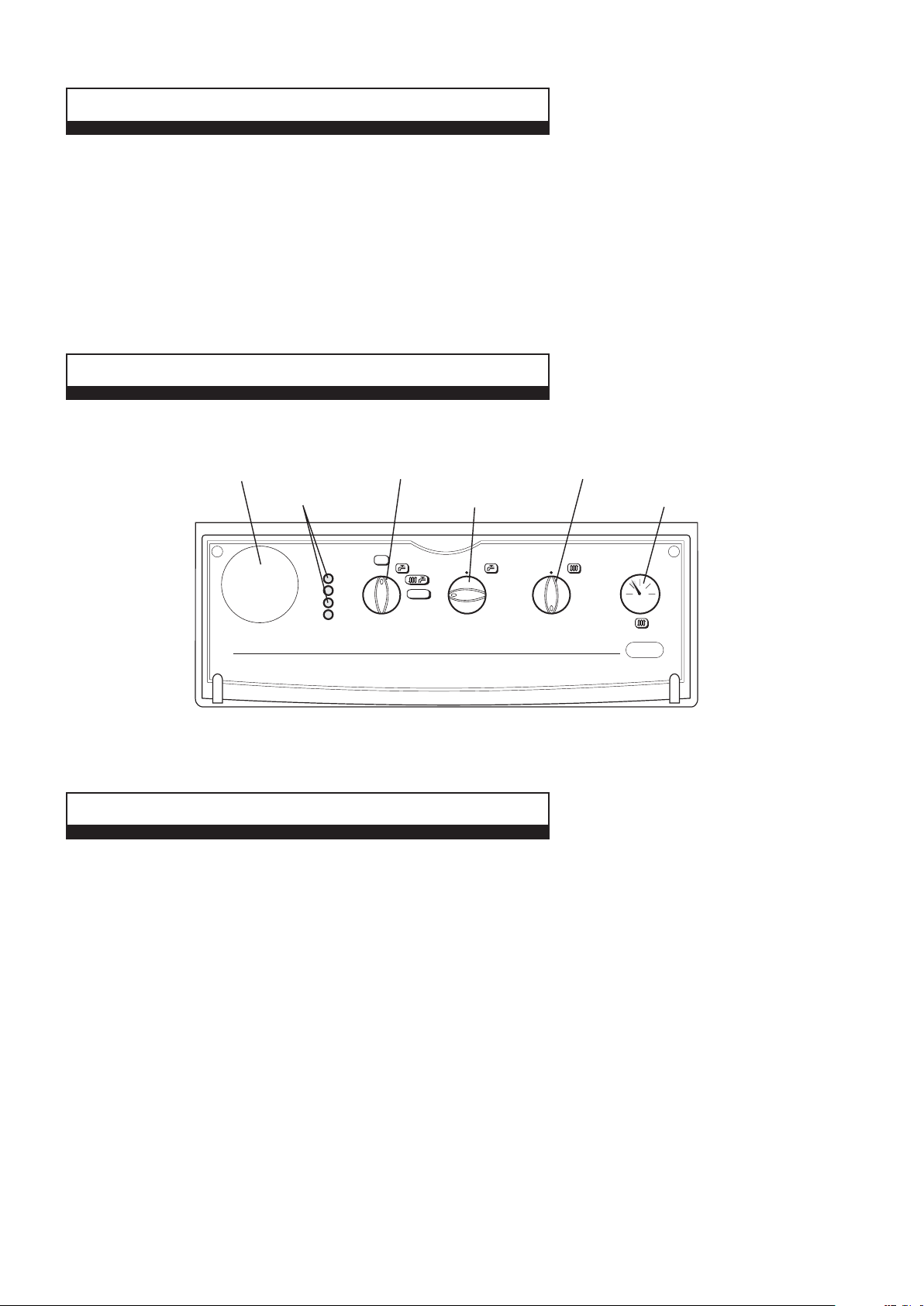
Pull the controls panel cover forward and down to gain access to the controls.
Clock (if fitted)
Indicator
Neons
Selector Switch
Domestic
Hot Water Thermostat
OFF
0
A
B
C
D
1
2
RESET
3
SELECTOR THERMOSTAT THERMOSTAT
1
2
3
9
4
8
5
7
6
Central
Heating Thermostat
1
2
3
9
4
8
5
7
6
System
Pressure Gauge
2
3
1
04
bar
Fig. 1
3 BOILER CONTROLS
1. CENTRAL HEATING THERMOSTAT
This thermostat controls the temperature of the water leaving the boiler for the heating system. For maximum efficiency from
the boiler the thermostat should be left at number 6 as shown in Fig. 1. If lower heating temperatures are required, turn the
thermostat ant-clockwise. If higher temperatures are required, turn the thermostat clockwise.
2. DOMESTIC HOT WATER THERMOSTAT
This thermostat controls the temperature of the domestic hot water leaving the boiler. For maximum hot water temperatures the
thermostat should be left at maximum i.e. fully clockwise. If lower temperatures are required, turn the thermostat anti-clockwise.
3. SELECTOR SWITCH
This control allows the boiler to provide central heating and hot water or hot water only.
Note: The internal clock and frost thermostat will not operate when the switch is in the vertical position, i.e. 'Off' position (0).
4. PRESSURE GAUGE
This indicates the central heating system pressure. It should always be within the green band when cold, increasing slightly
when hot.
If the pressure falls below the green band, i.e. lower red area, refer to the label on the inside of the hinged control panel cover
for guidance on re-pressurising the system. Or contact your Installer to have the system checked and pressurised.
Alpha CD25C/28C/35C
2
Page 3

5. INDICATOR NEONS
When neons A (red), B (red), C (yellow), D (green) are illuminated, the following conditions apply:-
Neon
D Illuminated continuously - Electricity supply to the boiler is on.
C Illuminated continuously - Burner is alight.
A Flashing on and off - Temperature sensor fault, contact your Service Engineer.
B Flashing on and off - Overheat thermostat has operated. Rotate selector switch to the reset position (3) to reset. If this continues
to happen, contact yor Service Engineer.
B Illuminated continuously - Burner has failed to light. Rotate selector switch to the reset position (3) and the ignition
sequence will restart after a delay of about 30 seconds.
A and B Flashing on and off at the same time - Blocked flue or fan fault, contact your Service Engineer.
A and B Flashing on and off alternatively - System pressure is very low and re-pressurisation is required.
A Flashing and B Illuminated continuously - Pump fault or restricted flow.
Note: Do not hold the selector switch in the reset position (3) for more than 2 or 3 seconds.
6. OVERHEAT THERMOSTAT
This thermostat automatically switches the boiler off in the unlikely event of the boiler overheating. When the thermostat operates,
the red neon (B) flashes on and off. Rotate the selector switch to the reset position (3) and the boiler will relight.
If this continually happens, contact your Service Engineer.
7. PRESSURE RELIEF VALVE
If the central heating system overheats and steam or water is discharged from the pipe connected to this valve, turn the boiler off
and contact your Service Engineer. Your Installer should have shown you where this pipe terminates, usually outside your dwelling.
8. FROST THERMOSTAT
The boiler has a built-in frost thermostat, which automatically operates the boiler if the water temperature falls below 8°C,
providing the electrical supply is on and the selector switch is set to position (1) or position (2).
4 LIGHTING INSTRUCTIONS
Refer to Fig. 1 for boiler controls.
1. Ensure the following:a. Electrical supply to the boiler is off.
b. All heating controls and thermostats are set to OFF or minimum position.
c. All isolation valves at the bottom of the boiler are in the open position (slot on the spindle in line with the valves i.e.
d. The gas and water supplies are on at the mains.
e. The heating system pressure is within the green band as shown by the pressure gauge.
2. Switch on the electrical supply to the boiler.
3. Set any room thermostats to maximum and ensure that any clock is in an 'on' position. Refer to section 8, if a clock is fitted
in the boiler control panel.
4. Set the selector switch to
5. Turn the hot water thermostat fully clockwise. Open a hot water tap, the main burner will light and the boiler will provide hot
water. Close the tap and the burner will go out.
6. Set the selector switch to position (2) and turn the heating thermostat fully clockwise. The main burner will light and the
boiler will provide central heating.
7. Set the boiler thermostats, clock, external controls i.e. room thermostat to your chosen settings and the boiler is ready to operate.
To turn the central heating off i.e. in Summer:- Set the selector switch to position (1).
To turn the boiler off for short periods:- Set the selector switch to position (1).
Note: In this position the pump will automatically operate for 5 minutes in every 24 hours. If the water temperature falls below
8°C the built-in frost thermostat will operate the boiler automatically until the temperature of the water in the heating system has
been raised.
To turn the boiler off for longer periods:- Switch off the electrical supply to the boiler. If required, all supplies i.e. gas, water
and electricity may be turned off at the mains. If there is any possibility of the boiler being left during frost conditions, then the
boiler and system should be drained and a label attached to the boiler drawing attention that the system has been drained. If
this is required, contact your Service Engineer.
(hot water only).
).
Alpha CD25C/28C/35C
3
Page 4

5 BOILER OPERATION
The operating sequence of the boiler is controlled by the selector switch on the control panel. With the switch set to (hot water
only) the boiler will only operate to provide domestic hot water, ideal for Summer use when central heating is not required.
Setting the selector switch to position (2) the boiler will operate to provide central heating and hot water.
If the boiler is operating to provide central heating and a hot water tap is opened, the boiler will automatically switch over to provide
hot water. Such an interruption in the central heating should not generally be noticed by any reduction in room temperature.
If a clock is fitted to the boiler, it will only control the operating times of the central heating. Hot water will always be available
when a tap is opened.
When the selector is set to central heating and hot water, it will respond to a demand for heat in the following sequence:-
a. The pump will start, the fan will operate and the main burner will light.
b. The output of the burner is automatically controlled to suit the system demand.
c. When the temperature of the system water in the boiler reaches that set by the thermostat or the room thermostat is
satisfied, the main burner is turned off and the fan stops after 50 seconds. The pump will continue to run for three minutes.
d. When a hot tap is opened, the boiler automatically senses a flow of water. The pump will start, the fan will operate and the
main burner will light.
e. The boiler will continue to supply hot water at the temperature set by the thermostat until the tap is closed.
6 HOT W ATER USE
The supply of hot water is almost instantaneous at the boiler, but the time taken to reach a tap and the temperature at which it leaves
the tap will depend on the rate at which the water is drawn off and the length of the pipe between the tap and the boiler.
Fully opening a hot tap may not always provide the maximum temperature as the flow rate may be too high, try closing it slightly until
the maximum temperature is achieved.
Depending on your mains water pressure, it may not be possible to operate several hot taps at the same time.
7 USING A SHOWER
Thermostatic or pressure equalising type - When using these types of shower set the boiler domestic hot water thermostat
to maximum. The shower should then maintain a relatively constant temperature.
Manual bath mixer type shower - When using this type of shower set the boiler domestic hot water thermostat to setting 7,
This should avoid excessive temperatures at the shower.
Note: If you get unacceptable temperature variations with this type of shower, then a thermostatic or pressure equalising type
should be used.
Alpha CD25C/28C/35C
4
Page 5

8 IMPORTANT NOTES
1. BOILER LOCATION
Always ensure the following clearances are available around the casing of the boiler:-
Top: 235 mm, Bottom: 250 mm, Each side: 5 mm, Front: 450 mm
Do not store any other articles in the cupboard containing the boiler and never place any clothing or combustible material on or near
the boiler or flue pipe.
2. FLUE TERMINAL
The terminal on the outside wall must not be allowed to be obstructed. If it is damaged, in any way, turn the boiler off and
contact your Service Engineer.
Note: The Alpha CD boilers are high efficiency condensing boilers and when operating vapour will be emitted from the terminal.
This is safe and quite normal.
3. MAINS FAILURE
In the event of an electrical supply failure the boiler will not operate. When the supply is restored, the boiler will return to normal
operation. Remember to reset the clock, if fitted, when the supply is restored.
If the mains water supply fails, there will be no hot water from the taps. The boiler will continue to provide central heating.
4. ADDITIONAL BATHROOM FITTINGS
Any equipment such as mixing valves, showers, bidets etc. must be designed to operate at mains water pressure. Contact your
plumbing merchant or installer for advice when considering purchasing such items.
5. CLEANING
Use only a damp cloth and mild detergent to clean the boiler outer casing. Do not use abrasive cleaners.
6. SERVICING
To maintain efficient and safe operation of your boiler, routine annual servicing is essential.
For advice on servicing contact:- The Alpha Helpline: 0870 3001964.
7. GAS LEAK
If a fault or gas leak is suspected, turn off the gas supply. Do not touch any electrical switches, do not smoke and extinguish all
naked flames. Contact your local Gas Region immediately.
8. ELECTRICAL SUPPLY
The boiler requires a 230/240 V ~ 50 Hz supply, fused at 3 A if a 13 A 3-pin plug is used or a 5 A fuse if any other type of plug is used.
To connect a plug:-
The colour of the wires in the mains lead of the boiler may not correspond with the coloured markings identifying the terminals
in your plug. In this case proceed as follows:-
The wire coloured green and yellow must be connected to the terminal in the plug that is marked with the letter E, or by the
earth symbol
The blue wire must be connected to the terminal which is marked with either the letter N or coloured black.
The brown wire must be connected to the terminal which is marked with the letter L or coloured red.
THE APPLIANCE MUST BE EARTHED.
, or coloured green or green and yellow.
Alpha CD25C/28C/35C
5
Page 6

d
)
Tappets pushed
9 GAS SAFETY REGULATIONS
Current Gas Safety (Installation and Use) Regulations:It is the law that all gas appliances are installed and serviced by a competent person, i.e. CORGI registered personnel. Failure
to install or service appliances correctly could lead to prosecution. It is in your interest and that of safety to ensure compliance
with the law. The manufacturer's instructions must not be taken in any way as over-riding statutory obligations.
The Benchmark Checklist must be fully completed by the installer on installation of the boiler. The Benchmark Checklist is
shown in Section 12 of the Installation and Servicing instructions. All CORGI registered installers carry a CORGI ID card and
have a registration number. Both should be recorded in the Checklist. You can check your installer is CORGI registered by
calling CORGI on 01256 372300.
10 CLOCK (if fitted)
The clock allows you to set the times at which the boiler will operate to provide central heating. It does not affect the supply of
domestic hot water, which is always available whatever the setting of the clock.
1. TO SET THE TIME
Turn the outer dial clockwise to set the clock hands to
the correct time.
(Ensure the time indicator corresponds with the correct
time on the 24hr dial as shown in Fig. 2,
e.g. 3.00pm = 15 not 3).
NOTE: Do not rotate the dial anti-clockwise
2. TO SET THE ON/OFF PERIODS
Select the ON times by pushing the tappets out.
Select the OFF times by pushing the tappets in.
Fig. 2 shows the clock set as follows:-
ON 3.00pm to 10.00pm (15 - 22)
OFF 10.00pm to 5.00am (22 - 5)
ON 5.00am to 8.00am (5 - 8)
OFF 8.00am to 3.00pm (8 - 15)
3. MANUAL SWITCH
The clock has a manual On/Off switch which operates as follows:-
Mid position Heating On/Off as set by the tappets
Position I (right) Heating On continuously
Position 0 (left) Heating Off continuously
to inside (off)
1
24
2
3
4
5
6
7
9
8
9
0
10
11
12
O
F
F
p
e
r
i
o
d
23
12
22
21
20
19
3
18
17
16
I
15
14
13
Tappets pushe
to outside (on
Time
indicator
Manual
On/Off switch
Fig. 2
Alpha CD25C/28C/35C
6
Page 7

11 F AULT FINDING FOR THE USER
If you experience a problem of no heating and, if applicable, no hot water, try to solve the problem by following the simple
checks below before calling out a service engineer.
Pull the controls panel cover forward and down to gain access to the controls.
Clock (if fitted)
Then turn selector to
This light should illuminate
If not - See C
If any of these lights are on or flashing,
rotate the selector switch to RESET (position 3)
See D
Turn selector to
(position 1)
OFF
0
A
B
C
D
1
2
RESET
3
9
8
SELECTOR THERMOSTAT THERMOSTAT
(position 2)
maximum
1
2
3
4
5
7
6
Open a hot tap fully and this light should illuminate
Turn to
1
2
3
9
4
8
5
7
6
If this light is not on
See B
If no hot water - See E
Is needle within or above
the green band ?
If not - See A
2
3
1
04
bar
- Refer to the label on the inside of the hinged cover for guidance on repressurising the
A
system. Or contact your installer. Or
- Check that the electrical supply to the boiler is on. If so
B
- Check that all controls are calling for heat, i.e. room thermostat, clock. If so
C
- Check that the gas supply is on. If the light continues to come on after resetting
D
- Contact the Alpha Helpline
E
Ring the
Alpha Helpline Service
Tel: 0870 3001964
You will be asked
the Serial No. of your
boiler when you ring.
The Serial No. of the
boiler is on the inside
of the hinged cover.
Alpha CD25C/28C/35C
7
Page 8

Alpha Therm Limited.
Nepicar House, London Road, Wrotham Heath,
Sevenoaks, Kent TN15 7RS
Tel: 0870 3001964
These instructions have been carefully prepared but we reserve the right to
alter the specification at any time in the interest of product improvement.
© Alpha Therm Limited 2008.
email: info@alphatherm.co.uk
website: www.alpha-innovation.co.uk
Manual compiled and designed by Publications 2000 - Tel: (01670) 356211 11/08/D232
Part No. 1.024379
 Loading...