

Page 1
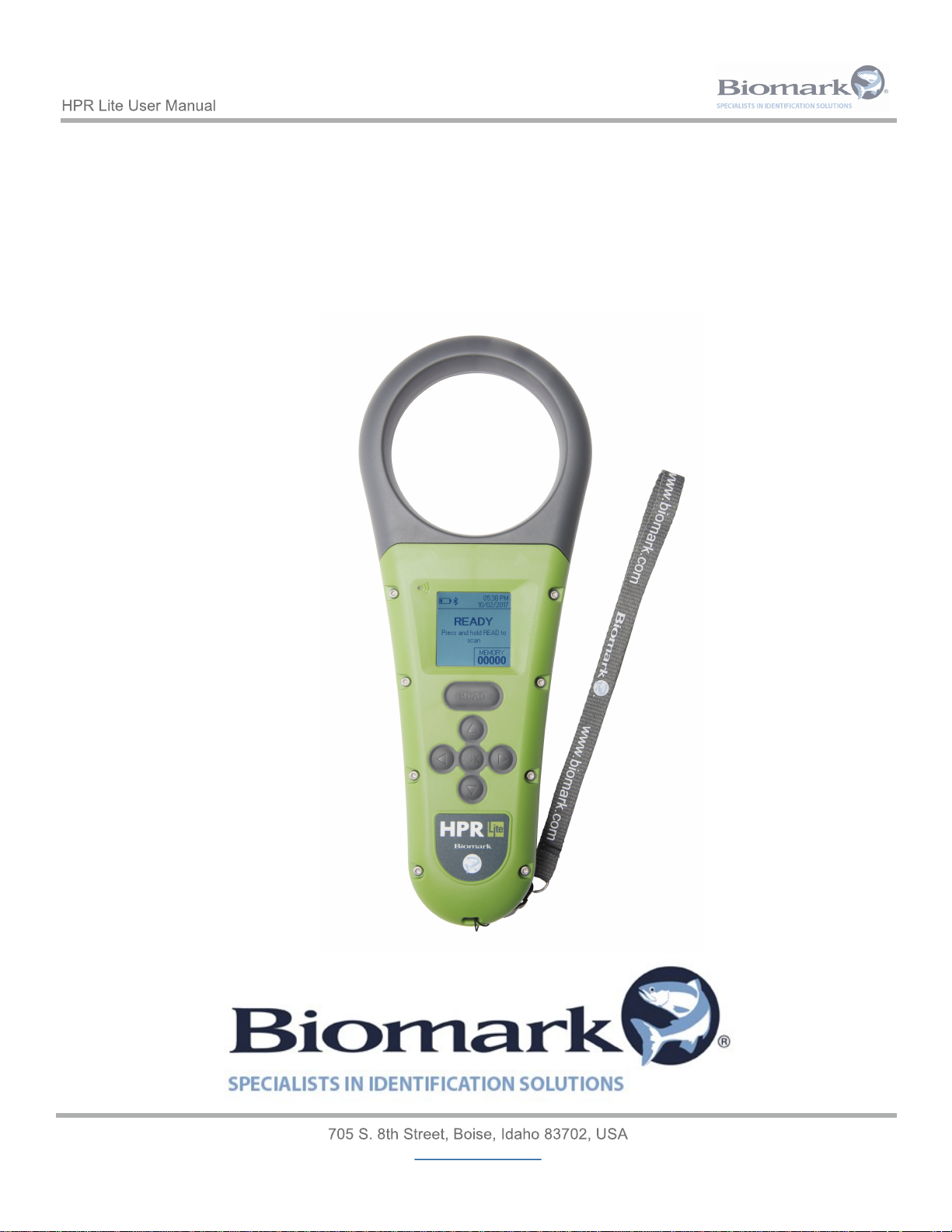
www.biomark.com
HPR Lite
User Manual
Revision 1
Page 2
www.biomark.com
Regulatory Information
USA-Federal Communications Commission (FCC)
This device complies with part 15 of FCC rules. Operation is subject to the following two conditions: (1) This device
may not cause interference, and (2) this device must accept any interference, including interference that may cause
undesired operation of the device.
This equipment has been tested and found to comply with the limits for a Class B digital device, pursuant to Part 15
of FCC Rules. These limits are designed to provide reasonable protection against harmful interference in a
residential installation. This equipment generates, uses, and can radiate radio frequency energy. If not installed and
used in accordance with the instructions, it may cause harmful interference to radio communications. However, there
is no guarantee that interference will not occur in a particular installation. If this equipment does cause harmful
interference to radio or television reception, which can be determined by tuning the equipment off and on, the user is
encouraged to try and correct the interference by one or more of the following measures:
• Reorient or relocate the receiving antenna.
• Increase the distance between the equipment and the receiver.
• Connect the equipment to outlet on a circuit different from that to which the receiver is connected.
Consult the dealer or an experienced radio/TV technician for help.
This portable equipment with it’s antenna complies with FCC’s radiation exposure limits set forth for an uncontrolled
environment. To maintain compliance, follow the instructions below:
(1) This transmitter must not be co-located or operating with any other antenna or transmitter;
(2) Avoid direct contact to the antenna, or keep contact to a minimum while using this equipment.
Notice to consumers:
Any changes or modifications not expressly approved by the party responsible for compliance could void the user’s
authority to operate the equipment.
Canada - Industry Canada (IC)
This device complies with Industry Canada’s license-exempt RSSs. Operation is subject to the following two
conditions:
(1) This device may not cause interference, and
(2) this device must accept any interference received, including interference that may cause undesired operation of
the device.
Notice to consumers:
Any changes or modifications not expressly approved by the party responsible for compliance could void the user’s
authority to operate the equipment.
Page 3
www.biomark.com
Regulatory Compliance
ISO 11784 & 11785
This device complies with the standards set forward by the International Standardization Organization.
Specifically, with standards:
11784: Radio frequency identification of animals -- Code Structure.
11785: Radio frequency identification of animals -- Technical Concept.
FCC NQY-30012
IC 4246A-30012
CE Marking
Miscellaneous Information
Snapshots are according to the latest version at the moment this document was released. Changes may
occur without notice.
Trademarks
Bluetooth® is a registered trademark of Bluetooth SIG, Inc.
Windows is a trademark or registered trademark of Microsoft Corporation in the United States and/or
other countries.
All other trademarks are trademarks of their respective owners.
Apple - Legal Notice
iPhone, iPad are a trademark of Apple Inc., registered in the U.S. and other countries.
“Made for iPhone,” and “Made for iPad” mean that an electronic accessory has been designed to connect
specifically to iPhone, or iPad, respectively, and has been certified by the developer to meet Apple
performance standards.
Apple is not responsible for the operation of this device or its compliance with safety and regulatory
standards.
Please note that the use of this accessory with iPhone or iPad may affect wireless performance.
Page 4
www.biomark.com
1
Reader Overview
6
1.1 Product Description 6
1.2 Reader Front View Diagram 7
1.3 Reader Back and Bottom View Diagram 8
1.4 Reader Display Diagram 9
1.5 Supplied Equipment 10
1.6 Reader Care and Maintenance 11
1.7 Updating Reader Firmware 11
2
Getting Started
12
2.1 Turning Reader On and Off 12
2.2 Charging Reader 13
2.2.1 Battery Symbols 14
3
Configuring Reader
15
3.1 General Settings 15
3.1.1 General Settings Diagram Tree 16
3.2 Memory Settings 17
3.2.1 Memory Settings Diagram Tree 19
3.3 Bluetooth Settings 20
3.3.1 Bluetooth Settings Diagram Tree 20
3.4 Reader Information 21
4
Reading Tags
22
4.1 Reading RFID Tags 22
4.2
Testing Reader Performance 22
Table of Contents
Page 5
www.biomark.com
5
23
Communicating with the Reader
5.1
Connecting to PC via USB 23
5.2 Connecting USB Flash Drive 23
5.3 Connecting to PC via Bluetooth 24
5.3.1 Bluetooth Operation 24
5.3.2 Bluetooth Indicators 25
6
Reader Commands
26
6.1 General Commands 26
6.2 Settings Commands 27
6.3 Memory Commands 27
6.4 Power Commands 27
7
Reader Setting Values and Defaults
28
8
Tag Transmission Format
29
8.1 “Streamed” Data 29
8.2 USB Drive Download 30
8.3 Memory Download 30
9
Reader Alarms
31
10
Reader Technical Specifications
32
11
Warranty
33
Page 6
www.biomark.com
1 Reader Overview
1.1 Product Description
The HPR Lite reader is a portable handheld radio frequency identification (RFID) PIT tag reader for intended
use with animal tags. The HPR Lite reader has been designed specifically for use in fish and wildlife research
applications.
The reader features:
• Rugged drop resistant and waterproof (IP67 rated) housing.
• Tag detection capabilities include: ISO 11784/11785 compliant FDX-B and HDX, FDX-B Fastag,
FDX-B BioTherm13 temperature sensing, FDX-A (FECAVA), Avid Encrypted, Trovan and Unique
Manchester coded tags.
• Memory for storage of over 50,000 tag IDs, each with a corresponding date/time stamp and
temperature (if used with FDX-B BioTherm13 temperature sensing tags).
• Internal 7.2V lithium ion rechargeable battery pack.
• Backlit LCD high-contrast 38 mm x 38 mm screen.
• Visual, audible and vibrating indication of a tag detection.
• Bluetooth wireless communication.
• Micro USB wired communication/charging.
Page 7
www.biomark.com
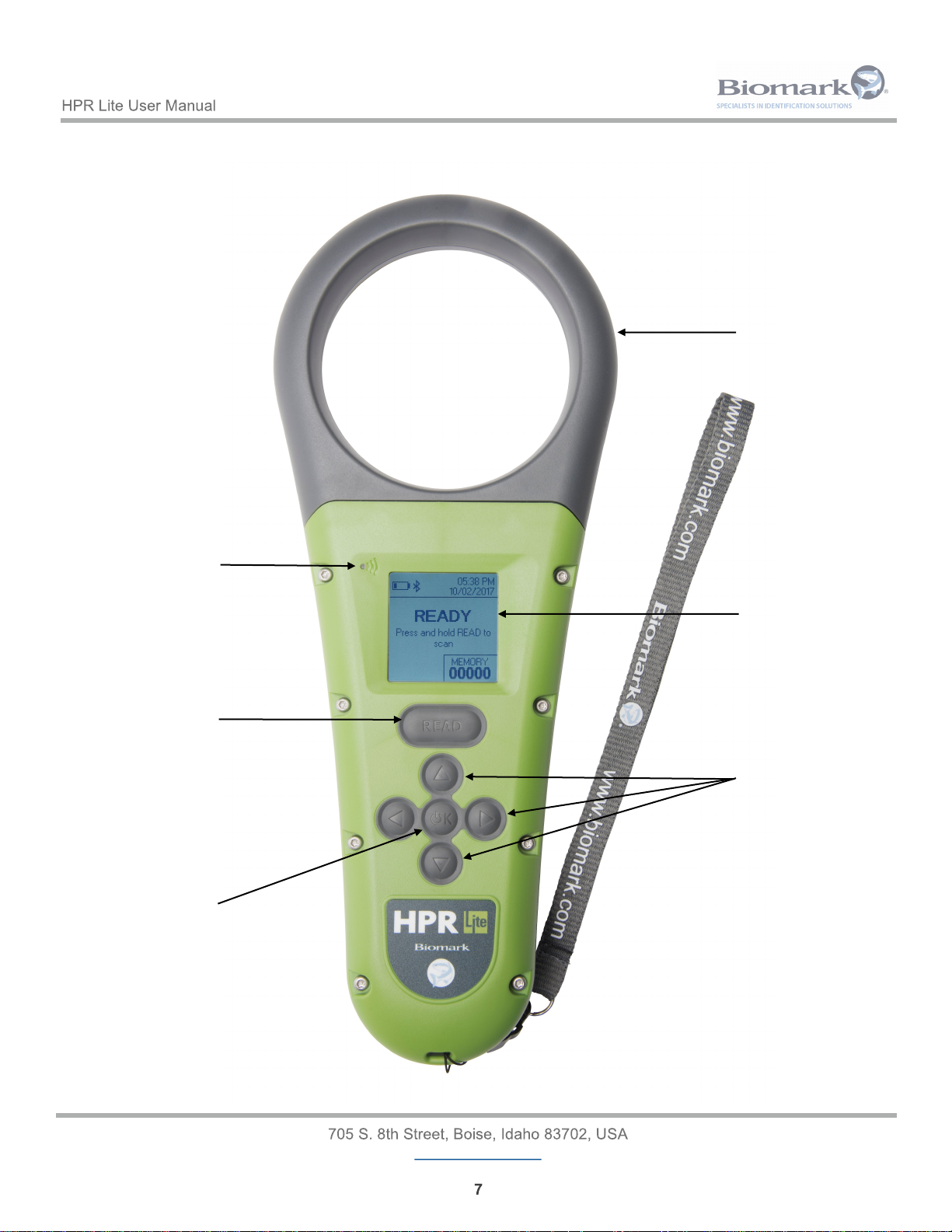
1.2 Reader Front View Diagram
Loop Antenna
LCD Display
Blue LED
Read Indicator
Read Button
Arrow Buttons
Power/OK Button
Page 8
www.biomark.com
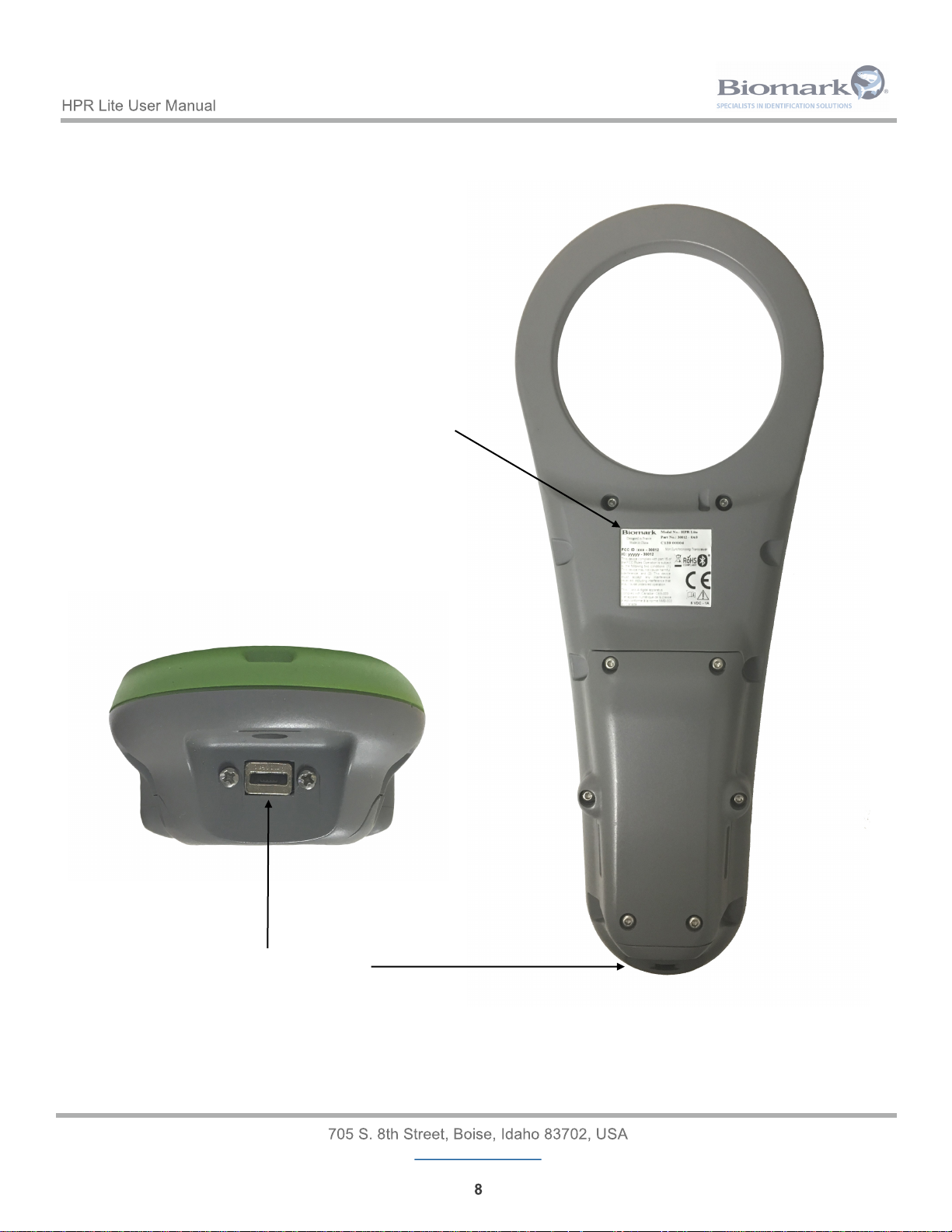
1.3 Reader Back and Bottom View Diagram
Micro USB Connector
Certification Label with
Part Number and Serial
Number information
Page 9
www.biomark.com
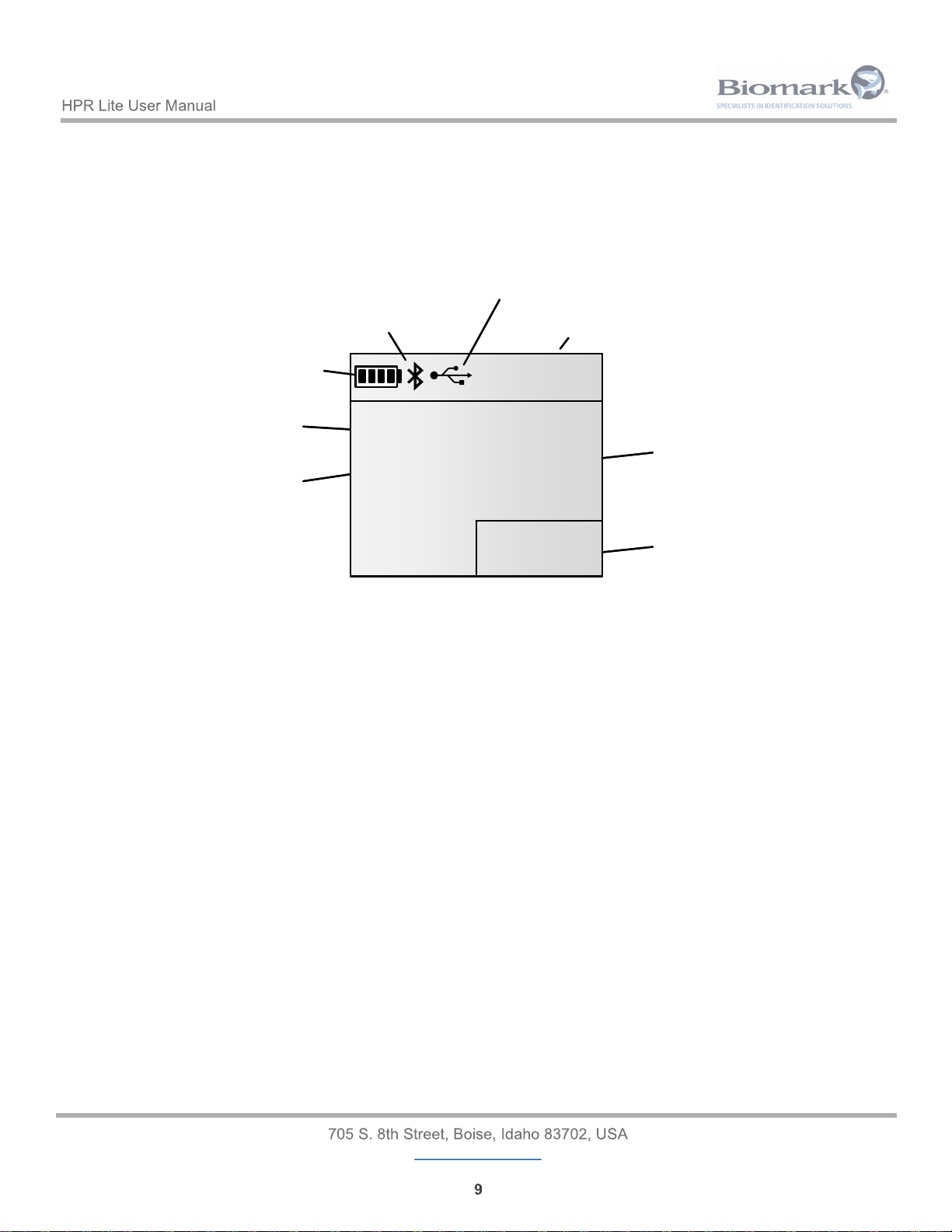
1.4 Reader Display Diagram
01234
7:13 PM
09/27/2017
MEMORY
3DD.003BA20748
100,5°FFDX-B
Date / Time
Tag ID
BioThermo tag
temperature
Memory
counter
Battery level /
Charge indicator
Bluetooth
indicator
USB connection
indicator
Tag type
01234
7:13 PM
09/27/2017
MEMORY
3DD.003BA20748
100,5°FFDX-B
Date / Time
Tag ID
BioThermo tag
temperature
Memory
counter
Battery level /
Charge indicator
Bluetooth
indicator
USB connection
indicator
Tag type
Page 10
www.biomark.com
1.5 Supplied Equipment
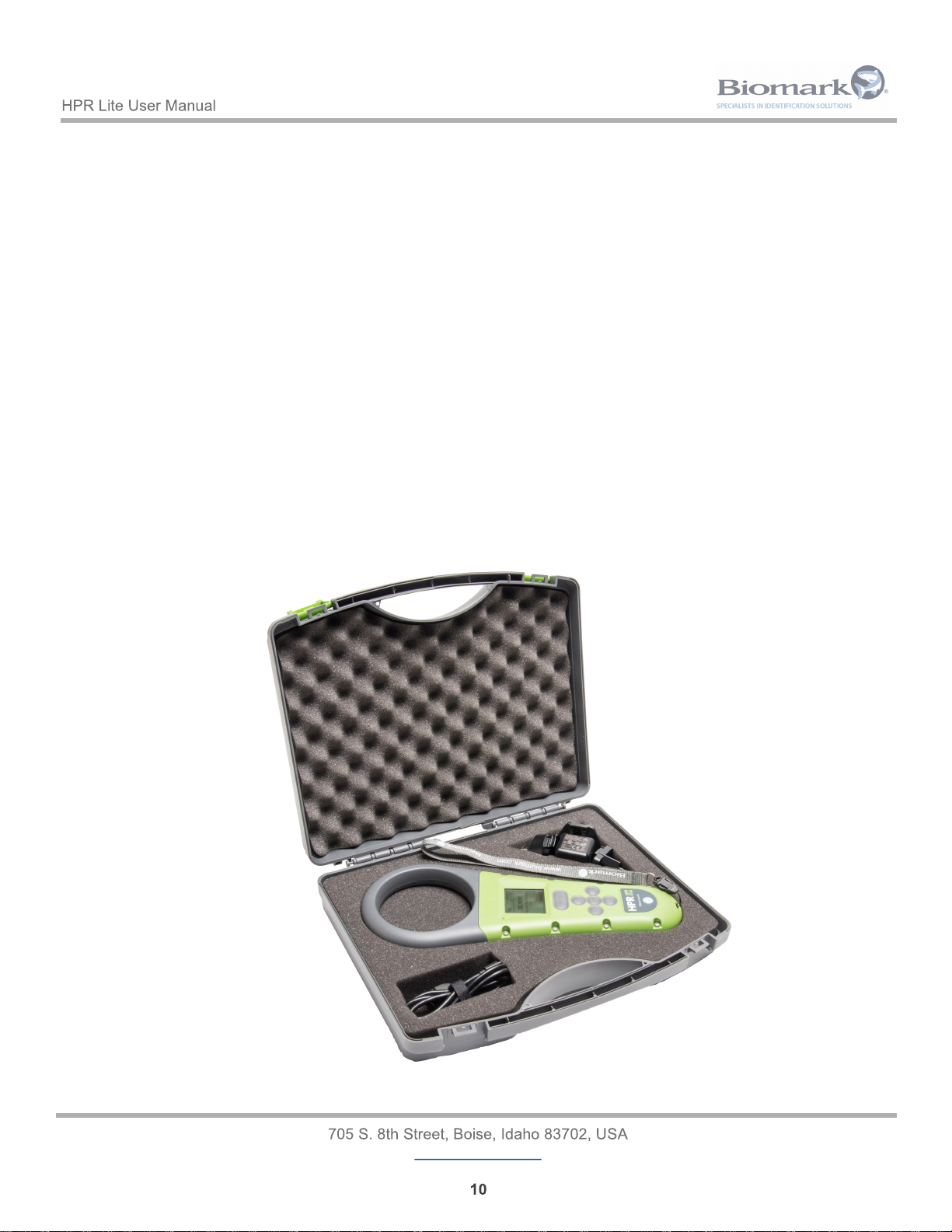
The following items are included with the purchase of HPR Lite reader:
• HPR Lite reader.
• RFID FDX-B Test Tag fish-shaped keychain.
• Power Charger kit (Input: 100-240 V AC; 50-60 Hz, 0.5 A; Output: 5.0 V DC, 2.1 A), including 3
international plug adapters.
• Micro USB to USB cable, 61 cm (3 ft.) long.
• Micro USB OTG Flash drive adapter.
• Biomark hand strap.
• HPR Lite Quick Start Guide.
• Custom hard case.
• Biomark Tag Manager software (1 PC installation). See page 11, section 1.7 for details.
Please ensure you have received all of the above equipment upon receipt of your new reader.
Page 11
www.biomark.com
1.6 Reader Care and Maintenance
While the HPR Lite reader has been designed to be as rugged and durable as possible, please observe the
following points to ensure your reader provides many years of trouble free service:
• Fully charge the battery before first use of the reader or before putting the reader into storage.
• If the reader is exposed to salt water, rinse the entire unit with fresh water and dry it thoroughly
before putting into storage.
• Clean and dry the reader before putting it back into its carry case.
The HPR Lite is waterproof up to 1 meter for 30 minutes (IP67 rated). The reader was not designed or
intended to be operated underwater or otherwise intentionally submerged.
NOTE: Water cannot enter into the reader through the connector, but any moisture could damage the
terminals in the Micro USB cable if inserted while wet.
Do not try to access or replace the internal battery. Contact Biomark for battery replacement.
Risk of fire if battery is replaced by an incorrect type.
1.7 Updating Reader Firmware
New or updated firmware may periodically become available for the HPR Lite reader. You can check
Biomark’s web site to see if an update is available. The easiest way to update the firmware is through the
Biomark Tag Manager or BioTerm communication software. Biomark Tag Manager requires a product key to
run, which is included with each purchase of the reader (1 PC installation only). Please contact the Customer
Service Department at Biomark to obtain the key by calling (208) 275-0011 or emailing
To check for availability of a firmware update or to download Biomark Tag Manager or BioTerm software
please go to https://www.biomark.com/help/firmware___applications/.
Please refer to corresponding software’s User Manual, available at https://www.biomark.com/help/
manuals___instructions/, for the reader’s firmware update procedure.
Refer to section 5 Communicating with Reader for more information on how to establish reader’s
communication with a PC.
NOTE: As a precaution, you should download all tag IDs contained in memory before initiating the update
process. All settings may be reset to manufacturer default values during the update process, so it is
recommended that you take a note of the present settings prior to updating the reader.
Page 12
www.biomark.com
2 Getting Started
2.1 Turning Reader On and Off
The reader can be powered on by any of the following methods:
• Pressing and holding the OK button for 1 second.
• Connecting the reader to the included AC power supply or USB port of a PC.
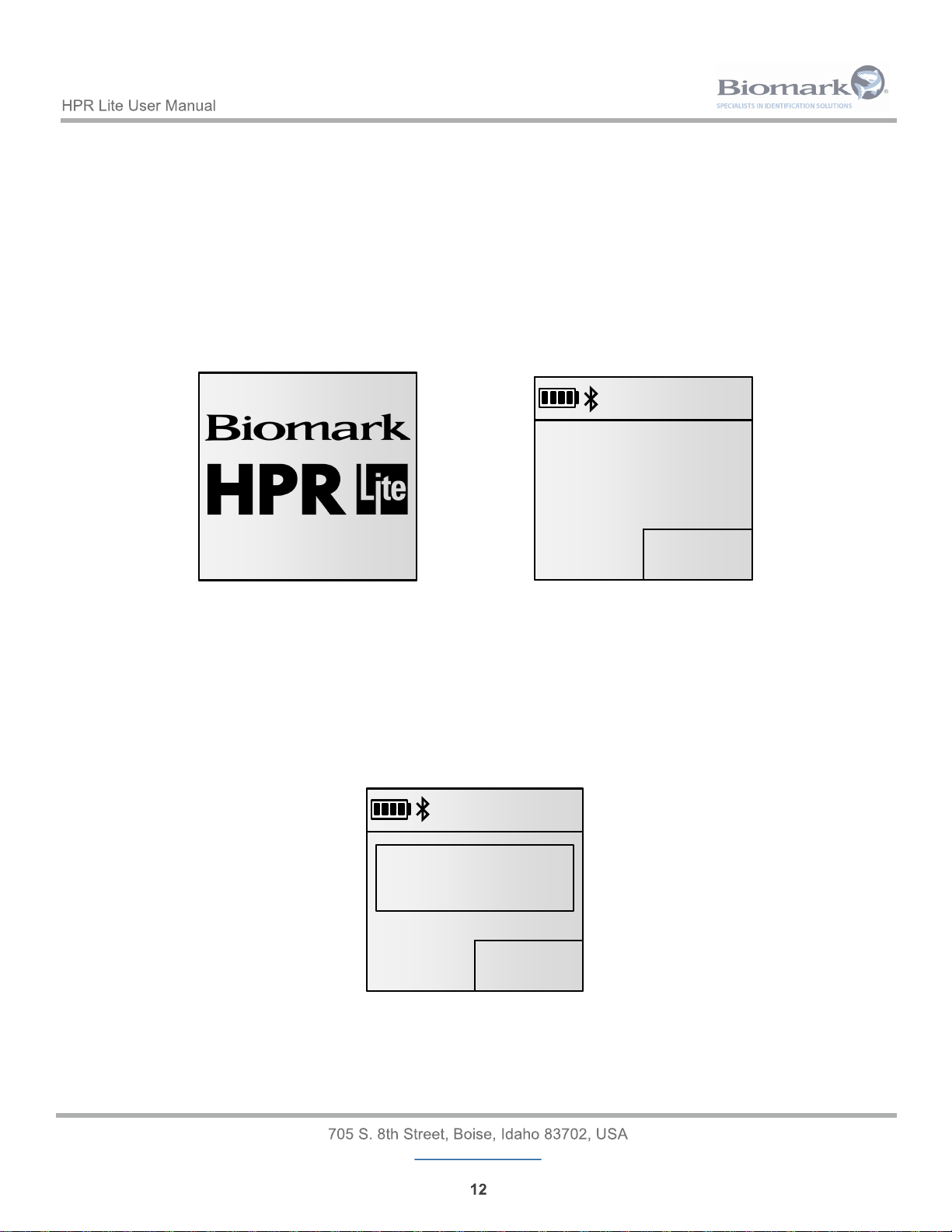
Upon powering up, the reader will display a splash screen and emit a short beep. This screen will display the
present firmware version in the bottom right corner. After approximately 1.5 seconds, the reader will display
the main screen.
NOTE: Operating ambient temperature of the HPR Lite reader must be between -20°C (-4°F) and +58°C
(+136.4°F) with relative humidity between 10% and 90%, non-condensing.
The reader can be powered off by any of the following methods:
• Pressing and holding the OK button while in main screen. After approximately one second a
shutdown timer will appear. Continue holding the OK button until the reader sounds two beeps and
shuts down. The count down can be aborted by releasing the OK button.
• The reader will automatically power off after certain period of inactivity. The inactivity time is user
adjustable and by default is set to 180 seconds (3 minutes). Pressing any button will reset the
timer.
V1.01.00V1.01.00
00000
7:13 PM
09/27/2017
MEMORY
Press and hold READ to
scan
READY
00000
7:13 PM
09/27/2017
MEMORY
Press and hold READ to
scan
READY
7:13 PM
09/27/2017
MEMORY
00000
Press and hold READ to
scan
READY
SHUTDOWN...
3
7:13 PM
09/27/2017
MEMORY
00000
Press and hold READ to
scan
READY
SHUTDOWN...
3
Screen during power up Main Screen
Page 13
www.biomark.com
The reader will stay powered on while:
• The reader is connected to the AC power supply or USB port of a PC.
• The reader is connected to a PC via Bluetooth in slave mode (remote device has established the
connection). The reader will power off automatically after 60 minutes of inactivity.
2.2 Charging Reader
The reader has an internal 7.2V lithium ion re-chargeable battery.
To charge the battery, follow these steps:
• Fast Charge: Plug the Micro USB cable into the connector at the bottom of the reader, then plug
the USB connector into the AC power supply. Charging using this method will take <6 hours with a
healthy battery. Multiple power plug adapters have been provided with the reader, please ensure
you are using the correct adapter for your location.
• Slow Charge: Plug the Micro USB connector of the cable into the connector at the bottom of the
reader, then plug the USB connector into a USB port of a PC. Charging using this method will take
≤16 hours with a healthy battery.
NOTE: Water cannot enter into the reader through the connector, but any moisture could damage the
terminals in the Micro USB cable if inserted while wet.
Ambient temperature during battery charging must be between 0°C (+32°F) and +40°C (+104°F) with relative
humidity between 35% and 85%, non-condensing.
The HPR Lite reader is not intended to be operated while the battery is charging. Should the reader begin
scanning while charging, the charge will be suspended and will restart after the scanning operation is
finished.
Please be aware that when using the reader in environments below freezing temperature, the battery’s ability
to supply power will be reduced. This will reduce the reader’s battery run-time and possibly the maximum
usable RF transmit power resulting in a reduction of reader performance. Please ensure your reader is set to
use power saving mode under these conditions to avoid excessively loading the battery. See page 15,
section 3.1 for more details.
Do not try to access or replace the internal battery. Contact Biomark for battery replacement.
Risk of fire if battery is replaced by an incorrect type.
Page 14
www.biomark.com
2.2.1 Battery Symbols
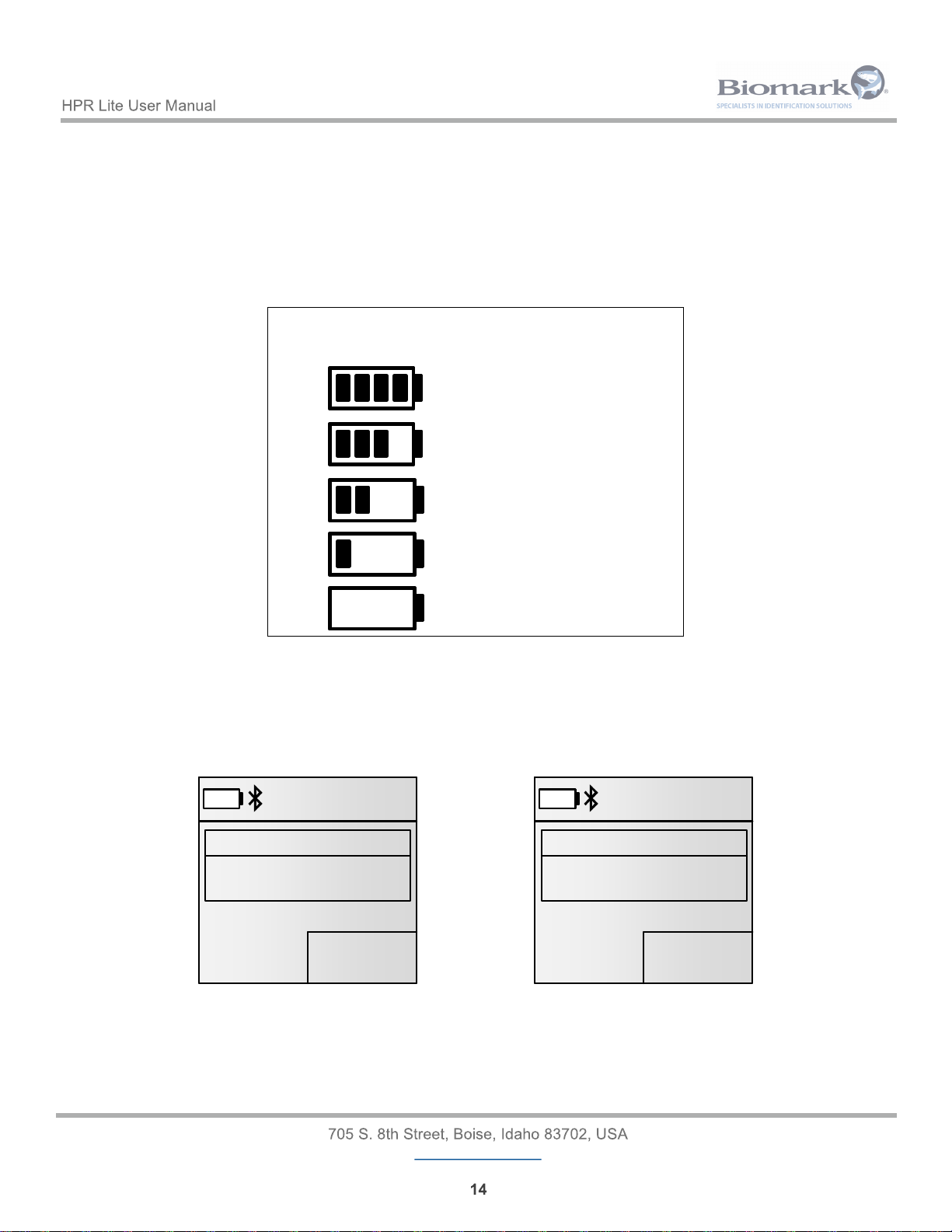
While charging, the battery icon becomes animated. The current level of charge is indicated by the location of
the flashing bars. For example, if the battery is at 50%, only two bars will be animated.
The animation speed of each bar will change depending on the amount of charge the battery it is currently
receiving.
NOTE: Charging is internally suspended during tag scanning but the charge icon continues to flash.
If the reader is powered on when the battery level is at or below 10%, the unit will display the message
Battery Low and will sound three quick beeps.
When the battery voltage become critically low (0%), the reader will display the message Battery Flat
Powering down…, will sound one long beep and will automatically shut down.
NOTE: If the battery level is critically low (0%), the reader will not power up.
Symbol Battery Charge Level
80 - 100%
50 - 80%
20 - 50%
10 - 20%
0 - 10%
01234
7:13 PM
09/27/2017
MEMORY
3DD.00075BCD15
FDX-B
Warning
Low battery
01234
7:13 PM
09/27/2017
MEMORY
3DD.00075BCD15
FDX-B
Warning
Low battery
01234
7:13 PM
09/27/2017
MEMORY
3DD.00075BCD15
FDX-B
Battery flat
Powering down...
01234
7:13 PM
09/27/2017
MEMORY
3DD.00075BCD15
FDX-B
Battery flat
Powering down...
Page 15
www.biomark.com
3 Configuring Reader
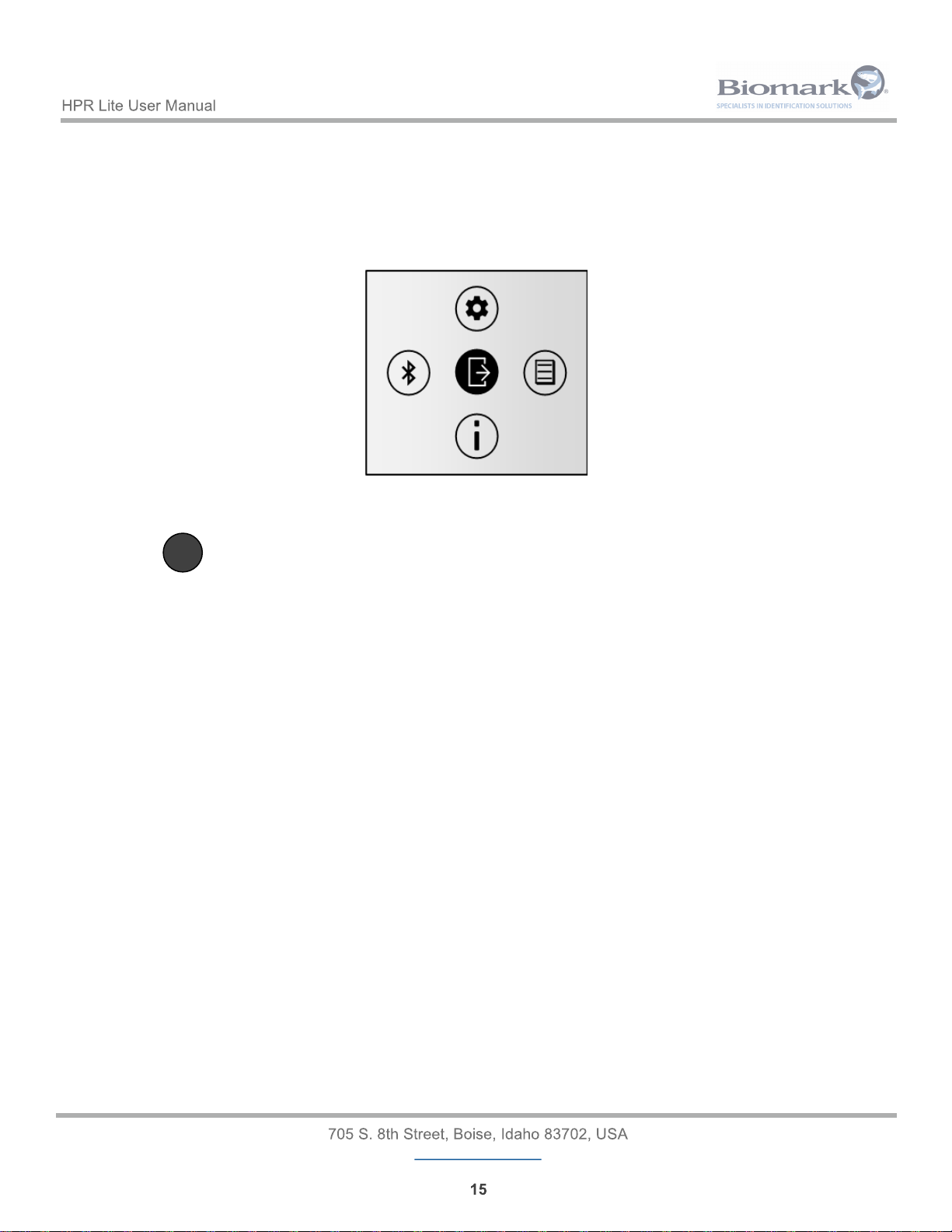
The Main Menu can be accessed by briefly pressing down the OK button. From here, pressing the
corresponding arrow key allows selecting the desired settings’ sub-menu. When in a sub-menu, up and down
arrow keys allow scrolling through settings; pressing OK key allows changing the selected setting. To exit a
sub-menu back to the Main Menu press the left arrow key. To exit the Main Menu screen press the OK
button.
<
3.1 General Settings
Pressing the (Up) key while in the Main Menu screen will display the General settings menu.
This menu provides access for managing the system settings of the reader.
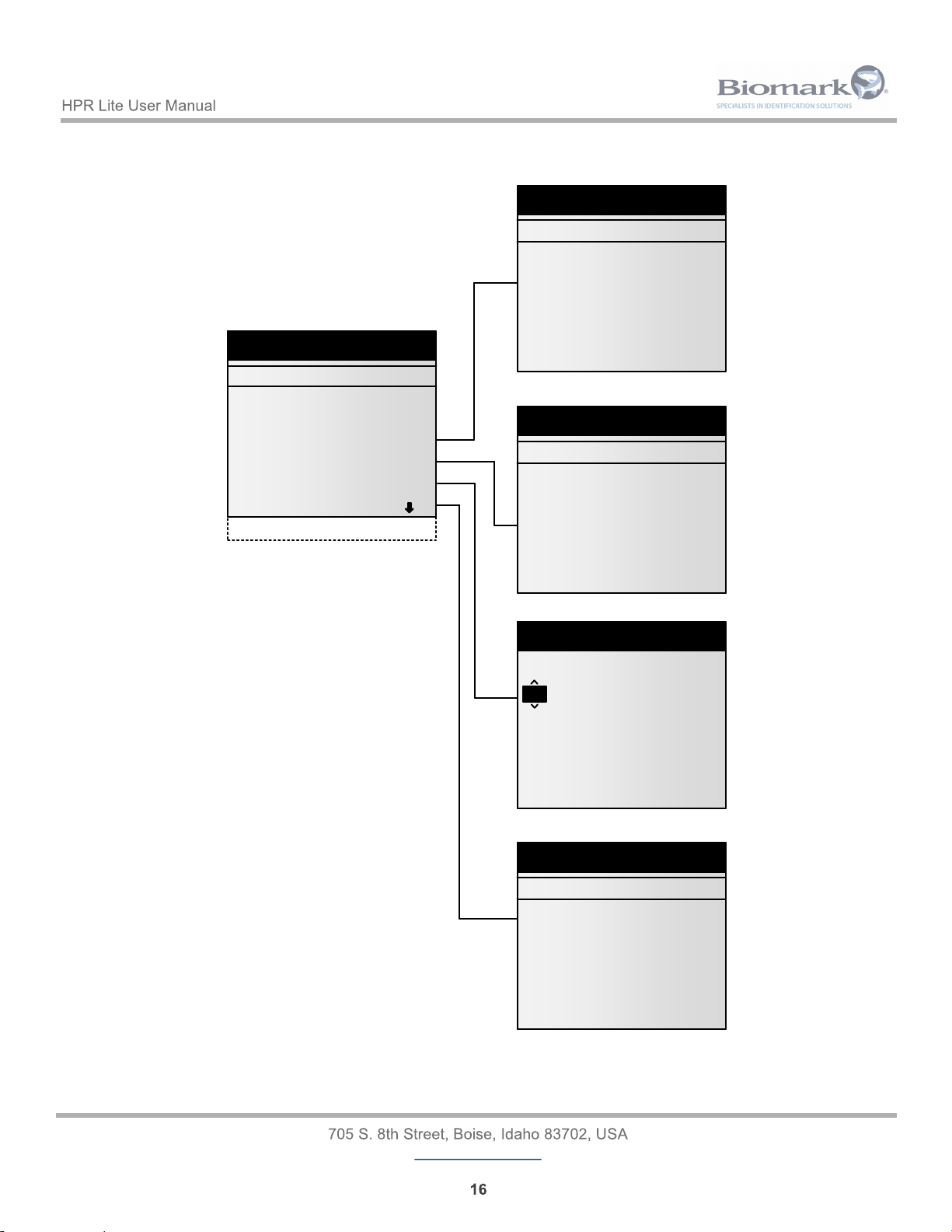
Parameters that can be adjusted are:
• Vibration - Turns the internal vibration on or off. The default for this setting is enabled.
• Beeper - Turns the audible indicator on or off. The reader emits a beep for many different reasons,
but when disabled all instances will be silent. The default for this setting is enabled.
• Power Saving Mode - When enabled, antenna power output will be reduced by 50% to increase
battery life. Enabling this mode will also reduce reader performance by 15-25%. The default for
this setting is disabled.
• Tag format - Switches between hexadecimal (e.g. 3DD.00075BCD15) or decimal (e.g.
989.000123456789) tag ID display. The default for this setting is HEX.
• Temperature unit - Switches between °C or °F tag temperature display (when FDX-B
BioTherm13 temperature sensing tag is detected). The default for this setting is °F.
• Date/Time - Allows setting the reader’s internal clock
• Language - Selects the language of the reader. Options are English, French, Spanish, and
Portuguese. The default for this setting is English.
• Load default settings - Will reset all options back to the factory defaults. A confirmation window
will appear asking to verify this action. If ‘Yes’ is pressed, the reader will automatically reset all
settings. Tag data stored in memory will not be erased.
NOTE: More settings are available though reader’s USB or Bluetooth connection to a PC.
Page 16
www.biomark.com
Settings
Vibration
Beeper
Power Saving Mode
Tag format
Temperature unit
Date/Time
Language
Load default settings
>
>
>
>
Tag Format
Decimal
}Hexadecimal
Temperature unit
Celsius
}Fahrenheit
Date/Time
Date (mm/dd/yyyy)
/ 21 / 2017
Time (hh:mm):
21 : 51
Language
}English
Français
Español
Português
08
Settings
Vibration
Beeper
Power Saving Mode
Tag format
Temperature unit
Date/Time
Language
Load default settings
>
>
>
>
Tag Format
Decimal
}Hexadecimal
Temperature unit
Celsius
}Fahrenheit
Date/Time
Date (mm/dd/yyyy)
/ 21 / 2017
Time (hh:mm):
21 : 51
Language
}English
Français
Español
Português
08
3.1.1 General Settings Diagram Tree
Page 17

www.biomark.com
>
3.2 Memory Settings
Pressing the (Right) key while in the Main Menu Screen will display the Memory settings menu.0
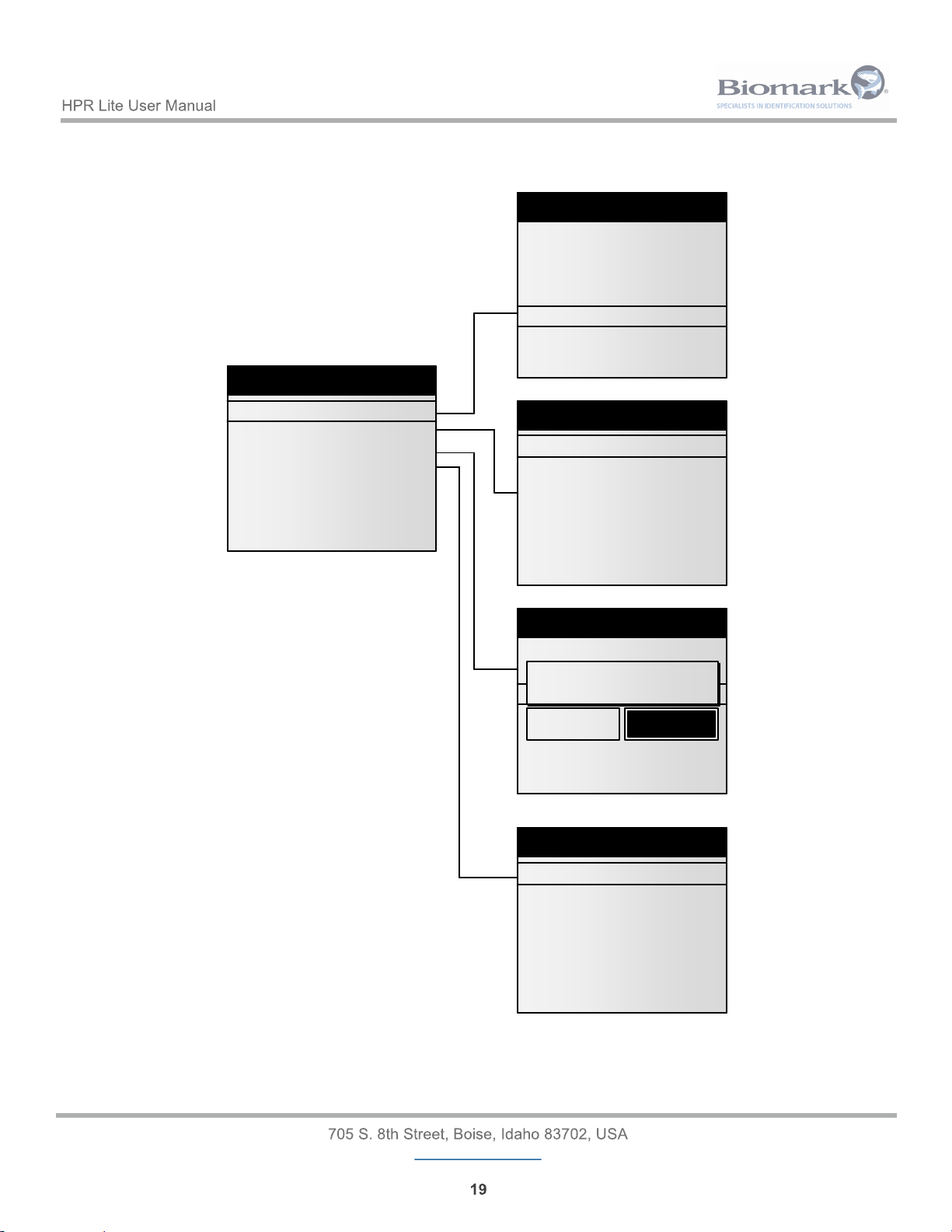
This menu allows you to access information within the reader’s memory.
Parameters that can be adjusted are:
• View tags - Displays the tag IDs currently stored in the reader’s memory from newest to oldest.
The numbers in the parenthesis tell you which tag ID you are currently viewing out of the total
number of tag IDs stored.
• Storage mode - Changes which detected tag IDs are stored in the memory. There are 3 possible
options:
Disabled - Disables the HPR Lite’s memory. Detected tag IDs will not be stored in the
memory, but will still be transmitted via USB and Bluetooth connections. When disabled,
the counter on the main screen is replaced with an ‘OFF’ indication.
On All - All detected tag IDs will be stored in the memory and transmitted via USB and
Bluetooth connections. The memory counter on the main screen will increase after each
detection.
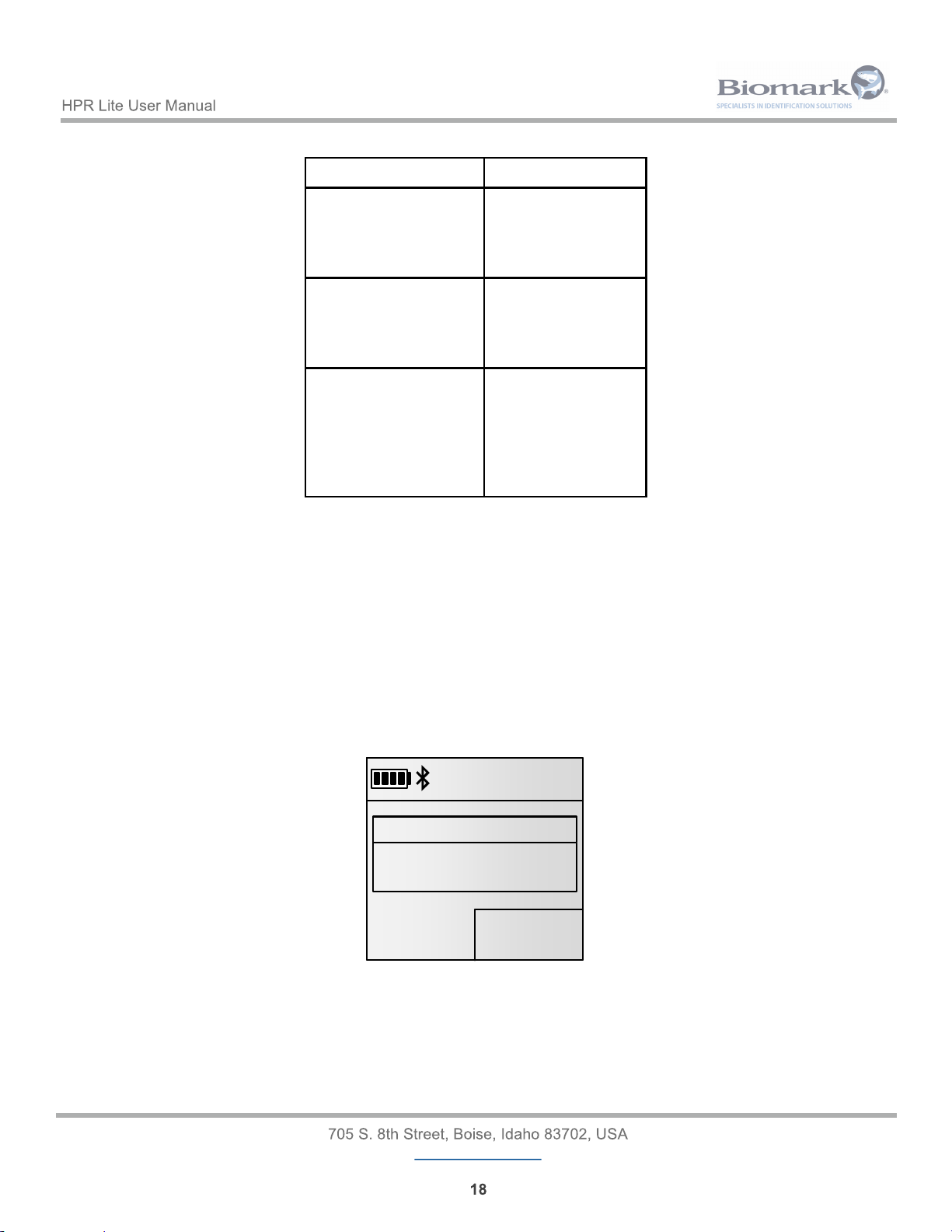
On Unique - A tag ID is stored and transmitted via USB and Bluetooth connections only
once when it is detected several times in a row. If another tag is detected after the first tag,
and the first tag is detected again, it will be read and stored again. If the reader is powered
off and on, the tag ID can be stored and transmitted again. On Unique is the default
Memory setting. See examples on page 18.
OFF
7:13 PM
09/27/2017
MEMORY
3DD.00075BCD15
FDX-B
OFF
7:13 PM
09/27/2017
MEMORY
3DD.00075BCD15
FDX-B
49744
7:13 PM
09/27/2017
MEMORY
3DD.00075BCD15
FDX-B
49744
7:13 PM
09/27/2017
MEMORY
3DD.00075BCD15
FDX-B
Page 18
www.biomark.com
Tags Detected Stored in Memory
Read tag A
Read tag A
Read tag B
Read tag A
Yes
No
Yes
Yes
Read tag A
Read tag A
Read tag A
Read tag A
Yes
No
No
No
Read tag A
Read tag A
Reader shut down
Reader powered up
Read tag A
Read tag A
Yes
No
Yes
No
On Unique Memory Examples
• Clear memory - Deletes all stored tag IDs from the reader’s memory. A confirmation window will
appear asking to verify this action. If ‘Yes’ is pressed, the reader will perform the deletion.
• USB Drive - Exports entire memory content to a connected USB Flash Drive.
NOTE: Memory capacity is 50,000 tag IDs. When the memory reaches the 50,000 tag, the 50,001st ID will
automatically replace the oldest record in the memory. In other words, the memory is circular and always
contains the last detected 50,000 tag IDs.
When the 50,000th tag ID is written into the memory the following message is displayed:
3DD.00075BCD15
50000
7:13 PM
09/27/2017
MEMORY
FDX-B
Oldest records will be
overwritten
Memory full
3DD.00075BCD15
50000
7:13 PM
09/27/2017
MEMORY
FDX-B
Oldest records will be
overwritten
Memory full
Page 19
www.biomark.com
Memory
View tags
Storage mode
Clear memory
USB Drive
>
>
>
View tags (5/125)
3D9.04A817C801
3DD.00075BCD15
3DD.0006745D15
3D9.04A8112345
3D9.04A8173215
3D9.04A8312564
3D9.0512CB12A5
Storage mode
Disabled
On all
}On Unique
Memory
View tags
Storage
Clear memory
>
>
Are you sure?
CancelOk
USB Drive
Export entire memory
Memory
View tags
Storage mode
Clear memory
USB Drive
>
>
>
View tags (5/125)
3D9.04A817C801
3DD.00075BCD15
3DD.0006745D15
3D9.04A8112345
3D9.04A8173215
3D9.04A8312564
3D9.0512CB12A5
Storage mode
Disabled
On all
}On Unique
Memory
View tags
Storage
Clear memory
>
>
Are you sure?
CancelOk
USB Drive
Export entire memory
3.2.1 Memory Settings Diagram Tree
Page 20
www.biomark.com
<
3.3 Bluetooth Settings
Pressing the (Left) key while in the Main Menu Screen will display the Bluetooth settings menu.
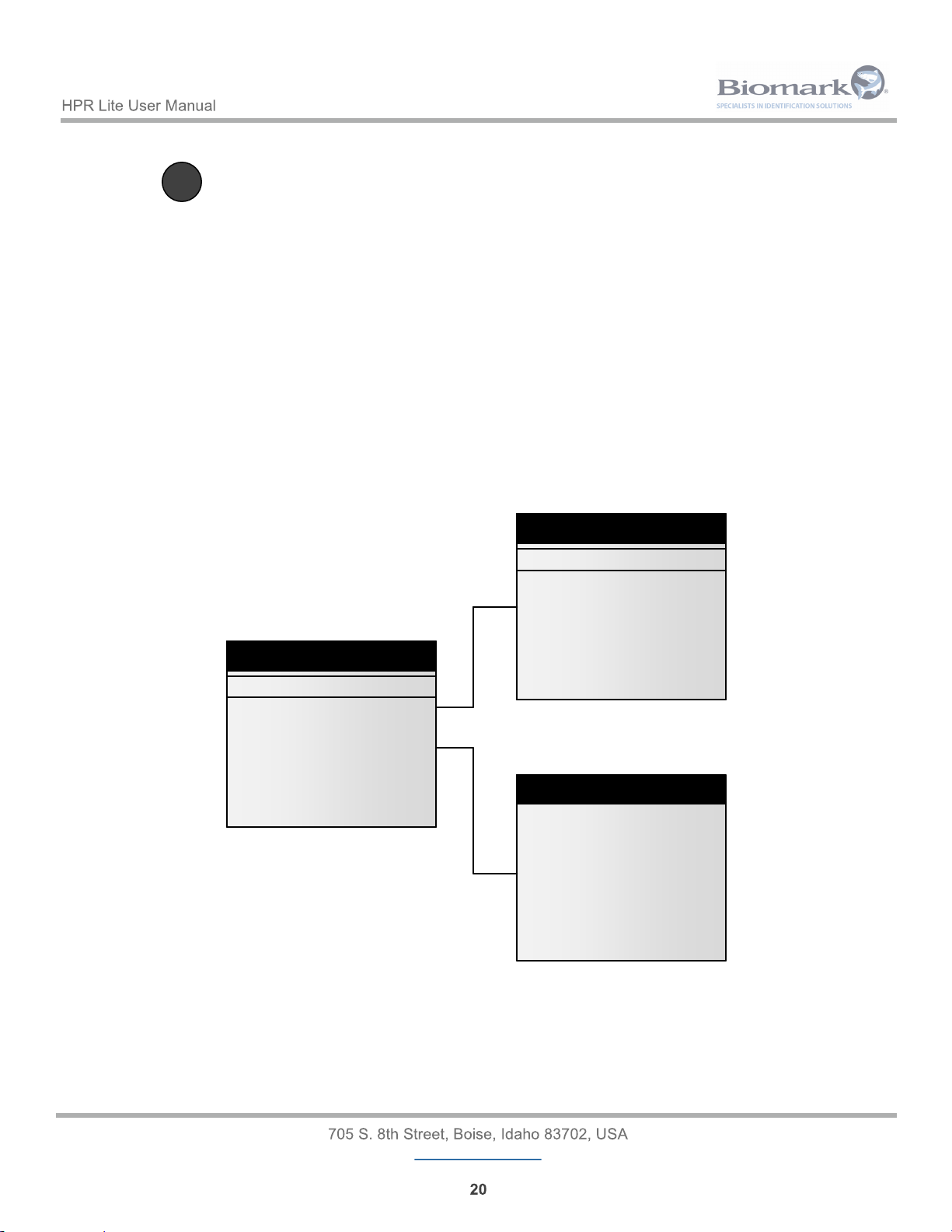
This menu allows you to manage all available Bluetooth actions.
Parameters that can be adjusted are:
• On/Off - Enables or disables Bluetooth communication of the HPR Lite reader. The default setting
for this option is Enabled.
• Select device - Allows you to switch the reader into Slave mode or scan for available Bluetooth
devices in the vicinity to connect to. Establishing Bluetooth connection with any device from the list
will switch the reader into Master mode. The default for this option is Slave.
• Authentication - Enables or disables SSP (Secured Simple Pairing). The default setting for this
option is Enabled. The default PIN is 1234.
• About - Displays the reader’s Bluetooth information.
3.3.1 Bluetooth Settings Diagram Tree
Bluetooth settings
On/Off
Select device
Authentication
About
>
>
Bluetooth settings
On/Off
Select device
Authentication
About
>
>
About Bluetooth
Name: HPR-Lite_0086
Addr: 00:04:3E:AA:C2:C6
Pairing: Slave
Authentication: ON
PIN: 1234
Version: 160105F IDPS
Select device
}Slave
MZ220
XR3000
My iPhone
Search new device...
Select device
}Slave
MZ220
XR3000
My iPhone
Search new device...
Bluetooth settings
On/Off
Select device
Authentication
About
>
>
About Bluetooth
Name: HPR-Lite_0086
Addr: 00:04:3E:AA:C2:C6
Pairing: Slave
Authentication: ON
PIN: 1234
Version: 160105F IDPS
Select device
}Slave
MZ220
XR3000
My iPhone
Search new device...
Page 21
www.biomark.com
>
3.4 Reader Information
Pressing the (down) key while in the Main Menu Screen will display the reader information menu.
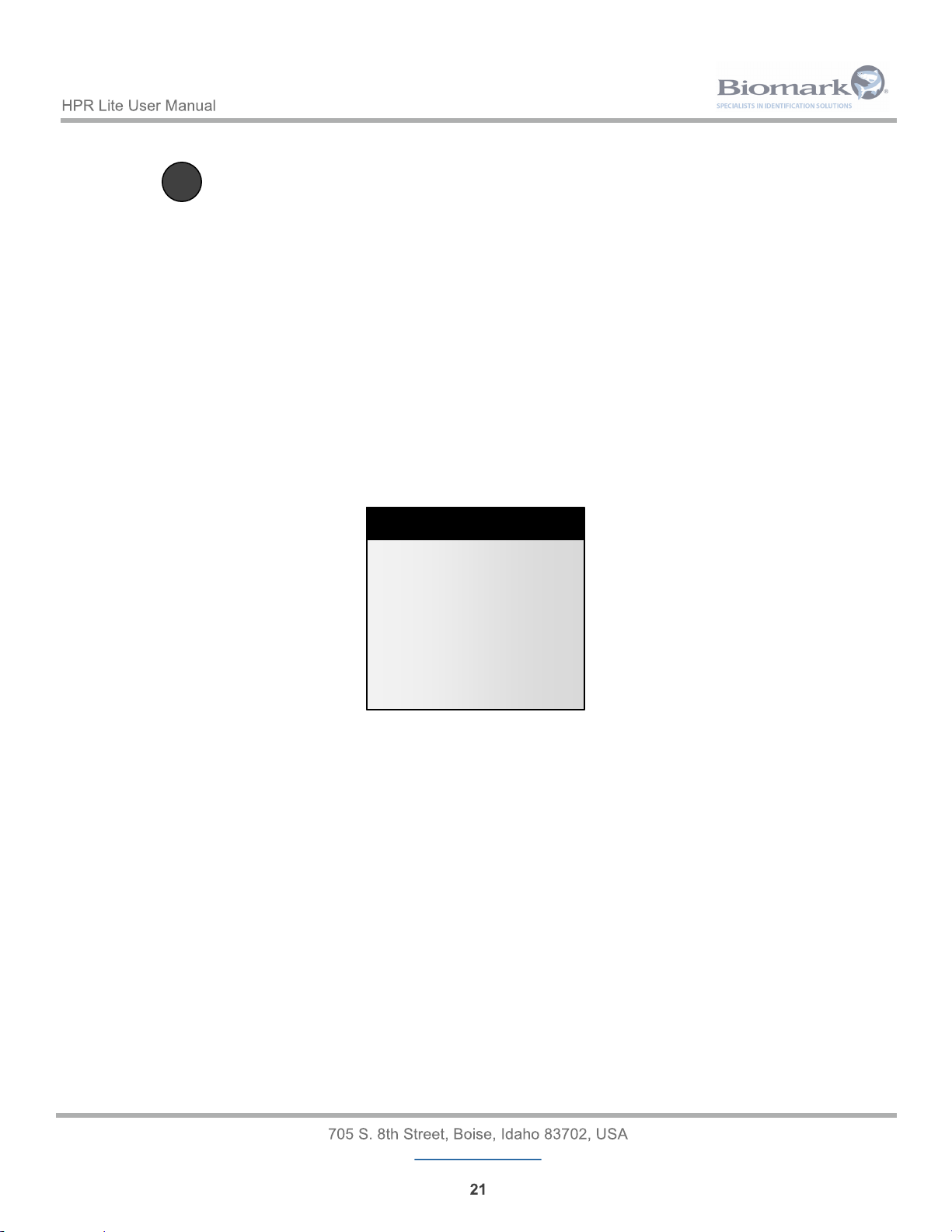
This menu allows you to view general reader information.
Displayed information includes:
• Reader name.
• Reader ID.
• Reader serial number.
• Reader firmware version.
• Reader part number (contains hardware / mechanical revision).
• Memory space used.
• Battery charge percentage.
Reader information
Name: HPR-Lite_0086
Reader ID: 01
S/N: DP0086
FW: 1.01.00 - Sep 25 201 7
P/N: 30012-0A2
Memory used: 7%
Batt: 87%
Reader information
Name: HPR-Lite_0086
Reader ID: 01
S/N: DP0086
FW: 1.01.00 - Sep 25 201 7
P/N: 30012-0A2
Memory used: 7%
Batt: 87%
Page 22
www.biomark.com
4 Reading Tags
4.1 Reading RFID Tags
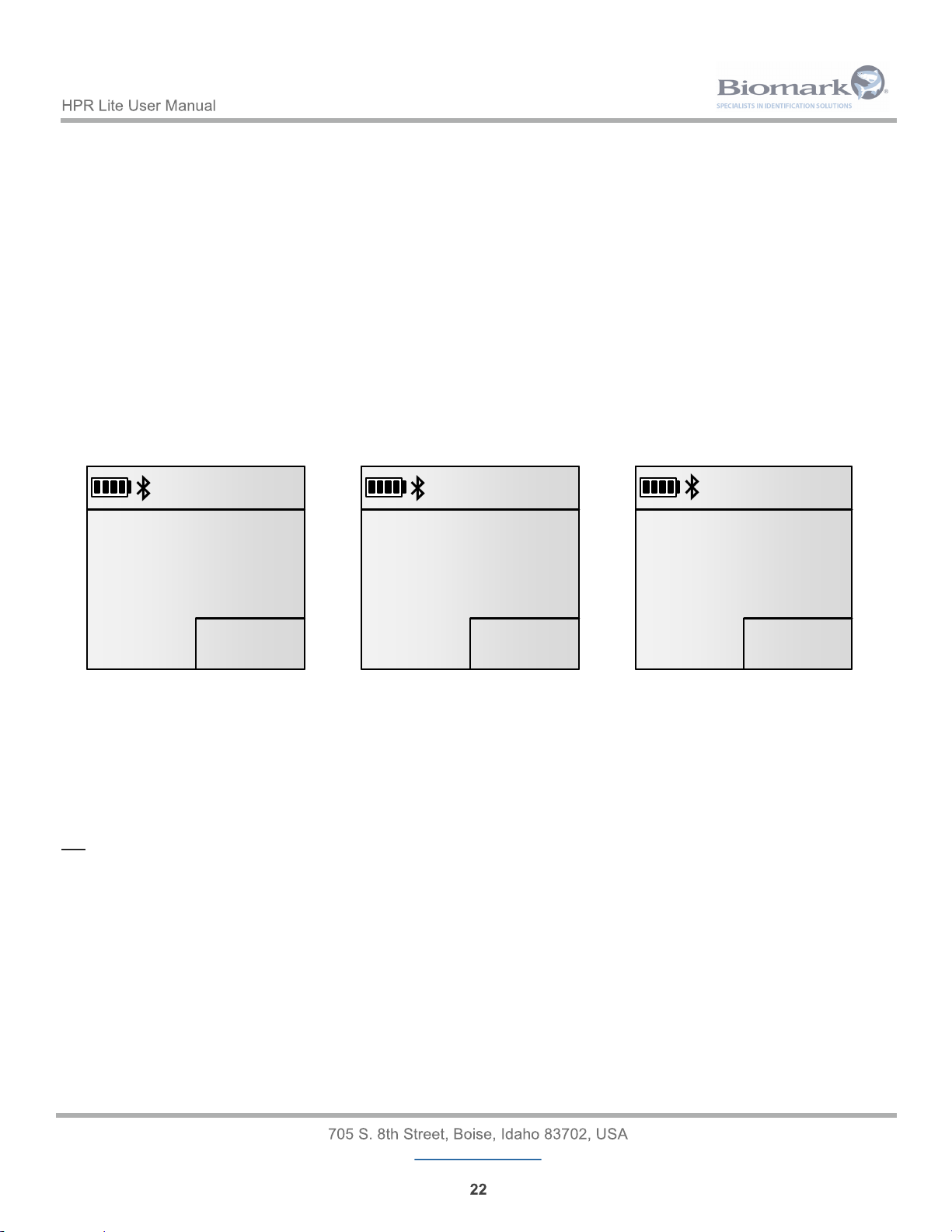
Upon starting up, the main screen of the HPR Lite will display the message READY - Press and hold READ
to scan. Pressing and holding the READ button will put the reader in scan mode and will display Reading…
on the main screen. The reader will remain in scan mode as long as the READ button is pressed or until a tag
is read.
Bring the reader as close to the likely location of the PIT tag as possible and move slowly over it.
When a PIT tag is read the HPR Lite, depending on how its settings are configured, will flash the blue LED
indicator once, generate a longer single beep and vibration, store the tag ID in the memory, exit scan mode,
and display the tag ID on the main screen.
When the same tag is read once again the reader will quickly flash the blue LED indicator once, generate a
shorter double beep and vibration, store tag ID in the memory, exit scan mode, and display the tag ID on the
main screen. The reader’s actions in this case also depend on its settings’ configuration.
When the READ button is released and no tag has been read, the HPR Lite will generate three short beeps,
exit scan mode, and display the message No tag detected then return to the last message that was on the
main screen.
4.2 Testing Reader Performance
The supplied 12mm FDX-B PIT test tag fish keychain should be used to verify operation of the reader. While
not in Power Saving mode, and the test tag located at the center of the reader’s antenna loop, fish pointing
into the loop, the tag should have a read range of approximately 20 cm (8 inches) from the center of the loop.
NOTE: The antenna and tag should not be placed on or near any metallic object while reading, as this will
significantly reduce the tag read range.
00000
7:13 PM
09/27/2017
MEMORY
Press and hold READ to
scan
READY
00000
7:13 PM
09/27/2017
MEMORY
Press and hold READ to
scan
READY
00001
7:13 PM
09/27/2017
MEMORY
3DD.00075BCD15
FDX-B
00001
7:13 PM
09/27/2017
MEMORY
3DD.00075BCD15
FDX-B
00000
7:13 PM
09/27/2017
MEMORY
Reading...
00000
7:13 PM
09/27/2017
MEMORY
Reading...
Page 23
www.biomark.com
5 Communicating with the Reader
Connecting the HPR Lite to a PC via USB or Bluetooth allows downloading tag IDs stored in the reader’s
memory and adjusting additional settings that are not available via the reader menus. Please refer to section
6 Reader Commands for more information. It is possible to communicate with the reader using any terminal
program on a PC.
Biomark recommends using BioTerm or Tag Manager programs to securely monitor, maintain, and update
the HPR Lite reader. BioTerm is a communication and device managing program used to connect a Biomark
reader to a computer and perform communication and configuration tasks or update the reader’s firmware.
Tag Manager software is a program designed to quickly and easily access tag data on a Biomark reader. The
program allows a user to download the data directly into Microsoft Excel, plus other useful functions, such as
convenient graphical user interface for configuring the reader and the reader’s automatic firmware verification
and update. While BioTerm is a free software available to all Biomark customers, Tag Manager program
requires an activation key to be used. One (1) copy of Tag Manager is included with the purchase of your
reader. When you open the software for the first time your PC will generate a computer ID number. Please
call +1 (208) 275-0011 or email [email protected] with this ID number to receive your activation
code. For more information about these products or to download them, please visit www.biomark.com.
5.1 Connecting to PC via USB
When the reader is connected to a computer via the USB cable, it will automatically turn on and beep once (if
not already on and if beeper is enabled), vibrate for a short time (if vibration is enabled) and the USB icon
( ) will be displayed on the screen. Once connected, Biomark Tag Manager or BioTerm software can be
used to access the reader’s memory or to configure its settings.
The reader’s internal battery will be slowly charging while it is connected to a PC via USB. The rate at which
the battery will be charging depends on the PC’s USB port specifications.
NOTE: The HPR Lite USB driver needs to be installed on the PC in order for the connection to be established
successfully. The driver should be installed automatically with installation of Biomark Tag Manager software
or upon connection of the reader to a USB port of the PC. If the driver did not install automatically the USB
icon will not be displayed on the reader’s screen and the connection will not get established. In this case the
driver needs to be installed manually. It can be found at https://www.biomark.com/help/
firmware___applications/.
5.2 Connecting USB Flash Drive
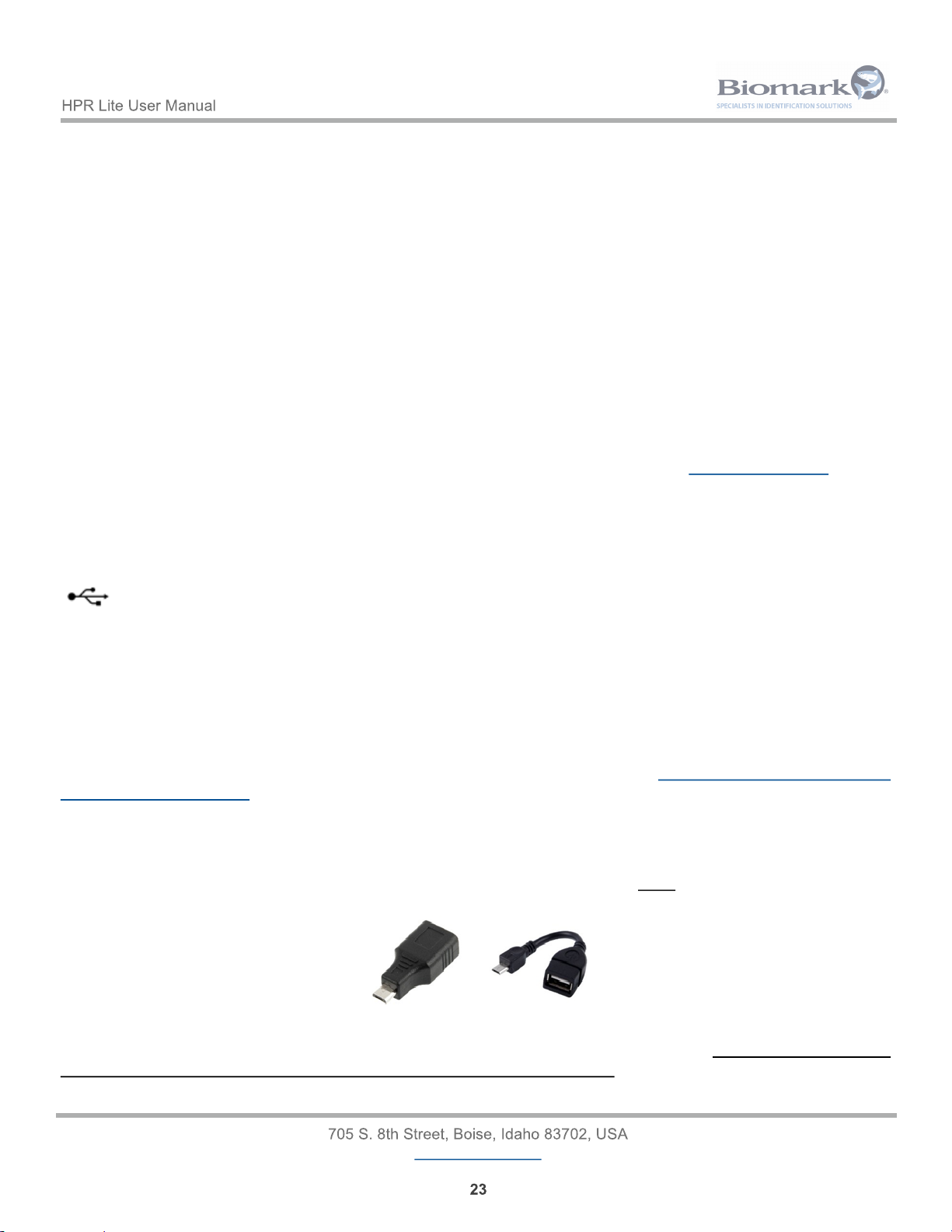
A USB flash drive can be connected to the HPR Lite using a micro USB OTG adapter for transferring the
content of reader’s memory.
or
Once the adapter is plugged into the reader, the reader will automatically attempt to connect to the drive.
Once it is connected, the HPR Lite will automatically create a new CSV file and copy only those tag IDs from
the reader’s memory that had never been transferred onto a Flash drive. The entire memory content can be
transferred onto a Flash drive manually.
Page 24
www.biomark.com
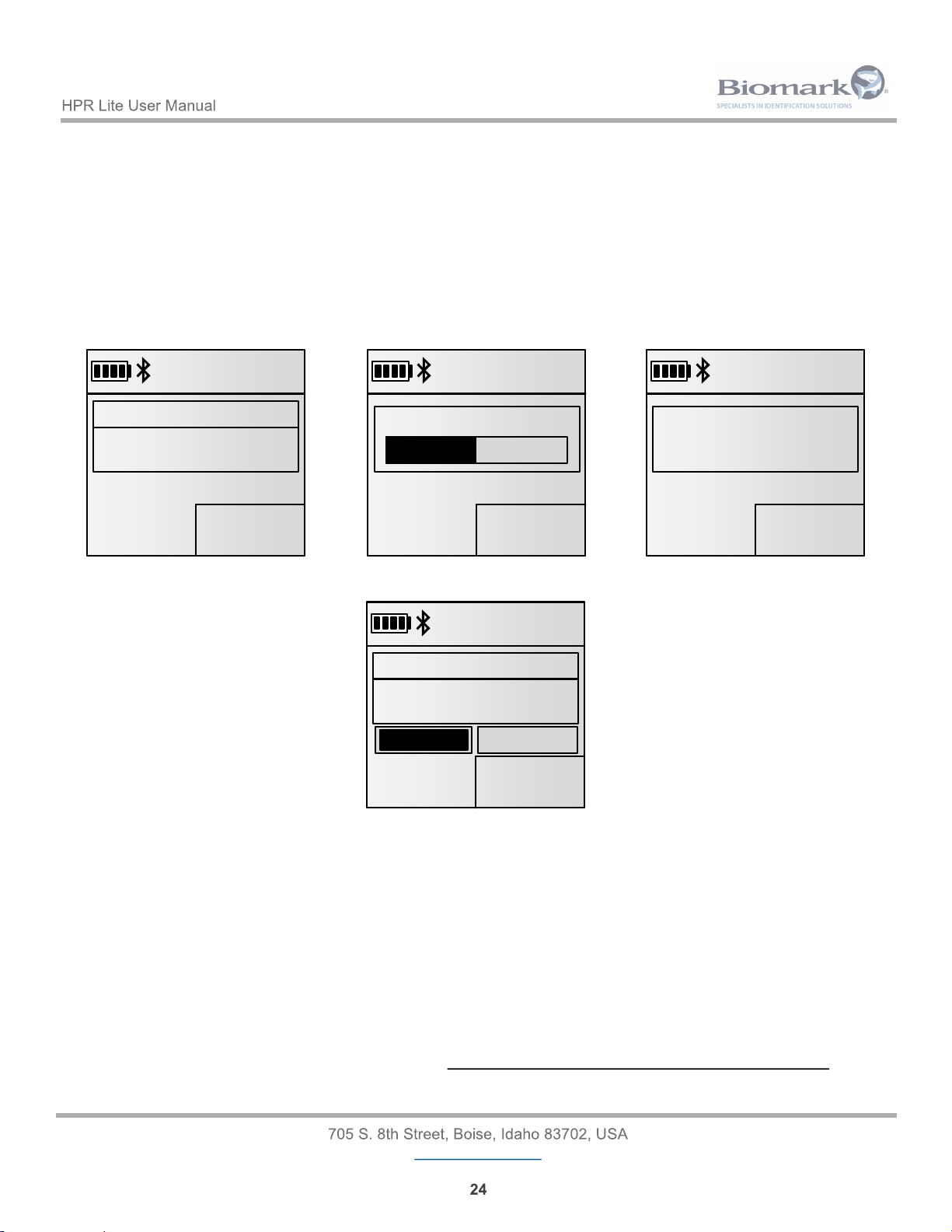
If the USB drive detection fails, the following screen will appear and allow you to retry or cancel the detection:
5.3 Connecting to PC via Bluetooth
5.3.1 Bluetooth Operation
By default, the Bluetooth module is discoverable and connectable (Slave mode or device).
Bluetooth authentication is enabled. When enabled, Bluetooth uses SSP (Secured Simple Pairing) to pair with
another remote device. The pairing will be done transparently for the user.
NOTE: When Bluetooth authentication is disabled, the default PIN code is 1234. This may be required with
older Bluetooth devices.
If the reader must connect by itself to a remote device, the menu allows to search for the devices in the
vicinity and pair to the desired device. Once a device is selected, the reader will operate as Master and will
constantly try to connect to the associated device. In the Master mode, the reader is not connectable.
NOTE: The Connection to an iPhone or an iPad requires the Master mode.
01234
7:13 PM
09/27/2017
MEMORY
3DD.00075BCD15
FDX-B
USB Drive
No USB drive detected
CancelRetry
01234
7:13 PM
09/27/2017
MEMORY
3DD.00075BCD15
FDX-B
USB Drive
No USB drive detected
CancelRetry
All files are automatically created in a dedicated folder named HPR-Lite. The name of the CSV file has the
following format:
tag_[ID]_[COUNTER].csv
where:
• ID is the Reader ID (2 HEX characters).
• COUNTER starts from 01 and is automatically incremented based on the existing files detected on
the USB Flash drive.
Example: G:\HPR-Lite\tag_A0_01.csv
01234
7:13 PM
09/27/2017
MEMORY
3DD.00075BCD15
FDX-B
USB Drive
Mounting USB drive...
01234
7:13 PM
09/27/2017
MEMORY
3DD.00075BCD15
FDX-B
USB Drive
Mounting USB drive...
01234
7:13 PM
01/27/2016
MEMORY
3DD.00075BCD15
FDX-B
Transferring...
01234
7:13 PM
01/27/2016
MEMORY
3DD.00075BCD15
FDX-B
Transferring...
01234
7:13 PM
09/27/2017
MEMORY
3DD.00075BCD15
FDX-B
Saved in
tag_A0_01.csv
01234
7:13 PM
09/27/2017
MEMORY
3DD.00075BCD15
FDX-B
Saved in
tag_A0_01.csv
Page 25
www.biomark.com
5.3.2 Bluetooth Indicators
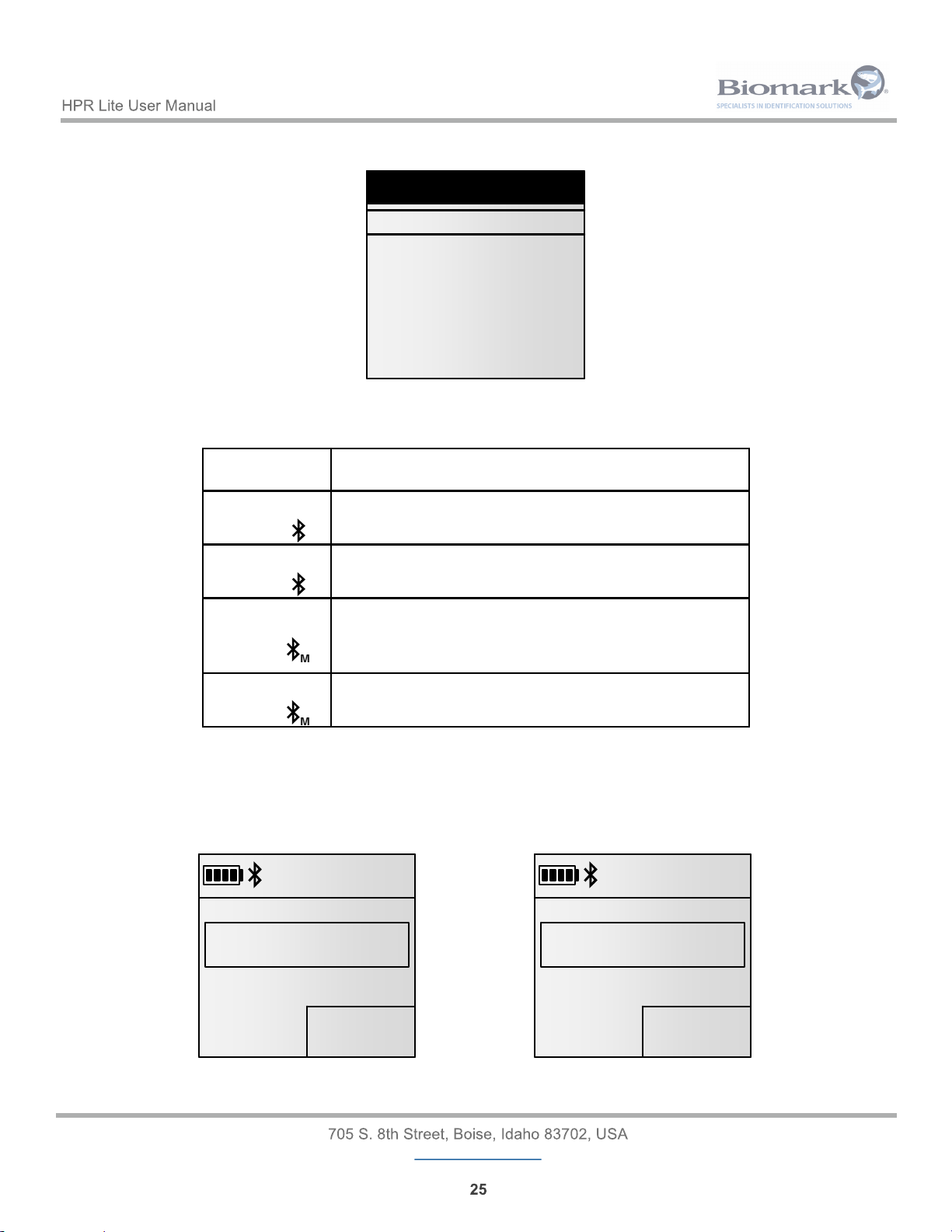
The table below explains the meaning of the Bluetooth symbol seen on the HPR Lite’s top bar of the screen.
Icon State
Blinking
Disconnected
(Visible and connectable, Slave mode)
Fixed
Connected
(Slave mode)
Blinking
Disconnected, tries to initiate connection with the
selected device
(Master mode)
Fixed
Connected
(Master mode)
NOTE: When the Bluetooth module is disabled, the Bluetooth icon is not displayed.
When a Bluetooth connection is successfully established, the reader will sound a single beep and will display
Bluetooth connected. When the Bluetooth connection is closed the reader will sound three (3) longer beeps
and will display the message Bluetooth disconnected.
01234
7:13 PM
09/27/2017
MEMORY
3DD.00075BCD15
FDX-B
Bluetooth connected
01234
7:13 PM
09/27/2017
MEMORY
3DD.00075BCD15
FDX-B
Bluetooth connected
Select device
}Slave
MZ220
XR3000
My iPhone
Search new device...
Select device
}Slave
MZ220
XR3000
My iPhone
Search new device...
The reader keeps in memory the last 4 devices it connected to for easy re-connection.
01234
7:13 PM
09/27/2017
MEMORY
3DD.00075BCD15
FDX-B
Bluetooth disconnected
01234
7:13 PM
09/27/2017
MEMORY
3DD.00075BCD15
FDX-B
Bluetooth disconnected
Page 26
www.biomark.com
6 Reader Commands
ASCII protocol is used for communication between a HPR Lite reader and a PC. ASCII (American
Standard Code for Information Interchange) is a character-encoding scheme based on the ordering of the
English alphabet. This is the simplest communications protocol. It transmits only ASCII characters and uses
ASCII control codes. It implies little or no error checking.
The HPR Lite commands are made up of three or more characters followed by a carriage return (Enter key).
Generally, the first three letters designate the command and the remaining letters/digits designate the
command’s parameter. The commands are not case sensitive. Space needs to be inserted between the
command and its parameter. The backspace key can be used to correct an improper command. The
responses to the commands confirming the requested action or setting parameter change are sent back by
the reader.
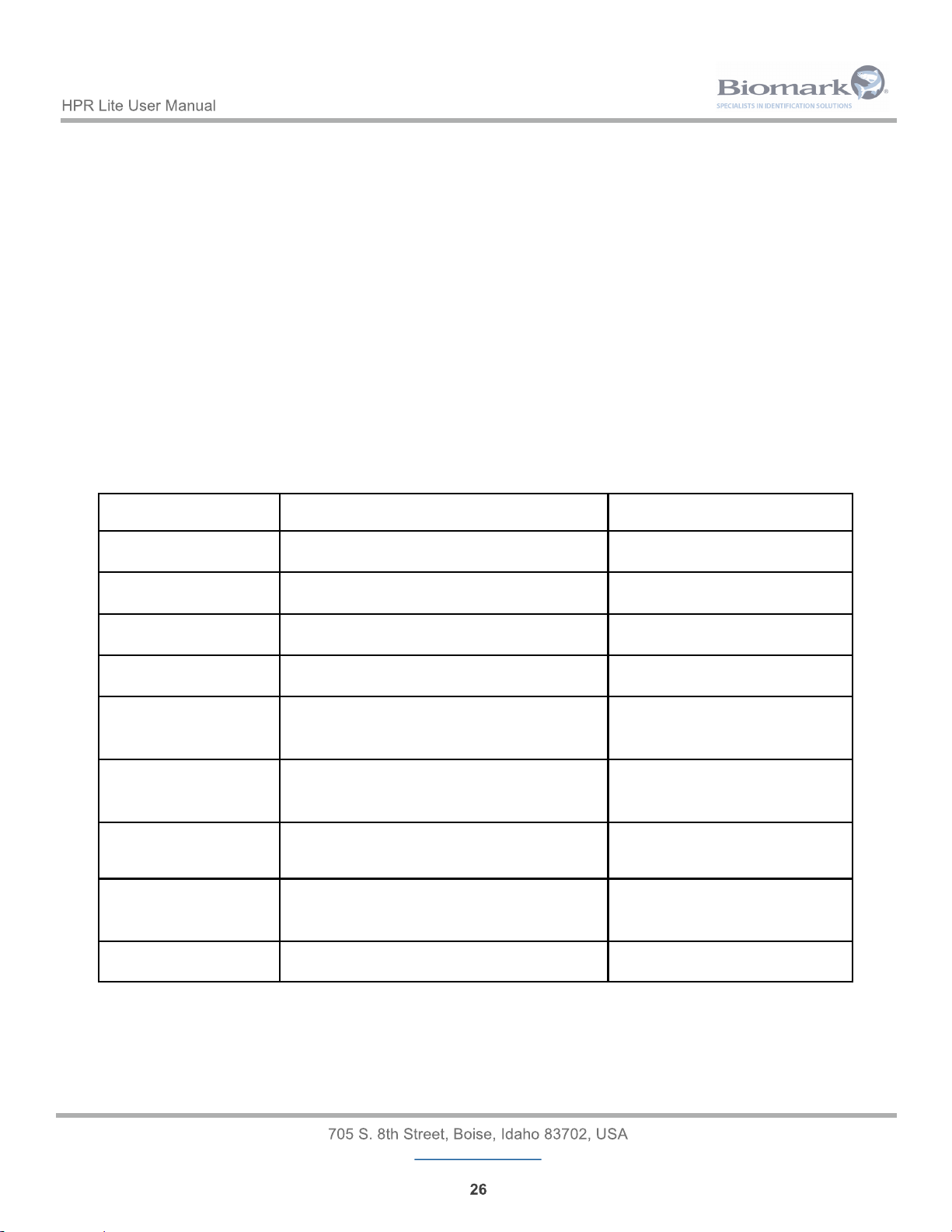
The following is a list of the available commands.
6.1 General Commands
Command Description Example Result
RFV Report Firmware Version 1.01
RHV Report Hardware Version A2
RID Report Reader ID 01
RUT Report Unit Type HPR-Lite
RDS <mm/dd/yyyy> Set Reader Date (mm/dd/yyyy)
“.” can be used as a separator
Date changed
RTS <hh:mm:ss> Set Reader Time (hh:mm:ss, 24-hour)
“.” can be used as a separator
Time changed
RDT Report Reader Date (mm/dd/yyyy) and
Time (hh:mm:ss, 24-hour)
<10/13/2012> <07:58:00>
RDP Reset to Factory Default Parameters Are you sure? y/n
Default settings loaded
? List All Commands
Page 27
www.biomark.com
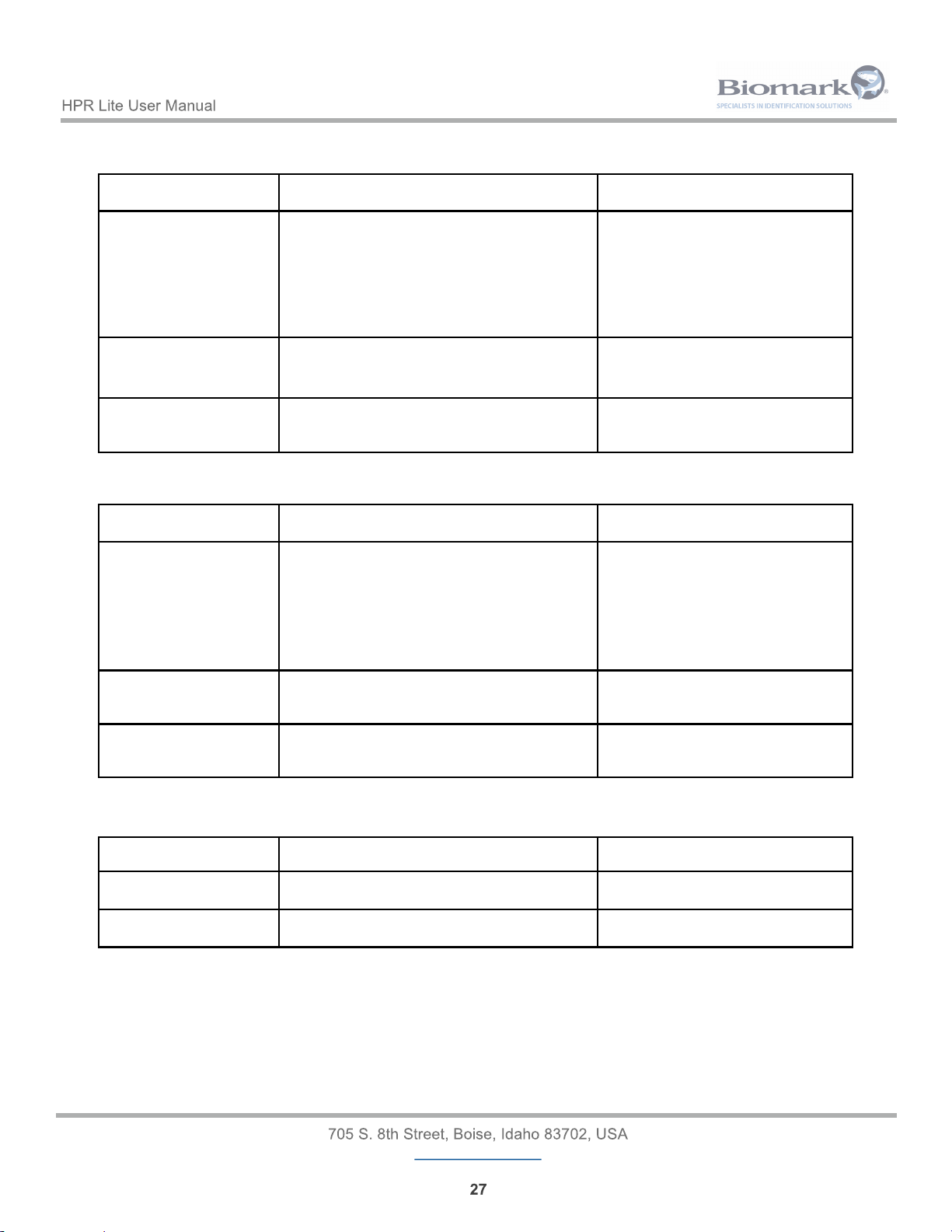
6.2 Settings Commands
6.3 Memory Commands
Command Description Example Result
FDA Download Entire Memory File
12-13-2016 11:46:28 01 TAG *
3DD.003BA20748
12-13-2016 11:53:45 01 TAG *
TR 00-06D1-86E7
…
Entire memory file downloaded
FEA Erase Entire Memory File Are you sure? y/n
Entire memory file erased
FCD Copy Entire Memory File to USB Drive Entire memory file copied to
USB drive: tag_01_00.csv
6.4 Power Commands
Command Description Example Result
POW Report Power Information Battery: 68% 7.81 V
RAR Reset Reader OK
Command Description Example Result
SLA List All Present Settings 1. Reader ID = 01
2. Unit Name = HPRLite_P0156
…
17. Bluetooth Password = 1234
ST <id> Report Present Value of a Setting st 1
1. Reader ID = 01
S <id> <value> Change Value of a Setting s 1 ff
1. Reader ID = FF
Page 28
www.biomark.com
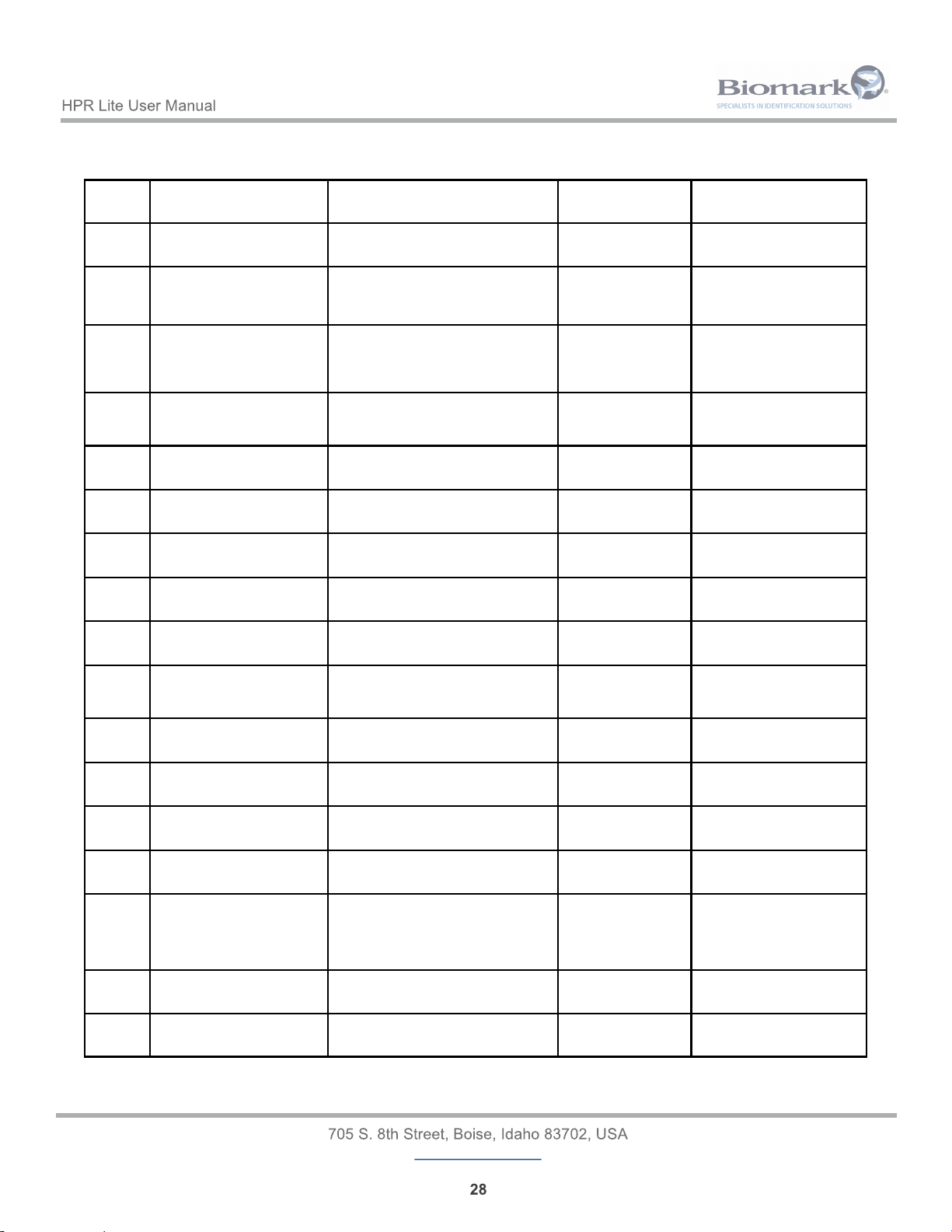
7 Reader Setting Values and Defaults
Setting
Number
Setting Name Description Factory Default
Value
Configurable Values
1 Reader ID Defines the reader ID
(2 HEX characters)
01 2 HEX characters
00-FF
2 Unit Name Defines the unit name that is used as
Bluetooth discoverable name
“HPR-Lite_xxxx”
(“xxxx” is the reader
Up to 16 alphanumeric
characters
3 Language Defines the reader interface language 1 (English) 1=English
2=French
3=Spanish
4=Portuguese
4 Timestamp Format Defines the date format for
timestamping
2 (MDY) 1=DMY
2=MDY
3=ISO 8601
5 Tag Format Defines the tag ID display format 1 (HEX) 1=DEC
2=HEX
6 Temperature Unit Defines the BioTherm13 tag
temperature display unit
2 (F) 1=“C”
2=“F”
7 Power Saving Mode Reduces antenna power output by 50% No 0=No
1=Yes
8 Auto Shutdown Time Defines the time before the reader
automatically powers off
180 0-7200 (seconds)
9 Backlight Time Defines the time before the backlight is
turned off
20 1-7200 (seconds)
10 Storage Mode Defines the tag IDs storage mode 3 (On Unique) 1=No storage
2=On All
3=On Unique
11 Vibration Enable Enables/Disables the vibration Yes 0=No
1=Yes
12 Beeper Enable Enables/Disables the beeper Yes 0=No
1=Yes
13 Bluetooth Enable Enables/Disables the Bluetooth Yes 0=No
1=Yes
14 Bluetooth Authentication Enables/Disables the Bluetooth
Authentication
Yes 0=No
1=Yes
15 Bluetooth Connection Mode Defines whether the reader operates in
Slave (discoverable and connectable)
or Master mode (automatically connect
to a known device)
1 (Slave) 1=Slave
2=Master
16 Bluetooth Remote Address Defines the Bluetooth address to
connect in Master mode to
00:00:00:00:00:00 6 bytes
17 Bluetooth Password Defines the PIN code for the Bluetooth
Authentication
1234 Up to 16 alphanumeric
characters
Page 29
www.biomark.com
8 Tag Transmission Format
Tag information is transmitted in the following format:
[TIMESTAMP] [READER ID] TAG [*] [TAG NUMBER] [TAG TEMPERATURE]
Where:
• TIMESTAMP is the date and time of the detection. Date can be represented in 3 different formats
depending on the present configuration of the reader. Ex: 12-13-2016 11:46:28.
• READER ID is the detecting reader ID (2 HEX characters). Ex: A0.
• “*” is only transmitted when tag ID is downloaded from reader’s memory via Bluetooth or USB
communication connection.
• TAG NUMBER is the detected tag’s unique ID number. It can be represented in DEC or HEX
format depending on the configuration of the reader.
FDX-B / HDX / Fastag: 900.074001615913 or 384.113AD70C29
FDX-A: 0A115A4D4D
TROVAN: TR 00-0724-CEE1
MANCHESTER: 0000187828868 or 000B320A84
AVID Encrypted: AVID*068*834*609
• TAG TEMPERATURE is the temperature reading of the detected FDX-B BioTherm13 tag
(BIO13.THERM.03V1).
8.1 “Streamed” Data
Each time a new tag is scanned, its ID number is transmitted to both communication links (Bluetooth and
USB):
12-13-2016 11:46:28 A0 TAG 3DD.003BA20748
If the same tag is scanned multiple times in a row it’s ID will be transmitted every time it is scanned if Storage
Mode is set to 1 (No storage) or 2 (On All). If Storage Mode is set to 3 (On Unique) the ID will only be
transmitted once until a different tag is scanned.
Page 30
www.biomark.com
8.2 USB Drive Download
When a tag ID is downloaded from reader’s memory onto USB Flash drive, it is written in a CSV file as a
single data string:
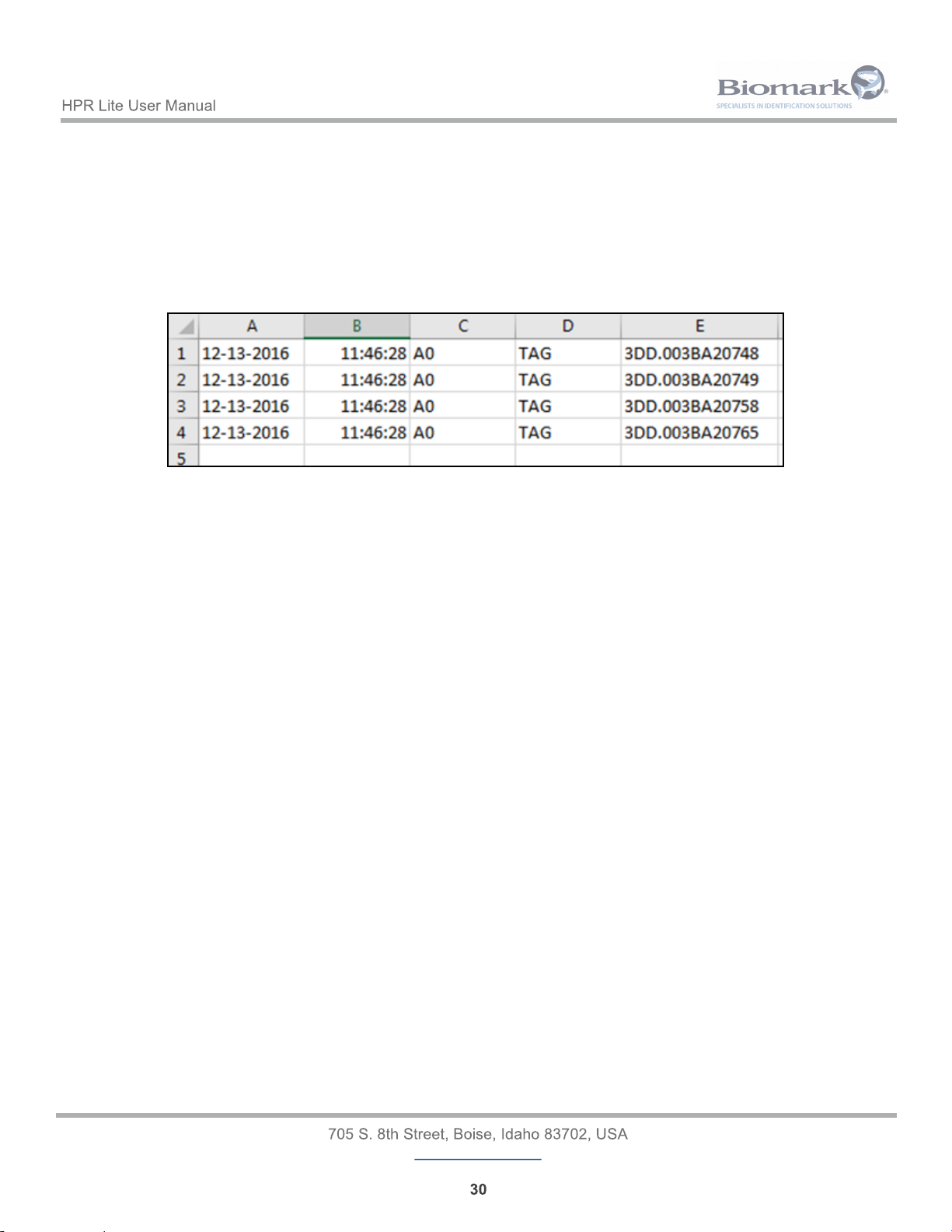
12-13-2016 11:46:28 A0 TAG 3DD.003BA20748
Once the CSV file is opened in Microsoft Excel, data can be sorted in columns using the space delimiter as
following:
8.3 Memory Download
When a tag ID is downloaded from reader’s memory via Bluetooth or USB communication connection, a “*” is
added to each line to differentiate it from “streamed” data:
12-13-2016 11:46:28 A0 TAG * 3DD.003BA20748
Page 31
www.biomark.com
9 Reader Alarms
Whenever a fault event occurs with the reader, an alarm message is displayed and 3 beeps are emitted to
make you aware of the condition.
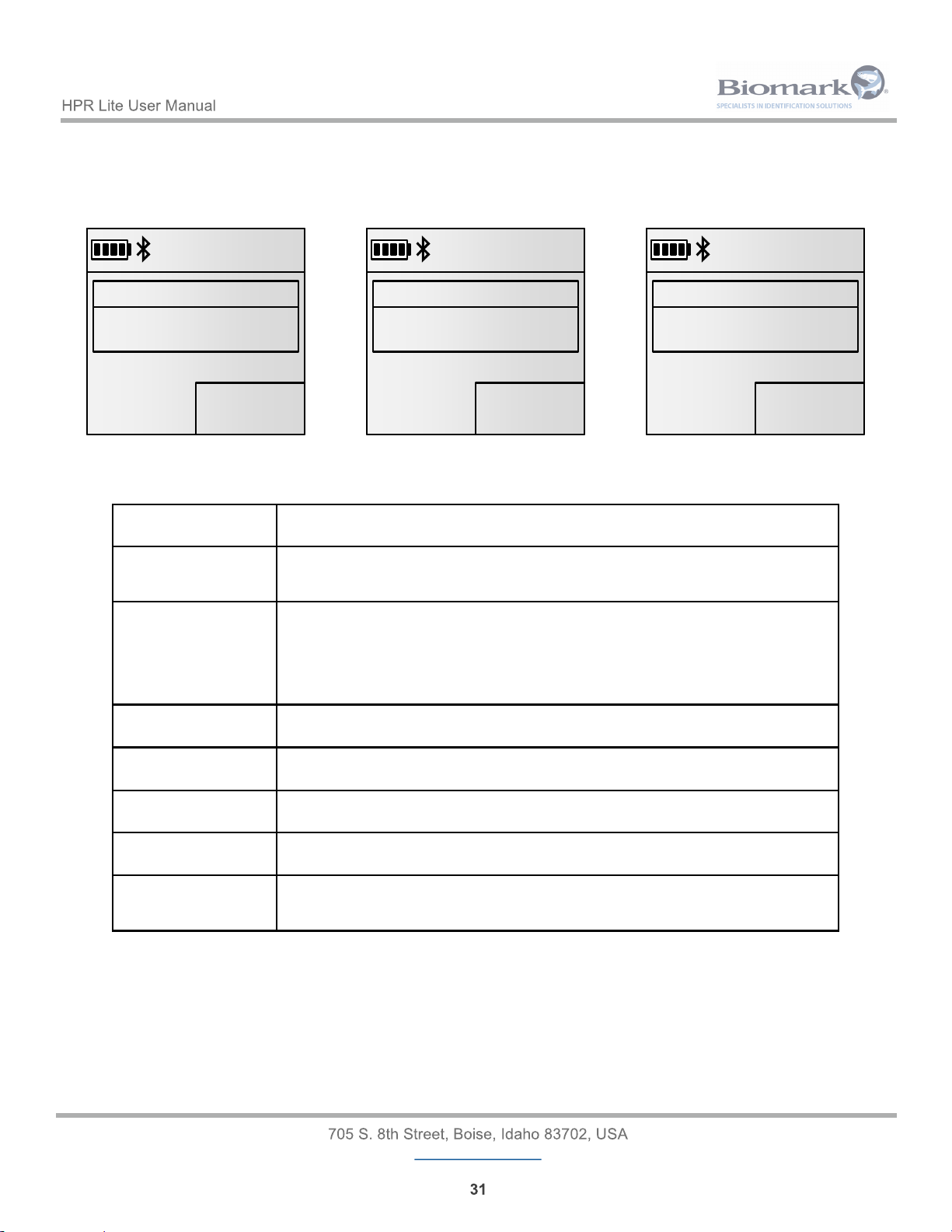
The following table contains the list of possible alarms and their detailed description:
Alarm Problem
High temperature The reader internal temperature is over 80°C. The reader will shut down
automatically.
Bad battery
detected
The reader detected a bad battery and the battery must be replaced.
Please contact Biomark customer service for this procedure. Do not
attempt to replace the battery yourself as this can damage the reader
and will void any existing warranty.
Battery too hot The battery temperature is over 40°C. Charging is internally suspended.
Battery too cold The battery temperature is below 0°C. Charging is internally suspended.
Low external power USB voltage is below 4.5 V. Charging is internally suspended.
Low battery The battery voltage is below 10%.
Battery flat The battery voltage is 0% and it must be charged. The reader will shut
down automatically.
01234
7:13 PM
09/27/2017
MEMORY
3DD.00075BCD15
FDX-B
Warning
High temperature
01234
7:13 PM
09/27/2017
MEMORY
3DD.00075BCD15
FDX-B
Warning
High temperature
01234
7:13 PM
01/27/2016
MEMORY
3DD.00075BCD15
FDX-B
Warning
Battery too hot
01234
7:13 PM
01/27/2016
MEMORY
3DD.00075BCD15
FDX-B
Warning
Battery too hot
01234
7:13 PM
09/27/2017
MEMORY
3DD.00075BCD15
FDX-B
Warning
Low external power
01234
7:13 PM
09/27/2017
MEMORY
3DD.00075BCD15
FDX-B
Warning
Low external power
01234
7:13 PM
09/27/2017
MEMORY
3DD.00075BCD15
FDX-B
Warning
Low external power
01234
7:13 PM
09/27/2017
MEMORY
3DD.00075BCD15
FDX-B
Warning
Low external power
Page 32
www.biomark.com
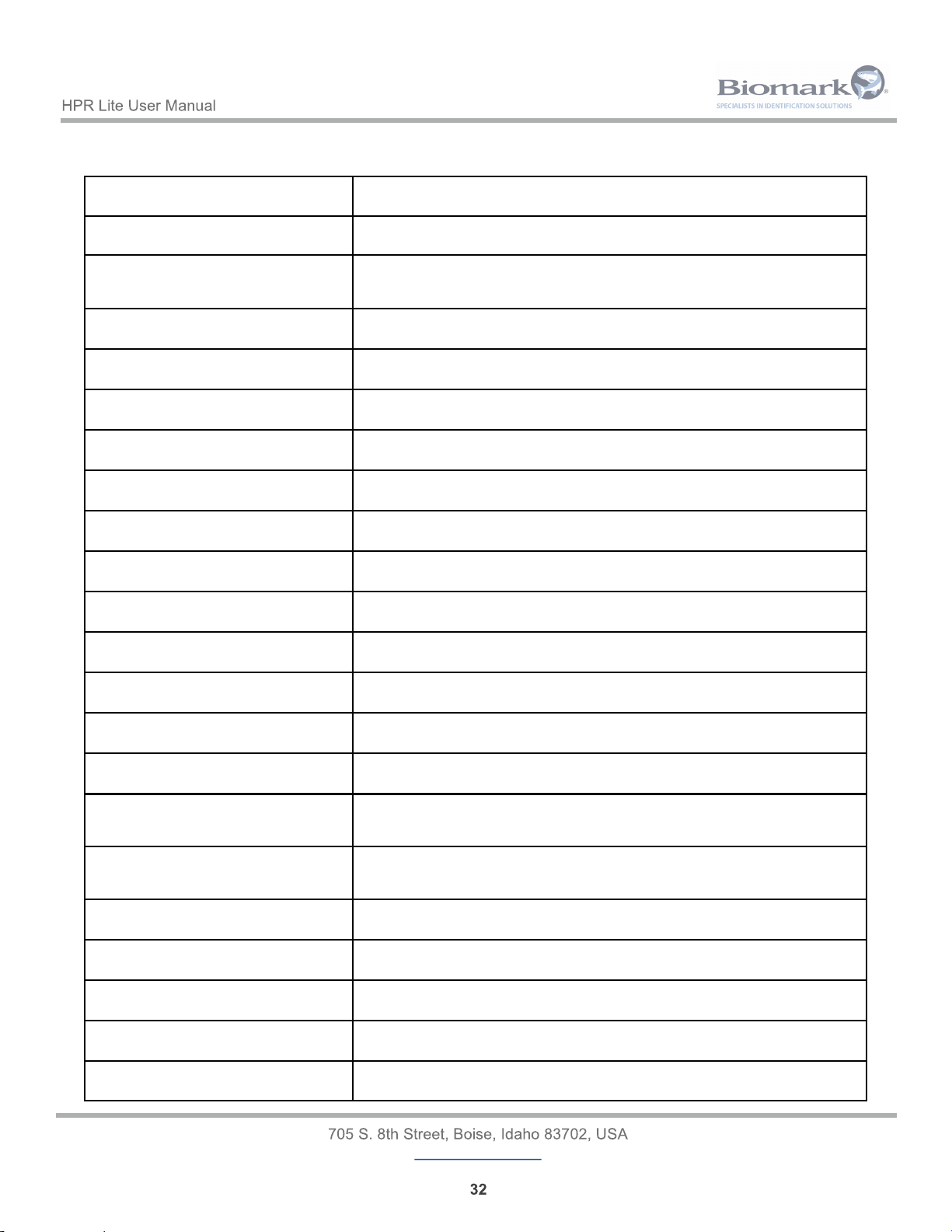
10 Reader Technical Specifications
Specification Description
Operating Frequencies 134.2 kHz
Tags Detection FDX-B, HDX, FDX-B Fastag, FDX-B BioTherm13, FDX-A, Avid
Encrypted, Trovan, Unique (Manchester Encoded)
Antenna Design Internal
Antenna Power Adjustable Yes
External Power Options 5 V DC
Internal Battery Type Li-ion (Rechargeable)
Tag ID Memory 50,000 IDs
Date & Time Stamp Option Yes
Communication Options USB, Bluetooth, USB Flash Drive
GPS Capable No
Automatic Power Shut-off Programmable
Continuous Operation Capability No
Display Type FSTN B&W, 3.8 cm x 3.8 cm LCD
Display Backlight Yes
Operating Temperature Range -20°C – 58°C with relative humidity between 10% and 90%, non-
Storage Temperature Range -20°C – 58°C with relative humidity between 10% and 90%, non-
Waterproof Yes (IP67)
Shockproof Yes (per EN 60068-2)
Dimensions 31 x 12.4 x 4 cm (12.2 x 4.9 x 1.6 in)
Weight 450 g (0.99 lbs)
Regulatory Compliance ISO 11784 & 11785, FCC, IC, CE
Page 33
www.biomark.com
11 Warranty
The HPR Lite reader is warranted against defects in materials and workmanship, under normal use and
service for one (1) year from the day of shipment.
This warranty will not apply if adjustment, repair or parts replacement is required because of accident,
neglect, damage during transportation or causes other than ordinary use.
Manufacturer’s sole responsibility under this warranty shall be at its option, to either repair or replace any
product which fails during the warranty period. In no event shall Manufacturer be liable for any indirect or
consequential damages or loss of profit.
 Loading...