

Page 1

Instructions for Use (IFU)
for
KardiaMobile® (Model AC-019)
19LB01.X13
AliveCor, Inc.
444 Castro Street,
Mountain View, CA 94041, USA
© AliveCor, Inc. 2019
AliveCor is a registered trademark of AliveCor, Inc.
Page 2

Instructions for Use for KardiaMobile® (Model AC-019)
Table of Contents
Introduction 3
Guide to Parts 3
Warnings 4
Cautions 5
Indications For Use 5
Terms 5
Setting up your KardiaMobile® (Model AC-019) hardware for the first time 6
Recording a Six-Lead ECG 8
Recording a Single-Lead ECG 10
ECG Analysis 12
Heart Rate 13
Previously Recorded ECGs 13
Clinical Testing 14
Environmental Specifications 14
Expected Service Life 14
Maintenance 15
Electromagnetic & Other Interferences 15
FCC Compliance 15
Ingress Protection Marking 16
Applied Parts 16
Troubleshooting 16
Electrical Safety 18
Equipment Symbols 23
Page 2 of 23
Page 3

Instructions for Use for KardiaMobile® (Model AC-019)
KardiaMobile® (Model AC-019)
Introduction
1. The KardiaMobile® (Model AC-019) System allows you to record a Six-Lead ECG and a
Single-Lead ECG.
a. It is recommended that you record a Six-Lead ECG (which provides more data to
your cardiologist) when possible.
2. The KardiaMobile® (Model AC-019) hardware is used with a user-supplied compatible
smartphone or tablet.
3. The KardiaMobile® (Model AC-019) System consists of:
a. KardiaMobile® (Model AC-019) – a device that has 3 electrodes to sense and
transmit 6-Lead ECG rhythms to the smartphone or tablet and that can optionally
attach to your compatible smartphone with the sold-separately phone clip;
b. Kardia app – SW application installed on a compatible smartphone or tablet used to
collect, view, and save ECG recordings and to wirelessly transmit to the AliveCor
server;
Guide to Parts
TOP VIEW
BOTTOM VIEW
Page 3 of 23
Page 4

Instructions for Use for KardiaMobile® (Model AC-019)
Warnings
1. AliveCor does not guarantee that you are not experiencing an arrhythmia or other health
conditions when labeling an ECG as normal. You should notify your physician for possible
changes in your health.DO use this device to record heart rate and heart rhythm only.
2. DO NOT use to diagnose heart- related conditions.
3. DO NOT use to self-diagnose heart related conditions. Consult with your physician before
making any medical decision, including altering your use of any drug or treatment.
4. DO NOT continue use until further instructed by a physician if your skin is irritated or
inflamed around the electrode.
5. AliveCor makes no warranty for any data or information that is collected erroneously by the
device, or misuse or malfunction as a result of abuse, accidents, alteration, misuse, neglect,
or failure to maintain the products as instructed. Interpretations made by this device are
potential findings, not a complete diagnosis of cardiac conditions. All interpretations should
be reviewed by a medical professional for clinical decision-making.
6. The device has not been tested for and is not intended for pediatric use.
7. Keep device away from young children. Contents may be harmful if swallowed. Device
contains a coin cell battery that is not accessible during normal use but, if exposed, can be a
choking hazard and may cause severe tissue injury if ingested.
8. DO NOT replace the battery when device is in use.
9. DO NOT use the electrode on a portion of the body with too much body fat, body hair or
very dry skin, a successful recording may not be possible.
10. DO NOT take a recording while driving or during physical activity.
11. DO NOT store in extremely hot, cold, humid, wet, or bright conditions.
12. DO NOT take a recording if electrodes are dirty. Clean them first.
13. DO NOT immerse device or expose device to excessive liquid.
14. DO NOT use while charging your phone.
15. DO NOT drop or bump with excessive force.
16. DO NOT expose to strong electromagnetic fields.
17. DO NOT expose the device to a magnetic resonance (MR) environment.
18. DO NOT use with a cardiac pacemaker, ICDs, or other implanted electronic devices.
19. DO NOT use during cautery and external defibrillation procedures.
20. DO NOT place electrodes in contact with other conductive parts including earth.
21. DO NOT use with un-approved accessories. Use of non-AliveCor approved accessories or
transducers and cables could result in electromagnetic emissions or decreased
electromagnetic immunity of this device and result in improper operation.
22. DO NOT use adjacent to or stacked with other equipment because it could result in
improper operation.
23. DO NOT use portable RF communications equipment (including peripherals such as
antenna cables and external antennas) closer than 30 cm (12 inches) to any part of the
KardiaMobile® (Model AC-019) System. Otherwise, degradation of the performance of the
KardiaMobile® (Model AC-019) System could result.
Page 4 of 23
Page 5

Instructions for Use for KardiaMobile® (Model AC-019)
Cautions
1. Detection of possible Atrial Fibrillation (AF) in your EKG results are not to be used for
diagnosis. If you are experiencing any concerning symptoms, contact your physician.
2. Result of "Bradycardia" or "Tachycardia" are designations of heart rate, not a clinical
diagnosis of an arrhythmia. Please consult with your physician should you receive
consistent identifications of "Bradycardia" or "Tachycardia".
3. “Unreadable” EKG results determines that you didn't have proper EKG recording for
analysis. You may try to re-record your EKG.
Indications For Use
The KardiaMobile® (Model AC-019) System is intended to record, store and transfer one- and
two-channel electrocardiogram (ECG) rhythms. In single channel mode, the KardiaMobile®
(Model AC-019) System can record Lead-I. In two channel mode, the KardiaMobile® (Model
AC-019) System can record Lead-I and Lead-II simultaneously and derive Lead-III and unipolar
limb leads aVR, aVF and aVL. The KardiaMobile® (Model AC-019) System also displays ECG
rhythms and output of ECG analysis from AliveCor’s KardiaAI platform including detecting the
presence of normal sinus rhythm, atrial fibrillation, bradycardia, tachycardia, and others. The
KardiaMobile® (Model AC-019) System is intended for use by healthcare professionals, patients
with known or suspected heart conditions and health conscious individuals. The device has not
been tested and is not intended for pediatric use.
Terms
ECG: Also known as an electrocardiogram, an ECG is a test that detects and records the
strength and timing of the electrical activity in your heart. This information is recorded on a
graph that shows each phase of the electrical signal as it travels through your heart.
Single-Lead ECG: When the 2 top electrodes (Left Hand Electrode and Right Hand Electrode)
are used, the Kardia app will display a Single-Lead ECG that is comparable to Lead I on
standard ECG machines.
Six-Lead ECG: When all 3 electrodes (Left Hand Electrode, Right Hand Electrode, and Left Leg
Electrode) are used, the Kardia app will display a Six-lead ECG that is comparable to Leads I, II,
III, aVF, aVL, and aVR on standard ECG machines. It is recommended that you record a SixLead ECG (which provides more data to your cardiologist) when possible.
Page 5 of 23
Page 6
Instructions for Use for KardiaMobile® (Model AC-019)
Setting up your KardiaMobile® (Model AC-019)
hardware for the first time
1. Remove KardiaMobile® (Model AC-019) from packaging.
2. Setup KardiaMobile® (Model AC-019)
○ Download the Kardia app from the App Store or Google Play on your compatible iOS
or Android device (check for compatibility at www.alivecor.com/compatibility).
○ Make sure you have Bluetooth turned on your smartphone (or tablet).
3. Tap on your home screen to launch the Kardia app and tap Create Account.
○ Follow the onscreen instructions to create an account.
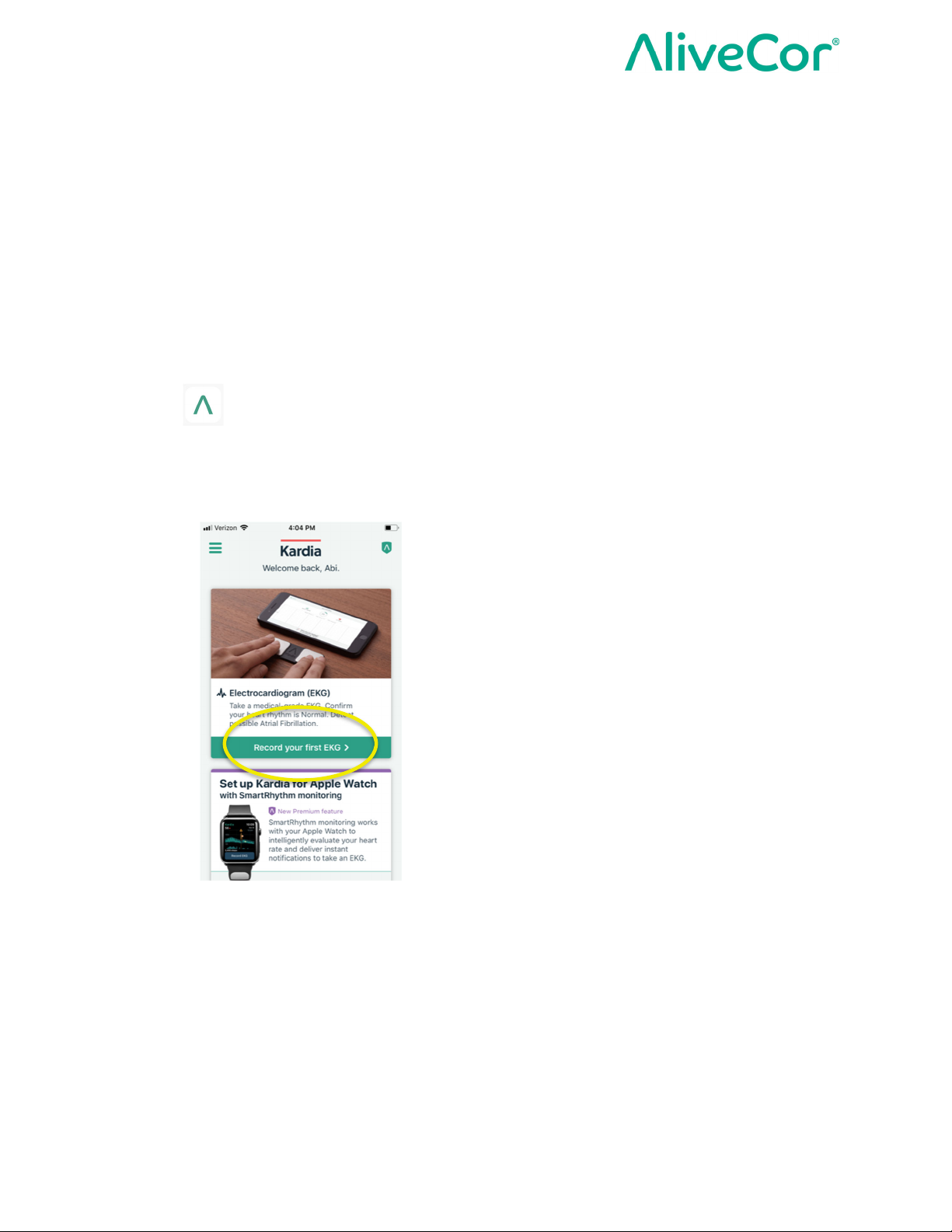
4. From the Kardia app home screen, tap Record your first ECG.
5. Select KardiaMobile® (Model AC-019) as your device
Page 6 of 23
Page 7
Instructions for Use for KardiaMobile® (Model AC-019)
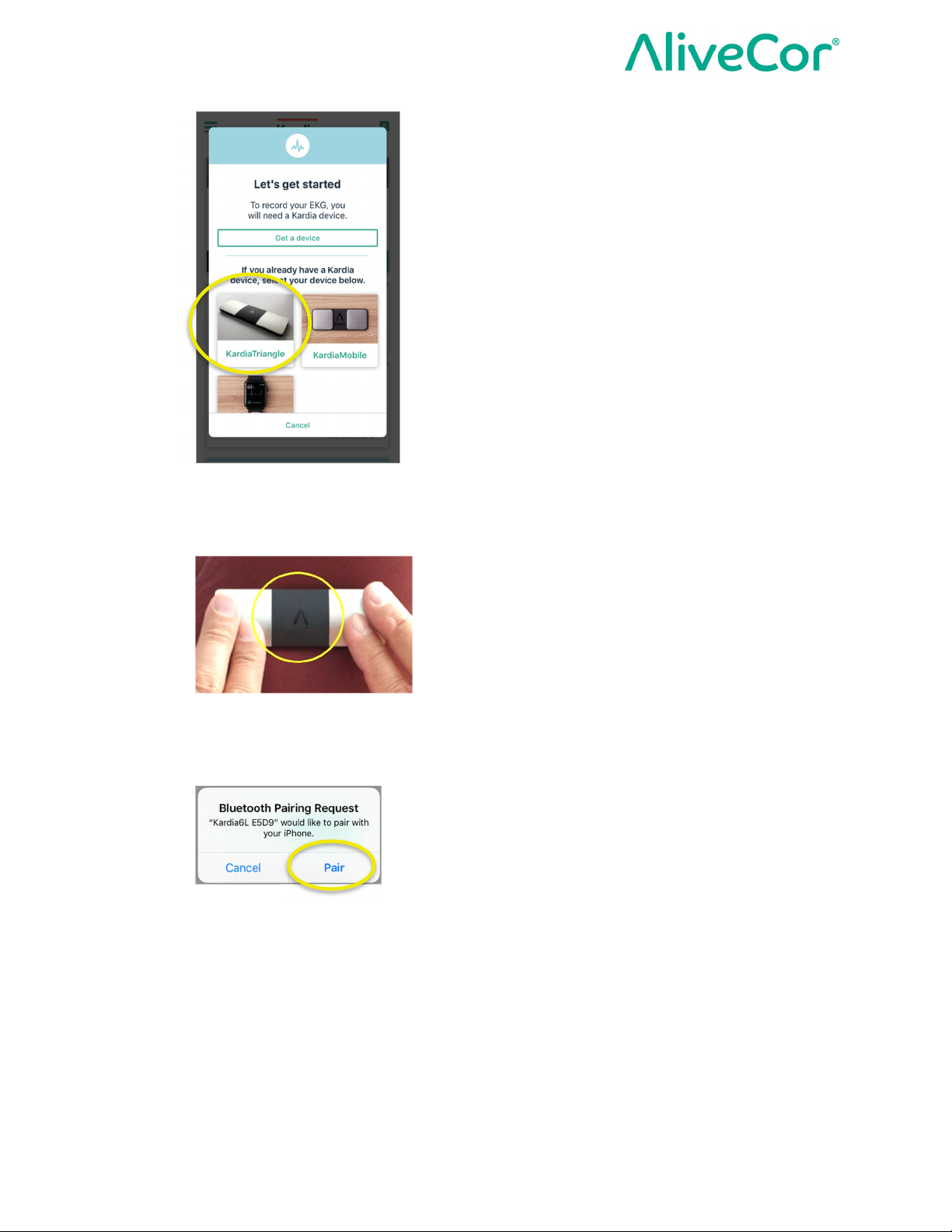
6. Tap lightly on the 2 top electrodes (Left Hand Electrode and Right Hand Electrode) for 5
seconds to wake up your KardiaMobile® (Model AC-019) hardware and initialize Bluetooth
pairing.
7. Select Pair to pair the KardiaMobile® (Model AC-019 hardware with your phone via
Bluetooth.
Page 7 of 23
Page 8
Instructions for Use for KardiaMobile® (Model AC-019)
Recording a Six-Lead ECG
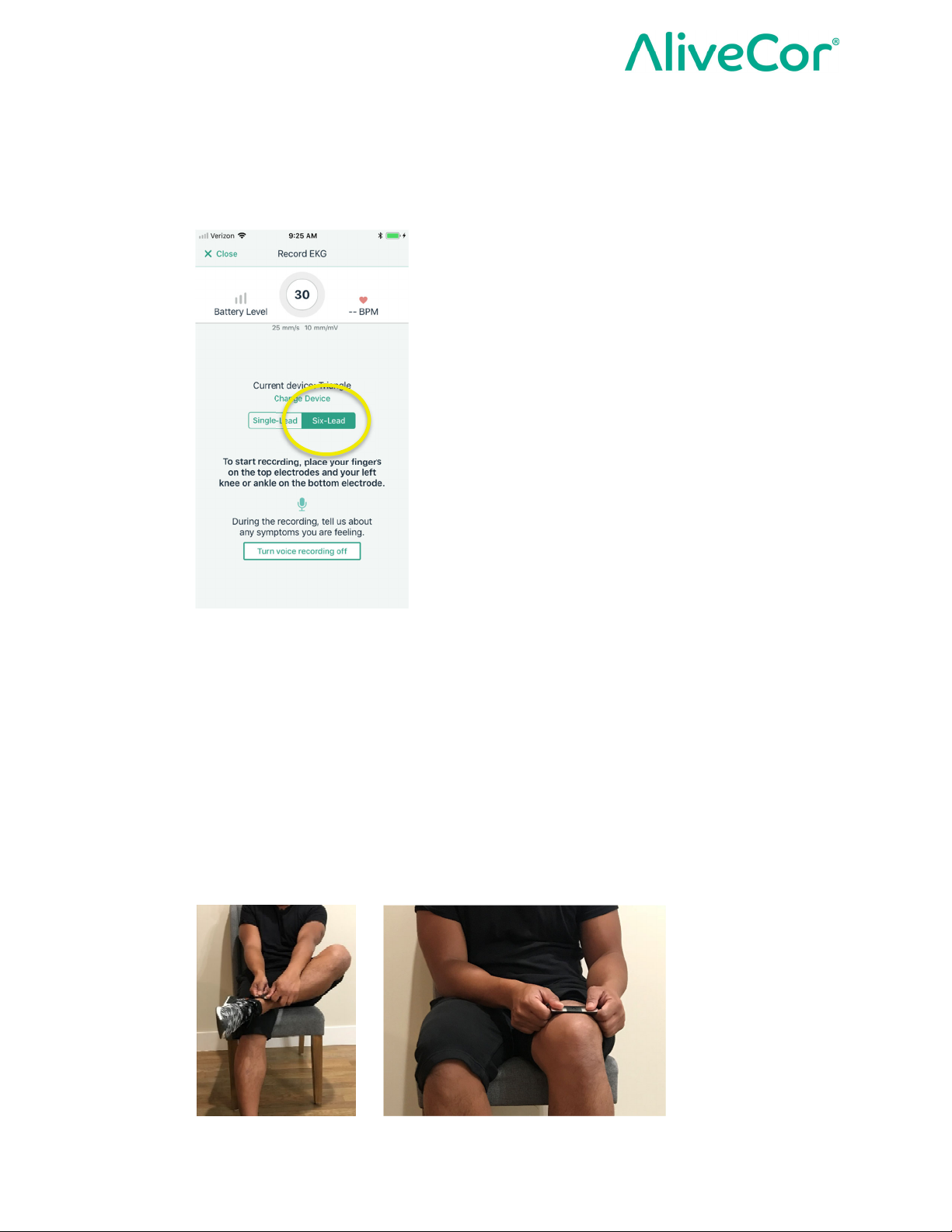
1. Select Six-Lead on the Record ECG screen.
NOTE: The Six-Lead option will be the default because it is recommended that you record a
Six-Lead ECG (which provides more data to your cardiologist) when possible.
If you prefer to record a Single-Lead ECG, follow the instructions in the section Recording
a Single-Lead ECG.
2. Remain still and hold the device with your thumbs on the 2 top electrodes (Left Hand
Electrode and Right Hand Electrode) and touch the bottom electrode (Left Leg Electrode) to
the skin above your left knee or your left ankle.
NOTE: It is recommended that the bottom electrode (Left Leg Electrode) touches bare skin
when you record a Six-Lead ECG.
Page 8 of 23
Page 9
Instructions for Use for KardiaMobile® (Model AC-019)
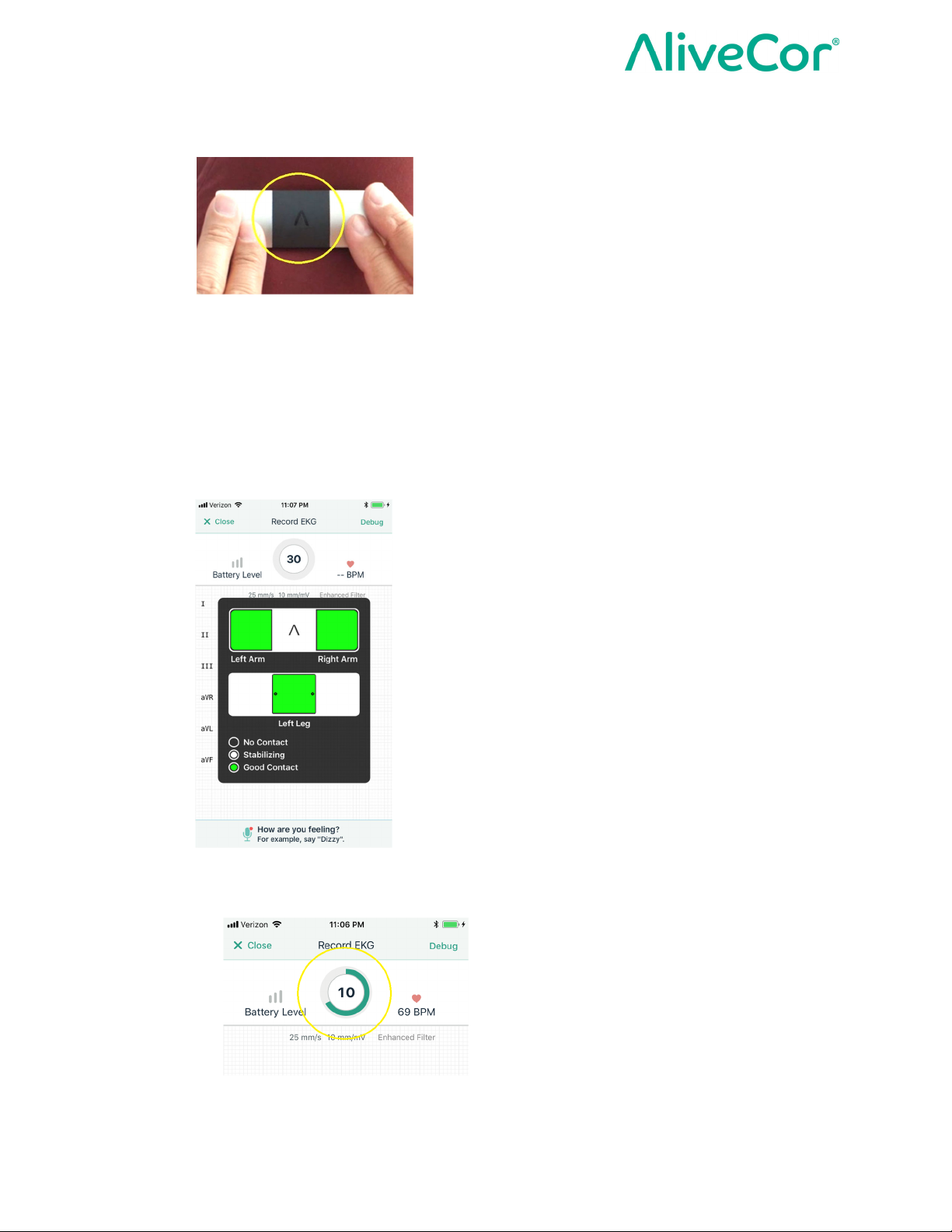
3. Make sure that the AliveCor logo is in the correct orientation.
4. An ECG recording will take 30 seconds and will start once all three electrodes (Left Hand
Electrode, Right Hand Electrode, and Left Leg Electrode) have good skin contact.
NOTE: Good Contact will be indicated by green lights on the electrode diagram on-screen.
An ECG recording will not start or will terminate when good skin contact is not obtained.
NOTE: KardiaMobile® (Model AC-019) may be used up to a distance of 10 feet from the
smartphone or tablet.
5. Hold steady while you watch the countdown timer decrease from 30 to 0 seconds.
6. After 30 seconds, you will see your Six-Lead ECG with the ECG Analysis.
Page 9 of 23
Page 10
Instructions for Use for KardiaMobile® (Model AC-019)
Recording a Single-Lead ECG
NOTE: It is recommended that you record a Six-Lead ECG (which provides more data to your
cardiologist) when possible.
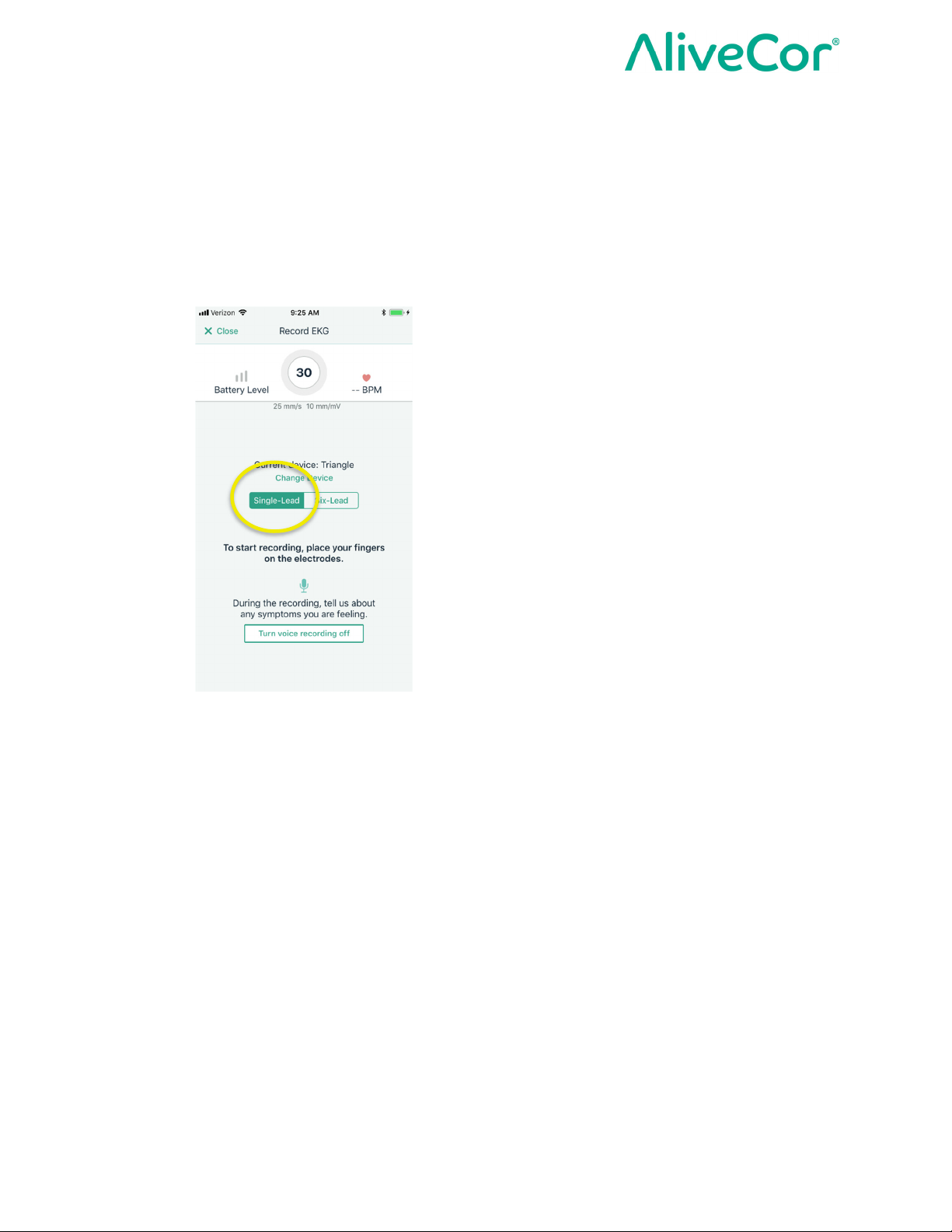
1. Select Single-Lead on the Record ECG screen.
NOTE: If you prefer to record a Six-Lead ECG, follow the instructions in the section
Recording a Six-Lead ECG.
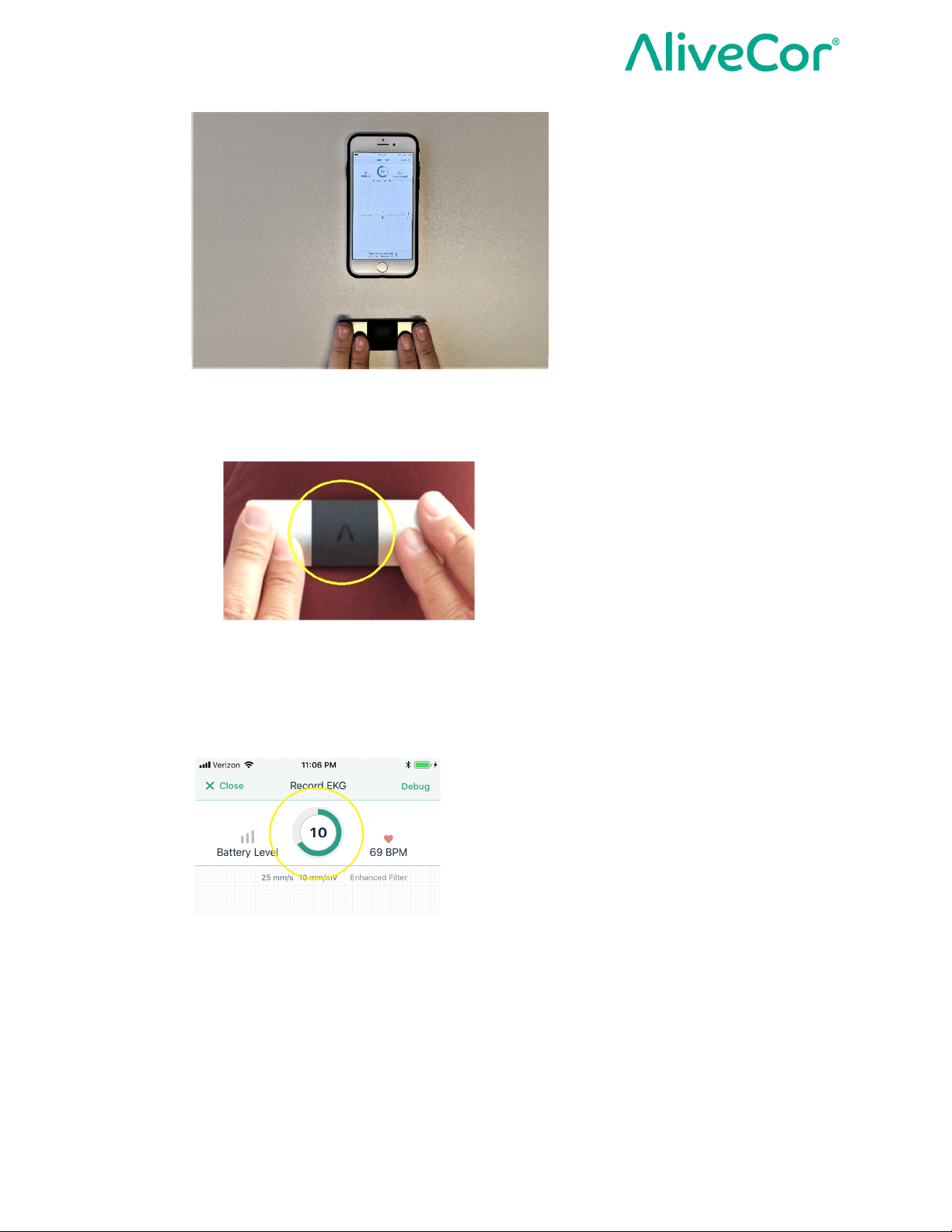
2. Rest your arms on a flat surface. Remain still and hold the device with your thumbs on the 2
top electrodes (Left Hand Electrode and Right Hand Electrode). Make sure your fingers
don’t touch the bottom electrode (Left Leg Electrode)
Page 10 of 23
Page 11
Instructions for Use for KardiaMobile® (Model AC-019)
3. Make sure that the AliveCor logo is in the correct orientation.
4. An ECG recording will take 30 seconds and will start once the Left Hand Electrode and
Right Hand Electrode have good skin contact. Hold steady while you watch the countdown
timer decrease from 30 to 0 seconds.
○ NOTE: An ECG recording will not start or will terminate when good skin contact is
not obtained.
○ NOTE: KardiaMobile® (Model AC-019) may be used up to a distance of 10 feet from
the smartphone or tablet.
5. After 30 seconds, you will see your Single-Lead ECG with the ECG Analysis.
Page 11 of 23
Page 12

Instructions for Use for KardiaMobile® (Model AC-019)
ECG Analysis
The KardiaMobile® (Model AC-019) hardware transmits the EKG signal from the electrodes to
the Kardia app on a mobile computing platform to be analyzed and presented to the user. The
KardiaMobile® (Model AC-019) System’s Kardia app will display an EKG, single-lead (Lead I
only) or six-lead EKGs (Lead I, Lead II, Lead III, aVL, aVR and aVF) and EKG Analysis.
The possible EKG Analysis Results that may be displayed based on the analysis of your EKG
are presented in the table below. Each EKG analysis result option is described along with
recommended action based on the result.
EKG Analysis Result Description Recommended Actions
Atrial Fibrillation Your EKG shows signs of
atrial fibrillation.
Bradycardia Your heart rate is less than
50 beats per minute, which is
slower than normal for most
people.
Normal No rhythm abnormalities are
detected in your EKG.
Tachycardia Your heart rate is faster than
100 beats per minute. This
can be normal with stress or
physical activity.
This is not a diagnosis, only
a possible finding. Contact a
physician if you have
questions or are concerned
about any symptoms.
This is not a diagnosis, only
a possible finding. Contact a
physician if you have
questions or are concerned
about any symptoms.
This is not a diagnosis, only
a possible finding. Contact a
physician if you have
questions or are concerned
about any symptoms.
This is not a diagnosis, only
a possible finding. Contact a
physician if you have
questions or are concerned
about any symptoms.
No Analysis Your EKG recording is of
insufficient duration. Instant
Analysis is not able to
provide an analysis on EKG
recordings shorter than 30
seconds.
Page 12 of 23
Record a new EKG. Try to
relax and hold still, rest your
arms, or move to a quiet
location that will allow for a
full 30 second recording.
Page 13
Instructions for Use for KardiaMobile® (Model AC-019)
Unclassified Your EKG does not fall into
the algorithmic classifications
of Normal, Bradycardia,
Tachycardia, or Atrial
Fibrillation. This result may
be caused by other
physiological condition (for
instance other arrhythmias,
very fast or slow heart rates)
or may be a result of poor
quality recordings.
Unreadable There is too much
interference in this recording.
WARNING: After ECG analysis, the app may incorrectly identify ventricular flutter,
ventricular bigeminy, and ventricular trigeminy heart conditions as unreadable. Please
consult with your physician.
This is not a diagnosis, only
a possible finding. Contact a
physician if you have
questions or are concerned
about any symptoms. Record
another EGK within hours or
days of this recording.
Record a new EKG. Try to
relax and hold still, rest your
arms, or move to a quiet
location with less
interference.
Heart Rate
Current heart rate is displayed during an ECG recording and the average heart rate is displayed
in completed ECG recordings along with the ECG Analysis.
The Kardia App has an internal QRS detector that is used to measure the heart rate, defined as
the inverse of the R-R time interval. During an ECG recording, the current heart rate is measured
from an average of this inverse calculation over the last 5 seconds.
For stored ECGs, the average heart rate is the average of this inverse calculation over the entire
30 seconds of the recording.
Previously Recorded ECGs
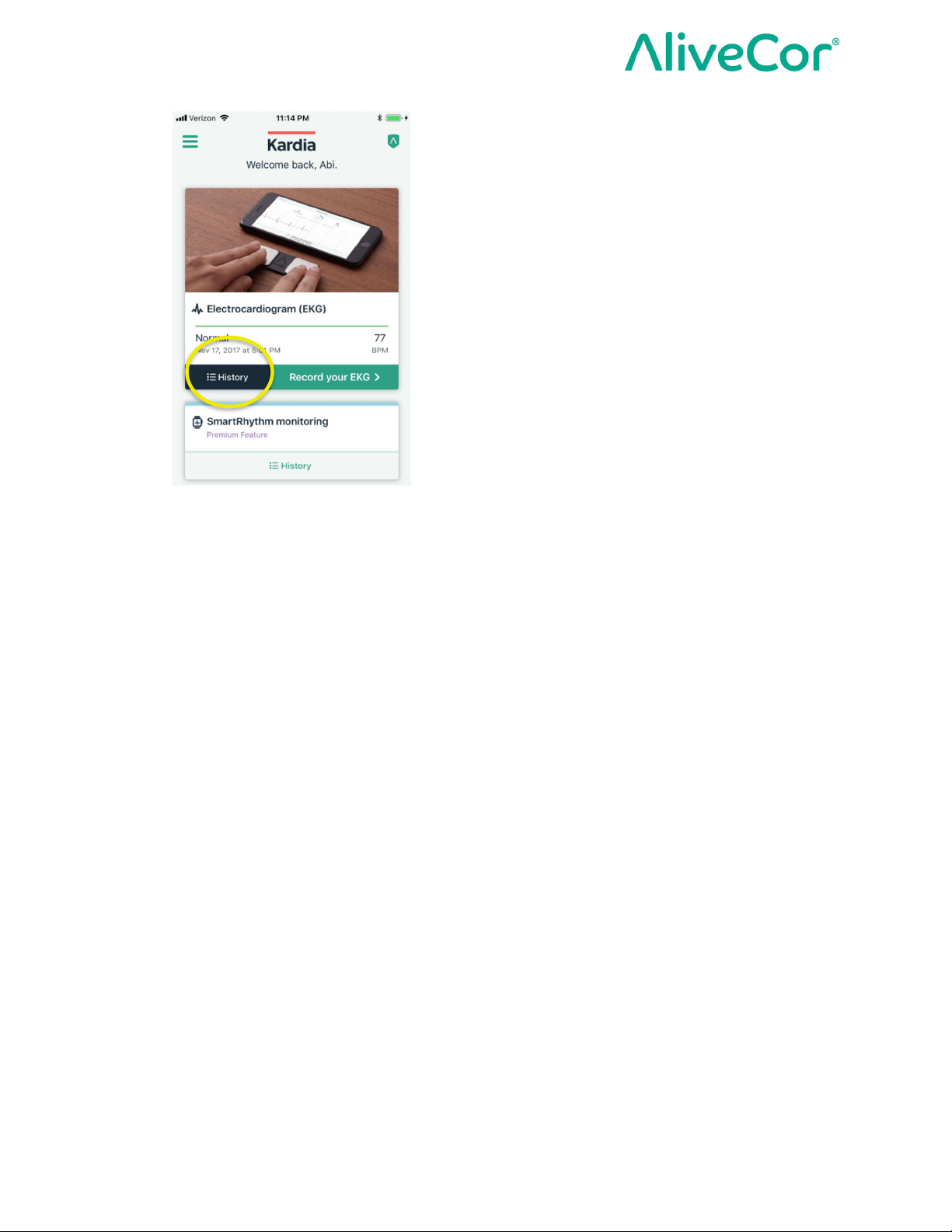
From the Kardia app home screen, tap History to access previously recorded ECGs.
Page 13 of 23
Page 14
Instructions for Use for KardiaMobile® (Model AC-019)
Clinical Testing
The KardiaMobile® (Model AC-019) System was thoroughly evaluated in a clinical study to
ensure users can get a medical grade ECG. Overall, 44 subjects participated in the study, that
included patients with arrhythmias as well as normal subjects. The study showed that the
KardiaMobile® (Model AC-019) device records a 6-lead ECG equivalent to the same leads on a
standard FDA-cleared hospital 12-lead ECG device but at an ambulatory bandwidth. Clinical
equivalence was shown qualitatively, through a review by two Board Certified Cardiac
Electrophysiologists and quantitatively, through a statistical test of equivalence between the two
sets of ECGs assessing various variables.
Environmental Specifications
Operational Temperature: +10°C to +45°C
Operational Humidity: 10% to 95% (non-condensing)
Storage Temperature: 0°C to +40°C
Storage Humidity: 10% to 95% (non-condensing)
Expected Service Life
The expected service life for KardiaMobile® (Model AC-019) is 2 years.
Page 14 of 23
Page 15
Instructions for Use for KardiaMobile® (Model AC-019)
Maintenance
1. No service or repair should be performed on the KardiaMobile® (Model AC-019) hardware
other than the maintenance listed in this section.
2. It is important to keep the electrodes clean by spraying with an alcohol-based sanitizer and
wiping with a soft cloth when needed.
○ Do use a clean, lint-free cloth
○ DO NOT use abrasive cleaners or materials
○ DO NOT immerse device or expose device to excessive liquid
3. Exterior Visual Inspection:
o Inspect electrodes for warping, surface damage, or corrosion
o Check for any other form of damage
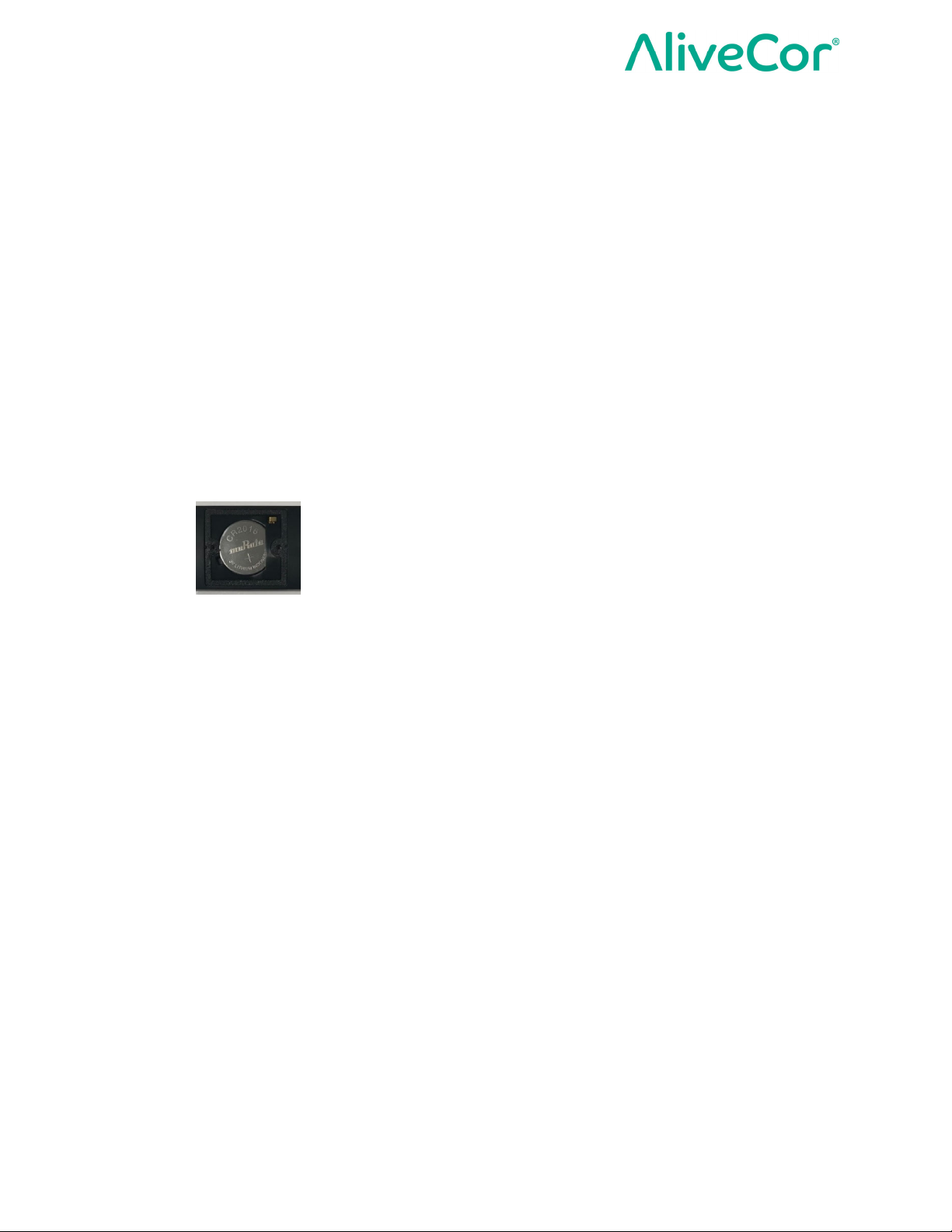
4. For battery replacement, AliveCor recommends that you bring your KardiaMobile® (Model
AC-019) hardware to a watch repair or hearing-aid repair shop.
○ Battery Type: CR2016 Coin Cell that is IEC 60086-4 compliant
○ Ensure proper orientation of the battery with battery information and (+) terminal
facing up
WARNING:
1. During replacement, keep device away from young children. Contents may be harmful if
swallowed. Device contains a coin cell battery that can be a choking hazard and may
cause severe tissue injury if ingested.
2. DO NOT replace the battery when device is in use.
Electromagnetic & Other Interferences
KardiaMobile® (Model AC-019) has been tested and deemed in conformance with the relevant
requirements in IEC 60601-1 -2:2014 Class B for Electromagnetic Compatibility (EMC).
FCC Compliance
FCC ID: 2ASFFAC019
This device complies with Part 15 of the FCC Rules.
Operation is subject to the following two conditions:
1. This device may not cause harmful interference, and
2. This device must accept any interference received, including interference that may cause
undesired operation.
Page 15 of 23
Page 16

Instructions for Use for KardiaMobile® (Model AC-019)
CAUTION: Changes or modifications not expressly approved by AliveCor could void your
authority to use this equipment.
To view FCC information on the Kardia app:
1. On the home screen, tap to access Kardia app Settings.
2. Tap “About Kardia” to the FCC ID and other applicable regulatory information.
Ingress Protection Marking
KardiaMobile® (Model AC-019) is IP22 rated. KardiaMobile® (Model AC-019) is protected
against insertion of fingers and is not affected by vertically dripping water. KardiaMobile®
(Model AC-019) has been tested with relevant requirement standard IEC 60601-1-11:2015.
Applied Parts
The 3 electrodes (Left Hand Electrode, Right Hand Electrode, and Left Leg Electrode) are Type
CF Applied Parts.
Operational temperature of the device is +10°C to +45°C. If ambient temperature exceeds
+41°C, Applied Parts can exceed +41°C.
Troubleshooting
If you experience difficulties in operating your KardiaMobile® (Model AC-019) System, refer to
the troubleshooting guide below or contact technical support at [email protected].
1. Problem: My KardiaMobile® (Model AC-019) is not working.
Solution
○ Option 1: Make sure you have Bluetooth turned on your smartphone (or tablet).
○ Option 2: Change the battery. AliveCor recommends that you bring your
KardiaMobile® (Model AC-019) hardware to a battery replacement shop for battery
replacement.
2. Problem: I have a lot of artifact, noise, or interference in my recording.
Solution
○ Option 1: Ensure that the “Enhanced Filter” is on.
○ Option 2: Ensure that your arms, hands, and left leg remain still during recordings to
reduce muscle noise.
○ Option 3: Clean the electrodes on the KardiaMobile® (Model AC-019) by spraying
with an alcohol-based sanitizer and wiping with a soft cloth.
○ Option 4: If your hands or left leg are very dry, use a water-based lotion before
recording.
Page 16 of 23
Page 17

Instructions for Use for KardiaMobile® (Model AC-019)
○ Option 5: If you wear hearing aids, turn them off prior to recording.
○ Option 6: Avoid close proximity to items that may cause electrical interference
(electronic equipment, computers, chargers, routers, etc.)
3. Problem: The ECG rhythm from Lead II does not appear while recording.
Solution
○ Ensure that the bottom electrode (Left Leg Electrode) is touching the skin above your
left knee or your left ankle.
NOTE: It is recommended that the bottom electrode (Left Leg Electrode) touches
bare skin when you record a Six-Lead ECG.
4. Problem: The ECG rhythms appear upside down.
Solution
○ Option 1: Make sure the AliveCor logo is in the correct orientation. Make sure your
thumbs are touching the 2 top electrodes (left thumb on the Left Hand Electrode and
right thumb on the Right Hand Electrode) and the bottom electrode (Left Leg
Electrode) is touching the skin above your left knee or your left ankle.
NOTE: It is recommended that the bottom electrode (Left Leg Electrode) touches
bare skin when you record a Six-Lead ECG.
○ Option 2: Invert the ECG.
In the Instant Analysis screen, tap “Invert” on the top left corner to toggle it ON or
OFF.
In the ECG Review screen, tap “MORE” at the bottom of the ECG Review
screen, and then tap the “INVERT” switch to toggle it ON or OFF.
Page 17 of 23
Page 18
Instructions for Use for KardiaMobile® (Model AC-019)
Electrical Safety
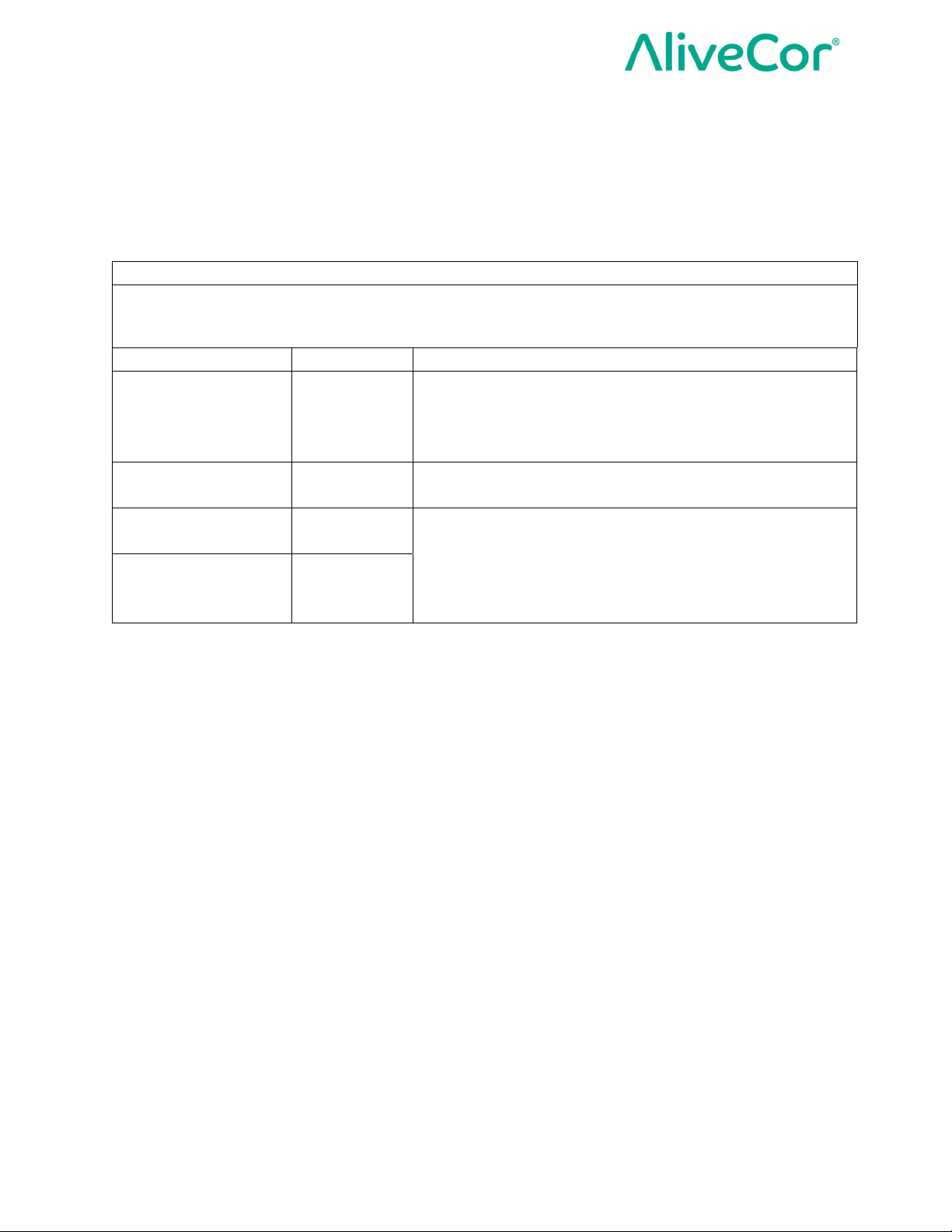
Guidance and manufacturer's declaration - electromagnetic emissions
KardiaMobile® (Model AC-019) is intended for use in the electromagnetic environment specified below.
The customer or the user of KardiaMobile® (Model AC-019) should assure that it is used in such an
environment.
Emissions test Compliance Electromagnetic environment - guidance
KardiaMobile® (Model AC-019) uses RF energy only for
RF emissions
CISPR 11
RF emissions
CISPR 11
Harmonic emissions
IEC 61000-3-2
Voltage fluctuations /
flicker emissions
IEC 61000-3-3
Group 1
Class B
N/A
N/A
its internal function. RF emissions are very low and are
not likely to cause any interference in nearby electronic
equipment.
KardiaMobile® (Model AC-019) is intended for use in
domestic surroundings.
KardiaMobile® (Model AC-019) is powered from a
lithium coin cell battery and does not require AC mains
power.
Page 18 of 23
Page 19

Instructions for Use for KardiaMobile® (Model AC-019)
Guidance and manufacturer’s declaration—electromagnetic immunity
KardiaMobile® (Model AC-019) is intended for use in the electromagnetic environment specified
below. The customer or the user of KardiaMobile® (Model AC-019) should assure that it is used in
such an environment.
Immunity test
Electrostatic
Discharge (ESD)
IEC 61000-4-2
IEC 60601 test
level
±2 kV contact
±4 kV contact
±6 kV contact
±8 kV contact
±2 kV air
±4 kV air
±8 kV air
±15 kV air
Compliance level
±2 kV contact
±4 kV contact
±6 kV contact
±8 kV contact
±2 kV air
±4 kV air
±8 kV air
±15 kV air
Electromagnetic
environment - guidance
Floors should be wood,
concrete, or ceramic tile. If
floors are covered with
synthetic material, the
relative humidity should be
at least 30%.
Electrical fast
transient/burst
N/A N/A
IEC 61000-4-4
Surge
IEC 61000-4-5
Voltage dips, short
interruptions, and
voltage variations
on power supply
N/A N/A
N/A N/A
KardiaMobile® (Model AC-
019) is powered from a
lithium coin cell battery and
does not require AC mains
power.
input lines
IEC 61000-4-11
Power frequency magnetic
Power frequency
(50/60 Hz)
magnetic field
IEC 61000-4-8
30 A/m 30 A/m
fields should be at levels
characteristic of a typical
location in a typical
commercial or hospital
environment.
Page 19 of 23
Page 20
Instructions for Use for KardiaMobile® (Model AC-019)
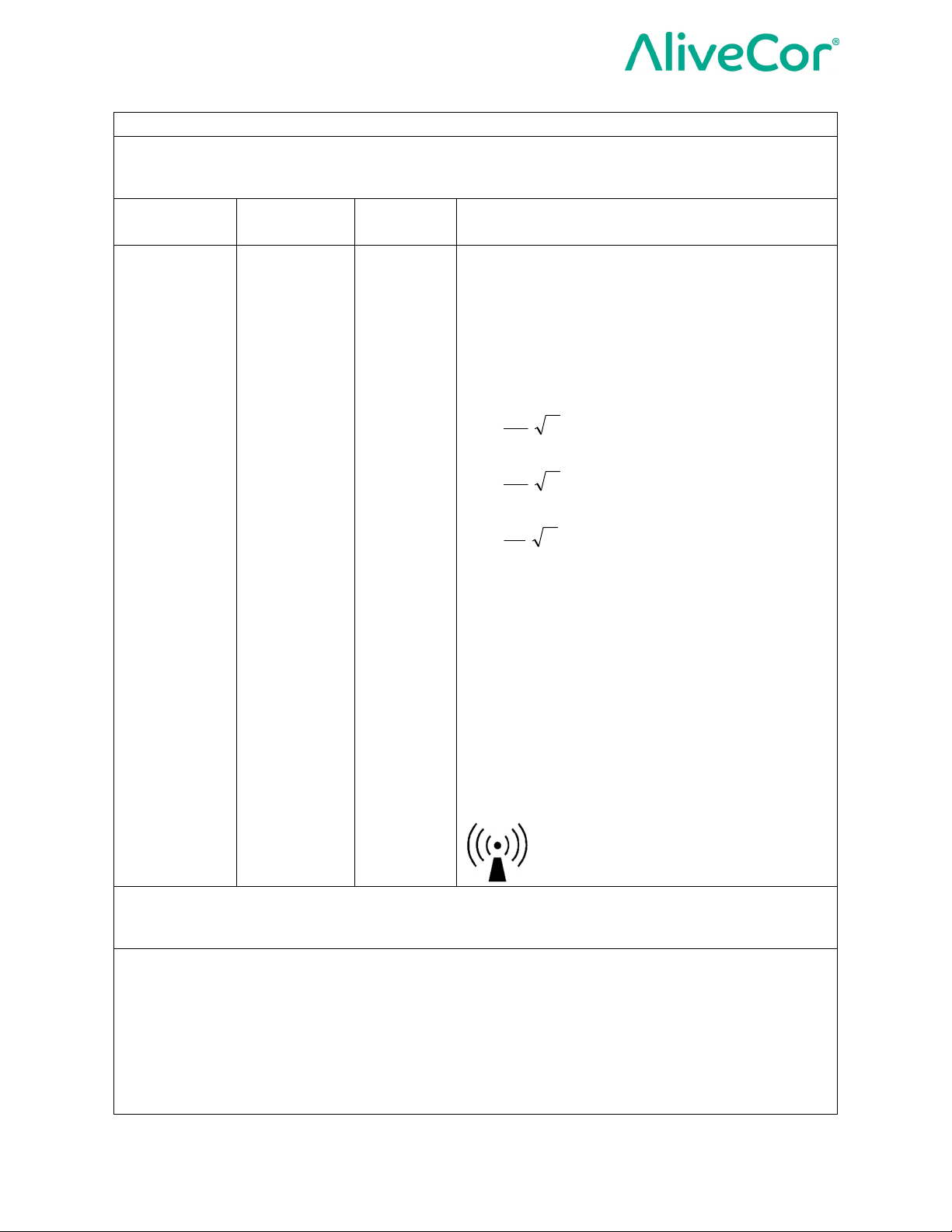
Guidance and manufacturer’s declaration—electromagnetic immunity
KardiaMobile® (Model AC-019) is intended for use in the electromagnetic environment specified
below. The customer or the user of KardiaMobile® (Model AC-019) should assure that it is used in
such an environment.
Immunity
test
IEC 60601
test level
Complian
ce level
Electromagnetic environment - guidance
Portable and mobile RF communications
equipment should be used no closer to any part
of KardiaMobile® (Model AC-019), including
cables, than the recommended separation
distance calculated from the equation
applicable to the frequency of the transmitter.
Recommended separation distance
5.3
d ]
[1
P
< 80MHz
V
5.3
d ]
[1
P
80 MHz to 800 MHz
E
7
d ]
Radiated RF
IEC 61000-43
10 V/m
80 MHz to
2.7 GHz
10 V/m
[1
where P is the maximum output power rating of
the transmitter in watts (W) according to the
transmitter manufacturer and d is the
recommended separation distance in meters
(m).
Field strengths from fixed RF transmitters, as
determined by an electromagnetic site survey,
should be less than the compliance level in
each frequency range.
Interference may occur in the vicinity of
equipment marked with the following symbol:
NOTE 1—At 80 MHz and 800 MHz, the higher frequency range applies.
NOTE 2—These guidelines may not apply in all situations. Electromagnetic propagation is affected by
absorption and reflection from structures, objects, and people
a
Field strength from fixed transmitters, such as base stations for radio (cellular/cordless)
telephones and land mobile radios, amateur radio, AM and FM radio broadcast, and TV broadcast
cannot be predicted theoretically with accuracy. To assess the electromagnetic environment due to
fixed RF transmitters, an electromagnetic site survey should be considered. If the measured field
strength in the location in which KardiaMobile® (Model AC-019) is used exceeds the applicable RF
compliance level above, KardiaMobile® (Model AC-019) should be observed to verify normal
operation. If abnormal performance is observed, additional measures may be necessary, such as reorienting or relocating KardiaMobile® (Model AC-019).
P
800 MHz to 2.7 GHz
E
b
a
Page 20 of 23
Page 21

Instructions for Use for KardiaMobile® (Model AC-019)
b
Over the frequency range 150 kHz to 80 MHz, field strengths should be less than 3 V/m.
Page 21 of 23
Page 22
Instructions for Use for KardiaMobile® (Model AC-019)
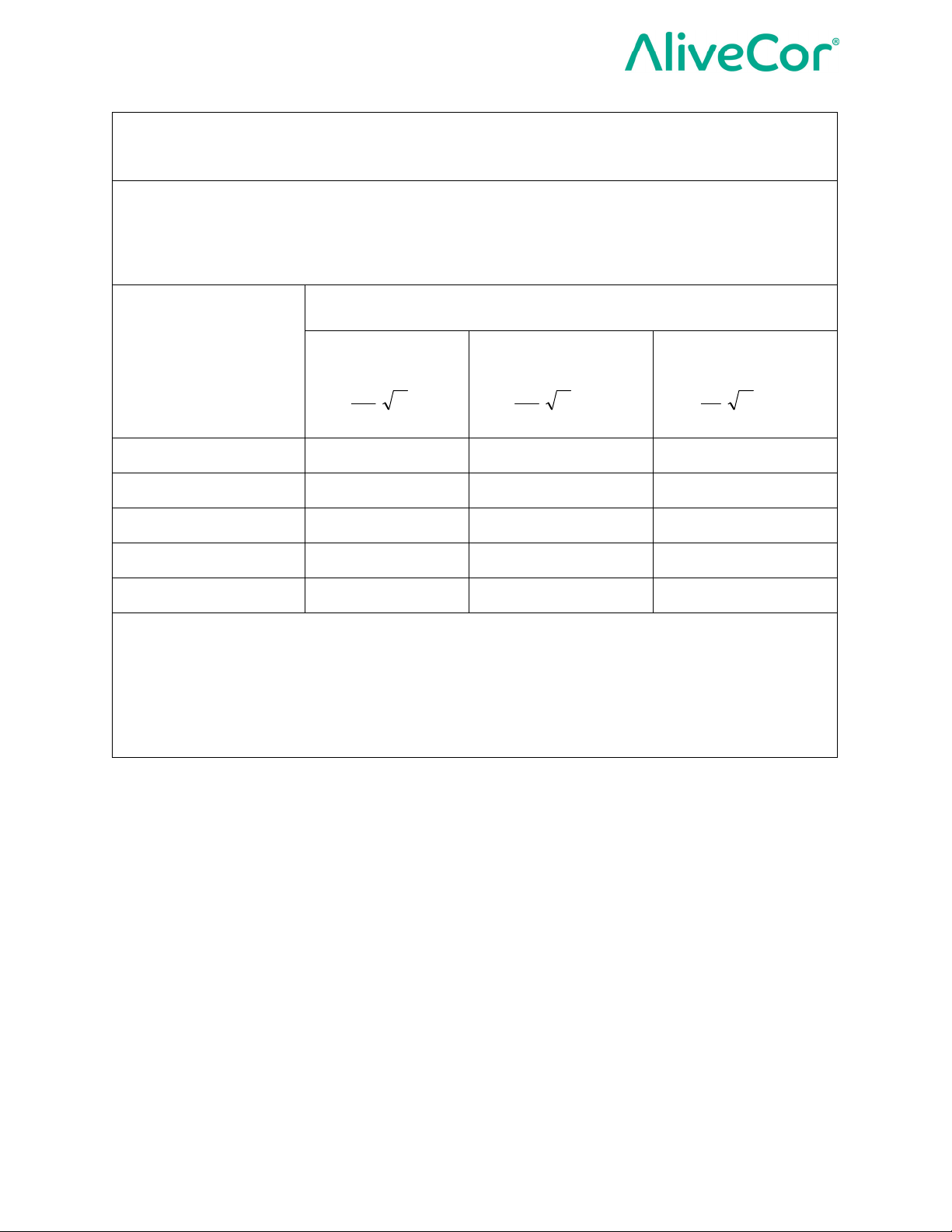
Recommended separation distances between
portable and mobile RF communications equipment and KardiaMobile® (Model AC-
019)
KardiaMobile® (Model AC-019) is intended for use in an electromagnetic environment in which
radiated RF disturbances are controlled. The customer or the user of KardiaMobile® (Model AC-019)
can help prevent electromagnetic interference by maintaining a minimum distance between portable
and mobile RF communications equipment (transmitters) and KardiaMobile® (Model AC-019) as
recommended below, according to the maximum output power of the communications equipment.
Separation distance according to frequency of transmitter
Rated maximum
output power of
transmitter
W
m
150 kHz to 80
MHz
5.3
d ]
[1 P
P
80 MHz to 800 MHz 800 MHz to 2.5 GHz
d ]
V
5.3
[1 P
E
7
d ]
[1
E
0.01 0.12 0.12 0.23
0.1 0.38 0.38 0.73
1 1.2 1.2 2.3
10 3.8 3.8 7.3
100 12 12 23
For transmitters rated at a maximum output power not listed above, the recommended separation
distance d in meters (m) can be determined using the equation applicable to the frequency of the
transmitter, where P is the maximum output power rating of the transmitter in watts (W) according to
the transmitter manufacturer.
NOTE 1—At 80 MHz and 800 MHz, the separation distance for the higher frequency range applies.
NOTE 2—These guidelines may not apply in all situations. Electromagnetic propagation is affected by
absorption and reflection from structures, objects, and people.
Page 22 of 23
Page 23
Instructions for Use for KardiaMobile® (Model AC-019)
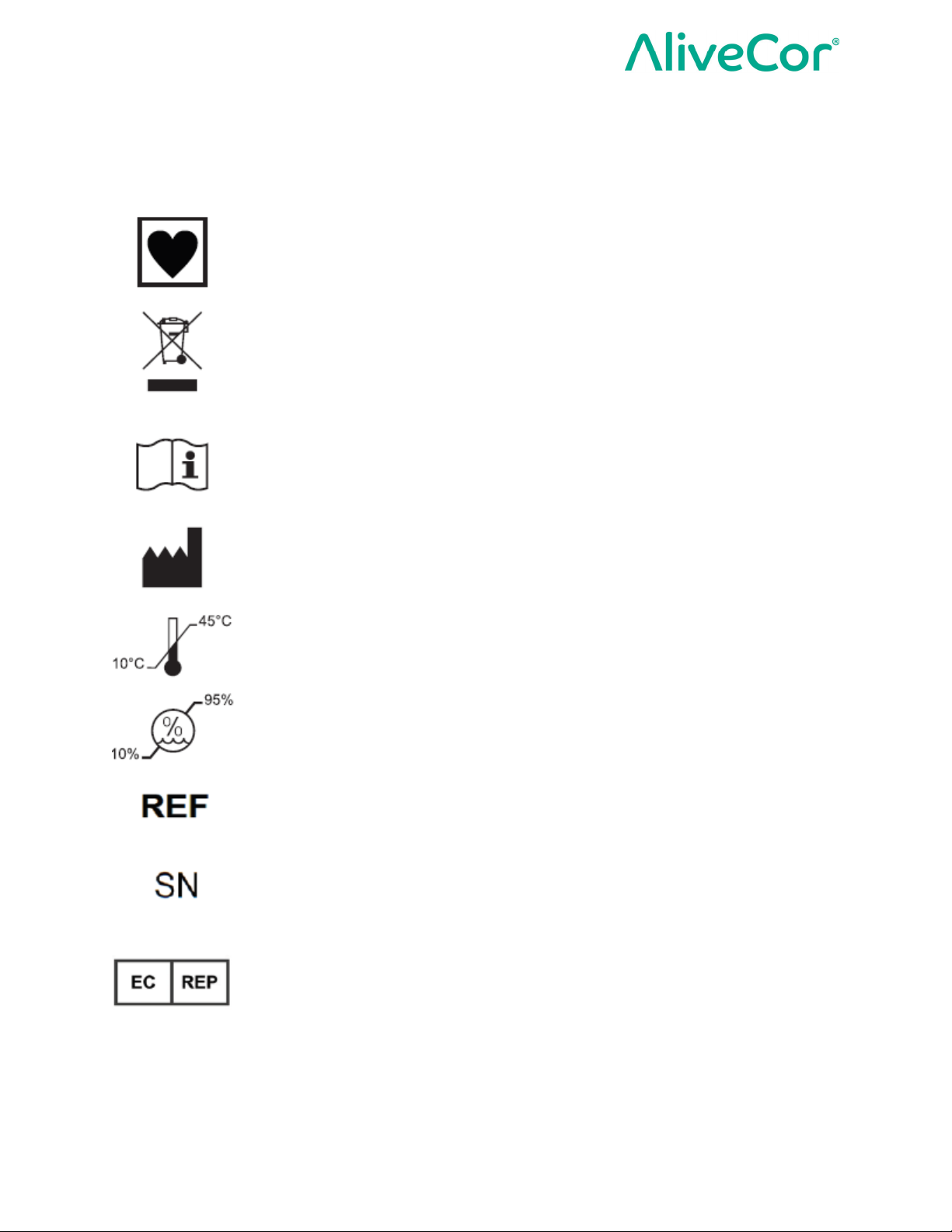
Equipment Symbols
These symbols will be used in the packaging and other labeling of the KardiaMobile® (Model
AC-019) hardware.
Type CF Applied Part
Do not dispose with household waste
Read instructions before use
Manufacturer
Temperature range
Humidity range
Model number
Serial number
European Authorized Representative
Page 23 of 23
 Loading...