

Page 1

www.alfatronelectronics.com
ALFATRON ELECTRONICS GmbH
GERMANY
ALF-MUK44N
4K 4x4 Matrix with Audio Outputs
Page 2

ALF-MUK44N
Preface
Read this user manual carefully before using this product. Pictures shown in
this manual is for reference only, different model and specifications are
subject to the real product.
This manual is only for operation instruction, not for any maintenance usage.
The functions described in this version are updated till March 2017. Any
changes in functions and parameters since then will be informed separately.
Please refer to the dealers for the latest details.
Trademarks
Product model and logo are trademarks. Any other trademarks mentioned in
this manual are acknowledged as the properties of the trademark owner. No
part of this publication may be copied or reproduced without the prior written
consent.
FCC Statement
This equipment generates, uses and can radiate radio frequency energy and,
if not installed and used in accordance with the instructions, may cause
harmful interference to radio communications. It has been tested and found
to comply with the limits for a Class B digital device, pursuant to part 15 of the
FCC Rules. These limits are designed to provide reasonable protection
against harmful interference in a commercial installation.
Operation of this equipment in a residential area is likely to cause
interference, in which case the user at their own expense will be required to
take whatever measures may be necessary to correct the interference
Any changes or modifications not expressly approved by the manufacture
would void the user’s authority to operate the equipment.
Page 3

ALF-MUK44N
Do not dispose of this product with the normal household waste at
the end of its life cycle. Return it to a collection point for the
recycling of electrical and electronic devices. This is indicated by
the symbol on the product, user manual or packaging. The
materials are reusable according to their markings. By reusing,
recycling or other forms of utilisation of old devices you make an
important contribution to the protection of our environment. Please
contact your local authorities for details about collection points.
Page 4

ALF-MUK44N
Important Safety Instructions
Do not expose this device to rain, moisture, dripping or splashing. No
objects filled with liquids, such as vases, shall be placed on the device.
Do not install or place this unit in a bookcase, built-in cabinet, or in
another confined space. Ensure the unit is well ventilated.
To prevent risk of electric shock or fire hazard due to overheating, do not
obstruct the unit’s ventilation openings with newspapers, tablecloths,
curtains, or similar items.
Do not install near any heat sources such as radiators, heat registers,
stoves, or other device (including amplifiers) that produce heat.
Do not place sources of naked flames, such as lighted candles, on the
unit.
Clean this device only with dry cloth.
Unplug this device during lightning storms or when unused for long
periods of time.
Protect the power cord from being walked on or pinched, particularly at
plugs.
Only use attachments / accessories specified by the manufacturer.
Refer all servicing to qualified service personnel
Page 5

ALF-MUK44N
Table of Contents
Introduction .................................................................................................... 1
Features ................................................................................................... 1
Package Contents .................................................................................... 2
Panel ........................................................................................................ 3
Front Panel ........................................................................................ 3
Rear Panel ........................................................................................ 4
Installation and Application .......................................................................... 5
Brackets Installation.................................................................................. 5
Steps to install the device in a suitable location ................................ 5
Application ................................................................................................ 6
IR Remote Control ......................................................................................... 7
RS-232 Control ............................................................................................... 9
Web UI Control ............................................................................................. 10
Access the Web Interface ....................................................................... 10
Web Interface Introduction ...................................................................... 11
General ............................................................................................ 11
Advanced ........................................................................................ 15
Specifications .............................................................................................. 20
Trouble Shooting ......................................................................................... 22
Warranty ....................................................................................................... 23
Page 6

ALF-MUK44N
Introduction
Overview
The ALF-MUK44N is a 4x4 compact HDMI matrix switcher, specially
designed for cost conscious projects and buyers. It features not only basic
functions like cross-point switching and control (IR, RS-232 and IP), but also
advanced functions such as auto-downscaling for each HDMI output when it
is connected to 1080P display. There is a SPDIF audio breakout for each
HDMI output, to provide more audio feeds to multi-zone audio system.
Features
4 HDMI Inputs and 4 HDMI Outputs.
All HDMI inputs and outputs support HDMI with HDR formats, including
HDR 10, HLG, DOLBY VISION up to 4K@60 4:4:4.
HDCP2.2 compliant.
With built-in 4K-1080P downscaling for each HDMI Output, the matrix
can downscale 4K@60Hz 4:4:4 to 1080P@60 4:4:4. 4K downscaling
works automatically when the matrix is connected to a 1080P display
and can be set to ON/OFF by API commands.
Each HDMI output has a SPDIF audio breakout and supports formats up
to 5CH HBR (High Bit Rate) or 2CH PCM audio.
Supports smart EDID; each input can be assigned to smart EDID mode.
Supports EDID presets, EDID copy and EDID write. By default, each
input EDID is set as 4K@60 4:4:4 HDR with 5.1CH encoded audio.
Supports audio mute as the four SPDIF outputs can be muted separately
by API commands.
1
Page 7

ALF-MUK44N
Supports upgrading firmware via both micro-USB and web UI (for MCU
and web module).
Rich control options, including RS-232, IR, IP Control and front panel
buttons control.
Package Contents
Matrix x 1
Power Adapter (DC 12V 2A) x 1
AC Power Cord with US Pins x 1
IR Remote x 1
IR Receiver x 1
Phoenix Male Connector (3.5mm, 3-Pin) x 1
Mounting Brackets (with Screws) x 2
User Manual x 1
2
Page 8

ALF-MUK44N
No.
Name
Description
1
IR Window
Receive IR signals.
2
Input LED (1-4)
On: The current HDMI input is selected.
Off: The current HDMI input is not selected.
3
Output Selection
Button (1-4)
Press to select input source for each output (1-4)
separately.
Panel
Front Panel
3
Page 9

ALF-MUK44N
1
4 5 6
7
8
2 3
No.
Name
Description
1
DC 12V
Connect to the DC 12V power adapter provided.
2
HDMI In 1-4
Connect to HDMI sources such as a Blu-ray
Player.
3
HDMI Out 1-4
Connect to HDMI displays.
4
FW
For firmware upgrade.
5
RS-232
Connect to a control PC or control system for
RS-232 serial control.
6
IP Control
Connect to local area network or a control system
for telnet or Web UI control. Port 23
7
IR Ext.
Connect to the IR receiver cable provided.
8
SPDIF Out 1-4
Connect to audio devices such as AV system for
digital de-embedded audio output from HDMI OUT
1-4.
Rear Panel
4
Page 10

ALF-MUK44N
Installation and Application
Bracket Installation
Note: Before installation, please ensure the device is disconnected from the
power source.
Steps to install the device in a suitable location
1. Attach the installation bracket to the enclosure using the screws that are
provided in the package separately.
2. The bracket is attached to the enclosure as shown below.
3. Repeat steps from 1 to 2 for the other side of the unit.
4. Attach the brackets to the desired surface using the screws
(separately).
5
Page 11
ALF-MUK44N
Blu-ray Playe r
PC
PC
Displa y
Displa y
Displa y
Amplifier
Ethernet Switch
Router
1
2
3
33
45
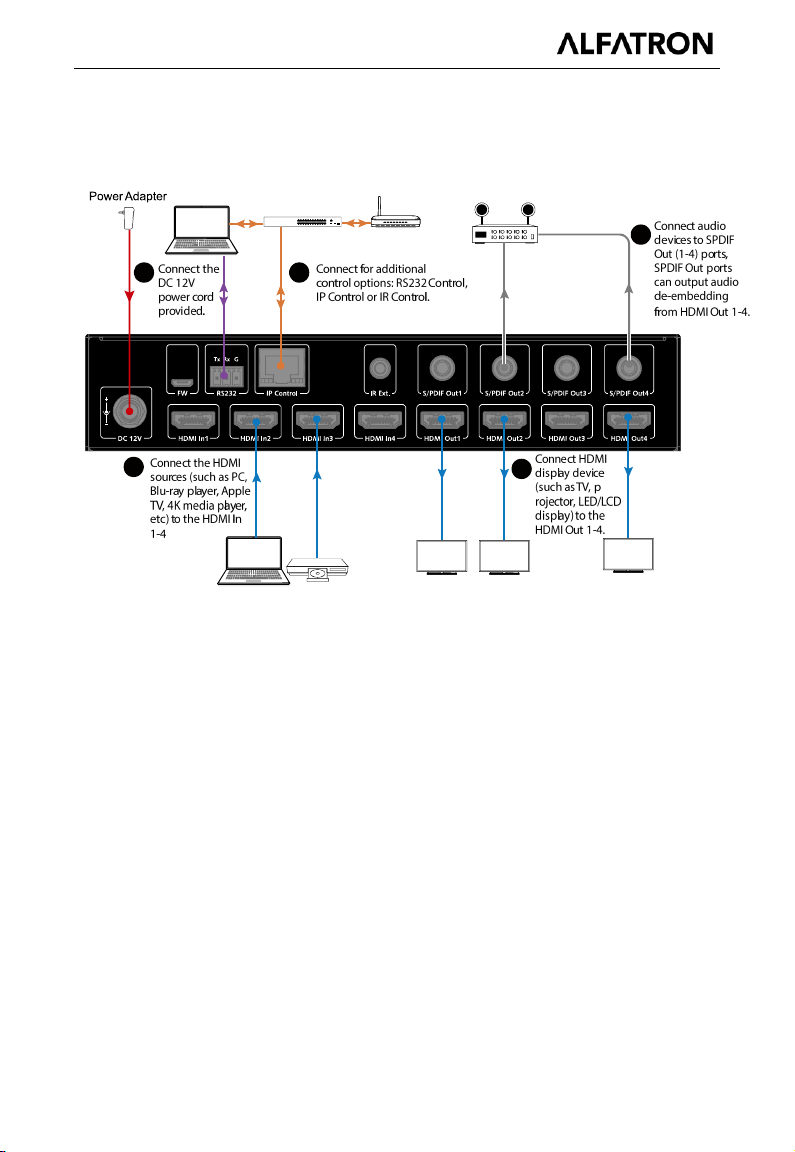
Application
6
Page 12

ALF-MUK44N
IR Remote Control
You can switch among multiple inputs for each output display by pointing the
matrix IR remote directly at the IR window on the front panel or the IR
receiver connected to the rear panel.
Steps for IR Remote Operation:
1. Point the matrix IR Remote directly at the IR window on front panel or at
the IR receiver connected to the rear panel. As shown in the following
pictures:
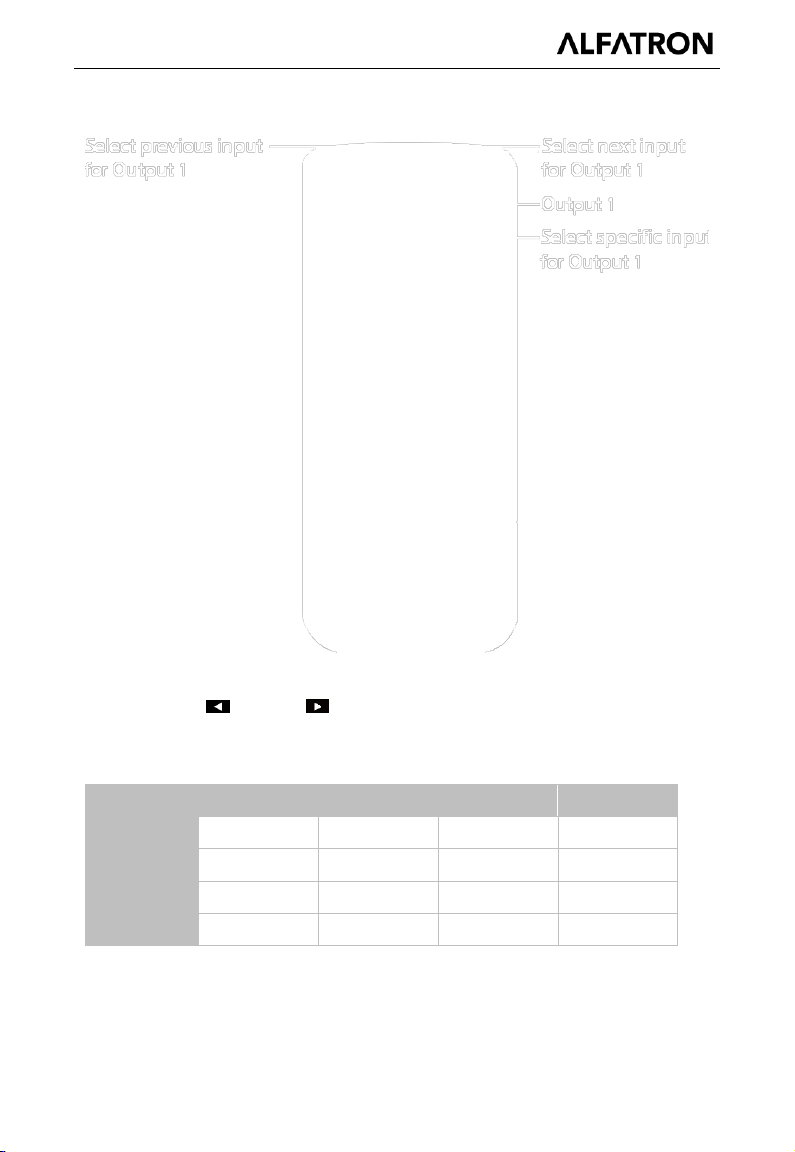
2. Locate the target output you want to switch inputs for on the remote,
numbered 1-4 vertically along the right side.
3. Press the desired input number to select the corresponding input source
7
Page 13
ALF-MUK44N
Code
IN1
IN2
IN 3
IN 4
OUT 1
0X80
0X81
0X82
0X83
OUT 2
0X90
0X91
0X92
0X93
OUT 3
0XA0
0XA1
0XA2
0XA3
OUT 4
0XB0
0XB1
0XB2
0XB3
for your target output.
4. To cycle through multiple inputs for your target output, press the
previous ( ) or next ( ) button.
Virtual IR Code Supported by Default (Matrix Switching Code):
8
Page 14

ALF-MUK44N
Parameters
Value
Baud Rate
115200 bps
Data Bits
8 bits
Parity
None
Stop Bits
1 bit
Flow Control
None
RS-232 Control
Advanced users may need to control the matrix through RS-232 serial
communication. Connect a control PC or control system to the RS-232 port of
the receiver. API commands for RS-232 control is available in the separate
document “API Command Set_ALF-MUK44N”. A 3rd party RS-232 serial
interface software may be required for testing or debugging.
Before executing the API command through an RS-232 serial connection,
please ensure the RS-232 interface of the device and the control PC are
configured correctly.
Serial Port Parameters and settings:
9
Page 15

ALF-MUK44N
Web UI Control
The Web UI designed for the matrix is available for switching control, general
and advanced settings. The Web UI is accessible through a browser such as,
Chrome, Firefox, Safari, Opera, IE10+, etc.
Accessing the Web Interface
1. Connect the IP Control port of the matrix to the Ethernet switch and
connect your PC to the same network.
Note: The IP mode of the matrix is DHCP and utilizes port number 23
for control, please ensure the Ethernet switch is connected to a DHCP
server.
2. Use the tool such as ‘SmartSetGUI’ to search the IP address of the
device or send API command to get IP address (See the separate
document “API Command Set_ALF-MUK44N”).
3. Input the IP address in your browser and press Enter to enter the login
page.
4. Enter the username and password on the login page, then click “Login”.
5. The default username and password are both “admin”.
10
Page 16

ALF-MUK44N
Web Interface Introduction
The main screen includes General and Advanced Setting.
General
The General Page includes: Switch, EDID, EDID Read, CEC, Audio Mute,
HDCP and Preset.
Switch
The Switch section manages distribution of input sources to output displays.
By default, Input 1 corresponds to Output 1, Input 2 corresponds to Output 2,
11
Page 17

ALF-MUK44N
i.e. Input (n) corresponds to Output (n), n = 1, 2, 3, 4.
Click the button in the table to select the input for the output display (button
turns from white to green once selection is done).
ALL: Click to switch INPUT (n) for all OUTPUTs.
EDID
This section allows you to configure EDID settings of each input port.
Select the item from the drop-down menu, then click “Apply” to take effect.
Note: If EDID copy fails, the input EDID will be 4K@30Hz 2.0ch audio.
By default, input EDID is set as 4K@60Hz 5.1ch audio with HDR.
EDID Read
Click “Enter” to open the EDID Setting page.
12
Page 18

ALF-MUK44N
Select Port: Click from the drop-down menu to choose an Output port
(1-4) for EDID setting.
Read: Click to read the EDID of the Output port you choose.
Write: Click to write the EDID of the Output port you choose to
corresponding Input selected by the output.
Save: Click to save the EDID of the Output as bin file to a desired
location.
Open: Click to open an EDID file from the local PC. Then you can click
"Write" to write the EDID information instead of Output port's EDID to
corresponding Input.
CEC
13
Page 19
ALF-MUK44N
Output Port: Select one Output (1-4) port or all from the drop-down
menu to control.
Note: When Output port is set to “all”, the Auto CEC and Delay Time
(min) settings are disabled.
Manual (ON/OFF): Click “ON/OFF” button to power on/off the
CEC-enabled display immediately.
Auto CEC: Click “ON/OFF” button to set Auto CEC control
enable/disable.
The default setting is “ON”.
Delay Time (min): Click the up/down arrow to set the time for the display
to power off automatically when no signal is present, then click “Apply” to
take effect. For example, if Auto control is set as on and the time is set to
2 minutes, click “Apply”, the output display will power off automatically
when there’s no signal at the display for 2 minutes.
Audio Mute
ON/OFF: This section allows you to set Audio output (1-4) mute to
ON/OFF. The default setting is OFF.
Note: The SPDIF Out 1-4 is following the audio output of HDMI OUT.
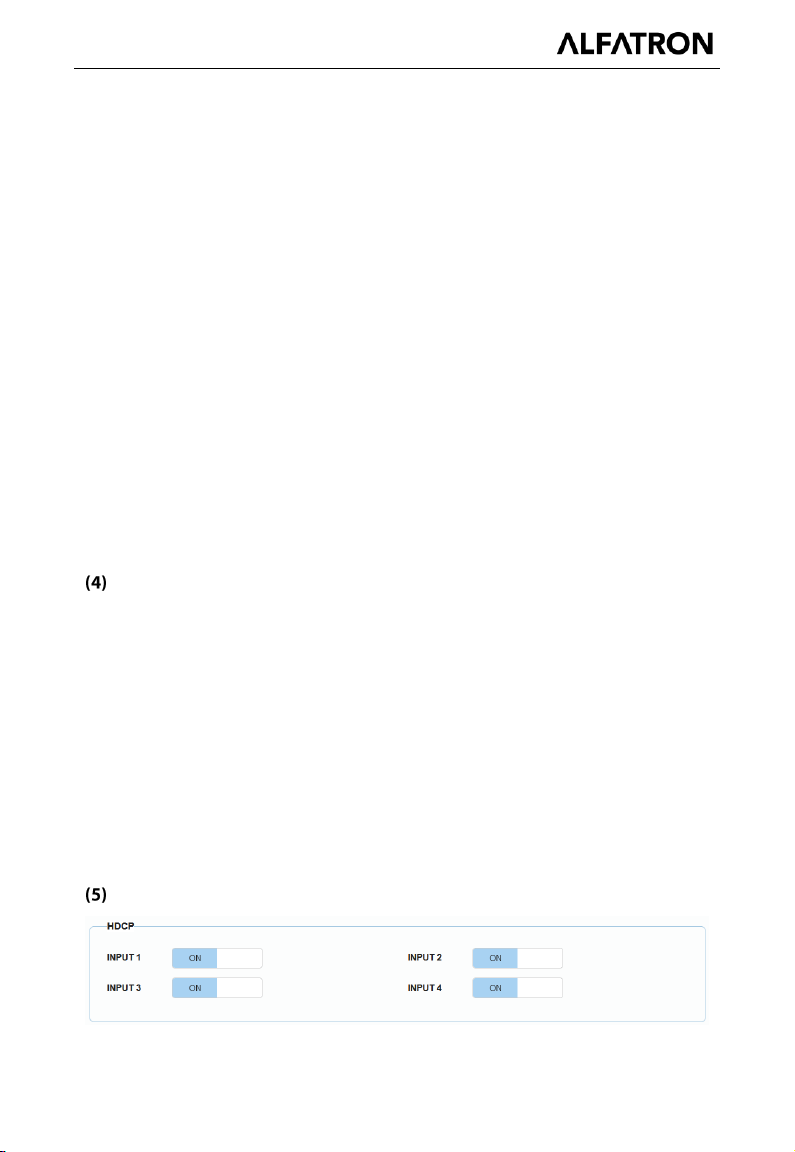
HDCP
14
Page 20

ALF-MUK44N
HDCP Support allows you to enable or disable HDCP compatibility of each
input. By default, HDCP Support is switched ON at each input and content
protected by HDCP standard will be received.
Preset
The Preset section saves or loads the Switch settings to or from the matrix.
Advanced
The Advanced page includes Network, Login Password, Custom Web UI
Logo, WEB Firmware Upgrade, ARM Firmware Upgrade, MCU Firmware
Upgrade, System, Firmware Version.
Network
Network settings is used to toggle between the dynamic and static IP
addressing.
DHCP: When enabled, the IP address of the Matrix is assigned
automatically by the DHCP server connected.
Static: When enabled, set up the IP address manually.
15
Page 21

ALF-MUK44N
Apply: Click to enable the network setting.
The default setting is DHCP.
Note:
When “Static” is selected, please ensure your PC is in the same network
segment as the Matrix, i.e. the IP address of your PC should be set as
192.168.xxx.xxx (x is suggested among 2 to 253).
Please wait for 2-3 minutes for the Matrix’s LAN module to reboot and
reconnect after the network setting is changed.
Login Password
This section allows you to change login password. The default password is
“admin”.
Apply: Click to save the changes.
Note: The new password must be 4 to 16 characters in length (alphanumeric
only).
Custom Web UI Logo
Custom Web UI Logo allows you to load your own logo for the Web UI.
To create customized Web UI logo:
1) Click “Browse” button to browse the LOGO file.
16
Page 22

ALF-MUK44N
2) Click “Apply”, and the following window will appear. Click "here" to
reconnect the system. When completed, the new logo will appear on the
upper left corner of the screen.
WEB Firmware Upgrade
1) Click “Browse” to load the update file.
2) Click "Update" to start the Web UI upgrade.
3) The matrix LAN Module will update and reboot automatically when Web
UI is completed. Please wait for about 3 minutes and then refresh the
web page and log in again.
Note: DO NOT disconnect the matrix during update process.
ARM Firmware Upgrade
1) Click “Browse” to load the update bin file.
2) Click "Upgrade" to start the ARM Firmware upgrade.
3) The matrix will upgrade and reboot automatically when upgrading ARM
17
Page 23

ALF-MUK44N
is completed. Please wait for about 3 minutes and then refresh the web
page and log in again.
Note: DO NOT power off the device when upgrading.
MCU Firmware Upgrade
1) Click “Browse” to load the update bin file.
2) Click "Upgrade" to start the MCU Firmware upgrade.
3) The matrix will upgrade and reboot automatically when upgrading MCU
is completed. Please wait for about 3 minutes and then refresh the web
page and log in again.
Note: DO NOT power off the device when upgrading.
System
This section allows you to reset the device to factory default settings or
reboot the device.
To reset the device to factory default settings:
Click the “Factory Default” icon, the following window will be popped up, click
“Ok” to reset the device to factory default.
18
Page 24

ALF-MUK44N
Note: Please wait about 30 seconds before refreshing the browser to access
the Web UI.
To reboot the device:
Click the “Reboot” icon, the following window will pop up, click “Ok” to reboot
the device.
Note: Please wait about 30 seconds before refreshing the browser to access
the Web UI.
Firmware Version
This section allows you to obtain information of the current firmware in use.
19
Page 25

ALF-MUK44N
Technical
Input/Output Port
4 x HDMI In, 4 x HDMI Out, 1 x RS-232,
1 x IP Control (RJ45), 4 x SPDIF Out (Digital),
1 x FW (Micro USB), 1 x DC 12V IN
Input/Output Signal Type
HDMI with 4K@60Hz 4:4:4, HDR 10, HLG &
Dolby Vision, HDCP 2.2
Note: Dolby vision is not supported in down
scaler mode.
Input/Output Resolution
Supported
VESA:
800x6008, 1024x7688, 1280x7688, 1280x8008,
1280x9608, 1280x10248,1360x7688, 1366x7688,
1440x9008, 1600x9008, 1600x12008,
1680x10508,1920x12008
SMPTE:
720x576P6, 1280x720P
6,7,8
, 1920x1080P
2,5,6,7,8
,
3840x2160
2,3,5,6,8
, 4096x2160
2,3,5,6,8
2 = at 24 Hz, 3 = at 25 Hz, 5 = at 30 Hz, 6 = at 50
Hz, 7 = at 59.94 Hz, 8 = 60 Hz
Audio Format
HDMI IN/OUT: Fully supports audio formats in
HDMI 2.0 specification, including PCM
2.0/5.1/7.1, Dolby TrueHD, Dolby Atmos, DTSHD
Master Audio and DTS:X
S/PDIF OUT: Supports PCM 2.0/5.1, Dolby
digital and DTS up to 5.1 Channel
Maximum Data Rate
18Gbps
Control Method
Front Panel Buttons, RS-232, IR, IP (Telnet
&Web UI)
Specifications
20
Page 26

ALF-MUK44N
General
Operating Temperature
0°C to 45°C (32°F to 113°F)
Storage Temperature
-20°C to 70°C (-4°F to 158°F)
Humidity
10% to 90%, non-condensing
ESD Protection
Human-body Model:
±8kV (Air-gap discharge)/
±4kV (Contact discharge)
Power Supply
DC 12V 2A
Power Consumption
(Max)
10.8W
Device Dimension
(W x H x D)
215mm x 42mm x 120.2mm/8.46” x 1.65” x
4.73” (Without mounting brackets)”
Product Weight
0.54kg/1.19lb
Cable Type
Range
Supported Video
HDMI
Input: 15m/50ft
Output: 10m/33ft
1080P@60Hz 24bpp
Input/Output: 10m/33ft
4K@30Hz 4:4:4 24bpp
4K@60Hz 4:2:0 24bpp
Input/Output: 3m/10ft
4K@60Hz 4:4:4 24bpp
Transmission Distance
21
Page 27

ALF-MUK44N
Trouble Shooting
Troubleshooting steps:
1 Power: Please make sure all devices are powered on. (source, matrix,
display devices)
2 Indicator: Please make sure LED indicators of the device are normal
according to the user manual.
3 Devices: Please ensure picture can be shown normally when
connecting source to display devices directly.
4 Cable: Plug in and out HDMI cable or try another HDMI cable.
5 Compatibility: Please test other source and display devices to
determine whether it is a compatibility issue.
22
Page 28

ALF-MUK44N
1.1 This limited warranty covers defects in materials and workmanship in this
product.
1.2 Should warranty service be required, proof of purchase must be
presented to the Company. The serial number on the product must be clearly
visible and not have been tampered with in any way whatsoever.
1.3 This limited warranty does not cover any damage, deterioration or
malfunction resulting from any alteration, modification, improper or
unreasonable use or maintenance, misuse, abuse, accident, neglect,
exposure to excess moisture, fire, improper packing and shipping (such
claims must be presented to the carrier), lightning, power surges, or other
acts of nature. This limited warranty does not cover any damage,
deterioration or malfunction resulting from the installation or removal of this
product from any installation, any unauthorized tampering with this product,
any repairs attempted by anyone unauthorized by the Company to make
such repairs, or any other cause which does not relate directly to a defect in
materials and/or workmanship of this product. This limited warranty does not
cover equipment enclosures, cables or accessories used in conjunction with
this product.
This limited warranty does not cover the cost of normal maintenance. Failure
of the product due to insufficient or improper maintenance is not covered.
1.4 The Company does not warrant that the product covered hereby,
including, without limitation, the technology and/or integrated circuit(s)
included in the product, will not become obsolete or that such items are or will
remain compatible with any other product or technology with which the
product may be used.
23
Page 29

ALF-MUK44N
1.5 Only the original purchaser of this product is covered under this limited
warranty. This limited warranty is not transferable to subsequent purchasers
or owners of this product.
1.6 Unless otherwise specified, the goods are warranted in accordance with
the manufacturer’s product specific warranties against any defect attributable
to faulty workmanship or materials, fair wear and tear being excluded.
1.7 This limited warranty only covers the cost of faulty goods and does not
include the cost of labor and travel to return the goods to the Company’s
premises.
1.8 In the event of any improper maintenance, repair or service being carried
out by any third persons during the warranty period without the Company’s
written authorization, the limited warranty shall be void.
1.9 A 7 (seven) year limited warranty is given on the aforesaid product where
used correctly according to the Company’s instructions, and only with the use
of the Company’s components.
1.10 The Company will, at its sole option, provide one of the following three
remedies to whatever extent it shall deem necessary to satisfy a proper claim
under this limited warranty:
1.10.1 Elect to repair or facilitate the repair of any defective parts within a
reasonable period of time, free of any charge for the necessary parts and
labor to complete the repair and restore this product to its proper operating
condition.; or
1.10.2 Replace this product with a direct replacement or with a similar
product deemed by the Company to perform substantially the same function
as the original product; or
1.10.3 Issue a refund of the original purchase price less depreciation to be
determined based on the age of the product at the time remedy is sought
under this limited warranty.
24
Page 30

ALF-MUK44N
1.11 The Company is not obligated to provide the Customer with a substitute
unit during the limited warranty period or at any time thereafter.
1.12 If this product is returned to the Company this product must be insured
during shipment, with the insurance and shipping charges prepaid by the
Customer. If this product is returned uninsured, the Customer assumes all
risks of loss or damage during shipment. The Company will not be
responsible for any costs related to the removal or reinstallation of this
product from or into any installation. The Company will not be responsible for
any costs related to any setting up this product, any adjustment of user
controls or any programming required for a specific installation of this
product.
1.13 Please be aware that the Company’s products and components have
not been tested with competitor’s products and therefore the Company
cannot warrant products and/or components used in conjunction with
competitor’s products.
1.14 The appropriateness of the goods for the purpose intended is only
warranted to the extent that the goods are used in accordance with the
Company’s installation, classification and usage instructions.
1.15 Any claim by the Customer which is based on any defect in the quality or
condition of the goods or their failure to correspond with specification shall be
notified in writing to the Company within 7 days of delivery or (where the
defect or failure was not apparent on reasonable inspection by the Customer)
within a reasonable time after discovery of the defect or failure, but, in any
event, within 6 months of delivery.
1.16 If delivery is not refused, and the Customer does not notify the Company
accordingly, the Customer may not reject the goods and the Company shall
have no liability and the Customer shall pay the price as if the goods had
been delivered in accordance with the Agreement.
25
Page 31

ALF-MUK44N
1.17 THE MAXIMUM LIABILITY OF THE COMPANY UNDER THIS LIMITED
WARRANTY SHALL NOT EXCEED THE ACTUAL PURCHASE PRICE PAID
FOR THE PRODUCT.
26
 Loading...