

Page 1
UQ1043 Quick Start P137 Pager.ppp Page 1of 3 v8.1 26/04/2017
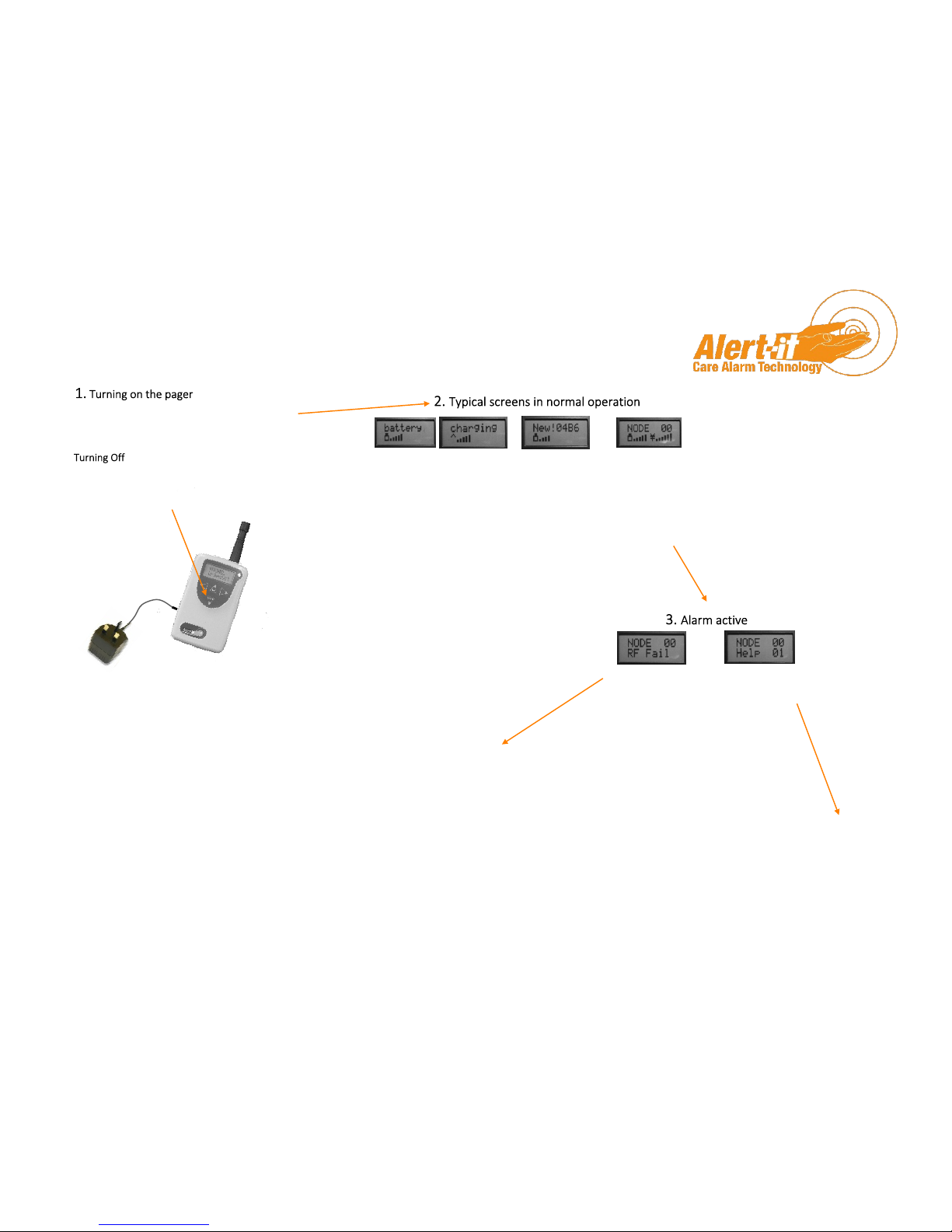
Shows battery
status
Name of alarm
will flash up
when safety
signal received.
Bars on right
show strength
of signal
Indicates there is
an alarm system
in the area, not
paired to this
pager. This may
be OK or an error
so check with the
supervisor
(Charger can
be left
permanently
connected or
it can boost
charge from
empty in 8
hours)
Press menu for 3 seconds to turn on. (If no
response, then charge battery for at least 5
minutes)
Enter MENU (see overleaf)
Scroll right to Turn Off & then Select (up arrow)
Do not remove batteries as this can damage the connections.
Radio contact with
an alarm fitted with
“Safelink” security
has been lost. This
MUST be corrected
immediately i.e.
Epilepsy Alarms
Typical alarm
indication. with
four levels:
Urgent, Help,
Assist, Fault
Quick Start Guide to using the P137 Advanced Pager
Try walking towards the user’s room. If the alarm cancels
then there is a problem with the building or distance
required. Contact Alert-It who can offer a signal booster
or if RF Fail does not cancel then:
1. Look for signs of damage and the status of
LED’s/Display on clients equipment.
2. Check the user equipment is turned on.
3. Contact Alert-It for further advice
1. Attend the user,
2. Reset the alarm on the user’s equipment and
the pager will return to normal operation
automatically
(Increased tone indicates more alarms are active.
See over for snooze and view.)
Page 2
UQ1043 Quick Start P137 Pager.ppp Page 2of 3 v8.1 26/04/2017
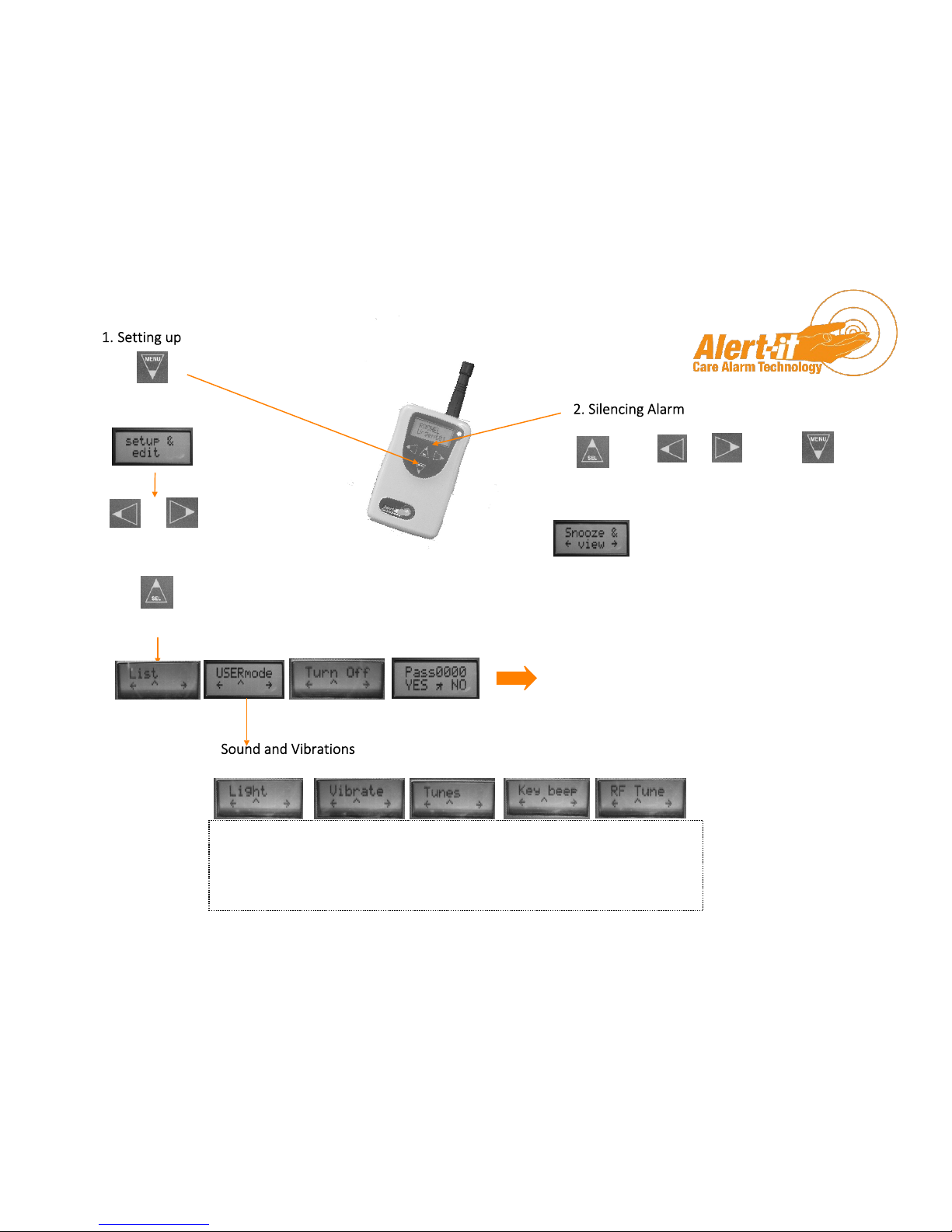
Press and hold menu for 3
seconds to enter setup/menus
Press to silence
alarms for 5 mins
You can scroll through
a list of all active
alarms in this window.
Return to normal
screen (also
happens after 30
seconds)
Scroll to menu item
required
Select items
Unless enabled by the Supervisor in Function, it is not possible to create total silence. Vibrate will be
automatically enabled if TUNES are turned off.
Disabling RF Tune is useful if monitors are turned off during the day. This will produce an RF Fail
alarm and disabling the tune prevents the nuisance of a continuous audible warning. It may be
password protected
Protected supervisor
functions
Page 3
UQ1043 Quick Start P137 Pager.ppp Page 3of 3 v8.1 26/04/2017
Safety Information:
1. Ensure the power cable is routed to avoid a trip hazard
2. Regularly check the power supplies for damage and potential shock risks
3. Clean and disinfect each item regularly in accordance with information on page 7
4. Ensure, by testing, that the alarm is annunciated at the carer's location(s)
5. Use only the power supply and batteries recommended
6. Operate power supply and charge pager away from direct heat and uncovered.
7. As with all medical electronic equipment there is potential for the equipment to interfere with or
be effected by interference from other electrical or electronic devices. For this reason avoid placing the monitor, sensor or connecting cable in close proximity to sensitive electronic devices or
devices which produce strong electromagnetic fields such as radio transmitters, mobile phones or
power cables.
8. Only use the monitor with accessories approved for use with this product and only in accordance
with instructions.
9. If the equipment is modified in any way, appropriate inspection and testing must be conducted to
ensure continued safe use of the equipment.
10. The carer must conduct a risk assessment to determine if the level of reliability offered by the mon-
The system complies with 93/42/EEC as a Class 1 Medical Device for use in a Home Heathcare environment
The system complies with EN60601 for Class 2 Electrical Safety and does not need a protective earth and Group 1 Class B for EMC in a Home Healthcare environment
The system has a radio receiver compliant to EN300-220 Class 2 operating at 434.075MHz wideband
The system uses the Alert-iT Safelink® Radio Protocol. This offers a failsafe detection of radio integrity using a Class 2 radio receiver, for specifically enabled monitors. The carer
must respond to the radio fail alarm as the user will be unprotected until solved.
Support
For technical support please phone or EMail:
HELP: 01530 239900
[email protected]
...using technology to care for carers
Designed by:
ITs Designs Ltd
Leicester
LE9 9FE UK
The Alert-it system has been designed with due regard to
reliability and integrity. While it offers a highly vigilant
monitoring method,it is always possible that a distress
condition can go undetected for a variety of reasons (including
malfunction) and in life threatening situations it is advisable to
use the Alert-it system in conjunction with additional
monitoring techniques. Neither the manufacturer nor its agent
can accept legal responsibility to provide a system that is
infallible. The carer is responsible for assessing the risks of using
this equipment and any settings pertaining to it.
 Loading...