

Page 1
1
www.AlenCorp.com 1-800-630-2396
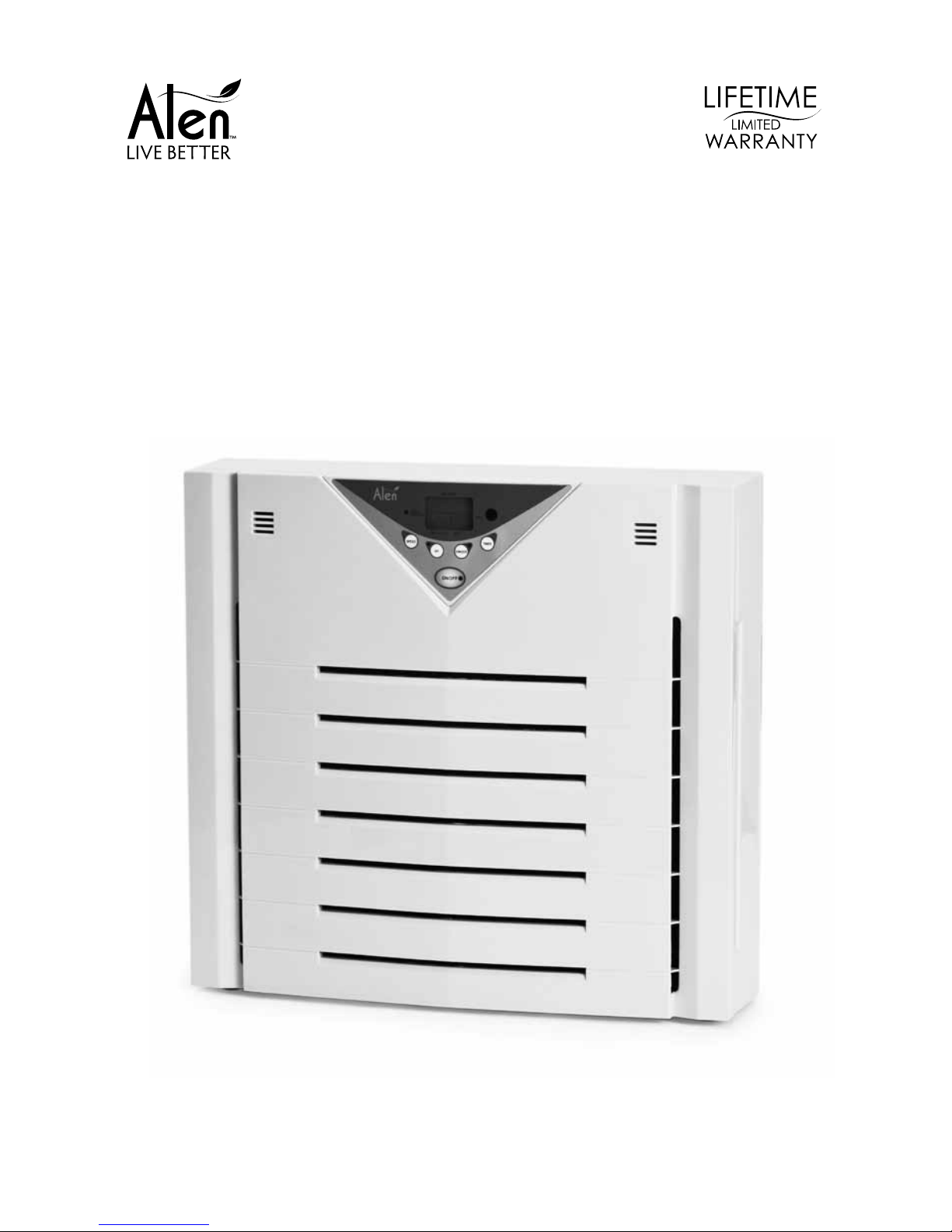
USER MANUAL
Alen A375 Air Purier
Page 2

3
www.AlenCorp.com 1-800-630-2396
TAbLE of CoNTENTS
Air Purier Safety
Using Your Air Purier
Operating Your Unit
Identication Of Parts
Know Your Air Purier
Care & Maintenance
Replacing The Filter
Why You Should Replace Your Filter
Alen’s AutoShip Filter Plans
How To Replace The Filter
How To Replace The UV Light
Troubleshooting Tips
Lifetime Limited Warranty
4
5
8
8
11
12
Page 3

4
Helping People Live Better
AIR PURIfIER SAfETY
Provided in this manual are important safety messages regarding your electrical home appliance. Always read, follow and save all safety directions.
Location Requirements
• Use a level surface at least 6” (15.2cm) from heat sources such as ranges or heaters.
• Do not block air vent openings or place air purier on a soft surface such as a bed or sofa.
• Never insert ngers or foreign objects into air grills or vents.
• Operate indoors only.
• Electrical and Safety Requirements — Reduce your risk of re or electrical shock.
Failure to follow these instructions can result in death, re or electrical shock.
• Do not connect unit to any electrical socket that is damaged.
• Ensure lter is correctly installed before turning on unit.
• Always turn off the air purier when not in use and before unplugging.
• Do not use next to a source of heat, such as a ranger, heater or dryer.
• Do not use near a bath, shower, swimming pool or where a unit can get wet.
• Change your lter on a regular basis, so dust and particles do not build up.
• Do not plug the air purier into an outlet controlled by a dimmer switch.
• Do not use in a window.
• Unplug air purier before servicing.
• Do not use an adapter.
• Do not use an extension cord.
• Always unplug the unit before changing the lter.
• Do not cover the unit or impede air ow.
• Do not exceed the rating of the power outlet or connection device. May cause electric
shock or re due to excess heat generation.
• Do not insert or pull out plug with wet hands, it may cause electric shock.
• Never try to take apart or repair the unit by yourself.
• Disconnect the power if strange sounds, smell or smoke comes from it.
• Do not try to change the lter during operation.
• Do not drop the unit, as this can result in damage.
• Do not place heavy objects on the power cord and take care so that the cord is not compressed as there is danger of re or electric shock.
• Do not climb up or sit on the unit. You may be injured if you fall or if the unit falls over.
• Do not spray insecticides or any other ammable sprays near the machine. It may cause
explosion or re.
• Use only in the proper electrical socket type. Socket type (voltage & hertz) can be found
on the product sticker on the side or bottom of the unit. Plugging the unit in to the incorrect
socket type can damage/destroy the unit.
• To reduce the risk of electric shock, this equipment has a polarized plug (one blade is wider
than the other). This plug will t in a polarized outlet only one way. If the plug does not t
fully in the outlet, reverse the plug. If it still does not t, contact qualied personnel to install
the proper outlet. Do not alter the plug in any way.
Page 4

5
www.AlenCorp.com 1-800-630-2396
USINg YoUR AIR PURIfIER
Operating Your Unit:
1. Plug your air purier into a grounded outlet.
2. Press ON/OFF to start the air purier. When your unit is on the control panel screen will
light up. To stop the air purier press ON/OFF and the indicator light will turn off.
3. Press SPEED and watch the indicator numbers until desired fan speed is achieved.
4.
Press TIMER to have the air purier automatically turn off in a set amount of hours. Up to
eight hours.
5. Press IONIZER to activate the ozone safe built in ionizer. The built-in IONIZER charges
particles in the air. This causes the particles to stick together and become larger, making it
easier for the lter and cleaners to trap. Press IONIZER again to turn off.
6. Filter replacement indicator — The A375 has a filter replacement indicator light that
illuminates when it is time for the filter to be changed.
7. After changing the lter, RESET the lter indicator by holding down TIMER while the unit is
ON until the clean indicator light disappears.
8. Press UV to activate the built-in ultraviolet lights. Press UV again to turn off.
9. When on AUTO fan speed, the unit will adjust fan speed based on the level of dust or
smell. Dust and smell bars adjust horizontally as their respective levels change.
Fan Speed Result
Level 1 Quietest operation
Level 2 Basic cleaning power
Level 3 Moderate cleaning power
Level 4 Maximum cleaning power
Auto AUTO fan speed, the unit will adjust fan speed based
on the level of dust or smell. Auto begins on level 1 and
if triggered will clean at level 4.
Page 5
6
Helping People Live Better
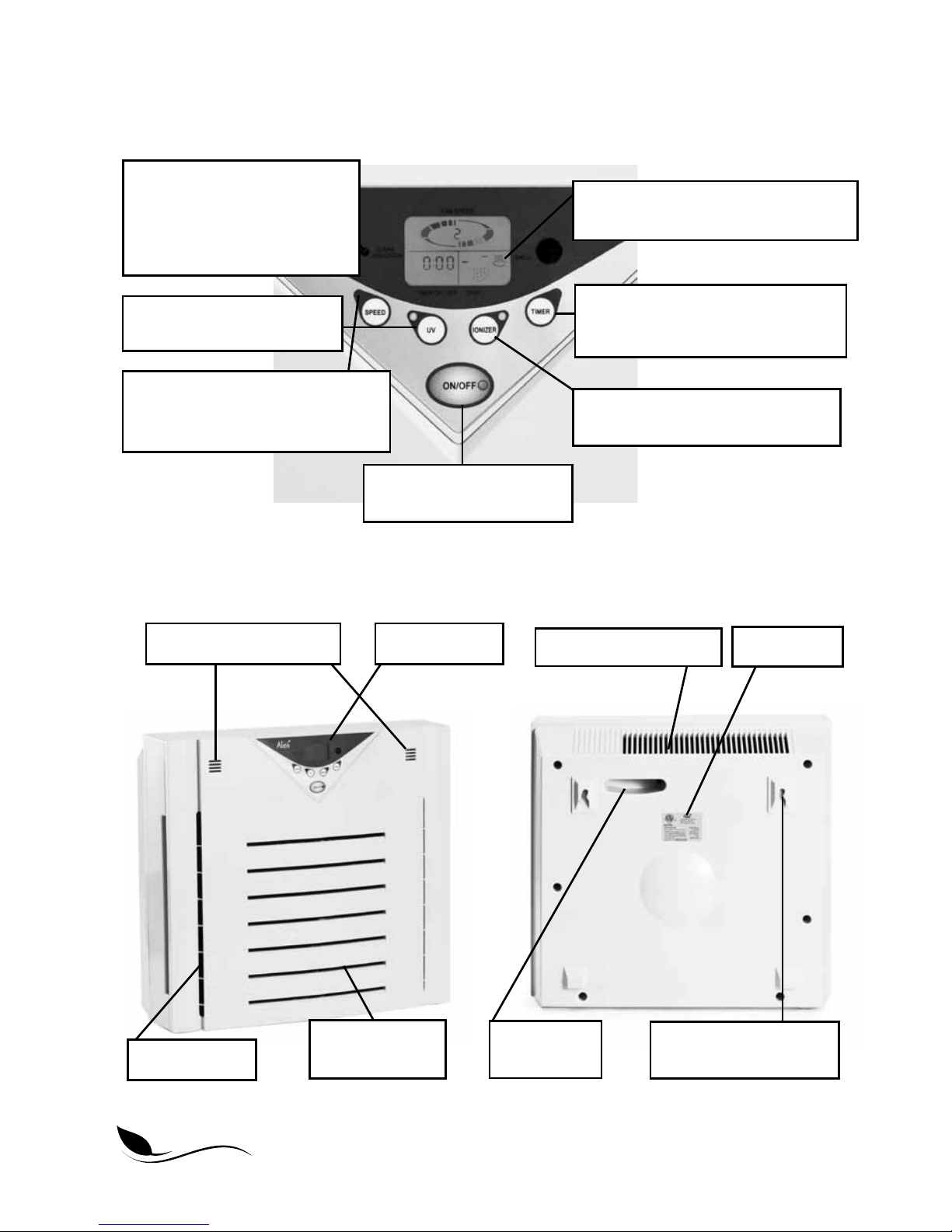
Identication Of Parts
Puried air outlet grill
Front air intake
grill
Side air intake
Dust and smell sensors
Control panel
5. Ozone safe optional Ionizer.
Press to turn Ionizer ON or OFF.
4. Eight hour timer. Press to display
desired hours in which to shut
off unit.
2. Press to START or
STOP your air purier.
9. Dust and smell bars adjust
horizontally as their levels change.
6. Noties you when it’s time
to replace the lter.
7. Hold down TIMER after
the lter has been changed.
8. Press to turn UV Lights
ON or OFF.
3. Press to select one of four fan
speeds. The illuminated screen
will display selected speed.
Rating label
Wall mountable hooks
(Hardware not included)
Handle for
easy carrying
Page 6
7
www.AlenCorp.com 1-800-630-2396
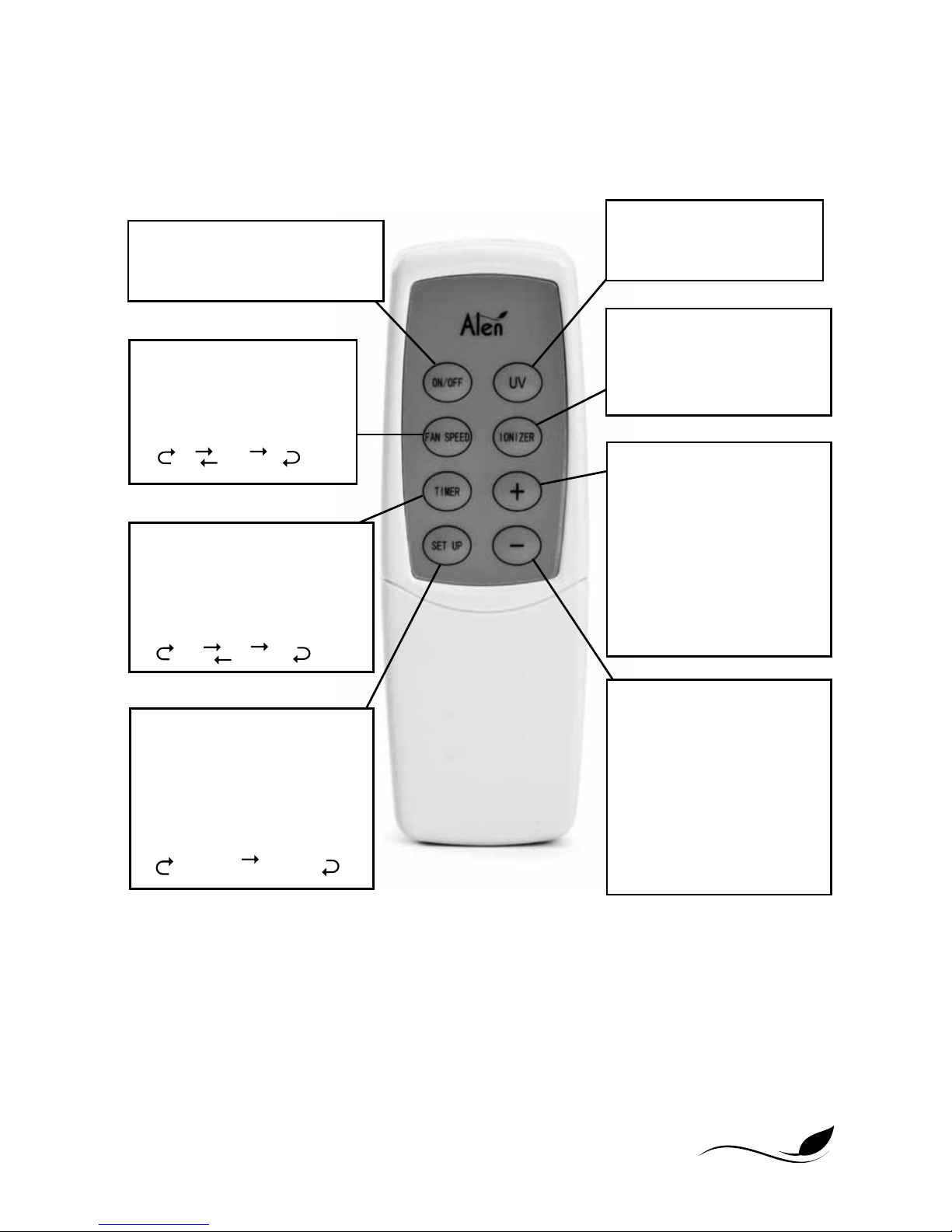
oN/off
Press this key to start operation,
press it again to stop it.
TIMER
Set the operation time. When
pressing the key, the timer
scale on the panel will
indicate the set time:
Low Medium High
Quiet AutoRun
1 Hour 2 Hour 4 Hour
Cancel 8 Hour
SET UP
Used to set the 3 modes. On
Time, Off Time and Air Flow in
operation. When pressed each
time, it will follow the order
below:
Low Medium High
Quiet AutoRun
1 Hour 2 Hour 4 Hour
Cancel 8 Hour
Preset On Time Preset Off Time
Preset Operation Fan Speed
fAN SPEED
Every time you press it, the
fan speed will vary according
to the following order:
Low Medium High
Quiet AutoRun
UV
Press this key to start UV,
press it again to stop it.
IoNIZER
Press this key to turn on
the ionizer, press it again to
stop it.
INCREASE
An auxillary key of the set
up key, used to increase
operation time and fan
speed. Each time it is
pressed, the present time
will increase by 30 minutes
or the fan speed will increase to the next level.
DECREASE
An auxillary key of the set up
key, used to increase
operation time and fan
speed. Each time it is
pressed, the present time
will decrease by 30 minutes
or the fan speed will
decrease to the next level.
Page 7

8
Helping People Live Better
KNOW YOUR AIR PURIFIER
When using the air purier for the rst time in a room, many prefer to use a higher fan speed
like speed three or four for a couple of hours in order to clean the room’s air initially. Then, it is
recommended that the air purier is left on to run continuously.
Features
• HEPA style ltration captures dust, allergens and airborne pollutants
• Activated Carbon layer traps light odors and chemicals (VOCs) from common household
products
• Ionizer charges particles, causing them to clump together for improved ltration
• Alen’s Smart-Sensor Technology automatically adjusts ltration levels based on level
of airborne pollutants. When the fan speed is set to AUTO, these sensors increase or
decrease the unit’s speed based on the level of odor or dust in the air.
• 4 fan speeds with an 8 hour timer to control air circulation
• Remote control conveniently manages features
• Wall-mountable for space saving or can be placed on the oor
• Digital display with simple and intuitive touch button controls
• Auto-off safety feature when front cover is removed
• Filter designed for easy replacement
• Lifetime Limited Warranty
CARE & MAINTENANCE
Replacing The Filter
The lters used in all of Alen Air Puriers are not designed to be washed, cleaned or otherwise reused. Over time, the lters become overloaded with particles, decreasing their ltration
performance. We recommend regular lter replacements (at least every 6 months with normal
use) to extend the life of your air purier and maximize performance.
The black foam layer of the lter, known as the Pre-Filter, captures large dust and hair. This
layer is held on with Velcro®. Once removed, the Alen Pre-Filter can be washed or vacuumed
to maintain efcient operation of the unit.
For optimal performance, it is recommended that the air purier is left on to run continuously.
Under this type of usage, lters will need to be replaced approximately every six months.
Why You Should Replace Your Filter
• Fullls the terms of Alen’s warranty which states that the lters are required to be changed
on a regular basis in order to prevent excessive stress on the unit.
• You have bought an Alen Air Purier to improve the quality of your indoor air. Changing
your lters will maintain the level of air quality you require. Excessively dirty lters can
compromise the level of clean air your air purier can provide.
Page 8
9
www.AlenCorp.com 1-800-630-2396
Alen’s AutoShip Filter Plan — Convenience, Pure Air and Savings
Regular replacement of your lter will extend the life of your air purier and keep your air pure.
Alen lters provide efcient ltration for 4 months of heavy usage, 6 months of normal usage
and 8 months of moderate usage. With Alen’s convenient AutoShip Filter Plan your lters will
be shipped FREE right to your door, exactly when needed.
SAVE — Get FREE LIFETIME SHIPPING on every lter.
CoNVENIENCE — Your lters are delivered right to your door exactly when needed.
Choose a 4, 6 or 8 month plan and cancel at anytime.
LIFETIME LIMITED WARRANTY — An Alen AutoShip plan is the convenient way to
extend the life of your air purier and benet from the Lifetime Limited Warranty.
To sign up and save just visit AlenCorp.com/lters or call 1-800-630-2396.
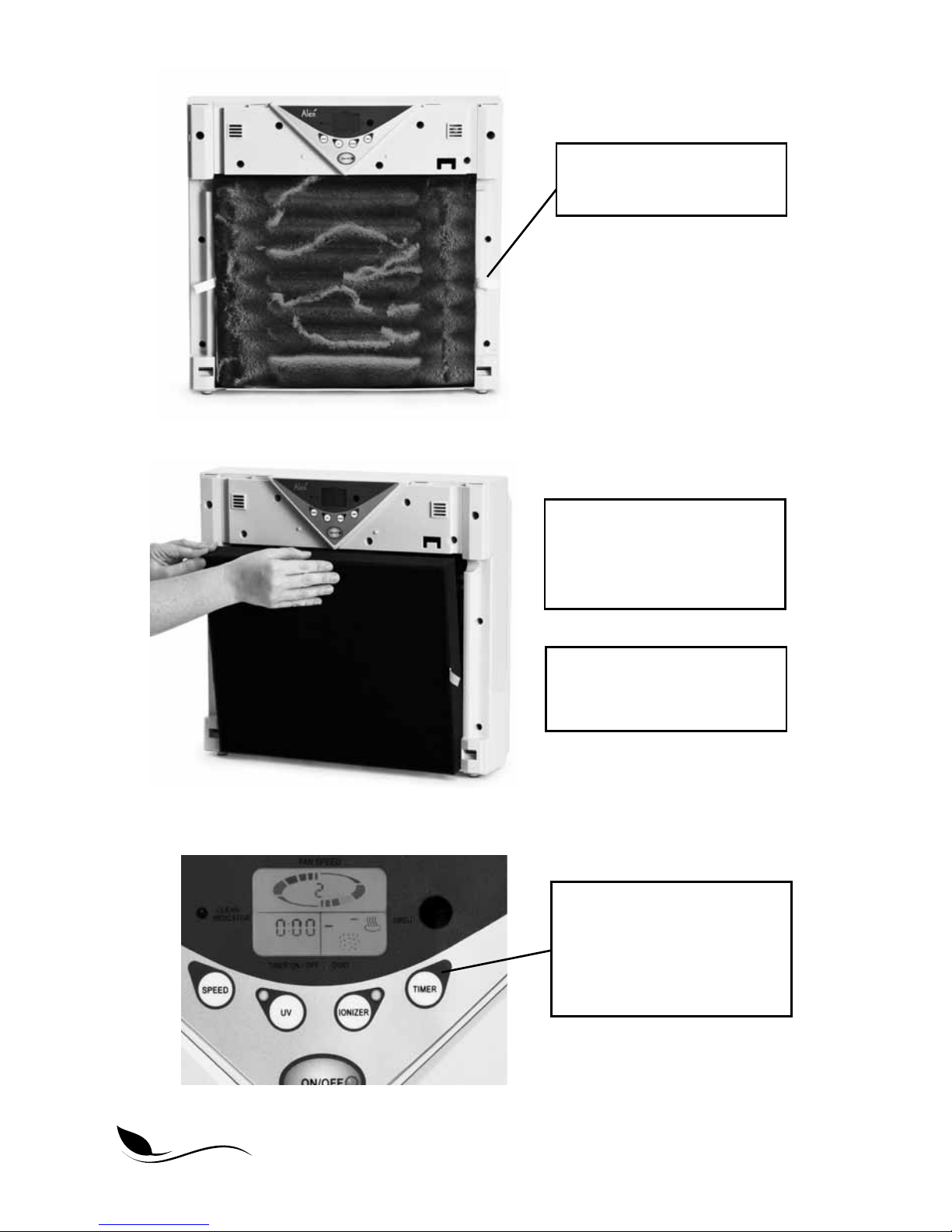
How To Replace The Filter
1. Always unplug the unit when installing a lter.
2. Distinguish the front side from the back side of the lter.
3. It is recommended to wear gloves while discarding the used lter. Place the used lter in
a plastic bag to prevent dust from reentering the air.
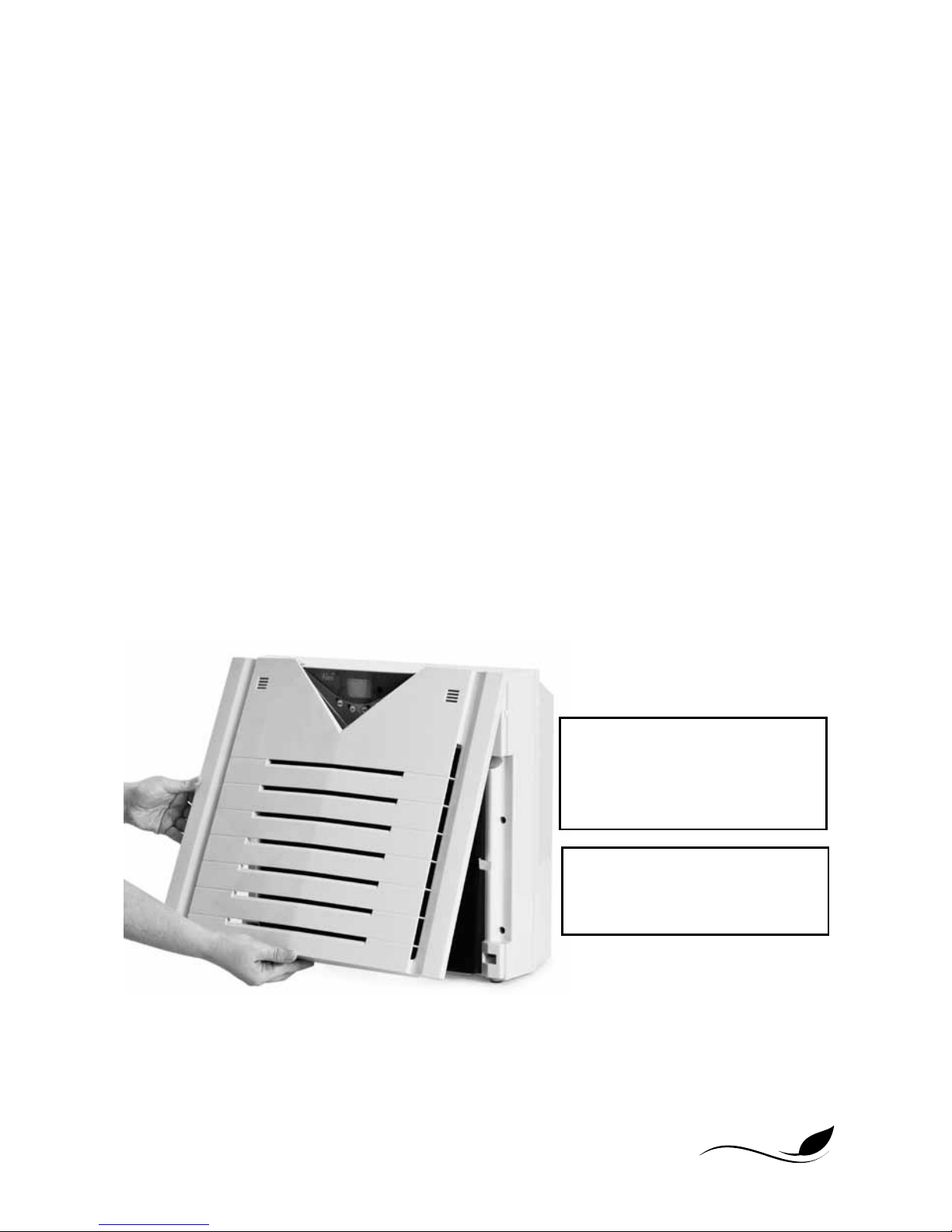
1. With the front of the unit
facing up, pull up on the
lower left or right corner of
the front inlet air intake grill.
2. After pulling up, push the
grill towards the display panel
at the top of the unit.
Page 9
10
Helping People Live Better
4. Take the new lter out of
the plastic bag and insert
it into the air cleaner with
the arrow pointing inward.
5. Insert the top of the inlet
grill rst and then snap in
the lower part of the grill.
3. Remove the used lter by
lifting the pull string.
6. RESET the lter indicator
by holding down TIMER
while the unit is ON until
the clean indicator light
disappears.
Page 10

11
www.AlenCorp.com 1-800-630-2396
How To Replace The UV Light
1. Before replacing the UV light, please unplug the unit.
2. With the front of the unit facing up, pull up the lower end of the inlet grill and push it
toward the display panel at the top of the unit, then remove it.
3. Remove the lter by lifting the pull string.
4. Unscrew the screws on the lampshade with a screwdriver, and then remove the lamp-
shade.
5. Gently rotate the bulb a quarter turn in either direction until it unlocks from the socket. Pull
the pins out of the sides of the socket, one end at a time.
6. Unpack the new UV bulb gently by handling the ends only. Starting with one end of the
bulb, then the other, gently insert the metal pins on the bulb into the white slotted socket
one pin at a time. Once the ends of the bulb are completely inserted into the socket,
rotate the bulb a quarter turn until it locks into place.
7. Reinstall the lampshade.
8. Reinsert the lter.
9. Hook the fasteners on the intake grid into the holes on the unit rst, and then push down
on the two sides of the inlet grid until the cover snaps into place.
TRoUbLEShooTINg TIPS
How do I reset the lter indicator light? I put in a new lter but the light is still
illuminated.
After changing the lter, RESET the lter indicator by holding down TIMER while the unit is ON
until the illuminated clean indicator light disappears.
Can I clean the lter?
The black foam layer of the lter, known as the Pre-Filter, captures large dust and hair. This
layer is held on with Velcro®. Once removed, the Pre-Filter can be washed or vacuumed to
maintain efcient operation of the unit. No other layers or parts of the lter can be washed,
cleaned or otherwise reused. Please replace the lter regularly to maintain optimal high perfor-
mance.
How can I tell if my UV lights have burnt out?
Turn on the UV lights by pressing UV and set the fan speed to 1. Make sure the room that the
unit is placed in is dark. Look through the top of the unit where the air blows out to see if there
is a blue glow. This glow is quite faint, so you may need to press the UV button on/off several
Page 11

12
Helping People Live Better
times to see if you notice a difference. If there is no glow, then the UV lights have burnt out
and need to be replaced. Visit www.AlenCorp.com or call 1-800-630-2396 to order a replacement UV light. UV lights are like normal light bulbs and will last approximately 9 to 12 months
when operated continuously.
I have an issue not listed in this manual.
Please visit www.AlenCorp.com and send us a message or call 1-800-630-2396. A customer
service representative will respond to your inquiry in a timely manner, in most cases within a
couple of hours.
What information do I need when I contact customer service for warranty?
Please refer to the rating label on the side of the unit. This rating label has your unit’s lot code
and other important information we need to assist you.
LIFETIME LIMITED WARRANTY
What Is Covered?
Alen offers the industry’s rst LIFETIME LIMITED WARRANTY program for all our air puriers.
We warrant your Alen Air Purier to be free from defects in materials or workmanship for as
long as you own it. Register your Alen Air Purier at www.alencorp.com/register.
What Will Alen Do?
Alen will, at its option, either furnish a replacement part or replace your air purier provided
the product is determined by Alen to be defective as a result of faulty material or workmanship
while in normal use. Replacement parts or units will, at Alen’s option, be either new or refurbished. Alen’s sole obligation under this warranty is to replace defective parts or replace your
air purier free of charge. All parts or units that are replaced become the property of Alen.
How To Get Service?
This warranty will be valid only for units in possession of the original purchaser. Proof of
purchase must be presented to Alen’s warranty service representative. To help us validate your
warranty, we encourage you to register your Alen Air Purier at www.alencorp.com/register.
To obtain warranty service, complete our online form or call 1-800-630-2396. The defective
product or part must be shipped or delivered to Alen’s authorized service center. All postage,
insurance and shipping charges are the responsibility of Alen and included in this warranty.
Your Lifetime Limited Warranty Program Remains In Effect Only If:
Your Alen Air Purier is operated in accordance with the instructions provided in the Alen user
manual. This includes replacing the lter at least once a year to prevent excessive stress on
the motor.
Your Alen Air Purier is connected to a proper power supply (see voltage label on unit).
Page 12

13
www.AlenCorp.com 1-800-630-2396
Your Alen Air Purier shows no evidence of tampering, mishandling, neglect, accidental damage, modication, and/or repair by anyone other than authorized Alen service personnel.
Ownership of the air purier has never been transferred.
DISCLAIMERS/LIMITATIoNS
ALEN’S LIFETIME LIMITED WARRANTY IS VALID ONLY FOR THE ORIGINAL PURCHASER
AND IS IN LIEU OF ALL OTHER WARRANTIES, EXPRESS OR IMPLIED, INCLUDING
WARRANTIES OF MERCHANTABILITY AND FITNESS FOR A PARTICULAR USE OR
PURPOSE. ALEN’S SOLE LIABILITY WITH RESPECT TO DEFECTS IN MATERIALS AND
WORKMANSHIP IN THE AIR PURIFIER SHALL BE, AT ALEN’S OPTION, TO FURNISH
REPLACEMENT(S) OF THE DEFECTIVE PART(S) OR REPLACE THE AIR PURIFIER ON
THE BASIS DESCRIBED ABOVE. ALEN WILL NOT INSTALL ANY REPLACEMENT PARTS
IT PROVIDES OR PROVIDE LABOR WITH RESPECT TO THE SAME. EXCEPT AS STATED
IN THE IMMEDIATELY PRECEDING SENTENCE, ALEN SHALL HAVE NO LIABILITY,
WHETHER UNDER A CAUSE OF ACTION IN TORT, STRICT LIABILITY, CONTRACT, OR
OTHERWISE, TO ANY PERSON FOR ANY CLAIM, INJURY, LOSS, DAMAGE OR EXPENSE
(INCLUDING ANY DIRECT, INDIRECT, SPECIAL, CONSEQUENTIAL, INCIDENTAL, PUNITIVE OR EXEMPLARY DAMAGES) IN ANY WAY ARISING OUT OF OR RELATING TO THE
AIR PURIFIER OR ITS USE BY ANY PERSON.
SOME STATES DO NOT ALLOW LIMITATIONS ON AN IMPLIED WARRANTY OR HOW
LONG AN IMPLIED WARRANTY LASTS, SO ANY SUCH LIMITATION IN ALEN’S LIFETIME
WARRANTY MAY NOT APPLY TO YOU. SOME STATES DO NOT ALLOW THE EXCLUSION
OR LIMITATION OF INCIDENTAL OR CONSEQUENTIAL OR OTHER DAMAGES SO ANY
SUCH EXCLUSIONS OR LIMITATIONS IN ALEN’S LIFETIIME WARRANTY MAY NOT APPLY
TO YOU. ALEN’S LIFETIME LIMITED WARRANTY GIVES YOU SPECIFIC LEGAL RIGHTS.
YOU MAY ALSO HAVE OTHER RIGHTS WHICH VARY FROM STATE TO STATE.
Page 13

14
Helping People Live Better
Copyright © 2012 Alen Corp. All Rights Reserved.
a375uv-pm-4-2012
 Loading...