

Page 1
Oximeter does not
turn on
Check that the batteries have been inserted the right way round. If
the batteries are correctly inserted try new batteries. Contact us.
inconsistent
See the section of this quick start guide with the explanation mark
bright light sources. If this doesn’t resolve it, please contact us.
settings menu
The settings menu is accessed by pressing and holding the power
o. See the main manual to nd out how to use the menu system.
I can't turn it o
The oximeter will turn o automatically in 10-20 seconds if a nger is
not inserted. You cannot turn it o manually.
It turned itself o
in 10-20 seconds. Put the oximeter on your nger before turning on.
Anything else
Please contact us and we'll be happy to help.
OxiPro OX2
Product
Support
Fingertip Pulse Oximeter
Quick Start Guide V. 1.3
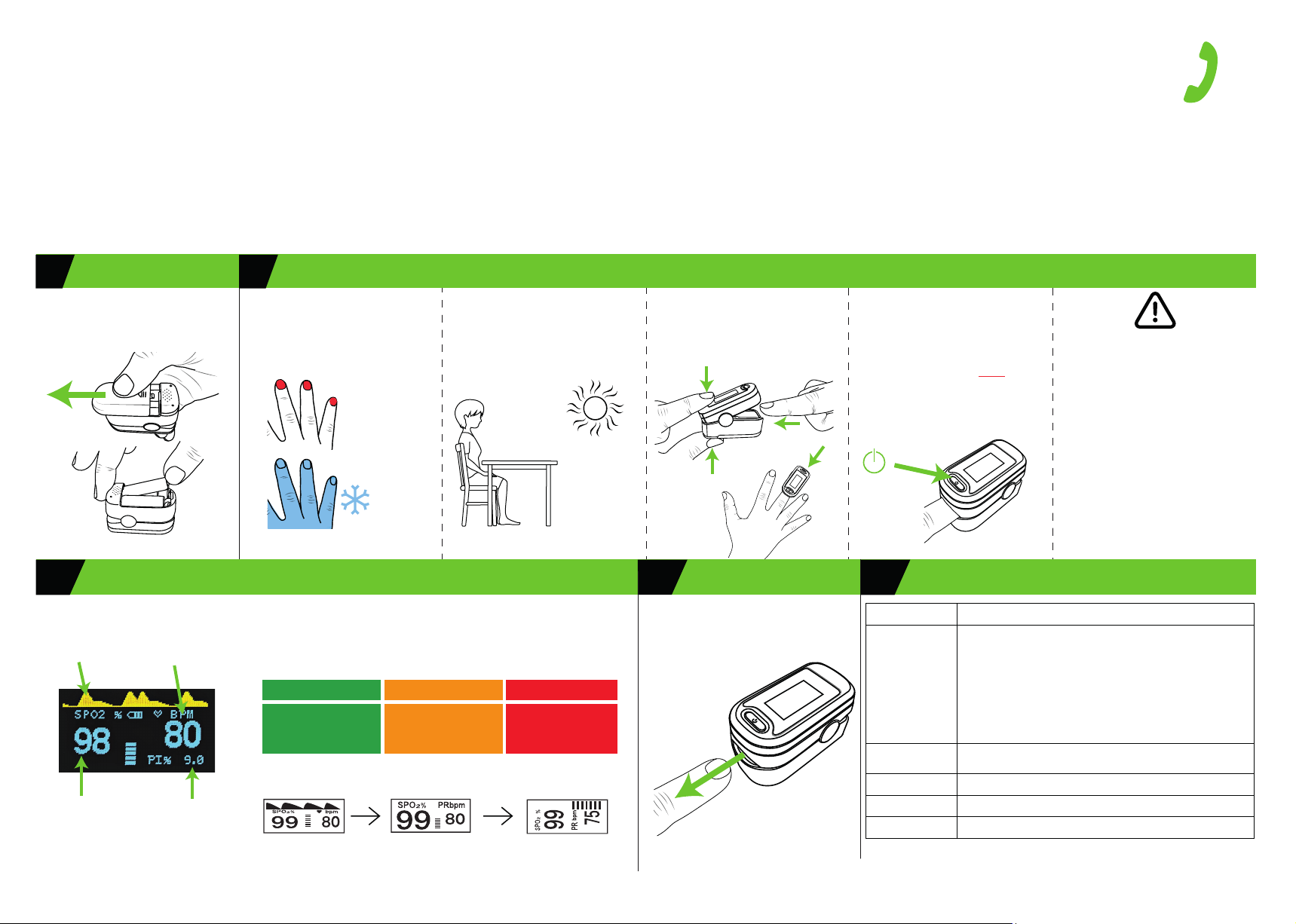
1 2 PERFORMING A TEST
INSTALL BATTERIES
Turn oximeter over, slide the battery
cover as shown to remove it. Insert 2 x
AAA batteries (included) and replace
the battery cover.
1) Clean hands
2) Remove nail varnish or false nails,
they blocks the signal.
3) Make sure your ngers and hands
are warm to the touch.
X
X
Take a reading when you are relaxed,
sitting or laying down.
Rest your testing hand on a xed
surface or part of your body when
testing.
Remain still while testing.
X
Make sure
you’re away
from bright
light when
testing, it may
interfere with
the oximeter
sensor.
Open the oximeter by squeezing the
end together.
Insert the middle nger of your
dominant hand until you feel the
rubber stop.
IMPORTANT
1) SIT OR LIE STILL WHILE TESTING.
2) REST YOUR HAND ON A SURFACE
WHILE TESTING.
3) TURN THE OXIMETER ON AFTER IT IS ON
YOUR FINGER, BY PRESSING THE BUTTON
ON THE FRONT.
4) WAIT FOR THE READING TO STABILISE
(UP TO 60 SECONDS) TAKING THE
HIGHEST READING.
www.alcosense.co.uk/oxipro
[email protected]
UK: 01628 778885
IRL: 01 513 7065
Lines open Mon-Fri
0900-1700
If you get a low or
inconsistent blood
oxygen reading
Blood ow quality can signicantly
vary between ngers. Typically, the
best ngers are the middle ngers
followed by the index nger, but this
can vary from person to person.
If you get an unstable reading, low
reading or weak signal, try another
nger or hand as oximeters can be
used on any nger. Wait up to 60
seconds until the blood oxygen
reading stabilises (shows the same
reading for 8-10 seconds) and take
the highest reading shown.
3
Wait for the reading to stabilise.
10 to 60 secs
Pulse graph
Blood oxygen
reading (SpO)
NOTE: Screen layout may vary
Heart rate
(Beats per minute)
Perfusion Index
(See full manual)
Take the stable blood pressure reading from the oximeter and reference it
against the chart below (Source: NHS).
If you have a reading of 94% or below (aer the reading has stabilised),
change ngers and take a second reading. Making sure you are still, with
your hand supported on a stable surface, remove all clear or coloured nail
varnish and wait up to 60 seconds for the reading to stabilise again.
95% to 100% 93%-94% 92% or less
This is the normal range for
healthy adults without
existing lung conditions
TOP TIP! You can change the orientation of the screen through several
options by clicking the power button while testing.
Seek urgent
medical advice or call
111
Go to A&E
immediately
or call 999
4 TURNING OFFUNDERSTANDING THE RESULTS
Remove your nger from the
oximeter. It will turn o automatically
in 10-20 seconds
10-20 secs
TROUBLE SHOOTING5
My reading seems
incorrect,
unstable or
I'm stuck in the
symbol at the top (far right on the rst page). In addition to this, it
could be as a result of movement whilst the reading is being taken or
light leakage into the sensor from the side of the nger. It can take
up to 1 minute for the reading to stabilise depending on your skin
type and the ambient light conditions. Make sure your hand is
supported on xed surface while testing and stay still, if
stabilise try a dierent nger and give the oximeter a slight squeeze
when it is on your nger to increase the light seal around the sensor.
Also check you are not wearing clear or coloured nail varnish or
false nails and if so, remove it from the test nger. Test away from
button. Just leave the oximeter for 10-20 seconds and it will power
The oximeter turns itself o automatically if it does not sense a signal
it still does not
 Loading...