

Page 1
User Manual
Lux
Page 2

Contents
Precautions……………………………………………………………………………………….. 03
Characteristics……………………………………………………………………………………..04
About the Player…………………………………………………………………………………...05
Screen Description………………………………………………………………………………...06
Basic Operation……………………………………………………………………………………07
System Menu………………………………………………………………………………………08
Listen to Music…………………………………………………………………………………….10
Resources Manager………………………………………………………………………………..11
Picture Browse/FM….…………………………………………………………………………….12
E-Book…………………………………………………………………………………………….13
Game Function…………………………………………………………………………………….14
USB Disk………………………………………………………………………………………….15
Transfer and Play Video File………………………………………………………………………16
Upgrade Player Driver...…………………………………………………………………………...18
Troubleshooting…………………………………………………………………………………...20
Specifications……………………………………………………………………………………...21
Page 3

Precautions 3
This manual contains important safe measurements and correct operational information, so please
read all the information carefully before you use the device in order to avoid any unexpected
accidents.
z Do not put the player in the condition of high temperature, humidity or dust.
z Do not put the player in high temperature place (over 40℃), especially not in the cars with
window closed in summer.
z Do not knock or hit the player, especially do not shake TFT screen in order to avoid TFT
being damaged or displayed abnormally.
z Select suitable volume, turn down or stop use when you feel tingle in ears.
Battery service lift may be various from different using conditions, manufacturer and
manufacturing time.
z Do not disconnect the player abruptly during the formatting or uploading and downloading,
otherwise, it will cause the program error.
z We will not be responsible for any obligation for any memory loss caused by product damage,
repair or other reasons. Please operate correctly as per the manual.
z The player, no matter is powered on or not, once connected with the USB port of started
computer, can be charged.
z Do not dismantle the player personally or use alcohol, thinner or benzene to clean the surface
of the player.
z Do not use the player in the electronics-prohibited area, such as in the plane.
z Do not use the player when driving or walking in order to avoid traffic accidents.
z Please charge in the following conditions:
A. Battery electricity icon displays no electricity.
B. Further power on the player when the system is powered off automatically, but it powers off
soon.
C. No response with the pressing keys.
※Our Company reserves the right for the improvement of the product. It is subject to any change
on the specifications and designs without further notice!
Page 4

Characteristics 4
2.8-inch 260K full-color TFT display
Multi music formats as MP3, WMA, APE, FLAC and WAV, good timber and real audio frequency
display
MPEG-4 video format play, full-screen play display, exterior-sound speaker play
High-definition JPEG picture browse function
Built-in hi-fi 8 Ohm speaker
Digital record
Energy-saving setting, brightness adjustable, customerized power off time
Good timber, support 3D EQ surrounding effect, customerized EQ
Support multi languages
USB2.0 ultra-high speed transmission as 5M/S
Listen to music while reading E-book, with bookmark function
Listen to music while playing games
Support g-sensor
Portable U-disk function, support Firmware Upgrade
A-B reapeat function
Page 5
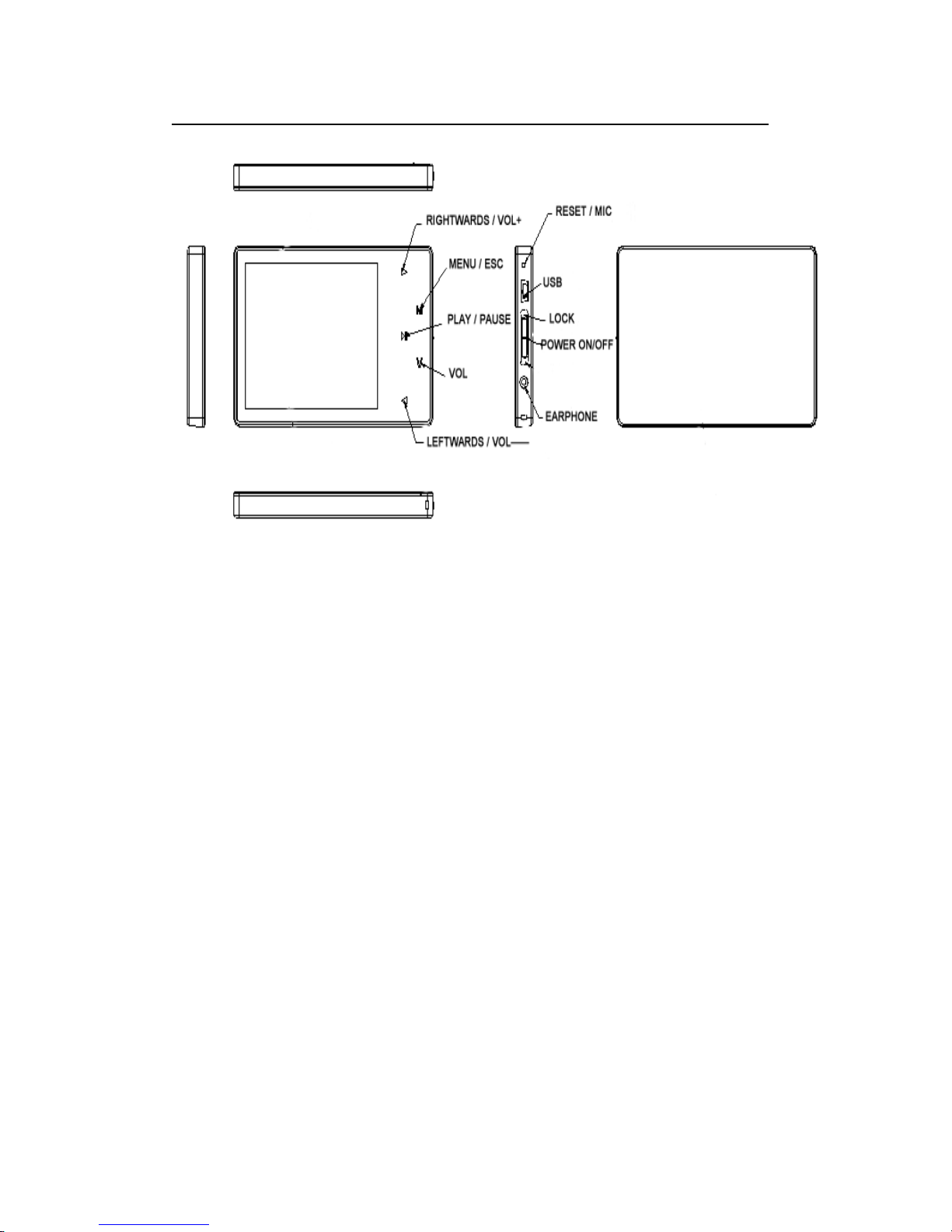
About the Player 5
Page 6
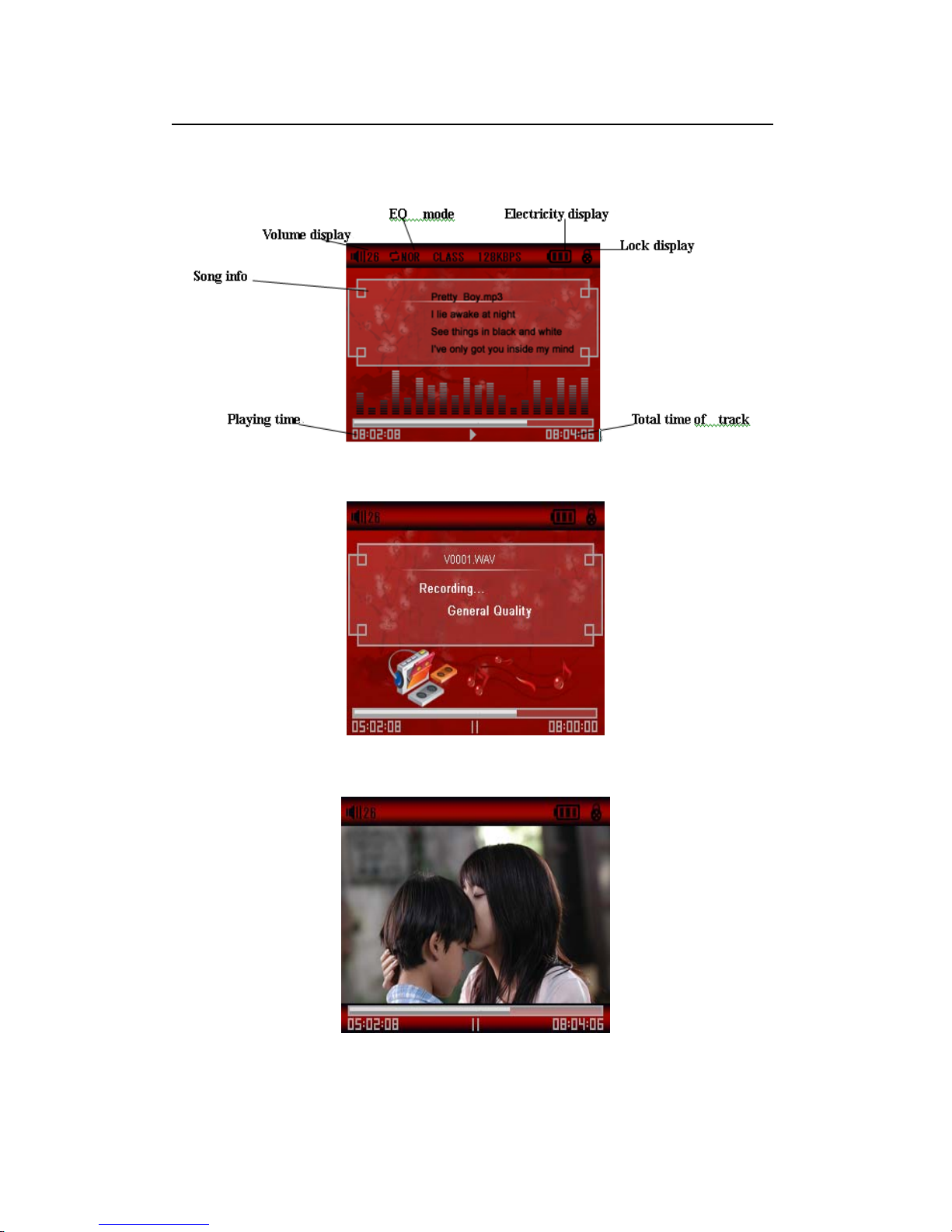
Screen Description 6
Music Play
REC Mode
Video Play
Page 7
Basic Operation 7
Power On/Off
Power On:
Push the power key switch to ON position, long press the key down for 3 seconds, the player will
display the Boot interface and enter the working mode before the Normal Power Off.
Power Off:
a. In Play state: short press”M” to pause, long press the power key down for 3 seconds, to power
off.
b.In other modes: long press the power key down for 3 seconds, to power off.
c. The system will power off automatically if the battery is not enough.
Hold On/Off
In Video, Music or REC state, you can set the Hold as On to avoid the unexpected operation.
Hold On: Short press “
” key to lock the player automatically.
Hold Off: Short press “
” key to unlock the player automatically.
Power Reset
If your player is blocked during the using, you can push [ON/OFF] power switch to restart the
player.
Connect to Computer and Data File Transmission
After starting the computer, you can connect the player to computer via USB cable to achieve the
USB power supply or USB data transmission. When the player is connected to the computer via
USB port, it can be used as a U disk. It requires you only to drag your favorite music or data into
MP3 instead of any 3
rd
procedure.
Vo l um e C on t r ol
you should short press
“∨”,when Speakers voice in flash ,press ◄ and ► to adjust the volume.
Battery
This player adopts built-in lithium batteries of high capacity.
The usable time of battery electricity may be various according to different volume, type of
playing file and pressing operation. The player can save battery as per the set [Customerized
Power Off Time] or [Display Setting].
Page 8
System Menu 8
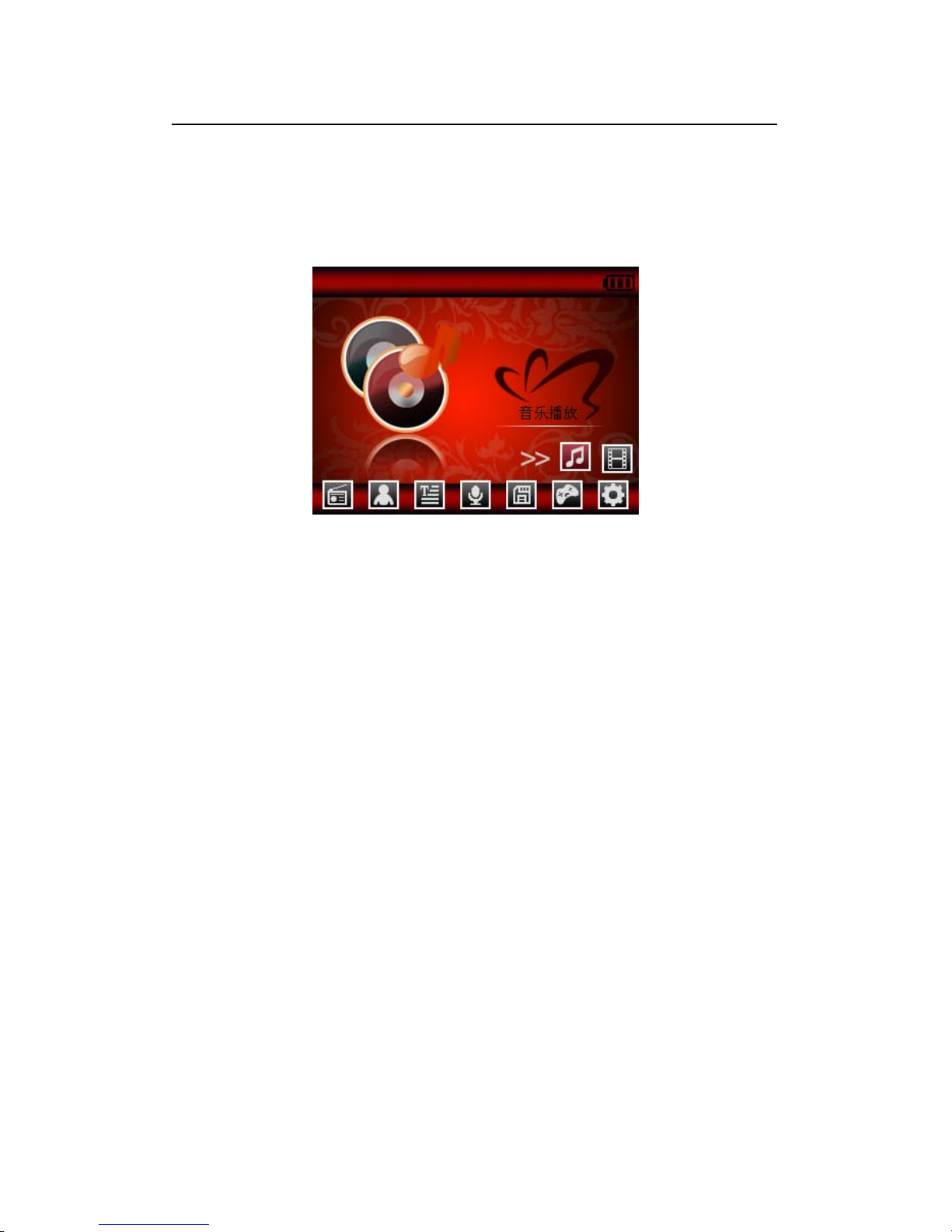
Main Interface
After entering the Main Interface, select your desired option among [Music ]/[Video ]/ [FM ]/
[Photo]/[Text]/[Record]/[Navigation]/[Game]/[Setting] circularly by pushing “◄/►”, and short
press the [M] key to enter the option menu, long press [M] key to exit the submenu and return to
Main Interface
Setup
In Main Interface, push “◄/►” to select [Settings] option, short press[M]key to enter Setting
interface (shown in right bottom), and select the sub-option to be set by pushing
◄ or►
Music Play
z Display Setup
①Backlight time: six options of 5 sec., 10 sec., 15 sec., 20 sec., 30 sec., and
always on.
②Lum: five options of +1, +2, +3, +4 and +5, the higher level, the more bright.
③Backlight mode: two options of Normal and Electricity-saving modes.
z System Setup
Four sub-options: Language, about, Upgrade and Default set.
①Language Selection: three options of Simplified Chinese, Traditional Chinese and English
②About: player storage memory, remain memory and system software version no., these
information are read-only, short press [M] key to exit.
③Firmware Upgrading
Eject out the dialog box in this menu, it reminds you whether to upgrade the firmware, it will
exit if no firmware upgrading.
⑤Defaulted Set
In this menu, eject out the dialog box, confirm whether to resume the defaulted value, select
“Yes” or “No”.
z Auto Power Off Time
In this menu, there are six options of Power: Off, 3 min., 5 min., 10 min., 15 min. and 20
min.
Page 9

z Format
In this menu, eject out the dialog box, confirm whether to format the player, select “Yes” or
“No”.
Play/Stop/Pause
In Music Play menu, connect the earphone with player, select the desired song file by pushing
“◄/►”key, then short press [M] key to begin the playing, then short press
key to pause,
operate it circularly. During the playing of music, the interface has real audio frequency display,
e.g., for the file with LRC file, behind the frequency is the Synchronous Lyric.
Lyric Di splay
The player only supports the Lyric Synchronous Display that the file shares the same name as
LRC file of MP3 format, e.g., music file is named as “Angel.mp3”, the LRC file must be named as
“Angel.Irc”, what’s more, they have to be in the same directory.
Music Play Setting Menu
In Music Play state, long press [M] key to enter Main Menu and enter the “Music” in “Settings”
option, there are multi options, push
◄ or ► key to shift to the desired setup menu. After your
selection, press
key to confirm.
■ A-B Repeat function
In Music Play state, Short press the
“∨”key of the loudspeaker in flash, short press the "M" to
begin the repeat, A will display on the screen; Short press the "M" key 2 times,to the end of
repetition, showed that the state 'A-B', the player will repeat between the beginning point and the
ending point.; short by the
“∨” key speakers to stop flashing, and withdraw from the repetition
model;
Page 10
Listen to Music 10
1. Repeat Mode
a. Once Stop after playing all the songs in each directory
b. Repeat 1 Repeat playing a single song.
c. Folder once Play all the songs in the folder.
d. All once Play randomly the songs in the current folder.
e. All repeat Repeatedly play all the songs.
f. Intro Play all the songs of the first 10 seconds in the current folder.
2. EQ Setup
Normal/3D/Rock/Pop/Classic/bass/Jazz/User EQ, the above eight options will bring you different
music effects; also, you can edit your favorite EQ effect by [User EQ set] option. The operation is
done by leftwards, rightwards,
keys.
3. play mode
order
shuffle
Voice REC
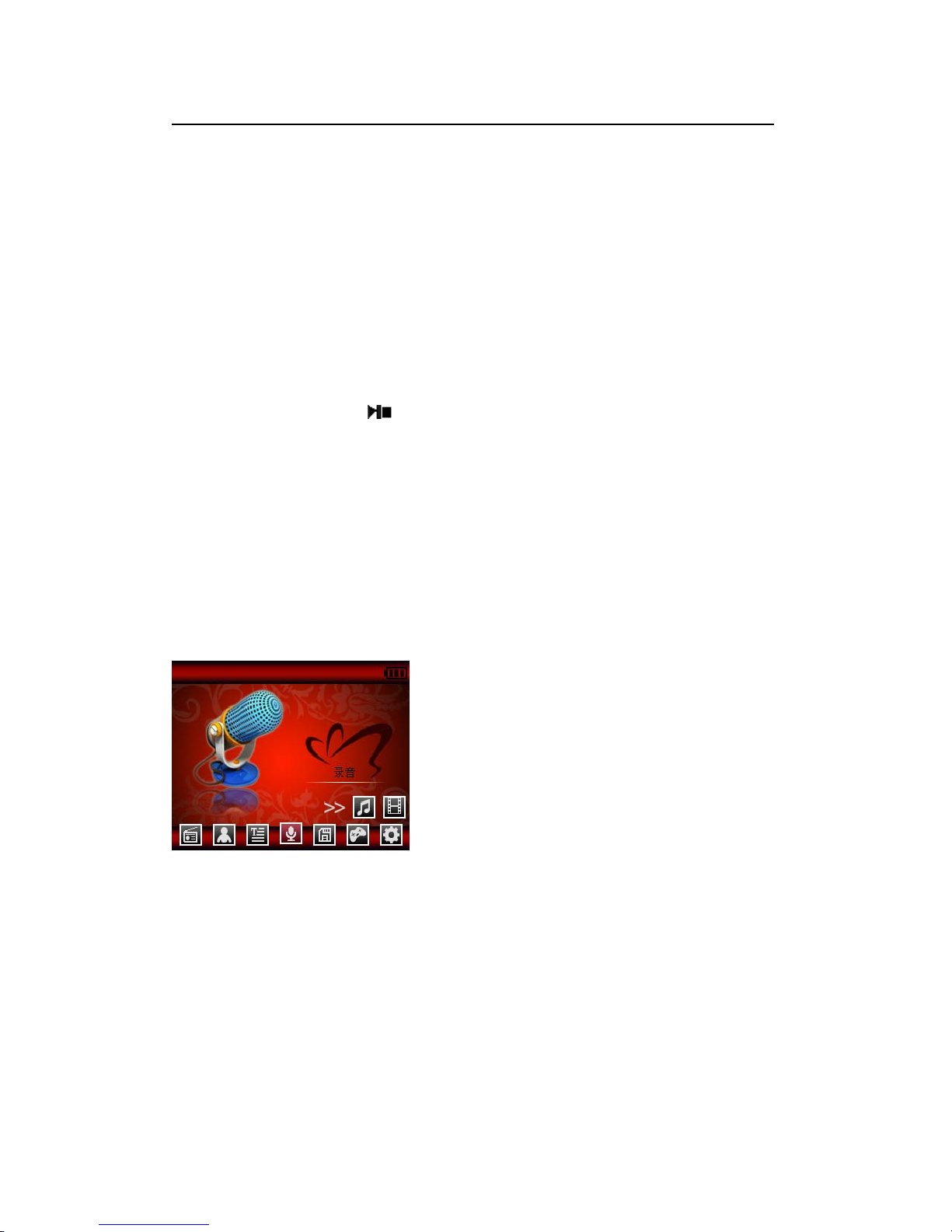
In Main Interface, enter Record state, Pull the power key downward to start recording, Pull the
power key downward again to pause the record, long pull down the power key or short press"M"
key to save the recorded file and enter next Record preparation state. Long press [M] key to save
the record and exit the REC mode.
REC Setup
In Stop state of REC mode, long press [M] key to exit the Main interface, and enter [Record]
option, adjust the settings among [REC Quality]/[REC Volume]/[CHECK SW].
1. REC Quality: high quality, common quality (the first one has larger REC file and better effect;
the second one is in the opposite)
2. REC Volume: five options of +1, +2, +3, +4 and +5. The higher level, the larger recorded
volume.
*The recorded voice files can be found in Music Play menu and played to try the effect.
*If the screen displays “Full Space”, it indicates that there is no space for new recorded file, please
delete other files to release more space.
Page 11

Resources Manager 11
Resources Manager
Resources manager is one of the function characteristics, it can make you know the inside file type,
structure and contents more clearly, for convenient management and search of the file content in
classifications.
Note:
Delete File
In Resources Manager, you can select music or video files, long press
∨”key to display delete
Dialog box, select “Yes” to delete and “No” to cancel. After the selection, short press [M] key to
implement the selected option.
Page 12
Picture Browse and FM 12
JPEG Browser
In Main Interface, short press [M] key to confirm to enter Picture Browse mode
Push
◄ and ► key to select the previous or next picture.
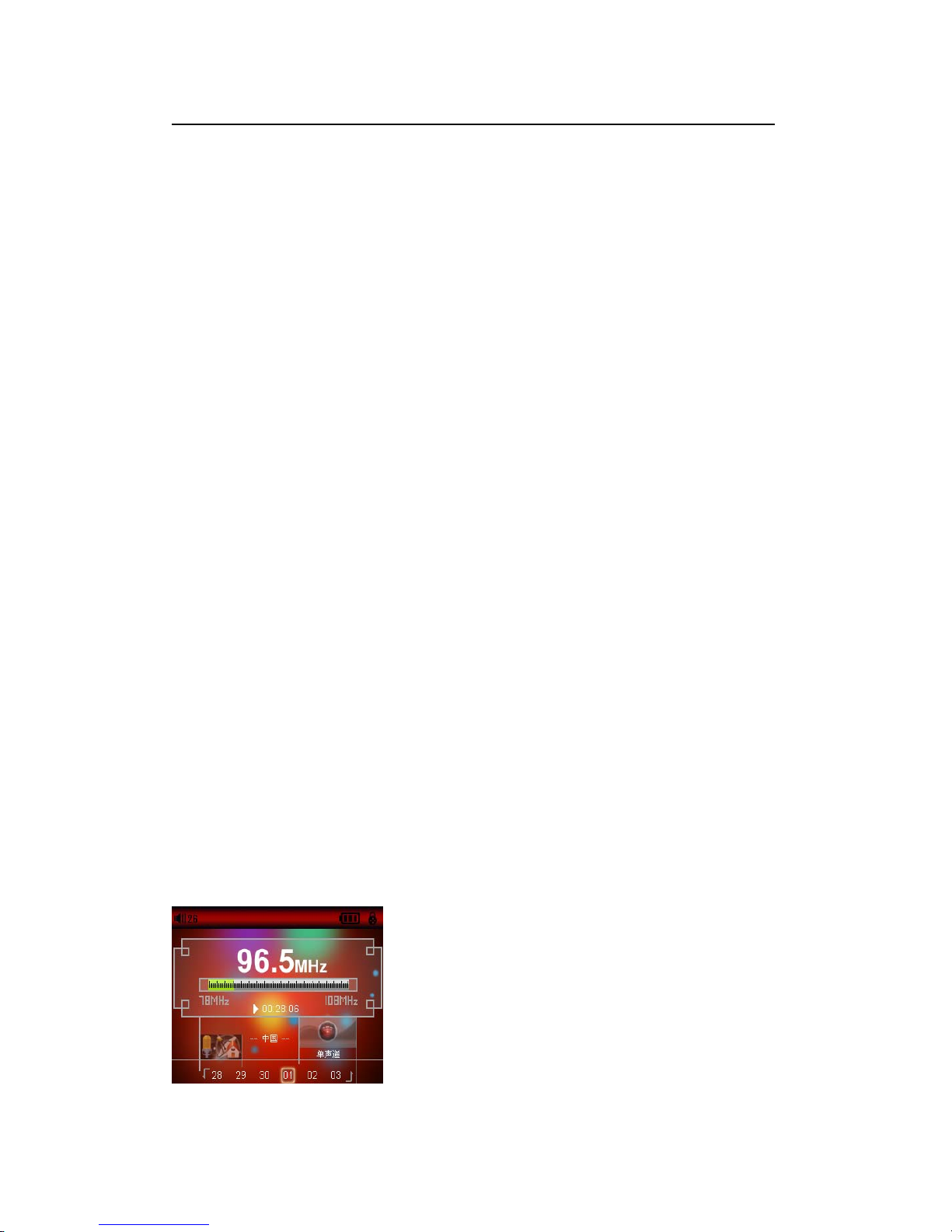
FM
Enter FM menu,.Press Mode key to select: Manu,Auto,Mem,Pres,Del
Manu:Short press [M] Key to confirm, press leftwards or rightwards to change the frequent
manually, long press [M] to exit.
Auto: Press [M]to enter, the player will automatically search, after search will display:pres CH
XX, Press leftwards or rightwards to select the station.
Mem: press[M]key to enter, press
◄ or ► to select the stations, press [M]to confirm store, the
frequent display on screen will replace the frequent that stored before. First Short press MENU to
exit mem,then long press MENU to return FM menu. pres: Pres[M] key to enter, press leftwards
or rightwards select the stations that stored in the player.
Del: press[M] key to enter, press
◄ or ► t to select the station that you want to delete, press [M]
the confirm, after delete the station’s frequent will display “empty”, First Short press[M] to exit
mem,then long press[M] to return FM menu.
FM record :
When you listen the FM music, Pull the power key downward to start recording, Pull the power
key downward again to pause the record, long pull down the power key or short press"M" key to
save the recorded file and enter next Record preparation state. Long press [M] key to save the
record and exit the REC mode.
l
Note:
In FM mode, the earphone is using as antenna, so please keeping the earphone is connected well.
Page 13

E-Book 13
Download TXT File
Connect the player to computer, select the desired file to download and save the file as TXT
format in portable disk.
Read File
In Main Interface, enter Text option, push
◄ or ► key to select the desired file to read, then
short press[M] to read. Turn pages by pushing“◄/►”.
Page 14

Game Function 14
Built-in Intellectual Game: Fighting Space, Tank, Pirates of the Caribbean
In System Menu, enter Game mode, short press
key to enter Game Setup Interface.
Keys Description
Enter Game Setup Interface., short press
key to shift between Quit and Pause functions,
press”◄/►” to move up /left move down/right . short press MENU to deathblow.. Long press”
M” to exit
Balance ulnar
Use a balance ulnar tests loom placed perspective
Craps
Kalman
Calculated steps and consumption of calories
Page 15
USB Disk 15
USB Display Mode
The player has a high-speed USB2.0 port with the transmission speed of 5M/S, and is a standard
USB disk, supports the systems including Windows98 (it needs to install the driver), over
Windows2K (it’s unnecessary to install the driver), Mac OS 10.3 and over, Linux Redhat 8.0 and
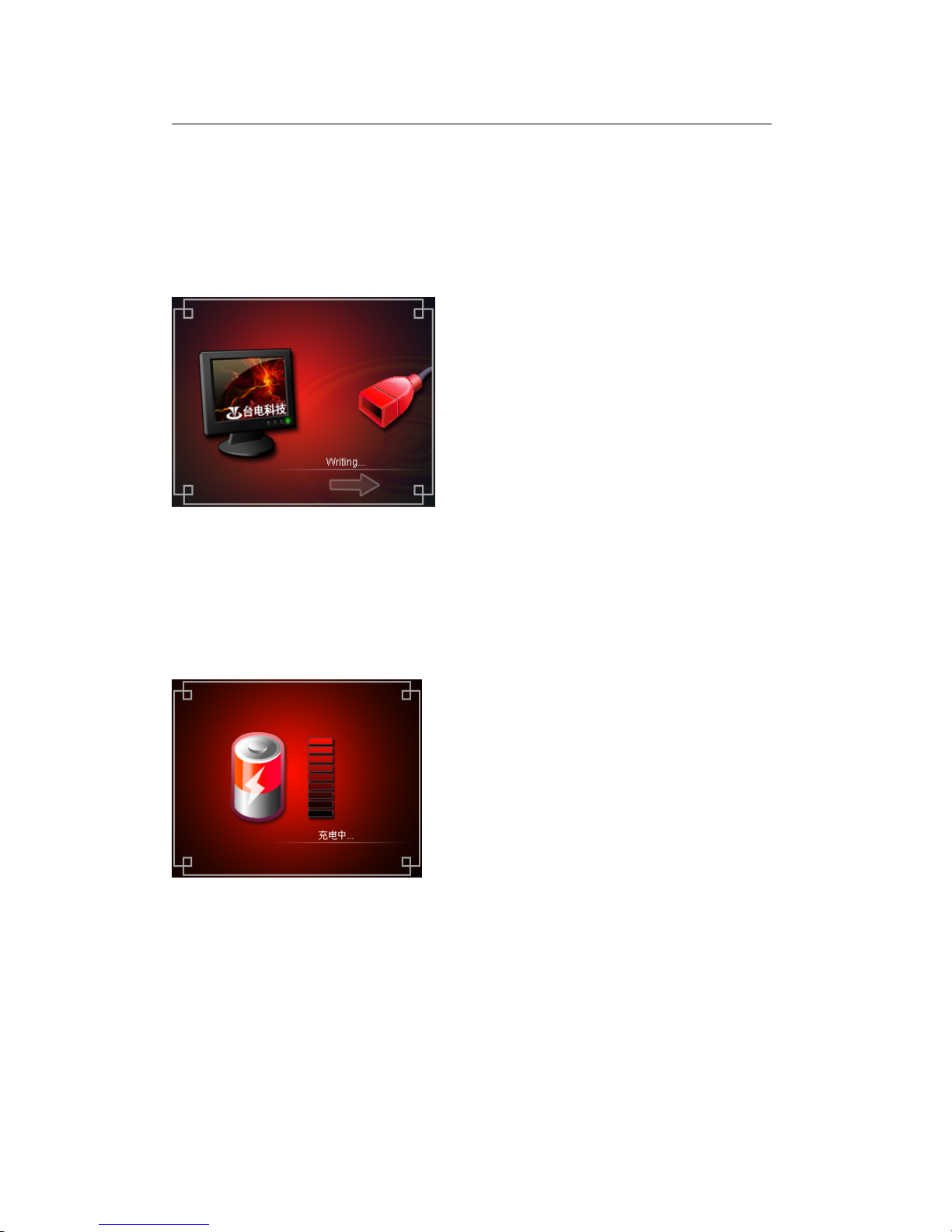
over. It supports USB power supply and can be played without battery. After connecting to the PC
(several seconds later), the player will display the On-line mode shown
Charge Display Mode
If the battery is too low, the display will shows “Low battery to power off”, then the player will be
powered off automatically. You can use the attached charger to charge the battery. During the
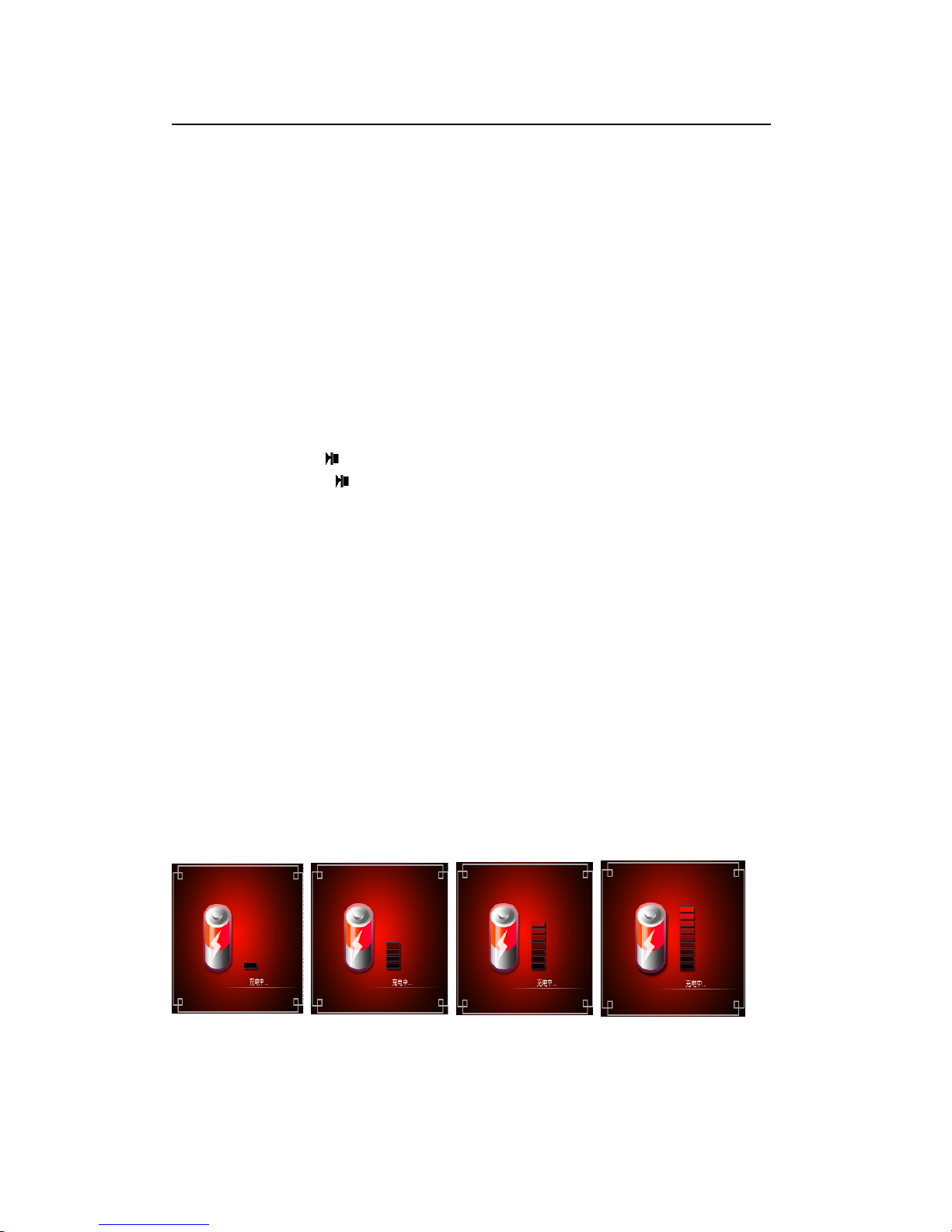
charging, the battery icon will display the impulse, after the charging, the battery electricity will
shows full grids (Fig.). It requires 4 hours to charge fully the battery (note: for the first two times,
you have to charge for 8 hours).
Page 16
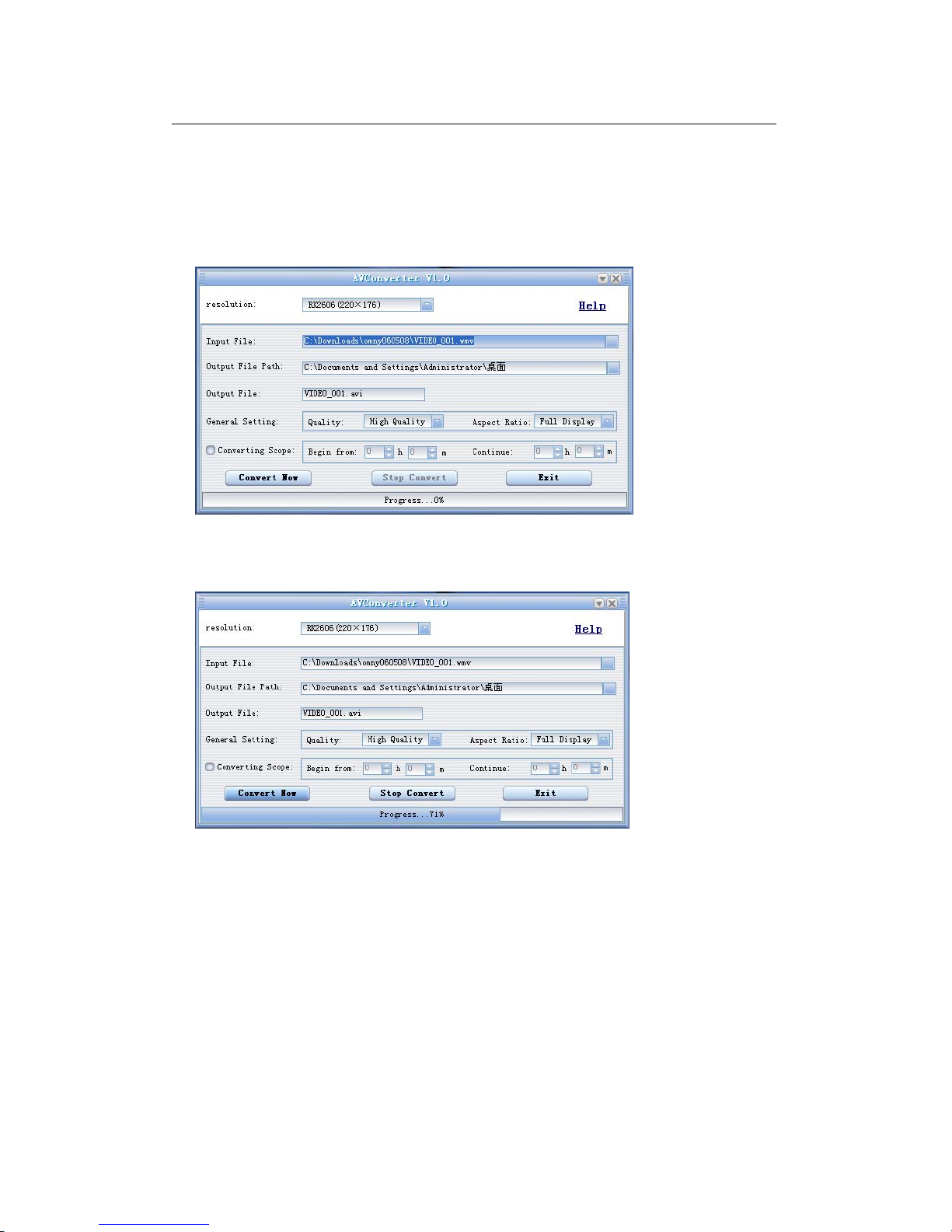
Convert and Play Video File 16
This player can convert the WMV, RM, AVI, VOB or DAT into AVI video format via the attached
video convert software.
1. Click and run the program of “AV Converter.exe”, select your desired video/audio file and
AVI video file routine to be generated, shown as follows:
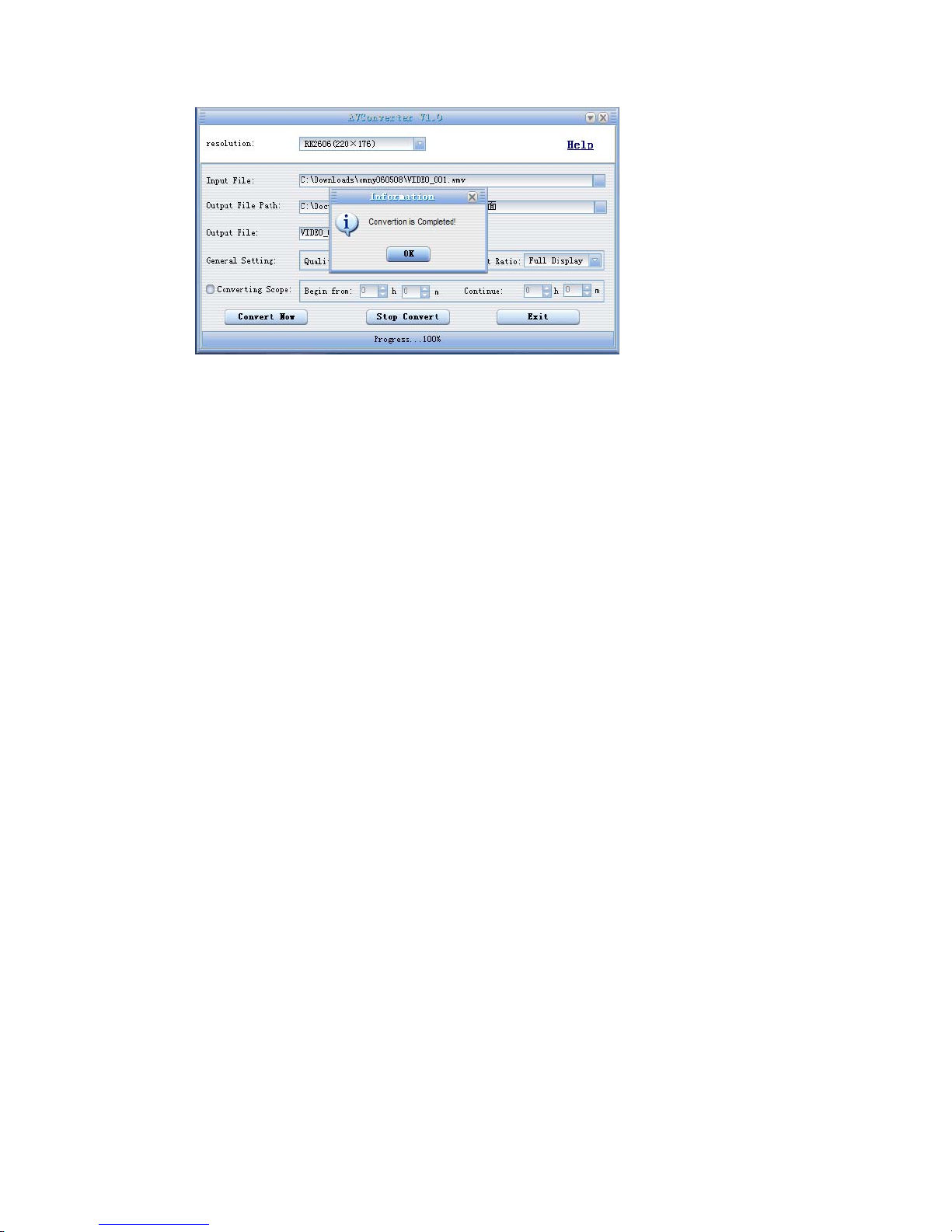
2. Select and set your desired parameters, click [Start to Convert] button, then begin to convert
to AVI file.
The successfully converted AVI video file can be played in MP4 player. During the operation,
3. enter Video Play menu, select the corresponding file, short press [MODE] key to play in video,
long press to exit (the Video Play interface refers to the Screen Description).
Page 17
Page 18
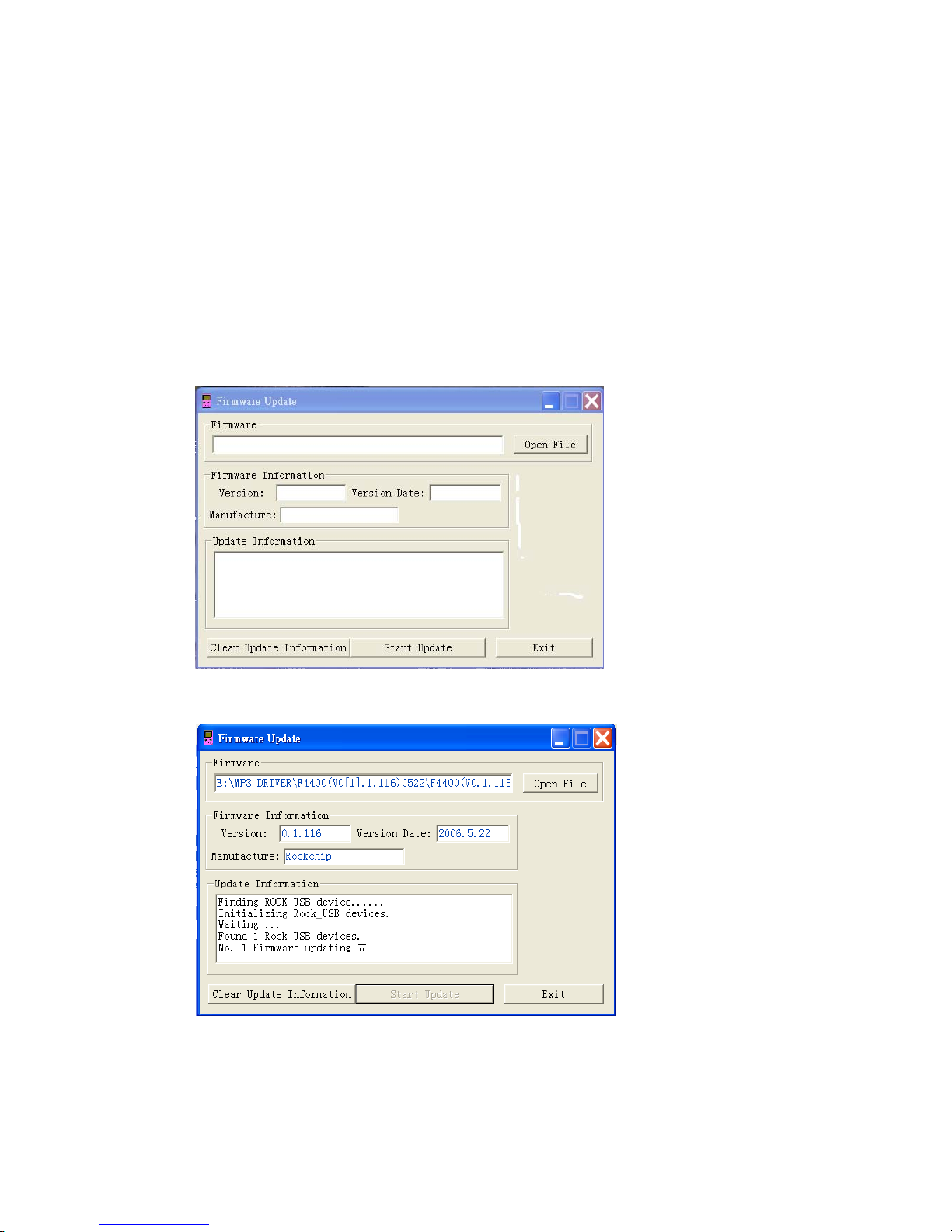
Upgrade Player Driver 18
The player can upgrade or resume the damaged player driver via the tool software in the attached
disk.
1. For the first upgrading of computer, insert the drive disk into the CD-ROM of computer, then
connect the MP4 player with computer (it requires you to press and hold the Leftwards key), till it
appears the program Installation Interface.
2. Implement the next step according to the Dialog box prompt, and select the “Upgrading Tool”
folder in the attached disk in the “Browse” option of the fourth Dialog box, then click Confirm.
4. Operate as per the prompt in dialog box till the accomplishment
5. When the installation of programs required by computer is OK, you can begin the upgrading;
select and run the firmware upgrading tool Consumer.exe (can be found in attached disk), then
open the option and select Rock2*.rfw file (the Interface is as follows).
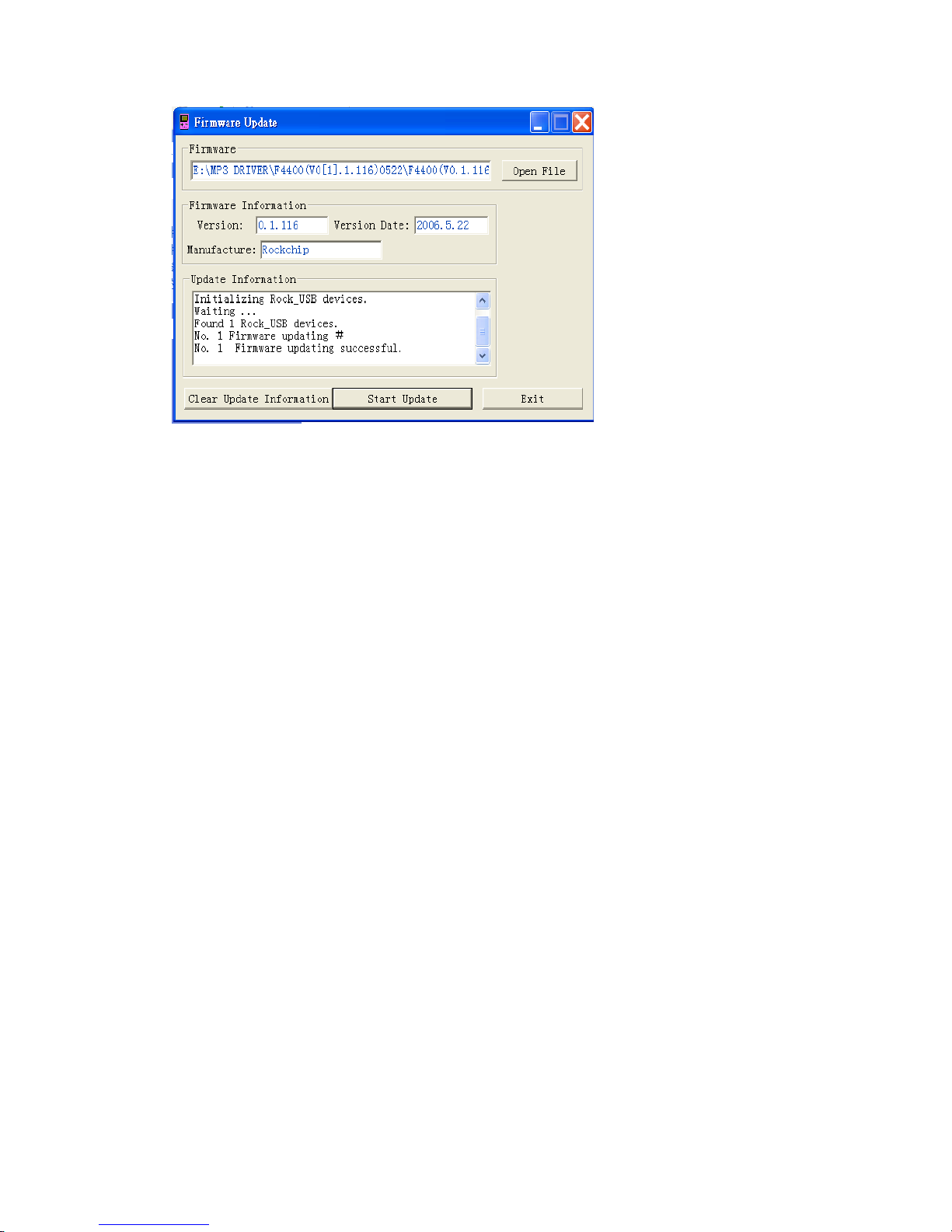
6. Connect the player to PC via USB cable (press and hold the Leftwards key before the On-line
operation), then click [Burnt Firmware] till the Auto Upgrading is achieved .
Page 19
Note: Firmware upgrade is to improve and optimize the performance of the player. The normal
work of the player would not be affected even if the firmware isn’t upgraded. The wrong operation
of upgrading firmware would cause the device not to work normally! The firmware upgrade
software of this player is not applied to other series of players.
Page 20

Troubleshooting 20
If the player can not be played normally, please check as follows:
Troubles Causes
It cannot be turned on
Check whether the player is powered on or not and whether the
machine program is damaged or not
The player is blocked Push the power switch to restart the player
It can not be played
Check whether the machine is powered on or not
Confirm the volume is not in “0” level, check the earphone is
connected well and keep the earphone clean
Format the disk again
It can not upload/download
the file or the disk can not
be found in computer
Insert USB cable totally well after the Power on. Correctly install
the driver again.
It can not be recorded Check the enough memory and the electricity
Words on display are
deformed
Make sure that you have selected the correct language
It can not be used normally
after upgrading
Upgrade again in Windows 2000
Page 21
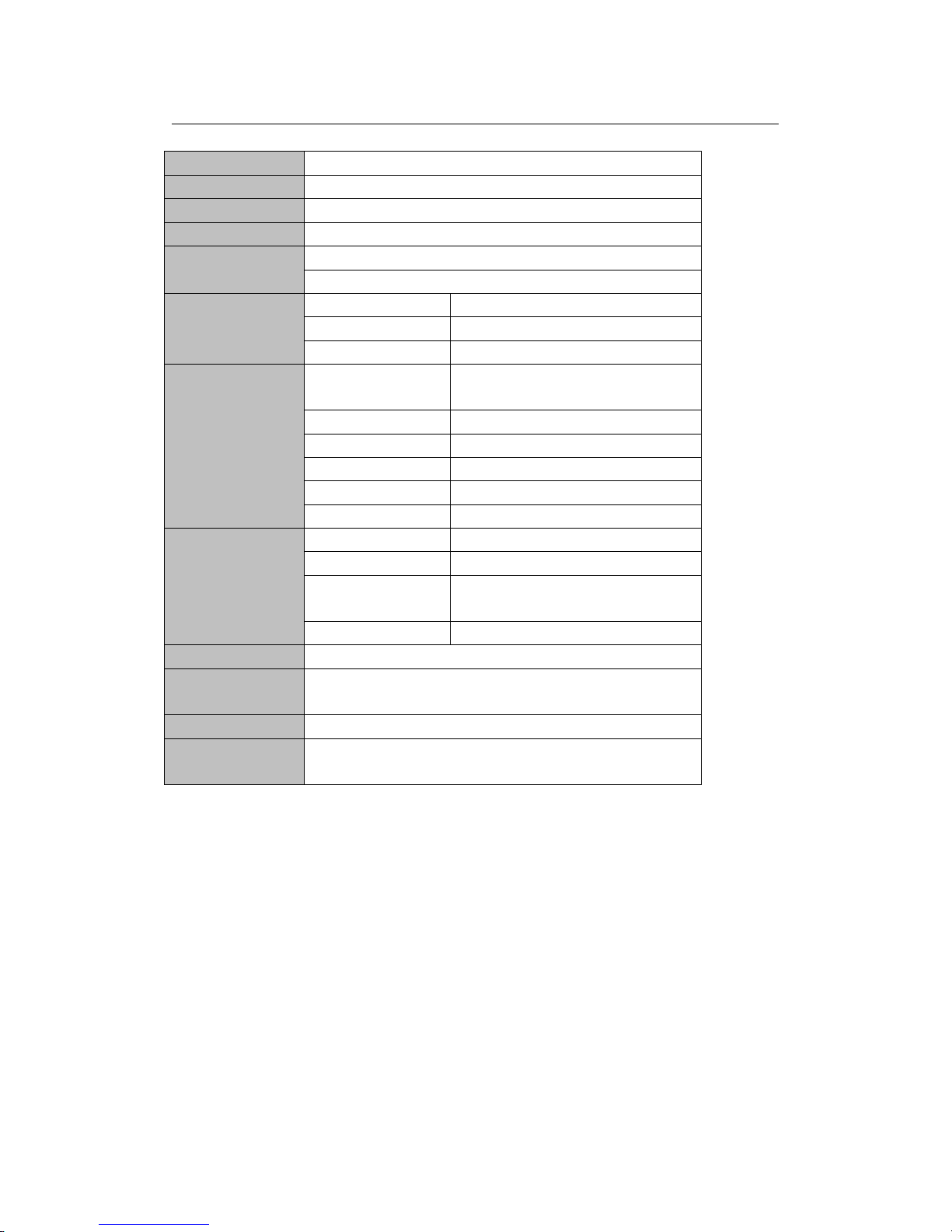
Product Specifications 21
Screen dot matrix(320*240)262K color 2.8〞
Dimension
88( length)×55(width)×7.9(height)
Connection Speed USB2.0 (HIGH SPEED)
Build-in Memory high speed flash memory: 2GB/4GB/8G(optional)
Power supply
polymer lithium battery 540mAh
Shut off the screen and play MP3 up to 10 hours
Record
Sampling Frequency 8KHz/16KHz
Record Format WMA(32kbps,64 kbps)
Record Time 14.30 hours(8GB)
MP3、WMA、
Earphone’s Max
Output
(L)4mW+(R)4mW(32Ohm)
MP3 Bit Rate 8K bps – 448K bps
WMA Bit Rate 5K bps – 192K bps
FR 20Hz~20KHz
SNR 88dB
Degree of Distortion 0.6%
FM Radio
Frequency Range 76MHz–90MHz/87.5MHz– 108MHz
Preservation No. 30
Earphone’s Max
Output
(L)4mW+(R)4mW(32Ohm)
SNR 45dB
Music Format MP1、MP2、MP3、WMA、WAV 、APE、FLAC
Service
Temperature
-5 ~40℃
Language Simple Chinese, Traditional Chinese, English and so on
System
Requirement
Windows98/SE/ME/2K/XP
Note: the specification and design shall be subject to change without any further notice!
Page 22

Distributor: Infopatika Ltd.
Angol str. 38. H-1149 Budapest, Hungary
www.infopatika.hu
Made in China
 Loading...