

Page 1
User Guide for SC001BLE
Smart Speed and Cadence sensor
Bluetooth 4.0 bicycle speed and cadence
sensor operation guide
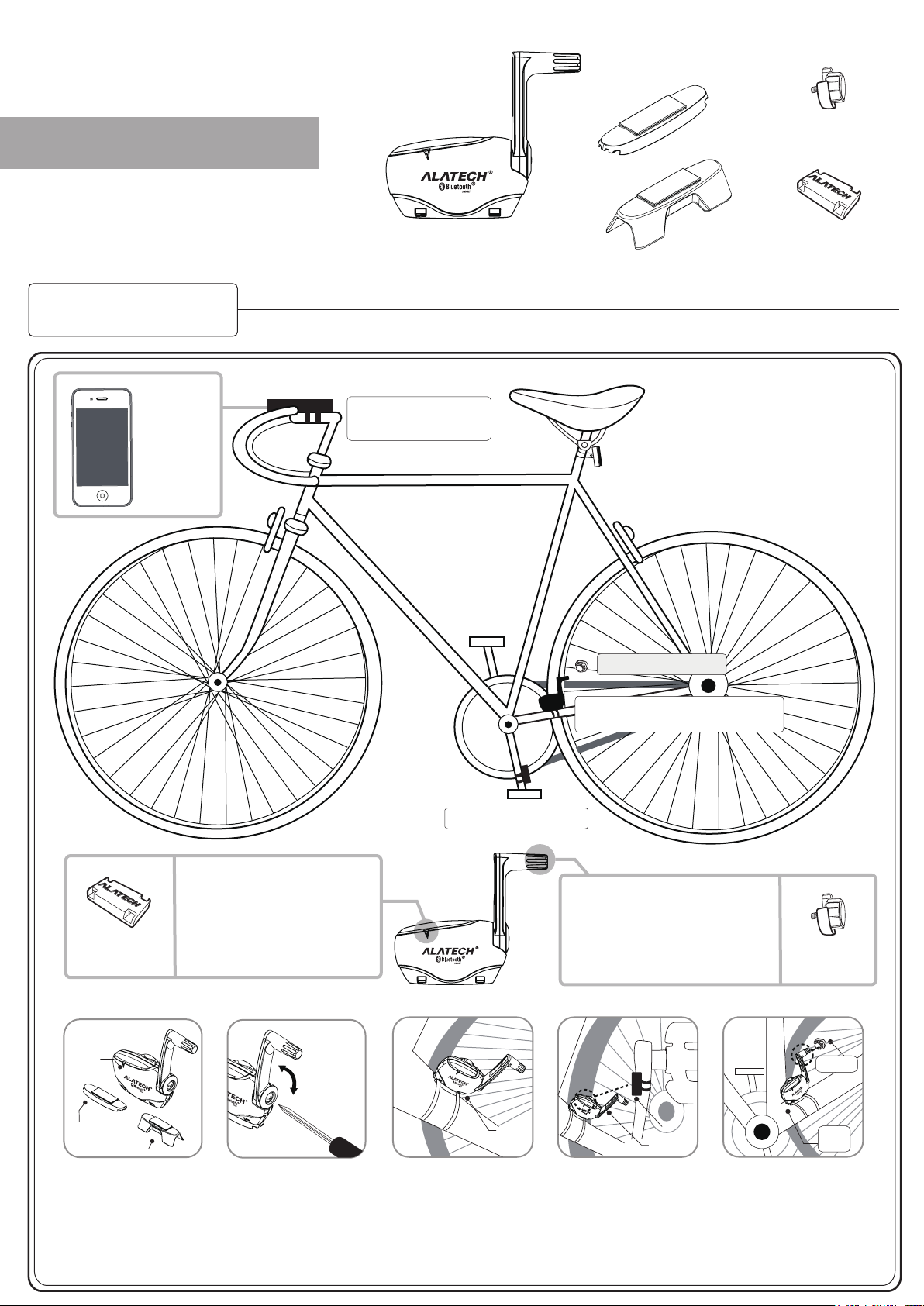
Rubber pad
type A
Speed-sensing
magnet
• This product is suitable to ALATECH app and
other apps that support Bluetooth Smart (BLE 4.0).
• Please go to Apple iTune to download the free
ALA COACH+ app.
Ex:
iPhone 4s
iPhone 5
iPod touch 5
users can
select suitable
devices.
Bluetooth BLE wireless transfer
Speed and cadence sensor for
the bicycle
(SC001BLE)
Bluetooth mobile
receptor device
Rubber pad
type B
Speed magnet
Cadence-sensing
magnet
English
Sensing zone for cadence
magnet
When assembling cadence magnet,
adjust the position of the magnet
such that its distance to SC001BLE is
Cadence-sensing
magnet
within 1 cm, so that they would not
collide with each other when stepping
on the pedals.
A: Installing the speed and cadence sensor
1.
SC001BLE
Rubber pad type A
or
Rubber pad type B
2.
3.
A.
Cadence magnet
4.
SC001BLE
Speed and cadence sensor
(SC001BLE)
Sensing zone for speed magnet
When assembling speed magnet, adjust
the position of the magnet
such that its distance to SC001BLE is
within 1 cm, so that they would not collide
with each other when stepping on the
pedals.
5.
Magnet
SC001BLE
Speed-sensing
magnet
Magnet
SC001BLE
1. Take one SC001BLE and pick
a suitable rubber pad. Assemble
it to underside of the SC001BLE
sensor.
2. Before assembling to chain
stay of the bicycle, be sure the
rotating axis for SC001BLE do
not hit spokes. It is recommended
to take a 3-mm screw driver to
loosen the screws and tighten
them again after having adjusted
to a suitable angle.
3. Have the speed and cadence
sensor Logo face outward and
secure it together with a rubber
stand via straps on the chain
stay.
4. Have the cadence-sensing magnet
Logo face the sensor and fix it on the
inner side of pedal crank arm with straps.
Adjust the position of magnet such that
the distance from the magnet to the
arrow-pointed spot in cadence-sensing
zone is within 1 cm, so that they would
not collide with each other when
stepping on the pedals.
5. Have the speed-sensing magnet
face the sensor (SC001BLE) and
lock it on the spoke lines of the rear
wheel.
Adjust the position of magnet such
that the magnet is of the same
height as the speed-sensing zone.
Distance of 1 cm between each
other is the optimal sensing distance.
Page 2
Instructions on battery
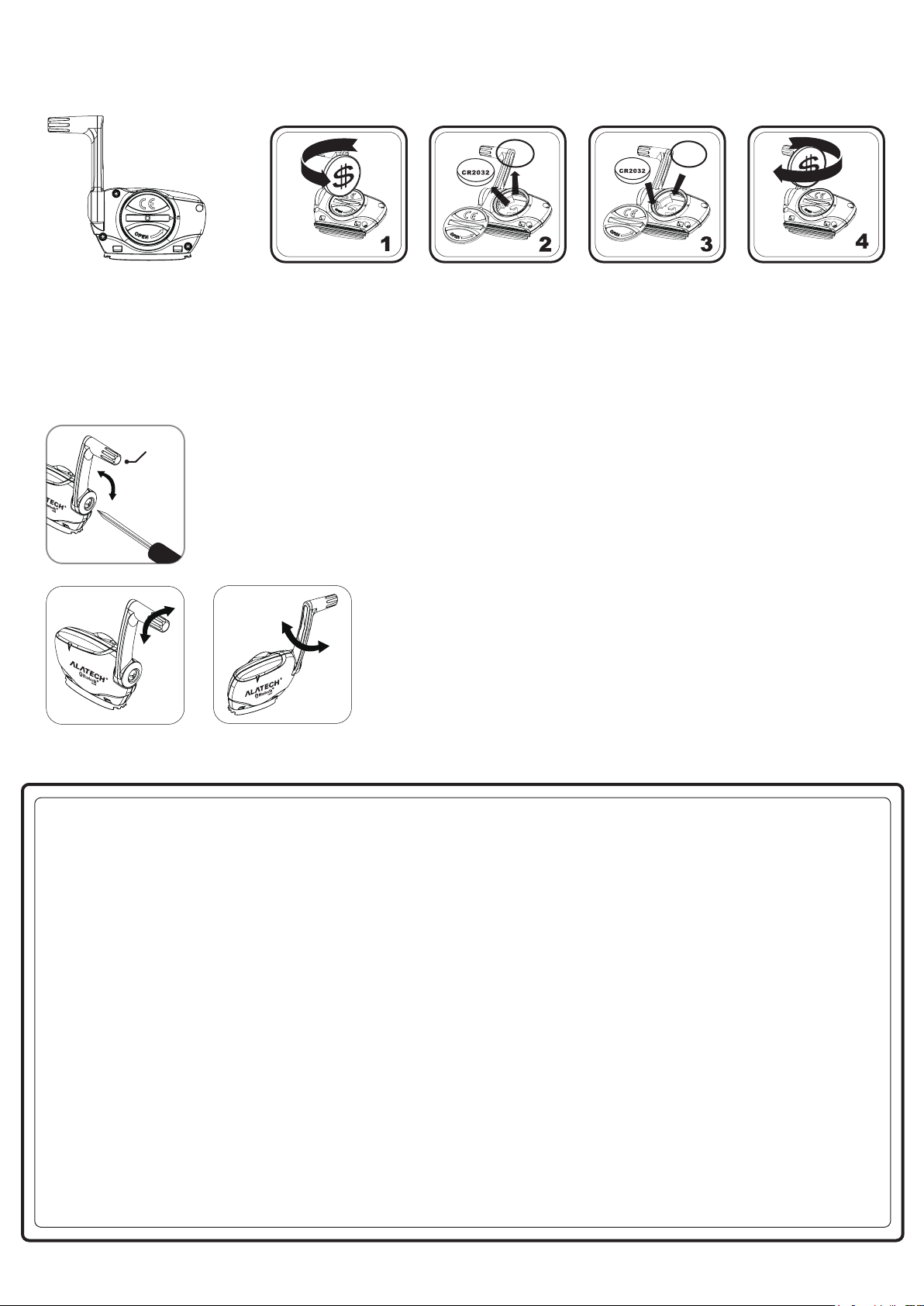
replacement
• Follow steps below to replace new battery wheh low battery indicator for the SC001BLE sensor appears on
the app screen
• Be sure to check whether the water-resisting rubber tube (O-ring) is correctly placed inside the recess slot
every time when replacing the battery, to ensure proper functioning of your sensor.
• Battery specification: CR2032.
+
Steps to replace the battery:
Step 1: Select a coin of suitable size and insert it into the recess slot on the back cover of the battery. Turn counter-clockwise to open the back cover.
Step 2: Carefully take out the battery and water-resisting ring.
Step 3: Place a new battery (positive pole facing upward) and water-resisting ring back to their original location.
Step 4: Close the back cover of the battery and check if the back cover and its screw thread would correctly line up with each other for the ease of
tightening the battery cover. Then, gently turn clockwise to spin the battery back cover in with fingers.
Step 5: Finally, tighten the battery back cover by turning clockwise with coins.
+
Assembly note
Speed-sens
ing zone
• When matching for the first time or connecting with a Bluetooth device, a magnet is needed to detect speed or the
cadence sensing spot in order to wake SC001BLE.
• First, loosen the screws by turning counter-clockwise with the screw driver. Based on individual bicycle structure, adjust
the speed-sensing zone to be 1 cm to the magnet in distance so that connection could be sensed and bike riding would
not be disrupted. After confirming so, then tighten the screw by turning it clockwise.
• The turning angle for the handle in the speed-sensing zone can only follow direction
indicated by the arrow in diagram. Do not pull or disassemble from other angles to avoid
causing damage to the product, which affects the sensing function.
X
Federal Communications Commission (FCC) Statement
15.21
You are cautioned that changes or modifications not expressly approved by the part responsible for compliance could void the user’s authority to
operate the equipment.
15.105(b)
This equipment has been tested and found to comply with the limits for a Class B digital device, pursuant to part 15 of the FCC rules. These limits are
designed to provide reasonable protection against harmful interference in a residential installation. This equipment generates, uses and can radiate
radio frequency energy and, if not installed and used in accordance with the instructions, may cause harmful interference to radio communications.
However, there is no guarantee that interference will not occur in a particular installation. If this equipment does cause harmful interference to radio or
television reception, which can be determined by turning the equipment off and on, the user is encouraged to try to correct the interference by one or
more of the following measures:
-Reorient or relocate the receiving antenna.
-Increase the separation between the equipment and receiver.
-Connect the equipment into an outlet on a circuit different from that to which the receiver is connected.
-Consult the dealer or an experienced radio/TV technician for help.
This device complies with part 15 of the FCC rules. Operation is subject to the following two conditions:
1. This device may not cause harmful interference, and
2. This device must accept any interference received, including interference that may cause undesired operation.
FCC RF Radiation Exposure Statement:
This equipment complies with FCC radiation exposure limits set forth for an uncontrolled environment. End users must follow the specific operating
instructions for satisfying RF exposure compliance. This transmitter must not be co-located or operating in conjunction with any other antenna or
transmitter.
CAUTION
RISK OF EXPLOSION IF BATTERY IS REPLACED BY AN INCORRECT TYPE.
DISPOSE OF USED BATTERIES ACCORDING TO THE INSTRUCTIONS.
 Loading...