

Page 1
OB001 OPTICAL
HEART RATE ARMBAND
Quick Start Guide
FEATURES
Dual mode technology
Compatible with sport watch /Cycling computer /fitness equipment and smart
device with Bluetooth 4.0, ANT+; also work with most Bluetooth Smart Fitness
Apps.
Storage function
The built-in memory can independently record and store heart rate data and
SPM(Steps per minutes); no need to bring the smartphone or wear the watch
when exercising. After exercising, the user can synchronize the data to Ala
Connect through Bluetooth to review the training overview.
Lightweight and comfortable
The sensor and armband are less than 20 grams; can be worn on the forearm or
upper arm.
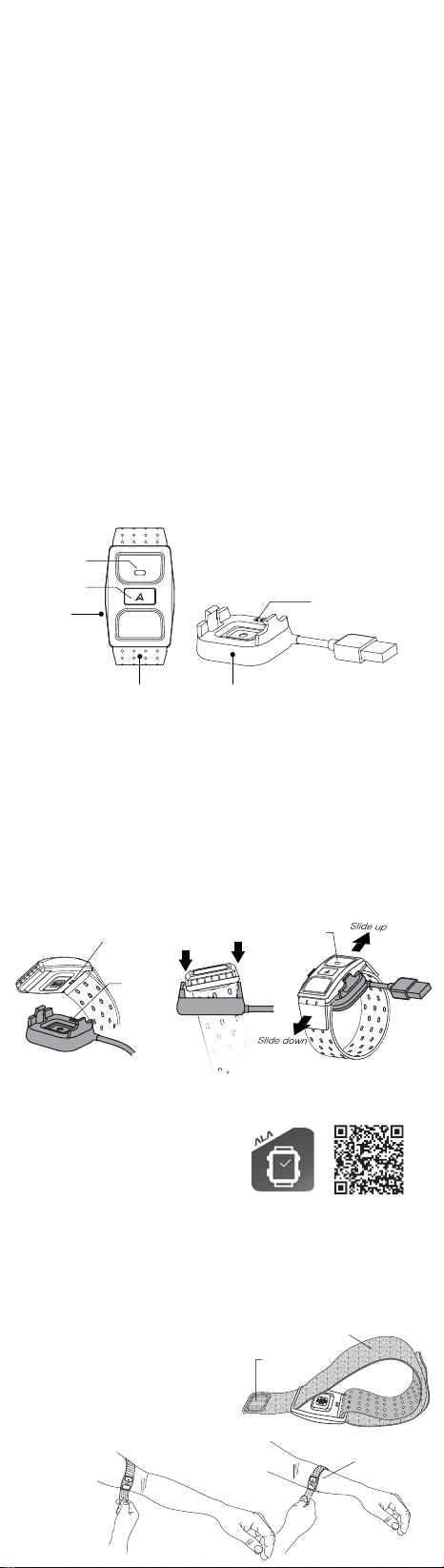
IN THE BOX
LED indicators
Button
1
Sensor
1
Armband
2
USB charging station
3
Quick guide
4
Warranty card
5
Charge terminals
2
3
HOW TO CHARGE
Please charge the sensor for the first use and when the battery is low (Green
flashing LED). Please make sure the charging station and charge terminals at
sensor back are clean and dry before charging to prevent any poor connection.
Put the sensor back facing down to align the charge contacts with the charge
1
terminals; refer to Fig. A.
Lock the sensor on the side close to the USB cable on charging station and
2
then lock on the other side; refer to Fig. B.
Connect the USB to a wall charger or your computer.
3
The green indicator will continuously flash when charging. The light will be
4
constantly ON when the charge is completed.
Take out the sensor from the charging station by sliding up or down; refer to
5
Fig. C.
Charging
contacts
Charging
terminals
Lock on first
Lock on
LED
Indicators
ABC
APP USE AND SENSOR PAIRING
Scan QR Code or search for Ala Connect on
1
Apple Store or Google Play and download.
Long press the sensor to activate (long
2
press until the red indicator is ON).
Open Ala Connect and add device
3
according the instructions. User’s age will
be written into the sensor automatically
after the device is successfully added.
Wear the sensor and go out for exercise.
4
After the exercise, open Bluetooth and Ala
5
Connect on your mobile device to
synchronize your training data wirelessly.
The uploaded training data will be stored in
6
the cloud. Log in cloud.alatech.com.tw to
check your activity report and results.
HOW TO WEAR
Slide both ends of the armband through the
1
buckles at both ends of the sensor.
Wear the sensor on the inside of forearm or
2
upper arm. Please do not wear on the wrist
and avoid any tattoo and hair.
Adjust the tightness to make sure the sensor
3
fits the arm.
System requirements of APP
installation:
• Support iOS 9 or above
• Support Android 4.4 or above
• Built-in Bluetooth
* Also compatible with other apps,
such as Strava and Wahoo fitness.
Fuzzy side facing the outside
Velcro
TM
4.0 or above
To ensure accurate cadence
detection, wear the sensor on
the inside of the forearm.
Page 2
HOW TO CLEAN
•To ensure accurate readings, clean the sensor lens with a soft and dry cloth.
•It is recommended to wash the armband with warm water (under 40°C). DO
NOT use the brightener, soap or softener. DO NOT soak, iron, dry clean, bleach
and twist.
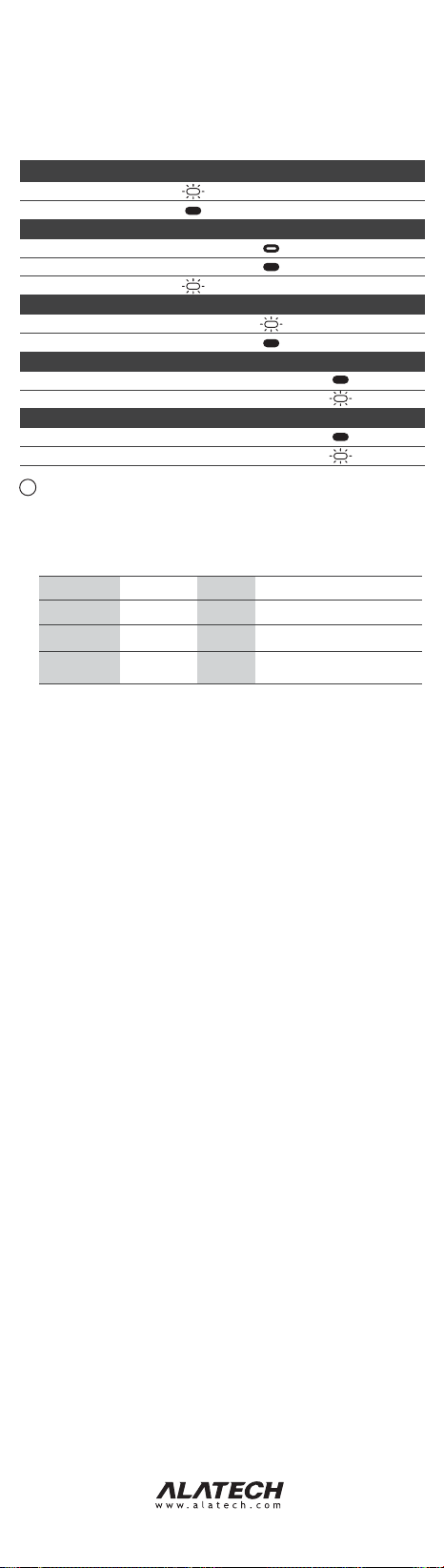
BLUETOOTH AND LED INDICATORS
The sensor only comes with one button; the operation of different uses is
described as follows:
Charge
Charging
Fully charged
Activate
Power on
Standby
Low battery
When used as an independent training device
Start recording
Stop recording
Bluetooth connection
Pairing
Synchronizing data
When used as an accessory for heart rate monitor and paired with compatible devices
Heart rate detected
Heart rate not detected
!
Notes
When the sensor is recording or connecting to Bluetooth, low battery light will not be ON.
1
The user can upload the recorded data to Ala Connect through Bluetooth communication.
2
When LED is constant ON, the sensor will turn off automatically if there is no operation or
3
connection over 3 minutes.
Blue /Red LED flash frequency varies according to user’s heartbeat in the heart rate zone at
4
that time:
Heart Rate Zone*
Z1
Z2
Z3
Z4
Z5
* The sensor will define your heart rate zone according to the age and maximum heart rate
(%MHR) input in Ala Connect
Note 1
Warm Up
Easy
Aerobic
Threshold
Maximum
Button
operation
Long press
Short press
Short press
Note 2
Training intensity
% (%MHR)
~60%
60-75%
75%~
Green
Red
Flash
Note 3
Constant ON
light up
Flash
LED Flash
frequency
Low speed
Intermediate
speed
High speed
Constant ON
Blinking
Constant ON
Training functions
Facilitate warm-up and energy
recovery
Improve metabolism
Enhance aerobic fitness
Increase speed and lactate threshold;
Only suitable for short-distance pace,
cannot maintain for a long time
Note 4
Blue
Note 3
Note 3
Constant ON
Flash
Constant ON
Note 4
Flash
Note 3
Note 3
SPECIFICATIONS
• Model: OB001
• Dimension: L 48×W 31.5×D 12.5mm
• Armband: L 380×W 25mm
• Weight: 13g (armband excluded)
• Memory capacity: Up to 30 hours training
• Operating temperature: -10~60°C (-14~140°F)
• Charge temperature: 10~45°C (50~113°F)
• Wireless transmission interface: Bluetooth 4.0/ANT+
• Wireless transmission frequency: 2.402~2.480 GHz
• Battery: rechargeable lithium battery
• Input voltage: 5V
• Run time: 40 consecutive hours (max.)
FCC
Federal Communications Commission Statement
This device complies with FCC Rules Part 15. Operation is subject to the following
two conditions:
• This device may not cause harmful interference.
• This device must accept any interference received, including interference that
may cause undesired operation.
This equipment has been tested and found to comply with the limits for a class B
digital device, pursuant to Part 15 of the Federal Communications Commission
(FCC) rules. These limits are designed to provide reasonable protection against
harmful interference in a residential installation. This equipment generates, uses,
and can radiate radio frequency energy and, if not installed and used in
accordance with the instructions, may cause harmful interference to radio
communications. However, there is no guarantee that interference will not occur in
a particular installation. If this equipment causes harmful interference to radio or
television reception, which can be determined by turning the equipment off and
on, the user is encouraged to try to correct the interference by doing one or more
of the following measures:
• Reorient or relocate the receiving antenna.
• Increase the separation between the equipment and receiver.
• Connect the equipment into an outlet on a circuit different from that to which the
receiver is connected.
• Consult the dealer or an experienced radio/TV technician for help.
FCC Caution
Any changes or modifications not expressly approved by the party responsible
for compliance could void the user‘s authority to operate the equipment.
Radiation Exposure Statement
This equipment complies with FCC radiation exposure limits set forth for an
uncontrolled environment. End users must follow the specific operating instructions for
satisfying RF exposure compliance. The antenna(s) used for this transmitter must not
be co-located or operating in conjunction with any other antenna or transmitter.
2PF290082080002
2019/01 V0
 Loading...