

Page 1

AMCDVD-1883
AMCDVD-1883
DVD PLAYER
OWNER'S MANUAL
Page 2

Page 3
FEATURES
CONTENTS
Page
DVD, CD compatible
CD-R, CD-RW capable
TV format:
PAL / NTSC colour system
4:3 / 16:9 screen format select
Video output:
Composite Video output
S-Video output
Component Video(Y Pb/Cb Pr/Cr) output
Scart output
Audio output:
Down-mix stereo output
Digital audio output (coaxial)
Dolby Digital output
Scart output
DVD features:
Multi Subtitle select
Multi Language select
Multi Angle select
Other features:
On screen display menu
Digital zooming
Slow motion
Parental control
JPEG picture viewer
SAFETY INFORMATION
FEATURES
CONTENTS
INTRODUCTION ..................................... 1-2
Front/Rear Panels ................................... 1
System Connections .............................. 3-5
Getting Started ...................................... 6-7
On Screen Display(OSD) ........................ 8-9
Remote Control ..................................... 10
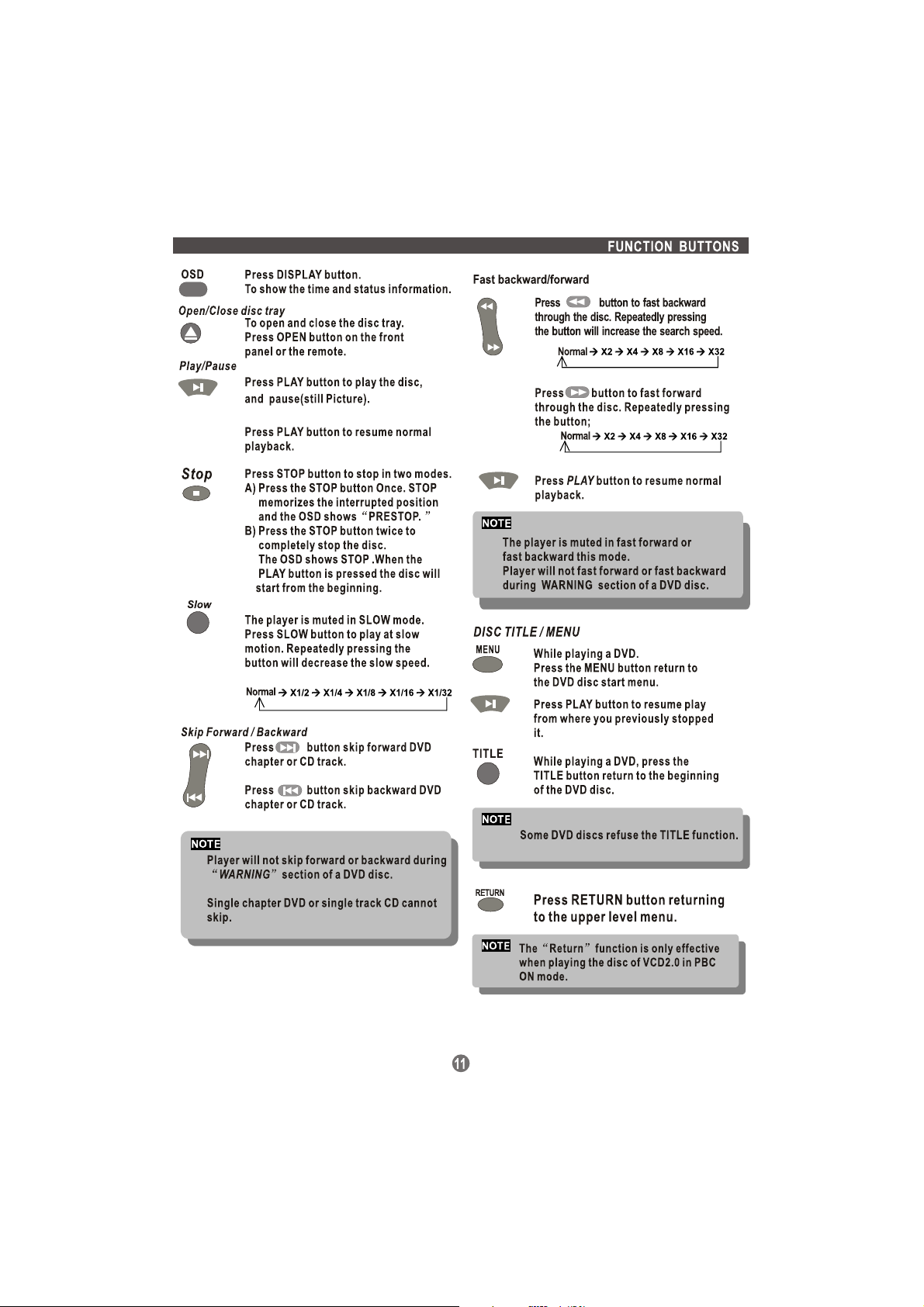
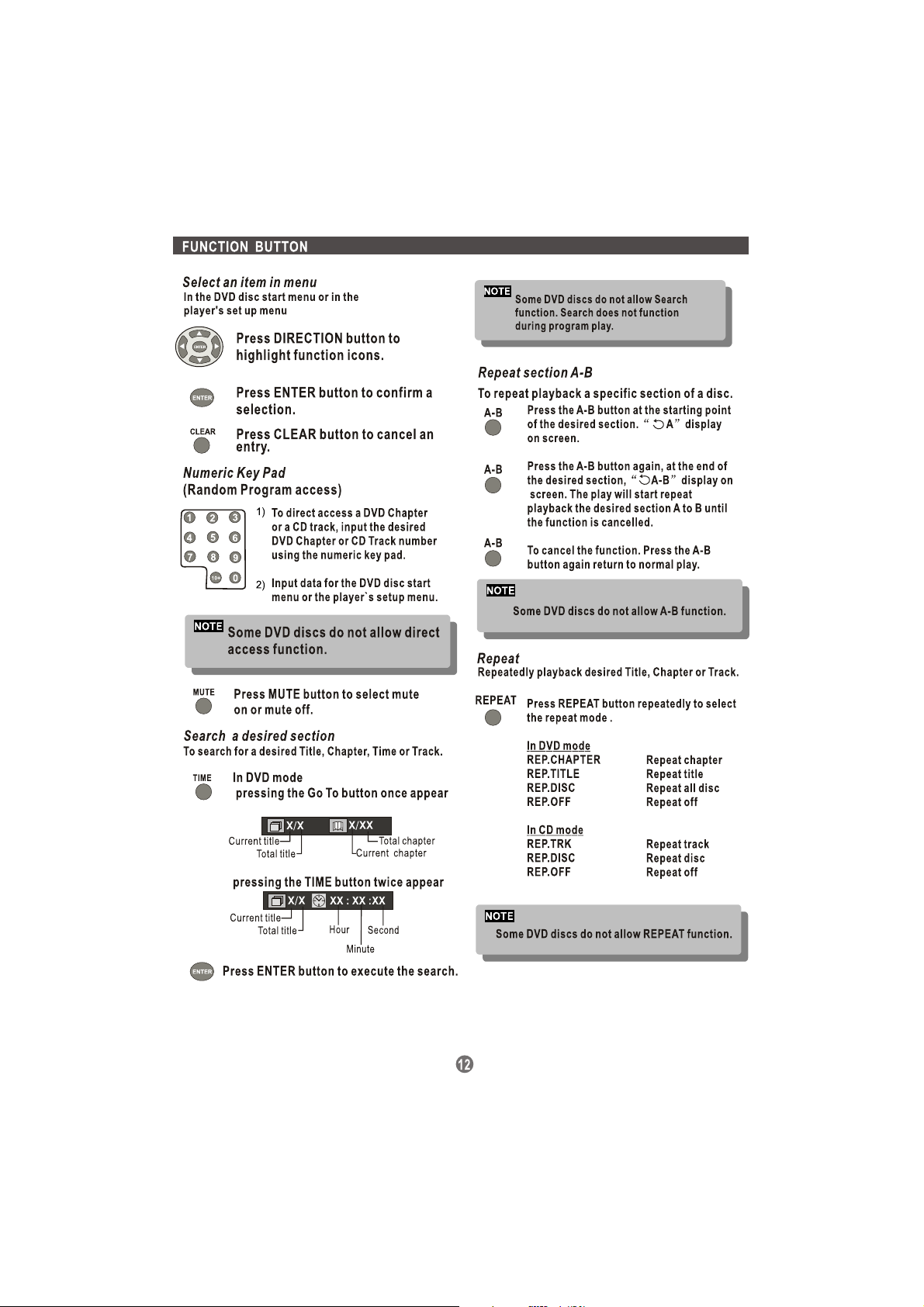
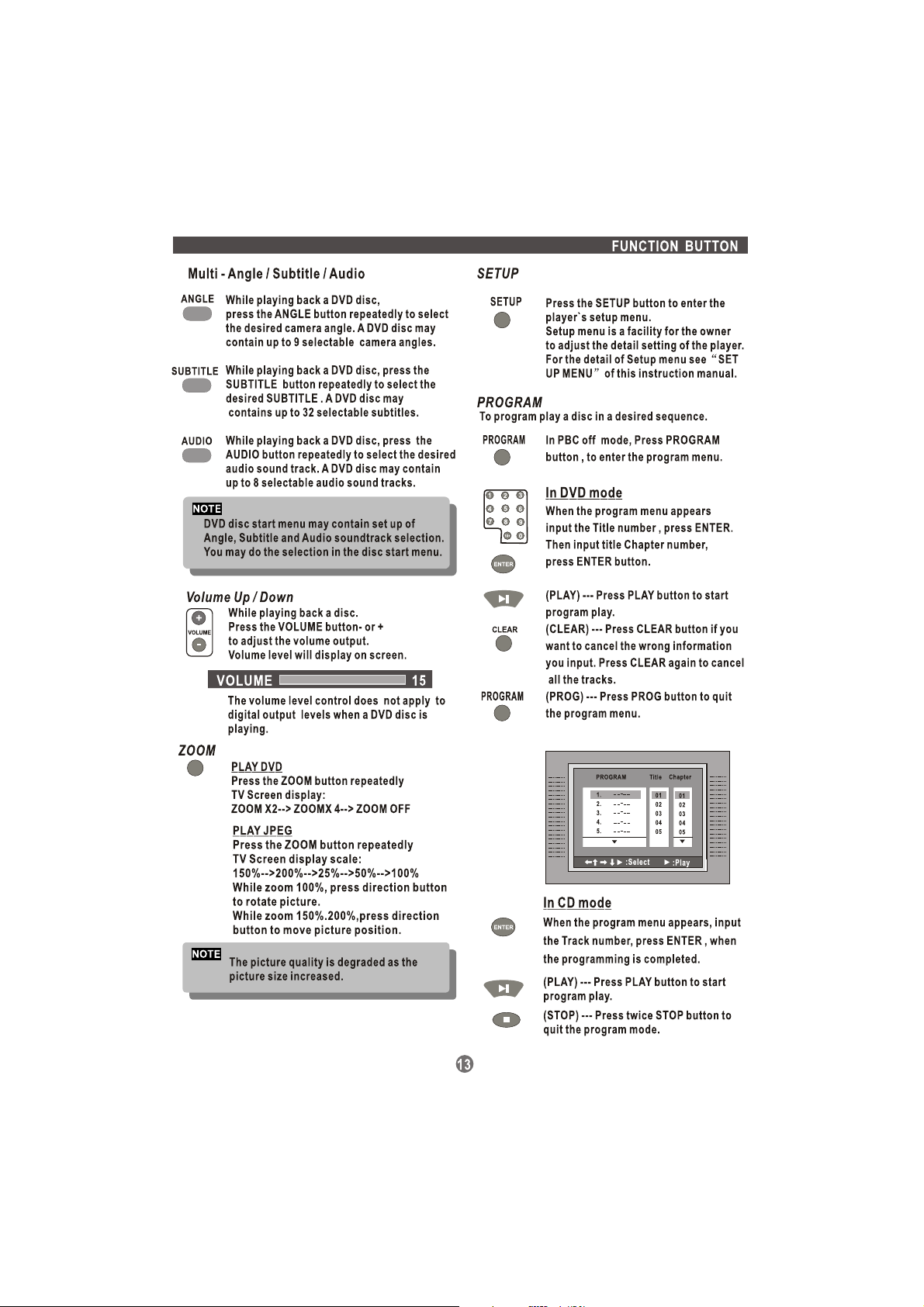
Function Buttons ................................... 11-13
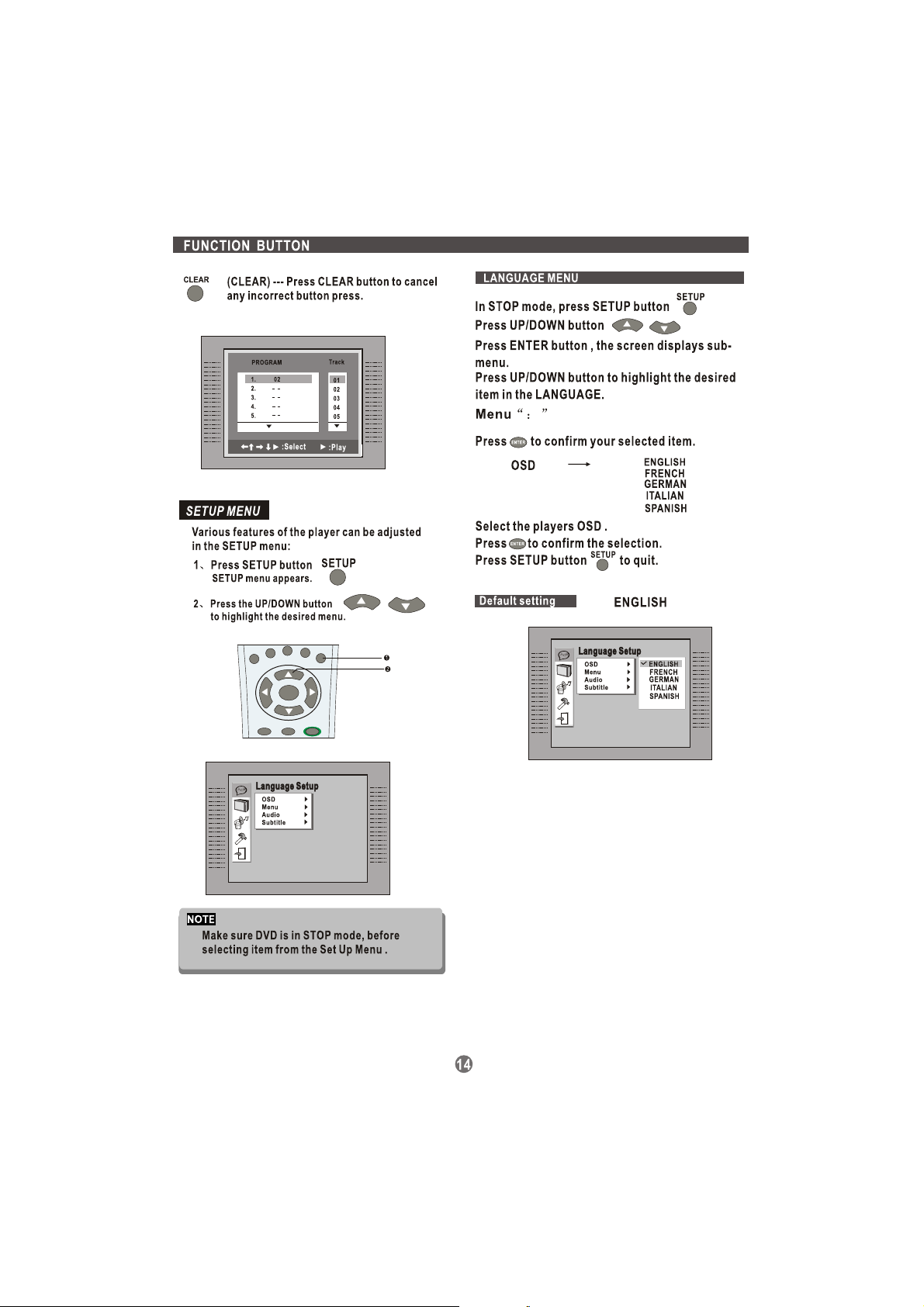
Menu s ................................................. 14-16
Trouble Shooting Guide ......................... 17
Specification ......................................... 18
This product incorporates copyright protection technology that is
protected by U.S. patents and other intellectual property rights.
Use of this copyright protection technology must be authorized by
Macrovision ,and is intended for home and other limited viewing
uses only unless otherwise authorized by Macrovision.Reverse
engineering or disassembly is prohibited."
The player has built in copyright
protection technology that
prevents copying from a DVD
disc to any media.
If a videorecorder is connected to
the player, the video output image
will be distortedduring recording.
Page 4
INTRODUCTION
About DVD
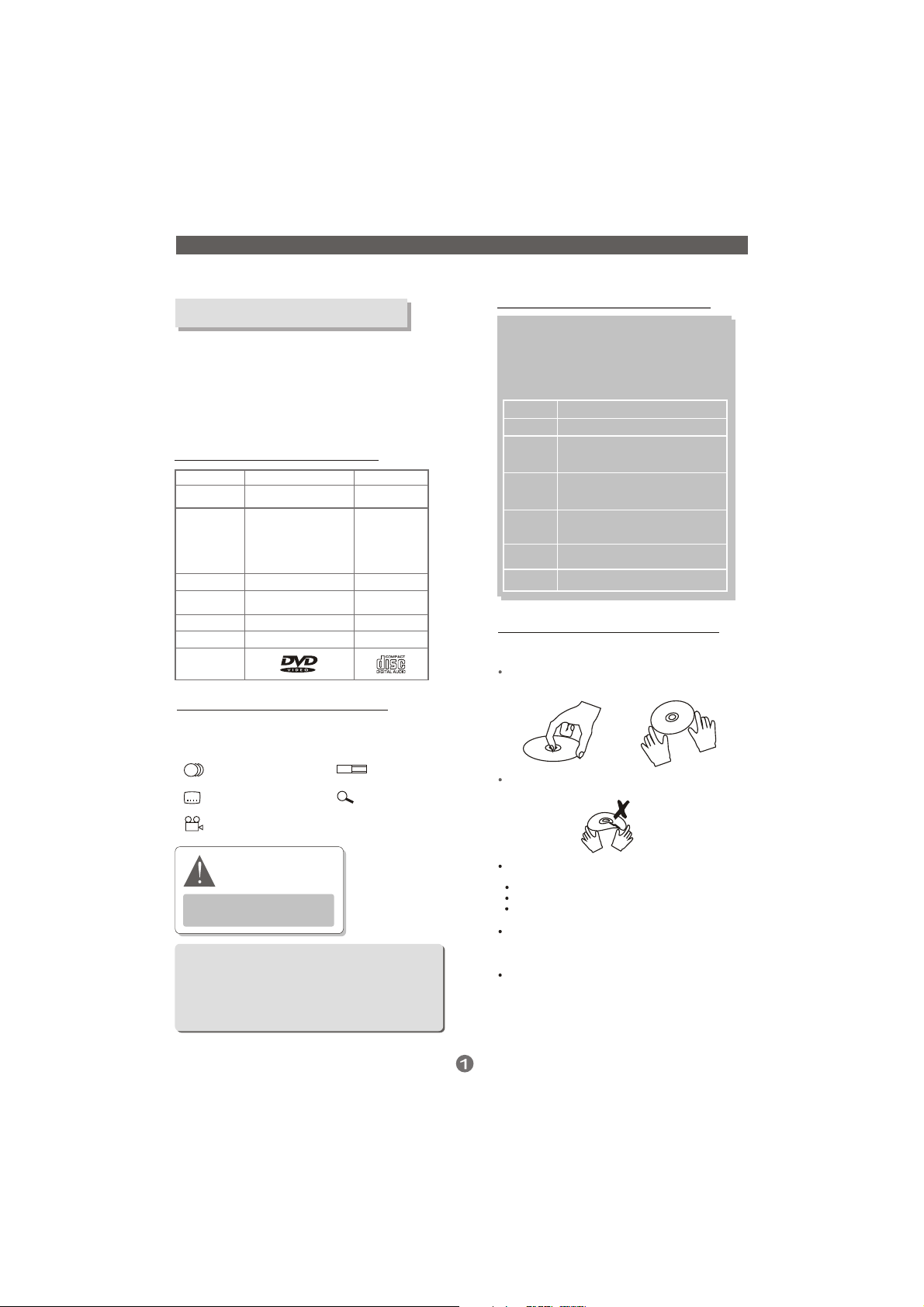
DVD (Digital Versatile Disc) is a digital video medium
under the MPEG II format, featuring a variety of
revolutionary entertainment capabilities. The MPEG II
video compression technology provides capacity foran
excellent picture ofminimum 500 lines resolution on
screen, up to 8 language soundtracks, up to 9 views
from different camera angles and up to 32 language
subtitles (provided by the DVD disc itself which supports
these features).
Disc information
Disc types
D
ecoding
Method
Capacity
Disc size
Horizontal
Resolution
Sub-titles
Sound tracks
Symbol
DVD features symbols
Each DVD disc contains various features depending
on production ofthe disc. Below are some of the
symbols representing the features:
2
Number of Audio Tracks
2
Number of Subtitles
DVD
Digital / MPEGII
Single-layer / Singleside
4.7GB = 2 hr
Single-layer / Doublesides
8.5GB = 4 hr
Double-layers / Singleside
9.4GB = 4.5 hr
Double-layers / Double sides
17GB = 8 hr
12cm / 8cm
500 lines up
32
8
650MB = 74min
L B
16 : 9
+
CD
Digital
12cm / 8cm
-
-
1
Screen Format
Zoom
Select a DVD disc
DVD Region Code
DVD discs and DVD players are manufactured
under the worldwide agreed DVD Regional
Code System that the player will operate only
with corresponding disc of the same Regional
Code.
Region code
Region
1
Canada, USA
2
Europe (incl. Poland, Romania, The Czech
republic), Japan, MiddleEast (incl. Saudi
Arabia, Egypt, Iran, South Africa)
East Asia (incl. Hong Kong, Taiwan, South
3
Korea),
South-East Asia
Australia, Caribbean, Central & South
4
America, Mexico,
New Zealand
Africa, Former Soviet Union, India, North
5
Korea, Pakistan,Turkmenistan
China
6
Care of disc
Video disc contains high-density compressed data
that needs properhandling
Hold the disc with fingers. Hold the disc's outer
edge and/or the center spindle hole. Do not touch
the disc surface.
Do not bend or press the disc. Do NOT expose the
disc to direct sunlight or heating sources.
2
Angle Indicator
The player has built in copyright
protection technology that
prevents copying from a DVD
disc to any media.
If a video recorder is connected to
the player, the video output image
will be distorted during recording.
Some features contained in this DVD playerare related to
the DVD disc's software.
Some features cannotbe performed if the disc does not
support the feature, or requires special settings.
Check the features printed on the disc's packing or follow
the instructions ofthe Disc's on screen menu.
REMARK
Store discs in cabinet vertically,in dry condition.
Prevent exposure to:
Direct sunlight
Heat or exhaust from a heating device.
Extreme humidity.
Clean the disc surface with a soft, dry cleaning cloth.
Wipe the disc surface gently,radically, from center
toward the outer edge.
Do not apply thinner, alcohol chemical solvent, or
sprays when cleaning. Such cleaning fluids will
permanently damage the disc surface.
Page 5
INTRODUCTION
About the player
Front panel
AMCDVD-1883
4 5 6 7 8
1 2 3
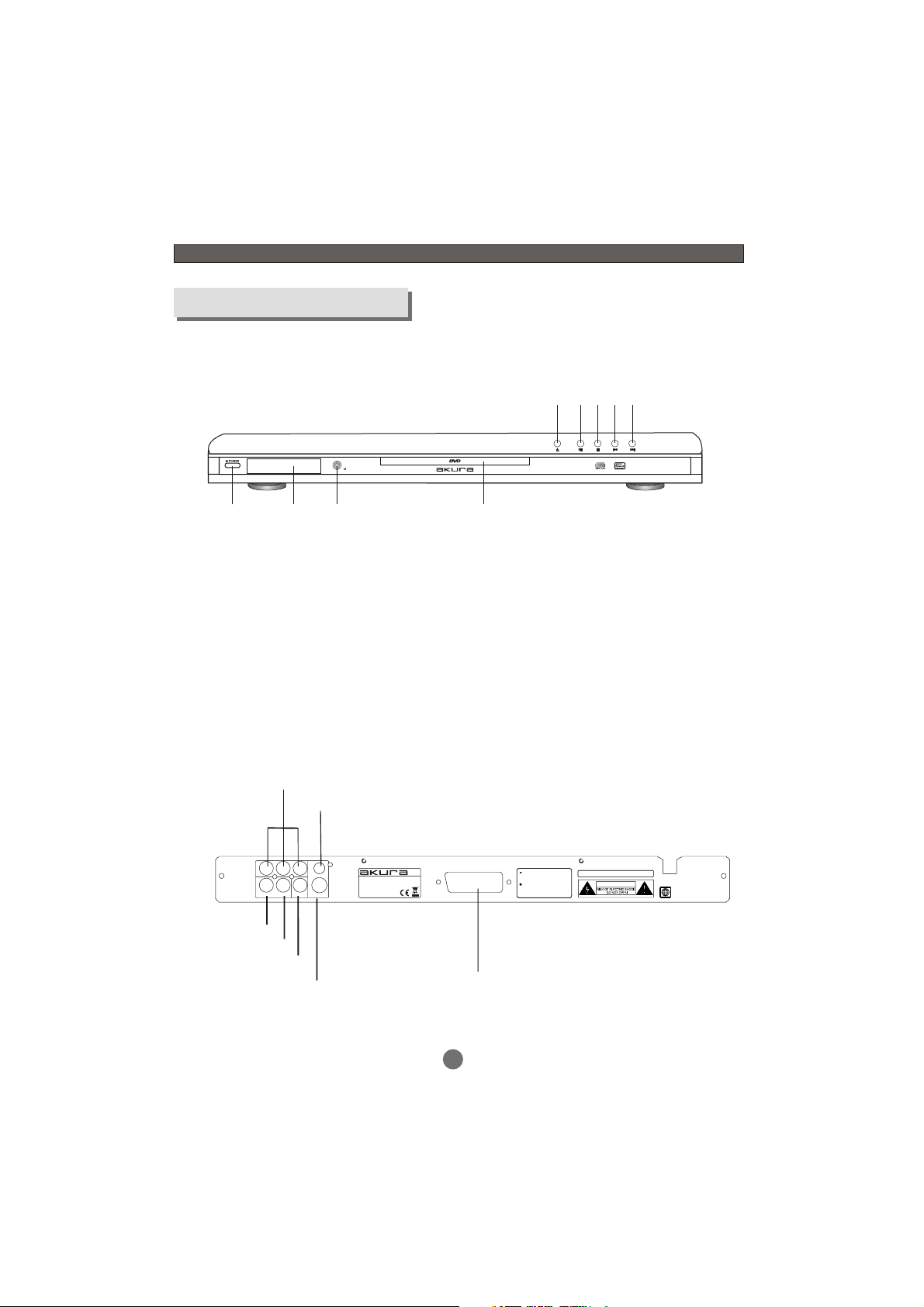
1. Power button
2. VFD display
3. Remote control sensor
4. Open/Close button
5. Play/pause button
Rear panel
Y.Pb/Cb.Pr/Cr
(Component -Video)
Y
L
Audio L
Audio R
Coaxial Digital Audio
Composite-Video
Pb/Cb
Pr/Cr
VIDEO
R
COAXIAL
S-VIDEO
S-video
MODEL NO.: AMCDVD-1883
POWER : AC100-240V~50/60Hz
CONSUMPTION : 15W
MADE IN CHINA
9
Scart output
6. Stop button
7. PREV button
8. NEXT button
9. Disc tray
Manufactured under license from Dolby Laboratories.
"Dolby" and the double-D symbol are trademarks of
Dolby Laboratories.ConfidentialUnpublished Works.
U.S.Patent Nos.4,631,603;4,819,098;4,907,093;
5,315,448;and 6,516,132.
S/N:
CLASS 1 LASER PRODUCT
CAUTION
~AC IN
2
2
Page 6

DO NOTconnect the
AC powersocket to the
wall outletbefore the system
connection iscompleted
R
C
Center
L
SCART OUT
ToCoaxial input
S-VIDEO
VIDEO
COAXIAL
Pr/Cr
R
Pb/Cb
L
Y
SR
SL
SYSTEM CONNECTION
System connection figure
3
Page 7
Pb/Cb Pr/Cr
SYSTEM CONNECTION
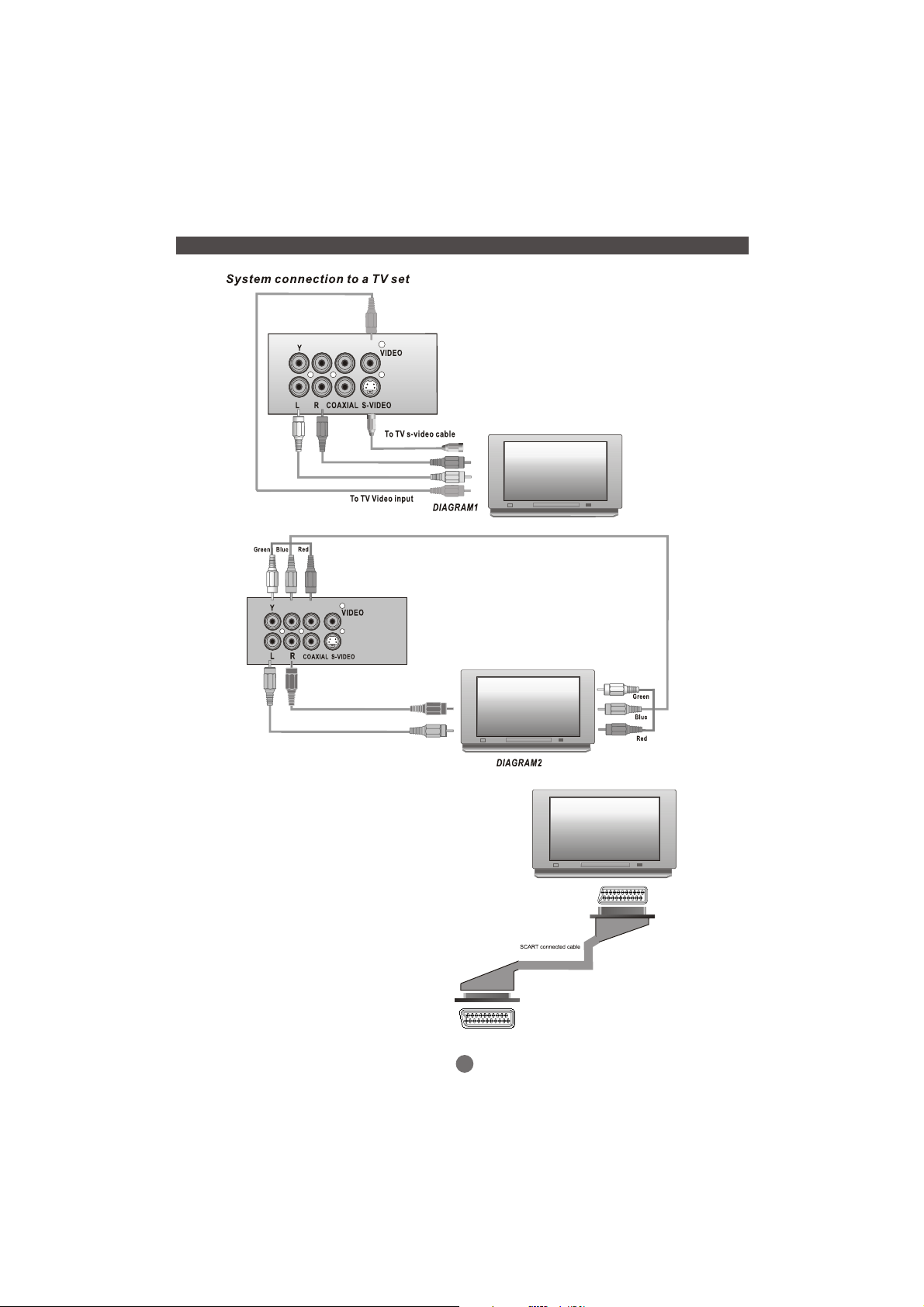
Select one video input method ONLY. If more
than one input connection is made then
interference patterns may be seen.
With the S-Video, CVBS, and Progressive scan
inputs, separate audio inputs must be used.
When using SCART it is not necessary to connect
separate audio inputs.
Pb/Cb Pr/Cr
The player is equipped with 4
forms of output.
Scart Output
S-Video
Composite video Output
Progressive Scan Output.
To view the DVD player, using Scart
Output, most modern Tv's will select
the DVD player automatically when the
DVD player is switched On.
If using S-Video, Composite Video or
Progressive Output, you will need to
select the correct input using the Tv
remote control.
If using an older Tv and Scart you may
need to select “AV” on your Tv.
.........
.........
.........
.........
.........
.........
.........
.........
.........
.........
.........
.........
.........
.........
Component video wires
for progressive scan
.........
.........
.........
.........
.........
.........
.........
.........
.........
.........
.........
.........
.........
.........
SCART OUT
.........
.........
.........
.........
.........
.........
.........
.........
.........
.........
.........
.........
.........
.........
.........
.........
.........
.........
.........
.........
.........
.........
.........
.........
.........
.........
.........
.........
.........
.........
.........
.........
.........
.........
.........
.........
.........
.........
.........
.........
.........
.........
.........
.........
.........
.........
.........
.........
.........
.........
.........
.........
.........
.........
.........
.........
4
Page 8
SYSTEM CONNECTION
Pb/Cb Pr/Cr
Pb/Cb Pr/Cr
NOTE
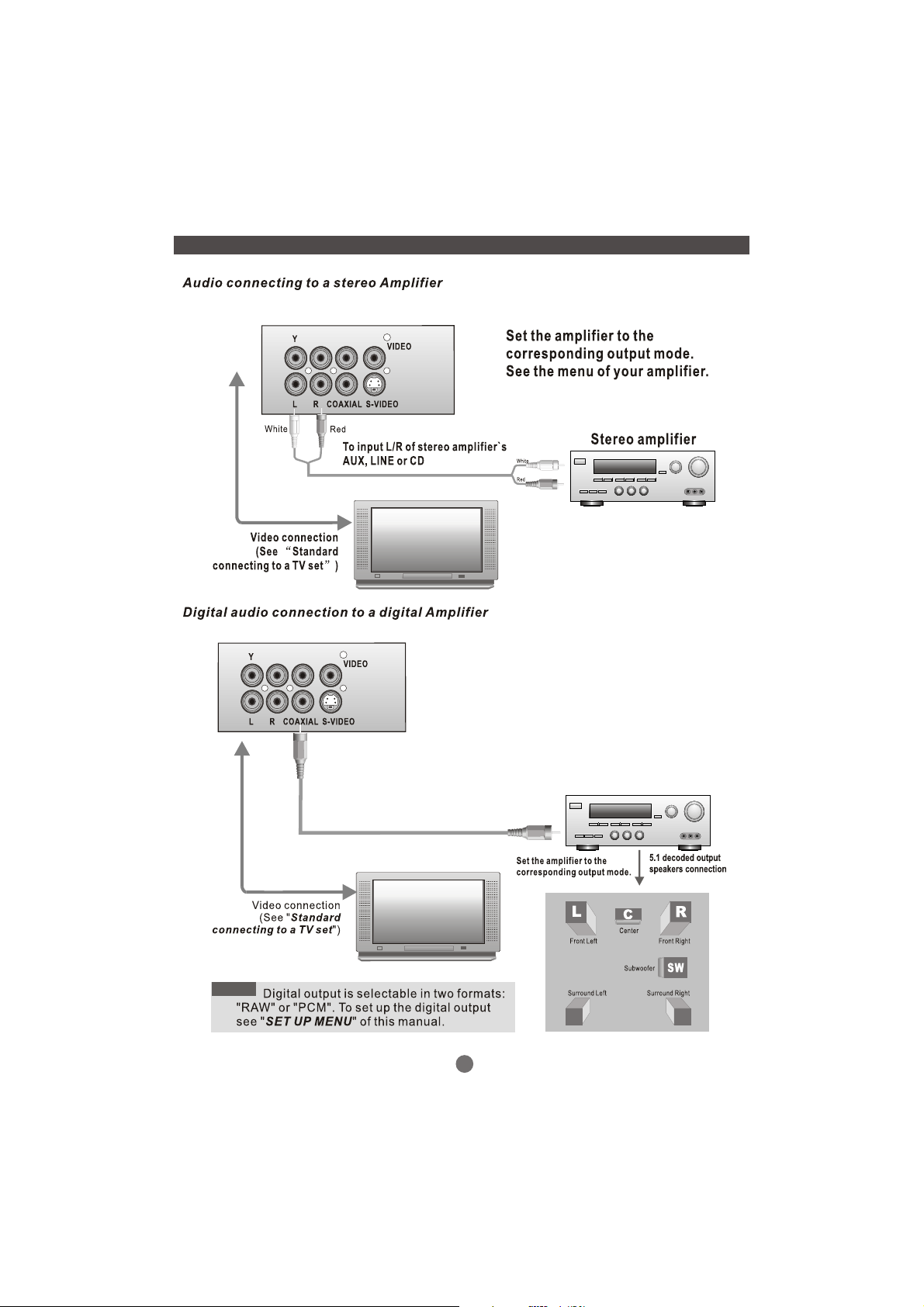
Digital audio (coaxial) to digital
input(coaxial)of digital amplifier
5
SL
SR
Page 9

Page 10

GETTING STARTED
Problem disc messages
The following message will display on screen when there is a format problem with the loaded disc:
WRONG REGIONAL DISC
Region code of the disc is not matching to the player`s region code (region 1 to region 6)
UK is region 2.
WRONG PASSWORD
The rating level of the disc is higher then the rating level setting of the player.
The player will not play the disc.
WRONG DISC
The player is equipped with automatic disc quality detection software. When the played
detects a problem disc or a damaged disc, the player may keep playing the disc at lower
quality or stop playing, depending on the damaged level of the disc.
Production qualities of DVD discs vary, some discs might deviate from the industrial
standard. Some incorrectly formatted discs may playback on the player. However,
the playback and operational quality of those disc may be substandard.
Power management
If not using the Player for long periods it is wise to turn off the power fully at the socket.
7
Page 11
ON SCREEN DISPLAY
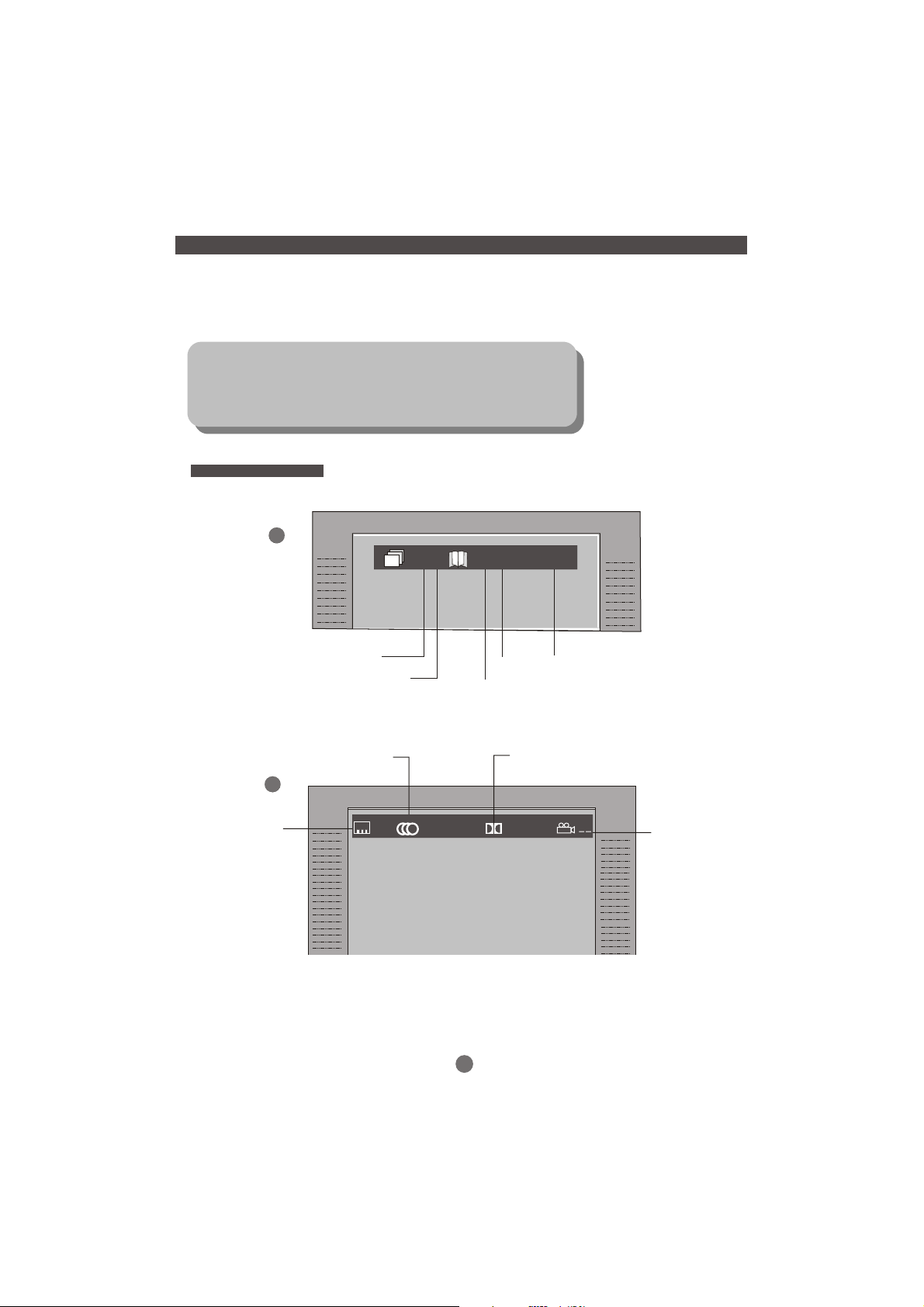
An On Screen Display ( OSD ) indicator will be displayed at the upper part of the TV screen when certain
functions are executed, or when pressing the DISPLAY button on the remote control.
The OSD indicator is a user friendly interface designed to display the status of playback type. When a
different disc is loaded ( DVD, CD) ; the OSD indicator bar will be different.
The OSD bar will appear automatically if it is activated by pressing the
DISPLAY button. Press the DISPLAY button again and a new status bar
will appear. Press DISPLAY button a third time and the OSD bar will disappear. When OSD indicator bar appears, press other button, the OSD
indicator bar will disappear automatically.
DVD mode - OSD
1
: 3 / 10
: 1 / 2
00:02:30
Disc title
2
Current title
Disc title
Audio track
:- - -
Current chapter
:
OTHER1/2
8
Chapter
Audio format
D 2.1CH
Playback time
:
Multi-angle
Page 12
ON SCREEN DISPLAY
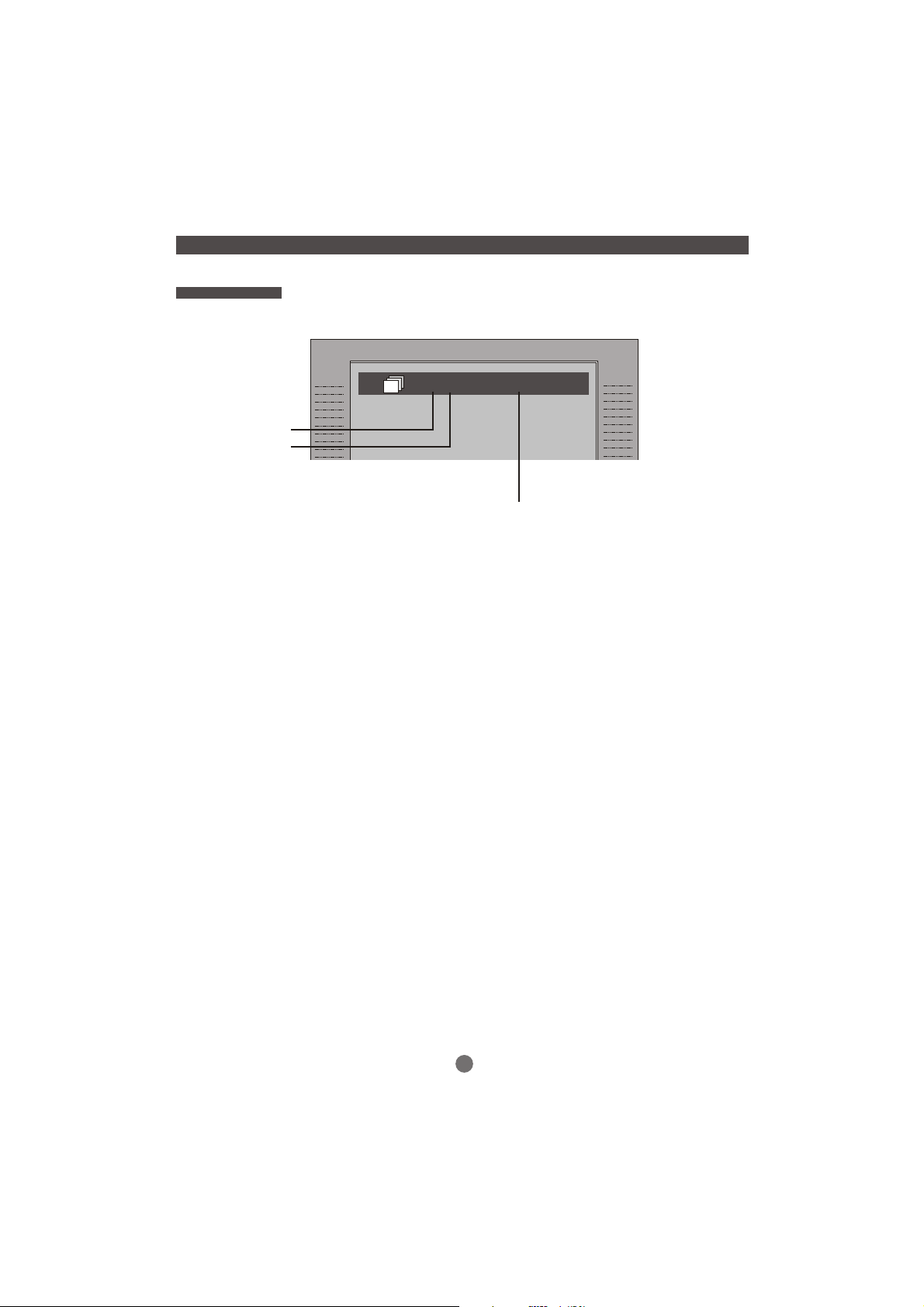
CD mo de - OSD
Current track
Disc track
: 3/15 00:02:30
Playback time
9
Page 13
Remote control
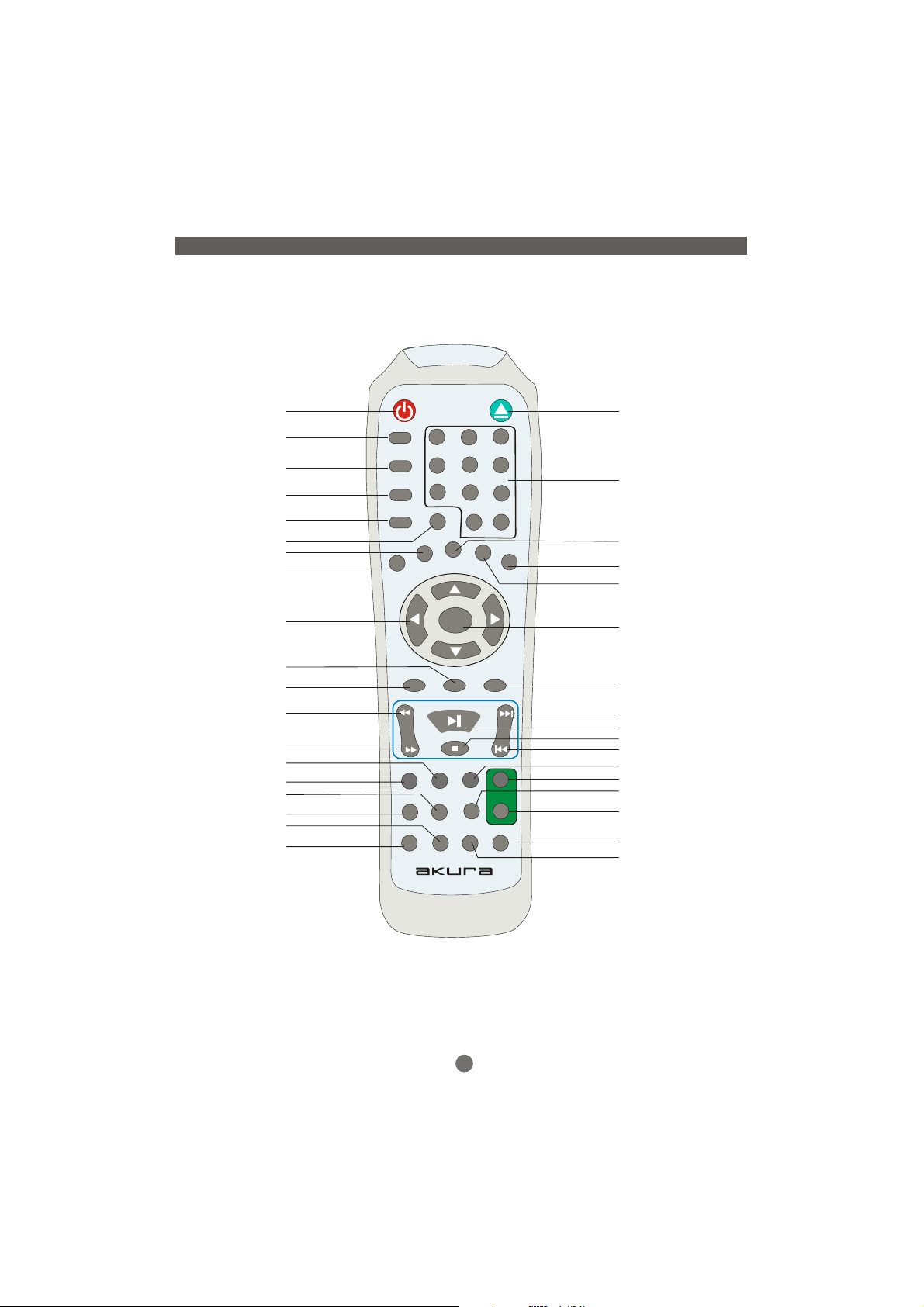
POWER OPEN/CLOSE
SUBTITLE
ANGLE
AUDIO
OSD
TIME
TITLE
PS/IS
SUBTITLE
ANGLE
AUDIO
OSD
PS/IS
1
4
78
TIME
PROG
TITLE
2
5
10+
CLEAR
3
6
9
0
SETUP
INTRODUCTION
NUMERIC KEYS
PROG
SETUP
CLEAR
DIRECTION
MENU
RETURN
FAST BACKWARD
FAST FORWARD
STEP
ZOOM
MUTE
R/L
N/P
RETURN
ENTER
MENU
PBC
ENTER
PBC
SKIP FORWARD
PLAY/PAUSE
STOP BUTTON
SKIP BACKWARD
ZOOM STEP SLOW
+
3D
MUTE
3D RAN
VOLUME
-
N/P
R/L A-B
REPEAT
SLOW
VOLUME +
RAN
VOLUME -
REPEAT
Segment repeat select
AMCDVD-1883
10
Page 14
Page 15
Page 16
Page 17
PS/IS
TITLE
PROG
ENTER
CLEAR
SETUP
B
A
C
MENU
PBC
RETURN
B
A
C
Page 18
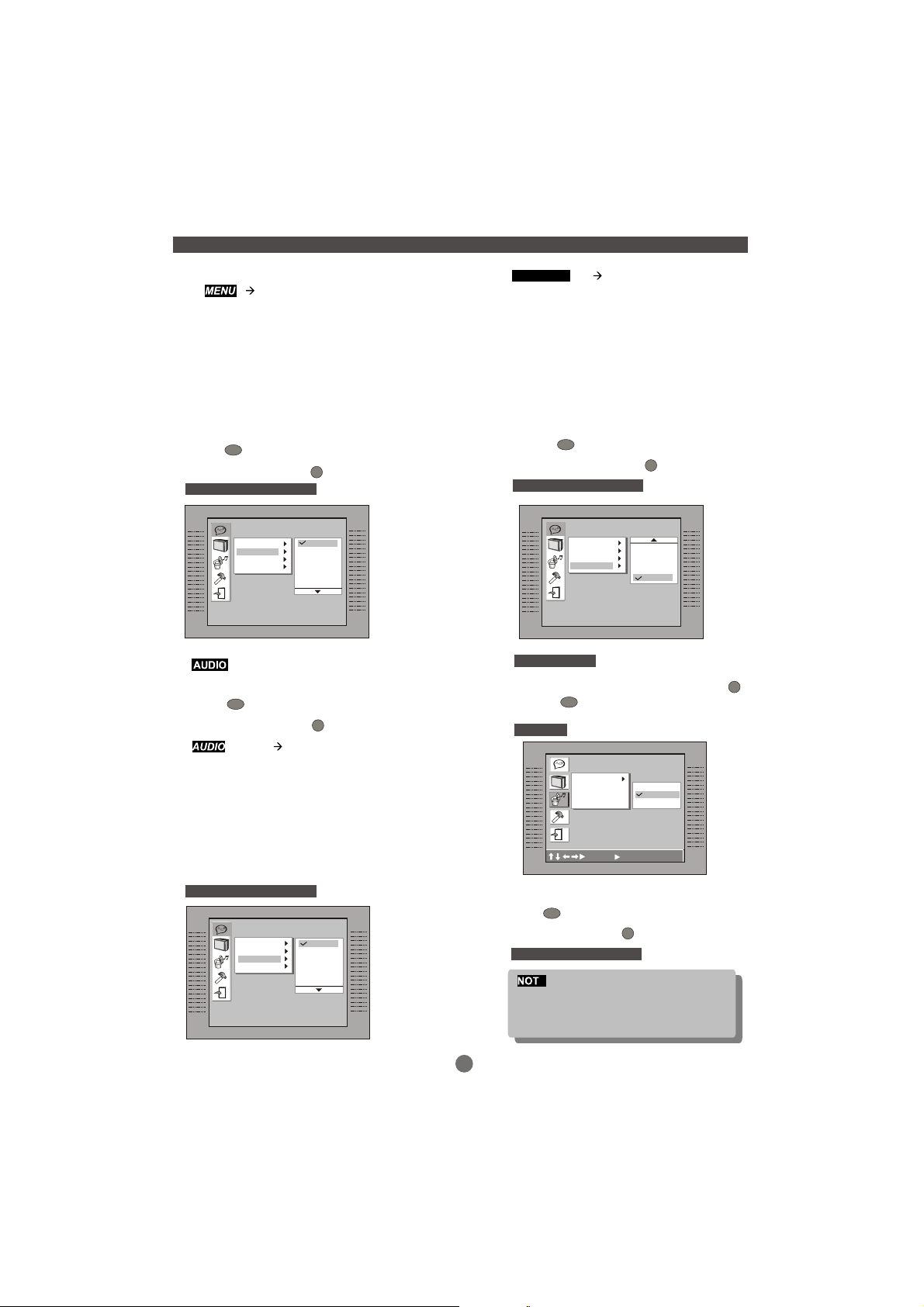
LANGUAGE MENU (continued)
ENGLISH
CHINESE
JAPANESE
FRENCH
GERMAN
ITALIAN
SPANISH
PORTUGUESE
HINDI
THAI
RUSSIAN
KOREAN
OTHERS
Select the disc language setting.
ENTER
Press to confirm the selection.
Press SETUP button to quit.
Default setting ENGLISH
B
A
C
Language Setup
OSD
Menu
Audio
Subtitle
SETUP
English
Chinese
Japanese
French
German
Italian
SETUP MENU (Press SETUP button)
SUBTITLE
Select the disc subtitle setting.
ENTER
Press to confirm the selection.
Press SETUP button to quit.
Default setting OFF
B
A
C
ENGLISH
CHINESE
JAPANESE
FRENCH
GERMAN
ITALIAN
SPANISH
PORTUGUESE
HINDI
THAI
RUSSIAN
KOREAN
OFF
Language Setup
OSD
Menu
Audio
Subtitle
SETUP
HINDI
THAI
RUSSIAN
KOREAN
OFF
Select the disc audio setting.
ENTER
Press to confirm the selection.
Press SETUP button to quit.
Default setting ENGLISH
B
A
C
Language Setup
OSD
Menu
Audio
Subtitle
SETUP
ENGLISH
CHINESE
JAPANESE
FRENCH
GERMAN
ITALIAN
SPANISH
PORTUGUESE
HINDI
THAI
RUSSIAN
KOREAN
OTHERS
English
Chinese
Japanese
French
German
Italian
15
AUDIO SETUP
In STOP mode. Press SETUP button
ENTER
Press to enter next sub-menu.
OUTPUT
B
A
C
Audio Setup
Digital Out
: Move :select SETUP:Quit
ENTER
Press to confirm the selection,or
Press SETUP button to quit.
Default setting SPDIF/RAW
E
When the digital output is NOT in use, it is
recommended to turn it off,for the purpose
of minimizing circuit interference.
SETUP
SPDIF/PCM
SPDIF/RAW
OFF
SETUP
Page 19
SETUP MENU (Press SETUP button)
SETUP MENU (Press SETUP button)
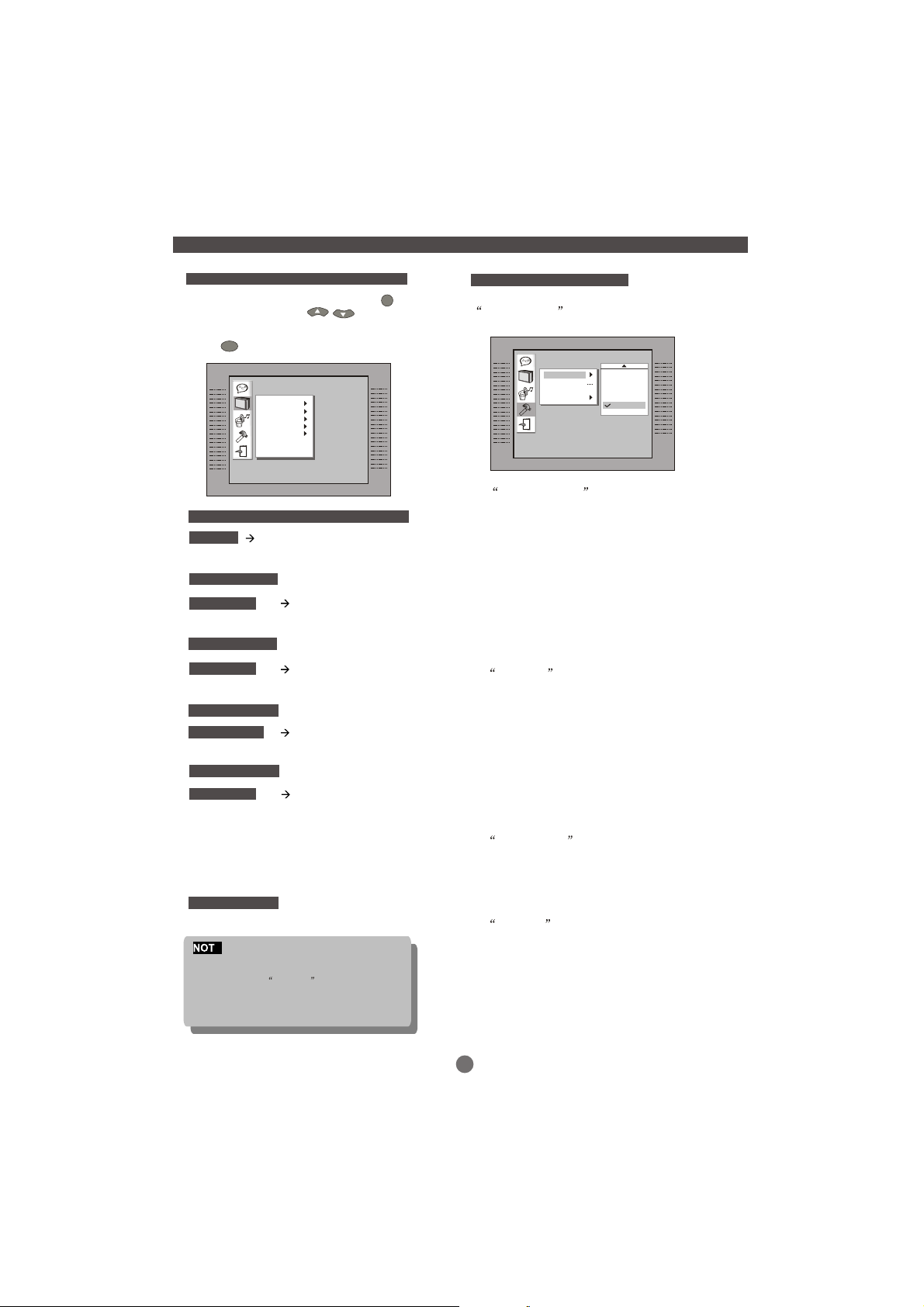
SCREEN MENU
In STOP mode, press SETUP button
SETUP
Press UP/DOWN button to highlight
the desired item in the SCREEN menu.
ENTER
Press to confirm the selection.
B
A
C
Screen Setup
TV Type
TV System
Video Output
Brightness
Contrast
Adjust TV screen viewable format
TV TYPE
4:3 PS (Pan Scan)
4:3 LB (Letter Box)
16:9 (Wide Screen)
Default setting 4:3 PS
TV SYSTEM
NTSC
PAL
AUTO
Default setting PAL
VIDEO OUT
CVBS+S-Video
CVBS+Y U V
YUV P- SCAN
CVBS+RGB
Default setting CVBS+ RGB
BRIGHTNESS
NORMAL
BRIGHT
SOFT
Default setting NORMAL
CONTRAST
-4
-3
-2
-1
0
1
2
3
4
Default setting 0
E
1. Certain DVD disc are formatted in wide screen (16:9) or letter box
(4:3)only. Adjusting the setting of the disc player will not alter the
screen size for these Format-only discs.
2. The PSCAN button on the remote should only be used if you have a
Component Video Connection
3. If you TV does not have a Y, Cb, Cr Component function, please do
not change Video Out setting
CUSTOM SETUP
After entering the main menu,choose and confirm
CUSTOM setup and then the following window
will appear on the TV screen.
B
A
C
Custom Setup
Parental Ctrl
Password
Angle Mark
Default
4:PG13
5:PGR
6:R
7:NC17
8:ADULT
A) Parental Control
There are 8 levels of ParentalControl,as follows:
1:KID SAF;2: G;3: PG; 4: PG13;5: PGR;6: R;7: NC17;
8: ADULT Levelone opens discs to people of all ages.
Level eight is suitable only for adults.
If you want to change the Parental Control setting,
enter the level number and then the four digit pass code.
The default code is 8888.(If you are using the player for the
first time, there is the code that is needed.)
When the input code has been confirmed, the level setting
menu will appear.Move the cursor to the appropriate level
and press ENTER to confirm. Press Set Up to exit the Menu.
B) Password
Move the cursor to the PASSWORD prompt and press ENTER.
Input the password 8888 ifthis is your first use.
After confirmation, you will be required to inputa new 4 digit
pass code.After entering your new pass code, press ENTER
to confirm.
WARNIN G: Please keep a copy of the new pass code
in a safe place, Otherwise you will not be able to change
the Parental Control.Please remember your PASSWORD,
as the DEFAULT setting will revert everything BUT the
PASSWORD to the factory defaults.
C) ANGLE MARK You can choose to have the
ANGLE MARK function ON or OFF . In the ON mode,
an ICON will display on the screen when a disc has
multiple angle shots available for viewing. Press ANGLE
on the remote to enjoy these scenes.
D) DEFAULT This function allows you to change the
player back to the factory default settings.All settings will
be changed back to the original settings. If you have
changed the default PASSWORD of 8888,this will not revert.
16
Page 20
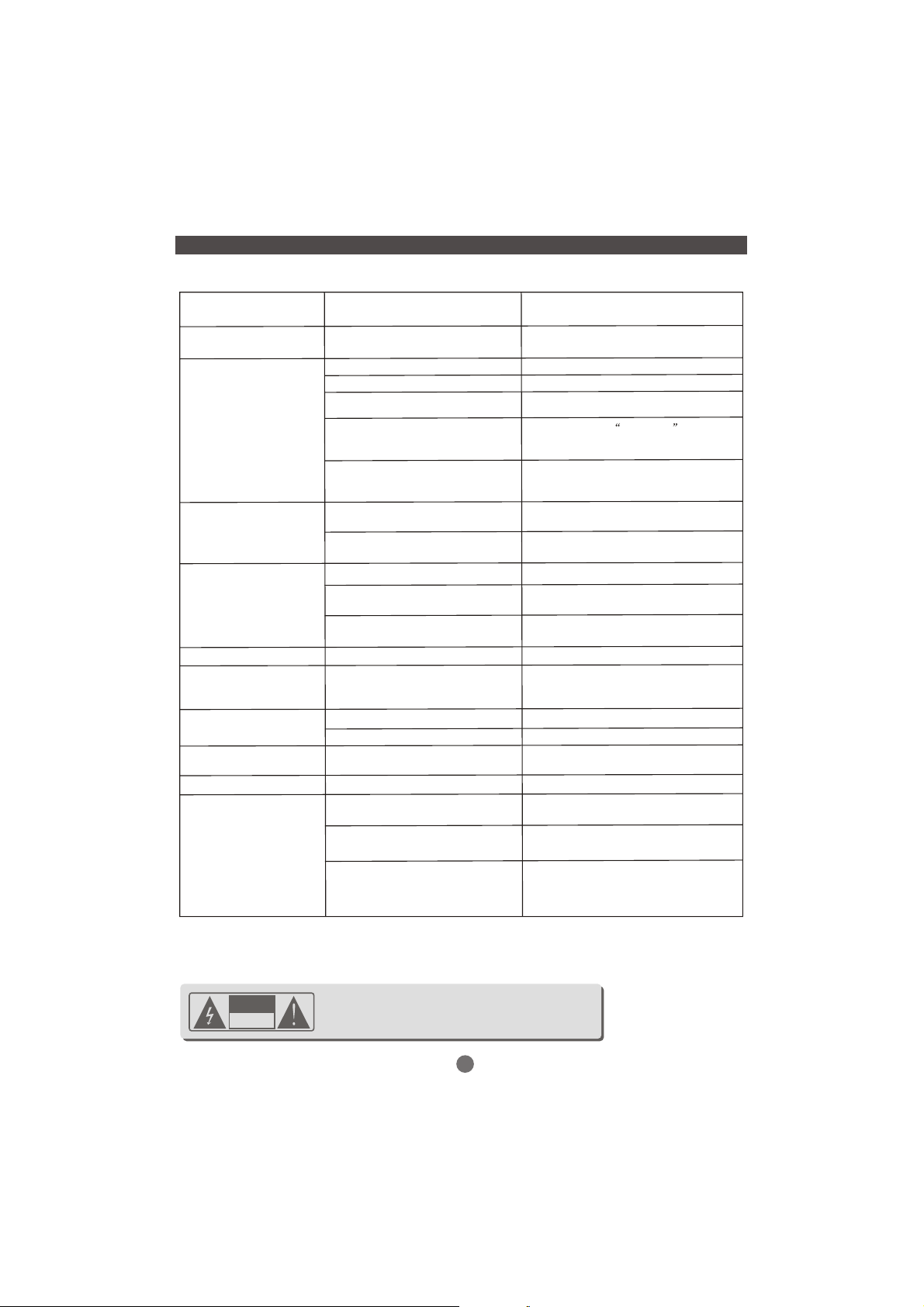
TROUBLE SHOOTING
Should the Player develop a fault please check below before calling the Customer help line
Fault
Dead No display lit
Disc will not play
No picture
Distorted or Noisy picture
Picture not full scree
General malfunction
No Sound
No Skip Search
No Surround sound
Remote control not working
Symptom Remedy
No power to the system
No disc
Disc placed upside down
Incorrect region code
Damaged disc or dirty surface
Laser lens may have condensation
on surface
TV not receiving DVD signal
TV settings incorrect
Dirty disc
Incorrect system selection
Connection of the DVD player
Screen format incorrect
No, or unusual operation
Incorrect language selected Enter Language setting menu page 16
Mute Set Un-mute
Incorrect type of disc
General setup incorrect See Setup .Page 15.
Batteries are low or exhausted
Objects in the signal path
Background light
Check system is plugged in and the
power is turned on
Insert a playable disc
Check disc is label side up
Ensure the region code of the disc is
Region 2
Clean the disc as page 1 .
If disc is cracked or badly scratched,
discard
If the player has been stored in a cold
place ,Leave the player in a warm room
for 2 hrs
Check that the TV is set to the TV are
correct
Check that the TV is set to the correct
Video input
Clean the disc as page 1
Reset DVD colour system to match
disc page11
Connect the DVD player directly to the
TV ,NOT via a VCR
Set screen format as page 16
Disconnect from the supply for 30
minutes to allow the controller to reset.
If no better contact your local supplier.
Some discs do not have this feature ,You
cannot Skip at the start of most discs.
Replace the batteries with known good ones
Remove any objects in the Line of sight”path
with the player.
Remote controls do not operate well in bright
sunlight.
Darken the room.
If you cannot rectify the problem. Please call the Customer Help Line on 01422 203676,
Monday Friday 8 am 8pm. Saturday 9am 4pm, Sunday 10am 4pm. Bank holidays as
Sunday.
CAUTION
RISK OF ELECTRIC SHOCK
DO NOT OPEN
CAUTION
shock, do not remove the cover (or back) of the unit. Refer
servicing only to qualified service personnel.
: To reduce the risk of fire and electric
17
Page 21
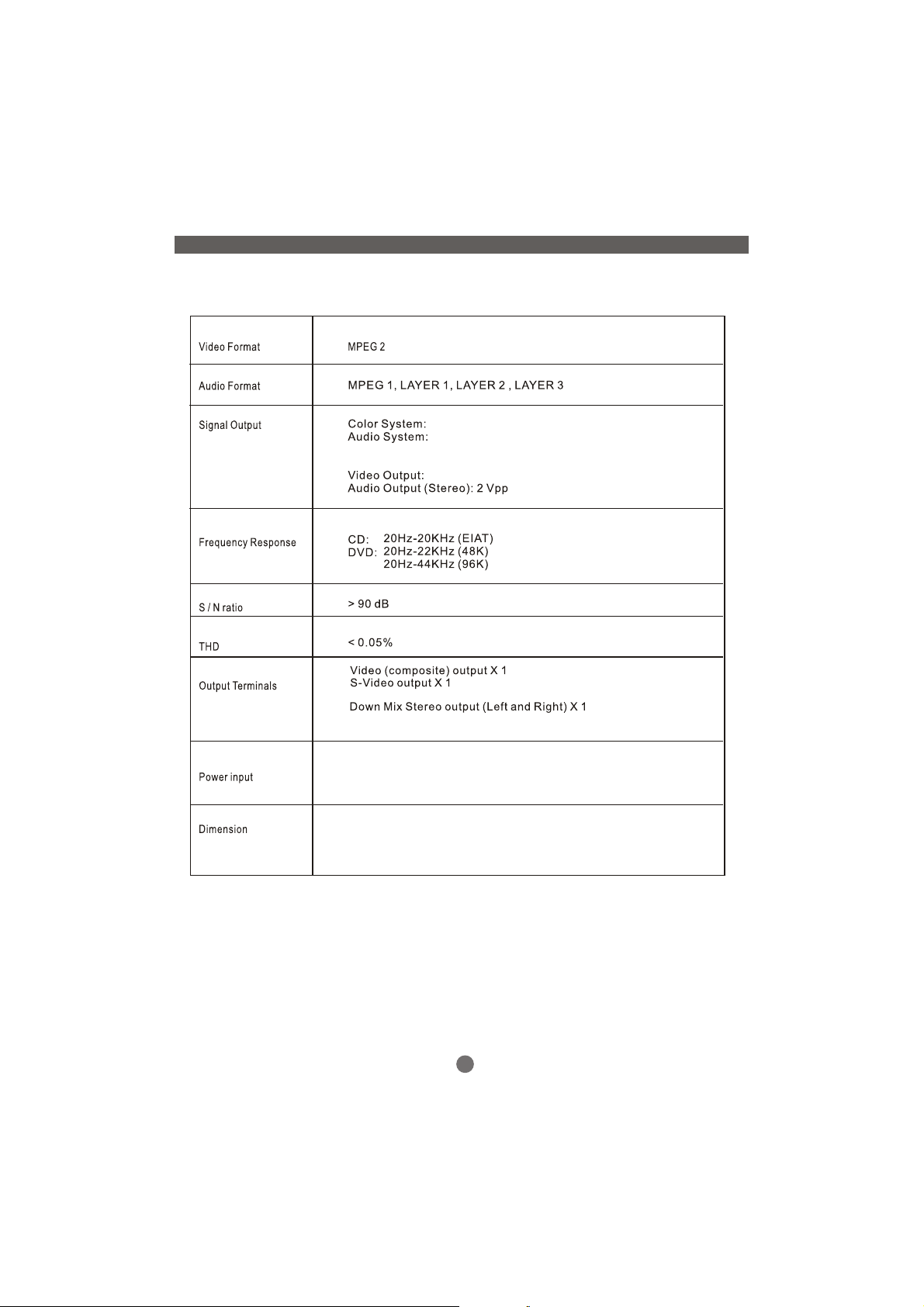
PAL/NTSC
DIGITAL down mix stereo
DIGITAL output
Audio DAC 24 bit/96KHz
1 Vpp(at 75 ohm)
Component Video(Y Pb/Cb Pr/Cr)
Digital audio(coaxial)output X1
Scart output X1
SPECIFICATIONS
AC 230V 50/60Hz
15W (Max)
Body size: L430xW260xH38mm
Packing size: L466xW96xH345mm
Net weight: 2.2kg
Please note :- Specifications may change at any time without notice
18
 Loading...