

Page 1

Congratulations on your purchase of the AktiMate Mini ac ti ve speaker system.
Using sp ea ke r tech no lo gy licensed from Epo s Limi te d in the U.K., these speakers have be en
developed and built to exacting standards.
With a 3-year parts and labour warranty, your AktiMate Mini system will provide you with years of
enjoyment. Choose your source - whether it be an i Po d, MP3 pl ay er, CD p la ye r, tuner, TV or any
other hi-fi product, plug it in, turn-up the volume and have some fun!
The AktiMate Mini speaker system has a built-in 40-Watt per ch an ne l amplifier making this a very
flexible and portable hi-fi sy st em , allowing you to listen to your mu si c whenever you like - wherever
you like.
Two way fully shielded active (master) and passive (slave)
Built-in iPod docking station complete with full-set of adaptors for all sizes
Auxiliary connection for any type of audio source including CD, Tuner, etc.
Local volume control on front of active speaker with push button standby feature
IR remote control
Switchable mains voltage
Available in high gloss white, black and red finish
The 3 -metre sp ea ke r c able is to connect the passive (slave) speaker. You h ave the choice of fitting
the screw-on banana plugs supplied with the speakers, or si mply us in g b ar e w ir es . We recommend
using 4mm p lu gs . If you want to extend the c ab le , please do so in on e length, not by adding to the
existing cable. Shorting the speaker cable can cause damage to the built-in amplifier.
Be sure to connect the speakers in phase. Maintain the same polarity by connecting the red and
black te rm in al s on one speaker to the red an d black terminals on the second speaker. Be sure to
match the gold-coloured side of the speaker wire to the red terminals on both speakers.
Verify that the power switch on the re ar of the active speaker is in the off (0) position. Check that the
voltage switch is set t o the right voltage f or your country. Check with your dealer if yo u are unsure.
Connect th e power cord into the speaker and th e other en d into the wall out le t. Switch the system on
(1) with the power switch on the rear panel.
It is a lw ay s worth remembering wh en positioning hi-fi speakers, that y ou r room acoustics h av e a
huge impact on th e o ve ra ll sound quality. As a co ns eq ue nc e, ther e a re no hard and fast rules when
specifying placement, so we wo ul d always re co mm en d that you try a few diff er en t locations t o see
what works best for your particular taste.
As a ru le , your speakers should be equ id is ta nt from side walls and at least 15-30 cm (6-12 ins ) from
a rear wall. Th e id ea l he ig ht wou ld be wh en twe et er s ar e at eye or ea r le ve l wh en listening.
FEATURES (See rear page for full sp ec if ic at io n)
r
r
r
r
r
r
r
CONNECTION
Speaker Cable
Power Cord
POSITIONING
AktiMate
Mini
Setup Instructions
Page 2
RUNNING IN
CLEANING
CONTROLS
STANDBY
VOLUME
Although a running in period i s not required, Ak ti Ma te Mini speakers will undoubtedly improve after
some use. We t he re fo re recommend th at you pl ay between 24 and 36 hours of music be fo re doing
any critical listening. You’ll be surprised at the result!
We wouldn’t recommend the use of any commercial solvents or household cleaners. All yo u need to
do is to wipe them over with a soft, dry cloth.
The active speaker features a volume control knob on the lower right hand side of the front of the
speaker and an infrared sensor on the lower left, which also contains 2 indicator LED’s.
To start playing th e AktiMate Mini speakers from an iPod or other in pu t, wake-up the system b y
pressing the vo lu me knob once. This wi ll turn the orange LED off. To stop a n iP od playing at a
precise point and cu t th e so un d, pre ss the knob once again.
When the system is in St an db y, power consumption is re du ce d to
a minimum.
To operate the vol um e, rot at e the knob right or left to in cr ea se or de cr ea se the level. The blue LED in
the window will flash whe n the volume le ve l is changing. There are 30 level steps fr om 0 to
maximum.
When waking the AktiMate Mini from Standby,
any iPod in the dock will automatically start to play at a pre-set level of 8. If you don’t want this to happen, remove
the iPod from the docking station first.
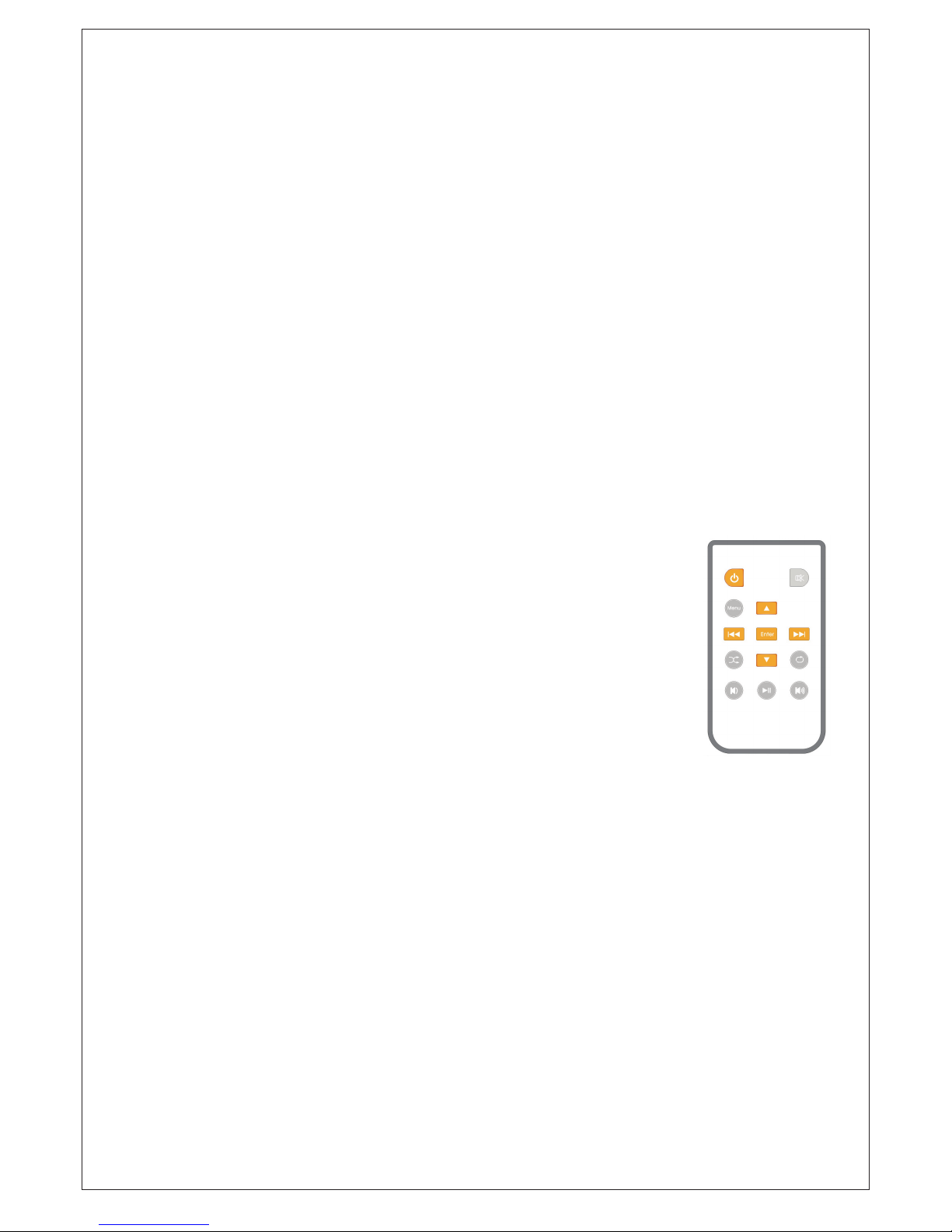
REMOTE CONTROL HANDSET
It is possible to put the system into St an db y or wake it up by pressing t he power
button (t op left side) on th e remote control. The blue L ED will light when On and
orange will light when in Standby.
The rem ot e control handset allows basic functions for your iPo d - i. e. menu,
enter, forward/back, shuffle, re pe at , pl ay and pause.
The volume control bu tt on s on the bottom right and left of the handset control the
volume le vel o f all inputs and iP od . The blue LE D w il l flash to show w he n the
volume is changing from 0 to 30.
Pressing th e M ute button on the top right w il l c ut the sound from all inputs an d a
red LED will light. When muted, the source will continue to play but will not be
heard.
iPod CONNECTION
AIRPORT EXPRESS
MP3 CONNECTION
USB
The iPod connection is an integral part of the loudspeaker system.
Carefully plug your iPod into the docking station on the top of the sp ea ke r, using t he appropriate
adaptor to suit your iPod body. The d oc ki ng station wil l accept most types o f iPod. A range o f
adaptors can be found in the accessory pack provided.
Choose the music you wish to listen to and operate th e v ol um e control either on the front of the
speaker or by using the handheld remote.
It is po ss ib le to link an Airport Express to yo ur A kt im at e Mini speakers. First, connect the Airport
Express receiver to the mains socket and then run a cable fr om th e r ec ei ve r to the 3.5mm jack plug
socket on the rear of the speaker.
Any make of MP3 or MP4 player ca n be connected, simply by using the 3.5mm jack plug inp ut on the
rear panel.
Your Akt im at e M ini sp ea ke rs have a USB connector on th e rear panel. Th is can be used for charging
an iPod or MP3 player. Simply connect the USB cable to the iPod or MP3 player, making sure the
speaker is switched-on! The USB connection is not des ig ne d to connect to a computer.
AktiMate
Page 3
AUXILIARY INPUTS
AUXILIARY OUTPUTS
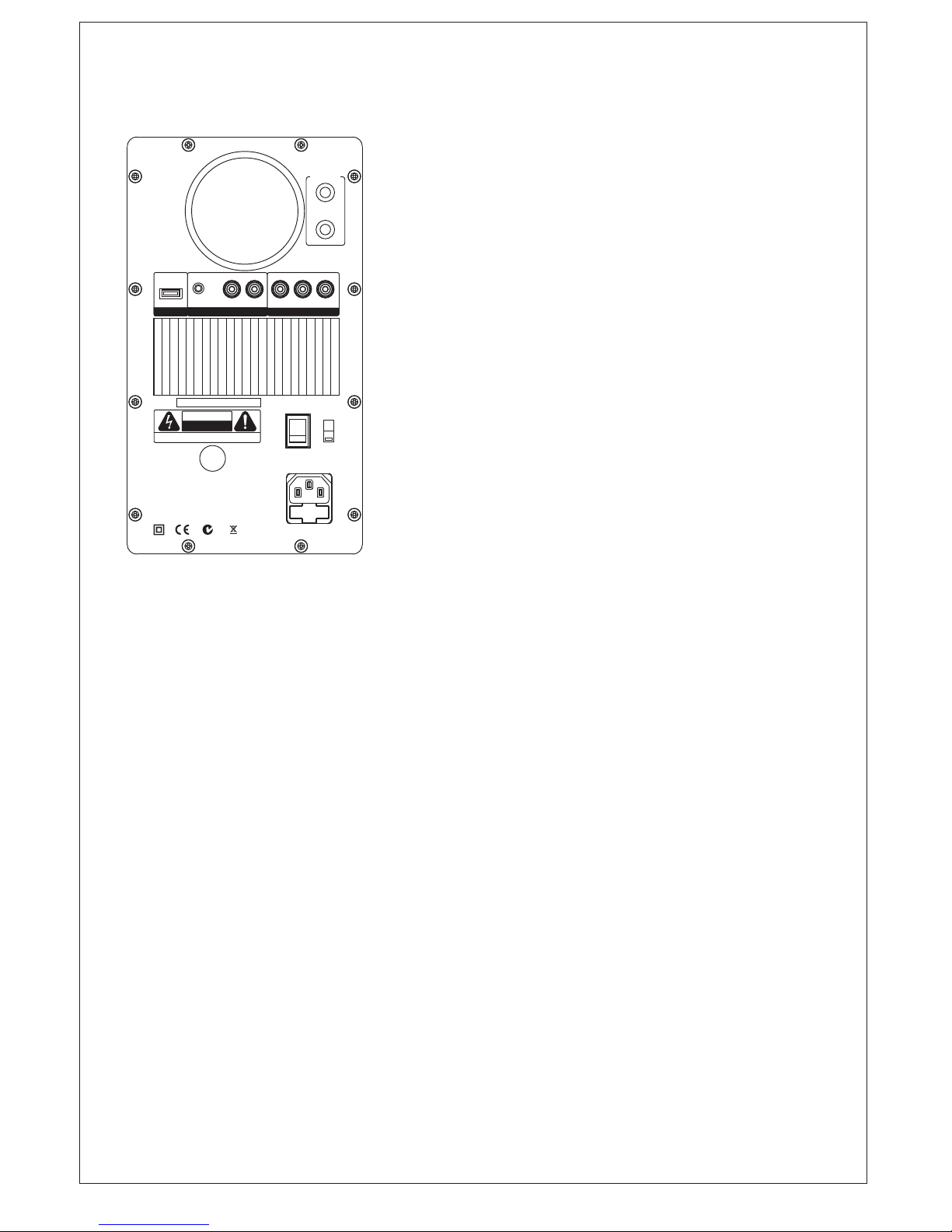
In addition to being able to play various sizes of iPod, your
AktiMate Mini speakers have 2 o th er types of inputs on th e
rear panel. The RCA input (L&R) is ideal for connecting to
a CD player, tuner, or other line l ev el source. T he AUX
3.5mm socket is i de al for connecting to a computer sound
card, AirPort Express, or other type of MP3 player.
Please note that all 3 inputs are connected together
internally. If you ch oo se to connect to 3 different sources at
the same time the level of one or other source may be
reduced. O nl y removing one or other device wi ll bring the
level back to normal. Please note al so that if 3 devices are
playing a t the s am e time, t he y will al l be he ar d together.
Pause or stop th e un wa nt ed dev ic es to listen to the one you
want.
The RC A stereo output on the rear panel al lo ws a second
pair of Ak tiMate Mini speakers o r a subwoofer to be
connected, to extend the low frequencies. Look at
www.aktimate.com for the matching subwoofer.
It is possible to run multiple pairs of Aktimate Mini sp ea ke rs
with an RCA stereo cable. Simply connect between the aux
RCA output of the master pai r and the aux RCA input of the
second p ai r. The source w il l th en play simultaneously
through the second pair. The volume can be controlled by
the master vo lu me , but the level s ho ul d be increased on
the slave pair to suit the conditions.
TROUBLESHOOTING
If the front panel LED does not light .....check the following
If no sound or low level sound can be heard .....check the following
If there is sound from only one speaker .....check the following
If you have 2 or more sources connected and they seem to be playing simultaneously
WARRANTY INFORMATION
Is the AC power cord firmly plugged in to the rear panel and wall socket?
Is the power switch on rear panel set to ON (0 is off/1 is on)?
Is the Voltage selector on the rear panel on the correct setting for the mains supply?
Is the master speaker turned-on?
Is the volume control turned-down or muted?
If using an iPod, is it seated in the dock correctly and is it playing?
Is the source component connected and is it playing?
Is the speaker cable properly connected from the master to the slave (left to right)? Rem o v e
the cable and re-connect making sure to remove any plastic insulation from the wire ends.
Remove your iPod, if listening to a source through the RCA or 3.5mm jack connections.
Press stop on yo ur source product connected via RCA or 3. 5 mm jack connections if lis te ni ng
to an iPod.
Your Aktimate Mini system has a three year parts an d labour warranty from th e date of purchase.
Please keep your r ec ei pt to verify purchase d at e. The warranty is automatic. You do not need to
register.
Your warranty does not co ve r any damage caused by misuse, ne gl ec t, abuse or problems caused by
power surges or lightning strikes. Unauthorised modification t o the Aktimate M ini s ys te m voids the
warranty.It is your responsibility to get your A kt im at e Min i s ys te m back to the point of sale for
service. However, if no fa ul t is found and the pro bl em you have experienced is fou nd to be
elsewhere, you will be liable for an y costs incurred, plus re tu rn freight. Warranty is the responsibility
of the international di stributor. All warranty c la im s must be referred to your dealer/distributor. This
does not affect your le ga l ri gh ts .
If you connect two or three devices at once, it may reduce the volume level of one input until
you disconnect one of the other unused devices.
REAR PANEL
AktiMate Mini
POWER
AC
VOLTAGE
SELECTOR
WARNING: TO REDUCE THE RISK OF FIRE OR ELECTRIC
SHOCK, DO NOT EXPOSE THIS APPLIANCE TO RAIN OR
MOISTURE
WARNING: FOR CONTINUED PROTECTION AGAINST RISK
OF FIRE, REPLACE ONLY WITH THE SAME TYPE OF FUSE
DESIGNED IN AUSTRALIA.
www.aktimate.com
MAX POWER
CONSUMPTION:
200 WATTS
RISK OF ELECTRIC SHOCK
DO NOT OPEN
CAUTION
WARNING: SHOCK HAZARD - DO NOT OPEN
INPUT
R
L
+
-
SERIAL
NUMBER
ON
OFF
FUSE:T2AL 250V/50Hz
T4AL 120V/60Hz
SLAVE
SPEAKER
N15057
Ro
H
S
USB
OUTPUT
R LVIDEO AUX
OUTPUT TO
Recharge
only
DC +5V
~120V
60Hz
~240V
50Hz
AktiMate Mini
Active Loudspeaker
AktiMate Min i also ha s a video output for co nn ec ti on to a larger monitor. This is ideal if your iPod has
photo or video storage! It requires an RCA to RCA ca bl e to con ne ct to th e TV or other monitor, similar
to connection of a camcorder. N.B. Not all TV monitors have this connector.
Page 4

AktiMate Mini
Designed in Australia and distributed internationally through
Epoz Pty Ltd, P.O. Box 258, Belrose NSW 2085
For information regarding international distributors, contact
Epoz Pty. Ltd.
Telephone: +61 2 8901 0415
E-mail: [email protected]
AktiMate Mini Specification
Configuration 2-Way Active Bookshelf Speak er s (1 Ac ti ve m as te r sp ea ke r an d
1 Passive slave speaker)
Power Output 40W into its own 4 Ohm speaker load
Woofer 130mm (5.25 ins) mid/bass with moulded polypropylene cone.
Shielded magnet. (Licensed from Epos Ltd - U.K.)
Tweeter 25 mm (1 in) metal dome with neodymium magnet
(Licensed from Epos Ltd. U.K.)
Frequency Response 50Hz - 22kHz +/- 1.5dB
Power Amplifier Type Class A/B (built in) 40 Watts p er c ha nn el R MS
Nat-Semi LM4766 Overture™
Burr-Brown PGA2311 digitally controlled analogue volume control
Transformer 120W Toroidal power transformer
Inputs 1 Pair RCA Stereo Sockets
1 x 3.5 mm Jack plug
Apple iPod dock
Outputs 1 Pair RCA Stereo Sockets (un-filtered) for connection of
subwoofer or to daisy-chain to second pair
Video output
Connections USB (for charging iPod or MP3 players only)
THD <0.05%
Crosstalk <50dB
Input Impedance 10k Ohms unbalanced
Passive Speaker
Impedance 4 Ohms
Protection Output current limiting, thermal over-temperature, power on/off
transient protection, replaceable external mains fuse
Mains Voltage 240/120V 50/60Hz
Inclusions Right angled IEC power cord
3 metres of connecting speaker cable
iPod connector accessory pack
IR remote control handset
4mm Banana plugs
Size 300 x 185 x 210 mm 12 x 7½ x 8½ ins
Weight 12 Kgs 26½ lbs Packed in 1 carton
N15057
www.epoz.com.au
Find out more about AktiMate Mini by visiting www.aktimate.com
 Loading...