

Page 1
MANUFACTURING
NUMBERS:
9700726
9700746
System Tested and Certified by NSF
International and WQA against NSF/ANSI
Standard 42 and 53 for the reduction of:
Standard No. 42: Aesthetic Effects
Nominal Particulate Reduction Class I
Standard No. 53: Health Effects
Cyst Reduction & Turbidity Reduction as
verified and substantiated by test data.
System Tested and Certified by WQA
against NSF/ANSI Standard 372
for lead-free compliance
P/N 1011064 Rev. F 12/13
VZN WATER
FILTRATION
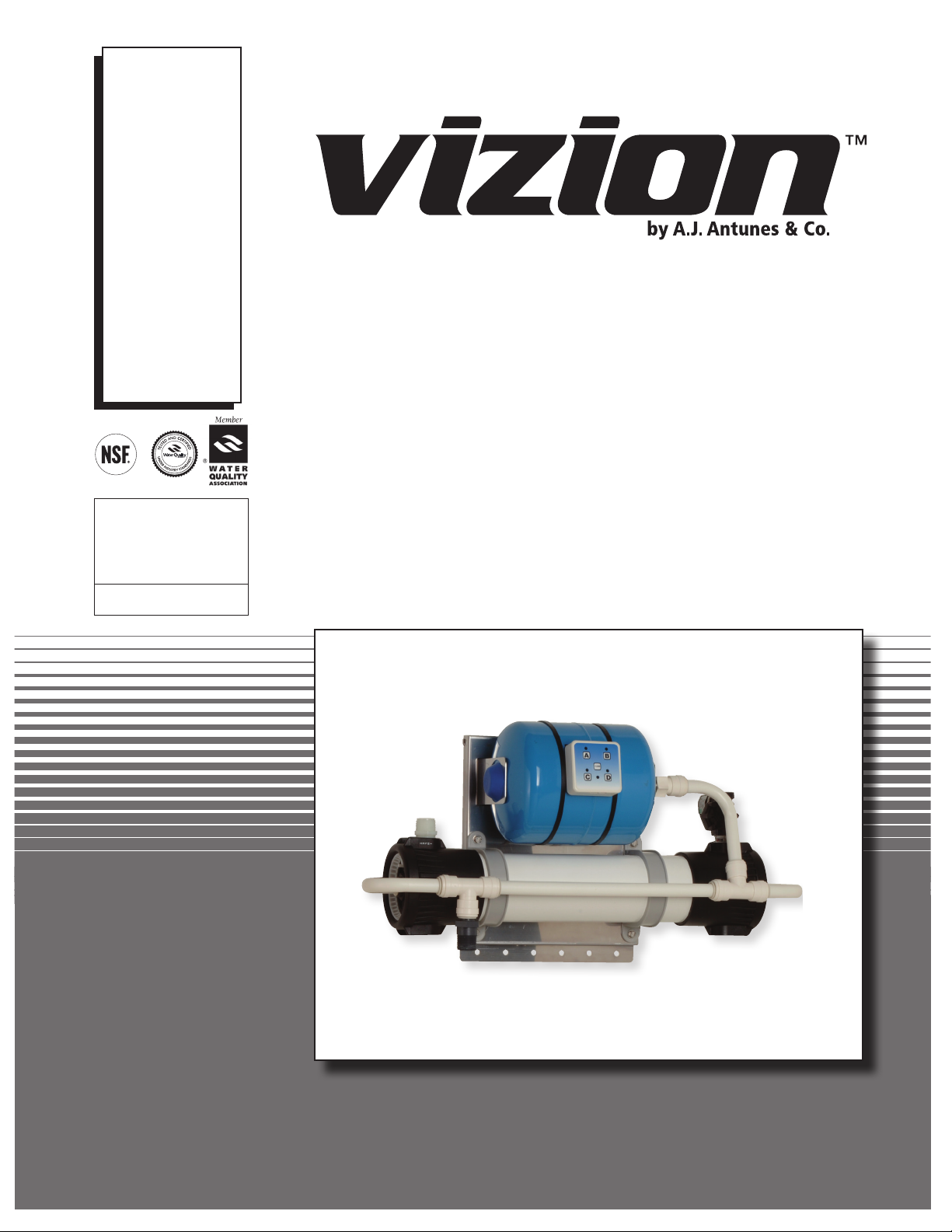
VZN-420H, VZN-440H
Owner’s Manual
Page 2
VZN SERIES
TABLE OF CONTENTS
Owner Information ...............................................................2
General............................................................................... 2
Warranty Information .......................................................... 2
Service/Technical Assistance ............................................. 3
Important Safety Information ..............................................4
Specifications .......................................................................6
Dimensions......................................................................... 6
Electrical Ratings and Plug Configurations ........................ 6
Replacement Cartridges .................................................... 6
Electrical Cord & Plug Configurations ................................ 6
Performance Data Sheet ......................................................7
Filter Cartridge Capacities.................................................. 7
Performance Claims for Percent Reduction....................... 7
Operation ...............................................................................8
Overview ............................................................................ 8
Manual Flushing ................................................................. 8
Installation .............................................................................9
Unpacking .......................................................................... 9
Equipment Setup ................................................................ 9
Mounting the System ....................................................... 10
Alternative Vertical Mounting............................................ 10
Drain Valve Connection .....................................................11
System Inlet Connection .................................................. 12
Filtered Water Permeate Outlet Connection .................... 12
Inlet Water Plumbing ........................................................ 12
Installing a Bypass ........................................................... 13
Starting the Controller ...................................................... 13
Rinsing the Ultra Filter Cartridge...................................... 13
Sanitizing the System and Lines ...................................... 14
Maintenance ........................................................................15
Replacing the Ultra Filter Cartridge.................................. 15
System Sanitization .......................................................... 15
Changing the Interval Setting ........................................... 16
Resetting the Timer Program ........................................... 16
Check Permeate Tank Air Pre-Charge ............................. 16
Troubleshooting .................................................................17
Replacement Parts .............................................................18
Limited Warranty ................................................................20
OWNER INFORMATION
General
The VZN system is an innovative filtration system that uses
proprietary multi-bore hollow fiber membranes as well as a
carbon element to provide the latest innovation in filtration
technology.
This manual provides the safety, installation, and
operating procedures for the VZN water filtration system. All
information contained in this manual should be read prior to
installing and operating the system. Your VZN system is manufactured from the finest materials available and is assembled
to strict quality standards. This system has been tested at the
factory to ensure dependable trouble-free operation.
Warranty Information
Please read the full text of the Limited Warranty in this
manual.
If the system arrives damaged, contact the carrier immediately and file a damage claim with them. Save all packing
materials when filing a claim. Freight damage claims are the
responsibility of the purchaser and are not covered under
warranty.
The warranty does NOT extend to:
• Damages caused in shipment or damage as result of
improper use.
• Installation of electrical service.
• Normal maintenance as outlined in this manual.
• Malfunction resulting from improper maintenance.
• Damage from moisture leaking into electrical
components.
• Damage from tampering with, removal of, or changing
any preset control or safety device.
IMPORTANT! Keep these instructions for future reference. If the system changes
ownership, be sure this manual accompanies the equipment.
2
P/N 1011064 Rev. F 12/13
Page 3
OWNER INFORMATION (continued)
Service/Technical Assistance
If you experience any problems with the installation or operation of your system, contact A.J. Antunes & Co. at 1-630-784-
1000, or toll free in the United States at 1-800-253-2991.
Fill in the information in the next column and have it handy
when calling for assistance. The serial number is on the
specification plate located on the system.
Purchased From:
Date of Purchase:
Model No.:
Serial No.:
Mfg. No.:
VZN SERIES
Suggested replacement period for the Ultra Filter Cartridge is
approximately 3 years.
For sales in the state of Iowa:
Seller: Date:
Buyer: Date:
IMPORTANT
A.J. Antunes and Company reserves the right to change specifications and product
design without notice. Such revisions do NOT entitle the buyer to corresponding
changes, improvements, additions, or replacements for previously purchased equipment.
P/N 1011064 Rev. F 12/13
3
Page 4
VZN SERIES
IMPORTANT SAFETY INFORMATION
In addition to the warnings and cautions in this manual, use
the following guidelines to safely operate the system:
• Read all instructions before using equipment.
• Install or locate the equipment only for its intended use
as described in this manual.
• Do NOT use corrosive chemicals in this equipment.
• Do NOT operate this equipment if it has a damaged
cord or plug; if it is not working properly, or if it has
been damaged or dropped.
• This equipment should be serviced by qualified personnel only. Contact A.J. Antunes & Co. for repair.
• Do NOT immerse cord or plug in water.
• Keep cord away from heated surfaces.
• This equipment should be supplied with only cold
water.
• For installations in Massachusetts, the Commonwealth
of Massachusetts Plumbing Code 248 CMR shall be
adhered to. The use of saddle valves are not permitted.
Please consult your local plumber.
The following warnings and cautions appear throughout this
manual and should be carefully observed.
• Unplug the power cord before performing any
service or maintenance on the unit.
• All electrical connections must be in accordance with
local electrical codes and any other applicable codes.
• WARNING ELECTRICAL SHOCK HAZARD. FAILURE
TO FOLLOW THESE INSTRUCTIONS COULD
RESULT IN SERIOUS INJURY OR DEATH.
- Do NOT modify the power supply cord plug. If it
does not fit the outlet, have a proper outlet installed
by a qualified electrician.
- Do NOT use an extension cord with this unit.
• If the supply cord is damaged, it must be replaced by
the manufacturer, its service agent, or a similarly qualified person.
• This equipment is to be installed to comply with the
local plumbing code and any other applicable code.
• Water pressure must not exceed 100 psig (690 kPa).
To reduce water pressure, install a water pressure
regulator and set to suit the application.
• The trans membrane pressure (inlet pressure minus
the permeate water pressure) must not exceed 45 psi
(310 kPa).
• A ground fault circuit interrupter (GFCI) must be
installed on the circuit to this system.
• When installed on metallic plumbing, a properly sized
electrical bonding jumper must be installed across the
inlet and outlet pipes serving this unit.
NOTE: If the inlet water pressure is less than 50 psig (345
kPa), it is recommended that a suitably-sized booster
system (outlet pressure 60 psig - 100 psig max (414 kPa 690 kPa max) be installed.
4
P/N 1011064 Rev. F 12/13
Page 5
IMPORTANT SAFETY INFORMATION (continued)
VZN SERIES
Protect from becoming dry
If the membrane dries out, irreversible damage to the Ultra
Filter membrane may result. Protect the filter from becoming
dry by keeping it wet and sealed at all times.
Protect from freezing
If the Ultra Filter membrane freezes during operation or storage, irreversible damage to the membrane and brittle cracking
of the cartridge or housing may result.
Protect from direct sunlight or other UV sources
Avoid long-term exposure to direct sunlight or other UV
sources. The Ultra Filter should be stored in a dark location.
Protect from high temperatures or abrupt variation in
temperature
The maximum operating temperature is 100°F (38°C). Avoid
abrupt variations in temperature. Any temperature variation
should be made slowly.
Protect from rough handling or dropping
Mechanical damage, external breakage, and/or internal breakage of the filter can result if the system is dropped or bumped.
Handle with care at all times during transportation and installation.
Protect from organic solvents and concentrated acids
Prevent any and all contact of the membrane with strong solvents, solvents containing chlorine, or concentrated acids. Do
NOT use strong solvents or concentrated acids on any plastic
parts of the filter system. Examples of some solvents to avoid:
acetone, methyl acetate (nail polish remover); hexane (spot
removers); turpentine, toluene (paint thinners); dry cleaning
solutions, insecticides.
CAUTION
This equipment is to be installed to comply with the
basic plumbing code of the Building Officials and Code
Administrators, Inc. (BOCA) and the Food Service
Sanitation Manual of the Food and Drug Administration
(FDA).
CAUTION
Water Flow Regulator Assemblies are NOT interchangeable. Operating the system with the wrong Water Flow
Regulator or without a regulator can damage the system, cause personal injury, and voids the warranty!
CAUTION
All electrical connections must be in accordance with
local electrical codes and any other applicable codes.
A ground fault circuit interrupter (GFCI) must be
installed on the circuit to this system.
When installed on metallic plumbing, a properly sized
electrical bonding jumper must be installed across the
inlet and outlet pipes serving this unit.
Protect from abrasive material
The membranes must be protected from abrasive materials
like shavings left in a pipe. Abrasive materials in contact with
the membrane can cause irreversible damage to the membrane. All pipes must be flushed clean before installing the filter. All plastic parts of the filter system must be protected from
sharp objects like knives, sand paper, or other tools. Cutting
or nicking a plastic part can weaken it and cause a leak. Do
NOT use abrasive cleansers on any plastic parts.
Protect from water hammer
The system must be protected from shock, pressure surges,
or pulsation that may occur inside water pipes. Water hammer occurs in pipes when a valve or faucet shuts quickly.
Install a water hammer arrestor (pressure vessel containing
compressed air separated from the water by a diaphragm) to
reduce pressure shock.
P/N 1011064 Rev. F 12/13
5
Page 6
VZN SERIES
MAY VA RY
SPECIFICATIONS
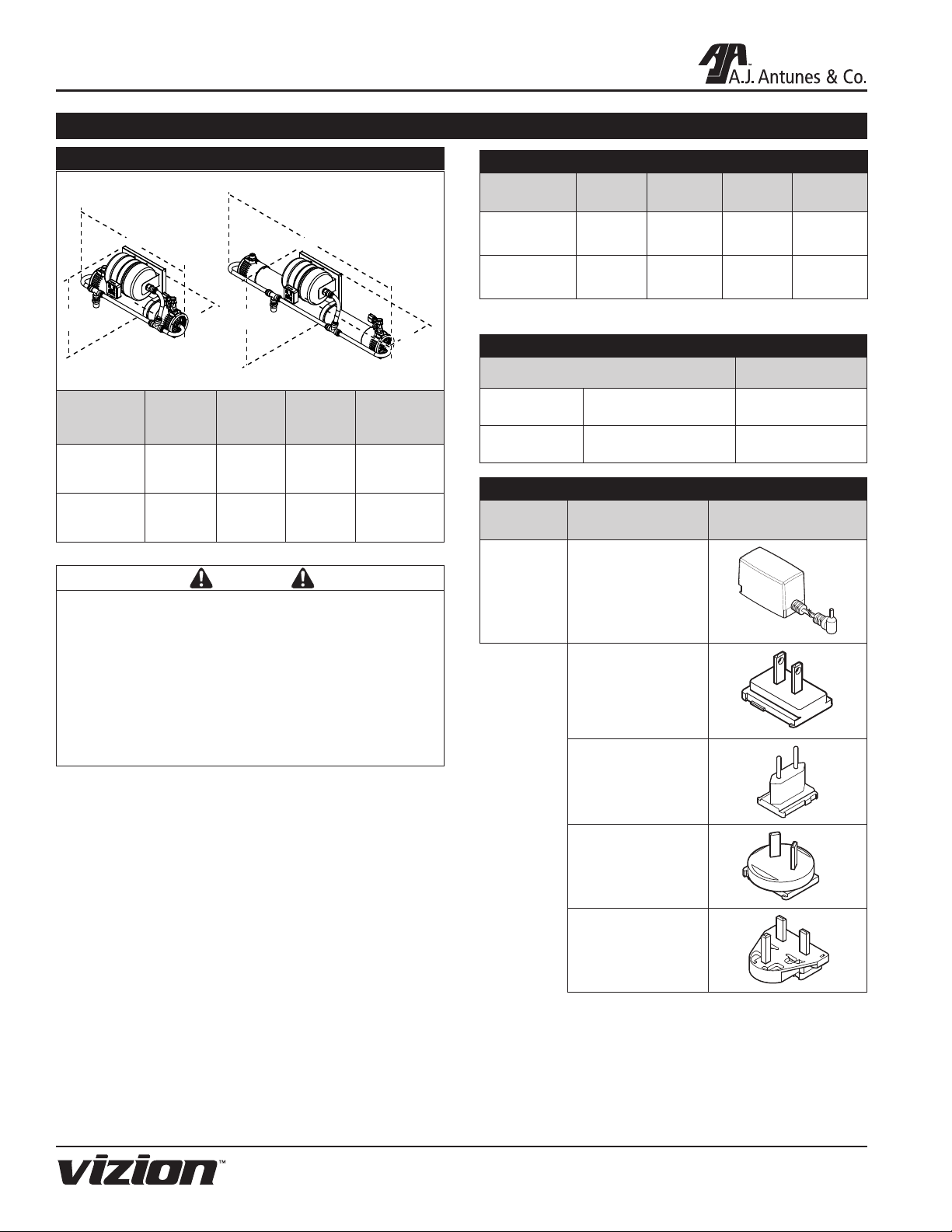
Dimensions
VZN-440HVZN-420H
C
Model &
Mfg. No.
VZN-420H
9700726
VZN-440H
9700746
A
Width
(A)
31"
(79 cm)
50"
(127 cm)
B
C
Depth
(B)
9"
(23 cm)
9"
(23 cm)
A
Height
(C)
15"
(38 cm)
15"
(38 cm)
B
Operating
Weight
40 lbs.
(18 kg)
54 lbs.
(25 kg)
CAUTION
All electrical connections must be in accordance with
local electrical codes and any other applicable codes.
Electrical Ratings and Plug Configurations
Model &
Mfg. No.
VZN-420H
9700726
VZN-440H
9700746
NOTE: Includes plug adaptors for US, Europe, Australia, and UK.
Volts Watts Amps Hertz
100–240 10 .08 50/60
100–240 10 .08 50/60
Replacement Cartridges
Replacement Part Number
VZN-420H L-420 Ultra Filter 7000411
VZN-440H L-440 Ultra Filter 7000412
Electrical Cord & Plug Configurations
Kit Model
Number
Description Configuration
DC Power Supply
100 - 240 VAC
0012146
Includes the
4 plug adaptors
below
NOTE: PLUG STYLE
A ground fault circuit interrupter (GFCI) must be
installed on the circuit to this system.
When installed on metallic plumbing, a properly sized
electrical bonding jumper must be installed across the
inlet and outlet pipes serving this unit.
US
NEMA 1-15 (2 pin)
or NEMA 5-15
(3 Pin)
Euro
CEE 7/16
AS/NZS
3112
AUS
(2 Pin)
UK
BS 136 3
6
P/N 1011064 Rev. F 12/13
Page 7

PERFORMANCE DATA SHEET
VZN SERIES
Filter Cartridge Capacities
Maximum Operating Pressure 100 psig (690 kPa)
Maximum Operating Temperature 100°F (38°C)
Minimum Operating Temperature 40°F (4°C)
Maximum Trans Membrane Pressure 45 PSI (3.1 Bar)
pH Range 3-10
MWCO 100 kD
NSF/WQA Certified Rated Service
Flow:
VZN-420H 7.9 gpm (30 l/m)
VZN-440H 13 gpm (49 l/m)
System Tested and Certified by NSF
International and WQA against NSF/ANSI
Standard 42 and 53 for the reduction of:
Standard No. 42: Aesthetic Effects
Nominal Particulate Reduction Class I
Standard No. 53: Health Effects
Cyst Reduction & Turbidity Reduction
as verified and substantiated by test data.
Performance Claims for Percent Reduction
Substance Influent
1
cyst
Turbidity 11 ± 1 NTU ≤ 0.5 NTU 99.1%
Particulate Class I
Particles 0.5 to <
1µm
1
based on the use of microspheres or Cryptosporium parvum oocysts
Challenge
Concentration
minimum
50,000/L
at least 10,000
particles /mL
Reduction
Requirement
99.95% 99.95%
≥ 85% N/A
Minimum
Reduction
%
System Tested and Certified by WQA
against NSF/ANSI Standard 372
for lead-free compliance
This system has been tested according to NSF/ANSI
Standard 42 and 53 for reduction of the substances listed
below. The concentration of the indicated substances in water
entering the system was reduced to a concentration less than
or equal to the permissible limit for water leaving the system,
as specified in NSF/ANSI 42 or 53. While testing was performed under standard laboratory conditions, actual performance may vary.
NOTE: The NSF/WQA information provided applies to the
Ultra Filter cartridge.
Do not use with water that is microbiologically unsafe or
of unknown quality without adequate disinfection before
or after the system. Systems certified for cyst reduction
may be used on disinfected waters that may contain filterable cysts.
P/N 1011064 Rev. F 12/13
7
Page 8

VZN SERIES
OPERATION
Overview
The VZN system operates in two modes:
• Normal Operation Mode
• Flush Mode
During Normal Operation Mode, water enters the Inlet and
flows through the Ultra Filter before exiting the Permeate
Outlet as usable product water.
During Flush Mode, the Drain Valve opens and water entering the Inlet flushes and cleans the Ultra Filter membrane by
removing any debris collecting on the membrane wall.
The Drain Valve is only powered during Flush Mode.
NOTE: Do NOT unplug the power cord or turn off the system during Flush Mode. If there is a power outage or the
system is unplugged, water will continue to be filtered
but the system will NOT flush. This could cause the Ultra
Filter to plug prematurely and may reduce the life of the
filter.
The flush is automated by the Universal Pulse Controller to
last 10 seconds and take place in one-hour intervals. This
interval can be changed (see Changing the Interval Setting
in the Maintenance section of this manual).
Ultra Filtration
Cartridge
Outlet
Solenoid
Inlet
(Automatic)
Figure 1. System Components
System
Flush
Valve
CAUTION
Changing the flush interval can cause the Ultra Filter to
plug prematurely and may reduce the life of the filter.
Consult the factory for more information.
Manual Flushing
A manual flush can be activated at any time by pressing the
FLUSH button on the Universal Pulse Controller.
When the FLUSH button is pressed, the Flush LED on the
controller flashes and the Drain Valve opens for 10 seconds.
After flushing is complete, the Drain Valve will close, the Flush
LED will stop flashing and the unit will automatically return to
Normal Operation Mode.
NOTE: A manual flush will not affect the interval flush
setting.
8
P/N 1011064 Rev. F 12/13
Page 9

INSTALLATION
VZN SERIES
Unpacking
1. Open the large box. It should contain:
A. Plate-mounted VZN system with Ultra Filter
Cartridge installed.
B. Padded envelope containing:
• Power Adaptor
• Adaptor Plugs
• Owner’s Manual
• Mounting Bracket
3. Remove all packing materials and protective coverings
from the system.
4. Remove the information packet. Fill out and mail the
warranty card immediately to prevent any delay in
obtaining warranty coverage.
NOTE: If any parts are damaged, contact A.J. Antunes &
Co. IMMEDIATELY at 1-800-253-2991 (toll free in the U.S.
and Canada) or 1-630-784-1000.
Equipment Setup
GENERAL
When placing the system into service, pay attention to the
following guidelines:
• Do NOT immerse cord or plug in water.
• Keep cord away from heated surfaces.
ELECTRICAL
The line voltage must match the voltage on the specification
label. The plug on the power cord must match the appropriate
outlet. Do NOT connect the system to a switched electrical
outlet.
PLUMBING
NOTE: The system must be connected to the COLD water
line. Do NOT connect the system to the hot water line.
The VZN system uses the following connections:
System Inlet 1" NPT
System Outlet
(Product Water)
Drain 3/4" FNPT
1" NPT
It is recommended that ball valves be installed on the inlet
and outlet of the system. This will aid in replacing cartridges
and servicing the system.
When making a plumbing connection to the system, use a
back-up wrench on the supporting plumbing. Always use a
quality, approved pipe sealant or thread seal tape on pipe
threads. Do NOT allow pipe sealant inside pipes.
Do NOT over tighten the connections. Use plastic fittings
when connecting to the plastic connections of the system.
If soldered plumbing is used, do NOT apply heat to, or near,
the filtration system. Use union (O-ring seal) connections for
ease of installation and future servicing.
SUGGESTED TOOLS AND SUPPLIES FOR INSTALLATION
The following tools and supplies are suggested to help with
the installation:
• Screwdriver • Adjustable Wrenches
• Drill with Bits • Level
• Tape Measure • Pipe Dope or Thread Seal Tape
• Two Gallon Bucket • Fresh, Unscented Liquid Chlorine
Bleach
• Pipe Wrenches • Hose or pipe for drain line
• Ball Valves (for inlet, outlet, and
bypass)
P/N 1011064 Rev. F 12/13
9
Page 10

VZN SERIES
INSTALLATION (continued)
CAUTION
Due to its weight and size, the VZN system MUST be
mounted with the provided Mounting Bracket. Read
the Mounting the System section before attempting to
mount the VZN system. Use care when lifting heavy
objects.
Mounting the System
NOTE: Use caution when lifting and mounting the system. The system MUST be mounted using the provided
Mounting Bracket.
The VZN system comes with a Mounting Bracket. When
mounting the system, pay attention to the following guidelines:
• Allow sufficient access for cartridge replacement. VZN420 units should be mounted with 20 inches to the left or
right. VZN-440 units should be mounted with 40 inches to
the left or right.
• Mount the system near but NOT above an appropriate
electrical outlet.
• Mount the system near a drain for flushing operations.
• Mount the system before all consumable water
filtration processes.
• Mount the system with the provided Mounting Bracket
and hardware capable of supporting 120 lbs. or more.
• Secure the Mounting Bracket into wall studs or with the
appropriate heavy duty mounting hardware.
The system is pre-assembled to a Back Plate. The Back Plate
has mounting holes across the bottom portion to secure the
bottom of the system to the wall. Some of the bottom mounting holes may be obscured. Plan your mounting accordingly.
Alternative Vertical Mounting
The system can be mounted vertically if required. See Figure
2A for more details. Note the following when mounting a system vertically:
1. Install the Mounting Bracket horizontally as shown in
Figures 2 and 2a.
2. The system must be mounted so the Solenoid Valve is
located at the TOP (Figure 2a).
3. Allow sufficient access for cartridge replacement. VZN420 units should be mounted with 20 inches above
or below. VZN-440 units should be mounted with 40
inches above or below.
The system is
designed to hang from
Back Plate
(holes along bottom
for additional
mounting stability)
Figure 2. Mounting the System
Follow these steps to secure the Mounting Bracket to the wall
and seat the VZN system:
1. Use a stud finder and level to attach the Mounting
Bracket securely to the wall with the appropriate
mounting hardware (Figure 2).
2. The Mounting Bracket is designed so that the VZN
system can be lifted and hung on the Mounting Bracket.
With assistance, lift the system and seat it onto the
Mounting Bracket securely (Figure 2).
3. Secure the bottom portion of the VZN system to the
wall using the holes provided. Make sure the mounting
hardware secures the system into wall studs or use the
appropriate mounting hardware.
Back Plate
(holes along right
for additional
mounting stability)
Solenoid
Valve
at Top
the Mounting Bracket.
Secure Mounting Bracket
to wall studs using
appropriate hardware.
The system is
designed to hang from
the Mounting Bracket.
Secure Mounting Bracket
to wall studs using
appropriate hardware.
4. With assistance, lift the system and seat it securely onto
the Mounting Bracket vertically (Figure 2a).
5. When mounted vertically, the back plate has mounting
holes across the right portion to secure the right side of
the system to the wall.
10
Mounting
Holes
Figure 2a. Vertical Mounting
P/N 1011064 Rev. F 12/13
Page 11

INSTALLATION (continued)
Drain Valve Connection
The drain is for flushing particle buildup out of the
system during self cleaning.
1. Cut a length of tubing (not supplied) so it reaches the
drain from the Drain Valve.
2. Connect one end of the hose to the Drain Valve with an
appropriate fitting (not supplied) (Figure 3).
3. Direct the other end of the hose to the drain (Figure 3).
When connecting the drain hose, pay attention to the following guidelines:
• The drain line plumbing must be able support the flow
rate whenever the system flushes. This flow rate is
dependent on the inlet water pressure, inlet pipe size,
and system.
VZN SERIES
Example Drain Valve
Connection
Secure Hose
with Worm
Clamp
Direct Hose
to Drain
• The drain line leading out of the system must be as
short as possible and slope downwards without any
kinks or loops.
• The drain line plumbing must be positioned and
secured at least 2 inches above the drain (Figure 4).
This air gap protects the system from contamination in
the event of a backed-up drain.
• The drain used must not be blocked or restricted.
• The drain used must be as large or larger than the
drain line plumbing.
Figure 3. Drain Valve Connection
Secure
End
Drain
Drain Line
from System
Secure
End
Drain Line
from System
2” (5.1 cm)
minimum
Standpipe
P/N 1011064 Rev. F 12/13
Floor
Drain
2” (5.1 cm)
minimum
Figure 4. Drain Line Plumbing
11
Page 12

VZN SERIES
INSTALLATION (continued)
System Inlet Connection
The System Inlet has a 1” NPT male thread at the Inlet
(Figure 5). Do NOT overtighten fittings as this could cause the
plastic to crack.
Use plastic fittings and a pipe thread sealant approved for use
on PVC fittings when making connections.
Filtered Water Permeate Outlet Connection
The System Outlet has a 1” NPT male thread at the Outlet
(Figure 5). Do NOT overtighten fittings as this could cause the
plastic to crack.
Inlet
Use plastic fittings and a pipe thread sealant approved for use
on PVC fittings when making connections.
Inlet Water Plumbing
A “T” or Cross Fitting with cap or plug (Not Supplied) should
be installed at the System Inlet. This fitting can be used for
draining and sanitizing the system and downstream plumbing
(Figure 5a).
Before connecting the fitting to the System Inlet, the plumbing to the system must be flushed clear of all debris. Hold a
bucket at the inlet water line and slowly open the Inlet Water
Valve. Allow the pipe to flush until all debris is removed.
Outlet
Figure 5. Inlet and Outlet Connections
Sanitation
Plug
Inlet
T-Fitting
12
Figure 5a. Installing a T-Fitting for Sanitizing
P/N 1011064 Rev. F 12/13
Page 13

INSTALLATION (continued)
VZN SERIES
Water
Flow
Tee
Inlet Ball
Valve
(Manual)
Fully
Ported
Ball Valve
Water
Outlet Ball
Valve
(Manual)
Figure 6. Install Bypass
Flow
Installing a Bypass
It is recommended that an optional bypass be installed to help
with replacing cartridges and servicing the system.
1. Install ball valves on the end of the Inlet and Outlet
(Figure 6)
2. Install tees on the end of the plumbing leading to the
Inlet and Outlet Ball Valves.
Rinsing the Ultra Filter Cartridge
The Ultra Filter Cartridge comes pre-installed in the VZN
system. The Ultra Filter Cartridge must be rinsed before the
system is used to remove any air and protective solution.
NOTE: Ultra Filter Cartridge must be rinsed to drain
before use. Rinsing to drain removes storage solution
and air. Do NOT rinse into carbon if present. Carbon life
and/or performance may be affected.
1. Direct water from the System Outlet to a drain.
2. Open the Outlet Ball Valve.
3. Close the Inlet Ball Valve.
4. Slowly turn on the water supply to the VZN system.
5. Slowly open the Inlet Ball Valve. Air and water will come
out of the Outlet Ball Valve.
6. Press the FLUSH button. The Drain Valve will open and
air and water will come out of the drain line. Repeat six
times to ensure all air and storage solution are flushed
out of the Ultra Filter Cartridge.
7. Continue to allow water to run at full flow out of the
Outlet Ball Valve for at least 15 minutes.
8. After 15 minutes, close the Outlet Ball Valve and allow
the system to sit for 15 minutes without any water
flow to release any trapped air from the Ultra Filter
Cartridge.
9. Inspect the unit for any leaks, repairing as needed.
3. Connect the two tees by installing plumbing and a fully
ported (preferably 1”) Ball Valve (Figure 6).
4. When the system is in use, open the Inlet and Outlet
Ball Valves and close the Bypass Ball Valve.
5. When servicing is needed, close the Inlet and Outlet Ball
Valves and open the Bypass Ball Valve.
Starting the Controller
1. Select the proper AC plug for your electrical outlet and
install it onto the power supply.
2. Plug the appropriate end of the power cord into the
controller.
3. Plug the other end of the power cord into the electrical
outlet. The LEDs on the controller will light up.
4. The controller automatically enters Flush Mode and the
Flush LED starts to flash.
5. When flushing is complete, the Flush LED will stop
flashing and one or more LEDs will remain lit, indicating
the unit has power and which interval is selected in the
controller.
P/N 1011064 Rev. F 12/13
10. After 15 minutes, open the Outlet Ball Valve and wait
for five minutes to flush out any remaining air.
11. Close the Outlet Ball Valve and redirect water from the
System Outlet to service.
12. Press the FLUSH button to open the Drain Valve.
Repeat six times to ensure any remaining air is flushed
out of the system.
13. Open the closest downstream tap or faucet.
14. Slowly open the Outlet Ball Valve and allow water to run
through the system and out the faucet for five minutes.
13
Page 14

VZN SERIES
INSTALLATION (continued)
Sanitizing the System and Lines
The plumbing must be sanitized to eliminate possible contamination that may have occurred during the installation process.
One ounce (30 ml) of liquid chlorine bleach (regular bleach,
unscented 5.25 % - 6 % sodium hypochlorite) or Kay-5
sanitizer solution (Sodium Dichloro-s-Triazinetrione Dihydrate,
6%) or equivalent can be used to sanitize the plumbing.
The Kay-5 sanitizer solution is made by dissolving a 1 oz.
packet of Kay-5 powder in 2 oz. (60 ml) of clean warm water.
This can be done by removing 1 inch from the top of the
Kay-5 packet and adding the 2 oz. of warm water to the packet. Mix with a coffee stirrer to dissolve. When added to the
system, this will create a 60-100 ppm chlorine solution.
NOTE: Follow the handling and safety instructions
supplied with the sanitizer.
1. Follow the steps in the Rinsing the Ultra Filter
Cartridge in the Installation section of this manual.
2. Turn off the water to the system.
3. Open the faucet or tap closest downstream to the
system.
4. Allow the system and plumbing to drain.
Flushing the Outlet Plumbing
To ensure that the highest quality water is produced from the
system, the plumbing leading from the filter system must be
flushed clear of all debris after the system is hooked up. After
making the connection to the outlet of the filter system, open
the faucet or tap closest to the filter system, then slowly open
the Inlet Water Valve. Allow the pipe to flush until all debris is
removed.
5. Remove the plug installed in the sanitizing "T" fitting at
the inlet of the system. Allow the water to drain out of
the system.
6. Pour the sanitizer into the inlet sanitation fitting using a
cup or funnel. Be careful not to spill the sanitizer onto
clothing or skin.
7. Reattach the plug on the sanitation fitting.
8. Slowly turn on the water supply to the system.
9. Allow water to flow through the system and out of the
open faucet or tap until the smell of sanitizer is present.
10. Close the faucet or tap.
11. Let the system stand without water flow for at least 15
minutes to allow the sanitizer to sanitize the pipes.
12. After 15 minutes without water flow, open the faucet or
tap.
13. Allow water to flow through the system until the
presence of sanitizer is gone.
14. Open all other faucets and taps in line with the system
to flush any remaining sanitizer from the plumbing.
15. Close all faucets and taps.
14
P/N 1011064 Rev. F 12/13
Page 15

Replacing the Ultra Filter Cartridge
VZN SERIES
MAINTENANCE
1. Turn off water to the system by closing the Inlet Ball
Valve.
2. Press the FLUSH button to flush the system and relieve
pressure. Repeat several times to ensure permeate
tank is empty.
3. Locate the long hooked tubing on the right and disconnect the long end from the tee by pushing the collet
squarely against the face of the fitting.
4. With the collet pushed in place, pull the tubing from the
fitting with your right hand.
NOTE: Water may drain from the tubing as it is removed.
NOTE: Make sure there is enough room next to the system
to remove the cartridge.
5. Remove the Snap Ring (Figure 7) from the Ultra Filter
Housing. Grab the raised lug with a pair of pliers and
pull towards the center of the End Cap and away. The
Snap Ring should lift out of its groove.
6. Remove the End Cap, End Cap O-Ring, and Cartridge
(Figure 7) from the housing.
NOTE: If the Cartridge does not easily come out of the
Housing, remove the opposite End Cap for assistance
during Step 5.
7. Inspect the Large End Cap O-rings and End Cap O-ring
for nicks or cuts. Replace as needed.
Snap Ring
End Cap
End Cap
O-Rings
Cartridge
O-Ring
Ultra Filter
Housing
Ultra Filter
Cartridge
Cartridge
O-Ring
End Cap
O-Rings
End Cap
Snap Ring
8. Lubricate all O-rings with a food-grade silicone lubricant. Apply a light coating of lubricant to the inside
center tube at both ends of the new cartridge.
9. Record the serial number of the new cartridge. The
cartridge serial number is engraved on one end of the
outer tube (for example: 05K 12013).
10. Install the End Cap O-ring on the End Cap and insert
the Large End Cap into the end of the new cartridge.
11. Position the new cartridge and End Cap at the housing
and gently insert into the housing.
12. Press the End Cap into position until it is fully seated
and the Snap Ring groove is visible.
13. Install the Snap Ring by guiding the non-lugged end
into the groove first, pushing outward and working
around the ring until it snaps into place.
NOTE: Make sure that the Snap Ring is fully seated
before turning the water on.
P/N 1011064 Rev. F 12/13
Figure 7. Replacing the Ultra Filter Cartridge
14. Reattach the tubing that was removed in Steps 3 and 4.
Be sure the tubing is pushed past the O-ring.
NOTE: Make sure the fitting is completely inserted onto
the tubing past the O-ring. A loose connection results in
leaking at the point of connection.
15. Rinse the new Ultra Filter Cartridge before placing the
system back into operation. Follow the Rinsing the
Ultra Filter Cartridge and Sanitizing the System
and Lines procedures in the Installation section of this
manual to complete the cartridge change.
16. When rinsing is complete, repressurize the system.
System Sanitization
The system and downstream plumbing should be sanitized
every six months. When necessary, follow the procedure in
Sanitizing the System and Lines in the Installation section
of this manual.
15
Page 16

VZN SERIES
MAINTENANCE (continued)
Changing the Interval Setting
CAUTION
Changing the flush interval can cause the Ultra Filter to
plug prematurely and may reduce the life of the filter.
Consult the factory for more information.
Though not recommended, the interval setting on the
Universal Pulse Controller can be changed. If the setting must
be changed, use the chart below. Press and hold the corresponding button. After 5 seconds, the Button LED will turn on.
After 10 seconds, the Flush LED will also turn on.
Flush
Interval
15 minutes A 10 seconds On On
30 minutes B 10 seconds On On
45 minutes C 10 seconds On On
1 hour A 5 seconds On Off
4 hour B 5 seconds On Off
6 hours C 5 seconds On Off
Button Hold Time
Button
LED
Flush
LED
Resetting the Timer Program
During the normal operation, the system will flush according to the set interval. It is possible the system will flush at a
time of high water use. If this poses a problem, the controller
can be reset. Unplug the power supply, wait for 5 seconds,
and then plug the power supply in. When power is restored
to the controller, it will automatically enter Flush Mode. The
controller will then begin timing from the point when power is
restored based on the interval setting selected.
Check Permeate Tank Air Pre-Charge
It is recommended the permeate tank air charge be checked
every six months.
Tools and supplies required:
• Air Pressure Gauge, 5‒40 psi range (0.3‒2.7 bar) with
tire valve (Schrader Valve) connection
• Source of compressed air (manual bicycle tire pump or
air compressor)
CAUTION
Air pre-charge should only be checked and adjusted
under zero system pressure. The system must be
depressurized before checking the tank pre-charge.
Do NOT adjust the tank air pre-charge with the system
under pressure.
12 hours D 5 seconds On Off
24 hours D 10 seconds On On
Figure 8. Universal Pulse Controller
CAUTION
Be careful when adding air to the tank. Do NOT add too
much air pressure to the tank.
1. Depressurize and make sure the Permeate Tank is fully
drained.
2. Unscrew the protective cap from the air valve on the
tank.
3. Use the pressure gauge to check the tank pre-charge
for pressure.
NOTE: If any water comes out the air valve, the tank
bladder has ruptured and the tank needs to be replaced.
4. The permeate tank should have a pressure of 28-31
PSI.
• To add pressure to the permeate tank, use a manual
bicycle tire pump or other source of compressed air.
• To release pressure from the permeate tank, press
the center pin on the air inlet valve.
5. Once the permeate tank is at 28-31 PSI, replace the
protective cap on the air valve.
6. Pressurize system.
16
P/N 1011064 Rev. F 12/13
Page 17

Problem Possible Cause Corrective Action
Unit does not have power.
No water comes out of the
filter system.
Low water flow comes out of the
filter system.
Water tastes bad.
Flush runs continuously.
Flush runs too long.
Flush occurs at a time of high
water usage.
Water splashes at drain during
flush.
Water leaks at ends of the Ultra
Filter cartridge after changing
cartridge.
Water leaks from system
fitting or connection.
VZN SERIES
TROUBLESHOOTING
The power cord is not plugged into the
appropriate outlet or control box.
The unit is plugged into a switched
electrical outlet.
Universal Pulse Controller is inoperable.
Transformer is defective.
Inlet/Outlet Ball Valves closed. Open the Inlet/Outlet Ball Valves.
System depressurized. Pressurize system.
Drain Valve is stuck open. Clean, rebuild, and/or replace the Drain Valve.
Rinse Ball Valve is open. Close the Rinse Ball Valve.
The system may be in a flush cycle. Wait for the flush cycle to end.
Inlet Strainer (if installed) is plugged. Clean or replace Inlet Strainer
Ultra Filter Cartridge is plugged. Replace Ultra Filter Cartridge.
See above. See above.
The inlet water pressure is too low. Boost the inlet water pressure.
The inlet flow restrictor may be plugged. Clean or replace the inlet flow restrictor.
Storage/shipping solution not completely
flushed out of the system.
Biological growth in pipes. Sanitize plumbing.
Water condition changed. Consider installing additional filtration.
Broken capillaries in Ultra Filter
Cartridge.
Drain Valve stuck open. Clean, rebuild, or replace the Drain Valve.
Controller sending continuous signals to
valve.
Flush settings changed from factory
setting.
Inoperable Universal Pulse Controller. Replace the Universal Pulse Controller.
The controller interval is set incorrectly or
setting was lost due to power loss.
Drain line not positioned properly. Reposition the end of the drain line.
Drain not capable of handling high flow
rate.
O-ring not lubricated. Lubricate O-ring with food grade lubricant.
O-ring is split, cut, or twisted. Replace O-ring.
Fitting broken or loose. Tighten or replace the fitting.
Not enough pipe thread sealant used.
Plug power cord into the appropriate outlet.
Plug the power cord into an unswitched outlet.
Contact your maintenance person or Authorized
Service Agency.
Flush the system for a longer period of time;
replace Carbon Element.
Replace Ultra Filter Cartridge.
Replace the controller.
Confirm flush settings; change back to
factory settings.
Set interval.
Clean drain; find alternate drain.
Redo the fitting with the proper amount of sealant.
P/N 1011064 Rev. F 12/13
17
Page 18

VZN SERIES
REPLACEMENT PARTS
Replacement Parts can be purchased from an authorized dealer. Contact
A.J. Antunes & Co. at 1-630-754-1000 or toll free in the United States at 1-800-253-2991.
VZN-420H Systems
14
8
9
10
16
17
18
19
25
22
12
13
11
15
3
4
23
1
2
26
5
6
7
20
21
24
Item Part Description Qty.
No.
1 0505872 VZN Back Plate 1
2 0012357 Universal Pulse Controller 1
3 4060438 36" Black Cable Tie 2
4 7000921 Permeate Tank Replacement Kit 1
5 0400381 Grommet, 1.75" OD x 1.197" ID 1
6 2190158 Female Connector, 3/4" CTS x 3/4" NPT 1
7 2010199 Tubing, Bent 90° 1
8 2180181 Lock Ring 2
9 2180230 End Cap 4" Quick Disconnect 2
10 7000413 O-ring Replacement Kit 1
11 2180201 Ultra Filter Housing 420 1
12 2070117 Nipple, Close 3/4" NPT 1
13 7000411 Ultra Filter Replacement Kit (Incl. #10) 1
10
9
20
8
19
Item Part Description Qty.
No.
14 2190147 Nipple Hex, 1" 1
15 2180287 UFL Housing Clamp 2
16 3000116 Nut Retainer, 1/4"-20 4
17 3250154 Washer, Lock 1/4" 4
18 3250109 Screw, 1/4"-20 x 1/2" 4
19 2010198 Tubing, UFL Bent 180° 2
20 2190155 Union Tee 2
21 2010200 Tubing, UFL 1
22 4040189 Solenoid Valve, NC 3/4" NPT 1
23 0505871 VZN Mounting Bracket 1
24 2190154 Adaptor Stem 1" NPT 1
25 0021667 Flow Regulator Assy., 7.9 gpm 1
26 0012146 Power Adaptor 1
18
P/N 1011064 Rev. F 12/13
Page 19

VZN SERIES
REPLACEMENT PARTS (continued)
Replacement Parts can be purchased from an authorized dealer. Contact
A.J. Antunes & Co. at 1-630-754-1000 or toll free in the United States at 1-800-253-2991.
VZN-440H Systems
8
9
14
25
10
16
17
18
11
15
19
20
20
24
21
22
12
13
10
9
3
4
8
23
1
2
26
5
6
7
Item Part Description Qty.
No.
1 0505872 VZN Back Plate 1
2 0012357 Universal Pulse Controller 1
3 4060438 36" Black Cable Tie 2
4 7000921 Permeate Tank Replacement Kit 1
5 0400381 Grommet, 1.75" OD x 1.197" ID 1
6 2190158 Female Connector, 3/4" CTS x 3/4" NPT 1
7 2010199 Tubing, Bent 90° 1
8 2180181 Lock Ring 2
9 2180230 End Cap 4" Quick Disconnect 2
10 7000413 O-ring Replacement Kit 1
11 2180202 Ultra Filter Housing 440 1
12 2070117 Nipple, Close 3/4" NPT 1
13 7000412 Ultra Filter Replacement Kit (Incl. #10) 1
P/N 1011064 Rev. F 12/13
19
Item Part Description Qty.
No.
14 2190147 Nipple Hex, 1" 1
15 2180287 UFL Housing Clamp 2
16 3000116 Nut Retainer, 1/4"-20 4
17 3250154 Washer, Lock 1/4" 4
18 3250109 Screw, 1/4"-20 x 1/2" 4
19 2010197 Tubing, UFL Bent 180° 2
20 2190155 Union Tee 2
21 2010200 Tubing, UFL 1
22 4040189 Solenoid Valve, NC 3/4" NPT 1
23 0505871 VZN Mounting Bracket 1
24 2190154 Adaptor Stem 1" NPT 1
25 0021666 Flow Regulator Assy., 15 gpm 1
26 0012146 Power Adaptor 1
19
Page 20

LIMITED WARRANTY
Equipment manufactured by A.J. Antunes & Co. has been constructed of the finest materials available and manufactured to high quality standards. These units are warranted to be free from defects in materials and workmanship for a period of one year from date of purchase under normal use and service, and when installed in accordance with manufacturer’s recommendations*. The ultra filtration membrane cartridge is warranted under the
same terms and conditions on a prorated basis for 24 months from date of purchase.
*To ensure continued proper operation of the units, follow the maintenance procedure outlined in the Owner’s
Manual.
1. This warranty does not cover failures due to improper system installation, defects caused by improper storage or
handling prior to placing of the equipment into service. This warranty does not include overtime charges or work
done by unauthorized service agencies or personnel. This warranty does not cover normal maintenance, calibration, or regular adjustments as specified in operating and maintenance instructions of this manual, and/or labor
involved in moving adjacent objects to gain access to the Equipment.
2. A.J. Antunes & Co. reserves the right to make changes in design or add any improvements on any product. The
right is always reserved to modify equipment because of factors beyond our control and government regulations.
Changes to update equipment do not constitute a warranty charge.
3.
If shipment is damaged in transit, the purchaser should make a claim directly upon the carrier. Careful inspection should be made of the shipment as soon as it arrives and visible damage should be noted upon the carrier’s documentation. Damage should be reported to the carrier. This damage is not covered under this warranty.
4. THIS WARRANTY IS EXCLUSIVE AND IS IN LIEU OF ALL OTHER WARRANTIES, EXPRESSED OR IMPLIED,
INCLUDING ANY IMPLIED WARRANTY OR MERCHANTABILITY OR FITNESS FOR A PARTICULAR PURPOSE, EACH OF WHICH IS HEREBY EXPRESSLY DISCLAIMED. THE REMEDIES DESCRIBED ABOVE ARE
EXCLUSIVE AND IN NO EVENT SHALL A.J. ANTUNES & CO. BE LIABLE FOR SPECIAL CONSEQUENTIAL
OR INCIDENTAL DAMAGES FOR THE BREACH OR DELAY IN PERFORMANCE OF THIS WARRANTY.
Prices and specifications are subject to change without notice.
 Loading...