

Page 1
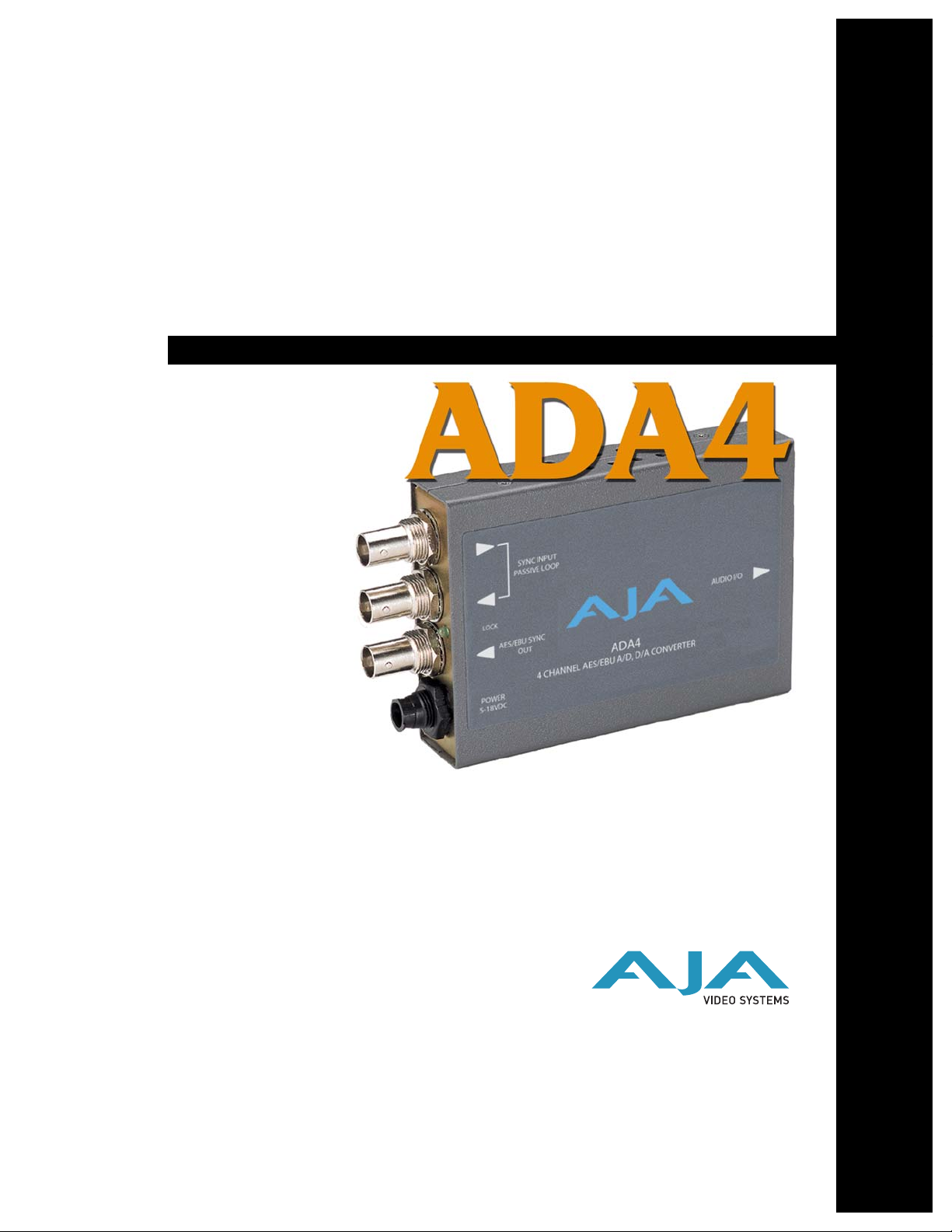
ADA4
4-Channel Bi-directional
Audio A/D and D/A
Converter
User Manual
October 30, 2008 P/N 101662-01
For ADA4 Serial Number H43000 or Later
®
Page 2
2
Trademarks
®
AJA
, KONA
trademarks of AJA Video, Inc. All other trademarks are the property of their respective holders.
Notice
Copyright © 2008 AJA Video, Inc. All rights reserved. All information in this manual is subject to
change without notice. No part of the document may be reproduced or transmitted in any form,
or by any means, electronic or mechanical, including photocopying or recording, without the
express written permission of AJA Inc.
FCC Emission Information
This equipment has been tested and found to comply with the limits for a Class A digital device,
pursuant to Part 15 of the FCC Rules. These limits are designed to provide reasonable protection
against harmful interference when the equipment is operated in a commercial environment. This
equipment generates, uses and can radiate radio frequency energy and, if not installed and used in
accordance with the instruction manual, may cause harmful interference to radio
communications. Operation of this equipment in a residential area is likely to cause harmful
interference in which case the user will be required to correct the interference at his own expense.
Changes or modifications not expressly approved by AJA Video can effect emission compliance
and could void the user’s authority to operate this equipment.
Contacting Support
To contact AJA Video for sales or support, use any of the following methods:
443 Crown Point Circle, Grass Valley, CA. 95945 USA
Telephone: +1.800.251.4224 or +1.530.274.2048
Fax: +1.530.274.9442
Web: http://www.aja.com
Support Email: support@aja.com
Sales Email: sales@aja.com
When calling for support, have all information on the product (serial number etc.) at hand prior to
calling.
®
, and XENA
®
are registered trademarks of AJA Video, Inc. Io HD
™
and Io
™
are
Limited Warranty
AJA Video warrants that this product will be free from defects in materials and workmanship for a period of five years from
the date of purchase. If a product proves to be defective during this warranty period, AJA Video, at its option, will either
repair the defective product without charge for parts and labor, or will provide a replacement in exchange for the defective
product.
In order to obtain service under this warranty, you the Customer, must notify AJA Video of the defect before the expiration
of the warranty period and make suitable arrangements for the performance of service. The Customer shall be responsible
for packaging and shipping the defective product to a designated service center nominated by AJA Video, with shipping
charges prepaid. AJA Video shall pay for the return of the product to the Customer if the shipment is to a location within
the country in which the AJA Video service center is located. Customer shall be responsible for paying all shipping charges,
insurance, duties, taxes, and any other charges for products returned to any other locations.
This warranty shall not apply to any defect, failure or damage caused by improper use or improper or inadequate
maintenance and care. AJA Video shall not be obligated to furnish service under this warranty a) to repair damage resulting
from attempts by personnel other than AJA Video representatives to install, repair or service the product, b) to repair
damage resulting from improper use or connection to incompatible equipment, c) to repair any damage or malfunction
caused by the use of non-AJA Video parts or supplies, or d) to service a product that has been modified or integrated with
other products when the effect of such a modification or integration increases the time or difficulty of servicing the
product.
THIS WARRANTY IS GIVEN BY AJA VIDEO IN LIEU OF ANY OTHER WARRANTIES, EXPRESS OR
IMPLIED. AJA VIDEO AND ITS VENDORS DISCLAIM ANY IMPLIED WARRANTIES OF
MERCHANTABILITY OR FITNESS FOR A PARTICULAR PURPOSE. AJA VIDEO’S RESPONSIBILITY TO
REPAIR OR REPLACE DEFECTIVE PRODUCTS IS THE WHOLE AND EXCLUSIVE REMEDY PROVIDED TO
THE CUSTOMER FOR ANY INDIRECT, SPECIAL, INCIDENTAL OR CONSEQUENTIAL DAMAGES
IRRESPECTIVE OF WHETHER AJA VIDEO OR THE VENDOR HAS ADVANCE NOTICE OF THE
POSSIBILITY OF SUCH DAMAGES.
Page 3
•
•
•
•
•
•
•
•
•
•
AJA ADA4 4-Ch Bi-directional Audio A/D and D/A Converter User Manual — Introduction
Introduction
Features
Block Diagrams
The ADA4 is a 4 channel converter which can be configured as a 4 channel A/D, a 4
channel D/A, or 2 channel A/D and 2 channel D/A. The ADA4 can accept a AES11,
wordclock, or video sync/color black reference input for synchronization. Reference
input and synchronization is automatic. Audio levels are configurable via dipswitch
control.
Simultaneous A/D and D/A, or AES Synchronizer
Full-time AES11 low jitter reference output
Up to 4 channels of balanced analog to AES/EBU audio
Up to 4 channels of AES/EBU to balanced analog audio
1
Supplied XLR breakout cable
AES11/Wordclock/Tri-level Sync/Color Black Reference Loop
Adjustable Audio Levels
Sample Rate Conversion Between 96KHz and 48KHz
Dipswitch configuration
5-18VDC Power
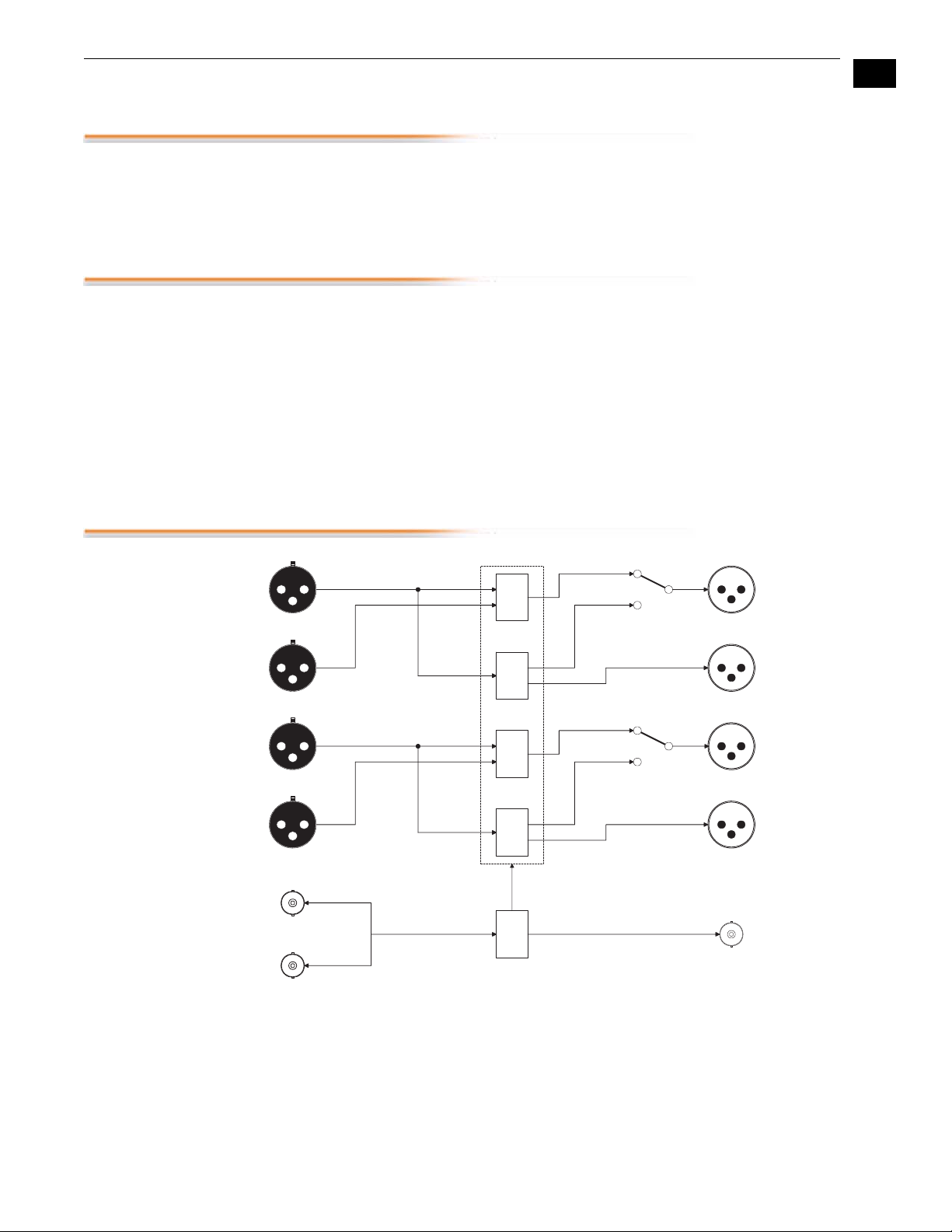
3
Analog Audio Ch . 1 or
AES/EBU Ch. 1/2 In
Analog Audio Ch. 2 In
Analog Audio Ch . 3 or
AES/EBU Ch. 3/4 In
Analog Audio Ch. 4 In
Reference Loop
Reference Loop
Analog Audio Ch. 1 or
AES/EBU Ch. 1/2 Out
Analog Audio Ch . 2 Out
Analog Audio Ch. 3 or
AES/EBU Ch. 3/4 Out
Analog Audio Ch . 4 Out
Input A
Input B
Input C
Input D
Audio
A/D
Audio
D/A
Audio
A/D
Audio
D/A
Clock
Gen
Dipswitch 1
Dipswitch 2
Output A
Output B
Output C
Output D
ADA4, Normal Mode Block Diagram (Jumper 2 Installed), A/D or D/A
AES-11 Out
Page 4

4
AES/EBU Ch. 1/2 In
n/a
AES/EBU Ch. 3/4 In
n/a
Reference Loop
Reference Loop
Audio
D/D
Input A
Input B
Input C
Input D
Audio
D/D
Clock
Gen
Output A
Output B
Output C
Output D
ADA4, Synchronizer Mode Block Diagram (Jumper 2 Removed), D/D
AES/EBU Ch. 1/2 Out
n/a
AES/EBU Ch. 3/4 Out
n/a
AES-11 Out
Page 5

AJA ADA4 4-Ch Bi-directional Audio A/D and D/A Converter User Manual — I/O Connections
I/O Connections
Sync Input
Passive Loop
BNCs
AES/EBU Sync Output
+ 5 to 18VDC
BNC
Power
Input
Audio I/O
D-connector
(attaches to
supplied cable)
Configuration
1
Determined by
DIP switch on
other side of
Converter
5
Cable
Not Shown
To Scale
ADA4 and Cable, Side View
Page 6

6
User Controls
Normal Mode
(Jumper #2
Installed)
The user interface for the ADA4 is a 4-switch DIP
accessible through a cut-out in the bottom of the
unit, and an internal 3-position jumper block
DIP Switch Setting
LEFT RIGHT
1 2 3 4
accessed by removing the ADA4 cover (secured by
4 screws). Use the jumper to configure the mode of
operation ( Normal or Synchronizer ).Then use the
DIP switches—if necessary— to configure
channels and audio levels.
The exact function of the jumper settings and each
DIP switch are described on the following pages.
Factory default switch settings are all in the
leftmost position.
Normal mode is the default operating mode of the ADA4 as shipped from the factory. In
Normal mode, the ADA4 performs A/D or D/A audio conversion as configured by the 4
DIP switches. In the factory Normal configuration, the internal jumper #2 is installed and
no jumper changes are required. DIP switch settings are discussed below:
Switch 1 (CH1/2: A/D or D/A)—Select type of conversion for
channels 1 and 2
:
LEFT RIGHT
Select Analog to Digital
Conversion
Select Digital to Analog
Conversion
Switch 2 (CH3/4: A/D or D/A)—Select type of conversion for
channels 3 and 4
:
LEFT RIGHT
Select Analog to Digital
Conversion
Select Digital to Analog
Conversion
Page 7

AJA ADA4 4-Ch Bi-directional Audio A/D and D/A Converter User Manual — User Controls
Switches 3 and 4 (LEVEL)—Controls audio levels (see matrix below)
Note:
VU reading corresponds to +4 dBu. Connecting a professional +4 dBu device to a consumer
audio input -10dBV (
device probably does not have sufficient power to drive a professional audio input. With
consumer and semi-professional audio equipment, a VU reading of 0 dB is typically
referenced to -10 dBV. 0 dBu = 0.775 VRMS.
Professional audio equipment has much higher levels than consumer equipment: a 0
-7.8 dBu)
may cause overloading, whereas the output of a consumer
Output Level Selection Matrix For Switches 3 and 4
The following table shows the combinations of DIP switch settings required to configure the
audio output levels shown.
1
DIP Switch #4
(LEVEL 2)
0 0 Pro USA: 0dBFS
0 1 Pro Europe: 0dBFS
1 0 Pro Germany: 0dBFS
DIP Switch #3
(LEVEL 1) Output Level
→
→
→
+24dBu
+18dBu
+15dBu
7
48 KHz/96KHz
Output Mode
(Jumper 1)
Synchronizer
Mode
(Jumper #2
Removed)
1 1 Consumer: 0dBFS
Jumper#1 selects how the AES outputs and the AES11 reference output run. If Jumper 1 is
installed, they run in 48 KHz mode. If Jumper 1 is removed, they run in 96 KHz mode.
Synchronizer mode is an alternative operating mode where no audio A/D or D/A conversion
takes place. Instead, it allows for an AES input to be sample rate converted and reclocked to
reveal an AES output that is low jitter, and—when a reference signal is applied—locked to
reference. In this mode the DIP switches are ignored and all configuration options are set via
a 3-position jumper located inside the ADA4 case. To access this jumper, remove the four
phillips screws securing back side of the ADA4 case (the side having the DIP switch access
hole in it). Once the case cover is removed, you can easily identify the jumper by its
appearance. Jumper positions 1 through 3 are clearly marked on the circuit board next to the
jumper. Refer to the following diagram for jumper settings and their meaning.
→
+12dBu
Page 8

1.
2.
3.
•
•
4.
•
8
Jumper 1:
Jumper 2:
Jumper 3:
1 23
1 2 3
123
Example:
Example:
Note:
96kHz output mode selec ted
(jumper effectively removed).
Normal mode selected.
Jumper 3 is not used, but is provided as
a spar e.
Meaning:
Jumper 1 installed—48kHz: Any AES outp uts and the A ES-11
reference output are running in 48kHz mode.
Jumper 1 removed—96kHz: Any AES ou tputs and t he AES- 11
reference output are running in 96kH z mode.
Meaning:
Jumper 2 installed—Normal Mode: S witches 1 and 2
independantly define A/D or D /A mode for their
respective pair of channels. Switches 3 and 4 are
used together to define the audio level.
Jumper 2 removed—Synchronizer Mode: Switches 1-4 have
no effect. The ADA4 is in D/D mode, with the out put
re-timed to the reference signal, when applied.
Without a reference signal applied, the ADA4 reclocks the output based on it s s table free-runni ng
local osci llator.
Meaning:
n/a: Jumper 3 is not used.
Jumper 3
Lock LED
Installation
ADA4, Internal Jumper Settings
Jumper#3 is currently unused.
An LED is located next to the BNC connectors which shows the type of signal locked (if
any). Here are the meanings of the LED colors:
Red = HD lock
Green = SD lock
Amber = AES-11 lock or Word Clock lock
Typically, ADA4 installation consists of the following:
disconnect +5VDC from the converter
configure the DIP switch for the desired equipment configuration
connect video equipment to the converter BNCs
apply +5VDC power to the converter (AJA power supply model DWP)
Page 9

Specifications
AJA ADA4 4-Ch Bi-directional Audio A/D and D/A Converter User Manual — Specifications
Item Specification
Analog Audio I/O Balanced, XLR. One Channel per XLR connector.
AES Audio I/O Balanced 110 ohm, XLR. Two Channels per XLR
Analog Audio Levels (with Respect
to Full Scale Digital)
Audio Converters 24 bit, 48/96 KHz
User Controls External Dipswitch:
Size 5.8" x 3.1" x 1 (147 x 79 x 25mm)
Power 5-18V, 3 watts. Requires power supply.
Reference Loop 75 Ohm (unterminated). HD/SD Sync, AES-11, or
connector.
+24dBu (SMPTE RP155), +18dBu (EBU R68),
+15dBu (Germany), +10dBV (consumer +12.2 dBu)
1
Channel 1/2: A/D, D/A
Channel 3/4: A/D, D/A
Audio Level 1
Audio Level 2
Wordclock (48/96 KHz)
9
Page 10

10
pin 2
pin 3
pin 1
pin 2
pin 3
pin 1
Input A
Input B
Input C
Input D
Output A
Output B
Output C
Output D
ADA4
pin 1
pin 14
End View: Side View:
ADA4 Cable
Channel Index
= Analog Ch. 1 or AES Ch. 1/2
= Analog Ch. 2
= Analog Ch. 3 or AES Ch. 3/4
= Analog Ch. 4
= Analog Ch. 1 or AES Ch. 1/2
= Analog Ch. 2
= Analog Ch. 3 or AES Ch. 3/4
= Analog Ch. 4
Input A
Input B
Input C
Input D
Output A
Output B
Output C
Output D
pin 13
pin 25
 Loading...